
콘텐츠로 건너뛰기
아매직소프트 로고 아이콘
  • 홈
  • 제품
    • Magic Data Recovery
    • Magic Recovery Key
  • 스토어
  • 블로그
  • 자세히 보기
    • 아마직소프트 소개
    • 문의하기
    • 개인정보 보호정책
    • 약관
    • 라이선스 계약
    • 환불 정책
  • 한국어
    • English
    • 日本語
    • Deutsch
    • Français
    • 繁體中文
Wiki

데이터 로깅

2025년 12월 1일 Eddie Data Logging에 댓글 닫힘
데이터 로깅

목차

When Problems Happen Without a Trace

A system hangs, a backup fails halfway, or a file transfer corrupts a critical archive.
If you have no logs, you only see the final symptom and guess what went wrong.

Data logging solves that gap.
By recording key events and transfer operations, you create a timeline that explains failures and supports safe recovery instead of trial and error.


What Data Logging Covers in Practice

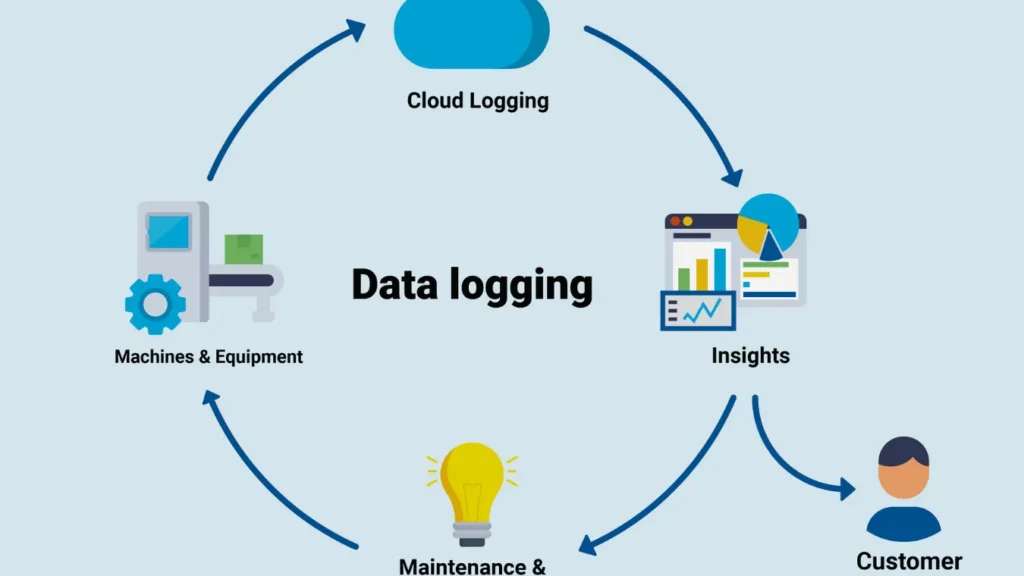
Data logging means that software records structured information about what it did and what happened around it.
Each record carries details such as time, component, action, and result.

Common log sources include:

  • Operating system events and driver messages

  • Application logs for backup, databases, and services

  • File transfer logs (FTP, SFTP, HTTP, SMB)

  • Security and audit logs for access and configuration changes

Together, they show how data moves, when operations succeed, and where errors start.

Event details that matter most

Effective logs focus on data you can act on:

  • Exact timestamps with time zone or UTC

  • IDs for jobs, sessions, and connections

  • File names, paths, sizes, and checksums when relevant

  • Error codes and plain-language summaries

With that detail, you can link a log entry directly to a file, disk, or backup set during investigation.


Logging Around Backup, Restore, and File Recovery

Backup and recovery workflows depend heavily on accurate logs.
Without them, you cannot prove that a job ran or explain why it produced partial results.

Important points in the chain:

  • Start and end times for each backup job

  • Source and destination paths, including network locations

  • Amount of data processed, skipped, and verified

  • Checksums or signatures for key files and images

사용 시 Amagicsoft 데이터 복구 after a failure, logs help you answer two questions quickly: which volume or folder to scan and which time window matters.


How Data Logging Happens Behind the Scenes

Software components usually log through a common framework rather than writing files in an ad hoc way.
That framework standardizes format, rotation, and retention.

Typical mechanisms:

  • Text log files with structured lines or JSON entries

  • Windows Event Log channels for system and application events

  • Database-backed logging for high-volume services

  • Remote log collectors that receive messages over the network

You can also route important logs into SIEM or monitoring tools to detect problems while they still develop, not only after users complain.


Building a Logging Plan for Windows-Based Systems

Instead of enabling every possible log, you pick signals that matter to your environment.
A short planning exercise pays off over time.

A practical sequence:

  1. List critical systems: backup servers, file servers, application servers, and endpoints.

  2. For each system, identify the events that affect data safety and integrity.

  3. Configure logging levels so routine operations stay visible without producing noise.

  4. Centralize key logs or copies on a secure server for long-term retention.

  5. Document where each class of log lives and who can read it during an incident.

This structure keeps logs usable and prevents disks from filling with low-value messages.


Using Logs During Incident Response and Recovery

When something breaks, you do not start with deep disk scans.
You start with logs to narrow the search.

Typical approach:

  1. Align user reports with log timestamps to find the first failure.

  2. Check backup and transfer logs around that time for warnings and errors.

  3. Identify which disk, share, or file set suffered interruption.

  4. Decide whether a restore from backup or targeted recovery from disk works best.

At that point, Amagicsoft 데이터 복구 can focus on the right volume and directories, guided by information the logs already revealed.

Windows 7/8/10/11 및 Windows Server를 지원합니다.


결론

Data logging turns invisible system behavior into a readable history.
It helps you understand why transfers fail, when backups miss files, and how system changes affect stored data.

With clear, well-structured logs feeding into your backup and recovery processes, you spend less time guessing and more time fixing issues.
다음과 같은 도구와 결합 Amagicsoft 데이터 복구, good logging practices give you both an explanation of what happened and a reliable path back to healthy data.

Magic Data Recovery 다운로드

Windows 7/8/10/11 및 Windows Server 지원

자주 묻는 질문

How is data logging done?

Data logging occurs through software components that collect events and write them to a chosen destination. Applications call logging libraries, operating systems emit event records, and devices send messages to central collectors. You configure formats, levels, and retention so important information remains accessible without overwhelming storage or staff.

What is the main purpose of logging?

The main purpose is accountability and visibility. Logging shows what systems did, who accessed resources, and how operations behaved over time. It gives you evidence when you investigate failures, measure performance, or review security alerts. Without logs, analysis depends on memory and guesswork instead of documented facts.

Why would you use a data logger?

You use a data logger when you need continuous or repeated measurement without constant human supervision. In IT, that might mean tracking transfer jobs, disk health, or service uptime. The logger stores readings or events with timestamps, so you can later review trends, detect anomalies, or correlate patterns with specific incidents.

What are the two main types of logging?

People often distinguish between operational logging and security or audit logging. Operational logs focus on performance, errors, and system health for troubleshooting and capacity planning. Security and audit logs focus on access, configuration changes, and policy enforcement so you can investigate suspicious activity and meet compliance requirements.

What is meant by data logging?

Data logging means recording information about system behavior, events, or measurements over time. Software or hardware writes structured entries that capture what happened, when it occurred, and which component took part. Those records then support troubleshooting, auditing, performance analysis, and data recovery after failures or user errors.

What is an example of data logging?

A simple example involves a backup application that records each job. It logs start and end times, the source and target locations, bytes transferred, and any errors. Later, when a restore fails or files go missing, you review those log entries to confirm what the job actually protected and where it stopped.

What is the purpose of logging data?

The main purpose is to create an objective history of system actions and outcomes. Logs let you verify that operations ran, trace the root cause of incidents, and prove compliance with policies. They also support capacity planning, performance tuning, and targeted recovery when something corrupts data or interrupts a transfer.

What is data logging in ICT?

In ICT, data logging refers to automated recording of events, metrics, and transactions across networks and systems. Routers, servers, applications, and storage devices all generate logs about traffic, resource usage, and errors. These digital traces help administrators manage infrastructure, secure services, and respond to problems efficiently.
  • WiKi
Eddie

Eddie는 컴퓨터 업계의 여러 유명 회사에서 10년 이상 근무한 경력을 가진 IT 전문가입니다. 그는 모든 프로젝트에 심도 있는 기술 지식과 실용적인 문제 해결 기술을 제공합니다.

글 탐색

이전 게시물
다음

검색

카테고리

  • 비트 로커 복구
  • 삭제된 파일 복구
  • 포맷 파일 복구
  • 하드 드라이브 복구
  • 라이선스 키 복구
  • 손실된 파일 복구
  • 메모리 카드 복구
  • 뉴스
  • 사진 복구
  • SSD 복구
  • 분류
  • USB 드라이브 복구
  • 사용자 가이드
  • Wiki

최근 게시물

  • 외장 하드 드라이브로서 SSD의 장단점
    외장 하드 드라이브로서 SSD의 장단점
  • Mac 컴퓨터에서 대상 디스크 모드 및 공유 모드를 사용하는 방법
    Mac 컴퓨터에서 대상 디스크 모드 및 공유 모드를 사용하는 방법: 전체 가이드
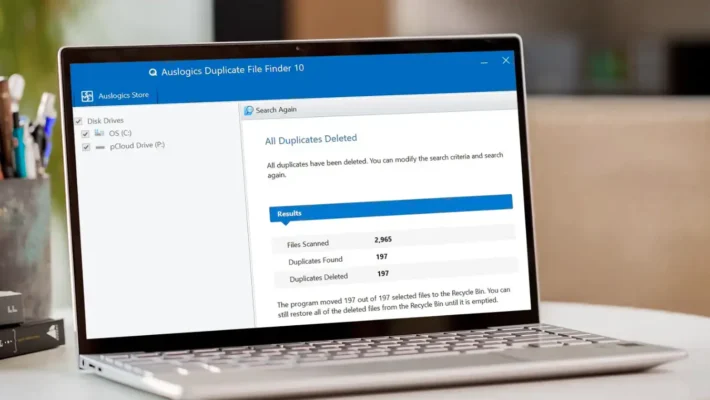
  • 중복 파일 찾기
    중복 파일 찾기

태그

방법 Magic Data Recovery Magic Recovery Key WiKi

관련 게시물

중복 파일 찾기
Wiki

중복 파일 찾기

2025년 12월 2일 Eddie 아직 댓글이 없습니다

목차 중복 파일은 실제 백업이 아닙니다 많은 사용자가 문서를 새 폴더나 외장 드라이브로 드래그하여 “추가 안전” 사본을 보관하는데, 시간이 지나면 이러한 사본이 늘어나 보호는커녕 오히려 혼란만 가중시킵니다. 중복 파일은 저장 공간을 낭비하고 백업 속도를 저하시키며 데이터 복구를 더욱 복잡하게 만듭니다. 중복 파일 찾기는 중복 사본을 식별하는 데 도움이 되므로 [...]

컨텍스트 전환
Wiki

컨텍스트 전환

2025년 12월 2일 Eddie 아직 댓글이 없습니다

목차 공유 리소스로서의 CPU 시간 최신 운영 체제는 수십 또는 수백 개의 활성 스레드를 저글링합니다.CPU 코어가 몇 개만 존재하므로 대부분의 스레드는 작은 하위 집합이 실행되는 동안 대기열에서 대기합니다. 컨텍스트 전환을 통해 스케줄러는 실행 중인 스레드 하나를 일시 중지하고 다른 스레드를 다시 시작할 수 있습니다.이 빠른 전환은 병렬 처리의 착각을 불러일으킵니다 [...]

데이터 수집
Wiki

데이터 수집

2025년 12월 2일 Eddie 아직 댓글이 없습니다

목차 인시던트 장면: 인시던트가 발생하면 가장 먼저 라이브 시스템을 “둘러보는” 경우가 많은데, 계획되지 않은 클릭, 루트 로그인 또는 파일 복사로 인해 타임스탬프, 로그, 할당되지 않은 공간이 변경될 수 있으며 깨끗한 상태를 기록하기 전에 변경될 수 있습니다. 데이터 수집은 이 문제를 해결하며, 통제된 [...]에서 데이터를 수집하는 데 중점을 둡니다.

아매직소프트 로고 아이콘

당사의 비전은 사용자에게 최고 수준의 제품과 서비스를 제공하는 세계적으로 유명한 소프트웨어 브랜드 및 서비스 제공업체가 되는 것입니다.

제품
  • Magic Data Recovery
  • Magic Recovery Key
정책
  • 약관
  • 개인정보 보호정책
  • 환불 정책
  • 라이선스 계약
회사
  • 아마직소프트 소개
  • 문의하기
  • 스토어
팔로우하기

저작권 © 2025 아마직소프트. 모든 권리 보유.

  • 약관
  • 개인정보 보호정책
