Skip to content
amagicsoft logo icon
  • Home
  • Products
    • Magic Data Recovery
    • Magic Recovery Key
  • Store
  • Blog
  • More
    • About Amagicsoft
    • Contact US
    • Privacy Policy
    • Terms
    • License Agreement
    • Refund Policy
  • English
    • 日本語
    • 한국어
    • Deutsch
    • Français
    • 繁體中文
Wiki

Data Integrity

01.12.2025 Eddie Comments Off on Data Integrity
Data Integrity

Table of Contents

Table of Contents

Real Consequences When Data Integrity Fails

Numbers can look correct on the screen while quietly drifting away from reality.
A single flipped bit in storage, a broken join in a report, or a half-finished write during a crash can change decisions, invoices, or audit results.

Data integrity focuses on these risks.
It ensures that stored and transmitted data remains accurate, consistent, and trustworthy over its entire lifecycle.
 

Dimensions of Data Integrity

Data integrity covers more than simple “no corruption.”
Several dimensions work together.

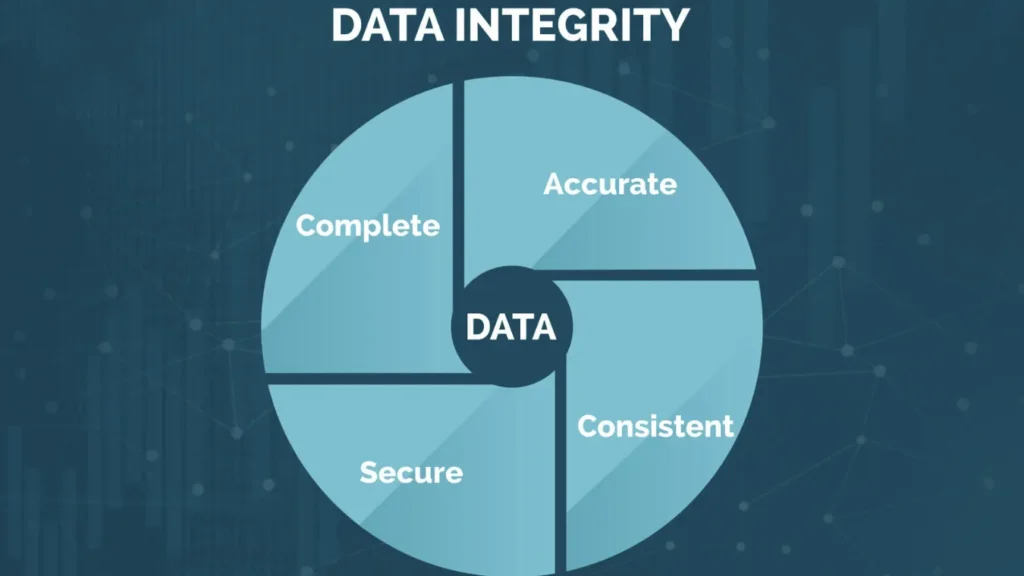
First, physical integrity deals with bit-level correctness on disks, SSDs, and networks.
Second, logical integrity ensures that relationships between records still follow business rules.
Third, temporal integrity checks that values make sense over time.
Finally, audit integrity tracks who changed what and when.

Because all four interact, a weakness in any one area can undermine the rest.


Mechanisms That Protect Data in Motion and at Rest

Systems defend integrity at many layers.
Storage devices use checksums, parity, and error-correcting codes to detect or repair bit flips.
File systems add their own checks and journaling.
Transport protocols such as TCP include sequence numbers and checksums to keep streams complete and ordered.

Additionally, applications apply validation rules before they accept or modify records.
When each layer enforces its part, the whole stack resists silent corruption much more effectively.


Data Integrity in Databases and SQL

Relational databases offer powerful tools for logical integrity.
They enforce structure, relationships, and allowed values through schema design and constraints.

Important features include:

  • Strong data types for each column

  • Primary keys that uniquely identify rows

  • Foreign keys that maintain relationships

  • CHECK constraints for ranges and formats

  • UNIQUE constraints to avoid duplicate identifiers

Furthermore, SQL transactions group changes into atomic units.
Either the entire change set commits or the engine rolls it back, which keeps sets of related updates internally consistent.


Integrity in Backup, Restore, and Recovery

Backups that restore successfully but contain silent corruption still fail the real test.
Therefore, integrity must extend into every backup and recovery workflow.

Good practice includes:

  • Verifying backup files with checksums or hash comparisons

  • Testing restores on non-production systems regularly

  • Tracking backup job metadata so you can trace specific runs

When something goes wrong and volumes turn RAW or files disappear, Amagicsoft Data Recovery helps reconstruct data from damaged media.
However, long-term trust still depends on backups and validation, not recovery alone.

Supports Windows 7/8/10/11 and Windows Server.

Download Magic Data Recovery

Supports Windows 7/8/10/11 and Windows Server

Practical Steps to Strengthen Data Integrity

Improving integrity does not always require new products.
It often starts with clearer rules and disciplined habits.

Recommended steps:

  • Define what “correct data” means for each critical field

  • Use the strongest appropriate data types instead of generic strings

  • Apply validation at the UI, API, and database levels

  • Keep schema changes versioned, reviewed, and tested

  • Use role-based access control to limit who can update sensitive records

In addition, you should align these steps with incident response plans so teams know how to react when checks start failing.

Monitoring and Integrity Checks in Daily Operation

Integrity does not stay guaranteed after deployment; you must keep checking.
Regular monitoring catches problems before they spread.

Useful techniques:

  • Scheduled queries that compare counts, totals, and balances across systems

  • Hash-based comparisons between source and target tables after ETL jobs

  • File integrity monitoring for critical configuration and binary files

  • Log review for repeated validation errors or failed writes

As a result, you get early warnings instead of discovering issues during audits or customer complaints.

Conclusion

Data integrity turns raw storage into reliable information.
It aligns physical protection, logical constraints, and ongoing verification so data stays accurate and consistent from entry to archive.

When failures occur, careful recovery with tools such as Amagicsoft Data Recovery can rescue content from damaged disks.
Yet the strongest position comes from prevention: well-designed schemas, disciplined validation, and continuous integrity checks.

Download Magic Data Recovery

Supports Windows 7/8/10/11 and Windows Server


 FAQ

What is meant by data integrity?

Data integrity means that data remains accurate, complete, and consistent throughout its lifecycle. Values still match reality, relationships still follow rules, and changes follow traceable processes. Strong integrity protects reports, decisions, and audits from hidden corruption or accidental modification, whether the data lives in files, databases, or backups.

What are the 4 types of data integrity?

Many organizations talk about four main types. Physical integrity focuses on bit-level correctness on storage media. Logical integrity enforces relationships and business rules. Referential integrity keeps linked records synchronized. Domain integrity restricts values to valid ranges or sets, such as allowed codes or date ranges that make sense.

How do you ensure data integrity?

You enforce integrity by combining technical controls and process discipline. Use strong data types, constraints, and transactions in databases. Add validation at APIs and user interfaces. Protect storage with checksums and redundancy, and verify backups regularly. Finally, monitor for anomalies with automated checks that compare counts, totals, and key relationships over time.

What is integrity of data in SQL?

In SQL systems, integrity centers on schema design and constraints. Primary keys, foreign keys, CHECK rules, and UNIQUE constraints keep rows consistent and relationships valid. Transactions group operations so they either succeed together or roll back. Together, these features stop many invalid states before they reach long-term storage or downstream reports.

What are the 7 principles of data integrity?

Different frameworks list variations, but common principles include accuracy, completeness, consistency, validity, timeliness, traceability, and security. Accurate data reflects reality, complete data avoids gaps, and consistent data matches across systems. Valid formats, current timestamps, clear change history, and protection from unauthorized changes round out a robust integrity posture.

What are the two concepts of integrity?

Integrity usually appears in two broad concepts: physical and logical. Physical integrity protects bits against corruption, loss, or hardware failure. Logical integrity focuses on meaning, relationships, and rules within the data model. You need both, because perfect media still fails if rules break, and perfect rules still fail if storage silently corrupts values.

What are the 4 types of integrity constraints?

Four common integrity constraints appear in relational design. Primary key constraints enforce unique row identities. Foreign key constraints maintain relationships between tables. UNIQUE constraints prevent duplicate values in critical columns. CHECK constraints enforce conditions such as ranges, formats, or custom expressions that must hold true for each row.

What are the three rules of data integrity?

A simple three-rule summary says data must be correct, consistent, and controlled. Correct data matches reality and passes validation checks. Consistent data agrees across tables and systems. Controlled data changes only through authorized, traceable actions. These rules guide both technical design and operational procedures around critical datasets.

How do you check data integrity?

You check integrity with automated and manual techniques. Run queries that compare counts, sums, and keys between related systems. Verify file or backup hashes against expected values. Review constraint violations and validation error logs. During audits or investigations, also sample records manually to confirm that stored values still align with real-world facts.
  • WiKi
Eddie

Eddie is an IT specialist with over 10 years of experience working at several well-known companies in the computer industry. He brings deep technical knowledge and practical problem-solving skills to every project.

文章导航

Previous
Next

Search

Categories

  • Bitlocker Recovery
  • Deleted File Recovery
  • Format File Recovery
  • Hard Drive Recovery
  • License Key Recovery
  • Lost File Recovery
  • Memory Card Recovery
  • News
  • Photo Recovery
  • SSD Recovery
  • Uncategorized
  • USB Drive Recovery
  • User Guide
  • Wiki

Recent posts

  • The Pros and Cons of SSDs as External Hard Drives
    The Pros and Cons of SSDs as External Hard Drives
  • How to Use Target Disk Mode and Share Mode on Mac Computers
    How to Use Target Disk Mode and Share Mode on Mac Computers: A Complete Guide
  • Duplicate File Finder
    Duplicate File Finder

Tags

How to Magic Data Recovery Magic Recovery Key WiKi

Related posts

Duplicate File Finder
Wiki

Duplicate File Finder

02.12.2025 Eddie No comments yet

Table of Contents Duplicate Files Are Not Real Backups Many users keep “extra safety” copies of documents by dragging them into new folders or external drives.Over time, these copies multiply and turn into clutter rather than protection. Duplicate files waste storage, slow backups, and make data recovery more confusing.A Duplicate File Finder helps identify redundant copies so […]

Context Switch
Wiki

Context Switch

02.12.2025 Eddie No comments yet

Table of Contents CPU Time as a Shared Resource Modern operating systems juggle dozens or hundreds of active threads.Only a few CPU cores exist, so most threads wait in queues while a small subset runs. A context switch lets the scheduler pause one running thread and resume another.This rapid switching creates the illusion of parallelism […]

Data Acquisition
Wiki

Data Acquisition

02.12.2025 Eddie No comments yet

Table of Contents  Incident Scene: Data at Risk Before Collection When an incident occurs, the first instinct often involves “looking around” the live system.Unplanned clicks, root logins, or file copies can alter timestamps, logs, and unallocated space before anyone records a clean state. Data acquisition solves this problem.It focuses on collecting data in a controlled […]

amagicsoft logo icon

Our vision is to become a globally renowned software brand and service provider, delivering top-tier products and services to our users.

Products
  • Magic Data Recovery
  • Magic Recovery Key
Policy
  • Terms
  • Privacy Policy
  • Refund Policy
  • License Agreement
Company
  • About Amagicsoft
  • Contact US
  • Store
Follow Us

Copyright © 2025 Amagicsoft. All Rights Reserved.

  • Terms
  • Privacy Policy