
Skip to content
amagicsoft logo icon
  • Home
  • Products
    • Magic Data Recovery
    • Magic Recovery Key
  • Store
  • Blog
  • More
    • About Amagicsoft
    • Contact US
    • Privacy Policy
    • Terms
    • License Agreement
    • Refund Policy
  • English
    • 日本語
    • 한국어
    • Deutsch
    • Français
    • 繁體中文
Wiki

Domain Controller

27.11.2025 Eddie Comments Off on Domain Controller
Domain Controller

Table of Contents

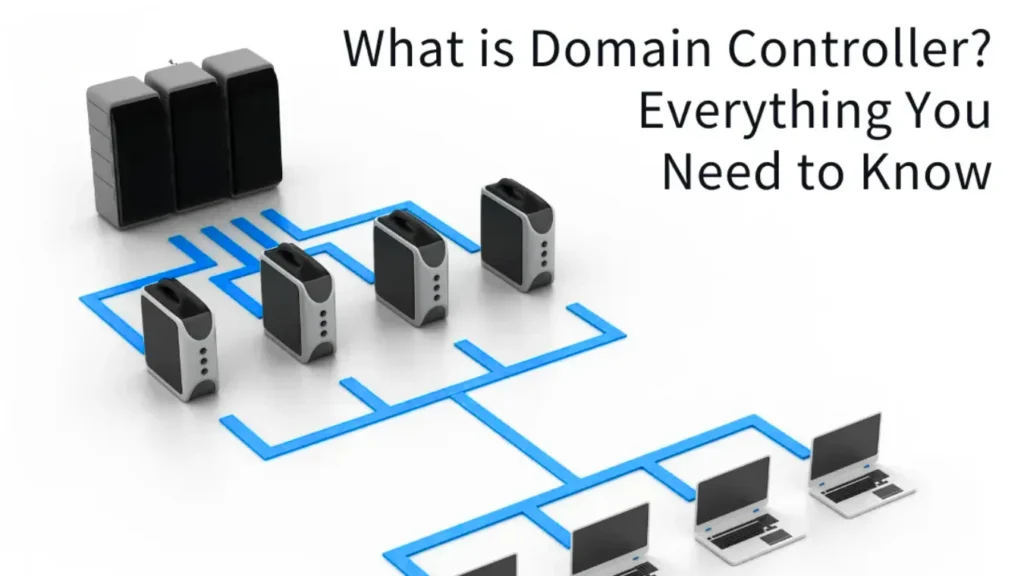
Domain Controllers at the Center of a Windows Network

When a user signs in to a company PC with a domain account, prints to a shared printer, or opens a file server, one component quietly decides “allowed” or “denied”: the domain controller.

It stores user identities, verifies passwords, and enforces security rules for the entire Windows domain.
If domain controllers stop, logons stall and shared resources become difficult to reach, even when data still exists on disk.


Core Concepts: Domain, Directory, and Authentication

A domain is a security boundary that groups users, computers, and resources under one set of rules.
The directory that describes them is Active Directory Domain Services (AD DS).

A domain controller (DC) is a Windows Server that runs AD DS and answers authentication requests.
It holds a writable copy of the directory database and responds when clients ask, “Who is this user?” and “What can this user do?”


What a Domain Controller Does Day to Day

Domain controllers handle several critical tasks every time someone uses the network.

Key functions:

  • Validate credentials during interactive logon and single sign-on

  • Issue Kerberos tickets and manage security tokens

  • Apply Group Policy to users and computers

  • Store and replicate AD objects such as users, groups, and OUs

  • Log security events that auditors later review

Because DCs sit on the trust path, they directly influence how safely users reach file servers, applications, and backup systems.


Domain Controller, Active Directory, and DNS: How They Relate

Domain Controller vs. Active Directory

Active Directory is the directory service and database.
A domain controller is the server that hosts this service for a domain.

You can think of AD DS as the information, schema, and rules, while domain controllers are the machines that store and replicate that information and answer client requests.

Domain Controller vs. DNS Server

Domain controllers rely on DNS to locate services.
In many environments, the same Windows Server instance runs both AD DS and DNS.

The DNS role translates host names to IP addresses and publishes service records (SRV) that help clients find domain controllers.
The DC handles identities; the DNS service handles name resolution.


Types of Domain Controllers

Administrators use several functional types of domain controllers, even though the underlying OS remains Windows Server.

Common categories include:

  • Writable domain controller: Standard DC that accepts changes and replicates them.

  • Read-Only Domain Controller (RODC): Holds read-only directory data, often for branch offices with weaker physical security.

  • FSMO role holders: DCs that own special roles such as PDC Emulator, RID Master, or Schema Master.

  • Global Catalog server: Stores a partial replica of every object in the forest for fast searches and logons.

Design choices depend on security, WAN quality, and how many sites the organization operates.


Planning How Many Domain Controllers You Need

You usually deploy at least two domain controllers per domain for redundancy.
If one server fails, the other continues to authenticate users and apply policy.

Factors that influence DC count:

  • Number of users and computers

  • Number of physical sites and WAN links

  • Logon and application load

  • Tolerance for downtime

Small organizations often run two DCs in one site.
Larger environments add DCs per site and spread FSMO roles to avoid single points of failure.


Domain Controllers and Data Protection

Domain controllers do not store user documents, but they control who can reach those documents.
If a DC fails, file servers may stay online while domain users cannot authenticate.

From a recovery perspective, you plan for:

  • System State backups of each domain controller

  • Tested procedures to restore a DC and handle USN rollbacks

  • Protection of AD-integrated DNS zones

At the endpoint level, tools like Amagicsoft Data Recovery help when users lose local or shared files, while the DC continues to provide identity and access control.
Together, identity recovery and file recovery form a complete resilience plan.

Download Magic Data Recovery

Supports Windows 7/8/10/11 and Windows Server

Practical Administration Checklist

Administrators can improve reliability of domain controllers with routine tasks.

Recommended actions:

  • Keep DCs on stable hardware or virtual platforms with redundant storage

  • Patch Windows Server and AD components promptly

  • Monitor replication health and event logs

  • Back up System State and test restores in an isolated lab

  • Protect DCs with strict access control and dedicated admin accounts

When the directory stays healthy, data recovery efforts on member servers and workstations become much simpler.

Supports Windows 7/8/10/11 and Windows Server.

FAQ


What is a domain controller used for?

A domain controller manages identity in a Windows domain. It authenticates users, issues Kerberos tickets, enforces Group Policy, and stores directory information about users, computers, and groups. When someone signs in or accesses a shared resource, the domain controller decides whether the request matches the security rules you configured.

What is the difference between Active Directory and domain controller?

Active Directory is the directory service and database that stores objects such as users, groups, and policies. A domain controller is a Windows Server that runs AD DS and hosts that directory. The directory defines the structure and rules; the domain controller holds the data, replicates it, and answers authentication and lookup requests.

What are the types of domain controllers?

You typically see writable domain controllers, read-only domain controllers (RODCs), and servers that hold special FSMO roles or the Global Catalog. All run Windows Server, but each plays a different part in replication, security, and performance. A robust design mixes these types based on site layout and security requirements.

What is the difference between a domain controller and a DNS server?

A domain controller authenticates users and stores directory data. A DNS server translates names to IP addresses and publishes service records. In many environments, one Windows Server runs both AD DS and DNS roles. Even then, authentication remains the DC’s job, while DNS handles name resolution that helps clients locate those controllers.

What is another name for a domain controller?

Administrators often just say “DC” when they refer to a domain controller. In older NT-based terminology, you might encounter phrases like Primary Domain Controller (PDC) and Backup Domain Controller (BDC), though modern Active Directory uses multi-master replication and Flexible Single Master Operations roles instead of strict PDC and BDC pairs.

How many domain controllers are needed?

Most organizations deploy at least two domain controllers per domain so they maintain authentication if one server fails. Larger or multi-site networks add more DCs to handle load and provide local logon services. The right number depends on user count, site topology, and how much downtime the business can tolerate during hardware or network failures.

What are the roles of a domain controller?

A domain controller verifies credentials, issues Kerberos tickets, applies Group Policy, and maintains a replica of the Active Directory database. Some DCs also hold FSMO roles such as PDC Emulator or Schema Master. Together, these roles support secure sign-in, centralized management, and consistent directory data across all servers in the domain.

Do I need a domain controller?

You need a domain controller when you want centralized authentication, Group Policy, and unified user management across many Windows systems. Very small networks with a few standalone PCs can run without one. As soon as you manage shared resources, compliance requirements, or many users, a domain controller simplifies administration and improves security.

What is DNS and why is it used?

DNS (Domain Name System) maps host names such as “fileserver.example.com” to IP addresses. Clients use DNS to locate servers, including domain controllers and other services. In an Active Directory domain, DNS also stores SRV records that advertise domain controller locations, so correct DNS configuration becomes essential for reliable authentication and logon.

What is an example of a domain controller?

A typical example is a Windows Server running AD DS for the “corp.example.com” domain. It holds user and computer accounts, responds to sign-in requests, and replicates directory data with other DCs. When an employee logs onto a domain-joined laptop, that server, or a peer controller, validates the credentials and applies Group Policy.

Who actually owns a domain name?

The legal owner of a domain name is the entity listed as the registrant with the domain registrar, usually a company or individual. That registration differs from a domain controller in Active Directory. The public domain name works on the internet, while the domain controller manages authentication for a private Windows domain that may share a similar name.
  • WiKi
Eddie

Eddie is an IT specialist with over 10 years of experience working at several well-known companies in the computer industry. He brings deep technical knowledge and practical problem-solving skills to every project.

文章导航

Previous
Next

Search

Categories

  • Bitlocker Recovery
  • Deleted File Recovery
  • Format File Recovery
  • Hard Drive Recovery
  • License Key Recovery
  • Lost File Recovery
  • Memory Card Recovery
  • News
  • Photo Recovery
  • SSD Recovery
  • Uncategorized
  • USB Drive Recovery
  • User Guide
  • Wiki

Recent posts

  • The Pros and Cons of SSDs as External Hard Drives
    The Pros and Cons of SSDs as External Hard Drives
  • How to Use Target Disk Mode and Share Mode on Mac Computers
    How to Use Target Disk Mode and Share Mode on Mac Computers: A Complete Guide
  • Duplicate File Finder
    Duplicate File Finder

Tags

How to Magic Data Recovery Magic Recovery Key WiKi

Related posts

Duplicate File Finder
Wiki

Duplicate File Finder

02.12.2025 Eddie No comments yet

Table of Contents Duplicate Files Are Not Real Backups Many users keep “extra safety” copies of documents by dragging them into new folders or external drives.Over time, these copies multiply and turn into clutter rather than protection. Duplicate files waste storage, slow backups, and make data recovery more confusing.A Duplicate File Finder helps identify redundant copies so […]

Context Switch
Wiki

Context Switch

02.12.2025 Eddie No comments yet

Table of Contents CPU Time as a Shared Resource Modern operating systems juggle dozens or hundreds of active threads.Only a few CPU cores exist, so most threads wait in queues while a small subset runs. A context switch lets the scheduler pause one running thread and resume another.This rapid switching creates the illusion of parallelism […]

Data Acquisition
Wiki

Data Acquisition

02.12.2025 Eddie No comments yet

Table of Contents  Incident Scene: Data at Risk Before Collection When an incident occurs, the first instinct often involves “looking around” the live system.Unplanned clicks, root logins, or file copies can alter timestamps, logs, and unallocated space before anyone records a clean state. Data acquisition solves this problem.It focuses on collecting data in a controlled […]

amagicsoft logo icon

Our vision is to become a globally renowned software brand and service provider, delivering top-tier products and services to our users.

Products
  • Magic Data Recovery
  • Magic Recovery Key
Policy
  • Terms
  • Privacy Policy
  • Refund Policy
  • License Agreement
Company
  • About Amagicsoft
  • Contact US
  • Store
Follow Us

Copyright © 2025 Amagicsoft. All Rights Reserved.

  • Terms
  • Privacy Policy
