
依容量與位元率劃分的 SD 卡錄影時間對照表
SD card recording time is the total duration of video a memory card can store at a given recording bitrate. At a combined average bitrate of 100 Mbps, an empty 128GB card theoretically holds about 2 hours 50 minutes; a 256GB card holds about 5 hours 41 minutes. Your camera’s actual estimate may differ.
The useful question is how quickly your chosen recording mode fills the card. This guide explains the numbers before you clear space for another shoot. For broader card issues, visit our SD card solutions guide; if you accidentally deleted footage while making room, Magic Data Recovery offers a recovery option.
目錄
SD Card Recording Time at a Glance
術語 | 意義 | 為何重要 |
Capacity, in GB | How much data the card can hold | More available space allows longer recording |
Bitrate, in Mbps | Millions of bits the recording uses each second | Higher average bitrate fills the card faster |
Write speed, in MB/s | How quickly the card accepts data | Insufficient sustained speed can interrupt recording |
Resolution and frame rate | Image dimensions and frames per second | These settings often change the camera’s bitrate |
Retention time | How far back saved recordings extend | Continuous and event recording produce different timelines |
Think of capacity as the space available and bitrate as the rate at which footage consumes it. Double the space at the same bitrate, and the recording duration doubles. Double the bitrate on the same card, and the duration halves.
That relationship explains why SD card recording time can differ between cameras even when both record 4K.
依容量與位元率劃分的 SD 卡錄影時間對照表
請使用這個 SD card recording time chart with the bitrate row that matches your recording settings. A resolution label such as “1080p” or “4K” cannot identify the correct row on its own.
Table assumptions: Empty cards at their labeled decimal capacity; one combined average bitrate covering all recorded streams; no allowance for filesystem space or a planning reserve. Values round down to whole minutes. “h” means hours; “m” means minutes.
Combined bitrate | Storage per hour | 32GB | 64GB | 128GB | 256GB | 512GB |
8 Mbps | 3.6GB | 8h 53m | 17h 46m | 35h 33m | 71h 06m | 142h 13m |
16 Mbps | 7.2GB | 4h 26m | 8h 53m | 17h 46m | 35h 33m | 71h 06m |
25 Mbps | 11.25GB | 2h 50m | 5h 41m | 11h 22m | 22h 45m | 45h 30m |
50 Mbps | 22.5GB | 1h 25m | 2h 50m | 5h 41m | 11h 22m | 22h 45m |
100 Mbps | 45GB | 42m | 1h 25m | 2h 50m | 5h 41m | 11h 22m |
150 Mbps | 67.5GB | 28m | 56m | 1h 53m | 3h 47m | 7h 35m |
200 Mbps | 90GB | 21m | 42m | 1h 25m | 2h 50m | 5h 41m |
400 Mbps | 180GB | 10m | 21m | 42m | 1h 25m | 2h 50m |
的 SD card recording time figures describe storage capacity, not uninterrupted shooting. A battery, temperature limit, or camera-specific recording restriction can stop a session before the card fills.
128GB SD Card Recording Time in Practice
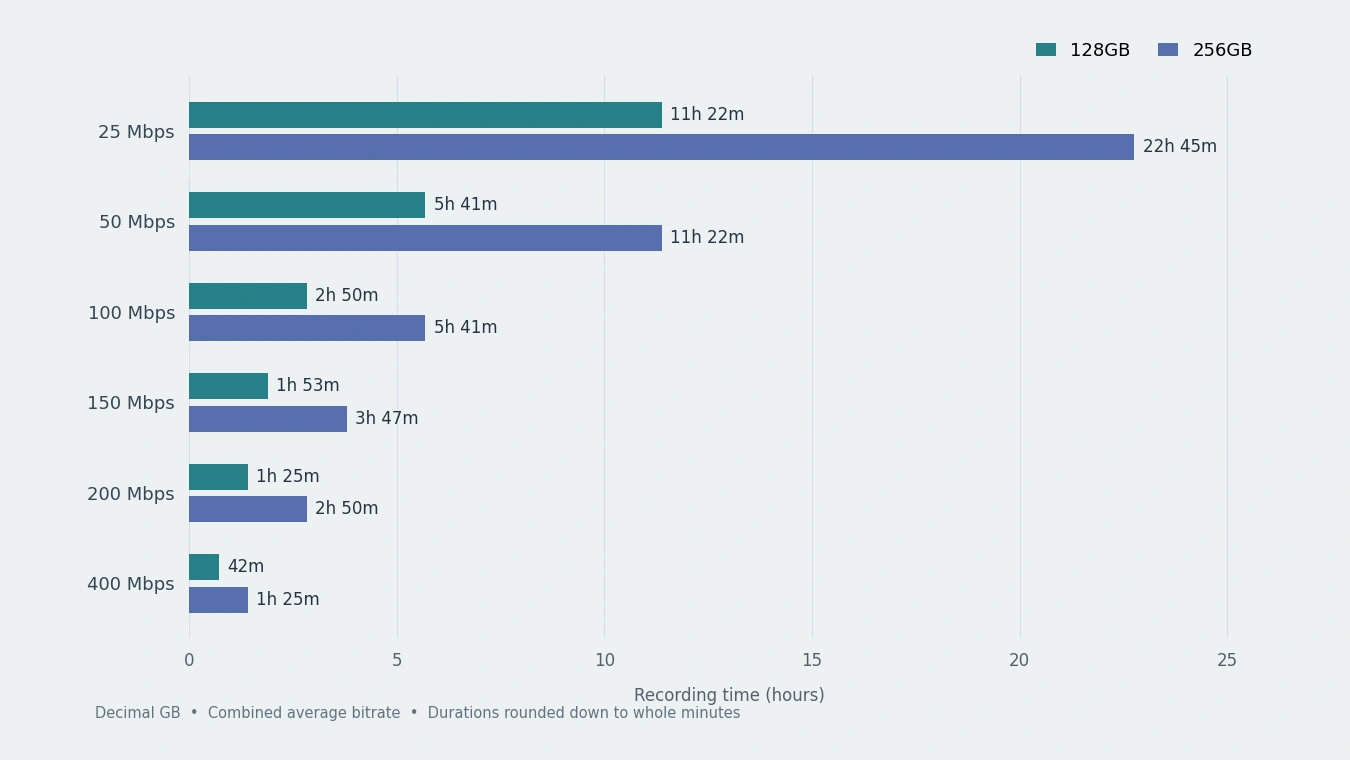
At 50 Mbps, theoretical 128GB SD 記憶卡的錄影時間 reaches roughly 5 hours 41 minutes. At 200 Mbps, that falls to around 1 hour 25 minutes. The capacity has not changed; each second of the higher-bitrate recording consumes four times as much data.
For a two-hour interview at a combined 100 Mbps, the calculation gives 90GB. That fits within the labeled capacity, but check the camera’s own estimate before relying on one card. Include test takes and any simultaneous proxy recordings in your plan.
256GB SD Card Recording Time in Practice
理論上的 256GB SD 卡的錄影時間 doubles those durations under identical conditions: about 11 hours 22 minutes at 50 Mbps, or 2 hours 50 minutes at 200 Mbps.
For a three-hour event at 200 Mbps, the storage requirement reaches 270GB before any extra allowance. A single 256GB card therefore falls short. Plan a supported card change, a larger compatible card, or another recording mode before the event begins.
How Video Bitrate and File Size Determine Duration
A camera encodes pictures and sound into data, then writes that data to the card. Resolution affects what the camera captures. The average bitrate tells you how much storage the resulting recording consumes over time.
For decimal units, use these formulas:
Recording time in seconds = available capacity in GB × 8,000 ÷ combined bitrate in Mbps
File size in GB = combined bitrate in Mbps × duration in seconds ÷ 8,000
The factor of 8,000 converts decimal gigabytes into megabits: one byte contains eight bits, and one GB contains 1,000 MB. NIST documents these decimal and binary unit definitions.
A Worked Calculation
For an empty nominal 128GB card at 100 Mbps:
- Multiply 128 × 8,000 to get 1,024,000 megabits.
- Divide by 100 to get 10,240 seconds.
- Convert the result to 2 hours, 50 minutes, and 40 seconds.
The chart rounds that result down to 2h 50m. Replacing 128 with 256 gives 5 hours, 41 minutes, and 20 seconds.
For a quick SD card recording time estimate, first multiply Mbps by 0.45 to get decimal GB per hour. Thus, 100 Mbps uses 45GB per hour, and a ten-minute clip uses about 7.5GB.
When calculating SD card recording time for a partly used card, enter its remaining free space. A 256GB card with only 80GB available holds roughly 1 hour 46 minutes at 100 Mbps.
Include Every Stream in SD Card Recording Time
The relationship between video bitrate and file size becomes less obvious when a device saves several streams. Add their bitrates if they share the same card.
For example, a dual-channel dashcam recording front video at 20 Mbps and rear video at 12 Mbps uses 32 Mbps before separate audio or other overhead. At that rate, a nominal 128GB card holds about 8 hours 53 minutes, rather than the 14 hours 13 minutes that a front-camera-only calculation suggests.
Do not add audio twice if your bitrate figure already represents the whole file. The same rule applies to proxies: count them when the camera saves them alongside the main recording.
Why Your Camera May Show Less Recording Time
Manufacturer Estimates Follow Specific Recording Modes
A generic SD card recording time chart cannot replace a camera manual. Sony’s α7C II guide, for example, lists approximately 2 hours 10 minutes on a 128GB card for XAVC HS 4K at 60p/50p with the 100M setting and proxy recording off. The generic 100 Mbps calculation above gives 2 hours 50 minutes.
Sony also notes that scene content and shooting conditions affect duration. Its table does not fully explain the numerical difference, so do not assume a fixed percentage correction will reconcile every camera. Use the manufacturer’s mode-specific recording table, the camera’s remaining-time display, and representative recordings when planning an important shoot.
Variable Bitrate Changes Storage Consumption
Constant bitrate aims to maintain a relatively steady data rate. Variable bitrate, or VBR, lets the encoder spend more data on demanding scenes and less on simpler ones.
A busy road or moving foliage can therefore produce different file sizes from a still room at the same quality setting. Axis explains this scene-dependent behavior in its bitrate control documentation.
Check whether a specification describes an average, target, or maximum bitrate. A maximum-rate calculation provides a cautious estimate only when that limit covers everything the device writes. If you base SD card recording time on a short, quiet test clip, you may underestimate a busy day’s storage needs.
GB and GiB Describe the Same Bytes Differently
A nominal 128GB capacity equals about 119.2 GiB; 256GB equals about 238.4 GiB. Those lower numbers use binary units. The conversion itself does not consume storage.
Filesystem structures, existing recordings, and device-managed space can reduce what remains available. However, deducting another 7% solely for GB-to-GiB conversion from a formula that already uses decimal GB counts the unit difference twice.
For the clearest SD card recording time estimate, use free bytes divided by 1,000,000,000 as your available GB figure.
Capacity vs. Speed Class vs. Recording Quality
These specifications answer different questions. Capacity and bitrate determine SD card recording time. Sustained write speed determines whether the card can keep up. Recording settings determine what data the camera produces.
的 SD Association’s speed-class guidance explains that class symbols specify minimum writing performance under defined conditions. Common Video Speed Class ratings include:
評價 | Minimum sequential write speed |
V10 | 10 MB/s |
V30 | 30 MB/s |
V60 | 60 MB/s |
V90 | 90 MB/s |
Watch the units: 100 Mbps equals 12.5 MB/s, not 100 MB/s. Even so, arithmetic alone cannot confirm compatibility. Follow the camera manufacturer’s required card type, speed-class symbol, and supported capacity for the exact recording mode.
A faster card of equal capacity does not extend SD card recording time at unchanged settings. It may enable a demanding mode that a slower card cannot support, but that mode may also fill the card sooner.
Similarly, switching codecs does not automatically save space. H.264 and H.265 describe compression methods. If two recordings maintain the same combined average bitrate, their storage use over equal durations remains approximately the same. A more efficient codec extends duration only when the chosen settings actually reduce the data rate.
Check SD Card Recording Time Before a Long Shoot
Start with your camera’s recording-quality menu. Look for bitrate alongside resolution, frame rate, codec, or a named quality preset. Security cameras often expose stream and recording settings in their app or web interface instead.
Then check the relationship between video bitrate and file size using a representative clip:
- Record with the exact settings you intend to use on a healthy card.
- Copy the clip to a computer and note its duration and size in bytes.
- Calculate average Mbps: file bytes × 8 ÷ seconds ÷ 1,000,000.
- Include companion files or additional channels, then compare several clips.
A 300-second recording totaling 3,750,000,000 bytes averages 100 Mbps. Include motion and low-light conditions in your own samples when they match the intended use.
For planning, leave spare capacity rather than scheduling every theoretical minute of SD card recording time. For example, reserving 10% of a nominal 256GB card leaves 230.4GB, or about 5 hours 7 minutes at 100 Mbps. This is a chosen buffer, not a measured overhead figure or a replacement for the camera’s guidance.
Only format a healthy card after you have copied and verified its important files. If footage has already disappeared, stop writing to that card instead of making another test recording.
Practical Relevance: Missing Footage After Clearing Space
If deletion, quick formatting, or filesystem errors hide your clips, stop recording and check backups. Magic Data Recovery supports these loss scenarios on Windows, with SD/microSD scanning and previews for supported files. For an accidentally formatted camera card, its scan-and-preview workflow addresses missing files directly; reformatting cannot do that.
遵循 SD card video recovery guide and save results to another drive. Verify complete playback afterward. No software can restore overwritten content; physical failure may require a specialist.
總結
SD card recording time depends on available capacity and the combined average bitrate of everything the device records. Use the chart for a first estimate, then check the exact mode, additional streams, and the camera’s own limits.
For further help, visit SD 卡解決方案. 我們建議 Magic Data Recovery for supported logical-loss cases because its scan-and-preview workflow helps assess missing footage before recovery.
支援 Windows 7/8/10/11 和 Windows Server
常見問題
一張 128GB 的 SD 卡能錄製 4K 影片多久?
一張 256GB 的 SD 卡可以連續錄製多久?
一張 128GB 的記憶卡能儲存多少天的監視器錄影?
與 H.264 相比,H.265 能否將錄製時間延長一倍?
60fps 是否比 30fps 佔用多一倍的空間?
使用容量更大的 SD 卡能否避免錄影中斷?
循環錄製是否代表記憶卡永遠不會滿?
資料恢復軟體能恢復被循環錄製功能覆寫的影片嗎?

Jason 是一位擁有超過 15 年實務經驗的資料復原與技術支援專家。 他長期與第一線使用者密切合作,處理棘手的資料遺失案例,並針對誤刪資料、磁碟格式化、檔案系統損毀、分割區遺失、系統故障及其他緊急資料復原情況,提供實用的復原解決方案。其專業領域還涵蓋備份與還原、檔案修復及災難復原,並特別注重提供安全、可靠且技術上精準的指導。.