
NTFS 已刪除檔案 MFT 測試:刪除後會有什麼變化?
顏色 NTFS 已刪除檔案 MFT 測試 需要比對的並非僅是檔案名稱。一旦最終刪除完成,NTFS 即可釋放檔案記錄、移除其有效目錄項目,並釋放其非駐留資料簇。 然而,這些變更未必會抹除舊內容。本實驗透過刪除與記錄再利用,比較一個小型駐留 TXT 檔案與一個非駐留 JPG 檔案,隨後檢視對 JPG 外部資料進行的定義性覆寫。此比較著重探討三個問題:檔案名稱是否仍存在、其映射關係是否仍存在,以及原始位元組是否仍相符?
目錄
這份 NTFS 已刪除檔案 MFT 測驗的考核重點
核心問題在於,已刪除的 MFT 記錄是否仍能完整描述一個檔案。答案取決於元資料和內容兩方面。存留的檔案名稱可以識別舊檔案,而存留的執行清單則能定位非駐留資料流的原始簇。但這兩者都無法證明這些簇中仍包含原始資料。.
關於背景,該 主檔案表 本指南說明記錄如何將名稱、屬性與儲存位置相互連結。此處的重點在於已定義狀態之間的轉換。.
此實驗採用了生成的 NTFS 結構範例、計算出的位元組比對結果,以及明確定義的分配狀態轉換。 螢幕截圖顯示在 wxHexEditor 中開啟的生成記錄,並標示出對應的「刪除前」與「刪除後」選取範圍:JPG 記錄的標誌位元以及 TXT 檔案的駐留內容位元組。此模型模擬的是單鏈結檔案被完全刪除(所有句柄均已關閉)的情境,而非移至「資源回收筒」的情況。.
NTFS MFT 測試配置與假設
此 NTFS 已刪除檔案 MFT 測試使用一個未加密的 NTFS 3.1 邏輯磁區。 該分區採用 512 位元組的邏輯磁區、4,096 位元組的簇,以及 1,024 位元組的 MFT 記錄。其分區起始於磁碟 LBA 2048 處。這些是預先設定的參數,而非裝置規格。.
目標,, mft-lab-file.jpg, 創下第42名的紀錄。這位未具名且非居民的 $DATA 該流包含精確的 10,240 位元組。其中一塊連續區塊橫跨三個叢集,起始於邏輯叢集編號 8192。因此,分配的空間為 12,288 位元組,其中有 2,048 位元組超出檔案的邏輯結尾。該 分配單位大小 本指南闡述了「大小」與「分配」之間的區別。.
這兩項目標都 一個硬連結 且不包含 NTFS 壓縮、稀疏分配、替代資料流或延伸記錄。 該 JPG 檔案為有效生成的 160 × 120 JPEG 檔案,具有確定性的像素模式,且其 JPEG 註解區段將長度設定為 10,240 位元組。為驗證樣本格式,已對其進行解碼。第 42 筆記錄以序號 42 開頭。.
第二個目標,, resident-note.txt, 在記錄 43 中包含精確 64 位元組的 ASCII 文字,最初位於序列 7 處。其 $DATA 該值無需獨立的資料叢集。在這兩個範例中,該 屬性標頭 決定儲存形式:a .txt 僅憑擴充功能本身並不能保證資料處於常駐狀態,而該 .jpg 僅憑延期本身並不能構成非居民資料。.
對於每項即時刪除比較,該模型會保留有效載荷和舊屬性。後續的模擬情境會變更記錄槽位,或是針對 JPG 檔案,變更一個外部資料叢集。此舉可隔離這些變更的影響,且無需假設特定的 SSD 讀取順序或 Windows 寫入順序。.
NTFS 已刪除檔案 MFT 測試程序
情境 1 至情境 4 遵循非駐留 JPG。S3 和 S4 獨立於 S2 分支。S5 至 S7 構成一個獨立的駐留 TXT 控制;這些狀態使用記錄 43 而非記錄 42。.
非駐留 JPG:NTFS MFT 測試狀態
S1 — JPG 基準線。.
建立第 42 筆記錄,並設定其名稱、非駐留資料映射及「正在使用」標記。設定對應的記錄與叢集分配位元。產生完整內容,並計算其 SHA-256 摘要。.
S2 — JPG 刪除完成。.
從 S1 開始,將原始名稱從 Active Directory 成員資格中移除,清除該記錄的「正在使用」位元,將其連結數減少至零,並遞增其序列號。清除相關記錄及叢集位圖的位元。保留舊檔名、資料屬性及有效載荷,作為定義中的「保留元資料」情況。.
S3 — JPG 記錄槽被重複使用。.
從 S2 開始,將記錄 42 替換為以下屬性: new-owner.txt, ,一個小型常駐檔案。再次設定記錄分配位元。將前三個資料簇維持原狀並釋放。檢查當前記錄是否仍提供原始的映射關係。.
S4 — JPG 中間簇被覆寫。.
另行返回 S2。將 LCN 8193 指派給另一個檔案,並將該簇中的每個位元組替換為其位元反轉值(原始 XOR 移位寄存器). 此定義的替換操作會變更該範圍內的每個位元組。請保持舊的、已釋放的目標記錄不變。將生成的 10,240 位元組資料流與原始資料流進行比較。.
常駐 TXT:NTFS MFT 測試狀態
S5 — 常駐 TXT 基準值。.
建立第 43 筆記錄,針對 resident-note.txt 其駐留記憶體中包含 64 位元組 $DATA 屬性。設定記錄分配位元,並記錄該值的位置與摘要。其資料流沒有外部叢集分配。.
S6 — 常駐 TXT 刪除完成。.
從 S5 開始,移除當前檔案名稱,清除該記錄的「正在使用」與「已分配」位元,將連結位元設為零,並將序列號從 7 遞增至 8。保留駐留內容位元組。此資料流無需清除任何獨立的載荷簇位元。.
S7 — Resident TXT record reused.
Starting from S6, reuse record 43 for replacement1.txt. Place 64 tilde characters in the same resident-value range. Compare that range with the original text to determine whether the original payload survives this replacement.
Compare Contents After Deletion and Reuse
Evaluate content separately. For the JPG, decode the retained mapping, read the external ranges in file order, and stop at 10,240 bytes. For the TXT, read the 64-byte value inside its record. Compare the complete bytes and digest; exclude cluster slack and do not use the filename as the integrity check.
These transformations apply to disposable generated structures. For a device-based follow-up, use expendable test media and verify the target’s identity before deleting anything. Preserve the affected source when investigating actual data loss.
NTFS File Deletion Hex Comparison
In the paired screenshot section below, compare each file with its own earlier state. The header field at +0x16 is the two-byte flags word. Its low bit changes from allocated to free. The nearby sequence and link fields provide supporting context. The h suffix identifies hexadecimal row offsets; the JPG screenshots select +0x16–+0x17; the TXT screenshots instead select the resident content for comparison.
Deleted File MFT Fields: What Changed?
The flag change releases the record; it does not instruct a parser to replace the file’s data with zeros. The sequence change also matters: an old reference that names record 42 with sequence 42 is now stale. Microsoft documents the sequence increment when a file record segment is freed.
The two bitmap changes describe record and cluster allocation. $MFT::$BITMAP tracks record allocation. In this sample, record 42 corresponds to bit 2 of byte +0x05. The volume’s $Bitmap::$DATA tracks cluster allocation. Clusters 8192–8194 correspond to bits 0–2 of byte +0x0400.
Clearing those bits makes resources available for reuse. It does not establish whether a later read returns original content. Also, the original name’s removal from the active directory index is separate from the retained $file_name attribute inside the freed record. Directory-tree updates can shift or overwrite index entries, so index remnants need their own interpretation.
How Does the MFT Locate a Deleted File?
In S1 and S2, the nonresident data attribute begins at record +0x118. Its mapping-pairs offset 是 0x40, placing the runlist at record +0x158. The bytes describe one run of three clusters starting at LCN 8192. The interactive comparison below retains the actual Hex values and lets readers inspect these fields.
LCNs are relative to the volume. Therefore, the first data cluster starts at volume byte offset 0x02000000. Adding the chosen partition offset gives disk byte offset 0x02100000, or disk LBA 67584. Confusing these bases would make a recovery reader inspect the wrong location.
Resident TXT vs Nonresident JPG: The Same Deletion, Different Storage
Compare the two files at the same stage: S5 versus S1 before deletion, S6 versus S2 after deletion, and S7 versus S3 after record reuse. The TXT occupies record 43; the JPG occupies record 42. Different filenames, record numbers, and initial sequence values identify different objects rather than showing deletion changes.
舞台 | Resident TXT: 64 bytes | Nonresident JPG: 10,240 bytes |
刪除前 | Content is inside record 43 at | Record 42 holds the runlist; content is in external clusters 8192–8194. |
刪除後 | Record is free; all 64 resident content bytes remain in the defined state. | Record and three clusters are free; the old mapping and all 10,240 content bytes remain in the defined state. |
After record reuse | The replacement value overwrites the same range: 0 / 64 original bytes match. | The replacement owner removes the old mapping; the baseline-known external range still matches 10,240 / 10,240 bytes. |
Inspect Deleted File MFT Test Fields
The interactive comparison opens with the two deleted states side by side. Its summary follows all three matched stages, and its storage view distinguishes resident content from nonresident mapping pairs.
Allocation, content checks and addresses
Before Deletion: Where Are the File Contents?
The 64-byte TXT has FormCode 00 at record +0x120. Its complete contents occupy +0x130–+0x16F inside the MFT record. The 10,240-byte JPG has FormCode 01; its record holds mapping pairs at +0x158, while the image bytes occupy external clusters 8192–8194.
Resident TXT
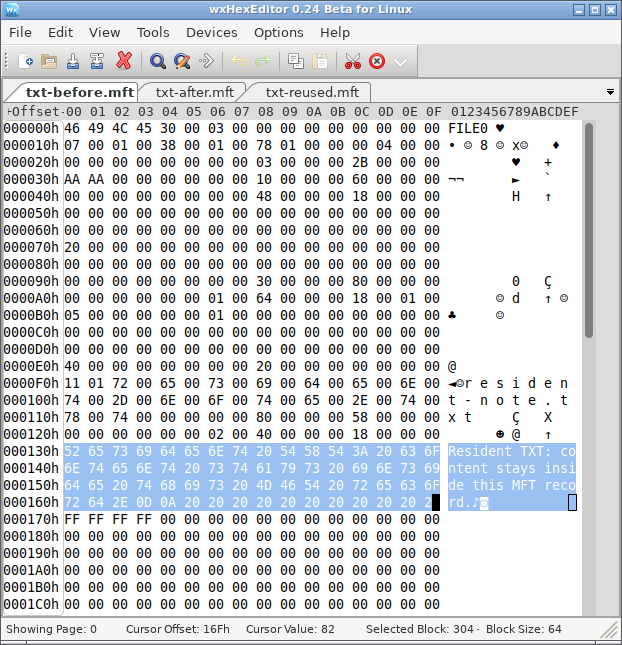
S5: The selected text is the file content itself, stored inside record 43.
Nonresident JPG
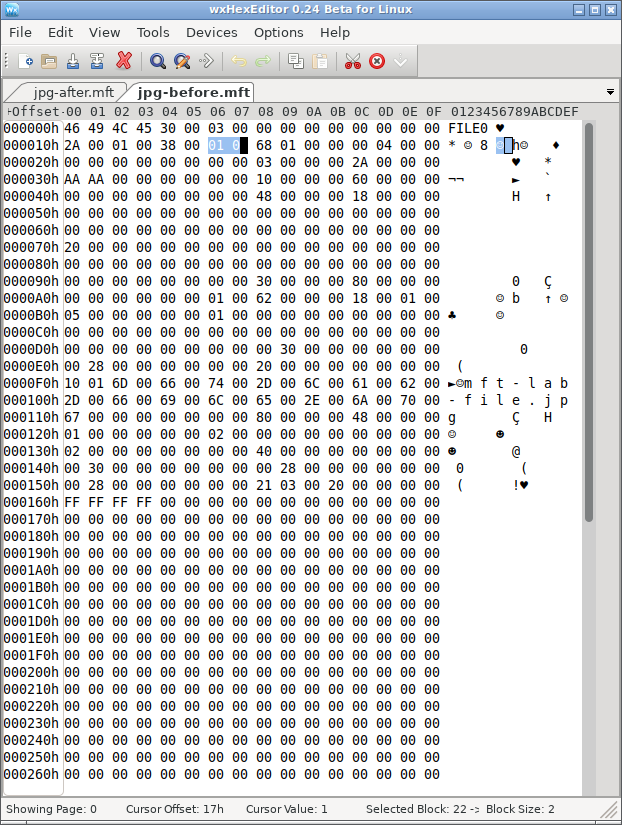
S1: Record 42 stores the nonresident attribute and runlist; the JPEG content is at the external location described by that mapping.
After Deletion: What Is Freed, and What Remains?
Both records lose their in-use bit. For the TXT, the defined deletion state retains all 64 bytes inside the freed record; this resident stream has no separate payload clusters to release. For the JPG, deletion also releases its three external data clusters. The defined S2 state retains both the old runlist and all 10,240 external content bytes.
Resident TXT
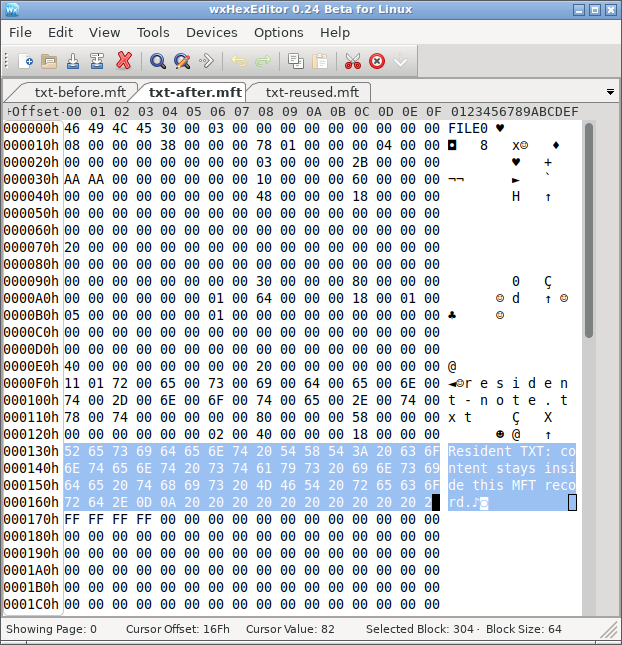
S6: Flags become 00 00, but the selected resident content is unchanged from S5.
Nonresident JPG
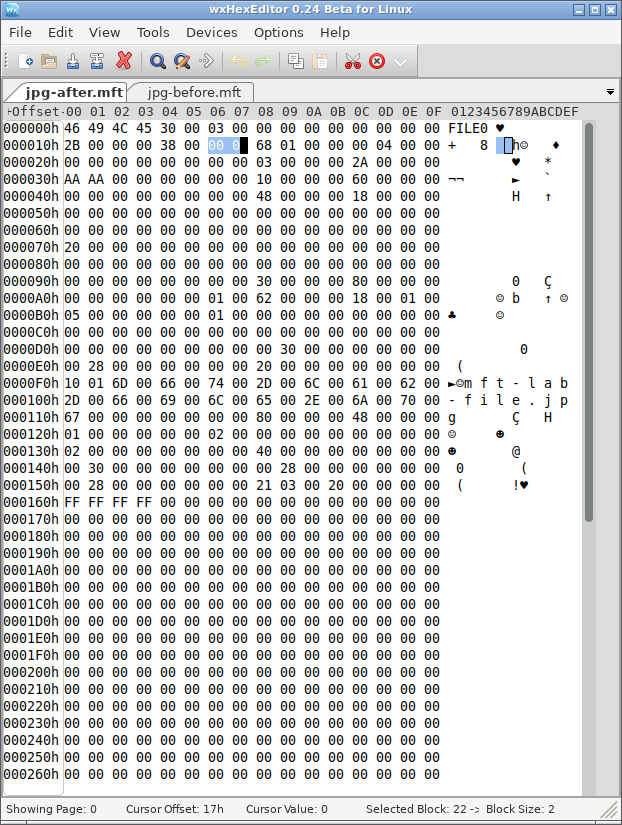
S2: Flags become 00 00, while the record retains its mapping. The external content check in the HTML reports 10,240 matching bytes.
After Record Reuse: What Does the Same Operation Destroy?
In the TXT control, the replacement owner writes 64 tilde characters over the same resident-value range. All 64 original bytes in that range differ. In the JPG control, the replacement owner removes the original record’s mapping, but the defined operation leaves the external image data unchanged. Thus the JPG loses its old map while its data survives elsewhere; the TXT loses its original content within the reused record.
Resident TXT
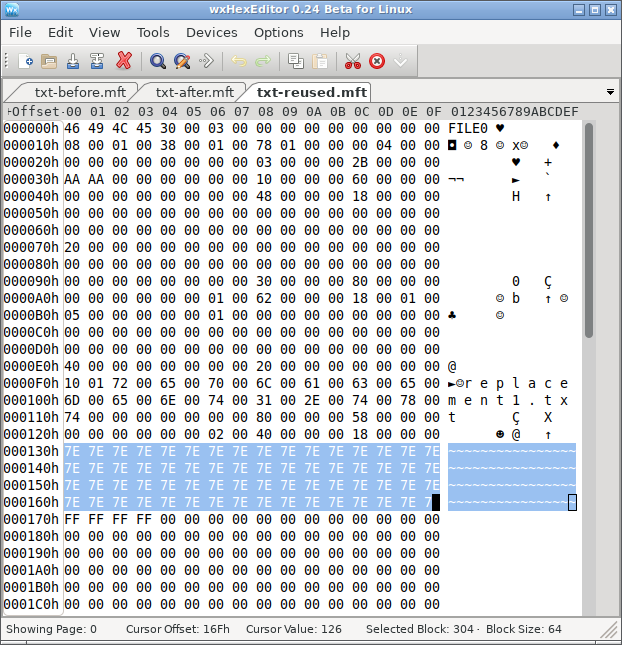
S7: The same selected range now contains replacement text. Original resident content matching that range: 0 / 64 bytes.
Nonresident JPG
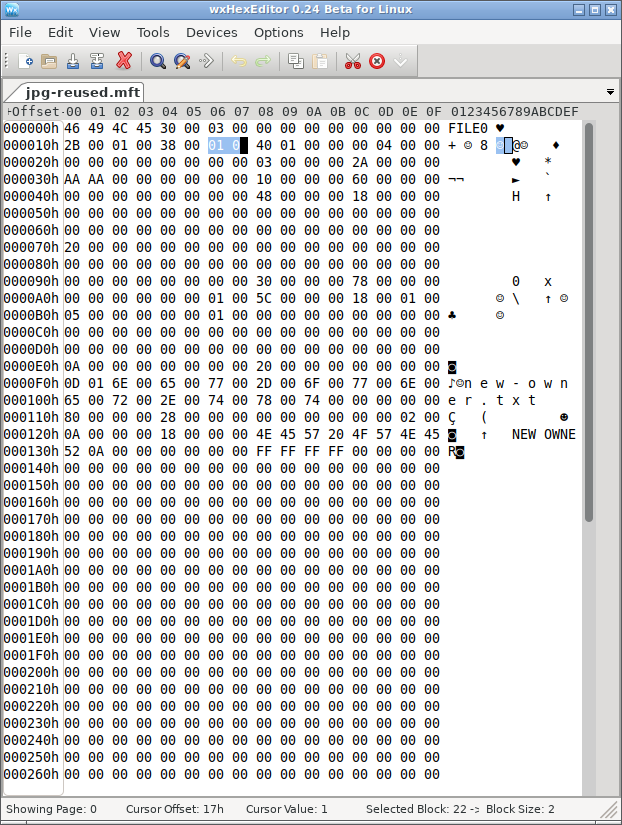
S3: Record 42 now describes new-owner.txt; the original JPG mapping is gone. The separately checked original external range still matches all 10,240 JPG bytes.
These are two different failure paths after the same kind of record reuse. A recovery assessment must check the resident value inside the TXT’s record, but it must check both historical mapping and external contents for the JPG. The record itself still occupies space within $MFT; “no external clusters” describes the resident TXT data stream only.
NTFS Deletion Metadata Experiment Results
For the JPG, S2 retains both the old map and all original content by construction. Reading the mapped clusters and trimming to 10,240 bytes produces a full byte-for-byte match and the same SHA-256 digest. That establishes content identity for this generated sample. However, this NTFS deleted file MFT test does not measure any application’s recovery performance.
S3 separates content survival from metadata survival. The original data bytes still match, but the current record belongs to a different file and no longer holds the original runlist. The saved baseline identifies where those bytes used to be; that knowledge is a comparison reference, not metadata available from the reused record. Other surviving structures or content analysis would be needed to locate and identify the old stream independently.
S4 demonstrates the opposite problem. The original filename and map remain in the freed record, but its middle cluster contains replacement bytes. Only 6,144 original bytes match; 4,096 differ. Reading the complete old range still produces a 10,240-byte result, yet its digest fails the original-content check. A correct filename and file length can therefore accompany damaged content. JPEG viewing behavior is a separate check from byte-for-byte identity.
For the TXT, S6 retains all 64 resident content bytes. In S7, none of those bytes match the replacement value. This is a content loss within the defined record replacement, without overwriting an external data cluster.
The NTFS deleted file MFT test above pairs the TXT and JPG at the same stage. Its other views retain the per-file before-and-after checks, while the details provide the calculated content digests.
Why Deleted File MFT Flags Cannot Prove Recoverability
A useful assessment needs three separate checks. First, establish the file’s identity from coherent metadata. Next, interpret its storage attributes, including resident-value boundaries, external mappings, and any additional records or streams. Finally, verify the contents available from those ranges. The generated scenarios deliberately let those checks produce different answers.
The two targets require different content checks. The resident TXT keeps its payload inside its record; the nonresident JPG relies on mapping information to reach external clusters. In S3, the new owner is resident to isolate record reuse from reuse of the JPG’s old data clusters. S5–S7 separately demonstrate what happens when the deleted target itself has resident data. Fragmented, compressed, encrypted, and sparse streams introduce additional interpretation requirements.
Nor should a tool equate an unused record with an intact deleted file automatically. Structural validity, allocation state, ownership, mapping consistency, and readable content answer different questions. Even a valid text fragment does not establish that a document, photograph, or video is complete.
What File Explorer and Disk Management Can Show
After final deletion, the original name should disappear from normal directory enumeration. Free space can increase once the file system releases its allocation, although unrelated activity can change the displayed total.
Ordinary deletion of one file does not turn an otherwise healthy NTFS volume into RAW or unallocated space. Disk Management describes volumes and partitions; it does not expose individual MFT record flags. A RAW label or missing partition therefore calls for a separate file-system or partition diagnosis, rather than being treated as confirmation of this deletion mechanism.
When File Recovery Comes Before File-System Repair
If the volume still works and only files are missing, repair is not the first explanation or action. Continued writes can reuse both freed records and freed clusters. Avoid installing tools, saving recovered files, or running unnecessary repair operations on the affected volume. Examine a suitable preserved copy when possible and save recovered content elsewhere.
For a practical check, Magic Data Recovery can scan the affected drive and preview supported files before recovery. Install it on another drive and save recovered files elsewhere; the software cannot recover content that later writes have overwritten.
SSD behavior adds another condition. The TRIM 指令 can notify storage that released logical ranges are no longer needed. Microsoft’s read-only query fsutil 行為查詢 DisableDeleteNotify reports the notification setting; it does not prove that a specific range retains its bytes.
If the original logical ranges return zeros or replacement content, a surviving MFT name cannot supply the missing nonresident payload. Conversely, readable old bytes still require correct mapping and content validation. Disabling notifications later does not reverse notifications already issued.
NTFS Deleted File MFT Test: Conclusion
這個 NTFS 已刪除檔案 MFT 測試 separates record allocation, data mapping, and content integrity. In the JPG’s retained-metadata scenario, deletion frees the record and clusters while the original content still matches. However, record reuse removes the old map without changing those data bytes, and a cluster overwrite damages content while leaving the old name and map available.
The resident TXT control adds a different failure path: deleting its record leaves the defined 64-byte value intact, but reusing that record replaces the value itself. The JPG instead requires separate checks of its record and external data.
The practical conclusion is to verify each layer independently. A filename identifies a candidate; a resident-value offset or nonresident runlist identifies its content location; a complete content check determines whether that location still reproduces the original stream. That distinction explains why a deleted file can appear in a scan yet fail to open correctly after extraction.
常見問題
MFT 標誌 0x0002 是否表示該檔案已被刪除?
FILE 簽名會驗證 NTFS MFT 記錄嗎?
序號會揭示檔案被刪除過多少次嗎?
僅憑位圖位元,能否將一個空閒叢集指派給已刪除的檔案?
刪除一個硬連結是否總是會釋放該檔案的資料?
正確的擴展能否證明提取的內容是有效的?

Vasilii 是一位在該領域擁有約 10 年實務經驗的資料復原專家。在他的職業生涯中,他已成功解決數千個複雜的個案,包括刪除的檔案、格式化的硬碟機、遺失的磁碟分割和 RAW 檔案系統。他的專業知識涵蓋使用十六進位編輯器等專業工具的手動復原方法,以及使用復原軟體的進階自動解決方案。Vasilii 的使命是讓 IT 專業人士和一般使用者都能獲得可靠的資料復原知識,協助他們保護寶貴的數位資產。.