
NTFS Deleted File MFT Test: What Changes After Deletion?
An NTFS deleted file MFT test needs to compare more than a filename. Once final deletion completes, NTFS can release the file record, remove its active directory entry, and free its nonresident data clusters. However, those changes do not necessarily erase the old contents. This experiment compares a small resident TXT with a nonresident JPG through deletion and record reuse, then examines a defined overwrite of the JPG’s external data. The comparison separates three questions: does the name survive, does its mapping survive, and do the original bytes still match?
Table of Contents
What This NTFS Deleted File MFT Test Examines
The core question is whether a deleted MFT record can still describe a complete file. The answer depends on both metadata and content. A surviving name can identify an old file, while a surviving runlist can locate the former clusters of a nonresident stream. Neither establishes that those clusters still contain the original data.
For background, the Master File Table guide explains how records connect names, attributes, and storage locations. Here, the focus is the change between defined states.
This worked experiment uses generated NTFS structure samples, calculated byte comparisons, and explicitly defined allocation-state transitions. The screenshots show the generated records opened in wxHexEditor, with matched before-and-after selections: the JPG record flags and the TXT’s resident content bytes. The model follows completed deletion of a single-link file, with all handles closed, rather than a move into the Recycle Bin.
NTFS MFT Test Configuration and Assumptions
This NTFS deleted file MFT test uses an unencrypted NTFS 3.1 logical volume. It uses 512-byte logical sectors, 4,096-byte clusters, and 1,024-byte MFT records. Its partition starts at disk LBA 2048. These are chosen inputs, rather than a device specification.
The target, mft-lab-file.jpg, occupies record 42. Its unnamed, nonresident $DATA stream contains exactly 10,240 bytes. One contiguous run covers three clusters, starting at logical cluster number 8192. Consequently, allocation is 12,288 bytes, with 2,048 bytes beyond the file’s logical end. The allocation unit size guide explains this size-versus-allocation distinction.
Both targets have one hard link and no NTFS compression, sparse allocation, alternate data streams, or extension records. The JPG is a valid generated 160 × 120 JPEG with a deterministic pixel pattern and a JPEG comment segment that sets its length to 10,240 bytes. It was decoded to check the sample format. Record 42 starts with sequence number 42.
The second target, resident-note.txt, contains exactly 64 bytes of ASCII text inside record 43, initially at sequence 7. Its $DATA value needs no separate data clusters. In both examples, the attribute header determines the storage form: a .txt extension alone does not guarantee resident data, and the .jpg extension alone does not establish nonresident data.
For each immediate deletion comparison, the model preserves the payload and old attributes. Subsequent scenarios change the record slot or, for the JPG, one external data cluster. This isolates their effects without assuming a particular SSD readout or Windows write sequence.
NTFS Deleted File MFT Test Procedure
Scenario 1 – Scenario 4 follow the nonresident JPG. S3 and S4 branch independently from S2. S5–S7 form a separate resident TXT control; those states use record 43 rather than record 42.
Nonresident JPG: NTFS MFT Test States
S1 — JPG baseline.
Construct record 42 with its name, nonresident data mapping, and in-use flag set. Set the corresponding record and cluster allocation bits. Generate the complete content and calculate its SHA-256 digest.
S2 — JPG deletion complete.
Starting from S1, remove the original name from active directory membership, clear the record’s in-use bit, reduce its link count to zero, and increment its sequence number. Clear the relevant record and cluster bitmap bits. Preserve the old filename, data attribute, and payload as the defined retained-metadata case.
S3 — JPG record slot reused.
Starting from S2, replace record 42 with the attributes of new-owner.txt, a small resident file. Set the record allocation bit again. Leave the former three data clusters unchanged and free. Check whether the current record still supplies the original mapping.
S4 — JPG middle cluster overwritten.
Separately return to S2. Assign LCN 8193 to another file and replace each byte in that cluster with its bitwise inverse (original XOR FF). This defined replacement changes every byte in the range. Keep the old, freed target record unchanged. Compare the resulting 10,240-byte stream with the original.
Resident TXT: NTFS MFT Test States
S5 — Resident TXT baseline.
Construct record 43 for resident-note.txt with 64 bytes inside its resident $DATA attribute. Set the record allocation bit, and record the value’s location and digest. Its data stream has no external cluster allocation.
S6 — Resident TXT deletion complete.
Starting from S5, remove the active filename, clear the record’s in-use and allocation bits, set links to zero, and increment sequence 7 to 8. Preserve the resident content bytes. There are no separate payload-cluster bits to clear for this stream.
S7 — Resident TXT record reused.
Starting from S6, reuse record 43 for replacement1.txt. Place 64 tilde characters in the same resident-value range. Compare that range with the original text to determine whether the original payload survives this replacement.
Compare Contents After Deletion and Reuse
Evaluate content separately. For the JPG, decode the retained mapping, read the external ranges in file order, and stop at 10,240 bytes. For the TXT, read the 64-byte value inside its record. Compare the complete bytes and digest; exclude cluster slack and do not use the filename as the integrity check.
These transformations apply to disposable generated structures. For a device-based follow-up, use expendable test media and verify the target’s identity before deleting anything. Preserve the affected source when investigating actual data loss.
NTFS File Deletion Hex Comparison
In the paired screenshot section below, compare each file with its own earlier state. The header field at +0x16 is the two-byte flags word. Its low bit changes from allocated to free. The nearby sequence and link fields provide supporting context. The h suffix identifies hexadecimal row offsets; the JPG screenshots select +0x16–+0x17; the TXT screenshots instead select the resident content for comparison.
Deleted File MFT Fields: What Changed?
The flag change releases the record; it does not instruct a parser to replace the file’s data with zeros. The sequence change also matters: an old reference that names record 42 with sequence 42 is now stale. Microsoft documents the sequence increment when a file record segment is freed.
The two bitmap changes describe record and cluster allocation. $MFT::$BITMAP tracks record allocation. In this sample, record 42 corresponds to bit 2 of byte +0x05. The volume’s $Bitmap::$DATA tracks cluster allocation. Clusters 8192–8194 correspond to bits 0–2 of byte +0x0400.
Clearing those bits makes resources available for reuse. It does not establish whether a later read returns original content. Also, the original name’s removal from the active directory index is separate from the retained $FILE_NAME attribute inside the freed record. Directory-tree updates can shift or overwrite index entries, so index remnants need their own interpretation.
How Does the MFT Locate a Deleted File?
In S1 and S2, the nonresident data attribute begins at record +0x118. Its mapping-pairs offset is 0x40, placing the runlist at record +0x158. The bytes describe one run of three clusters starting at LCN 8192. The interactive comparison below retains the actual Hex values and lets readers inspect these fields.
LCNs are relative to the volume. Therefore, the first data cluster starts at volume byte offset 0x02000000. Adding the chosen partition offset gives disk byte offset 0x02100000, or disk LBA 67584. Confusing these bases would make a recovery reader inspect the wrong location.
Resident TXT vs Nonresident JPG: The Same Deletion, Different Storage
Compare the two files at the same stage: S5 versus S1 before deletion, S6 versus S2 after deletion, and S7 versus S3 after record reuse. The TXT occupies record 43; the JPG occupies record 42. Different filenames, record numbers, and initial sequence values identify different objects rather than showing deletion changes.
Stage | Resident TXT: 64 bytes | Nonresident JPG: 10,240 bytes |
Before deletion | Content is inside record 43 at | Record 42 holds the runlist; content is in external clusters 8192–8194. |
After deletion | Record is free; all 64 resident content bytes remain in the defined state. | Record and three clusters are free; the old mapping and all 10,240 content bytes remain in the defined state. |
After record reuse | The replacement value overwrites the same range: 0 / 64 original bytes match. | The replacement owner removes the old mapping; the baseline-known external range still matches 10,240 / 10,240 bytes. |
Inspect Deleted File MFT Test Fields
The interactive comparison opens with the two deleted states side by side. Its summary follows all three matched stages, and its storage view distinguishes resident content from nonresident mapping pairs.
Allocation, content checks and addresses
Before Deletion: Where Are the File Contents?
The 64-byte TXT has FormCode 00 at record +0x120. Its complete contents occupy +0x130–+0x16F inside the MFT record. The 10,240-byte JPG has FormCode 01; its record holds mapping pairs at +0x158, while the image bytes occupy external clusters 8192–8194.
Resident TXT
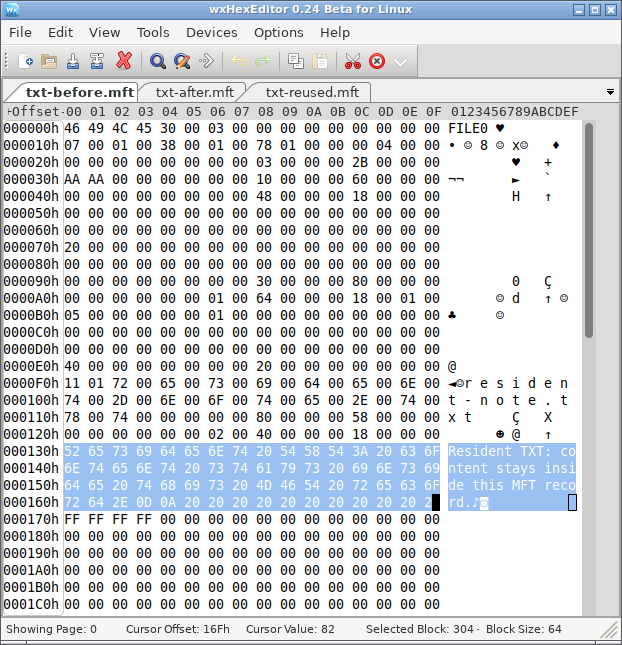
S5: The selected text is the file content itself, stored inside record 43.
Nonresident JPG
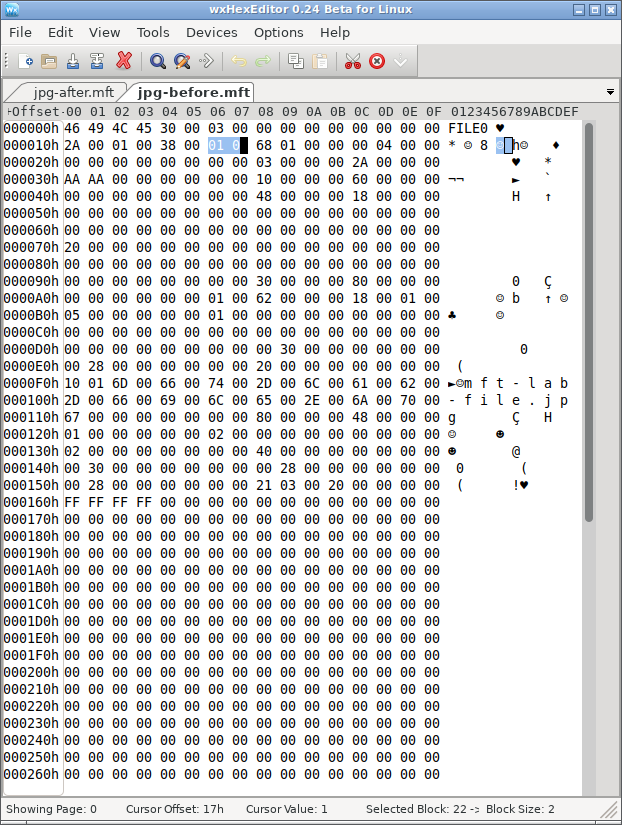
S1: Record 42 stores the nonresident attribute and runlist; the JPEG content is at the external location described by that mapping.
After Deletion: What Is Freed, and What Remains?
Both records lose their in-use bit. For the TXT, the defined deletion state retains all 64 bytes inside the freed record; this resident stream has no separate payload clusters to release. For the JPG, deletion also releases its three external data clusters. The defined S2 state retains both the old runlist and all 10,240 external content bytes.
Resident TXT
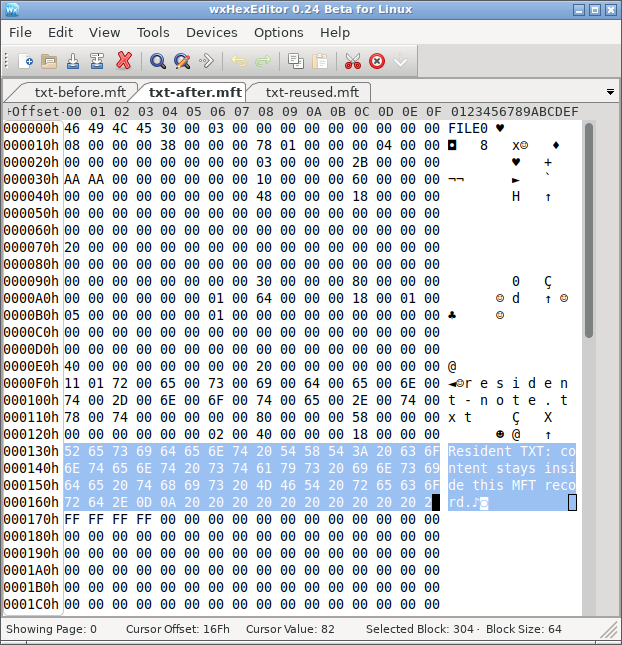
S6: Flags become 00 00, but the selected resident content is unchanged from S5.
Nonresident JPG
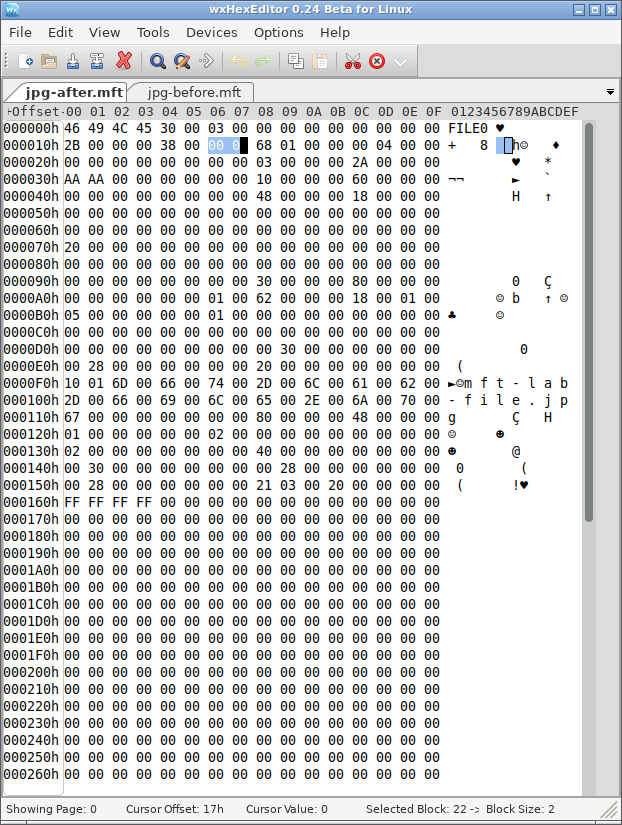
S2: Flags become 00 00, while the record retains its mapping. The external content check in the HTML reports 10,240 matching bytes.
After Record Reuse: What Does the Same Operation Destroy?
In the TXT control, the replacement owner writes 64 tilde characters over the same resident-value range. All 64 original bytes in that range differ. In the JPG control, the replacement owner removes the original record’s mapping, but the defined operation leaves the external image data unchanged. Thus the JPG loses its old map while its data survives elsewhere; the TXT loses its original content within the reused record.
Resident TXT
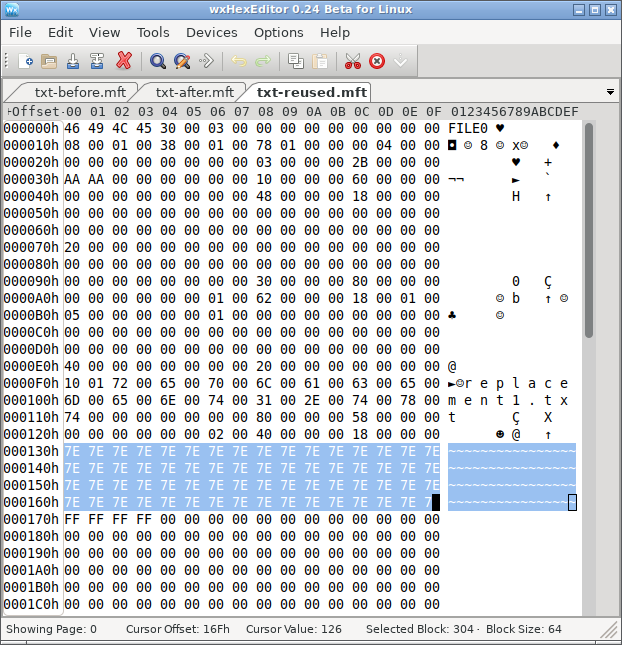
S7: The same selected range now contains replacement text. Original resident content matching that range: 0 / 64 bytes.
Nonresident JPG
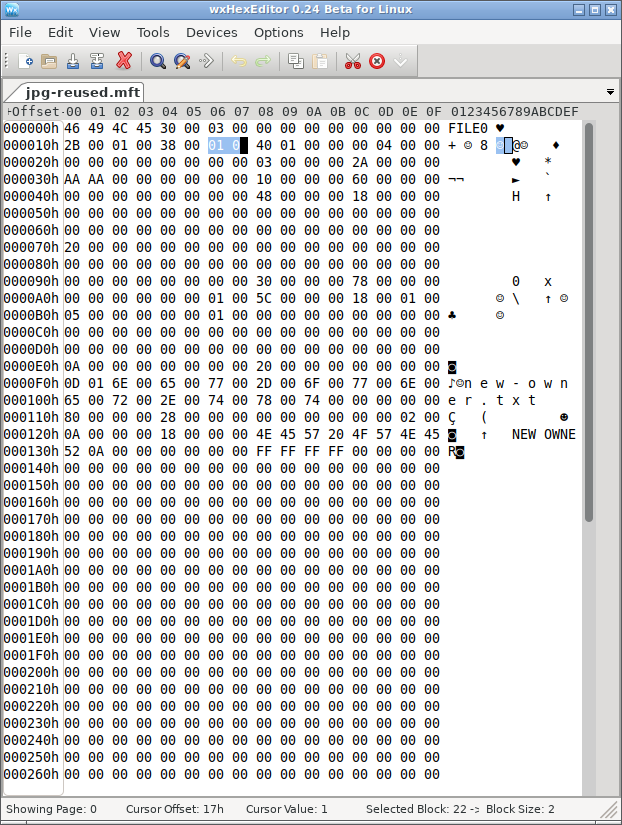
S3: Record 42 now describes new-owner.txt; the original JPG mapping is gone. The separately checked original external range still matches all 10,240 JPG bytes.
These are two different failure paths after the same kind of record reuse. A recovery assessment must check the resident value inside the TXT’s record, but it must check both historical mapping and external contents for the JPG. The record itself still occupies space within $MFT; “no external clusters” describes the resident TXT data stream only.
NTFS Deletion Metadata Experiment Results
For the JPG, S2 retains both the old map and all original content by construction. Reading the mapped clusters and trimming to 10,240 bytes produces a full byte-for-byte match and the same SHA-256 digest. That establishes content identity for this generated sample. However, this NTFS deleted file MFT test does not measure any application’s recovery performance.
S3 separates content survival from metadata survival. The original data bytes still match, but the current record belongs to a different file and no longer holds the original runlist. The saved baseline identifies where those bytes used to be; that knowledge is a comparison reference, not metadata available from the reused record. Other surviving structures or content analysis would be needed to locate and identify the old stream independently.
S4 demonstrates the opposite problem. The original filename and map remain in the freed record, but its middle cluster contains replacement bytes. Only 6,144 original bytes match; 4,096 differ. Reading the complete old range still produces a 10,240-byte result, yet its digest fails the original-content check. A correct filename and file length can therefore accompany damaged content. JPEG viewing behavior is a separate check from byte-for-byte identity.
For the TXT, S6 retains all 64 resident content bytes. In S7, none of those bytes match the replacement value. This is a content loss within the defined record replacement, without overwriting an external data cluster.
The NTFS deleted file MFT test above pairs the TXT and JPG at the same stage. Its other views retain the per-file before-and-after checks, while the details provide the calculated content digests.
Why Deleted File MFT Flags Cannot Prove Recoverability
A useful assessment needs three separate checks. First, establish the file’s identity from coherent metadata. Next, interpret its storage attributes, including resident-value boundaries, external mappings, and any additional records or streams. Finally, verify the contents available from those ranges. The generated scenarios deliberately let those checks produce different answers.
The two targets require different content checks. The resident TXT keeps its payload inside its record; the nonresident JPG relies on mapping information to reach external clusters. In S3, the new owner is resident to isolate record reuse from reuse of the JPG’s old data clusters. S5–S7 separately demonstrate what happens when the deleted target itself has resident data. Fragmented, compressed, encrypted, and sparse streams introduce additional interpretation requirements.
Nor should a tool equate an unused record with an intact deleted file automatically. Structural validity, allocation state, ownership, mapping consistency, and readable content answer different questions. Even a valid text fragment does not establish that a document, photograph, or video is complete.
What File Explorer and Disk Management Can Show
After final deletion, the original name should disappear from normal directory enumeration. Free space can increase once the file system releases its allocation, although unrelated activity can change the displayed total.
Ordinary deletion of one file does not turn an otherwise healthy NTFS volume into RAW or unallocated space. Disk Management describes volumes and partitions; it does not expose individual MFT record flags. A RAW label or missing partition therefore calls for a separate file-system or partition diagnosis, rather than being treated as confirmation of this deletion mechanism.
When File Recovery Comes Before File-System Repair
If the volume still works and only files are missing, repair is not the first explanation or action. Continued writes can reuse both freed records and freed clusters. Avoid installing tools, saving recovered files, or running unnecessary repair operations on the affected volume. Examine a suitable preserved copy when possible and save recovered content elsewhere.
For a practical check, Magic Data Recovery can scan the affected drive and preview supported files before recovery. Install it on another drive and save recovered files elsewhere; the software cannot recover content that later writes have overwritten.
SSD behavior adds another condition. The TRIM command can notify storage that released logical ranges are no longer needed. Microsoft’s read-only query fsutil behavior query DisableDeleteNotify reports the notification setting; it does not prove that a specific range retains its bytes.
If the original logical ranges return zeros or replacement content, a surviving MFT name cannot supply the missing nonresident payload. Conversely, readable old bytes still require correct mapping and content validation. Disabling notifications later does not reverse notifications already issued.
NTFS Deleted File MFT Test: Conclusion
This NTFS deleted file MFT test separates record allocation, data mapping, and content integrity. In the JPG’s retained-metadata scenario, deletion frees the record and clusters while the original content still matches. However, record reuse removes the old map without changing those data bytes, and a cluster overwrite damages content while leaving the old name and map available.
The resident TXT control adds a different failure path: deleting its record leaves the defined 64-byte value intact, but reusing that record replaces the value itself. The JPG instead requires separate checks of its record and external data.
The practical conclusion is to verify each layer independently. A filename identifies a candidate; a resident-value offset or nonresident runlist identifies its content location; a complete content check determines whether that location still reproduces the original stream. That distinction explains why a deleted file can appear in a scan yet fail to open correctly after extraction.
FAQ
Do MFT Flags of 0x0002 Identify a Deleted File?
Does the FILE Signature Validate an NTFS MFT Record?
Does the Sequence Number Reveal How Many Times a File Was Deleted?
Can a Free Cluster Be Assigned to a Deleted File by Its Bitmap Bit Alone?
Does Deleting One Hard Link Always Release the File’s Data?
Does a Correct Extension Prove That Extracted Content Is Valid?

Vasilii is a data recovery specialist with around 10 years of hands-on experience in the field. Throughout his career, he has successfully solved thousands of complex cases involving deleted files, formatted drives, lost partitions, and RAW file systems. His expertise covers both manual recovery methods using professional tools like hex editors and advanced automated solutions with recovery software. Vasilii's mission is to make reliable data recovery knowledge accessible to both IT professionals and everyday users, helping them safeguard their valuable digital assets.