
Récupérer des fichiers supprimés il y a deux ans : 5 méthodes
Est-ce que tu peux récupérer des fichiers supprimés il y a deux ans, ou est-ce qu'il s'est écoulé trop de temps ? La réponse honnête est : parfois. La date à elle seule ne détermine pas si un fichier supprimé peut être récupéré. Ce qui est advenu de l'espace de stockage par la suite est bien plus déterminant. Si vous avez cessé d'utiliser un ancien disque dur, conservé une sauvegarde ou synchronisé le fichier sur le cloud, la récupération peut encore être possible. En revanche, un SSD activement utilisé représente un cas bien plus difficile.
Ce guide explique comment évaluer vos chances, où rechercher les copies oubliées et comment tenter de récupérer vos données sans aggraver la situation. Vous pouvez commencer par le guide de Amagicsoft’s guide de récupération des fichiers effacés ou analyser un lecteur Windows accessible à l'aide de Magic Data Recovery lorsque les sauvegardes ne suffisent pas.
Première règle : Cessez d'écrire de nouvelles données sur le disque qui contenait les fichiers supprimés. N'installez pas de logiciel de récupération, ne téléchargez pas de mises à jour et n'enregistrez pas les fichiers récupérés sur ce même disque.
Prise en charge de Windows 7/8/10/11 et Windows Server
Table des matières
Peut-on récupérer des fichiers supprimés il y a deux ans ?
Oui, il est possible de récupérer des fichiers supprimés il y a deux ans, mais aucun outil ne peut garantir le succès. Lorsque Windows supprime un fichier, il supprime généralement la référence du système de fichiers à ces données et marque l'espace occupé comme disponible. Le contenu d'origine peut toutefois subsister jusqu'à ce que Windows ou une autre application réutilise ces secteurs.
C'est cette distinction qui explique pourquoi l'ancienneté d'une suppression peut être trompeuse. Un disque dur externe resté dans un tiroir pendant deux ans peut encore contenir les anciennes données. À l'inverse, un disque système utilisé quotidiennement peut écraser cet espace en quelques heures, quelques jours ou quelques mois.
La technologie de stockage joue également un rôle important. Sur de nombreux SSD modernes, le Commande TRIM indique au disque que les blocs supprimés ne contiennent plus de données utiles. Le SSD peut alors effacer ces blocs lors du processus de nettoyage. Par conséquent, les chances de récupération de données à partir d'un SSD sur lequel la fonction TRIM est activée sont souvent bien plus faibles que celles d'un disque dur mécanique inutilisé.
Vérification des chances de rétablissement rapide
Situation | Probabilité élevée | La meilleure première action |
Une copie de sauvegarde ou une copie synchronisée existe | Haut | Restaurer la copie sans analyser le disque d'origine |
Un disque dur externe a été débranché après la suppression | Moyen à bon | Connectez-le en tant que disque secondaire et lancez une analyse en lecture seule |
Une clé USB ou une carte SD n'a pratiquement plus servi par la suite | Modéré | Si possible, verrouillez la carte, puis scannez-la |
Un disque dur a été utilisé régulièrement pendant deux ans | Faible à incertain | Cessez de l'utiliser et effectuez l'analyse à partir d'une autre installation de Windows |
Un SSD compatible TRIM est resté sous tension et actif | Faible | Vérifiez les sauvegardes et autres copies avant de lancer une analyse |
Le disque émet un cliquetis, se déconnecte ou n'est pas détecté | Ne le faites pas vous-même | Éteignez-le et adressez-vous à un laboratoire de récupération de données |
Ces estimations sont données à titre indicatif et ne constituent en aucun cas des garanties. La taille des fichiers, la fragmentation, le formatage, le chiffrement et les écritures ultérieures peuvent tous influencer le résultat.
Quels sont les facteurs qui déterminent si d'anciens fichiers supprimés peuvent être récupérés ?
Avant d'essayer de récupérer des fichiers supprimés il y a plusieurs années, tenez compte de quatre facteurs.
1. Écriture par-dessus
L'écrasement des données constitue le principal obstacle. Un fichier supprimé ne peut être récupéré que tant que les blocs de stockage qui lui étaient associés contiennent encore les données d'origine. Dès que ces blocs sont remplacés par de nouvelles données, les logiciels de récupération ne peuvent plus reconstituer le contenu écrasé. Même un fichier retrouvé par son nom peut ne s'ouvrir que partiellement ou apparaître corrompu si seuls certains de ses blocs ont été préservés.
2. Disque dur (HDD) ou SSD ?
Un disque dur traditionnel (HDD) enregistre les données par voie magnétique et n’efface généralement pas tous les secteurs supprimés en une seule fois. Cela permet aux outils de récupération de retrouver d’anciens enregistrements de fichiers ou des signatures de fichiers brutes. Les SSD fonctionnent différemment. La commande TRIM et le mécanisme interne de nettoyage de la mémoire peuvent supprimer le contenu supprimé avant qu’un autre fichier visible n’occupe la même adresse logique.
3. Activité depuis la suppression
Chaque mise à jour Windows, chaque mise à jour du cache du navigateur, chaque installation d'application, chaque importation de photos et chaque document enregistré peut occuper de l'espace libre. Par conséquent, un disque C: presque plein et utilisé quotidiennement offre un environnement de récupération défavorable. Un disque externe déconnecté offre quant à lui un environnement bien plus propice.
4. Sauvegardes et copies secondaires
Un fichier original supprimé n'est pas votre seule option. L'historique des fichiers, une sauvegarde externe, OneDrive, un ancien ordinateur portable, les pièces jointes d'e-mails, les applications de messagerie et la copie d'un collègue peuvent tous conserver le fichier indépendamment les uns des autres. Quand on vous demande comment récupérer des fichiers supprimés il y a deux ans, cette recherche plus approfondie donne souvent de meilleurs résultats que d'analyser d'abord le disque.
Que faire avant de tenter une récupération ?
Prenez les précautions suivantes avant d'utiliser un outil :
- Cessez d'utiliser l'appareil concerné. Éteignez l'ordinateur si les données manquantes se trouvaient sur son disque dur interne.
- N'installez pas de logiciels sur ce disque. Utilisez un autre ordinateur ou un autre disque dur pour l'installation.
- Préparez une destination distincte. Les fichiers récupérés doivent être enregistrés sur un autre disque.
- Vérifiez la présence de symptômes physiques. Des cliquetis, des grincements, des déconnexions répétées ou un disque manquant dans la Gestion des disques nécessitent l'intervention d'un professionnel.
- Conservez les éléments de preuve importants. Si ces fichiers revêtent une importance juridique ou commerciale, envisagez de réaliser une image secteur par secteur ou de faire appel à un service d'expertise judiciaire agréé avant de procéder à toute manipulation.
Ces mesures ne permettent pas de récupérer les données qui ont déjà été écrasées. Elles empêchent simplement que de nouvelles écritures, qui pourraient être évitées, ne réduisent encore davantage les chances restantes.
Comment récupérer des fichiers supprimés il y a deux ans : 5 méthodes sûres
Commencez par utiliser des méthodes qui n'interfèrent pas avec le support d'origine. Ne passez à l'analyse du disque que s'il n'existe aucune copie utilisable.
Méthode n° 1 : rechercher dans les sauvegardes, le stockage dans le cloud et les anciens appareils
Le moyen le plus rapide de récupérer des fichiers supprimés il y a plusieurs années consiste souvent à trouver un exemplaire qui a été conservé. Ne vous limitez pas au dossier dans lequel le fichier se trouvait à l'origine.
- Ouvrez OneDrive, Google Drive, Dropbox, iCloud Drive ou tout autre service que vous utilisiez à l'époque.
- Vérifiez les corbeilles de recyclage dans le cloud et l'historique des versions, tout en gardant à l'esprit que les durées de conservation standard dépassent rarement deux ans.
- Passez en revue les disques de sauvegarde externes, les instantanés NAS, les jeux de sauvegarde Windows et les anciennes images système.
- Effectuez des recherches sur d'anciens PC, des téléphones hors service, des appareils photo, des cartes SD et des clés USB.
- Recherchez des e-mails par nom de fichier, extension, destinataire, nom de projet et date approximative.
- Vérifiez sur Slack, Teams, WhatsApp ou tout autre service sur lequel vous auriez pu mettre le fichier en ligne.
- Demandez à vos collaborateurs s'ils ont téléchargé ou reçu une copie.
Par exemple, un graphiste peut avoir supprimé un fichier PSD de son ordinateur portable il y a deux ans, mais retrouver une version partagée dans un fil de discussion par e-mail. Cette copie intacte est plus sûre et plus utile qu'un fragment de disque partiellement récupéré.
Méthode 2 : Restaurer à l'aide de l'historique des fichiers ou des versions précédentes
L'historique des fichiers de Windows ne peut restaurer une copie antérieure que si vous l'avez activé et que la destination de sauvegarde contient toujours la version concernée. Il ne remonte pas automatiquement dans le temps.
- Connectez le lecteur ou l'emplacement réseau précédemment utilisé pour l'historique des fichiers.
- Ouvrez le menu Démarrer et recherchez Récupérez vos fichiers grâce à l'historique des fichiers.
- Accédez au dossier qui contenait auparavant le fichier manquant.
- Utilisez les flèches pour consulter les dates disponibles.
- Sélectionnez le fichier et restaurez-le, de préférence dans un autre emplacement dans un premier temps.
Vous pouvez également cliquer avec le bouton droit de la souris sur l'ancien dossier parent du fichier, puis sélectionner Propriétés, et ouvrir Versions précédentes. Une version peut apparaître si elle a été créée par l'Historique des fichiers ou un autre système de sauvegarde. Copiez le fichier souhaité au lieu de remplacer immédiatement le dossier actuel.
Il ne faut pas confondre la restauration du système avec une sauvegarde de fichiers personnels. La restauration du système concerne principalement les paramètres système, les pilotes et les applications ; ce n'est pas une méthode fiable pour récupérer des documents personnels supprimés.
Méthode 3 : Analyser le disque dur avec Magic Data Recovery
S'il n'existe aucune sauvegarde et que l'appareil fonctionne normalement, une analyse approfondie constitue le moyen le plus pratique de rechercher les données qui y subsistent. Magic Data Recovery prend en charge la récupération de fichiers perdus à la suite d'une suppression, d'un formatage, d'erreurs du système de fichiers, de partitions inaccessibles et d'autres situations de perte logique de données. Il permet d'analyser les disques durs internes, les disques externes, les clés USB, les cartes mémoire et les SSD connectés à Windows.
Son intérêt dans le cas d’une suppression ancienne réside dans un processus d’analyse contrôlé et en lecture seule : sélectionnez le volume concerné, analysez-le, filtrez les résultats, prévisualisez les fichiers pris en charge, puis enregistrez uniquement les éléments utiles sur un autre périphérique. Il prend en charge plus de 5 000 formats de fichiers ; un seul balayage permet ainsi de rechercher des documents, des photos, des vidéos, des archives et des types de fichiers moins courants. L’étape de prévisualisation est essentielle, car la présence d’un nom de fichier dans les résultats ne garantit pas que le contenu du fichier soit intact.
Comment utiliser Magic Data Recovery
1. Connectez le périphérique concerné à un ordinateur Windows en tant que disque secondaire. Si le fichier supprimé se trouvait sur le disque C:, installez et lancez le logiciel à partir d'un autre disque physique ou connectez l'ancien disque à un autre PC.
Prise en charge de Windows 7/8/10/11 et Windows Server
2. Lancez Magic Data Recovery et sélectionnez le volume sur lequel le fichier était initialement stocké.
3. Lancez l'analyse. Laissez l'analyse approfondie se terminer si les résultats rapides ne contiennent pas l'élément manquant.

4. Filtrez par type de fichier, nom, taille ou chemin d'accès. Vérifiez également les fichiers identifiés par leur signature, car les anciens enregistrements de répertoires peuvent ne plus exister.
5. Prévisualisez les correspondances possibles. Une prévisualisation correcte constitue une meilleure preuve d'intégrité que le nom de fichier d'origine seul.

6. Sélectionnez les fichiers et restaurez-les sur un autre disque physique.

7. Ouvrez et vérifiez les copies restaurées avant de les réorganiser ou de les renommer.
Magic Data Recovery est plus adapté que la navigation manuelle lorsque des entrées de répertoire ont disparu, qu'une partition est devenue inaccessible ou qu'un formatage rapide a modifié le système de fichiers. Cependant, il ne permet pas de récupérer les secteurs que le disque a écrasés, effacés de manière sécurisée ou supprimés via la fonction TRIM des SSD. Cette limitation s'applique aux logiciels de récupération de données en général.
Méthode 4 : Essayez la récupération de fichiers Windows
Microsoft fournit Récupération de fichiers sous Windows, un utilitaire en ligne de commande destiné à récupérer les fichiers manquants sur le stockage local. Il prend en charge les disques durs internes, les disques externes et les périphériques USB, mais ne permet pas de récupérer directement des données à partir d'un stockage dans le cloud ou de partages réseau. Les recommandations de Microsoft conseillent de limiter au maximum l'utilisation de l'ordinateur et de choisir un disque de destination différent de celui d'origine.
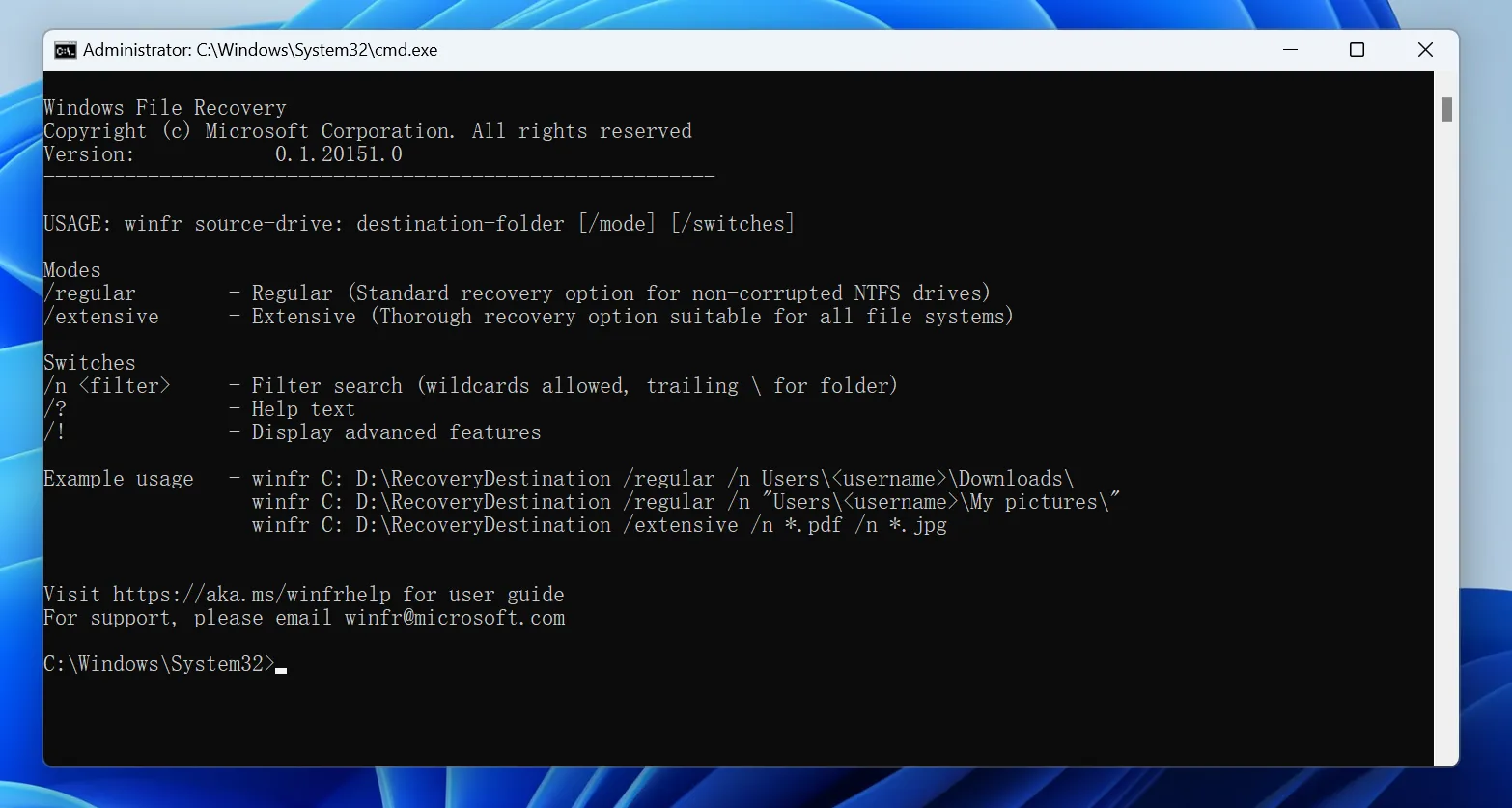
Installez l'application depuis le Microsoft Store sur un disque sécurisé, si possible. Ouvrez ensuite Terminal ou l'Invite de commandes en tant qu'administrateur. Pour récupérer des fichiers supprimés depuis longtemps sur un disque NTFS, voici un exemple de commande :
- winfr E: F: /extensive /n *.docx /n *.pdf
Dans cet exemple, E: correspond à la source et F: à la destination. L'option /extensive effectue une recherche plus large, tandis que les filtres /n limitent les résultats aux fichiers Word et PDF. Remplacez les lettres de lecteur et les types de fichiers par vos propres valeurs.
Windows File Recovery est gratuit, mais son interface en ligne de commande augmente le risque d'erreurs et rend la consultation des résultats moins pratique. Si vous souhaitez disposer d'aperçus et de filtres plus simples lorsque vous essayez de récupérer des fichiers supprimés il y a deux ans, un outil de récupération graphique peut offrir un processus plus clair.
Méthode n° 5 : Contacter un laboratoire spécialisé dans la récupération de données
Cessez toute tentative de récupération par vos propres moyens et contactez un laboratoire de confiance lorsque :
- le disque dur émet des cliquetis, des grincements, ralentit ou cesse de fonctionner de manière intermittente ;
- l'appareil a subi des dommages causés par l'eau, un incendie, un choc ou un problème électrique ;
- les données perdues ont une grande valeur financière, juridique ou personnelle ;
- le disque utilise du matériel endommagé ou un contrôleur défaillant ;
- Il vous faut une procédure d'expertise judiciaire et une chaîne de conservation des preuves documentée.
Un laboratoire peut réparer ou stabiliser du matériel défectueux et les secteurs lisibles à l'aide d'équipements spécialisés. Cependant, il ne peut pas annuler un effacement définitif ni recréer des blocs SSD déjà effacés par la fonction TRIM. Demandez un diagnostic, un devis écrit, les conditions relatives à la confidentialité et une politique tarifaire claire avant de valider l'intervention.
Quelle méthode devriez-vous essayer en premier ?
Votre situation | Ordre recommandé |
Le fichier a été synchronisé ou partagé | Cloud/historique des versions → e-mails et messages → anciens appareils |
Le fichier se trouvait sur un disque dur débranché | Sauvegardes → Analyse Magic Data Recovery → Récupération de fichiers Windows |
Le fichier se trouvait sur un disque dur Windows en service | Arrêter l'utilisation → sauvegardes → analyse depuis un autre PC |
Le fichier se trouvait sur un SSD en service | Sauvegardes et copies → analyse prudente → en laboratoire uniquement si le matériel est défectueux |
Le disque dur présente une défaillance matérielle | Mise hors tension → laboratoire professionnel |
Cette configuration protège le périphérique d'origine et donne la priorité aux copies intactes. Elle permet également d'éviter de perdre du temps avec la Corbeille lorsque la durée de conservation prévue par Windows ou le service cloud a depuis longtemps expiré.
Les erreurs courantes qui réduisent les chances de guérison
Souvent, les utilisateurs aggravent la situation après s'être aperçus de la perte. Évitez ces erreurs :
- Continuer à utiliser l'ordinateur. Les processus en arrière-plan enregistrent des données même lorsque vous n'enregistrez pas délibérément de fichiers.
- Installation de l'outil sur le volume concerné. Le programme d'installation risque d'écraser précisément les secteurs dont vous avez besoin.
- Retour aux sources. Les fichiers restaurés peuvent écraser d'autres éléments supprimés au cours de la même session.
- Lancer d'abord CHKDSK. Les réparations du système de fichiers modifient les métadonnées et ne sont pas destinées à récupérer les fichiers supprimés par l'utilisateur.
- Effectuer plusieurs fois une analyse d'un disque présentant des problèmes physiques. Chaque cycle de mise sous tension et hors tension peut aggraver les dommages mécaniques.
- Se fier à un nom de fichier sans le prévisualiser. Les anciennes métadonnées peuvent subsister même après la perte d'une partie ou de la totalité du contenu d'un fichier.
- On s'attend à une garantie. Toute affirmation selon laquelle la récupération des données serait garantie au bout de deux ans ne tient pas compte des opérations d’écrasement, de la fonction TRIM, du chiffrement et de l’état du périphérique.
Comment éviter que le même problème ne se reproduise la prochaine fois
Une fois la restauration effectuée, mettez en place une routine de sauvegarde basée sur le Principe 3-2-1: conservez trois copies de vos données importantes, stockez-les sur deux types de supports différents et conservez-en une hors site. Activez l'historique des fichiers ou un autre système de sauvegarde avec gestion des versions, mais vérifiez les paramètres de conservation afin que les anciennes versions ne disparaissent pas de manière inattendue.
Pour les dossiers dans le cloud, découvrez comment fonctionne la synchronisation des suppressions. La suppression d'un fichier d'un dossier synchronisé peut entraîner sa suppression du cloud et des autres appareils connectés. Enfin, effectuez quelques tests de restauration tous les quelques mois. Une sauvegarde qui n'a jamais fait l'objet d'un test de restauration reste une simple hypothèse, et non une protection.
Conclusion
Vous pouvez être en mesure de récupérer des fichiers supprimés il y a deux ans, surtout lorsqu'une sauvegarde a été conservée ou que le disque dur, la clé USB ou la carte mémoire d'origine n'a pratiquement pas été utilisé après la suppression. Commencez par effectuer des recherches dans vos comptes cloud, vos anciens appareils, vos e-mails et l'historique des fichiers. Si aucune copie n'existe, cessez toute écriture sur la source et effectuez une analyse minutieuse.
Magic Data Recovery constitue un choix pratique pour les utilisateurs de Windows qui ont besoin d’analyser des supports de stockage contenant des fichiers supprimés, formatés, inaccessibles ou dont le système de fichiers est endommagé, sans avoir à utiliser de commandes complexes. Son processus de filtrage et de prévisualisation vous aide à déterminer ce qui reste récupérable avant d’enregistrer les fichiers ailleurs. Pour plus d’informations sur le fonctionnement de la récupération de fichiers supprimés, consultez le site de Amagicsoft récupération de fichiers effacés. La leçon principale reste simple : le temps écoulé importe moins que l'activité ultérieure du disque dur, mais le moment le plus sûr pour agir, c'est maintenant.
Prise en charge de Windows 7/8/10/11 et Windows Server
Foire aux questions sur la récupération de fichiers supprimés il y a plusieurs années
Est-il vraiment possible de récupérer des fichiers supprimés il y a deux ans ?
Oui, mais uniquement s'il existe encore une sauvegarde intacte ou si les données du disque sont encore récupérables. Un disque dur débranché peut conserver des données supprimées pendant des années, tandis qu'un SSD utilisé activement peut les effacer bien plus rapidement grâce aux fonctions TRIM et de collecte des données inutiles.
La corbeille conserve-t-elle les fichiers supprimés pendant deux ans ?
Windows n'impose pas de délai de conservation fixe de deux ans. Le contenu de la Corbeille dépend de l'espace alloué, des actions de l'utilisateur et des paramètres de nettoyage. Si la Corbeille a été vidée ou si les éléments les plus anciens ont été supprimés, vérifiez les sauvegardes et analysez le disque d'origine.
Puis-je récupérer d'anciens fichiers supprimés sur un SSD ?
Vous pouvez toujours essayer, mais les chances de récupération sur un SSD sont souvent faibles une fois que la fonction TRIM a effacé des blocs. Cessez d'utiliser le SSD, vérifiez d'abord vos sauvegardes et lancez l'analyse depuis un autre système. Les logiciels ne peuvent pas restaurer les blocs que la fonction TRIM a déjà effacés.
Est-il possible de récupérer des fichiers écrasés après deux ans ?
Aucun programme de récupération ne permet de restaurer le contenu d'origine une fois que de nouvelles données ont bel et bien écrasé les mêmes blocs de stockage physiques. Vous pouvez toutefois retrouver une autre version dans une sauvegarde, l'historique du cloud, une pièce jointe à un e-mail, une copie temporaire ou sur l'appareil d'un collaborateur.
Le logiciel Windows File Recovery permet-il de récupérer des fichiers supprimés il y a plusieurs années ?
Windows File Recovery intègre un mode « Extensive » destiné aux cas les plus complexes, notamment les suppressions anciennes. La réussite de l'opération dépend toutefois de la présence de données intactes. Utilisez des disques distincts pour la source et la destination, et respectez scrupuleusement la syntaxe des commandes de Microsoft afin d'éviter toute écriture inutile.
Dois-je lancer CHKDSK avant d'utiliser un logiciel de récupération de données ?
Non. CHKDSK répare les structures du système de fichiers ; il ne s'agit pas d'un outil de récupération de fichiers supprimés. Dans certains cas, les modifications qu'il apporte peuvent compliquer la récupération. Commencez par récupérer ou sauvegarder vos données importantes, puis réparez le système de fichiers une fois que vos fichiers sont en sécurité.
Où dois-je enregistrer les fichiers récupérés ?
Enregistrez toujours les fichiers récupérés sur un disque physique différent. Les réécrire sur le disque d'origine risque d'écraser d'autres données supprimées que l'analyse n'a pas encore restaurées. Vérifiez les copies récupérées avant de les déplacer ou de les renommer.
Quand dois-je faire appel à un service de dépannage professionnel ?
Choisissez un laboratoire lorsque le disque dur émet des cliquetis, ne se connecte plus, a subi des dommages physiques ou contient des données irremplaçables et de grande valeur. Cessez de le mettre sous tension. Un laboratoire peut réparer les pannes matérielles, mais il ne peut pas annuler un écrasement de données ni une suppression via la fonction TRIM d’un SSD.

Jason est un spécialiste de la récupération de données et de l'assistance technique, fort de plus de 15 ans d'expérience sur le terrain. Il a beaucoup travaillé auprès des utilisateurs finaux, résolvant des cas complexes de perte de données et proposant des solutions de récupération concrètes en cas de suppression accidentelle, de disques formatés, de systèmes de fichiers endommagés, de partitions perdues, de pannes système et d’autres situations d’urgence nécessitant une récupération. Son expertise couvre également la sauvegarde et la restauration, la réparation de fichiers et la reprise après sinistre, en mettant particulièrement l’accent sur des conseils sûrs, fiables et techniquement rigoureux.