
Orphaned Files: How Lost Cluster Chains Work in NTFS and FAT
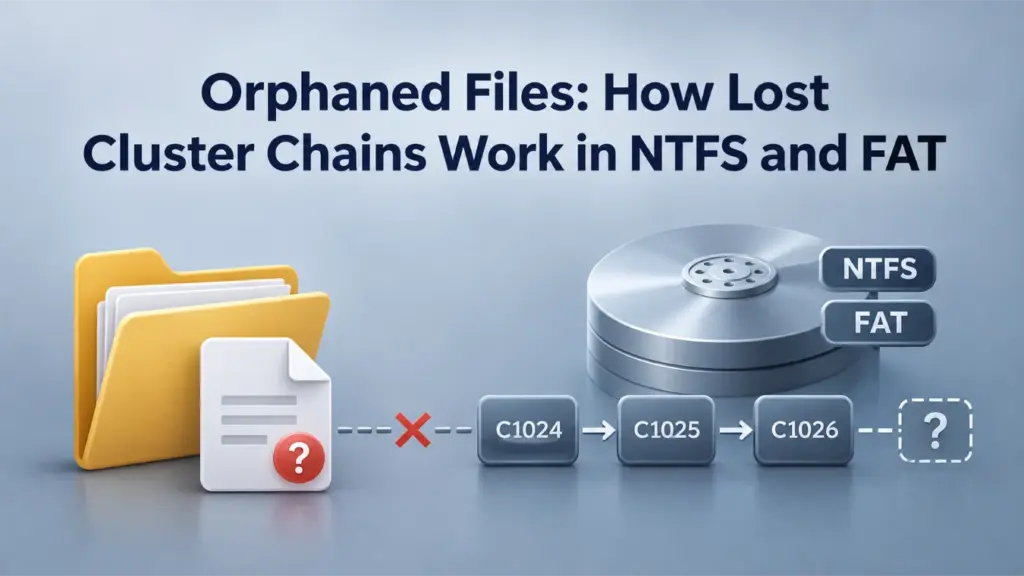
Orphaned files are file records or allocated data that a file system can no longer connect to a valid directory path. In NTFS, the problem may involve an MFT record and its parent directory. In FAT32, lost cluster chains consist of allocated clusters without a valid directory reference. Although the symptoms can look similar, the underlying structures differ. This guide explains those differences and what CHKDSK can—and cannot—repair.
Indice dei contenuti
What Are Orphaned Files?
A file system connects a name and directory path to metadata that identifies the file’s contents. For example, a directory entry may point to a starting cluster, or a directory index may reference an NTFS file record. Orphaned files occur when those relationships fail while some record or allocation remains.
Consequently, a file may disappear from File Explorer even though the disk still contains information about it. However, a missing file is not automatically an orphan. Deletion, access permissions, and other directory errors can produce the same symptom.
The term also appears in cloud storage and application databases. Here, orphaned files means on-disk file-system objects, not cloud files without an owner.
Why Orphaned Files Occur
File-system operations may need to update several metadata structures. If an update fails partway through, those structures may no longer agree. Several conditions can contribute:
- Interrupted updates: Power loss or unsafe device removal can interrupt directory and allocation changes.
- Directory damage: A damaged entry or directory index may no longer identify an otherwise recognizable file.
- Allocation inconsistencies: The volume may still mark clusters as occupied without a valid record that claims them.
- Errori di archiviazione: Failed reads or writes can leave related metadata inconsistent.
However, these events do not always produce orphaned files. The outcome depends on which records changed and whether the file system can restore a consistent state. Furthermore, a normal completed deletion is different: the file system ordinarily releases the relevant allocation or marks records for reuse.
How Orphaned Files Work in NTFS
NTFS stores file and directory information in the Master File Table (MFT). Each file has at least one file record segment, and its attributes describe names, storage, and other properties. For a foundation, see the Tabella file master NTFS.
NTFS Records and Parent-Directory Links
Several structures help Windows locate a named file:
Struttura | Funzione | Relevance to orphaning |
| Stores NTFS file record segments | A recognizable record may remain after a directory relationship fails |
| Stores a name and parent-directory reference | Connects that name to a directory |
| Contains directory index information | Helps locate entries within a directory |
| Stores additional index data where needed | Index damage can interfere with lookup |
| Describes file contents | Content storage is separate from the directory relationship |
Microsoft’s FILE_NAME structure includes a ParentDirectory reference. Moreover, an NTFS file reference includes a sequence number. That number helps distinguish a current record from an older reference to a record that the file system has reused.
When Orphaned Files Keep Their MFT Records
Consider a simplified teaching example: directory record 17 contains an index entry for file record 42. In a consistent state, that directory entry and the file’s filename attribute identify the same relationship. Meanwhile, the file’s $DATA attribute describes its contents.
Now suppose the directory entry becomes unreadable or the parent relationship cannot be resolved. File record 42 may still contain a recognizable filename and data attributes. As a result, a forensic tool might identify the record without reconstructing its original path.
Some tools place such records under a virtual [orphan] folder. However, that display does not prove Windows created an actual [orphan] directory on disk. It also does not prove the file’s contents are intact.
There is another important exception: NTFS supports multiple hard links and filename attributes. Therefore, losing one valid name does not necessarily make the entire file unreachable. To classify orphaned files, an examiner must consider available directory indexes, file references, and any other surviving names.
How Lost Cluster Chains Form in FAT32
FAT32 identifies a file’s starting cluster in a directory entry. It then follows entries in the File Allocation Table (FAT) to locate subsequent clusters. In contrast to NTFS, this connection is central to locating a FAT32 file’s contents. For background, see Tabella di allocazione dei file e FAT Directory Entry.
Compare the same file-system structures before and after a directory reference is lost.
$ NOME_FILEParent: #17$DATAData attribute recorded$ NOME_FILEParent: #17$DATAData attribute recorded$ NOME_FILE parent reference and a $DATA attribute. This is a simplified single-link example; other hard links can preserve access.Illustrative metadata states, not a disk scan or recovery result. The diagram shows retained records or allocations—not proof that the original file bytes are complete or readable.
Directory Entries and FAT Chains
Imagine PHOTO.JPG starts at cluster 5 and occupies three clusters. The following values are an illustrative example, not data extracted from an actual disk.
Metadati | Example value | Interpretazione |
Voce dell'elenco | Avvio del cluster | The file begins at cluster 5 |
|
| Continue at cluster 9 |
|
| Continue at cluster 12 |
| End-of-chain (EOC) | The chain ends here |
The logical chain is 5 → 9 → 12 → EOC. When the directory entry remains valid, the file system knows where to begin reading. However, if that reference disappears while the three clusters remain allocated, the chain has no recognized owner.
This is a lost cluster chain. Unlike a correctly completed deletion, it leaves allocation metadata behind. Therefore, orphaned files in FAT32 commonly concern allocated chains whose original directory records are missing or invalid.
A Lost Cluster Chain Is Not a File Count
Assume each cluster holds 4,096 bytes. The three allocated clusters occupy 3 × 4,096 = 12,288 bytes, or 12 KiB. This calculation describes allocated capacity, not the original logical file size.
For example, a 10,000-byte file could use the same three clusters. Its final cluster would include unused slack space. If the directory entry disappears, the file size recorded there may disappear as well.
Likewise, three lost chains do not necessarily mean three complete files. A chain may contain file data, directory data, or a fragment that needs additional metadata to identify. See dimensione dell'unità di allocazione for the relationship between cluster size and allocated capacity.
Orphaned Allocations vs. Other Chain Errors
Condizione | Structural problem | What it does not prove |
Lost chain | Allocated FAT chain lacks a valid directory reference | That a complete original file survives |
Broken chain | The expected sequence contains a missing or invalid link | That the directory entry is missing |
Cross-linked chains | Multiple claims overlap in cluster allocation | That the shared content is recoverable |
Freed clusters | The allocation metadata marks clusters available | That the previous bytes remain unchanged |
These categories can overlap. For example, a lost chain may also contain unreadable clusters. Consequently, orphaned files should not be treated as a guarantee of recoverable data.
Orphaned Files in NTFS, FAT32, and exFAT
The idea of a missing reference applies across file systems. Nevertheless, their allocation structures differ substantially.
Sistema di file | Main metadata | Typical orphaning relationship | Special consideration |
NTFS | MFT records and directory indexes | Recognizable file record without a resolvable directory relationship | Multiple names and resident data are possible |
FAT32 | Directory entries and FAT chains | Allocated chain without a valid directory entry | A lost chain does not preserve its original file size |
exFAT | Directory entry sets, Allocation Bitmap, and optional FAT chains | Allocated space cannot be associated with valid file metadata | Some allocations do not use FAT entries as a chain |
Why exFAT Orphaned Allocations Need a Different Check
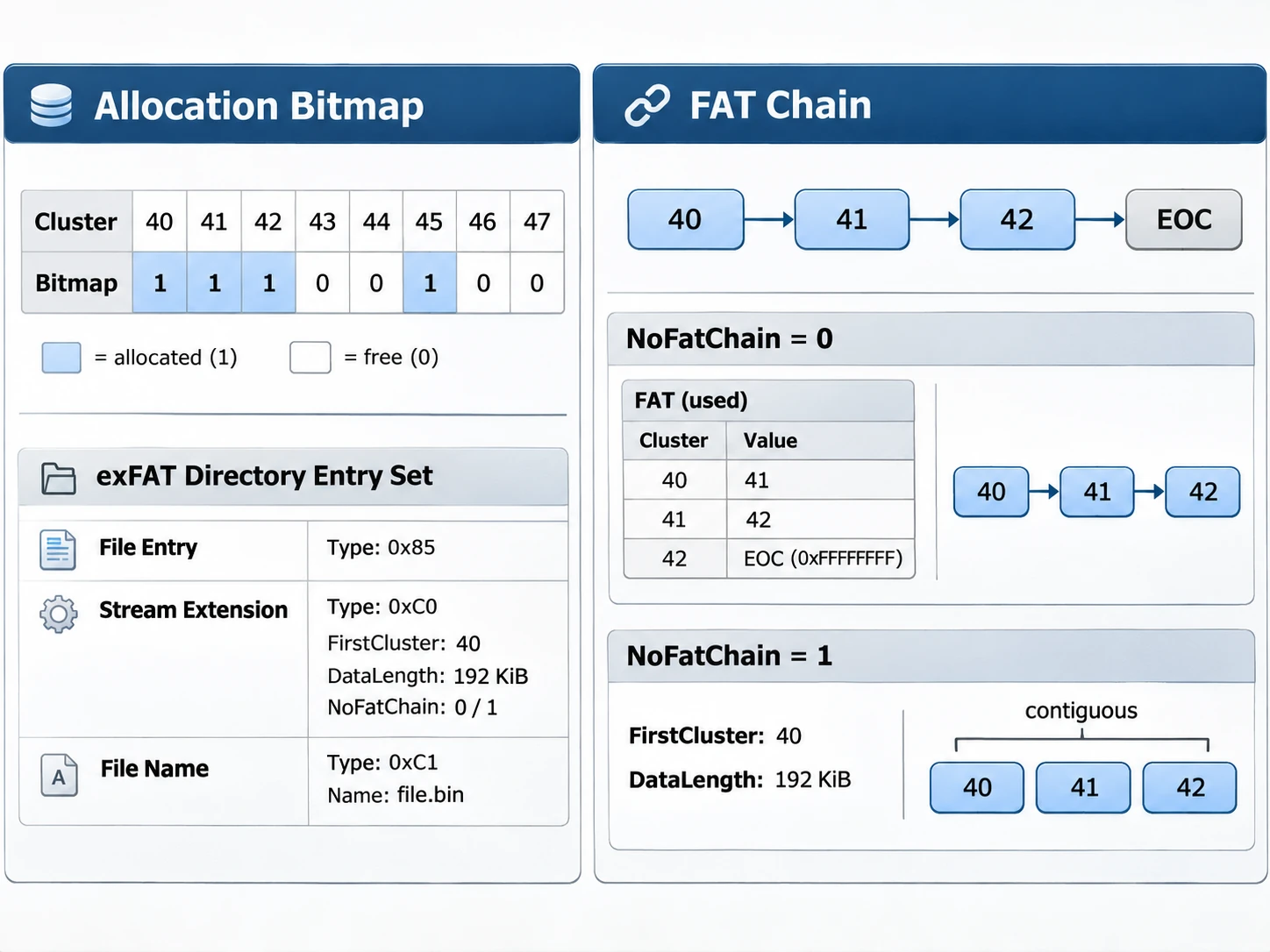
Microsoft’s Specifiche del file system exFAT identifies the Allocation Bitmap as the source of cluster allocation status. The Stream Extension entry also contains NoFatChain, which changes how the file system locates an allocation.
Quando NoFatChain = 0, FAT entries describe the chain. When NoFatChain = 1, the allocation is contiguous, and its corresponding FAT entries are not valid for tracing it. Instead, the starting cluster and data length describe the extent.
Therefore, a method that searches only for lost FAT chains can miss relevant exFAT allocations. A sound analysis must consider the bitmap, directory entry set, and allocation mode together. This distinction matters when evaluating orphaned files on SD cards and USB drives formatted as exFAT.
How CHKDSK Handles Lost Clusters
CHKDSK checks file-system consistency. However, its repair goal is not necessarily to reconstruct each file’s original name and contents. Microsoft’s CHKDSK command documentation describes both lost-allocation reports and FAT-chain repair options.
How CHKDSK Reports Lost Allocation Units
Microsoft shows this sample message: 10 lost allocation units found in 3 chains. Here, ten allocation units belong to three chains. It does non identify ten recovered files.
In addition, a count of lost clusters cannot tell you whether the underlying content is complete. The original file size and directory path may be unavailable. Thus, the chkdsk lost clusters message reports an allocation inconsistency, not a recovery success rate.
Can CHK Files Restore Orphaned Files?
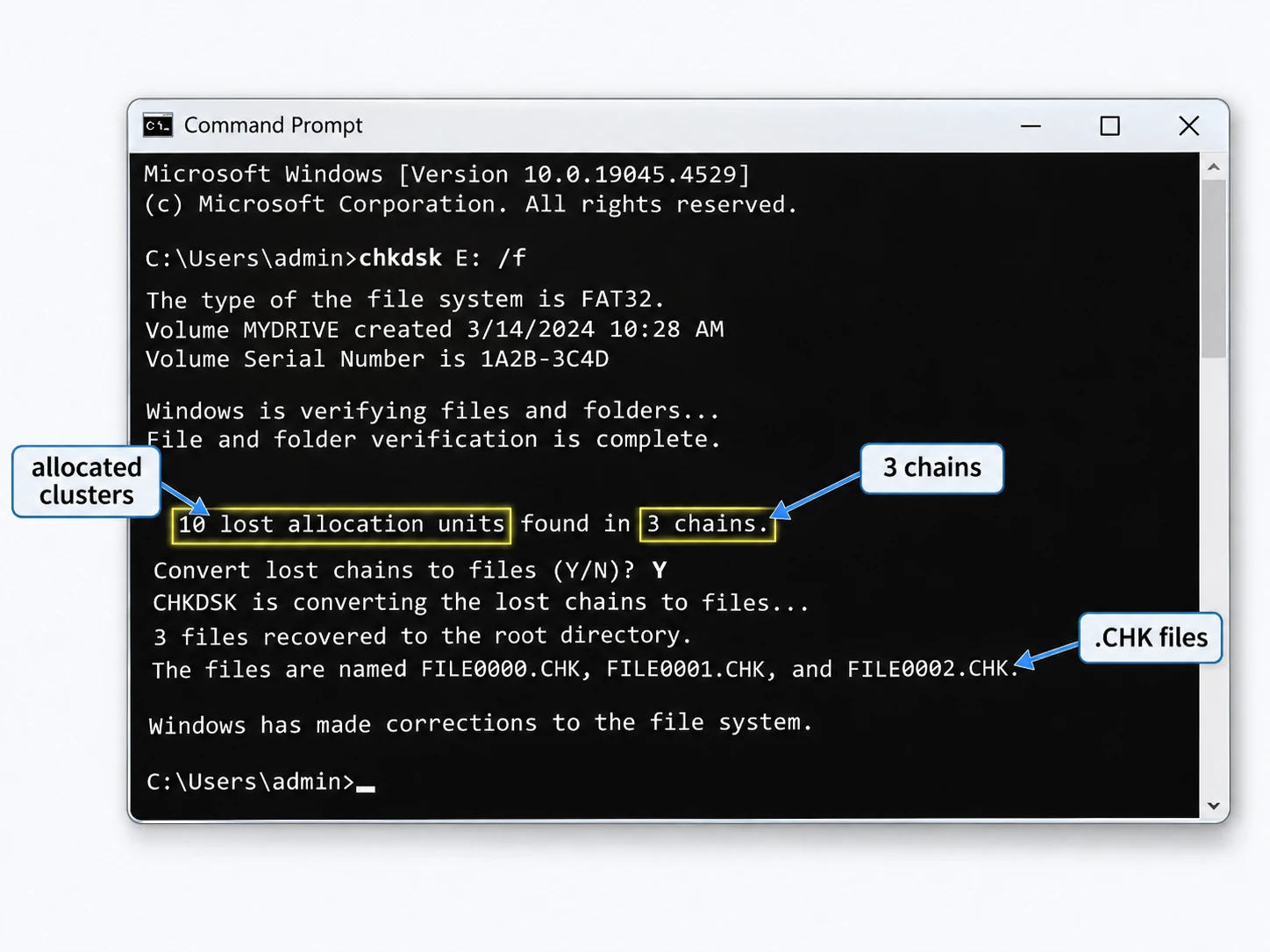
For certain FAT repair scenarios, CHKDSK can offer to convert lost chains into files. If the user chooses that option, Windows may save chain contents in the volume’s root directory with names such as File0000.chk.
Tuttavia, .CHK files do not necessarily preserve the original name, path, file boundaries, or valid file contents. A saved chain could contain a fragment, directory information, or other data that needs separate interpretation. Consequently, orphaned files saved as .CHK entries should not automatically be described as restored originals.
What Does /freeorphanedchains Do?
The option chkdsk E: /freeorphanedchains applies to FAT, FAT32, and exFAT volumes; replace E: with the correct drive letter. Instead of preserving orphaned chains, it releases their allocation.
Although that action may resolve a consistency error, it can destroy allocation evidence useful for finding the original data. Therefore, do not use this option as a recovery procedure when important files are missing. The option does not apply to NTFS.
Why CHKDSK Repair Is Not File Recovery
Comando | Scopo principale | Limitazione importante |
| Report file-system status without requesting | An active volume may produce misleading reports if it cannot be locked |
| Repair logical file-system errors | Changes metadata and may affect evidence needed for recovery |
| Check for bad sectors and attempt to recover readable information | Adds disk-intensive checks; it is not an original-filename recovery tool |
| Free orphaned allocation chains on FAT/FAT32/exFAT | Does not preserve those chain allocations |
In short, CHKDSK can restore file-system consistency while leaving files missing or incomplete. This distinction is especially important when a user sees a successful repair message after losing valuable data.
How to Identify Orphaned Files Safely
Several symptoms may suggest orphaned files, but none is definitive on its own. For instance, a directory may appear empty while the volume still reports used space. Likewise, a forensic tool might list records without a normal path.
However, hidden files, permission issues, the Recycle Bin, and other file-system damage can create similar symptoms. As a result, the most useful evidence comes from the affected metadata and specific consistency-check messages.
Check the File System Before Interpreting Results
For a stable, accessible Windows volume, start with non-repair queries:
- Open PowerShell and run
Get-Volume -DriveLetter E | Select-Object DriveLetter, FileSystem, AllocationUnitSize. SostituisciEwith the correct letter. - Check whether the output identifies NTFS, FAT32, or exFAT. The result does not diagnose orphaning, but it determines which structures matter.
- On a stable volume, run
chkdsk E:in Command Prompt without/fto request a status check rather than repair. - Read the full messages before drawing conclusions. For example, a FAT lost-chain report points to an allocation inconsistency, not necessarily a missing original filename.
Note that Microsoft warns about spurious reports when CHKDSK checks an active volume without locking it. Furthermore, if the drive disconnects repeatedly, makes unusual noises, or shows read failures, stop routine scanning. Repeated reads may further stress failing hardware.
Why Orphaned Files May Need Preservation Before Repair
When valuable data goes missing, protect the source volume before changing its metadata. The immediate goal is to preserve whatever file records, directory entries, and cluster links remain.
A cautious order of operations is:
- Stop saving new files to the affected volume.
- Copy still-accessible important files to another device.
- If conditions permit, make a sector-level image on healthy destination storage.
- Examine the preserved copy before attempting write-enabled repair.
- For a physically unstable drive, seek specialist assessment instead of repeatedly scanning it.
Because repairs can overwrite or release metadata, they may make later reconstruction harder. Also, no surviving directory reference guarantees that every content byte remains readable. In particular, SSD TRIM may reduce recovery options after the file system frees clusters and the device processes TRIM.
Ultimately, orphaned files are a metadata relationship problem, but recovery still depends on the surviving allocation information and data bytes.
Conclusione
Orphaned files arise when directory references and remaining file-system records or allocations no longer agree. NTFS may retain recognizable MFT records, while FAT32 can retain lost cluster chains without valid directory entries. exFAT requires additional attention to its Allocation Bitmap and NoFatChain mode.
Therefore, treat a CHKDSK consistency repair and original-file recovery as separate outcomes. Identify the affected file system, protect valuable data, and interpret surviving metadata before making changes.
FAQ
Do orphaned files retain their original names?
$ NOME_FILE attribute even if its normal directory path is unavailable. However, FAT32 stores a name in its directory entry. If that entry disappears, the original name may also be lost.Can orphaned files contain resident NTFS data?
$DATA. Therefore, a recognizable record may retain content even when its directory relationship fails. This does not prove that the record or content is intact.Does every lost cluster chain represent a complete file?
Can CHKDSK recover original filenames from lost clusters?
.CHK filenames. However, those generated names do not recreate the original file's identity or directory path. Additional surviving metadata may be necessary.Can exFAT orphaned files exist without useful FAT-chain entries?
NoFatChain = 1, exFAT uses a contiguous allocation. Its corresponding FAT entries are not valid for tracing that allocation. Consequently, the Allocation Bitmap and directory metadata are essential to the analysis.Does an SSD handle orphaned files differently from an HDD?
Should I run CHKDSK /r to recover orphaned files?
/r option checks for bad sectors and attempts to recover readable information. However, it does not rebuild original directory paths. Moreover, its intensive reads can stress a failing drive.
Vasilii è uno specialista del recupero dati con circa 10 anni di esperienza pratica nel settore. Nel corso della sua carriera, ha risolto con successo migliaia di casi complessi riguardanti file cancellati, unità formattate, partizioni perse e file system RAW. La sua esperienza copre sia i metodi di recupero manuale utilizzando strumenti professionali come gli editor esadecimali, sia le soluzioni automatiche avanzate con i software di recupero. La missione di Vasilii è quella di rendere accessibile la conoscenza del recupero dati affidabile sia ai professionisti IT che agli utenti di tutti i giorni, aiutandoli a salvaguardare i loro preziosi beni digitali.