
Come ottenere il codice prodotto di Windows 10 (CDKeys incluso)
Conoscere come ottenere il codice prodotto di Windows 10 è ancora oggi essenziale per molti utenti. Sia che si intenda reinstallare Windows, aggiornare l'hardware, sostituire un disco rigido guasto o risolvere problemi di attivazione, disporre del codice prodotto corretto può far risparmiare ore di frustrazione.
In situazioni reali, molti utenti scoprono che il metodo tradizionale del Prompt dei comandi non sempre funziona. A volte, la chiave appare incompleta. In altri casi, non viene visualizzata alcuna chiave. Questo spesso genera confusione, soprattutto quando Windows sostiene che la chiave è già attivata.
Questa guida spiega come ottenere il codice prodotto di Windows 10 passo dopo passo. Imparerete metodi pratici, capirete perché alcuni approcci falliscono e scoprirete un metodo affidabile recupero della chiave persa soluzione quando gli strumenti standard non sono all'altezza.
Indice dei contenuti
Risposta rapida: Come ottenere il codice prodotto di Windows 10
Il modo migliore per ottenere il codice prodotto di Windows 10 I dettagli dipendono da come hai ottenuto Windows. Verifica Impostazioni > Aggiornamenti e sicurezza > Attivazione Innanzitutto, CMD o PowerShell potrebbero rilevare una chiave OEM dal BIOS o dall'UEFI, mentre gli utenti che hanno acquistato il prodotto al dettaglio dovrebbero controllare le e-mail, la confezione e la cronologia degli ordini.
Quando i metodi integrati non funzionano, un Strumento per la ricerca del codice prodotto di Windows può eseguire la scansione delle posizioni supportate e organizzare i risultati.
Cos'è il codice prodotto di Windows 10?
Il codice prodotto di Windows 10 è un codice di 25 caratteri utilizzato per attivare Windows. Verifica che la copia di Windows in uso sia autentica e con licenza corretta.
Esistono diversi tipi di licenze per Windows 10:
- Licenza di vendita al dettaglio: Acquistato direttamente da Microsoft o da venditori autorizzati
- Licenza OEM: Preinstallato su computer portatili o desktop
- Licenza digitale: Collegato all'account Microsoft invece che a una chiave visibile
La comprensione di queste differenze aiuta a spiegare perché alcuni utenti fanno fatica a trovare il codice prodotto di Windows 10 utilizzando metodi comuni.
Codice prodotto di Windows 10 e licenza digitale
Prima di provare a ottenere il codice prodotto di Windows 10 dati, identificare il metodo di attivazione.
A Codice prodotto di Windows 10 è un codice di 25 caratteri:
XXXXX-XXXXX-XXXXX-XXXXX-XXXXX
A licenza digitale attiva Windows senza richiedere un codice di 25 caratteri visibile. Microsoft conferma che Windows 10 può utilizzare sia un codice prodotto che una licenza digitale, a seconda di come l'utente abbia ottenuto il sistema.
Tra i tipi più comuni figurano Licenze OEM memorizzato nel firmware, licenze per la vendita al dettaglio fornito tramite una registrazione di acquisto, licenze digitali relativo all'hardware, e licenze a volume gestito da un'organizzazione.
Questa differenza spiega perché un PC attivato potrebbe non visualizzare una chiave leggibile.
I modi migliori per ottenere il codice prodotto di Windows 10
Metodo | Il migliore per | Vantaggio | Limitazione |
Impostazioni di attivazione | Verifica del tipo di licenza | Veloce e integrato | Non mostra la chiave per intero |
Documentazione relativa agli acquisti | Licenze per la vendita al dettaglio | Potrebbe fornire la chiave originale | È necessario disporre di una ricevuta o dell'accesso all'account |
CMD | Computer OEM | Comando rapido | Potrebbe risultare vuoto |
PowerShell | Ricerca chiavi OEM | Alternativa moderna al WMIC | Non è possibile rivelare tutti i tipi di licenza |
Registro di sistema | Dati relativi alle chiavi memorizzate | Nessun software aggiuntivo | Potrebbe visualizzare una chiave generica |
Magic Recovery Key | I metodi manuali non funzionano | Ordina le chiavi supportate | Non è possibile sostituire una licenza valida |
Inizia con la modalità gratuita corrispondente al tuo tipo di licenza.
Metodo 1: Verificare il tipo di attivazione di Windows
Il primo passo per ottenere il codice prodotto di Windows 10 L'informazione serve a verificare come è stato attivato Windows.
- Selezionare Inizio.
- Aperto Impostazioni.
- Scegliere Aggiornamento e sicurezza.
- Selezionare Attivazione.
- Leggi il messaggio di attivazione.
Potrebbe comparire uno dei seguenti messaggi.
Windows è attivato con una licenza digitale
Windows utilizza una licenza digitale anziché richiedere un codice prodotto visibile. Se la licenza è associata al tuo account Microsoft, la riattivazione potrebbe risultare più semplice dopo una modifica significativa dell'hardware. Prima di sostituire la scheda madre, verifica che la licenza sia associata a Impostazioni > Aggiornamenti e sicurezza > Attivazione.
Quando si reinstalla la stessa edizione di Windows sullo stesso dispositivo, Windows potrebbe riattivarsi automaticamente dopo che il computer si è connesso a Internet.
Windows utilizza il servizio di attivazione della tua organizzazione
Un'azienda o un istituto scolastico gestisce la licenza di Windows tramite un sistema di attivazione aziendale. Rivolgiti all'amministratore IT invece di cercare di estrarre o riutilizzare la chiave di attivazione dell'organizzazione.
Metodo 2: Controllare le e-mail, l'imballaggio e i registri degli acquisti
Per una copia acquistata in negozio, il modo più sicuro per ottenere il codice prodotto di Windows 10 Per i dettagli, occorre verificare:
- E-mail di conferma da parte di Microsoft o del rivenditore
- La cronologia degli ordini del rivenditore o l’archivio digitale
- Una tessera, un'etichetta o un certificato di autenticità
- Documenti forniti insieme a un PC ricondizionato
- Il portale delle licenze di un’organizzazione
Microsoft spiega che la posizione del codice dipende dalle modalità di acquisto di Windows. Nel caso di una copia digitale acquistata al dettaglio, il codice potrebbe essere contenuto in un’e-mail o nell’account del rivenditore, mentre nel caso di una copia in confezione, potrebbe essere incluso nella confezione stessa. Alcuni aggiornamenti acquistati su Microsoft Store forniscono una licenza digitale anziché un codice prodotto.
Suggerimento: Cerca nella tua casella di posta i termini “Windows”, “ordine Microsoft”, “codice prodotto” e il nome del rivenditore.
Metodo 3: Ottenere il codice prodotto di Windows 10 tramite CMD
Il Codice prodotto di Windows 10 CMD Il metodo è veloce e non richiede l'installazione di alcun software.
- Tipo cmd in Ricerca di Windows.
- Cliccare con il tasto destro del mouse Prompt dei comandi.
- Selezionare Eseguire come amministratore.
- Immettere il seguente comando:
percorso wmic softwarelicensingservice get OA3xOriginalProductKey - Stampa Entrare.
Se il produttore ha memorizzato una chiave OEM nel BIOS o nell'UEFI, CMD potrebbe visualizzarla. Salva il risultato in un luogo sicuro, invece di lasciarlo in uno screenshot o in un file di testo non protetto.
Un risultato vuoto non indica sempre la presenza di un problema. Il comando interroga principalmente la chiave originale OA3 presente nel firmware. Potrebbe non restituire alcun risultato quando Windows utilizza una licenza digitale, una licenza al dettaglio o un'attivazione gestita dall'organizzazione.
A partire da Windows 10 versione 21H1, Microsoft ha reso WMIC obsoleto e raccomanda l'uso di PowerShell per le attività WMI. Di conseguenza, alcuni sistemi potrebbero visualizzare un errore del tipo “wmic non è riconosciuto”.”
Metodo 4: Ottenere il codice prodotto di Windows 10 tramite PowerShell
PowerShell offre un modo moderno per Ottenere il codice prodotto di Windows 10 dal BIOS quando WMIC non funziona.
- Cliccare con il tasto destro del mouse Inizio.
- Aperto Windows PowerShell (amministratore).
- Incolla il seguente comando:
(Get-CimInstance -ClassName SoftwareLicensingService).OA3xOriginalProductKey - Stampa Entrare.
Quando il firmware contiene una chiave OEM, PowerShell dovrebbe visualizzare il codice di 25 caratteri.
Se viene visualizzata una riga vuota, ricontrolla la pagina "Attivazione". PowerShell non è in grado di visualizzare un valore OEM univoco quando il computer utilizza esclusivamente una licenza digitale o un altro canale di attivazione.
Pertanto, un risultato vuoto in PowerShell non dimostra che Windows sia privo di licenza.
Metodo 5: Individuare la chiave nel Registro di sistema di Windows
Il Registro di sistema può contenere un valore di chiave di backup e offre un altro modo gratuito per ottenere il codice prodotto di Windows 10 informazioni.
- Stampa Windows + R.
- Tipo
regedit. - Stampa Entrare.
- Vai a:
HKEY_LOCAL_MACHINE\SOFTWARE\Microsoft\Windows NT\CurrentVersion\SoftwareProtectionPlatform - Trova BackupProductKeyDefault.
È inoltre possibile interrogare il valore tramite il Prompt dei comandi: reg query "HKEY_LOCAL_MACHINE\SOFTWARE\Microsoft\Windows NT\CurrentVersion\SoftwareProtectionPlatform" /v BackupProductKeyDefault
Interpretare il risultato con attenzione. Windows potrebbe visualizzare un chiave di installazione generica anziché la licenza univoca associata al dispositivo.
Una chiave generica può identificare o installare un'edizione di Windows, ma di solito non attesta il possesso della licenza né attiva Windows di per sé. Ad esempio, il valore potrebbe identificare Windows 10 Pro senza rappresentare la licenza retail o OEM assegnata a quel PC specifico.
Visualizzare il valore è semplicissimo. Tuttavia, non modificare né eliminare voci del Registro di sistema non pertinenti.
Metodo 6: Utilizzare Magic Recovery Key quando i metodi manuali non funzionano
I metodi manuali risultano meno pratici quando CMD restituisce un risultato vuoto o quando è necessario eseguire il backup di diverse licenze software.
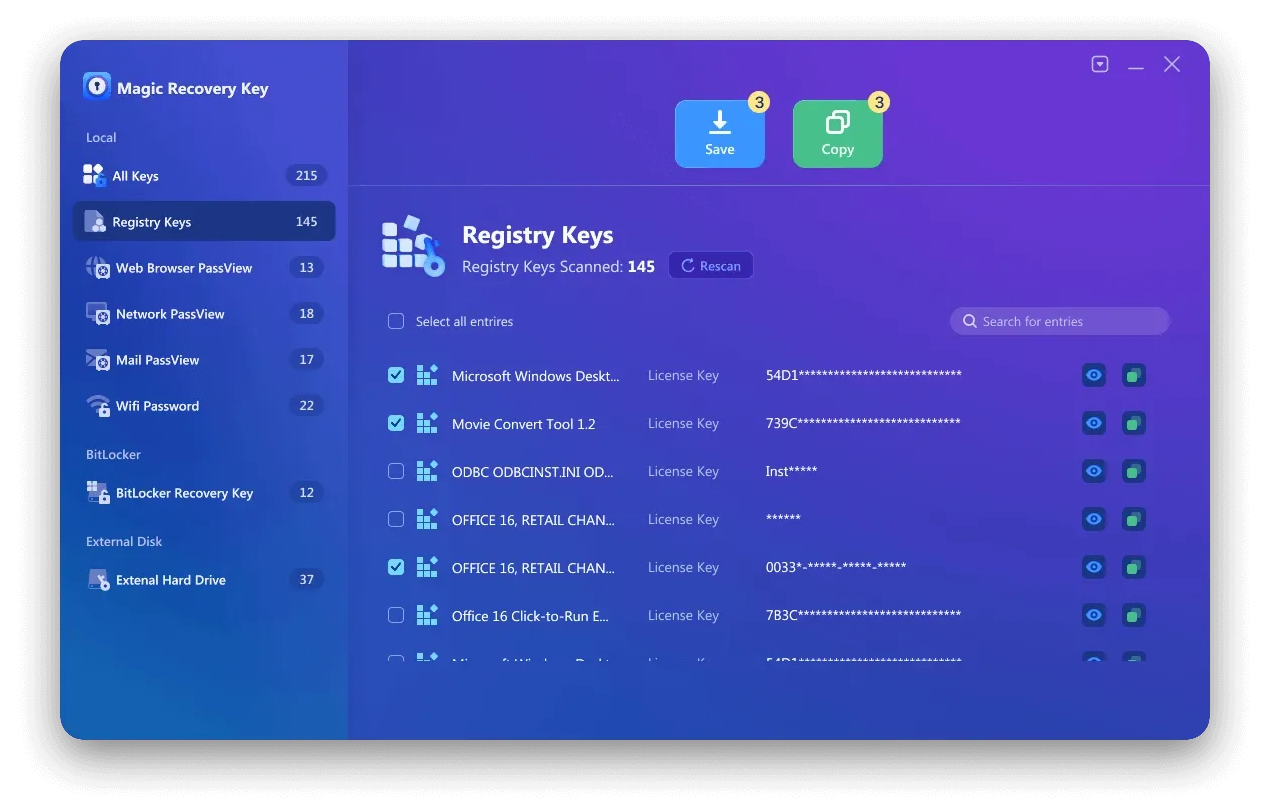
Magic Recovery Key offre un percorso guidato per ottenere il codice prodotto di Windows 10 informazioni provenienti dagli ambienti Windows supportati. La documentazione del prodotto Amagicsoft indica che lo strumento è in grado di recuperare le chiavi di licenza memorizzate per Windows, Microsoft Office e altri programmi supportati. Gli utenti possono inoltre salvare, stampare o esportare i risultati.
Come utilizzare Magic Recovery Key
1. Scaricare e installare Magic Recovery Key.
Supporta Windows 7/8/10/11 e Windows Server
2. Avviare il programma.
3. Aprire la finestra Chiavi di registro sezione “Locale”.

4. Individuate il codice prodotto di Windows nel pannello dei risultati.
5. Copiare o salvare la chiave per un uso successivo.
Perché Magic Recovery Key è più affidabile di altri metodi
Da un punto di vista pratico, Magic Recovery Key offre diversi vantaggi quando si cerca di ottenere il codice prodotto di Windows 10.
Vantaggi principali
- Esegue la scansione di più posizioni del registro di sistema
- Funziona anche quando CMD non funziona
- Supporta Windows 7, 8, 10, 11 e Windows Server
- Recupera le chiavi anche per altri software installati
Scenari di utilizzo nel mondo reale
Molti utenti si sono già affidati a Magic Recovery Key:
- Reinstallazione di Windows dopo un crash del sistema
- Sostituzione della scheda madre o del disco rigido
- Migrazione del software su un nuovo PC
Rispetto ai metodi manuali, riduce l'incertezza e minimizza gli errori di attivazione.
Se siete alla ricerca di una soluzione più efficiente, Magic Recovery Key offre un'opzione affidabile senza inutili complessità.
Contattare l'assistenza Microsoft come ultima risorsa
Se non è possibile trovare il codice prodotto di Windows 10 con qualsiasi metodo, Supporto Microsoft può ancora essere utile.
Prima di contattarli, preparatevi:
- Prova d'acquisto
- Dettagli dell'account Microsoft
- Informazioni sul dispositivo
L'assistenza può verificare le licenze digitali, ma i tempi di risposta variano e il successo dipende dai documenti disponibili.
Conclusione
Il modo più sicuro per ottenere il codice prodotto di Windows 10 La procedura consiste innanzitutto nell'identificare il tipo di attivazione. Successivamente, controllare i registri degli acquisti, utilizzare CMD o PowerShell per ottenere una chiave firmware OEM e, se necessario, esaminare il Registro di sistema.
Questi metodi gratuiti possono risolvere molti casi comuni. Tuttavia, poiché ciascun metodo verifica una fonte limitata, è possibile che restituisca un risultato nullo, generico o incompleto.
Magic Recovery Key diventa utile quando si esegue manualmente metodi di recupero delle chiavi fornire informazioni incomplete o quando è necessario eseguire un unico backup di più chiavi software supportate. Riduce le operazioni manuali, organizza le chiavi rilevate e crea un registro esportabile prima della riparazione o della reinstallazione.
Per gli utenti che hanno bisogno di un modo efficiente per ottenere il codice prodotto di Windows 10 A tal proposito, Magic Recovery Key offre una soluzione pratica che rispetta i limiti delle licenze digitali e le regole di attivazione di Microsoft.
Supporta Windows 7/8/10/11 e Windows Server
Domande frequenti
Come posso ottenere gratuitamente il codice prodotto di Windows 10?
Perché il campo OA3xOriginalProductKey è vuoto?
L'ID prodotto è la stessa cosa del codice prodotto?
È possibile trasferire un codice di attivazione di Windows 10?
Posso utilizzare la chiave dopo aver sostituito un disco rigido?
È sicuro utilizzare un programma per recuperare il codice prodotto?

Erin Smith è riconosciuta come una delle scrittrici più professionali di Amagicsoft. Negli ultimi 10 anni ha continuamente affinato le sue capacità di scrittura e ha aiutato milioni di lettori a risolvere i loro problemi tecnologici.