
什麼是 FAT32 檔案系統
FAT32 File System (File Allocation Table 32) is a disk file system introduced by Microsoft in 1996 as an extension of the original FAT architecture. It uses a 32-bit file allocation table to organize data storage, allowing more efficient space usage than FAT16 while maintaining broad compatibility across operating systems, consumer electronics, and embedded devices.
的 FAT32 File System is still commonly used on USB flash drives, SD cards, cameras, game consoles, bootable media, and other removable storage where compatibility is important. Its biggest limitation is that a single file cannot reach 4 GB in size. Therefore, FAT32 remains useful for cross-device storage, but newer file systems such as exFAT and NTFS are often more suitable for large files and modern computers.
目錄
FAT32 檔案系統如何運作
的 FAT32 File System organizes data using a File Allocation Table, or FAT, that tracks which clusters belong to each file. A cluster is a fixed-size group of disk sectors used as the basic allocation unit for storing data.
FAT32 commonly maintains two copies of the File Allocation Table. The additional copy provides redundancy if one FAT becomes damaged, although it should not be considered a complete backup of the file system.
Each file can occupy one or more clusters. When a file spans several clusters, FAT32 records them as a cluster chain. The system reads entries in the File Allocation Table to determine which cluster comes next until it reaches the end of the file.
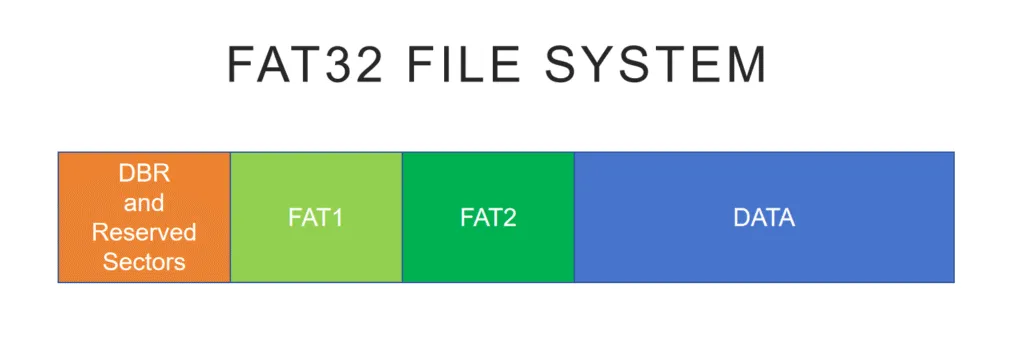
When the operating system reads a file, it uses the directory information to find the file’s starting cluster and then follows the cluster chain recorded in the FAT.
與 FAT16, FAT32 can address significantly more clusters. This allows smaller cluster sizes on larger volumes and can reduce wasted storage space.
FAT32 File System Size and Volume Limits
One of the most important characteristics of the FAT32 File System is its 4 GB individual file-size limit.
Technically, the maximum size of a single FAT32 file is 4 GiB minus 1 byte, or 4,294,967,295 bytes. In everyday usage, this is commonly referred to as the 4 GB FAT32 file size limit.
This limitation comes from the 32-bit unsigned field used to store the file size in a standard FAT directory entry. Therefore, the commonly cited 4 GB FAT32 limit refers to the size of an individual file rather than the total capacity of the storage device.
For example, a 128 GB FAT32 USB drive can contain many gigabytes of data, but you cannot copy one 6 GB video file to it.
Volume size is a separate issue. With commonly used 512-byte sectors, FAT32 volumes are typically associated with capacities up to approximately 2 TB. The practical limit can vary depending on sector size, cluster configuration, the operating system, and the tool used to create the file system.
In short:
- Maximum individual file: About 4 GB
- FAT32 volume: Can be much larger than 4 GB
- Formatting limit: Depends partly on the operating system and formatting utility
This distinction is important when choosing FAT32 for modern storage devices.
為何 FAT32 檔案系統仍被廣泛使用
Although newer file systems such as NTFS 和 exFAT offer support for larger files and more advanced features, the FAT32 File System remains relevant for several practical reasons.
- 通用相容性: FAT32 is supported by Windows, macOS, Linux, cameras, smart TVs, game consoles, media players, and many embedded systems.
- 管理費用低: Its relatively simple structure makes FAT32 suitable for removable storage and hardware with limited resources.
- 開機與韌體支援: Many BIOS, UEFI, recovery, and firmware-update environments support or require FAT32-formatted media.
- Legacy device support: Older devices may recognize FAT32 even when they cannot read exFAT or NTFS.
As a result, FAT32 is still commonly used when compatibility matters more than advanced file-system functionality.
When Should You Use FAT32 File System?
的 FAT32 File System remains a sensible choice when:
- A camera, smart TV, game console, car multimedia system, or other device specifically requires FAT32.
- You are creating compatible boot or firmware-update media.
- A USB drive must work with both newer and older devices.
- You do not need to store individual files larger than 4 GB.
- Cross-platform compatibility is more important than advanced security features.
However, FAT32 is generally less suitable when:
- You regularly work with videos, disk images, archives, or other files larger than 4 GB.
- You are formatting a Windows system or internal drive.
- You need file permissions, encryption, or journaling.
- You use a large external SSD mainly with modern computers.
- Your devices already support exFAT.
In these situations, exFAT or NTFS will usually provide a more practical storage environment.
FAT32 vs NTFS
Both FAT32 and NTFS are Microsoft file systems, but they were designed for different purposes.
特點 | FAT32 | NTFS |
Maximum individual file | About 4 GB | Supports much larger files |
典型用途 | USB drives, SD cards, removable media | Windows internal and system drives |
日記 | 沒有 | 是 |
權限 | 沒有 | 是 |
File-system encryption | 沒有 | 是 |
跨平台支援 | 極佳 | More limited outside Windows |
Legacy-device support | 極佳 | 有限責任 |
FAT32 prioritizes compatibility and simplicity, while NTFS focuses more heavily on reliability, security, permissions, journaling, and support for modern Windows storage.
For an internal Windows HDD or SSD, NTFS is generally more appropriate. However, FAT32 can still be preferable for removable storage that must work with cameras, televisions, game consoles, firmware tools, or older devices.
FAT32 vs exFAT vs NTFS
For modern removable storage, it is also useful to compare FAT32 File System with both exFAT and NTFS.
特點 | FAT32 | exFAT | NTFS |
最適合用於 | Maximum device compatibility | Modern removable storage | Windows internal storage |
Files larger than 4 GB | 沒有 | 是 | 是 |
日記 | 沒有 | 沒有 | 是 |
Windows 讀寫 | 是 | 是 | 是 |
macOS 讀寫 | 是 | 是 | Limited native NTFS write support |
File permissions | 沒有 | 沒有 | 是 |
Typical devices | USB, SD, cameras, firmware media | USB, SDXC, external SSDs | Windows HDDs and SSDs |
選擇 FAT32 File System when maximum compatibility is required or a device specifically requires FAT32.
選擇 exFAT when you need removable storage capable of holding files larger than 4 GB while remaining compatible with modern Windows and macOS computers.
選擇 NTFS primarily for Windows internal drives or storage that benefits from journaling, permissions, encryption, and other Windows-specific features.
常見的 FAT32 檔案系統限制
雖然 FAT32 File System is reliable enough for many removable-storage applications, its relatively simple architecture also creates several limitations.
4 GB Individual File Size Limit
FAT32 cannot store an individual file that reaches 4 GB in size. This can be a major problem for large videos, virtual-machine images, disk images, installation packages, and compressed archives.
No File-Level Security
FAT32 does not support NTFS-style access-control permissions or built-in file-system encryption.
Therefore, it is poorly suited to situations where multiple users require different levels of access to stored files.
No Journaling
FAT32 does not maintain a metadata transaction journal.
As a result, sudden power loss, system crashes, or unsafe drive removal can leave file-system metadata inconsistent and increase the risk of corruption.
碎片化
Files can become fragmented after repeated creation, deletion, and modification. On heavily used storage, this can affect performance, particularly on mechanical disks.
Limited Suitability for Modern System Drives
FAT32 lacks many of the reliability, security, and management features expected from a modern desktop operating system.
These limitations make the FAT32 File System unsuitable for many modern internal-storage workloads. However, they do not eliminate its usefulness for removable media, boot drives, embedded systems, and compatibility-focused storage.
如何將 USB 磁碟機格式化為 FAT32 檔案系統
Formatting creates a new file system on the selected partition. Therefore, back up any important files before starting.
To format a compatible USB drive as FAT32 in Windows:
- 插入 USB 隨身碟。.
- 開啟 磁碟管理.
- Right-click the USB partition and select 格式.
- 選擇 FAT32 作為檔案系統。.
- Select the preferred allocation unit size if necessary.
- 請確認此操作。.
For supported USB drives, FAT32 may also be available through File Explorer.
Does Windows Still Have a 32 GB FAT32 Formatting Limit?
The commonly discussed 32 GB limit is not the actual maximum capacity of the FAT32 File System. Instead, it originated from limitations imposed by Windows formatting tools.
Traditional Windows graphical formatting interfaces may not offer FAT32 for partitions larger than 32 GB. However, newer Windows 11 versions have increased the FAT32 creation limit of the command-line 格式 tool to as much as 2 TB.
Therefore, FAT32 formatting behavior may depend on:
- Windows version and build
- The formatting interface being used
- 儲存容量
- Sector size
- Partition configuration
If FAT32 is unavailable for a large USB drive, first check whether the target device specifically requires FAT32.
For modern removable storage that must hold files larger than 4 GB, exFAT is often a better choice.
資料安全注意事項
如果 FAT32 磁碟區變成 腐化 或 誤格式化, important file-system metadata may be damaged or reset while some original file data remains on the storage device.
This is particularly important from a data-recovery perspective. A deleted or formatted FAT32 file may remain recoverable until its clusters are overwritten by new data.
Therefore, if important files suddenly disappear:
- Stop writing new data to the FAT32 drive.
- Avoid formatting the drive again.
- Do not copy new files onto the affected storage.
- Recover important files before attempting file-system repairs.
A controlled, read-only recovery approach can reduce the risk of overwriting recoverable data.
專業復原工具,例如 Magic Data Recovery can scan FAT32 volumes and identify recoverable files after accidental deletion, formatting, or certain logical file-system problems.
If you need to recover data from a FAT32 drive, follow these steps.
1.Download and Install the Software
Install Magic Data Recovery on a different drive so that the installation does not overwrite potentially recoverable files on the affected FAT32 device.
Do not install the software directly on the drive from which you need to recover data.
支援 Windows 7/8/10/11 和 Windows Server
2.選擇 FAT32 磁碟機並開始掃描
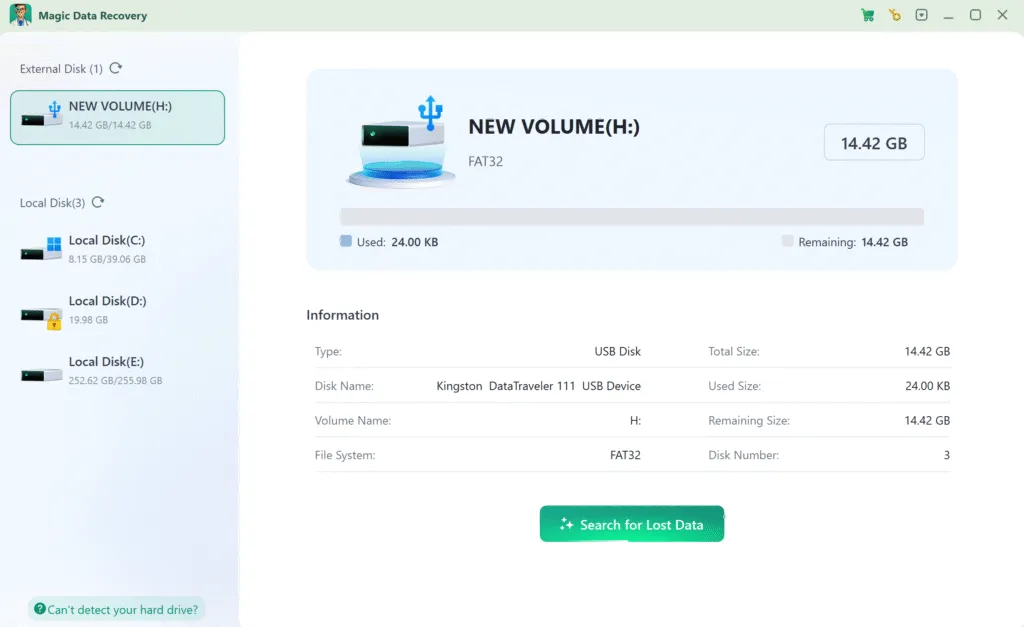
啟動軟體。它會自動偵測所有連接的磁碟機。.
→ 選擇 FAT32 磁碟機 包含丟失的檔案。.
→ 按一下「搜尋“ 開始恢復過程。.
3.等待掃描完成
軟體會執行進階掃描,找出所有可復原的檔案。掃描時間主要取決於硬碟機的容量和效能。.

4.復原前預覽檔案
掃描完成後,所有找到的檔案都會出現在結果清單中。使用「預覽」功能開啟檔案 (例如相片、文件),並驗證它們是否與您遺失的資料相符。.

5.安全復原資料
選擇需要的檔案,然後按一下「復原」按鈕,選擇不同的磁碟機 (例如外接式 USB 或輔助內接式磁碟機)。.
⚠️ 絕對不要將檔案復原至原始 FAT32 磁碟機 - 這樣會有覆寫和永久遺失資料的風險。.

總結
的 FAT32 File System remains a practical and widely supported file system for removable storage, particularly when broad device compatibility matters more than advanced security and file-management features.
Its simple design makes FAT32 suitable for USB flash drives, SD cards, cameras, boot media, firmware-update devices, smart TVs, game consoles, and many embedded systems. However, the 4 GB individual file-size limit, lack of journaling, and absence of modern permissions make it less suitable for large files and modern operating-system drives.
For modern removable storage containing large files, exFAT may be more appropriate. For Windows system and internal drives, NTFS provides more advanced reliability and security features.
If unexpected data loss occurs on a FAT32 volume, avoid writing new data to the affected device. You can use Magic Data Recovery to scan the FAT32 storage for recoverable files before attempting repairs or another format.
支援 Windows 7/8/10/11 和 Windows Server
FAT32 檔案系統常見問題
FAT32 對 USB 有何意義?
FAT32 和 NTFS 孰優孰劣?
所有 32GB SD 卡都是 FAT32 嗎?
FAT32 是否仍在使用?
是否所有 USB 磁碟機都支援 FAT32?
如何將我的 USB 裝入 FAT32?
FAT32 有哪些缺點?
我可以將 FAT32 轉換為 NTFS 嗎?

Vasilii 是一位在該領域擁有約 10 年實務經驗的資料復原專家。在他的職業生涯中,他已成功解決數千個複雜的個案,包括刪除的檔案、格式化的硬碟機、遺失的磁碟分割和 RAW 檔案系統。他的專業知識涵蓋使用十六進位編輯器等專業工具的手動復原方法,以及使用復原軟體的進階自動解決方案。Vasilii 的使命是讓 IT 專業人士和一般使用者都能獲得可靠的資料復原知識,協助他們保護寶貴的數位資產。.