Need a Data Recovery Specialist Near Me? Save Now

Need a Data Recovery Specialist Near Me Save Now

That sudden realization that your critical files are gone can be terrifying. Whether you accidentally 清空回收站, formatted a partition by mistake, or encountered a sudden Windows system crash, your immediate reaction is probably panic. Consequently, you might grab your phone and frantically search for a professional data recovery specialist near me to rescue your business documents, financial records, or irreplaceable family photos. Your first instinct is likely to pack up your computer and drive to the nearest local tech support shop or mail your drive to a massive commercial lab.

However, before you spend hundreds or even thousands of dollars on a physical data recovery specialist, you need to know an industry secret. Over 80% of daily data loss situations are caused by software issues rather than mechanical failures. This means you can often 從硬碟中復原檔案 yourself by deploying a smart utility like Magic Data Recovery. By following a simple diagnostic checklist, you can easily save your time, protect your privacy, and keep your hard-earned money in your pocket.

支援 Windows 7/8/10/11 和 Windows Server

目錄

Do You Actually Need an In-Lab Data Recovery Specialist?

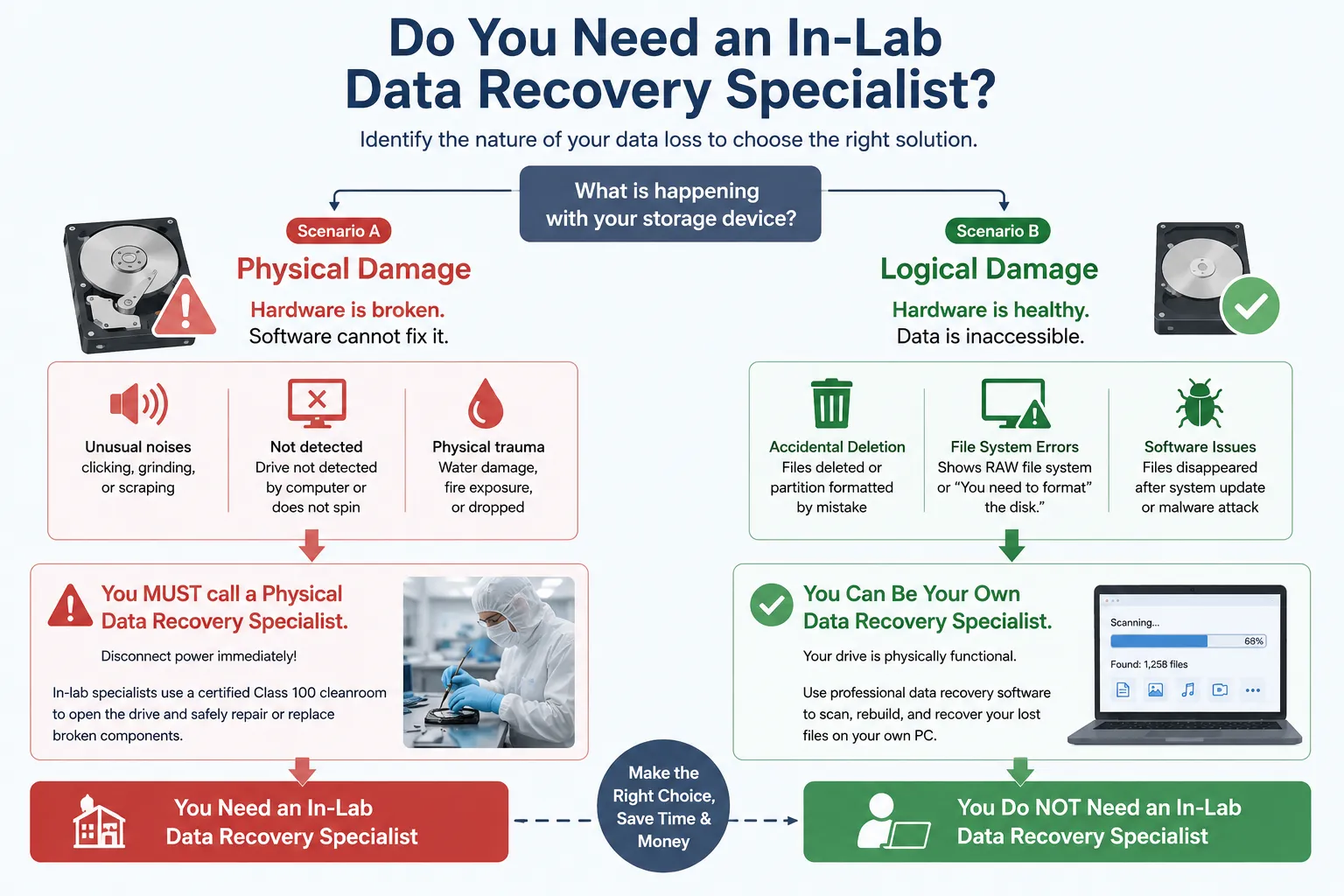
To determine the best course of action, you must first understand the exact nature of your data loss. Professional data recovery engineers divide drive failures into two main categories: physical damage and logical damage. Knowing the difference will save you from making costly mistakes.

Scenario A: When You MUST Call a Physical Data Recovery Specialist

Physical damage occurs when the internal mechanical components of your storage device break down. If your hard drive has suffered a physical trauma, software cannot fix it. You should immediately look for a local data recovery specialist near me if you notice any of these warning signs:

  • The drive makes unusual clicking, grinding, or scraping noises when plugged in.
  • Your computer completely fails to detect the drive at a hardware level, or the drive does not spin at all.
  • The device has been physically submerged in water, exposed to fire, or dropped from a significant height.

If you experience these symptoms, disconnect the power immediately. In these extreme situations, an in-lab data recovery specialist must open the drive inside a certified Class 100 cleanroom to safely swap out broken parts.

Scenario B: When You Can Be Your Own Data Recovery Specialist (Logical Damage)

另一方面、, 邏輯損害 means your hardware is perfectly healthy, but the data has become inaccessible. This represents the vast majority of data loss cases. You are dealing with logical damage if you face the following scenarios:

  • You accidentally deleted files or formatted a partition.
  • Your drive shows up in Windows 磁碟管理 but prompts an error like “RAW 檔案系統” or “You need to format the disk.”
  • Files disappeared after a sudden Windows update or a malware attack.

When the drive is physically functional, hiring a physical data recovery specialist is usually an unnecessary expense. Instead, you can safely deploy professional-grade software to scan the storage sectors and rebuild your lost files directly on your own PC.

Do-You-Actually-Need-an-In-Lab-Data-Recovery-Specialist

The Smarter Alternative: Magic Data Recovery (Your At-Home Data Recovery Specialist)

If your drive is healthy but your files are missing, utilizing a specialized software utility is the most logical step. If you are looking for a highly efficient solution, you should try Magic Data Recovery. This utility serves as an automated digital data recovery specialist, eliminating the need for expensive external technical assistance. It bridges the gap between complicated professional engineering tools and everyday user accessibility.

Advanced Algorithms That Match In-Lab Software

Commercial data recovery labs utilize expensive hardware and proprietary code to scrape data sectors. Magic Data Recovery incorporates similarly advanced deep-scanning algorithms into a lightweight Windows package.

The software bypasses the standard Windows file system layer to read the raw underlying data directly. It carefully pieces together fragmented file signatures, allowing you to restore files from deeply corrupted, unallocated, or RAW partitions that Windows cannot open.

Risk-Free Diagnosis with 500MB Free Recovery

Many local repair shops charge a mandatory diagnostic fee just to look at your broken drive. Furthermore, shipping your device to a corporate lab creates massive data privacy concerns.

Magic Data Recovery changes this dynamic by offering a completely transparent, risk-free trial. You can download the software, scan your target drive, and preview every single recoverable file before making any financial commitment.

Even better, the tool includes a generous 還原檔案的免費資料上限為 500 MB. This allows you to recover your most essential documents immediately without spending a single penny. It is a completely secure way to test the efficacy of the tool on your own machine.

Step-by-Step Guide: How to Recover Lost Data Yourself

You do not need an advanced computer science degree to utilize professional file restoration techniques. Follow this straightforward step-by-step guide to rescue your data safely.

步驟 1:下載並安裝 Magic Data Recovery

First, download Magic Data Recovery and install the software on a healthy drive partition that is completely separate from the affected data loss area. This cautious approach effectively prevents accidental overwriting and protects your lost data from being destroyed.

支援 Windows 7/8/10/11 和 Windows Server

步驟 2:選取要掃描的目標磁碟機

Launch the program on your computer. Then, from the main user interface, choose the specific drive or partition where your files were deleted and click to start the scanning process.

Using Magic Data Recovery as a digital Data Recovery Specialist

步驟 3:掃描磁碟機以尋找遺失的檔案

The software automatically performs an Advanced Scan to dig deep into the storage sectors. Meanwhile, it organizes and lists all recoverable files in real time as the scan progresses.

等待掃描

步驟 4:復原前預覽檔案

Next, utilize the built-in preview function to confirm the actual content of your documents or photos. This important step ensures you recover only the exact files you actually need before utilizing your data limit.

預覽檔案

步驟 5:將檔案復原至安全位置

Finally, select your target files and save them securely to an entirely different drive or backup storage device. Never restore data to the same original drive partition, because doing so risks permanent data corruption.

檔案復原

In-Lab Data Recovery Specialist Near Me: What to Look For If Software Fails

Occasionally, software might not be enough. If your storage drive is physically dead or if the software cannot read the drive due to a severe mechanical breakdown, you will need to find an official brick-and-mortar data recovery specialist near me.

To avoid falling victim to predatory pricing or amateur repair operations, make sure the provider you choose meets these strict industry standards:

  1. A Clear “No Data, No Charge” Policy: A reputable data recovery specialist will never demand full payment if they fail to retrieve your critical files. Always verify that you will only pay a nominal diagnostic or shipping fee if the recovery attempt proves unsuccessful.
  2. Certified Cleanroom Facilities: Ask if the provider operates an actual local laboratory equipped with certified cleanrooms. Opening a modern hard drive outside a dust-free cleanroom will allow microscopic airborne particles to land on the platters, permanently ruining your chances of file retrieval.
  3. Strict Data Privacy Agreements: Your storage device contains highly sensitive financial information, passwords, and personal records. A trustworthy data recovery specialist must provide a legally binding non-disclosure agreement (NDA) and follow SOC 2 or equivalent security compliance protocols to safeguard your personal information during processing.

Comparison: At-Home Software Specialist vs. In-Lab Pro Services

To help you make an informed decision for your specific situation, let us look at how an at-home software solution compares to standard physical lab services.

Evaluation Metric

Magic Data Recovery (Software Solution)

Local In-Lab Specialist (Physical Lab)

平均成本

500MB Free / Affordable license

Typically $300 to $2,000+ per drive

週轉時間

Immediate results (5 to 30 minutes)

3 to 14 business days average

Data Privacy Control

100% Secure (Data never leaves your home)

Risk of physical transit and employee exposure

Best Utilization For

Accidental deletion, formatting, RAW drives

Mechanical clicking, smoke, water immersion

Conclusion & Final Verdict

Experiencing sudden data loss does not mean you have to automatically spend your savings on an expensive technician. Whenever your drive is still recognized by Windows, acting as your own data recovery specialist is always the smartest, fastest, and most cost-effective first step for 硬碟復原.

We highly recommend starting your recovery journey with Magic Data Recovery. This specialized Windows tool eliminates the risk of data loss by giving you full visibility into your file system.

Instead of scheduling an expensive appointment or driving to a store to find a data recovery specialist near me, you can take immediate action to protect your files. Download the software today, leverage the 500MB free file restoration limit, and rescue your valuable data right now.

支援 Windows 7/8/10/11 和 Windows Server

FAQ About Data Recovery Specialist

How much does a professional data recovery specialist charge?

In-lab specialists generally charge between $300 and $2,000+ depending on the severity of the damage. However, you can fix logical issues at home for a fraction of that cost by using advanced recovery software.

How do I choose the best data recovery specialist near me?

Look for local specialists who provide a strict "No Data, No Charge" policy, possess certified cleanrooms, and guarantee complete data privacy with non-disclosure agreements before handling your storage device.

軟體是否能從點擊的硬碟機中復原檔案?

No, a clicking noise indicates severe physical and mechanical failure. Software cannot fix physical components, so you must immediately shut down the drive and contact an in-lab data recovery specialist near me.

Is it safe to use software for data recovery at home?

Yes, using professional software is completely safe for your data privacy. However, you must always install the program on a separate, healthy partition to avoid overwriting the deleted files you want to save.

Why do data recovery specialists charge so much money?

Physical specialists charge high rates because they invest heavily in sterile cleanroom environments, specialized hardware tools, manual labor, and years of engineering expertise required to safely open and repair delicate drives.

Vasilii 是一位在該領域擁有約 10 年實務經驗的資料復原專家。在他的職業生涯中,他已成功解決數千個複雜的個案,包括刪除的檔案、格式化的硬碟機、遺失的磁碟分割和 RAW 檔案系統。他的專業知識涵蓋使用十六進位編輯器等專業工具的手動復原方法,以及使用復原軟體的進階自動解決方案。Vasilii 的使命是讓 IT 專業人士和一般使用者都能獲得可靠的資料復原知識,協助他們保護寶貴的數位資產。.