
Cerchi uno specialista in recupero dati vicino a te? Risparmia subito

Rendersi conto all'improvviso che i propri file importanti sono spariti può essere terrificante. Che si tratti di una cancellazione accidentale svuotare il Cestino, hai formattato una partizione per sbaglio o hai avuto un improvviso crash del sistema Windows, la tua reazione immediata è probabilmente il panico. Di conseguenza, potresti prendere il cellulare e cercare freneticamente un professionista specialista nel recupero dati vicino a me per recuperare i tuoi documenti aziendali, i registri finanziari o le foto di famiglia che non hanno prezzo. Probabilmente il tuo primo istinto sarà quello di mettere in valigia il computer e recarti al negozio di assistenza tecnica più vicino oppure spedire il disco rigido a un grande laboratorio specializzato.
Tuttavia, prima di spendere centinaia o addirittura migliaia di dollari per un specialista nel recupero dati, devi conoscere un segreto del settore. Oltre l'80% dei casi di perdita giornaliera di dati è causato da problemi software piuttosto che da guasti meccanici. Ciò significa che spesso puoi recuperare i file dai dischi rigidi prova tu stesso a utilizzare un'applicazione intelligente come Magic Data Recovery. Seguendo una semplice lista di controllo diagnostica, potrai risparmiare tempo, tutelare la tua privacy e tenere in tasca i tuoi sudati guadagni.
Supporta Windows 7/8/10/11 e Windows Server
Indice dei contenuti
Hai davvero bisogno di uno specialista in recupero dati in laboratorio?
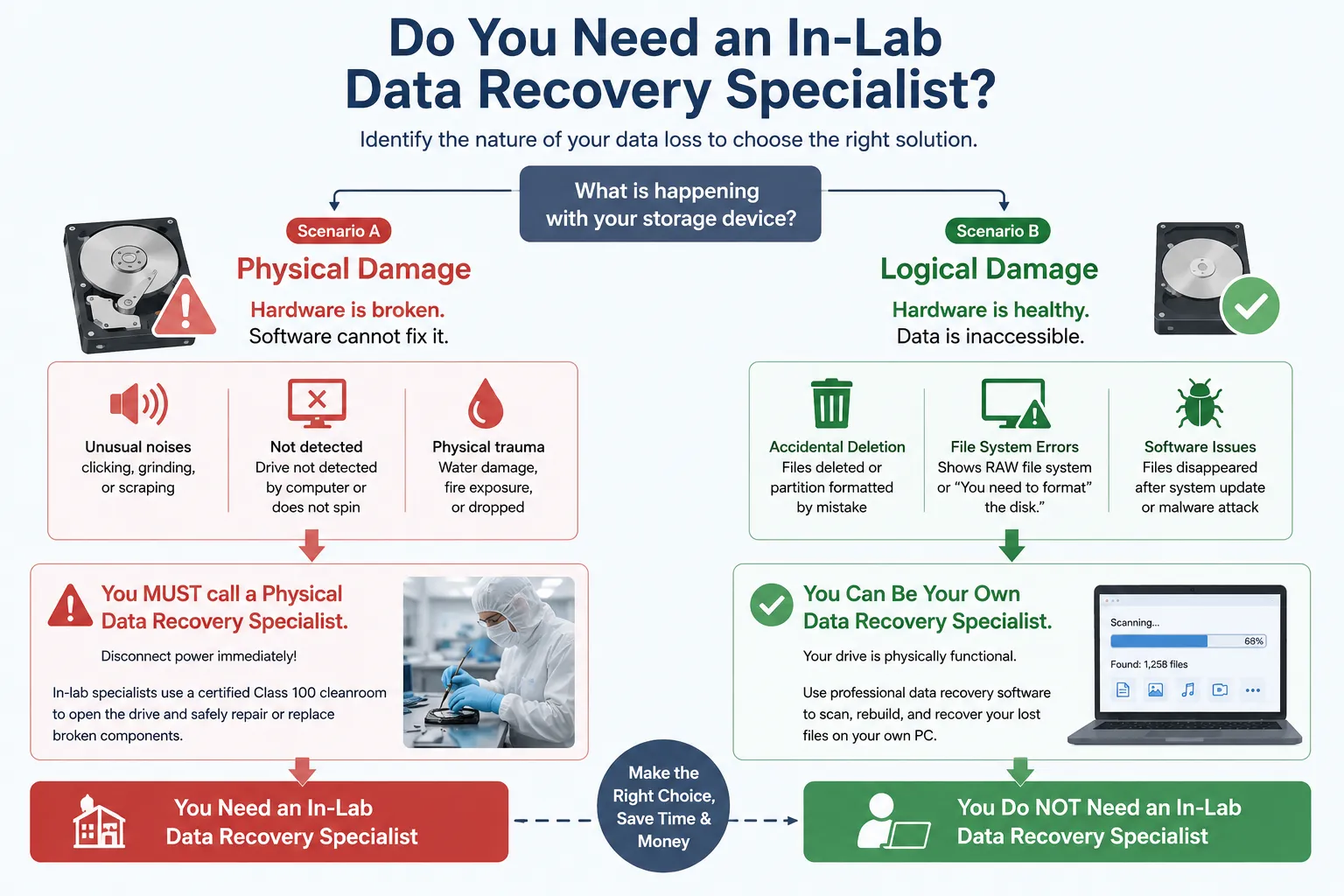
Per stabilire la linea d'azione più appropriata, è necessario innanzitutto comprendere la natura esatta della perdita di dati. I tecnici professionisti del recupero dati classificano i guasti dei dischi rigidi in due categorie principali: danni fisici e danni logici. Conoscere la differenza vi eviterà di commettere errori che potrebbero rivelarsi molto costosi.
Scenario A: Quando è NECESSARIO rivolgersi a uno specialista nel recupero fisico dei dati
I danni fisici si verificano quando i componenti meccanici interni del dispositivo di archiviazione si guastano. Se il disco rigido ha subito un trauma fisico, il software non è in grado di ripararlo. È necessario rivolgersi immediatamente a un tecnico locale specialista nel recupero dati vicino a me se noti uno qualsiasi di questi segnali di allarme:
- Quando è collegato, il disco emette rumori insoliti, come scricchiolii, cigolii o stridii.
- Il computer non rileva affatto l'unità a livello hardware, oppure l'unità non gira affatto.
- Il dispositivo è stato immerso in acqua, esposto al fuoco o è caduto da un'altezza considerevole.
Se si verificano questi sintomi, scollegare immediatamente l'alimentazione. In queste situazioni estreme, un intervento in laboratorio specialista nel recupero dati è necessario aprire l'unità all'interno di una camera bianca certificata Classe 100 per sostituire in sicurezza i componenti danneggiati.
Scenario B: Quando puoi occuparti personalmente del recupero dei dati (danni logici)
D'altra parte, danno logico significa che l'hardware è perfettamente funzionante, ma i dati sono diventati inaccessibili. Questo rappresenta la stragrande maggioranza dei casi di perdita di dati. Si tratta di un danno logico se ti trovi nelle seguenti situazioni:
- Hai cancellato dei file per sbaglio o hai formattato una partizione.
- Il tuo disco rigido viene visualizzato in Gestione disco di Windows ma genera un errore del tipo “Sistema di file RAW” oppure “Devi formattare il disco.”
- I file sono scomparsi in seguito a un aggiornamento improvviso di Windows o a un attacco di malware.
Quando l'unità è fisicamente funzionante, è opportuno ricorrere a un tecnico specialista nel recupero dati è solitamente una spesa superflua. È invece possibile utilizzare in tutta sicurezza un software professionale per eseguire la scansione dei settori di memoria e recuperare i file persi direttamente sul proprio PC.
L'alternativa più intelligente: Magic Data Recovery (il tuo specialista nel recupero dati a domicilio)
Se il disco è integro ma mancano dei file, ricorrere a un software specializzato è la soluzione più logica. Se cerchi una soluzione altamente efficiente, dovresti provare Magic Data Recovery. Questa utility funge da strumento digitale automatizzato specialista nel recupero dati, eliminando la necessità di costose consulenze tecniche esterne. Colma il divario tra i complessi strumenti di ingegneria professionale e l'accessibilità per l'utente comune.
Algoritmi avanzati compatibili con il software di laboratorio
I laboratori commerciali specializzati nel recupero dati utilizzano hardware costoso e codici proprietari per estrarre i settori di dati. Magic Data Recovery integra algoritmi di scansione approfondita altrettanto avanzati in un pacchetto leggero per Windows.
Il software aggira il livello standard del file system di Windows per leggere direttamente i dati grezzi sottostanti. Ricompone con cura le firme dei file frammentati, consentendo di ripristinare file da partizioni gravemente danneggiate, non allocate o in formato RAW che Windows non è in grado di aprire.
Diagnosi senza rischi con 500 MB di spazio di recupero gratuito
Molte officine di riparazione locali applicano una tariffa obbligatoria per la diagnosi anche solo per esaminare l'unità danneggiata. Inoltre, spedire il dispositivo a un laboratorio aziendale solleva gravi preoccupazioni in materia di privacy dei dati.
Magic Data Recovery ribalta questa situazione offrendo una prova completamente trasparente e senza rischi. Puoi scaricare il software, eseguire la scansione dell'unità di destinazione e visualizzare in anteprima ogni singolo file recuperabile prima di assumerti qualsiasi impegno finanziario.
E, cosa ancora migliore, lo strumento include una generosa Limite di 500 MB di dati gratuiti per il ripristino dei file. Questo ti permette di recuperare immediatamente i tuoi documenti più importanti senza spendere un centesimo. È un modo assolutamente sicuro per testare l'efficacia dello strumento sul tuo computer.
Guida passo passo: come recuperare da soli i dati persi
Non serve una laurea in informatica per utilizzare tecniche professionali di recupero dei file. Segui questa semplice guida passo passo per recuperare i tuoi dati in tutta sicurezza.
Passo 1: Scaricare e installare Magic Data Recovery
Per prima cosa, scarica Magic Data Recovery e installa il software su una partizione del disco in buone condizioni, completamente separata dall'area interessata dalla perdita di dati. Questo approccio prudente impedisce efficacemente la sovrascrittura accidentale e protegge i dati persi dalla distruzione.
Supporta Windows 7/8/10/11 e Windows Server
Fase 2: Selezionare l'unità di destinazione da analizzare
Avvia il programma sul tuo computer. Quindi, dall'interfaccia utente principale, seleziona l'unità o la partizione specifica in cui sono stati cancellati i tuoi file e clicca per avviare il processo di scansione.

Fase 3: scansione dell'unità alla ricerca dei file persi
Il software esegue automaticamente una scansione avanzata per analizzare in profondità i settori di memoria. Nel frattempo, man mano che la scansione procede, organizza ed elenca in tempo reale tutti i file recuperabili.

Passo 4: Anteprima dei file prima del recupero
Successivamente, utilizza la funzione di anteprima integrata per verificare il contenuto effettivo dei tuoi documenti o delle tue foto. Questo passaggio fondamentale ti garantisce di recuperare solo i file di cui hai effettivamente bisogno prima di esaurire il tuo limite di dati.

Passo 5: Recuperare i file in una posizione sicura
Infine, seleziona i file desiderati e salvali in modo sicuro su un'unità completamente diversa o su un dispositivo di archiviazione di backup. Non ripristinare mai i dati sulla stessa partizione dell'unità originale, poiché ciò comporta il rischio di un danneggiamento irreversibile dei dati.

Specialista nel recupero dati in laboratorio vicino a me: cosa cercare se il software non funziona
A volte, il software potrebbe non bastare. Se l'unità di archiviazione è fisicamente guasta o se il software non riesce a leggerla a causa di un grave guasto meccanico, dovrai rivolgerti a un centro di assistenza ufficiale specialista nel recupero dati vicino a me.
Per evitare di cadere vittima di pratiche di prezzi predatori o di interventi di riparazione eseguiti da personale non qualificato, assicurati che il fornitore che scegli soddisfi questi rigorosi standard di settore:
- Una chiara politica del tipo “Nessun dato, nessun addebito”: Una rinomata specialista nel recupero dati non ti chiederanno mai il pagamento dell'intero importo se non riescono a recuperare i tuoi file importanti. Assicurati sempre che, qualora il tentativo di recupero non andasse a buon fine, dovrai pagare solo una modesta tariffa per la diagnosi o la spedizione.
- Strutture con camere bianche certificate: Chiedete se il fornitore dispone di un vero e proprio laboratorio locale dotato di camere bianche certificate. L'apertura di un disco rigido moderno al di fuori di una camera bianca priva di polvere consentirà alle particelle microscopiche presenti nell'aria di depositarsi sui piatti, compromettendo definitivamente le possibilità di recupero dei file.
- Accordi rigorosi in materia di protezione dei dati: Il tuo dispositivo di archiviazione contiene informazioni finanziarie altamente riservate, password e dati personali. Un servizio affidabile specialista nel recupero dati deve fornire un accordo di riservatezza (NDA) giuridicamente vincolante e attenersi ai protocolli di conformità SOC 2 o a protocolli di sicurezza equivalenti per tutelare i dati personali durante il trattamento.
Confronto: specialista in software per uso domestico vs. servizi professionali in laboratorio
Per aiutarti a prendere una decisione consapevole in base alla tua situazione specifica, vediamo come si confronta una soluzione software da utilizzare a casa con i tradizionali servizi di laboratorio.
Parametri di valutazione | Magic Data Recovery (Soluzione software) | Specialista di laboratorio locale (laboratorio fisico) |
Costo medio | 500 MB gratuiti / Licenza a prezzo accessibile | In genere da $300 a oltre $2.000 per unità |
Tempi di consegna | Risultati immediati (da 5 a 30 minuti) | In media da 3 a 14 giorni lavorativi |
Controllo della riservatezza dei dati | 100% Secure (I dati non escono mai da casa tua) | Rischi legati al trasporto fisico e all'esposizione dei dipendenti |
Miglior utilizzo per | Cancellazione accidentale, formattazione, unità RAW | Rumori meccanici simili a scatti, fumo, immersione in acqua |
Conclusione e verdetto finale
Subire un'improvvisa perdita di dati non significa che devi per forza spendere tutti i tuoi risparmi per un tecnico costoso. Se il tuo disco viene ancora riconosciuto da Windows, puoi occupartene da solo specialista nel recupero dati è sempre il primo passo più intelligente, veloce ed economico per recupero del disco rigido.
Consigliamo vivamente di iniziare il tuo percorso di recupero con Magic Data Recovery. Questo strumento specifico per Windows elimina il rischio di perdita di dati garantendoti una visibilità completa sul tuo file system.
Invece di fissare un appuntamento costoso o di andare in auto in un negozio per trovare un specialista nel recupero dati vicino a me, puoi intervenire immediatamente per proteggere i tuoi file. Scarica subito il software, approfitta del limite gratuito di 500 MB per il recupero dei file e salva subito i tuoi preziosi dati.
Supporta Windows 7/8/10/11 e Windows Server
Domande frequenti sullo specialista nel recupero dati
Quanto costa rivolgersi a uno specialista professionista nel recupero dati?
Gli specialisti dei centri di assistenza richiedono generalmente una tariffa compresa tra 1.143,00 e oltre 2.000 sterline, a seconda della gravità del danno. Tuttavia, è possibile risolvere i problemi di natura logica a casa propria a un costo molto inferiore, utilizzando un software di recupero dati avanzato.
Come faccio a scegliere il miglior specialista in recupero dati vicino a me?
Cercate specialisti locali che applichino una rigorosa politica "No Data, No Charge", dispongano di camere bianche certificate e garantiscano la totale riservatezza dei dati tramite accordi di non divulgazione prima di maneggiare il vostro dispositivo di archiviazione.
Il software può recuperare i file da un disco rigido che fa clic?
No, un ticchettio indica un grave guasto fisico o meccanico. Il software non è in grado di riparare i componenti fisici, quindi è necessario spegnere immediatamente l'unità e contattare uno specialista in recupero dati presso un laboratorio vicino a me.
È sicuro utilizzare un software per il recupero dei dati a casa?
Sì, l'uso di un software professionale è assolutamente sicuro per la riservatezza dei tuoi dati. Tuttavia, devi sempre installare il programma su una partizione separata e integra, per evitare di sovrascrivere i file cancellati che desideri recuperare.
Perché gli specialisti del recupero dati chiedono così tanto?
Gli specialisti nel settore hardware applicano tariffe elevate perché investono ingenti somme in camere bianche sterili, attrezzature specializzate, manodopera e anni di esperienza ingegneristica necessari per aprire e riparare in sicurezza unità disco delicate.

Vasilii è uno specialista del recupero dati con circa 10 anni di esperienza pratica nel settore. Nel corso della sua carriera, ha risolto con successo migliaia di casi complessi riguardanti file cancellati, unità formattate, partizioni perse e file system RAW. La sua esperienza copre sia i metodi di recupero manuale utilizzando strumenti professionali come gli editor esadecimali, sia le soluzioni automatiche avanzate con i software di recupero. La missione di Vasilii è quella di rendere accessibile la conoscenza del recupero dati affidabile sia ai professionisti IT che agli utenti di tutti i giorni, aiutandoli a salvaguardare i loro preziosi beni digitali.