
iCare 資料恢復軟體評測:是否安全且值得使用?
iCare 資料救援 雖然能夠恢復已刪除及已格式化的檔案,但儲存檔案後並不保證內容可正常使用。在我們針對 47 個 exFAT USB 檔案的測試中,該軟體在兩種情境下均成功匯出所有目標檔案。然而,在每次測試中,同一份的兩份文件皆包含無法讀取的文字,且在已格式化磁碟的恢復過程中,還產生了一段畫面出現損壞的 MOV 影片。.
在 2026 年 10 月 8 日至 20 日期間,本實驗室針對 iCare 與 Magic Data Recovery 的完整授權版本進行了比較,這兩款軟體均於 2026 年 10 月 8 日從各自的官方網站下載。兩者皆在同一台運行 Windows 10 22H2 的電腦上執行,並使用兩支內容完全相同的 USB 隨身碟,其中包含完全一致的檔案與資料夾。 以下,我們將檔案內容的測試結果與目錄恢復、檔案名稱問題、試用限制及授權費用等項目分開討論。.
Amagicsoft 持續發展 Magic Data Recovery, ,即下文將討論的替代方案。我們對這兩款產品進行相同的檢查:恢復範圍、實際可用配額、預覽、成本及限制。關於掃描前應進行的檢查步驟,請從我們的 已刪除檔案復原指南.
目錄
iCare 資料救援:簡短評價
iCare 資料救援 在刪除並進行快速格式化後,已匯出所有 47 個目標檔案。 內容檢查的結果則較不令人放心:有兩份文件在兩種情境下均未能恢復,且格式化後的 MOV 檔案出現視覺損毀。Magic 在兩次測試中均成功恢復了所有 47 個檔案的可使用內容,儘管格式化後有兩個檔案名稱包含意外字元。每種情境下每款產品僅進行一次測試,因此這些結果僅描述此資料集的狀況,而非對一般恢復效果的保證。.
請根據工作性質選擇:
- 穩定磁碟機上最近刪除的檔案: 在購買授權之前,請先試用 iCare Recovery Free。.
- 針對已格式化或無法存取的磁碟區所進行的測試: 評估 iCare 資料救援專業版 並檢查已還原的樣本檔案。.
- 我們在 exFAT 測試中獲得的更佳結果: Magic Data Recovery 在兩種情境下,皆成功保留了全部 47 個檔案中的可用內容,並維持了資料夾結構。請將此視為評估該軟體的理由,而非對每顆硬碟皆能達成此效果的保證。.
- 喀噠聲、反覆斷線或偵測不穩定: 請停止使用軟體進行掃描,並考慮尋求專業的資料恢復服務。.
付款可解除授權限制,但無法恢復遺失的檔案內容。.
什麼是 iCare 資料救援?
的 iCare 資料救援 該產品系列提供 Windows 軟體,用於從儲存裝置中恢復遺失的檔案。其官方資料說明,該軟體支援因意外刪除、格式化、RAW 磁區以及無法存取的磁碟所導致的資料遺失情況。所謂 RAW 磁區,是指 Windows 無法辨識其可用的檔案系統;該軟體本身並不會自行判定根本原因。.
主要區別在於三種方案:獨立的免費版、Pro 試用版,以及付費的 Pro 授權。這些方案的品牌形象相似,因此很容易將免費下載與無限制的資料恢復功能混為一談。.
的 官方 Pro 頁面 此處列出了 Windows 11 及更早的 Windows 版本,以及 Windows Server 各版本。這些清單並不代表與所有硬體配置或儲存設定皆相容。在進行長時間掃描之前,請先檢查您的裝置和檔案系統。.
iCare Data Recovery Pro 與免費版:實際上有哪些不同?
的 官方免費版比較 目前會區分復原模式與版本。以下是兩者之間的實際差異。.
項目 | iCare Recovery 免費版 | 專業試用版 | 付費專業版 |
平台 | 視窗 | Windows;所列之伺服器版本 | Windows;檢查已選取的授權 |
實際免費恢復 | 在「已刪除檔案恢復」模式下無限制 | 購買前 1GB | 取得許可證後無需額外配額 |
深度掃描/RAW 檔案支援 | 根據官方網頁的資料,每 24 小時可處理 500 份檔案 | 在 1GB 的流量配額內 | 根據本授權,恢復數量不限 |
主要價值 | 近期刪除檔案的免費恢復服務 | 付款前測試 | 取消審判賠償上限 |
主要限制 | 依模式而定的檔案數量限制 | 大型檔案可能會耗盡配額 | 付款無法解決內容無法閱讀或內容遺失的問題 |
最適合 | 注重預算的家庭用戶 | 使用者正在檢查一小份復原樣本 | 已驗證結果且需要更多恢復時間的使用者 |
版本詳細資訊已於 2026 年 10 月 21 日核對。免費版頁面所述的 24 小時間隔,是以您上次關閉應用程式為基準。請確認您已安裝版本中的相關規則。.
檔案數量限制與大小限制會產生不同的影響。一個存放小型文件的資料夾,可能適合字節數受限的試用方案;但單一大型影片就可能單獨超過該配額。在使用試用配額之前,請先決定哪些檔案最重要。.
我們如何測試 iCare 資料恢復與 Magic
iCare 資料救援 是本篇評測的主要對象。Magic 提供了有限的 Windows 系統比較:這兩款產品皆可處理常見的邏輯資料遺失問題,均提供試用版復原功能,並提供不同的授權選項。Magic 由 Amagicsoft 開發;下文的測試結果與限制事項,在相同的評估標準下,同樣適用於這兩款產品。.
這並非一份詳盡的替代方案排名。原生 macOS 工具及實驗室級資料恢復服務未納入本次比較範圍。我們未針對 RAW 磁碟區、遺失的分區、Windows Server、固態硬碟(SSD)或實體硬體故障進行測試。.
測試環境與資料集
測試詳情 | 設定 |
測試期間 | 2026年10月8日至20日 |
電腦 | 這兩款產品均使用同一台搭載 Windows 10 22H2 的電腦 |
原始媒體 | 兩支同型號的 ThinkBook BU100 32GB USB 隨身碟 |
檔案系統 | 兩顆硬碟均採用 exFAT 格式 |
資料集 | 每個磁碟機上都有相同的檔案和資料夾,每個約 300MB |
文件 | 30 個檔案,包括 DOC、Excel 和 PDF 文件 |
圖片 | 15 個檔案,包括 JPG、PNG 和 WEBP |
影片 | 2 個檔案:MP4 和 MOV |
目標檔案總數 | 47 |
軟體來源與下載日期 | 這兩款產品均於 2026 年 10 月 8 日從各自的官方網站下載 |
軟體授權 | 這兩款產品的完整授權版本 |
掃描程序 | 完整掃描;實驗室等待每次掃描完成 |
還原目標位置 | 其他儲存裝置,與來源 USB 儲存裝置分開 |
重複 | 每個情境中,每項產品執行一次 |
實驗室紀錄中並未包含 CPU/RAM 的詳細資料,亦未列出獨立的匯出時間。以下的大致時間是根據提供的測試紀錄所列出;這些時間並不能證明存在可重複的速度優勢。.
刪除與快速格式化程序
針對刪除情境,實驗室採用了一般的刪除方式。由於該記錄並未標示為 Shift+Delete 操作,因此我們不以此方式描述。.
在準備格式化情境之前,實驗室已將 USB 隨身碟完全格式化,並將原始資料集複製回隨身碟中。接著,實驗室使用 Windows 檔案總管的右鍵選單 格式 指令搭配 快速格式, ,並在使用各產品進行掃描前保留 exFAT 格式。此準備步驟屬於測試設定的一部分,並非建議對含有遺失資料的磁碟進行格式化。.
兩顆來源磁碟均包含相同的檔案和目錄。然而,兩顆同型號的磁碟未必是位元組層級完全相同的儲存媒體,且該紀錄並未附帶任何已還原的磁碟映像基準檔。在比較細微差異時,請務必謹記此項限制。.
我們如何檢查已恢復的檔案
實驗室逐一檢查了所有 47 個儲存的檔案。文件檢查內容涵蓋文字、表格及圖片;兩段影片均進行了完整播放。本次審查區分以下幾點:
- 已匯出的檔案: 鎖定該軟體儲存至另一顆磁碟機的檔案。.
- 可用內容: 通過實驗室開頭、內容及播放檢查的檔案。.
- 資料夾保留: 還原過程是否保留了原始的目錄結構。.
- 檔案名稱保留: 還原後的名稱中是否包含未預期的字元。.
這些是功能性檢查,並非能證明每個位元組都與原始檔完全一致的加密證明。例如,一個名稱被修改過的檔案,其內容仍可能可用。反之,一份成功匯出的文件,其內容也可能包含無法閱讀的文字。.
iCare 資料恢復測試結果
場景 | 產品 | 據報的大致時間 | 已匯出的目標檔案 | 通過內容檢查的檔案 | 原始資料夾 | 關於檔案名稱的觀察 |
普通刪除 | Magic Data Recovery | 27 minutes | 47/47 | 47/47 | Preserved | No filename problem reported |
普通刪除 | iCare | 35 minutes | 47/47 | 45/47 | Preserved | No filename problem reported |
快速格式 | Magic Data Recovery | 32 minutes | 47/47 | 47/47 | Preserved | One DOC and one MOV name contained unexpected characters |
快速格式 | iCare | 34 minutes | 47/47 | 44/47 | Not preserved | One DOC and one MOV name contained unexpected characters |
After ordinary deletion
iCare 資料救援 exported every target file and retained the folders, but one DOC and one Excel document contained garbled text. Repair attempts did not resolve those problems. The remaining 45 files passed the checks.
Magic exported all 47 files with their directories, and all passed the content checks. Some file formats did not support preview before recovery. Their saved copies still opened correctly, showing why unsupported preview should not automatically count as recovery failure.
After quick formatting
iCare 資料救援 again exported all 47 files, but it did not preserve the original directories. The same DOC and Excel source files failed the document checks. In addition, the MOV video showed visual corruption during playback. That leaves 44 files passing the stated content checks in this run.
Magic preserved the directories, and all 47 files passed the content checks. However, one DOC filename and one MOV filename contained unexpected characters. The iCare output also showed filename anomalies for those file types. The tests do not establish the cause of the naming problems.
What these results establish—and what they do not
Magic delivered the better file-content and formatted-folder results in this small exFAT comparison. However, each product had only one run per scenario. The lab did not repeat the MOV recovery, so we cannot establish whether that visual corruption would recur. The two document failures involved the same source files in both scenarios; they are not four independent examples.
All results concern full licensed editions. They do not verify the recovery quotas or behavior of iCare 資料救援專業版 trials or the standalone Free edition. Free limits below come from vendor documentation.
Is iCare Data Recovery Safe?
Safety has three parts: the download, the way you handle the source drive, and the condition of that drive. A vendor’s security badge does not settle all three.
Download from the official source
Use the vendor’s official website. Avoid repackaged installers, cracked editions, and pages that promise activation codes with unrelated downloads.
We did not audit the current installer, run malware analysis, or inspect its network traffic for this review. Therefore, we cannot certify every build as malware-free or make an independent privacy guarantee. Keep Windows security protection enabled and investigate any warning before proceeding.
Keep new writes away from the affected drive
請勿安裝 iCare 資料救援 on the drive that lost your files. Save recovered items to a different physical device as well. If the affected drive contains Windows, consider connecting it to another computer instead of continuing normal use.
微軟的 Windows 檔案恢復指南 explains why: Windows can reuse the space that deleted files occupied. Downloads, application installations, and ordinary computer activity may overwrite that space.
Stop if the hardware behaves abnormally
A drive that clicks, disappears during reads, or repeatedly disconnects needs a different approach. Long scans may stress failing hardware and reduce the time available to retrieve important data.
Likewise, do not format a RAW drive merely because Windows prompts you to do so. Recovering files and repairing the file system are separate tasks. Preserve the data first when it matters.
iCare Data Recovery Pro: Strengths and Limitations
最適合 Windows users evaluating recovery from a stable drive before paying for a larger restoration.
Documented workflow: 的 iCare 資料救援專業版 trial offers 1GB of actual recovery. A usable document or photo gives you more relevant evidence than a supported-extension list.
The vendor also documents multiple recovery modes. Its workflow includes choosing a mode, selecting the source, scanning, inspecting candidate partitions, and saving files elsewhere. This provides a route for looking beyond straightforward recent deletion.
Documented strengths:
- A 1GB trial allowance supports sample restoration before purchase.
- Documented modes address deletion, formatting, and RAW or missing-volume scenarios.
- Official instructions include file preview and recovery to another drive.
限制:
- The Windows application does not provide a native macOS recovery workflow.
- The 1GB trial may not cover a large video or project archive.
- In our tests, two documents remained unusable in both scenarios; the formatted-drive run also lost the folder structure and produced a visually corrupted MOV.
- Home and Premium plans involve annual auto-renewal, according to the store.
Laboratory results:iCare Data Recovery exported 47/47 files in each test. Usable contents totaled 45/47 after deletion and 44/47 after quick formatting. It preserved folders after deletion but not after formatting; two formatted filenames contained unexpected characters.
License: The trial includes 1GB of recovery. The following table separates paid plans by PC count, duration, and renewal.
Verdict:iCare Data Recovery Pro remains an option to evaluate, but our full-edition tests show why file counts alone are insufficient. Check document contents and full video playback before deciding that a recovery meets your needs.
How Much Does iCare Data Recovery Pro Cost?
的 official iCare store displayed these USD prices when checked on October 21, 2026:
授權條款 | Displayed offer | Listed reference price | 覆蓋範圍 | Renewal / upgrade terms |
首頁 | $69.99 | $89.99 | 1 PC for 1 year | Auto-renewal; cancellation available |
尊享版 | $99.99 | $169.99 | 2 PCs for 1 year | Auto-renewal; cancellation available |
無限制 | $399.99 | $999.99 | Unlimited PCs and years within a company | Technician / IT service use; lifetime upgrades listed |
The store excludes VAT from those prices. Confirm the final charge, renewal amount, and cancellation terms at checkout; a displayed discount does not establish the next renewal price.
For a one-time recovery job, check whether the annual commitment fits your needs and whether the license covers your intended use.
iCare Data Recovery vs Magic Data Recovery
Comparing iCare 資料救援 with Magic involves two separate questions: what worked in our full-edition tests, and what each vendor offers before and after purchase. The following table covers documented features and licenses; the test table above reports observed results.
決策因素 | iCare Pro | Magic Data Recovery |
復原方案 | Deletion, formatting, RAW / inaccessible volumes | 刪除、格式化及檔案系統錯誤 |
平台 | Windows;所列之伺服器版本 | 視窗 |
實際免費恢復 | 1GB trial | 500MB trial |
預覽 | Included in official instructions | Included in the documented workflow |
Displayed one-year offer | $69.99 for 1 PC | $49.95 for 1 PC |
Perpetual option shown | Unlimited company plan at $399.99 | Single-PC plan at $69.95 with lifetime upgrades |
Main buying limitation | Annual auto-renewal on Home / Premium | Smaller free recovery allowance |
Prices checked October 21, 2026. These plans have different usage rights; they are not interchangeable licenses. Check both vendors’ checkout terms.
Magic Data Recovery: Strengths and Limitations
最適合 Windows users evaluating files lost through deletion, formatting, or file system errors, particularly those considering a single-PC perpetual license.
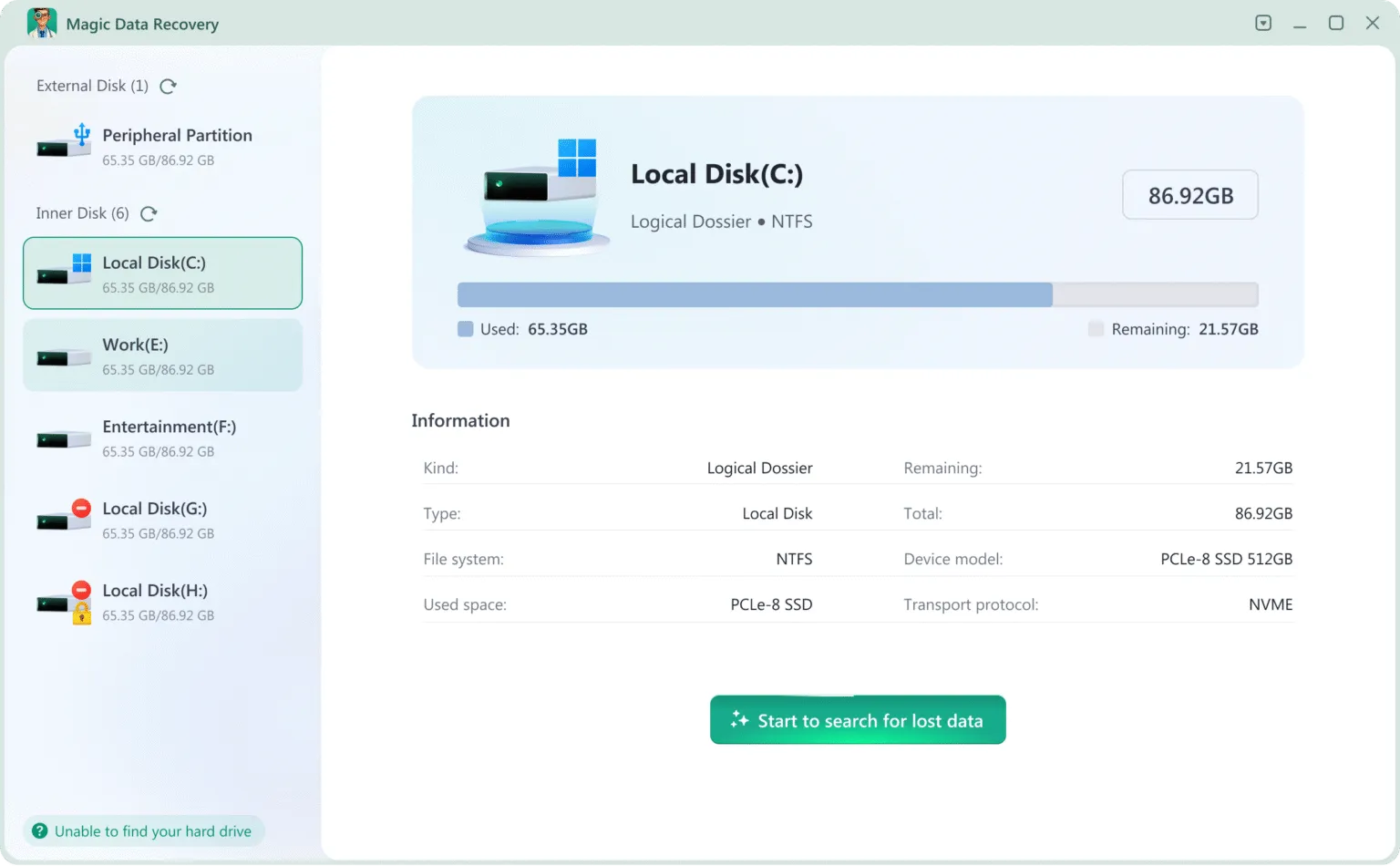
Documented workflow: Choose the source, scan, filter the results, preview supported files, and save selected items to another drive. For example, a user with missing invoices and photos on a stable external drive can check a representative selection within the free allowance.
Documented strengths:
- The 500MB allowance permits actual file restoration before payment.
- Scanning, filtering, and preview help users inspect candidate files.
- A single-PC perpetual plan offers an alternative to an annual license.
限制:
- The free allowance is smaller than iCare Pro’s 1GB trial.
- The Windows application does not offer a native macOS workflow.
- Some tested file formats lacked preview support; after formatting, one DOC and one MOV filename contained unexpected characters.
Laboratory results: All 47 files passed content checks after both deletion and quick formatting, with directories preserved. The formatted output included two altered filenames. Some formats lacked preview support, even though their restored contents passed the checks.
License: 的 Magic Data Recovery 產品頁面 describes the trial. Its current license options include annual and single-PC perpetual plans; confirm the terms before payment.
判決: Magic is our preferred option for a comparable exFAT USB scenario based on these runs: it retained usable file contents and directories in both tests. Its smaller trial allowance and filename anomalies remain relevant tradeoffs. These results do not predict performance on every device or file type.
How to Use iCare Data Recovery Without Undermining Recovery
The documented iCare 資料救援 process follows these steps. Button names and available modes may vary by edition or build.
- 請準備另一個目的地。. Use another storage device with enough room for the files you hope to recover.
- Install away from the source. Download the official edition without writing to the affected drive.
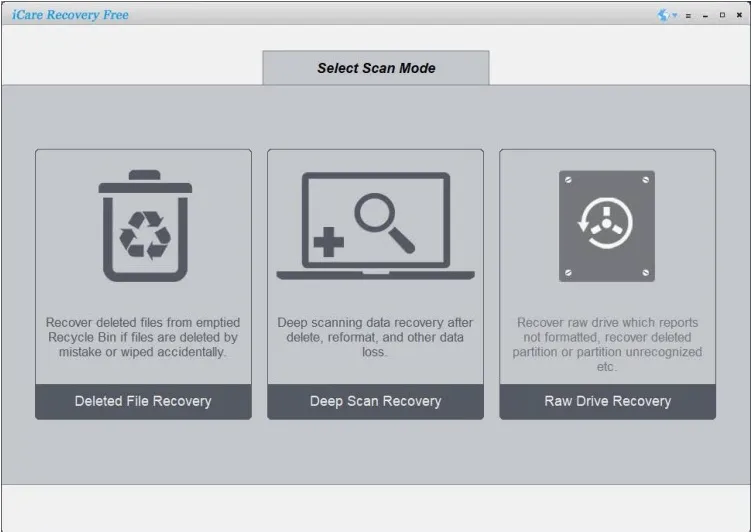
- Choose an appropriate mode. The Free edition guidance points to Deleted File Recovery for recent deletion, Deep Scan for broader searches, and RAW Drive Recovery for RAW or missing partitions.
- Select the source carefully. Check the device identity and capacity before starting.
- 檢查結果。. Review candidate partitions where applicable. Preview important files when the application supports their format.
- Restore a sample elsewhere. Open the saved files in their normal applications and check their contents before committing to a license or larger recovery.
If a stable drive yields no usable files, another supported mode or tool may be worth evaluating. However, do not treat repeated scans as a substitute for diagnosing disconnections, read errors, or physical failure.
When Should You Buy, Switch Tools, or Stop?
Use the following situations to decide whether to continue with software, change the approach, or stop.
您的情況 | Sensible next step |
A backup or cloud copy contains the missing files | Restore that copy first |
A healthy drive lost recently deleted files | Try the standalone Free edition before paying |
The Pro trial restores the files you need intact | Consider the appropriate paid license if you need more recovery |
A stable drive produces incomplete results | Compare another tool’s preview and sample recovery |
You prefer a single-PC perpetual option | Evaluate Magic Data Recovery’s perpetual plan |
The drive clicks or repeatedly disconnects | Stop DIY scanning and seek professional assessment |
There are also hard limits. Software cannot reconstruct file content that new data has overwritten. SSD TRIM can make deleted blocks unavailable to recovery applications. An encrypted volume needs the appropriate unlocking credentials; buying another scanner does not bypass encryption.
Conclusion: Is iCare Data Recovery Worth Using?
iCare 資料救援 retrieved every target file in our deletion and quick-format tests, but some saved contents were unusable. Two documents failed in both scenarios; the formatted-drive run also produced visual corruption in a MOV video and lost the directory structure. Its documented free options still deserve consideration when budget is the priority.
For a similar exFAT USB recovery task, we recommend evaluating Magic Data Recovery. It restored usable contents for all 47 files and preserved folders in both runs, although two filenames changed after formatting. Its documented file system error support is a separate capability, not a scenario tested here. The small dataset and single-run design limit how widely these findings apply.
For a broader recovery process, return to our 已刪除檔案復原指南. Check backups first, protect the source, and stop if the hardware shows signs of failure.
支援 Windows 7/8/10/11 和 Windows Server
常見問題
iCare 資料恢復真的完全免費嗎?
下載 iCare Data Recovery Pro 是否安全?
iCare 能在格式化後恢復檔案嗎?
iCare 資料恢復軟體在 Mac 上能運作嗎?
為什麼恢復的檔案無法開啟?
iCare Data Recovery Pro 會自動續訂嗎?
資料恢復軟體能否從物理上受損的硬碟中恢復檔案?
Magic Data Recovery 是否是 iCare 的良好替代品?

Jason 是一位擁有超過 15 年實務經驗的資料復原與技術支援專家。 他長期與第一線使用者密切合作,處理棘手的資料遺失案例,並針對誤刪資料、磁碟格式化、檔案系統損毀、分割區遺失、系統故障及其他緊急資料復原情況,提供實用的復原解決方案。其專業領域還涵蓋備份與還原、檔案修復及災難復原,並特別注重提供安全、可靠且技術上精準的指導。.