
iCare Data Recovery Review: Is It Safe and Worth Using?
iCare Data Recovery can retrieve deleted and formatted files, but saving a file does not guarantee usable contents. In our 47-file exFAT USB tests, it exported every target file in both scenarios. However, the same two documents contained unreadable text in each test, and the formatted-drive recovery also produced a MOV video with visual corruption.
Between October 8 and 20, 2026, our lab compared full licensed editions of iCare and Magic Data Recovery downloaded from their respective official websites on October 8, 2026. Both ran on the same Windows 10 22H2 computer, using two matching USB drives with identical files and folders. Below, we separate file-content results from directory recovery, filename issues, trial limits, and license costs.
Amagicsoft develops Magic Data Recovery, the alternative discussed below. We apply the same checks to both products: recovery scope, actual free allowance, preview, cost, and limitations. For the steps to check before scanning, start with our deleted file recovery guide.
Table of Contents
iCare Data Recovery: The Short Verdict
iCare Data Recovery exported all 47 target files after deletion and quick formatting. Content checks were less reassuring: two documents failed in both scenarios, and the formatted MOV showed visual corruption. Magic restored usable contents for all 47 files in both tests, although two filenames contained unexpected characters after formatting. Each scenario had one run per product, so these findings describe this dataset rather than a general recovery guarantee.
Choose according to the job:
- Recently deleted files on a stable drive: Consider iCare Recovery Free before buying a license.
- A trial for a formatted or inaccessible volume: Evaluate iCare Data Recovery Pro and inspect the restored sample files.
- The stronger result in our exFAT tests: Magic Data Recovery preserved usable contents across all 47 files and retained the folder structure in both scenarios. Treat that as a reason to evaluate it, rather than a promise for every drive.
- Clicking, repeated disconnections, or unstable detection: Stop software scans and consider professional recovery.
Paying removes licensing restrictions. It does not make missing file content recoverable.
What Is iCare Data Recovery?
The iCare Data Recovery product family provides Windows software for retrieving lost files from storage devices. Its official materials describe support for accidental deletion, formatting, RAW volumes, and inaccessible drives. A RAW volume means Windows cannot recognize a usable file system; it does not identify the underlying cause by itself.
The main distinction involves three offerings: the standalone Free edition, the Pro trial, and paid Pro licenses. They share similar branding, which makes it easy to confuse a free download with unrestricted recovery.
The official Pro page lists Windows 11 and earlier Windows versions, plus Windows Server releases. Those listings do not establish compatibility with every hardware configuration or storage setup. Check your device and file system before committing to a long scan.
iCare Data Recovery Pro vs Free: What Actually Changes?
The official Free edition comparison currently distinguishes recovery modes as well as editions. Here is the practical difference.
Item | iCare Recovery Free | Pro trial | Paid Pro |
Platform | Windows | Windows; Server versions listed | Windows; check the selected license |
Actual free recovery | Unlimited in Deleted File Recovery mode | 1GB before purchase | No free allowance needed after licensing |
Deep Scan / RAW allowance | 500 files per 24 hours, according to the official page | Within the 1GB allowance | Unlimited recovery amount under the license |
Main value | Free recovery for recent deletion | Testing before payment | Removing the trial recovery cap |
Main limitation | Mode-specific file-count restriction | Large files can exhaust the allowance | Payment cannot fix unreadable or missing content |
Best fit | Budget-conscious home users | Users checking a small recovery sample | Users with verified results who need more recovery |
Edition details checked October 21, 2026. The Free edition page describes the 24-hour interval relative to when you last closed the application. Confirm the rules in your installed build.
A file-count limit and a size limit have different consequences. A folder of small documents may suit a byte-limited trial. One large video may exceed that allowance by itself. Decide which files matter most before using the trial quota.
How We Tested iCare Data Recovery and Magic
iCare Data Recovery is the main subject of this review. Magic provides a limited Windows comparison: both products address common logical data loss, offer trial recovery, and provide different licensing choices. Amagicsoft develops Magic; the test results and limitations below apply to both products under the same evaluation criteria.
This is not an exhaustive alternatives ranking. Native macOS tools and laboratory recovery services fall outside this comparison. We did not test RAW volumes, missing partitions, Windows Server, SSDs, or physical hardware faults.
Test environment and dataset
Test detail | Setup |
Test period | October 8–20, 2026 |
Computer | The same Windows 10 22H2 computer for both products |
Source media | Two ThinkBook BU100 32GB USB flash drives of the same model |
File system | exFAT on both drives |
Dataset | Identical files and folders, approximately 300MB on each drive |
Documents | 30 files, including DOC, Excel, and PDF documents |
Images | 15 files, including JPG, PNG, and WEBP |
Videos | 2 files: MP4 and MOV |
Total target files | 47 |
Software source and download date | Both products downloaded from their respective official websites on October 8, 2026 |
Software licensing | Full licensed editions of both products |
Scan procedure | Full scans; the lab waited for each scan to finish |
Recovery destination | Other drives, separate from the source USB drives |
Repetitions | One run per product in each scenario |
The laboratory record does not include CPU/RAM details or separate export timings. The approximate times below follow the supplied test record; they do not establish a repeatable speed advantage.
Deletion and quick-format procedure
For the deletion scenario, the lab used ordinary deletion. The record does not identify a Shift+Delete operation, so we do not describe it that way.
Before preparing the formatting scenario, the lab fully formatted the USB drives and copied the original dataset back onto them. It then used Windows File Explorer’s right-click Format command with Quick Format, retaining exFAT, before scanning with each product. This preparation step is part of the test setup, not advice to format a drive that contains missing data.
Both source drives contained matching files and directories. However, two same-model drives are not necessarily byte-identical media, and no restored disk-image baseline accompanies the record. Keep that limitation in mind when comparing small differences.
How we checked the recovered files
The lab checked all 47 saved files individually. Document checks included text, tables, and images; both videos underwent full playback. This review distinguishes:
- Exported files: Target files that the software saved to another drive.
- Usable contents: Files that passed the lab’s opening, content, and playback checks.
- Folder preservation: Whether the recovery retained the original directory structure.
- Filename preservation: Whether the restored names contained unexpected characters.
These are functional checks, not cryptographic proof that every byte matches the originals. For example, a file with an altered name can still have usable contents. Conversely, a successfully exported document can contain unreadable text.
iCare Data Recovery Test Results
Scenario | Product | Approximate reported time | Target files exported | Files passing content checks | Original folders | Filename observations |
Ordinary deletion | Magic Data Recovery | 27 minutes | 47/47 | 47/47 | Preserved | No filename problem reported |
Ordinary deletion | iCare | 35 minutes | 47/47 | 45/47 | Preserved | No filename problem reported |
Quick format | Magic Data Recovery | 32 minutes | 47/47 | 47/47 | Preserved | One DOC and one MOV name contained unexpected characters |
Quick format | iCare | 34 minutes | 47/47 | 44/47 | Not preserved | One DOC and one MOV name contained unexpected characters |
After ordinary deletion
iCare Data Recovery exported every target file and retained the folders, but one DOC and one Excel document contained garbled text. Repair attempts did not resolve those problems. The remaining 45 files passed the checks.
Magic exported all 47 files with their directories, and all passed the content checks. Some file formats did not support preview before recovery. Their saved copies still opened correctly, showing why unsupported preview should not automatically count as recovery failure.
After quick formatting
iCare Data Recovery again exported all 47 files, but it did not preserve the original directories. The same DOC and Excel source files failed the document checks. In addition, the MOV video showed visual corruption during playback. That leaves 44 files passing the stated content checks in this run.
Magic preserved the directories, and all 47 files passed the content checks. However, one DOC filename and one MOV filename contained unexpected characters. The iCare output also showed filename anomalies for those file types. The tests do not establish the cause of the naming problems.
What these results establish—and what they do not
Magic delivered the better file-content and formatted-folder results in this small exFAT comparison. However, each product had only one run per scenario. The lab did not repeat the MOV recovery, so we cannot establish whether that visual corruption would recur. The two document failures involved the same source files in both scenarios; they are not four independent examples.
All results concern full licensed editions. They do not verify the recovery quotas or behavior of iCare Data Recovery Pro trials or the standalone Free edition. Free limits below come from vendor documentation.
Is iCare Data Recovery Safe?
Safety has three parts: the download, the way you handle the source drive, and the condition of that drive. A vendor’s security badge does not settle all three.
Download from the official source
Use the vendor’s official website. Avoid repackaged installers, cracked editions, and pages that promise activation codes with unrelated downloads.
We did not audit the current installer, run malware analysis, or inspect its network traffic for this review. Therefore, we cannot certify every build as malware-free or make an independent privacy guarantee. Keep Windows security protection enabled and investigate any warning before proceeding.
Keep new writes away from the affected drive
Do not install iCare Data Recovery on the drive that lost your files. Save recovered items to a different physical device as well. If the affected drive contains Windows, consider connecting it to another computer instead of continuing normal use.
Microsoft’s Windows File Recovery guidance explains why: Windows can reuse the space that deleted files occupied. Downloads, application installations, and ordinary computer activity may overwrite that space.
Stop if the hardware behaves abnormally
A drive that clicks, disappears during reads, or repeatedly disconnects needs a different approach. Long scans may stress failing hardware and reduce the time available to retrieve important data.
Likewise, do not format a RAW drive merely because Windows prompts you to do so. Recovering files and repairing the file system are separate tasks. Preserve the data first when it matters.
iCare Data Recovery Pro: Strengths and Limitations
Best for: Windows users evaluating recovery from a stable drive before paying for a larger restoration.
Documented workflow: The iCare Data Recovery Pro trial offers 1GB of actual recovery. A usable document or photo gives you more relevant evidence than a supported-extension list.
The vendor also documents multiple recovery modes. Its workflow includes choosing a mode, selecting the source, scanning, inspecting candidate partitions, and saving files elsewhere. This provides a route for looking beyond straightforward recent deletion.
Documented strengths:
- A 1GB trial allowance supports sample restoration before purchase.
- Documented modes address deletion, formatting, and RAW or missing-volume scenarios.
- Official instructions include file preview and recovery to another drive.
Limitations:
- The Windows application does not provide a native macOS recovery workflow.
- The 1GB trial may not cover a large video or project archive.
- In our tests, two documents remained unusable in both scenarios; the formatted-drive run also lost the folder structure and produced a visually corrupted MOV.
- Home and Premium plans involve annual auto-renewal, according to the store.
Laboratory results:iCare Data Recovery exported 47/47 files in each test. Usable contents totaled 45/47 after deletion and 44/47 after quick formatting. It preserved folders after deletion but not after formatting; two formatted filenames contained unexpected characters.
License: The trial includes 1GB of recovery. The following table separates paid plans by PC count, duration, and renewal.
Verdict:iCare Data Recovery Pro remains an option to evaluate, but our full-edition tests show why file counts alone are insufficient. Check document contents and full video playback before deciding that a recovery meets your needs.
How Much Does iCare Data Recovery Pro Cost?
The official iCare store displayed these USD prices when checked on October 21, 2026:
License | Displayed offer | Listed reference price | Coverage | Renewal / upgrade terms |
Home | $69.99 | $89.99 | 1 PC for 1 year | Auto-renewal; cancellation available |
Premium | $99.99 | $169.99 | 2 PCs for 1 year | Auto-renewal; cancellation available |
Unlimited | $399.99 | $999.99 | Unlimited PCs and years within a company | Technician / IT service use; lifetime upgrades listed |
The store excludes VAT from those prices. Confirm the final charge, renewal amount, and cancellation terms at checkout; a displayed discount does not establish the next renewal price.
For a one-time recovery job, check whether the annual commitment fits your needs and whether the license covers your intended use.
iCare Data Recovery vs Magic Data Recovery
Comparing iCare Data Recovery with Magic involves two separate questions: what worked in our full-edition tests, and what each vendor offers before and after purchase. The following table covers documented features and licenses; the test table above reports observed results.
Decision factor | iCare Pro | Magic Data Recovery |
Recovery scenarios | Deletion, formatting, RAW / inaccessible volumes | Deletion, formatting, and file system errors |
Platform | Windows; Server versions listed | Windows |
Actual free recovery | 1GB trial | 500MB trial |
Preview | Included in official instructions | Included in the documented workflow |
Displayed one-year offer | $69.99 for 1 PC | $49.95 for 1 PC |
Perpetual option shown | Unlimited company plan at $399.99 | Single-PC plan at $69.95 with lifetime upgrades |
Main buying limitation | Annual auto-renewal on Home / Premium | Smaller free recovery allowance |
Prices checked October 21, 2026. These plans have different usage rights; they are not interchangeable licenses. Check both vendors’ checkout terms.
Magic Data Recovery: Strengths and Limitations
Best for: Windows users evaluating files lost through deletion, formatting, or file system errors, particularly those considering a single-PC perpetual license.
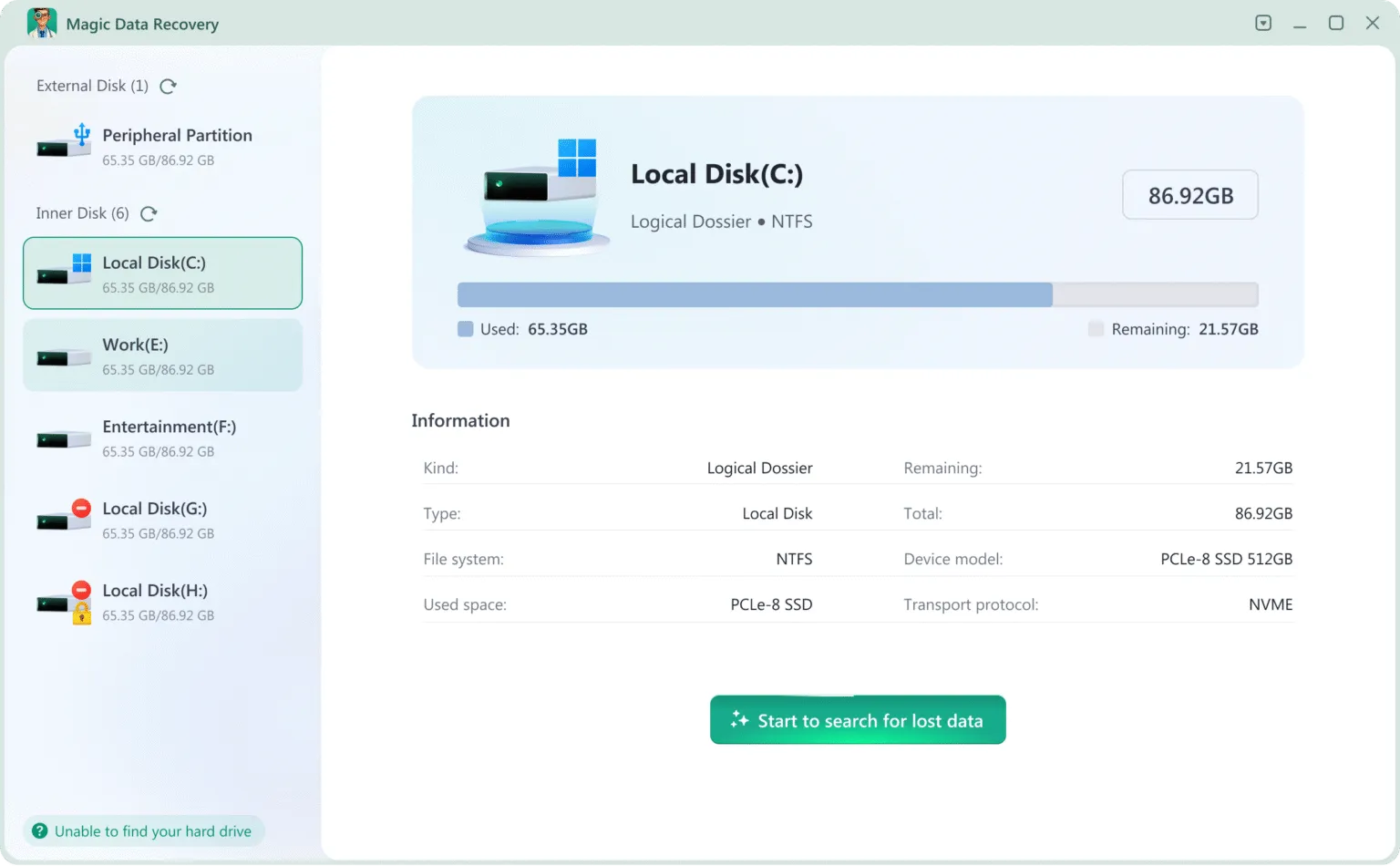
Documented workflow: Choose the source, scan, filter the results, preview supported files, and save selected items to another drive. For example, a user with missing invoices and photos on a stable external drive can check a representative selection within the free allowance.
Documented strengths:
- The 500MB allowance permits actual file restoration before payment.
- Scanning, filtering, and preview help users inspect candidate files.
- A single-PC perpetual plan offers an alternative to an annual license.
Limitations:
- The free allowance is smaller than iCare Pro’s 1GB trial.
- The Windows application does not offer a native macOS workflow.
- Some tested file formats lacked preview support; after formatting, one DOC and one MOV filename contained unexpected characters.
Laboratory results: All 47 files passed content checks after both deletion and quick formatting, with directories preserved. The formatted output included two altered filenames. Some formats lacked preview support, even though their restored contents passed the checks.
License: The Magic Data Recovery product page describes the trial. Its current license options include annual and single-PC perpetual plans; confirm the terms before payment.
Verdict: Magic is our preferred option for a comparable exFAT USB scenario based on these runs: it retained usable file contents and directories in both tests. Its smaller trial allowance and filename anomalies remain relevant tradeoffs. These results do not predict performance on every device or file type.
How to Use iCare Data Recovery Without Undermining Recovery
The documented iCare Data Recovery process follows these steps. Button names and available modes may vary by edition or build.
- Prepare a separate destination. Use another storage device with enough room for the files you hope to recover.
- Install away from the source. Download the official edition without writing to the affected drive.
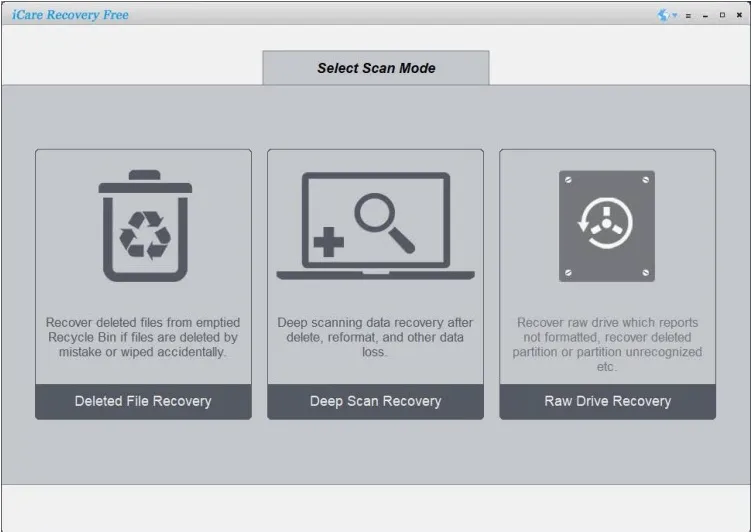
- Choose an appropriate mode. The Free edition guidance points to Deleted File Recovery for recent deletion, Deep Scan for broader searches, and RAW Drive Recovery for RAW or missing partitions.
- Select the source carefully. Check the device identity and capacity before starting.
- Inspect the results. Review candidate partitions where applicable. Preview important files when the application supports their format.
- Restore a sample elsewhere. Open the saved files in their normal applications and check their contents before committing to a license or larger recovery.
If a stable drive yields no usable files, another supported mode or tool may be worth evaluating. However, do not treat repeated scans as a substitute for diagnosing disconnections, read errors, or physical failure.
When Should You Buy, Switch Tools, or Stop?
Use the following situations to decide whether to continue with software, change the approach, or stop.
Your situation | Sensible next step |
A backup or cloud copy contains the missing files | Restore that copy first |
A healthy drive lost recently deleted files | Try the standalone Free edition before paying |
The Pro trial restores the files you need intact | Consider the appropriate paid license if you need more recovery |
A stable drive produces incomplete results | Compare another tool’s preview and sample recovery |
You prefer a single-PC perpetual option | Evaluate Magic Data Recovery’s perpetual plan |
The drive clicks or repeatedly disconnects | Stop DIY scanning and seek professional assessment |
There are also hard limits. Software cannot reconstruct file content that new data has overwritten. SSD TRIM can make deleted blocks unavailable to recovery applications. An encrypted volume needs the appropriate unlocking credentials; buying another scanner does not bypass encryption.
Conclusion: Is iCare Data Recovery Worth Using?
iCare Data Recovery retrieved every target file in our deletion and quick-format tests, but some saved contents were unusable. Two documents failed in both scenarios; the formatted-drive run also produced visual corruption in a MOV video and lost the directory structure. Its documented free options still deserve consideration when budget is the priority.
For a similar exFAT USB recovery task, we recommend evaluating Magic Data Recovery. It restored usable contents for all 47 files and preserved folders in both runs, although two filenames changed after formatting. Its documented file system error support is a separate capability, not a scenario tested here. The small dataset and single-run design limit how widely these findings apply.
For a broader recovery process, return to our deleted file recovery guide. Check backups first, protect the source, and stop if the hardware shows signs of failure.
Supports Windows 7/8/10/11 and Windows Server
FAQs
Is iCare Data Recovery really free?
Is iCare Data Recovery Pro safe to download?
Can iCare recover files after formatting?
Does iCare Data Recovery work on Mac?
Why do recovered files fail to open?
Does iCare Data Recovery Pro renew automatically?
Can recovery software retrieve files from a physically damaged drive?
Is Magic Data Recovery a good iCare alternative?

Jason is a data recovery and technical support specialist with over 15 years of hands-on experience. He has worked extensively with frontline users, troubleshooting difficult data loss cases and providing practical recovery solutions for accidental deletion, formatted drives, damaged file systems, lost partitions, system failures, and other recovery emergencies. His expertise also includes backup and restoration, file repair, and disaster recovery, with a strong emphasis on safe, reliable, and technically accurate guidance.