
刪除分割區會發生什麼事?MBR 與 GPT 的變化詳解
刪除分割區後會發生什麼事?分割區軟體會將該分割區的定義從磁碟的「活躍分割區佈局」中移除,因此 Windows 將無法再將該區域視為原始磁碟區來存取。此操作未必會覆寫所有檔案,但會使該空間可供重新使用,並可能導致剩餘資料面臨風險。.
MBR 磁碟與 GPT 磁碟的元資料變更細節有所不同。在 GPT 磁碟上,即使某個分割區消失,保護性 MBR 通常也不會改變。本文將說明一般 Windows 10 和 Windows 11 基本磁碟的這些差異,包括在 WinHex 中應檢查哪些項目。動態磁碟和儲存空間則需要另行分析。.
目錄
刪除分割區後會有什麼變化?
分割表用於識別磁碟區域。檔案系統則負責組織其中某個區域內的檔案。刪除分割區主要會改變第一層。.
圖層 | 角色 | 刪除普通分區的影響 |
分割表 | 定義分割區的位置與類型 | 已將選取的分區從已識別的佈局中移除 |
檔案系統元資料 | 記錄目錄、檔案配置及其他卷資訊 | 可能仍留在原分治地區,儘管已無法正常進出 |
檔案內容 | 儲存文件、圖片、影片及其他資料 | 在被覆寫或因其他原因而無法讀取之前,內容可能仍可讀取 |
Windows 磁碟區存取 | 透過磁碟機代號或掛載點呈現該磁碟區 | 該原始卷已無法透過原先的路徑取得 |
Windows 通常會將前一個分割區區域顯示為 未分配. 若從延伸分割區內部刪除一個 MBR 邏輯磁碟機,反而可能會留下 空白處 在該容器內。.
這兩項標籤均無法證明其底層的區段中包含零。.
刪除分割區也與幾項相關操作有所不同:
- 移除磁碟機代號 在保留已定義分割區的同時,變更存取路徑。.
- 格式化 在磁區內建立檔案系統結構。.
- 磁碟分割
清洗移除整個磁碟的分區資訊。. - 磁碟分割
清除所有內容在磁碟上寫入一連串的零。.
在評估尚可收回的金額時,不應將這些操作視為可互換的。.
MBR 分區表有哪些變更?
在傳統的 MBR 磁碟上,四個 16 位元組的磁區記錄佔用 字節 0x1BE–0x1FD LBA 0 的。.
紀錄 | 從磁碟起始位置算起的絕對位元組範圍 |
第一個分割區項目 |
|
第二個分割區條目 |
|
第三個分割區項目 |
|
第四個分割區項目 |
|
MBR 簽名 |
|
每個記錄包含分區類型、起始 LBA 以及扇區數。該 MBR 分區表指南 說明完整的記錄佈局。.
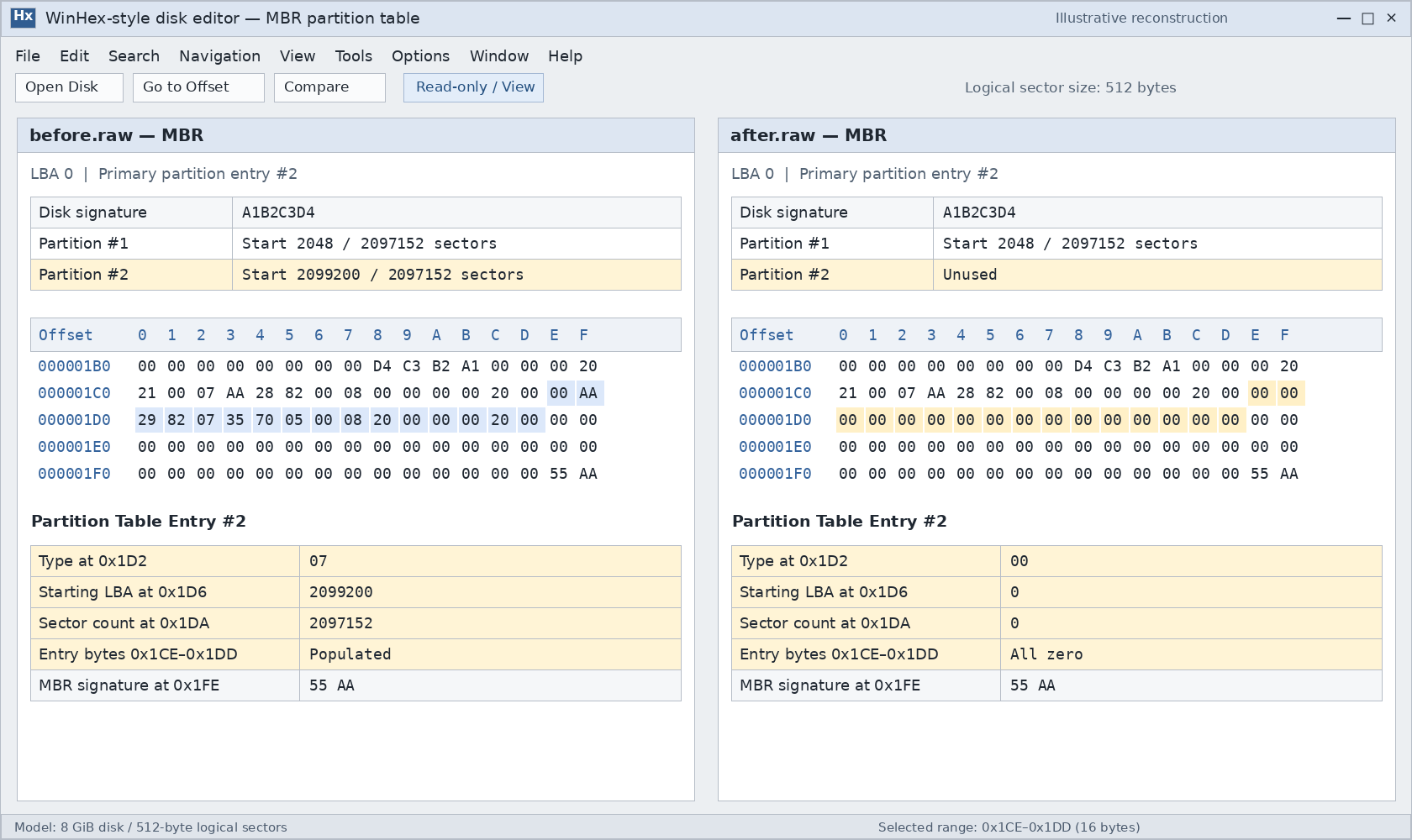
已刪除的項目將變為未使用狀態
常見的實作方式會將選定的分割區記錄清零。例如,util-linux 的分割區程式碼在刪除 MBR 主要分割區時,便會將該記錄清零。.
然而,實際寫入的位元組數屬於實作細節。請勿假設每個 Windows 公用程式和每個第三方分割區管理工具所產生的磁區映像都完全相同。.
已刪除的分區表條目不再是對原分區的有效描述。通常不會將其作為包含可恢復「已刪除」標記的完整記錄予以保留。.
範例: 假設有一個 MBR 主要分割區,起始位置為 LBA 2,048,並包含 2,097,152 個邏輯磁區。.
該記錄中的欄位 | 相對偏移量 | 刪除前 | 某個實作清除整個記錄後 |
分割區類型 |
|
|
|
起始 LBA |
|
|
|
扇區數 |
|
|
|
多位元組值採用小端序編碼。以 512 位元組的邏輯磁區計算,此範例分割區佔用 1 GiB。類型 0x07 僅憑此點並不能證明其檔案系統是 NTFS。.
整個 MBR 未必會消失
刪除一個主分割區,本身並不一定需要清除引導程式碼、磁碟簽名、其他分割區記錄或最後的 55 AA 簽名。.
因此,尋找 55 AA 刪除後並不能證明原始分割區仍然存在。.
邏輯磁碟機需要進行額外的檢查。其佈局取決於延伸分割區內的「延伸開機記錄」(Extended Boot Records,簡稱 EBR)。刪除操作可能會修改這些記錄或其連結,但同時會保留位於 LBA 0 處的頂層延伸分割區記錄。.
GPT 分割區刪除的元資料有哪些變化?
GPT 將其分割區定義儲存於一個分割區條目陣列中。通常的條目大小為 128 位元組,但實際大小由標頭提供。.
的 GPT 分割區條目結構 包含以下欄位:
現場 | 條目內的偏移量 | 刪除後的含義 |
分割區類型 GUID |
| 全零類型的 GUID 代表一個未使用的條目 |
唯一的分區 GUID |
| 可與該條目其餘內容一併刪除 |
起始 LBA |
| 當該項目未被使用時,不再將其定義為活躍分割區 |
LBA 結尾 |
| 與起始 LBA 相同的限制 |
屬性 |
| 可能已清除 |
分割區名稱 |
| 可能已清除 |
關鍵的區別在於 一個未使用的條目 和 一種能保證逐位元組刪除的模式.
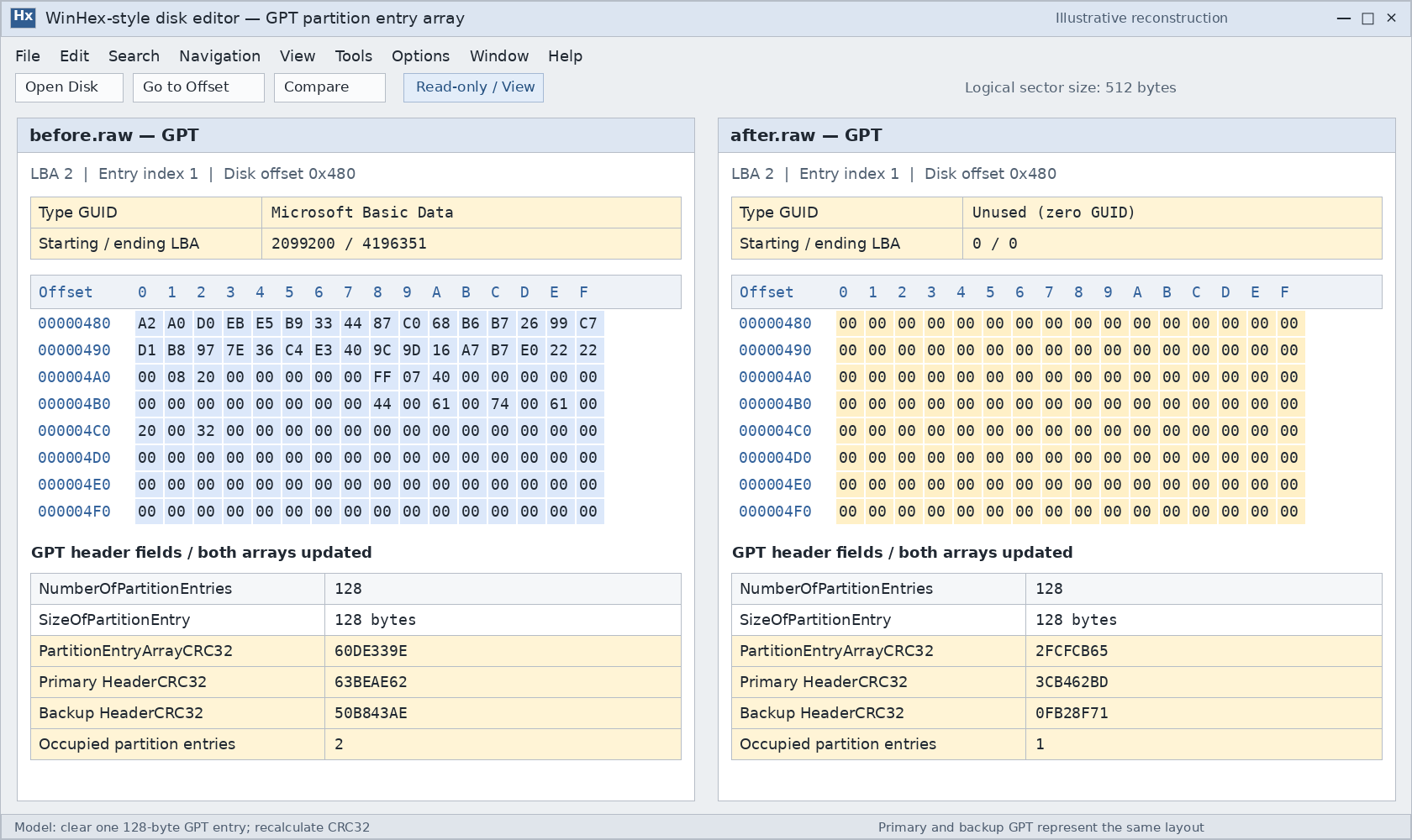
UEFI 將分區類型 GUID 為零的項目定義為未使用。分區軟體可能會清除整個項目;util-linux 提供了此行為的具體範例。針對特定的 Windows 操作,仍需分別擷取其執行前後的狀態,以精確確定該操作變更了哪些位元組。.
僅憑一個全為零的槽位,也無法證明曾發生刪除。該槽位可能從未被使用過。.
兩份 GPT 副本都應反映此刪除操作
GPT 會維護主分區與備份分區的元資料。若更新操作正確完成,這兩份副本都會被修改,以反映當前的分區佈局。.
這表示備用 GPT 通常是 並非撤銷副本 其中包含已被刪除的分區。在一般情況下,若刪除操作已成功完成,恢復該分區後,通常會還原為當前的相同佈局。.
在寫入中斷或資料損毀後,可能會殘留過期的備份,但這僅是需要調查的一種不一致狀況,而非可靠的復原方法。.
必須重新計算校驗和
若要變更條目陣列,必須更新其 PartitionEntryArrayCRC32. 由於該校驗和位於標頭內部,因此標頭的 標頭CRC32 也必須重新計算。.
的 GPT header guide explains these relationships.
Two fields are especially easy to misinterpret:
分區條目數is the number of available entry slots, not the number currently occupied. Deleting one partition normally does not reduce it.磁碟 GUIDidentifies the disk. Removing one partition does not inherently require changing that identifier.
Valid GPT checksums establish metadata consistency. They do not establish that the former partition’s files remain intact.
Does the Protective MBR Change When a GPT Partition Is Deleted?
Usually, its meaningful partition information does not change.
The structure sometimes called a GPT disk’s “virtual MBR” is more accurately called the protective MBR, or PMBR. It occupies LBA 0 and helps prevent older MBR-only utilities from treating the disk as empty.
A standard protective MBR contains one 0xEE record. That record protects the GPT disk area; it does not separately describe each GPT partition.
Protective record field | Normal meaning | Expected effect of deleting one GPT partition |
分割區類型 |
| Remains |
起始 LBA | LBA 1 | Remains LBA 1 |
扇區數 | Disk logical-block count minus one, capped at | Does not shrink by the deleted partition’s size |
Other three MBR records | Unused | Remain unused |
If the protective record occupies the first MBR slot, WinHex shows its type byte at absolute offset 0x1C2.
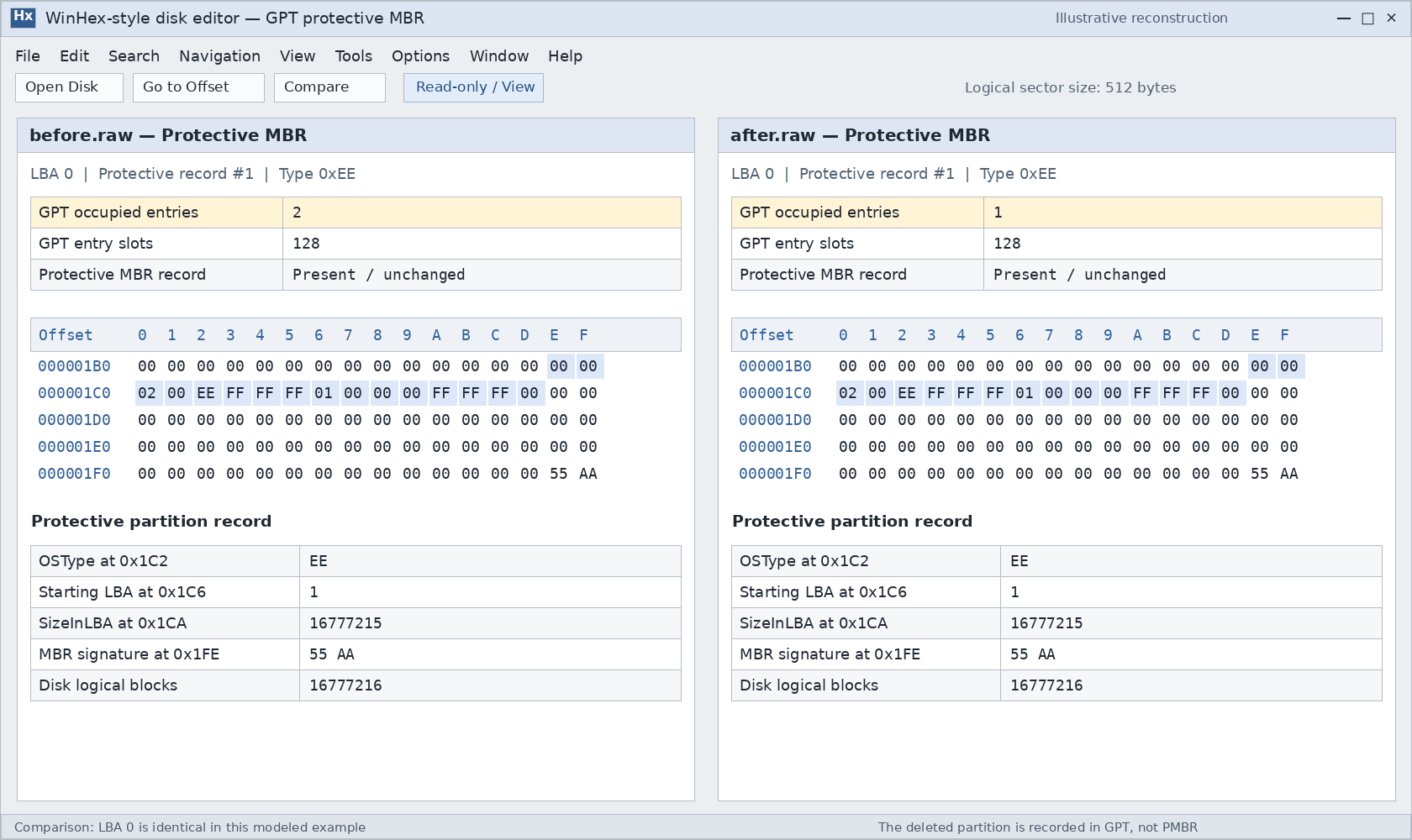
An unchanged protective MBR does not mean GPT partition deletion failed. The actual partition definitions reside in the GPT arrays.
Software can rewrite or normalize LBA 0 while saving changes, so an identical whole-sector comparison is not a universal requirement. Hybrid MBR layouts also require separate treatment because they contain additional legacy partition mappings.
What Happens to the File System and Files?
Removing a partition definition does not inherently require overwriting the former volume’s boot sector, NTFS Master File Table, FAT structures, or every file-data sector.
That separation explains how a scanner can sometimes locate a missing volume even after its partition-table record has been cleared.
However, “the partition table changed” is not enough to conclude that all file data survived:
- Additional formatting or signature-wiping operations can damage file-system metadata.
- New partitions and subsequent writes can overlap the original data.
- TRIM, UNMAP, or related deallocation behavior can make storage ranges unavailable through normal reads.
- Existing corruption may prevent a surviving file system from being reconstructed.
On SSDs and thin-provisioned storage, do not assume that avoiding new file copies guarantees recovery. Deallocation behavior depends on the operation, operating system, storage stack, and device.
The partition’s role also matters. Deleting a data partition removes normal access to its files. Deleting an EFI 系統分割區 can prevent startup even while the Windows partition remains present.
How to Inspect the Changes in WinHex
For an affected disk containing important files, preserve a disk image before investigating. Use a disposable test disk or virtual disk for a deliberate deletion experiment.
A reliable comparison requires images captured before and after the same operation. An after-only image cannot show exactly what changed.
Identify the disk and its logical sector size
In an elevated PowerShell window, these commands query the current layout:
Get-Disk |- Select-Object Number, FriendlyName, SerialNumber, PartitionStyle,
- Size, LogicalSectorSize, PhysicalSectorSize
After identifying the correct disk, inspect its recognized partitions:
Get-Partition -DiskNumber 3 |- Select-Object PartitionNumber, DriveLetter, Offset, Size, Type
3 is an example disk number. Confirm the actual device by its model, capacity, and identifier before substituting it.
These queries report the recognized layout; they do not recover a deleted entry.
Open the correct address space in read-only mode
Open the complete disk image in WinHex, or select the physical disk when direct examination is appropriate. Confirm Read-only/View mode in the information pane.
Opening a mounted volume starts from that volume’s address space. It does not present the whole disk’s LBA 0.
Use the device’s logical sector size when converting logical block addresses to byte offsets:
- Disk byte offset = LBA × logical sector size
Compare the relevant structures
For MBR, compare LBA 0, particularly the four partition records. Include the EBR chain when investigating a logical drive.
For GPT:
- Read the primary header at LBA 1.
- Obtain
PartitionEntryLBA,分區條目大小, 以及分區條目數. - Compare the relevant entries in both arrays.
- Check the array and header checksums.
- Compare the protective MBR separately.
For a zero-based entry index i, its disk byte offset is:
- PartitionEntryLBA × logical sector size
- + i × SizeOfPartitionEntry
範例: With 512-byte logical sectors, an array beginning at LBA 2, and 128-byte entries, entry index 0 begins at 0x400. These are example conditions, not universal offsets.
Finally, compare the former volume’s starting sector using its recorded pre-deletion location. A surviving boot sector is useful evidence, but it does not prove that every directory or file remains readable.
What Recovering a Deleted Partition Structure Requires
Recovering deleted partition structure means reconstructing a valid partition definition from surviving evidence. It differs from copying recoverable files to another disk.
A candidate structure needs more support than a familiar signature. Check:
- Whether the proposed start and length fit inside the disk.
- Whether the file system’s internal geometry agrees with those boundaries.
- Whether it overlaps any partition that must remain.
- Whether directories and representative files can be read.
- Whether the proposed layout preserves other required partitions.
TestDisk can search for lost partitions and write selected definitions. Its search results still require review; finding a candidate does not make writing it automatically correct.
If the immediate goal is retrieving documents or photos, recovering files to another physical disk can avoid committing a reconstructed layout first. The lost partition recovery guide explains how to choose an appropriate next step.
After reconstruction, verify the recognized boundaries, readable folders, and actual files. For a system disk, startup verification is a separate requirement. A successful partition-table write alone does not confirm a complete recovery.
常見問題
刪除最後一個分割區會將 GPT 轉換為 MBR 嗎?
備份的 GPT 能否還原一個被刻意刪除的分區?
「未分配」是否表示每個扇區都是空的?
CHKDSK 能否重建已刪除的磁碟區項目?
刪除分割區會將檔案移至「資源回收筒」嗎?
建立一個相同大小的分割區,就能恢復所有資料嗎?
在出售硬碟之前,僅刪除分區就足夠了嗎?

Jason 是一位擁有超過 15 年實務經驗的資料復原與技術支援專家。 他長期與第一線使用者密切合作,處理棘手的資料遺失案例,並針對誤刪資料、磁碟格式化、檔案系統損毀、分割區遺失、系統故障及其他緊急資料復原情況,提供實用的復原解決方案。其專業領域還涵蓋備份與還原、檔案修復及災難復原,並特別注重提供安全、可靠且技術上精準的指導。.