
What Happens When You Delete a Partition? MBR and GPT Changes Explained
What happens when you delete a partition? The partitioning software removes its definition from the disk’s active partition layout, so Windows can no longer access that region as the original volume. This does not necessarily overwrite every file, but it makes the space available for reuse and can put the remaining data at risk.
The exact metadata changes differ between MBR and GPT disks. On GPT, the protective MBR usually remains unchanged even though a partition disappears. This article explains those differences for ordinary Windows 10 and Windows 11 basic disks, including what to inspect in WinHex. Dynamic disks and Storage Spaces require separate analysis.
Table of Contents
What Changes When a Partition Is Deleted?
A partition table identifies disk regions. A file system organizes the files inside one of those regions. Deleting a partition primarily changes the first layer.
Layer | Role | Effect of ordinary partition deletion |
Partition table | Defines partition locations and types | The selected partition is removed from the recognized layout |
File-system metadata | Records directories, file allocation, and other volume information | May remain in the former partition region, although normal access is lost |
File contents | Stores document, image, video, and other data | May remain readable until overwritten or otherwise made unavailable |
Windows volume access | Presents the volume through a drive letter or mount point | The original volume is no longer available through its previous path |
Windows commonly displays the former partition region as Unallocated. An MBR logical drive deleted from inside an extended partition can instead leave Free space within that container.
Neither label proves that the underlying sectors contain zeros.
Partition deletion also differs from several related operations:
- Removing a drive letter changes an access path while leaving the partition defined.
- Formatting creates file-system structures within a volume.
- DiskPart
cleanremoves disk-wide partitioning information. - DiskPart
clean allwrites zeros across the disk.
These operations should not be treated as interchangeable when assessing what remains recoverable.
What Changes in the MBR Partition Table?
On a conventional MBR disk, four 16-byte partition records occupy bytes 0x1BE–0x1FD of LBA 0.
Record | Absolute byte range from disk start |
First partition entry |
|
Second partition entry |
|
Third partition entry |
|
Fourth partition entry |
|
MBR signature |
|
Each record includes a partition type, starting LBA, and sector count. The MBR partition table guide explains the complete record layout.
The deleted entry becomes unused
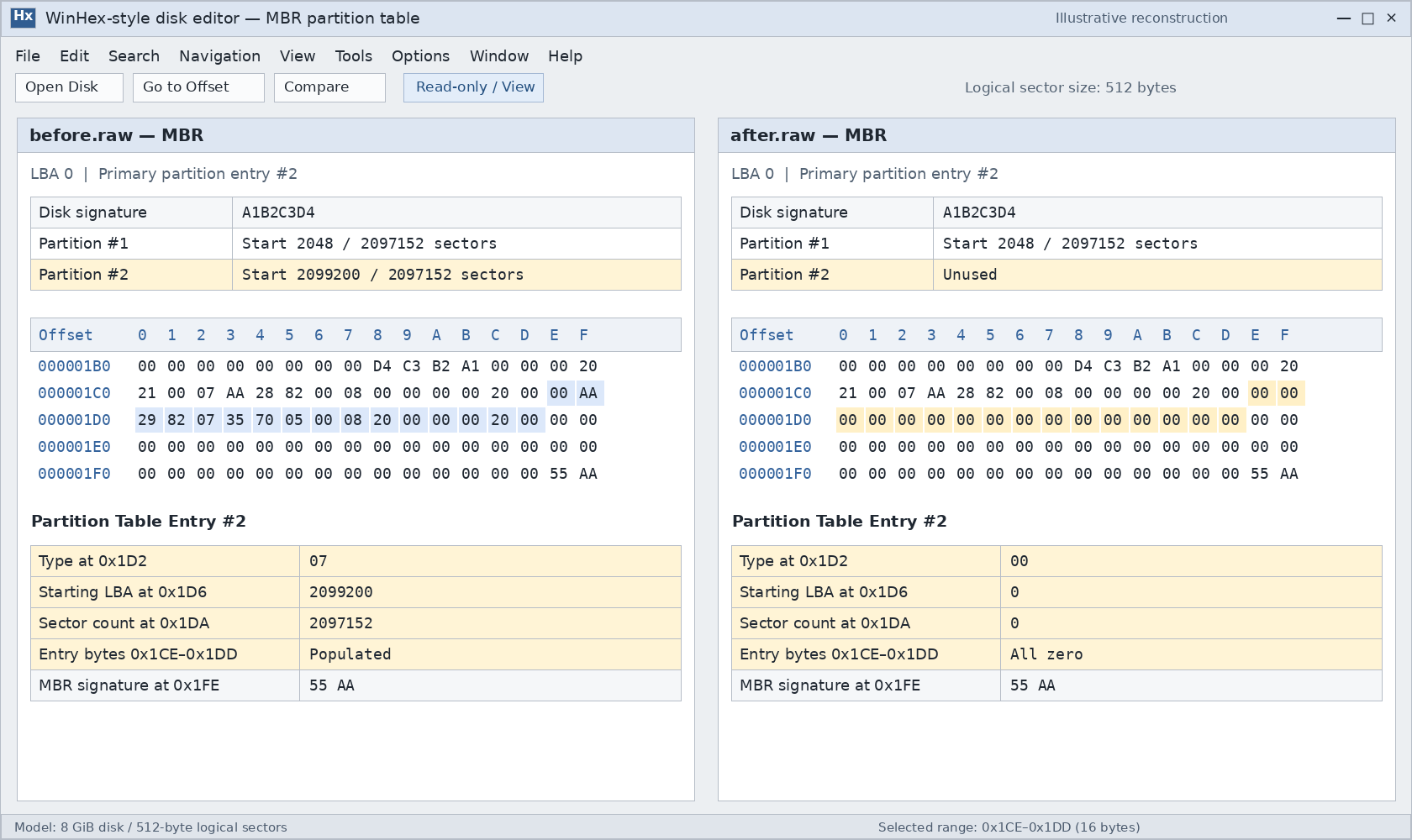
A common implementation clears the selected partition record to zeros. For example, the util-linux partitioning code clears the record when deleting an MBR primary partition.
However, the exact bytes written are an implementation detail. Do not assume that every Windows utility and every third-party partition manager produces an identical sector image.
A deleted partition table entry is no longer a valid description of the former partition. It is not normally retained as a complete record with a recoverable “deleted” flag.
Example: Consider an MBR primary partition beginning at LBA 2,048 and containing 2,097,152 logical sectors.
Field within its record | Relative offset | Before deletion | After an implementation clears the entire record |
Partition type |
|
|
|
Starting LBA |
|
|
|
Sector count |
|
|
|
The multi-byte values use little-endian encoding. With 512-byte logical sectors, this example partition occupies 1 GiB. Type 0x07 alone does not prove that its file system is NTFS.
The whole MBR does not have to disappear
Deleting one primary partition does not inherently require erasing the bootstrap code, disk signature, other partition records, or final 55 AA signature.
Consequently, finding 55 AA after deletion does not prove that the original partition still exists.
Logical drives require an additional check. Their layout depends on Extended Boot Records, or EBRs, inside an extended partition. Deletion can modify those records or their links while leaving the top-level extended-partition record present in LBA 0.
What Changes in GPT Partition Deletion Metadata?
GPT stores its partition definitions in a partition-entry array. The usual entry size is 128 bytes, but the header supplies the actual size.
The GPT partition entry structure contains the following fields:
Field | Offset within an entry | Meaning after deletion |
Partition type GUID |
| An all-zero type GUID identifies an unused entry |
Unique partition GUID |
| May be cleared with the rest of the entry |
Starting LBA |
| No longer defines an active partition when the entry is unused |
Ending LBA |
| Same limitation as the starting LBA |
Attributes |
| May be cleared |
Partition name |
| May be cleared |
The important distinction is between an unused entry and a guaranteed byte-for-byte deletion pattern.
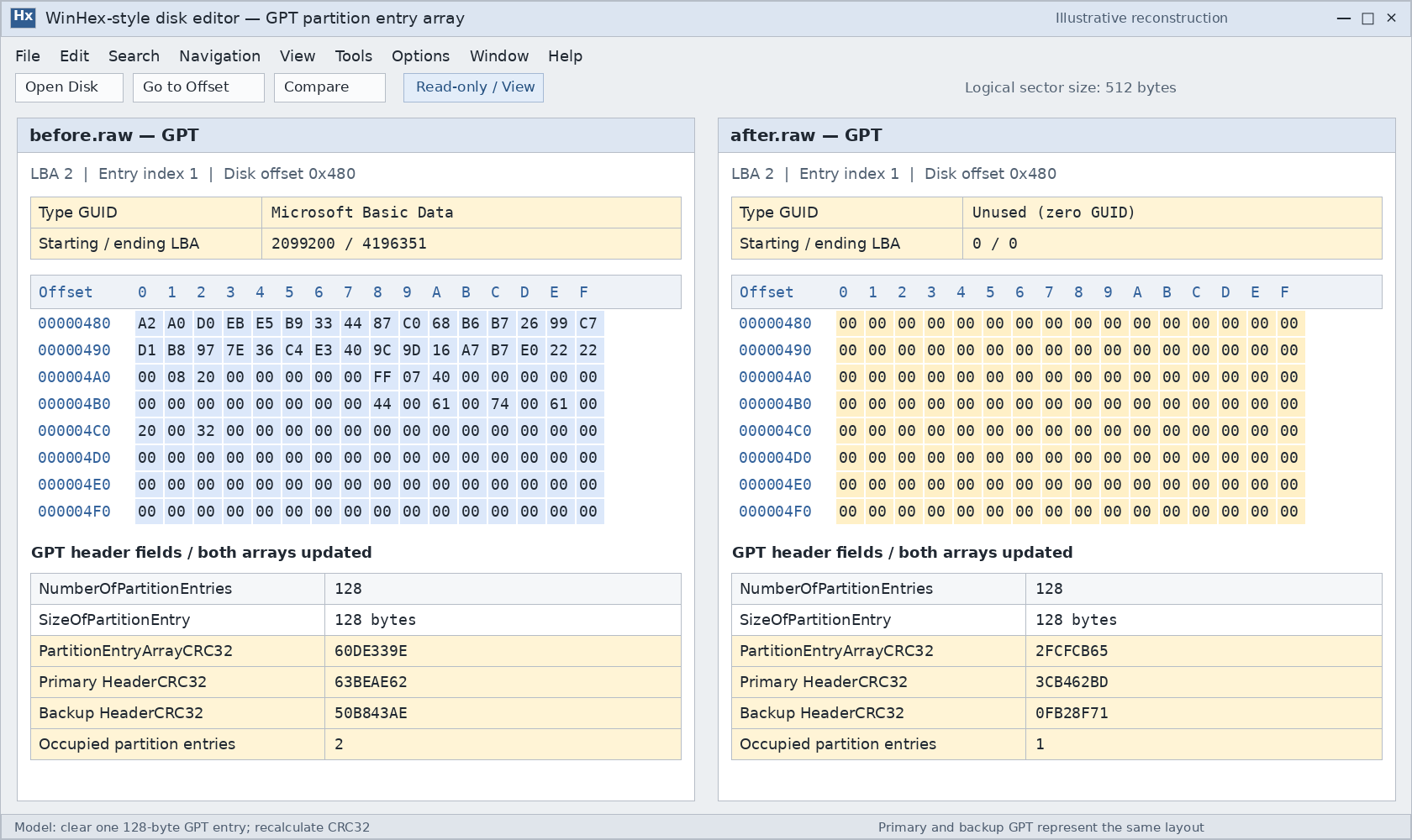
UEFI defines a zero partition type GUID as unused. Partitioning software may clear the whole entry; util-linux provides a concrete example of that behavior. A particular Windows operation still needs its own before-and-after capture to establish exactly which bytes it changed.
An all-zero slot alone also cannot prove that deletion occurred. The slot might never have been used.
Both GPT copies should reflect the deletion
GPT maintains primary and backup partition metadata. A correctly completed update changes both copies to describe the current layout.
This means the backup GPT is normally not an undo copy containing the deleted partition. Restoring it after an ordinary, successfully completed deletion usually restores the same current layout.
A stale backup may exist after interrupted writes or corruption, but that is an inconsistency to investigate rather than a dependable recovery method.
Checksums must be recalculated
Changing the entry array requires updating its PartitionEntryArrayCRC32. Because that checksum resides inside the header, the header’s HeaderCRC32 must also be recalculated.
The GPT header guide explains these relationships.
Two fields are especially easy to misinterpret:
NumberOfPartitionEntriesis the number of available entry slots, not the number currently occupied. Deleting one partition normally does not reduce it.DiskGUIDidentifies the disk. Removing one partition does not inherently require changing that identifier.
Valid GPT checksums establish metadata consistency. They do not establish that the former partition’s files remain intact.
Does the Protective MBR Change When a GPT Partition Is Deleted?
Usually, its meaningful partition information does not change.
The structure sometimes called a GPT disk’s “virtual MBR” is more accurately called the protective MBR, or PMBR. It occupies LBA 0 and helps prevent older MBR-only utilities from treating the disk as empty.
A standard protective MBR contains one 0xEE record. That record protects the GPT disk area; it does not separately describe each GPT partition.
Protective record field | Normal meaning | Expected effect of deleting one GPT partition |
Partition type |
| Remains |
Starting LBA | LBA 1 | Remains LBA 1 |
Sector count | Disk logical-block count minus one, capped at | Does not shrink by the deleted partition’s size |
Other three MBR records | Unused | Remain unused |
If the protective record occupies the first MBR slot, WinHex shows its type byte at absolute offset 0x1C2.
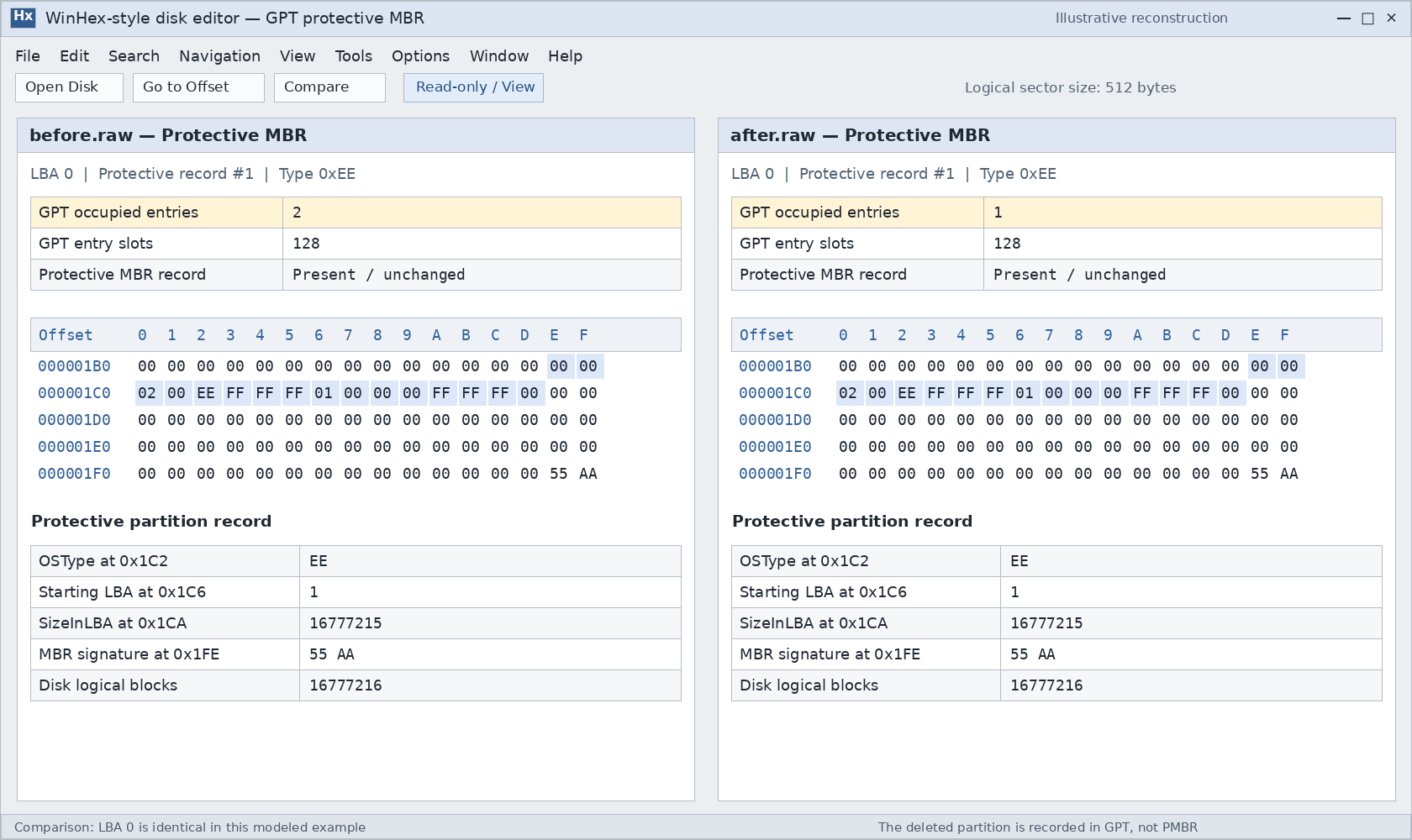
An unchanged protective MBR does not mean GPT partition deletion failed. The actual partition definitions reside in the GPT arrays.
Software can rewrite or normalize LBA 0 while saving changes, so an identical whole-sector comparison is not a universal requirement. Hybrid MBR layouts also require separate treatment because they contain additional legacy partition mappings.
What Happens to the File System and Files?
Removing a partition definition does not inherently require overwriting the former volume’s boot sector, NTFS Master File Table, FAT structures, or every file-data sector.
That separation explains how a scanner can sometimes locate a missing volume even after its partition-table record has been cleared.
However, “the partition table changed” is not enough to conclude that all file data survived:
- Additional formatting or signature-wiping operations can damage file-system metadata.
- New partitions and subsequent writes can overlap the original data.
- TRIM, UNMAP, or related deallocation behavior can make storage ranges unavailable through normal reads.
- Existing corruption may prevent a surviving file system from being reconstructed.
On SSDs and thin-provisioned storage, do not assume that avoiding new file copies guarantees recovery. Deallocation behavior depends on the operation, operating system, storage stack, and device.
The partition’s role also matters. Deleting a data partition removes normal access to its files. Deleting an EFI System Partition can prevent startup even while the Windows partition remains present.
How to Inspect the Changes in WinHex
For an affected disk containing important files, preserve a disk image before investigating. Use a disposable test disk or virtual disk for a deliberate deletion experiment.
A reliable comparison requires images captured before and after the same operation. An after-only image cannot show exactly what changed.
Identify the disk and its logical sector size
In an elevated PowerShell window, these commands query the current layout:
Get-Disk |- Select-Object Number, FriendlyName, SerialNumber, PartitionStyle,
- Size, LogicalSectorSize, PhysicalSectorSize
After identifying the correct disk, inspect its recognized partitions:
Get-Partition -DiskNumber 3 |- Select-Object PartitionNumber, DriveLetter, Offset, Size, Type
3 is an example disk number. Confirm the actual device by its model, capacity, and identifier before substituting it.
These queries report the recognized layout; they do not recover a deleted entry.
Open the correct address space in read-only mode
Open the complete disk image in WinHex, or select the physical disk when direct examination is appropriate. Confirm Read-only/View mode in the information pane.
Opening a mounted volume starts from that volume’s address space. It does not present the whole disk’s LBA 0.
Use the device’s logical sector size when converting logical block addresses to byte offsets:
- Disk byte offset = LBA × logical sector size
Compare the relevant structures
For MBR, compare LBA 0, particularly the four partition records. Include the EBR chain when investigating a logical drive.
For GPT:
- Read the primary header at LBA 1.
- Obtain
PartitionEntryLBA,SizeOfPartitionEntry, andNumberOfPartitionEntries. - Compare the relevant entries in both arrays.
- Check the array and header checksums.
- Compare the protective MBR separately.
For a zero-based entry index i, its disk byte offset is:
- PartitionEntryLBA × logical sector size
- + i × SizeOfPartitionEntry
Example: With 512-byte logical sectors, an array beginning at LBA 2, and 128-byte entries, entry index 0 begins at 0x400. These are example conditions, not universal offsets.
Finally, compare the former volume’s starting sector using its recorded pre-deletion location. A surviving boot sector is useful evidence, but it does not prove that every directory or file remains readable.
What Recovering a Deleted Partition Structure Requires
Recovering deleted partition structure means reconstructing a valid partition definition from surviving evidence. It differs from copying recoverable files to another disk.
A candidate structure needs more support than a familiar signature. Check:
- Whether the proposed start and length fit inside the disk.
- Whether the file system’s internal geometry agrees with those boundaries.
- Whether it overlaps any partition that must remain.
- Whether directories and representative files can be read.
- Whether the proposed layout preserves other required partitions.
TestDisk can search for lost partitions and write selected definitions. Its search results still require review; finding a candidate does not make writing it automatically correct.
If the immediate goal is retrieving documents or photos, recovering files to another physical disk can avoid committing a reconstructed layout first. The lost partition recovery guide explains how to choose an appropriate next step.
After reconstruction, verify the recognized boundaries, readable folders, and actual files. For a system disk, startup verification is a separate requirement. A successful partition-table write alone does not confirm a complete recovery.
FAQs
Does deleting the last partition convert GPT to MBR?
Can the backup GPT restore an intentionally deleted partition?
Does Unallocated mean every sector is empty?
Can CHKDSK recreate a deleted partition entry?
Does partition deletion put the files in the Recycle Bin?
Will creating a partition with the same size restore everything?
Is deleting a partition sufficient before selling a drive?

Jason is a data recovery and technical support specialist with over 15 years of hands-on experience. He has worked extensively with frontline users, troubleshooting difficult data loss cases and providing practical recovery solutions for accidental deletion, formatted drives, damaged file systems, lost partitions, system failures, and other recovery emergencies. His expertise also includes backup and restoration, file repair, and disaster recovery, with a strong emphasis on safe, reliable, and technically accurate guidance.