
磁碟複製開機測試:若無來源磁碟,Windows 能否正常啟動?
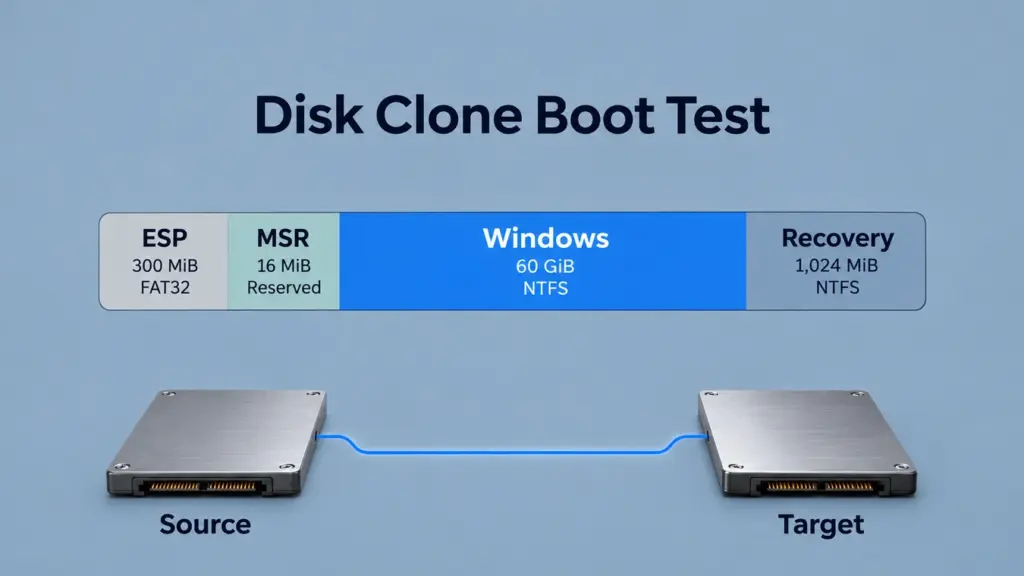
A 磁碟克隆開機測試 檢查目標系統是否能在未連接原始磁碟的情況下啟動 Windows。同時也確認由哪個實體磁碟執行安裝程序。然而,若在兩顆磁碟皆連接的狀態下成功進入桌面,可能會掩蓋來源 ESP 的依賴關係。本指南採用經計算得出的 GPT 佈局,並透過六種條件情境來追蹤該依賴關係。因此,通過標準結合了獨立啟動與目標系統身分驗證兩項條件。.
目錄
此磁碟克隆開機測試會檢查哪些項目?
此磁碟克隆開機測試旨在探討一個問題:複製的 Windows 能否透過目標磁碟上的開機檔案啟動?例如,參考系統在同一台電腦上採用 Windows x64、UEFI 及 GPT。 此外,此測試將儲存控制器配置維持不變。同時,此測試將加密功能排除在參考模型之外,並假設 Windows 檔案可讀取,且內部儲存裝置連接符合支援規範。.
核心的比對過程會變更來源磁碟的可用性,同時保持目標磁碟的分區邊界與 Windows 內容不變。隨後的重建過程則會變更目標磁碟的啟動檔案與開機參照。因此,這些屬於條件式模型狀態,其位址均為計算得出的;下文所述的「獨立啟動」程序則提供了驗證實體克隆的標準。.
關於啟動檔案與 Windows 系統本身之間的根本區別,請參閱 EFI 系統分割區如何支援 Windows 的啟動.
磁碟克隆開機測試的設定與參考佈局
項目 | 參考假設 |
電腦與開機模式 | 同一台電腦;Windows x64;UEFI |
來源與目標容量 | 各 64 GiB;68,719,476,736 位元組 |
邏輯扇區大小 | 512 位元組 |
分區配置 | GPT;ESP、MSR、Windows、還原 |
分區容量 | 300 MiB、16 MiB、60 GiB、1,024 MiB |
檔案系統 | FAT32 ESP;NTFS Windows 及還原分區;MSR 沒有檔案系統 |
NTFS 分配單位 | 假設為 4 KiB |
啟動先決條件 | 相容的驅動程式、可接受的開機二進位檔、可讀取的 Windows 檔案 |
參考佈局使磁碟克隆啟動測試能專注於啟動依賴項。其容量僅定義一個位址範例,而非硬體規格。然而,復原分割區所選定的容量,亦無法確定特定的自訂 Windows RE 映像是否適用。.
微軟的 UEFI/GPT 部署指南 將 ESP、MSR、Windows 分割區及還原分割區分開。例如,在此佈局中,ESP 始於 LBA 2,048, ,而 Windows 從 LBA 開始 649,216. 其計算出的位元組偏移量為 1,048,576 和 332,398,592, ,分別為。.
此渲染的比較圖顯示了完整的分區邊界,並明確標示了每個分區的容量與位址。.
克隆開機測試程序:情境 S1–S6
請使用以下六種條件進行磁碟克隆開機測試。將每個獨立案例重置為其所述的基準狀態。S2、S4 和 S5 對 S1 進行了獨立變更;S3 具有「連接來源」與「隔離來源」兩種狀態;S6 則在 S3 隔離後重建目標開機路徑。 這六種情境屬於測試條件,而非重複進行的硬體測試。.
S1 — 完整的克隆開機路徑
請定義所有四個目標分割區、可用的目標 ESP 檔案,以及可解析至該目標的韌體與 BCD 參照。此外,請確保來源不可用。磁碟克隆開機測試模型會將此路徑標記為符合獨立啟動檢查的條件。.
S2 — 僅限 Windows 版本
在保留已複製 Windows 分區的參考位置的同時,省略 ESP、MSR 及復原分區。因此,由於來源不可用,目標分區缺少此 UEFI 配置所需的 ESP 啟動檔案。由此可見,省略 ESP 是導致啟動失敗的直接原因;其餘省略項則各有其作用。.
S3 — 隱藏來源的 ESP 依賴關係
保留目標磁碟的四個分割區項目,但將其 ESP 定義為缺乏可用的 Windows 啟動檔案。取而代之的是,韌體會選取來源 ESP,其 BCD 會解析至目標 Windows。針對此磁碟複製啟動測試,請比較來源隔離前後同一目標磁碟的狀態。假設沒有其他可用的啟動路徑。.
S4 — 採用錯誤韌體模式進行克隆開機測試
請保留 S1 的目標佈局和檔案,但在提供該模式的機器上選擇「僅相容模式」啟動。因此,標準的 Windows UEFI/GPT 路徑無法透過該選項執行。.
S5 — 使用過期的 Windows 參考進行克隆開機測試
讓目標 ESP 保持可存取狀態,但將其 BCD 的 Windows 裝置參照設定為解析至一個不可用的舊分割區識別碼。假設沒有其他有效的載入器項目。結果,載入鏈會在預期的 Windows 安裝程序開始前停止。.
S6 — 重建目標開機路徑
從隔離的 S3 開始,建立目標 ESP 的啟動檔案及指向目標 Windows 的 BCD 參照,然後定義一個可抵達該 ESP 的韌體選取方式。重新評估依賴路徑。然而,符合資格的模型狀態仍需實際進行隔離啟動,才能滿足通過標準。.
若要進行實體驗證,請使用已備份的遷移目標磁碟或一次性測試磁碟。在進行任何複製或修復操作之前,請先根據裝置識別碼和容量確認來源與目標。請保留原始磁碟,直到目標磁碟通過獨立啟動檢查為止。.
磁碟克隆開機測試結果:隔離前後
在這次磁碟克隆開機測試中,請比較 經選定的 ESP 車主 並保持 Windows 分區不變。例如,以下圖像為條件模型的渲染視圖,其中採用了相同的目標、欄位順序及位址範圍。.
隔離之前:一條可達的跨驅動路徑
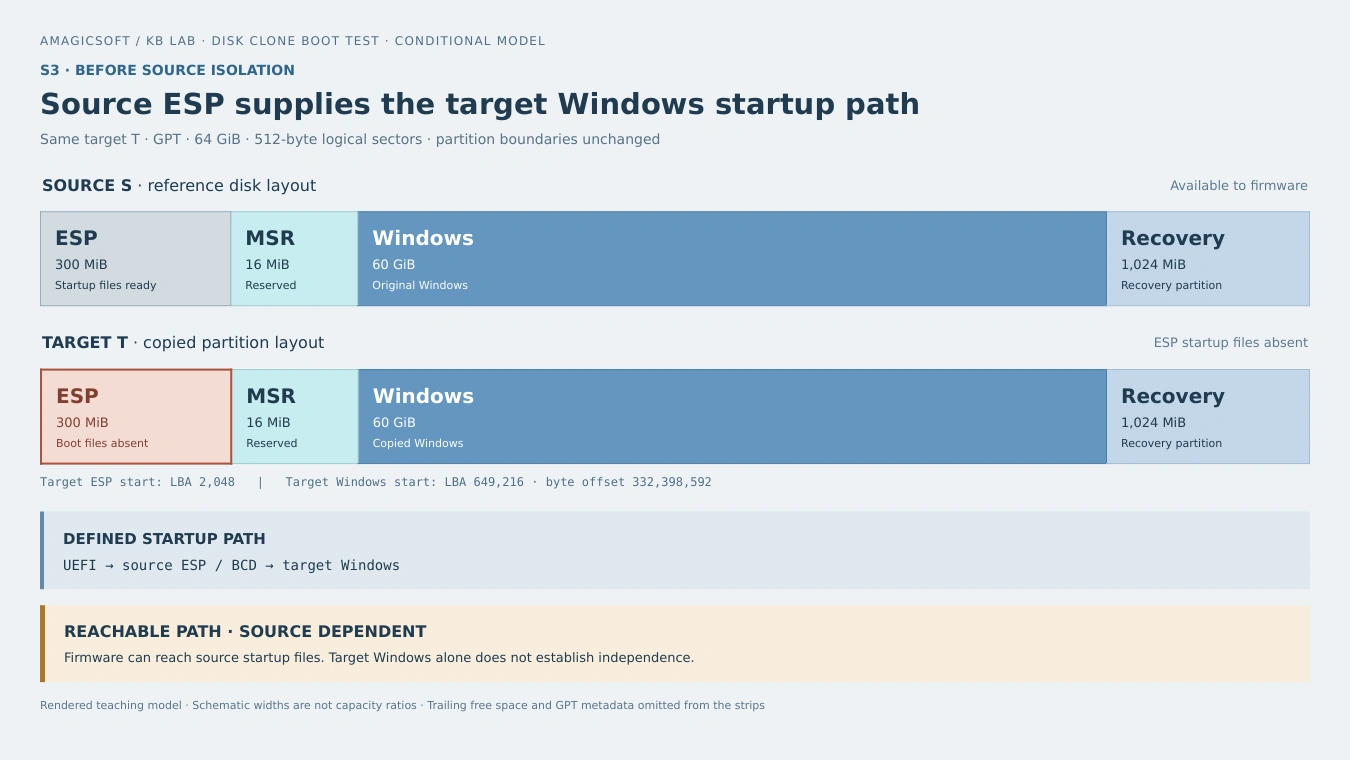
隔離前的 S3:來源 ESP 提供 Windows 啟動管理員 (Boot Manager) 和 BCD,而 Windows 安裝位於目標 P3 上。建模的鏈路是可達的,但啟動取決於來源。.
在此情況下,即使成功進入目標 Windows 桌面,仍會存在對來源磁碟的依賴性。因此,在磁碟克隆開機測試中,若僅檢查 Windows 系統,可能會忽略來源磁碟的啟動檔案。.
隔離後:同一目標沒有可用的啟動路徑
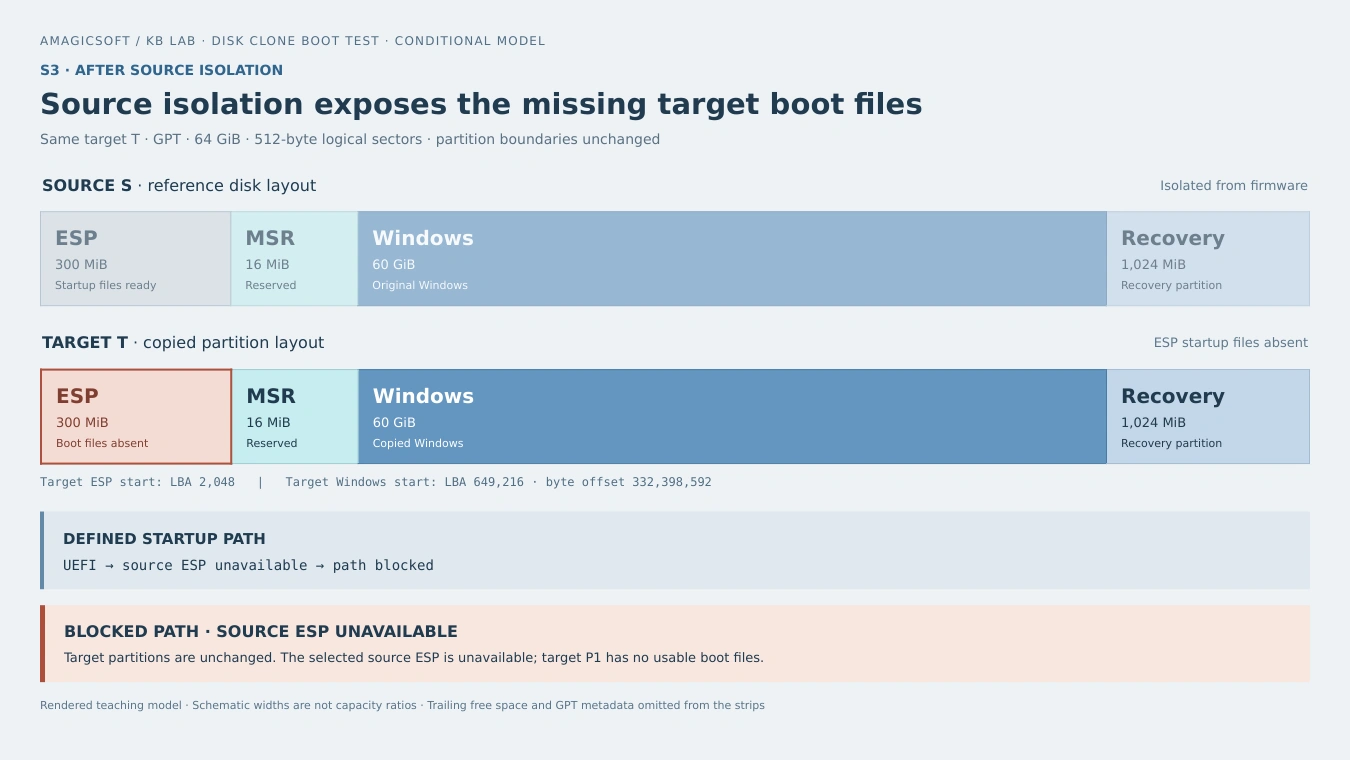
隔離後的 S3:目標 P3 及其邊界保持不變。選定的來源 ESP 已無法使用,且目標 P1 沒有可用的啟動檔案,因此定義的鏈路被阻斷。.
改變的輸入是「來源可用性」。該模型並不會刪除 Windows,也不會將其 NTFS 磁碟區轉換為 RAW 格式。相反地,它會移除對提供啟動路徑的 ESP 的存取權限。因此,相應的實際症狀可能是出現韌體開機選單畫面或啟動錯誤;其確切的提示文字則取決於韌體及可用的備用項目。.
重建之後:新創企業的先決條件須符合目標
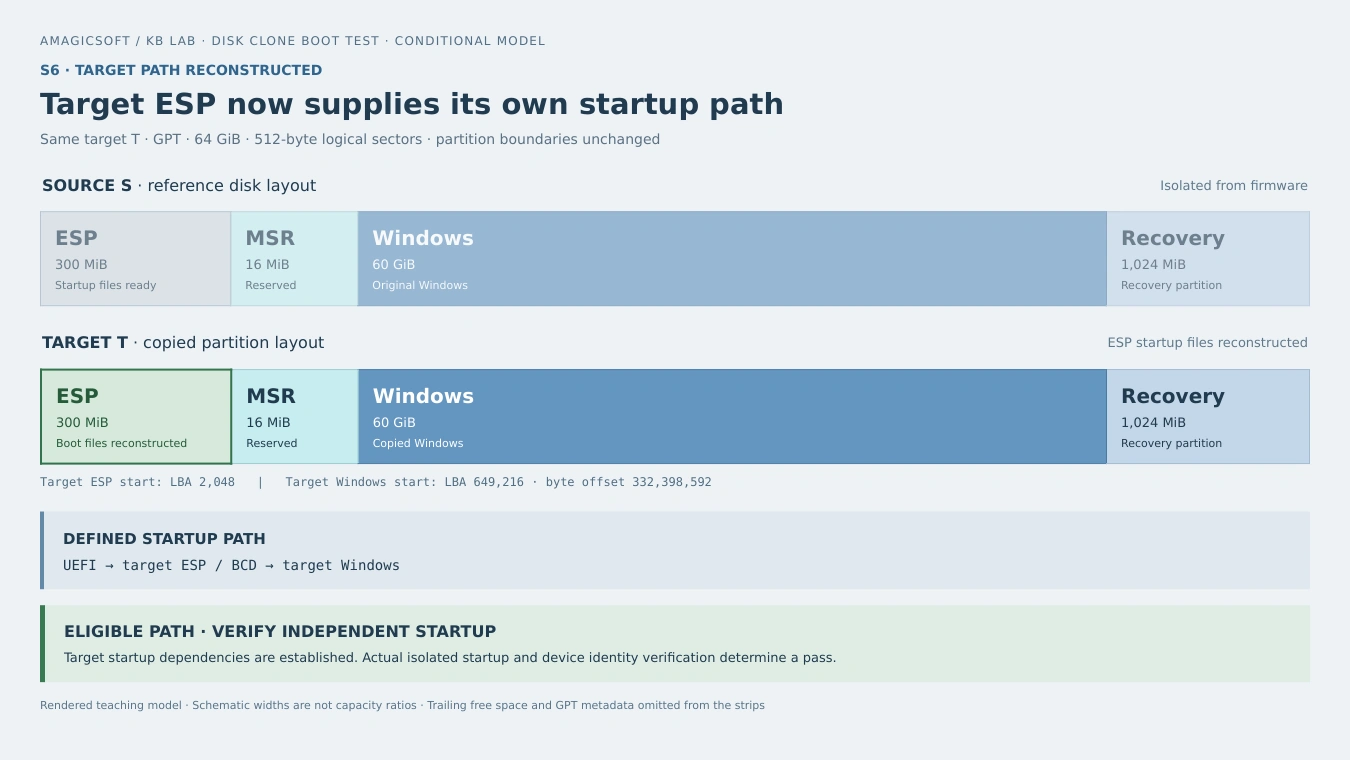
S6:目標 ESP 提供啟動檔案,韌體選項對應至目標 P1,而 BCD 解析為目標 P3。此建模路徑符合獨立啟動檢查的條件。.
重建過程會變更啟動依賴項,同時保留 Windows 分割區的位置。請使用互動式比較功能,檢視所有六種磁碟克隆啟動測試情境以及計算出的分割區位址。.
互動式克隆開機測試比較
比較各種情境,然後檢查分割區位址。.
S2 會複製 Windows,但會省略 ESP、MSR 及 Recovery。.
點擊分區以查看位址;在狹窄螢幕上請滑動。紅色:缺少分區/啟動檔案。綠色:已重建 ESP。.
寬度僅供示意。虛線標示的空隙可能合併。GPT 元資料、對齊空隙及尾端空閒空間(2.69 GiB)均未列入。.
分割區位址
| 分區 | 容量 | 格式 | 起始 LBA | LBA 結束 | 位元組偏移量 |
|---|---|---|---|---|---|
| P1 · ESP | 300 MiB | FAT32 | 2,048 | 616,447 | 1,048,576 |
| P2 · MSR | 16 MiB | 無 | 616,448 | 649,215 | 315,621,376 |
| P3 · Windows | 60 GiB | NTFS | 649,216 | 126,478,335 | 332,398,592 |
| P4 · Recovery | 1,024 MiB | NTFS | 126,478,336 | 128,575,487 | 64,756,908,032 |
Disk-absolute LBAs, inclusive. Offset=LBA×512. Last usable:134,217,694; tail:5,642,207 sectors. S3/S6 boundaries unchanged.
情境
| 案例 | 狀況 | Modeled path |
|---|---|---|
| S1 | Full clone | Eligible |
| S2 | Windows only; no ESP | Blocked |
| S3 | Source ESP | Connected: reachable; isolated: blocked |
| S4 | Legacy mode | UEFI blocked |
| S5 | Stale BCD | Windows blocked |
| S6 | Rebuilt ESP | Eligible |
Eligible paths still require actual source-isolated startup and target identity checks.
Why a Cloned Disk Can Fail to Boot
A disk clone boot test checks several links in the startup chain. Firmware entries, ESP contents, and BCD configuration each play a separate role. First, firmware selects an EFI application. Next, Windows Boot Manager reads the boot configuration and starts the Windows loader. Therefore, an ESP partition can exist while its files are missing, or valid files can exist while the selected boot reference points elsewhere.
的 UEFI Boot Manager specification describes firmware boot options and their device paths. Copying disk contents does not, by itself, copy the motherboard’s NVRAM configuration.
Partition identity also matters. A partition’s type GUID identifies its role; its unique GUID identifies that partition. Amagicsoft’s GPT partition entry structure and GUID fields explain that distinction. If a migration changes identities, boot references must still resolve correctly. If cloning preserves identities, those copied GUIDs cannot distinguish the physical source from the target reliably.
Likewise, a valid GPT header and its checksums establish partition-metadata consistency, rather than a complete Windows startup path. S3 keeps the target layout fixed while changing whether its external startup dependency remains available.
How to Run an Independent Clone Boot Test
Therefore, the following disk clone boot test steps connect startup checks to the target’s physical identity.
Record the Target and Isolate the Source
- Record physical identity. Before shutdown, note the target’s model, serial number or device identifier, capacity, and connection location. In Windows,
Get-Disk | Format-List Number,FriendlyName,SerialNumber,UniqueId,Guid,Size,Location,IsBoot,IsSystemprovides useful fields. Cross-check identifiers because adapters can omit or alter what they expose. - Make the source unavailable to firmware. Shut down fully, then disconnect the source safely or use a documented firmware setting that actually removes its storage path. Remove recovery USB media and other drives that could supply startup files. The source must be unavailable to firmware during the disk clone boot test. Setting it offline inside Windows is insufficient because firmware runs earlier.
- Select the target startup path. Keep the appropriate UEFI mode and existing security policy. Next, choose the Windows Boot Manager entry associated with the target. An entry’s display name alone may not identify the physical device.
Verify Windows and Its Startup Partition
- Start Windows and map its partition. 使用
Get-Partition -DriveLetter C | Get-Diskwhen the running Windows installation usesC:. Then, match the returned device to the recorded target. Adjust the letter if necessary; disk numbers and drive letters can change between environments. - Check the startup partition too. 檢查
Get-Partition | Format-Table DiskNumber,PartitionNumber,DriveLetter,IsBoot,IsSystem. Windows terminology distinguishes the running Windows partition from the system partition containing startup files. With alternative startup drives unavailable, confirm both roles map to the intended target. - Check a further startup and representative files. Perform a restart and a full shutdown/startup with the source still unavailable. Also, open important documents and applications. Record startup verification and file checks separately, because a working boot path does not establish that every copied file is intact.
微軟在文件中說明了 Get-Partition queries, partition status properties, 以及 disk identity properties. Use those fields together with source isolation and the physical device record.
When a Clone Boot Test Points to Startup Repair
If Windows is readable but its ESP files or BCD need repair, Microsoft BCDBoot can rebuild the boot environment. First, identify the target Windows directory and its ESP. Drive letters in recovery mode can differ from normal Windows.
One detail matters when interpreting a repair: specifying BCDBoot’s /s option directs the system-partition destination but does not create a firmware NVRAM entry. A file-copy completion message therefore leaves firmware selection as a separate check. The S6 model includes both corrected target files and a working target firmware selection. After repair, repeat the disk clone boot test with the source still unavailable.
If the target instead appears RAW, has missing partitions, or reports read errors, reassess its layout, file-system state, and clone completeness before writing repairs. A missing boot entry alone does not explain a RAW Windows volume. Preserve recoverable files before further changes when the source or target is damaged.
總結
有用的 磁碟克隆開機測試 ends with an identified target starting Windows independently. The central comparison explains why that standard matters: Windows can occupy the target while the selected ESP remains on the source. Isolating the source exposes the dependency without changing the target’s Windows partition.
Judge the migration in stages. First check the target layout and startup files. Next make the source and alternative startup media unavailable. Then start Windows and verify the physical target and startup partition. Keep the original drive until those checks succeed, and validate important files separately. This distinguishes a complete copy operation, a coherent startup configuration, and a verified independent startup—three results that require different evidence. Complete the disk clone boot test before you erase or reuse the original drive.
Disk Clone Boot Test FAQ
克隆機能否安裝到另一塊主機板上?
BitLocker 會影響克隆後的首次開機嗎?
較大的目的地是否需要進行不同的檢測?
缺少 Windows RE 是否代表 Windows 無法啟動?
為了進行測試,是否應停用「安全開機」功能?
此程序是否可驗證 USB 開機安裝?

Vasilii 是一位在該領域擁有約 10 年實務經驗的資料復原專家。在他的職業生涯中,他已成功解決數千個複雜的個案,包括刪除的檔案、格式化的硬碟機、遺失的磁碟分割和 RAW 檔案系統。他的專業知識涵蓋使用十六進位編輯器等專業工具的手動復原方法,以及使用復原軟體的進階自動解決方案。Vasilii 的使命是讓 IT 專業人士和一般使用者都能獲得可靠的資料復原知識,協助他們保護寶貴的數位資產。.