
GPT 分區條目:結構、陣列與 GUID 欄位
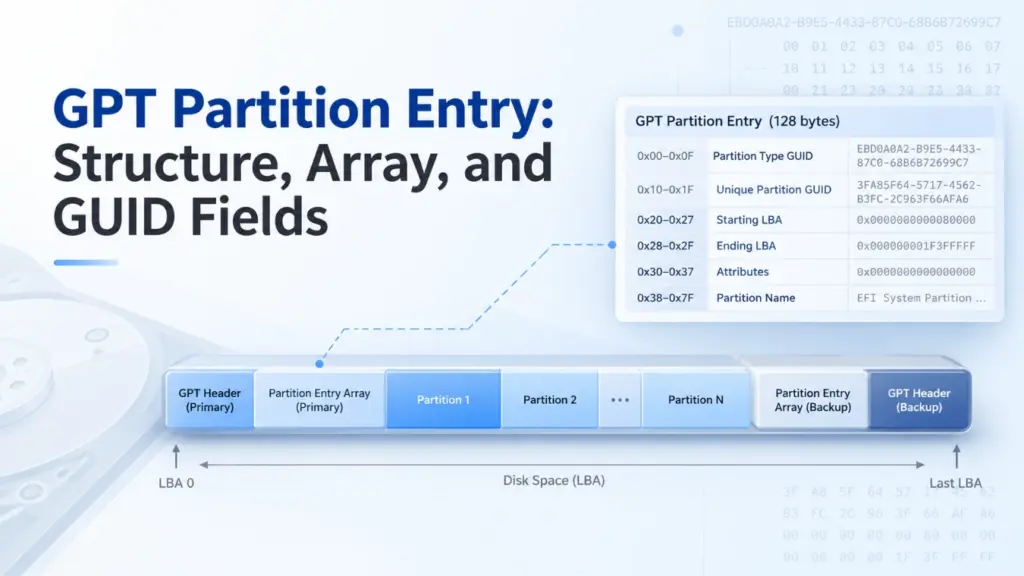
A GPT 分區項目 是一種記錄,用以描述 GUID 分割表 (GPT) 磁碟上的某個分割區。它會標示該分割區的類型、唯一的 GUID、起始與結束的邏輯區塊位址 (LBA)、屬性以及名稱。通常 GPT 分割區條目結構 佔用 128 位元組。透過解碼這些欄位,您可以定位一個分割區、計算其大小,並檢查其元資料是否合理。.
本指南遵循 UEFI 規範 2.10,並以 Windows 10、Windows 11 及 Windows Server 作為實務範例。其底層的 GPT 格式亦適用於其他相容的作業系統。以下所有位元組範例均為模擬生成,並非來自實際磁碟的擷取資料。.
目錄
什麼是 GPT 分區條目?
A GPT 分區項目 定義了分割區的識別資訊與邊界;它並不包含該分割區的檔案。要了解其位置,請將以下三種結構區分開來:
結構 | 儲存的內容 |
GPT 標題 | 陣列位置、元素數量與大小、可用 LBA 範圍,以及校驗和 |
GPT 分區條目陣列 | 一組分區記錄,其中包含未使用的槽位 |
GPT 分區項目 | 某個分割區的 GUID、邊界、屬性及名稱 |
該項目會引導作業系統前往某個邏輯區塊區域。該區域可能包含 NTFS、FAT32、exFAT、其他檔案系統,或是未採用傳統檔案系統的資料。.
關於整體磁碟佈局,請參閱 Amagicsoft 的 GUID 分割表 (GPT) 概述.
GPT 分區條目結構:六個欄位及其偏移量
UEFI 規範 2.10,第 5.3.3 節 定義了標準的 128 位元組 GPT 分割區條目結構:
現場 | 相對偏移量 | 長度 | 意義 |
|
| 16 位元組 | 預設分割區類型 |
|
| 16 位元組 | 此特定分割區的識別碼 |
|
| 8 位元組 | 第一個邏輯區塊 |
|
| 8 位元組 | 最後一個邏輯區塊(含該區塊) |
|
| 8 位元組 | 64 位元屬性遮罩 |
|
| 72 位元組 | 以 UTF-16LE 碼元儲存的名稱 |
這些偏移量從 一則條目, ,而非位於磁碟的起始處。此外,128 位元組是常見的條目大小,但並非唯一有效的值。在 UEFI 2.10 之下,, 分區條目大小 必須等於 128 × 2^n, 其中為非負整數 n. 對於較大的條目,偏移量之後的位元組 0x7F 這些是保留的,且必須為零。.
這兩個 GUID 欄位
分區類型 GUID 告知軟體該項目所描述的分區類型為何。. 唯一分割區 GUID 用以識別特定分割區。例如,兩個「基本資料」分割區可能共用同一個類型 GUID,但不應共用同一個唯一分割區 GUID。.
這兩個欄位都不是 GPT 磁碟識別碼。該 磁碟 GUID 屬於 GPT 標頭。.
LBA 邊界與區塊大小
A GPT 分區項目 將這兩個端點皆儲存為無符號、小端序的 64 位元整數。因為 EndingLBA 若包含在內,請按以下方式計算區塊數與容量:
區塊數 = 結束 LBA − 起始 LBA + 1
以位元組為單位的大小 = 區塊數 × 邏輯區塊大小
若某個分割區的範圍從 LBA 2048 到 LBA 4095,則該分割區涵蓋 2,048 個區塊。 若採用 512 位元組的邏輯區塊,其大小為 1 MiB;若採用 4096 位元組的邏輯區塊,其大小則為 8 MiB。切勿假設 LBA 總是代表 512 位元組。.
屬性與區段名稱
的 屬性 該欄位儲存一個 64 位元遮罩。 UEFI 將第 0 位元定義為「必需分割區」、第 1 位元定義為「無區塊 I/O 協定」,以及第 2 位元定義為「傳統 BIOS 可開機」。在 UEFI 2.10 版本中,第 3 至 47 位元為保留位元,而第 48 至 63 位元則依分割區類型而定。.
對於適用的 Windows 分割區類型,, 微軟的 GPT 分割區資訊文件 定義了高位標誌,包括唯讀(第 60 位元)、影子副本(61)、隱藏(62)以及無預設磁碟機代號(63)。請勿將這些 Windows 的定義不加區分地套用至所有分區類型。.
分割區名稱 包含 36 個 UTF-16 碼元(72 位元組)。較短的名稱則使用空字元結尾。重要的是,此 GPT 名稱與儲存於檔案系統中的磁碟區標籤不同。讀取一個 GPT 分區項目 僅憑此並不能確定 Windows 針對已掛載的磁碟區所顯示的標籤。.
GPT 分區條目陣列的運作原理
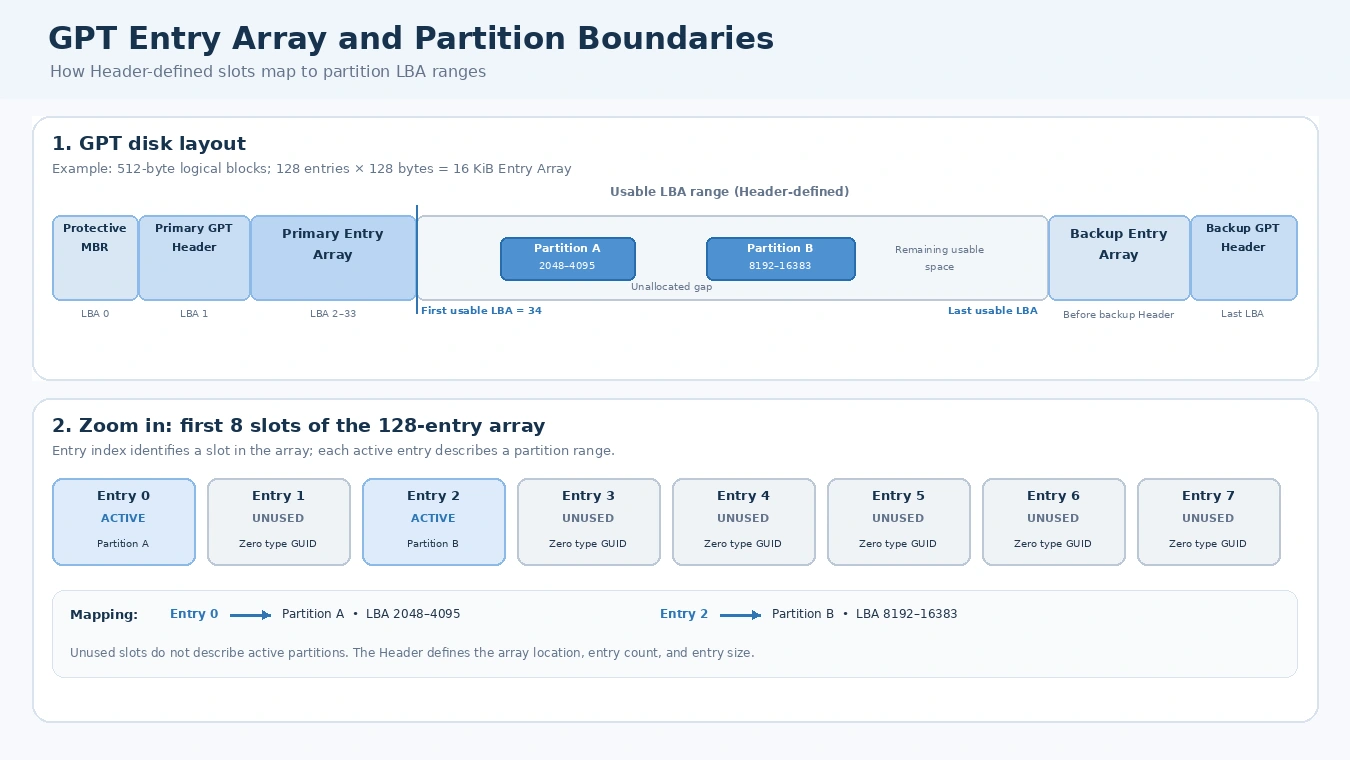
的 GPT 分割區條目陣列 包含多個大小相等的連續區段。其 GPT 標頭指定 PartitionEntryLBA, 分區條目數, 以及 分區條目大小. 因此,軟體必須先讀取標頭,才能可靠地定位特定記錄。.
陣列 bytes = 分割區條目數 × 分割區條目大小
陣列邏輯區塊數 = ceiling(陣列位元組 ÷ 邏輯區塊大小)
UEFI 2.10 要求 Entry Array 至少需有 16,384 位元組的空間。常見的配置是使用 128 個插槽,每個插槽為 128 位元組。 因此,在 512 位元組的邏輯區塊磁碟上,它會佔用 32 個區塊;而在 4096 位元組的磁碟上,則佔用 4 個區塊。然而,128 並非通用的分割區上限。該數值由標頭(Header)所指定。.
未使用的插槽值為零 分區類型 GUID; ;在維護得當的陣列中,其其餘位元組也應為零。因此,128 個可用槽位會 不是 意即有 128 個活躍分割區。.
透過索引查找特定條目
尋找條目 i, ,其中 i 若從零開始,請使用:
絕對位元組偏移量 = (PartitionEntryLBA × 邏輯區塊大小) + (i × 分區條目大小)
舉例來說,假設 PartitionEntryLBA = 2, SizeOfPartitionEntry = 128, 以及 i = 5.
邏輯區塊大小 | 計算出的絕對偏移量 | 磁碟上的位置 |
512 位元組 |
| LBA 3,第 128 位元組 |
4096 位元組 |
| LBA 2,第 640 位元組 |
這些是針對一個已給定範例的計算結果,並非對兩台實體裝置的觀測結果。請注意,相同的 GPT 分區項目 當裝置的邏輯區塊大小發生變化時,索引可能會落在不同的 LBA 上。.
主陣列與備援陣列
傳統的 GPT 磁碟會將其主標頭置於 LBA 1,並將備用標頭置於最後一個 LBA。主條目陣列通常緊接在主標頭之後;備用條目陣列則位於備用標頭之前。這些位置是由各自的標頭欄位決定的,而非由通用的硬編碼扇區範圍所決定。.
我們的 GPT 標頭結構與 CRC32 指南 詳細說明了這些標頭欄位,以及兩個陣列之間的關係。.
GPT 分割區類型 GUID 與唯一分割區 GUID 的比較
A GPT 分割區類型 GUID 說明該分割區的預期用途。唯一分割區 GUID 用於識別特定分割區,而磁碟 GUID 則用於識別 GPT 磁碟。這三種識別碼雖然相互關聯,但不可互換。.
Common Windows-related type GUIDs include:
Partition type | Type GUID |
EFI 系統分割區 |
|
Microsoft Reserved |
|
Microsoft Basic Data |
|
Microsoft Recovery |
|
A type GUID does 不是 directly identify a file system. For example, a Microsoft Basic Data partition could hold NTFS, FAT32, or exFAT. To recognize its file system, software must inspect data inside the partition.
Likewise, not every GPT disk has an EFI System Partition. An ordinary GPT data disk may not need one.
When copying disks, duplicate unique identifiers can also matter. UEFI requires GPT-aware copying software to generate appropriate new Disk GUIDs and Unique Partition GUIDs. A raw clone may preserve identifiers instead, so never assume that an exact copy has newly generated GUIDs.
Decode a GPT Partition Entry from Hex
Here is the article’s worked technical example: a synthetic GPT 分區項目 built from the UEFI field layout. It is internally consistent as a single entry, but it is not a complete GPT disk image or a real-world experiment.
現場 | Decoded example |
類型 | Microsoft Basic Data |
Type GUID |
|
Unique GUID |
|
Starting LBA | 2048 |
Ending LBA | 4095 |
屬性 |
|
Partition Name |
|
Synthetic Basic Data partition entry, not a WinHex capture or a reading from your device. The entry is internally consistent; no complete disk layout or GPT header CRC is asserted.
Step 1: Decode the type GUID
The first 16 bytes are:
A2 A0 D0 EB E5 B9 33 44 87 C0 68 B6 B7 26 99 C7
The on-disk GUID representation uses little-endian byte order for its first 4-byte, 2-byte, and 2-byte components. Therefore:
A2 A0 D0 EB成為EBD0A0A2.E5 B9成為B9E5.33 44成為4433.- The remaining eight bytes produce
87C0-68B6B72699C7.
The complete value is the Microsoft Basic Data type GUID. See Microsoft’s GUID representation specification for the underlying encoding.
Step 2: Decode the LBA fields
At relative offset 0x20, the bytes 00 08 00 00 00 00 00 00 represent decimal 2048 in little-endian order.
在 0x28, FF 0F 00 00 00 00 00 00 represents decimal 4095. Therefore, this GPT 分區項目 describes 2,048 logical blocks, not 2,047.
If the device exposes 512-byte logical blocks, the starting byte offset equals 2048 × 512 = 1,048,576. If it exposes 4096-byte blocks, the corresponding offset is 8,388,608.
Step 3: Decode attributes and name
The example’s attribute bytes are all zero, so no attribute bits are set. At relative offset 0x38, the name starts with 44 00 41 00 54 00 41 00, which decodes to DATA in UTF-16LE.
A hex editor’s ASCII column may show D.A.T.A. because it treats the zero bytes as nonprintable characters. However, those periods are not part of the partition name.
Together, these steps let you move from raw bytes to a readable GPT 分區項目 without treating GUID text, LBA values, and UTF-16LE text as if they shared one encoding.
How to Validate a GPT Partition Entry
A decoded GPT 分區項目 is not necessarily a valid description of the disk. Check its fields against the GPT Header and other active entries.
檢查 | What to verify | 為何重要 |
Active slot |
| All-zero type marks an unused slot |
LBA order |
| Rejects reversed or empty ranges |
Usable range | Both endpoints fall between | Keeps partitions out of reserved GPT space |
Overlap | Active entries describe disjoint ranges | Avoids conflicting partition descriptions |
Identifiers | Appropriate nonduplicate Unique Partition GUIDs | Avoids identity conflicts |
Reserved bits | Required reserved bits and bytes are zero | Checks compliance with the entry format |
These checks reveal metadata consistency, not the original cause of a failure. A GPT 分區項目 is only one part of a broader disk-layout check. A boundary can be invalid even when its two 64-bit fields decode without error.
CRC32 checks cover the whole Entry Array
GPT does not store a CRC32 in each entry. Instead, the Header stores PartitionEntryArrayCRC32, calculated over exactly 分區條目數 × 分區條目大小 bytes. This range includes unused entry slots, but excludes any logical-block padding after the declared array length.
If software modifies a GPT 分區項目, it must update the Array CRC32 and then the corresponding Header CRC32. A matching checksum means that the bytes agree with the recorded checksum. It does 不是 prove the partition boundaries, identifiers, or file system are correct.
For a complete integrity review, also compare the primary and backup GPT metadata. However, do not assume that a backup always preserves an older partition layout.
GPT validity is not file-system validity
A GPT 分區項目 may accurately point to a partition whose NTFS or exFAT structures are damaged. Conversely, a deleted entry may leave much of the underlying data untouched. The partition table and the file system occupy different structural layers, so they require different checks.
Missing or Corrupted GPT Partition Entry: What Changes?
An unused slot, a deleted partition definition, and a damaged record are not identical:
- Unused: Its type GUID is zero, and a properly cleared slot has zero values in the remaining fields.
- 已刪除: A partitioning operation removes the definition from the active GPT layout. Depending on what else the operation does, the old file-system data may remain.
- 損壞: A record contains inaccurate or conflicting information, such as an incorrect LBA boundary or GUID.
Windows may show the affected region as Unallocated or fail to mount a volume. Still, those symptoms alone cannot identify which GPT 分區項目 field changed.
A valid backup array can sometimes help determine the intended layout. Yet a normal deletion may update both arrays, and an outdated backup may contain obsolete addresses. Therefore, restoring a record solely because it appears in a backup is unsafe.
If important data is at risk, avoid formatting, initializing, running destructive partition commands, or rewriting GPT metadata before preserving the source. If the drive repeatedly disconnects or reports serious read errors, stop unnecessary access.
GPT Partition Entry vs. MBR Partition Entry
的 GPT 分區項目 provides more metadata than an MBR partition record, which occupies only 16 bytes.
特點 | GPT | MBR |
Typical entry size | 128 bytes | 16 位元組 |
Partition type | 128-bit GUID | 8-bit type code |
Partition identifier | Unique Partition GUID | No equivalent per-entry GUID |
Range | 64-bit starting and ending LBAs | 32-bit starting LBA and sector count |
名稱 | UTF-16LE field | No partition-name field |
Built-in metadata redundancy | Primary and backup structures | No built-in backup partition table |
MBR supports extended partitions to provide additional logical volumes. GPT instead uses an array whose slot count is declared in the Header. See the MBR 分區表 for its record format.
GPT vs. MBR: See the Structural Difference
Compare the disk layouts and inspect the structure of each partition record.
GPT 磁碟佈局
Modern structurePrimary and backup metadata; partition records live in arrays.
Common GPT layout. Exact array locations and sizes are defined by the headers.
MBR disk layout
Legacy structureThe first sector contains boot code and four partition-table entries.
Conceptual MBR layout. Extended partitions are optional.
Partition record fields: 128 bytes vs. 16 bytes
Record size at a common scale
At this shared scale, one GPT entry is eight times the size of one MBR entry. The colored field blocks in the two cards below are interactive.
GPT partition entry · 128 bytes (common)
Six defined fields describe type, identity, boundaries, attributes, and name.
MBR partition entry · 16 bytes
Four slots are stored in the MBR sector. Each slot uses a compact legacy record.
What changes when you use GPT instead of MBR?
| 特點 | GPT | MBR |
|---|---|---|
| Record size | 128 bytes is common; Header defines entry size and count. | 16 bytes per entry; four top-level slots in the MBR. |
| Partition type | 128-bit GUID | 8-bit type code |
| 處理 | 64-bit starting and ending LBA | 32-bit starting LBA and sector count |
| Partition count | Depends on the Entry Array size | Four primary-table slots; one may be an extended partition |
| Metadata redundancy | Primary and backup GPT metadata | No built-in backup partition table |
GPT is not simply a larger partition record. It uses a Header-defined array, GUID-based identifiers, 64-bit LBA boundaries, and backup metadata. MBR uses a compact 16-byte record and a four-slot table in the first sector.
Teaching example based on the GPT format defined by UEFI and the legacy MBR partition-record layout. The diagrams summarize structure; they do not read or modify a disk.
總結
A GPT 分區項目 connects a partition’s identity to its logical-block range. Its six fields explain what the partition is meant to be, where it resides, and which attributes apply. By combining the GPT 分割區條目結構, Header-defined array offsets, GUID decoding, and boundary checks, you can interpret GPT metadata without confusing it with the file system or assuming that a valid CRC32 proves the data is healthy.
常見問題
每個 GPT 分區條目是否都正好是 128 位元組?
128 × 2^n 位元組。標頭的 分區條目大小 該欄位會告知解析器實際大小。因此,若解析器總是精確地向前跳過 128 位元組,可能會錯誤地讀取較大的條目。.GPT 分區條目陣列能否容納超過 128 個分區?
GPT 分區類型的 GUID 能否告訴我該分區是否為 NTFS?
為什麼在十六進位編輯器中,GUID 會顯示為倒序?
GPT 分割區名稱與卷標是否相同?
GPT 分區條目是否可能通過 CRC32 驗證,但內容卻有誤?
刪除 GPT 分區項目會將檔案一併刪除嗎?

Vasilii 是一位在該領域擁有約 10 年實務經驗的資料復原專家。在他的職業生涯中,他已成功解決數千個複雜的個案,包括刪除的檔案、格式化的硬碟機、遺失的磁碟分割和 RAW 檔案系統。他的專業知識涵蓋使用十六進位編輯器等專業工具的手動復原方法,以及使用復原軟體的進階自動解決方案。Vasilii 的使命是讓 IT 專業人士和一般使用者都能獲得可靠的資料復原知識,協助他們保護寶貴的數位資產。.