
FAT32 快速格式化前後的元資料
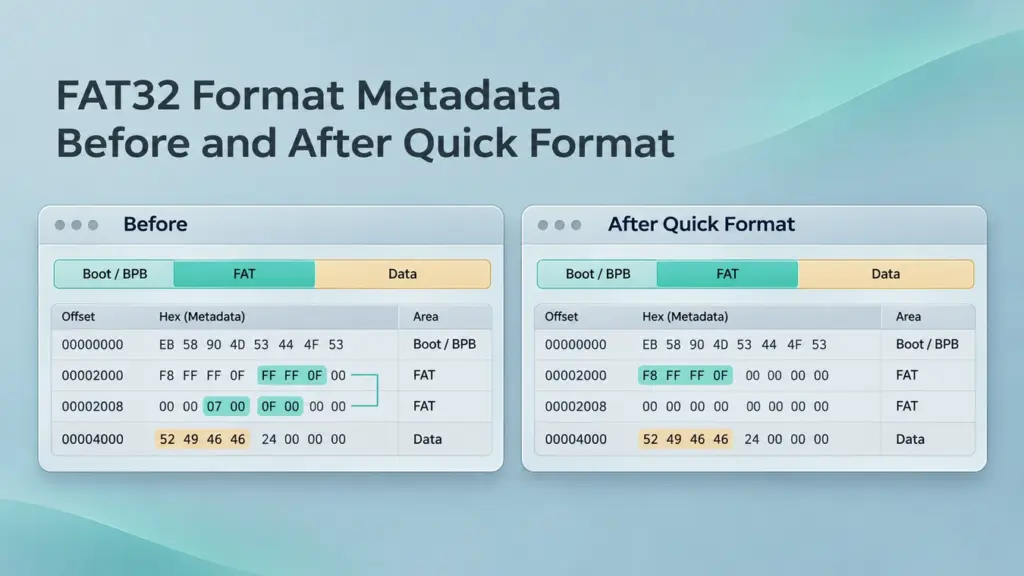
當快速格式化初始化新的檔案系統時,FAT32 格式的元資料會發生變化:開機資訊會描述新的佈局,分配表會失去舊的檔案鏈,而根目錄也會重新建立。在重新寫入的區域之外,某些舊的子目錄和檔案內容可能仍然可以讀取。 因此,在「檔案總管」中顯示為空的磁碟,並不能證明所有先前檔案都已刪除。.
在意外格式化 USB 隨身碟、SD 卡或 FAT32 資料分割區後,這一點至關重要。 以下分析涵蓋 FAT32 轉 FAT32 的快速格式化,以及在磁碟編輯器中進行唯讀檢視。本文說明預期會發生的變化,並採用 WinHex 記錄範例中的目錄條目位元組,同時區分可恢復的元資料與證明完整檔案實際仍存留的證據。.
目錄
格式化前後的 FAT32 元數據
一個 FAT32 磁區包含一個保留區域、FAT 區域,以及一個同時存放目錄和檔案內容的資料區域。該 檔案分配表 連接簇;目錄條目提供檔案名稱、起始簇及大小。.
微軟將 Windows 的快速格式化描述為:刪除原有的檔案表和根目錄,而不會逐個掃描每個磁區以檢查是否有壞區。這僅描述了該操作的範圍,而非保證每個格式化程式都會寫入相同的磁區。.
結構 | 格式化之前 | FAT32 快速格式化後 | 對復甦的影響 |
開機扇區與 BPB | 請描述現有的佈局 | 已針對新檔案系統進行初始化;部分值可能保持不變 | 當前參數需與原始佈局進行比較 |
FSInfo | 儲存自由空間資訊及分配提示 | 已為新卷進行初始化 | 這並非舊檔案位置的記錄 |
FAT 副本 | 追蹤已分配的叢集與檔案鏈 | 使用新檔案系統所需的預留項目與分配空間進行初始化 | 舊的鏈結可能會從兩份副本中消失 |
根目錄 | 引用頂層檔案和資料夾 | 初始化為一個新目錄,可能包含一個卷標條目 | 原始路徑可能已無法存取 |
舊的子目錄 | 包含子條目 | 有些可能在未被重寫的區域中倖存下來 | 已分離的目錄記錄仍可能識別出檔案 |
檔案內容 | 佔用已分配的叢集 | 可能仍可讀取、被覆寫,或因遭丟棄而無法存取 | 還原時需要檢查實際內容 |
例行性的磁碟格式化操作,本身並不會刪除磁碟的分區表項目。這也與刪除個別檔案不同,後者通常會將目錄項目標記為 0xE5 並釋放其叢集。經過格式化的根目錄無需保留這些已刪除項目的標記。.
快速格式化後的 FAT32 開機區段
的 磁碟區開機記錄 從卷相對扇區 0 開始。在整個磁碟映像中,必須根據該卷的起始位置來轉換該位址。.
在解析該卷的其餘內容之前,請先讀取這些 BPB 欄位。以下所列的偏移量均為從開機區起始位置算起的十六進位位元組偏移量。.
偏移 | 現場 | 長度 | 意義 |
|
| 2 位元組 | 每扇區的位元組數 |
|
| 1 位元組 | 每個叢集的區段數 |
|
| 2 位元組 | 保留區域的扇區數 |
|
| 1 位元組 | FAT 副本的數量 |
|
| 4 位元組 | 一個 FAT 中的區塊 |
|
| 2 位元組 | FAT 鏡像與主動 FAT 選取 |
|
| 4 位元組 | 第一個根目錄叢集 |
|
| 2 位元組 | FSInfo 磁區編號 |
|
| 2 位元組 | 備份開機記錄的位置 |
多位元組整數採用小端字節序。該 分配單位大小 等於每扇區的位元組數乘以每簇的扇區數。.
快速格式化後仍可重複使用相同的磁碟結構。即使叢集大小欄位未變更,甚至開機區段區域完全相同,也不能證明未曾進行格式化。請一併比對 FAT 項目與目錄內容。.
備用開機記錄通常位於卷相對的第 6 個磁區;請檢查 BPB_BkBootSec. 它保護的是開機資訊,而非每個目錄或 FAT 項目。重新格式化後,有效的備份應能反映新的檔案系統,而非保留舊的檔案系統。.
格式化前後的 FAT32 FAT 表
每個 FAT32 項目佔用四個位元組,其中低 28 位元被解釋為其簇值。關於簇 N, 其條目開頭寫道 N × 4 從所選 FAT 的起始位置算起的位元組。.
解讀值 | 意義 |
| 自由星團 |
一個有效的資料叢集編號 | 鏈中的下一個叢集 |
| 瑕疵簇 |
| 鏈條末端 |
項目 0 和 1 為保留項目。資料簇的編號從 2 開始。因此,所謂「格式化會清除 FAT」並不表示每個位元組都會變成零:保留項目以及新根目錄的分配空間仍然是必要的。.

摘自 WinHex 記錄資料中的 FAT 區段。此結構參考僅顯示保留與已分配的項目;並非以「前後對照」格式呈現的擷取內容。.
範例: 一個檔案最初佔用若干簇 100 → 101 → 900 → 結束. 若格式化將這些項目重設為「未分配」,即使這三個資料簇仍可讀取,原始的順序也會消失。一個倖存的目錄項目會標示簇 100,但不會將 900 識別為第三個片段。.
當 BPB 指定兩個 FAT 副本時,請檢查這兩個副本。它們在檔案系統實例內提供冗餘機制,而非永久性的預格式化存檔。若鏡像功能已停用,則由 BPB_ExtFlags 這一點也很重要。.
在 WinHex 中定位原始資料區域
對於已經格式化的裝置,請停止寫入操作,並將其磁區映像備份至另一顆實體硬碟。在 WinHex 或其他合適的磁碟編輯器中,以唯讀模式開啟該映像。即使再次格式化原始裝置,也無法還原其已遺失的「格式化前」狀態。.
記錄裝置識別碼、磁區起始位置、磁區大小及映像範圍。接著根據已驗證的 FAT32 參數計算位置:
- 第一個 FAT 區段 = ReservedSectors
- 第二個 FAT 區塊 = 保留區塊數 + 每個 FAT 的區塊數
- 第一個資料扇區 = 保留扇區數 + FAT 數量 × 每個 FAT 的扇區數
- 叢集 N 的第一個磁區 = FirstDataSector + (N − 2) × SectorsPerCluster
- 根目錄的第一個磁區 = FirstDataSector + (RootCluster − 2) × SectorsPerCluster
這些磁區編號是相對於卷而言的;第二 FAT 公式僅在存在第二份副本時才適用。對於整個磁碟的映像檔,請將相對於卷的磁區轉換為位元組偏移量,並加上該卷的起始位元組偏移量。若為僅包含單一卷的映像檔,則無需再次加上該起始偏移量。.
根目錄通常位於叢集 2 中,但其位置源自 BPB_RootClus. 因此,第一個資料區塊並不一定就是根目錄的起點。.
若格式化程式曾變更簇大小或 FAT 大小,當前的參數可能會錯誤地對應舊有的簇編號。若可取得格式化前的 BPB 擷取檔,請使用該檔;否則,在提取資料之前,應透過比對多個存留的目錄及檔案標頭,來驗證所提出的舊佈局是否正確。.
若要進行真正的比較,請檢視事件發生前後所拍攝影像中相應的位元組範圍。若無先前影像作為對照,僅憑當前的零值無法精確判定某個範圍是在何時被清空的。.
解碼一個存留的目錄條目
一項標準 FAT32 目錄項目 為 32 位元組。其中有四個欄位對於定位一般檔案特別有用:
以條目為基準的偏移量 | 現場 | 口譯 |
| 屬性 | 可區分檔案、目錄及長名稱項目 |
| 第一聚類中的高頻詞 | 起始星團的上部 |
| 第一簇的低頻詞 | 起始星團的下部 |
| 檔案大小 | Four-byte little-endian size in bytes |

Directory-entry bytes from the recorded example: 06 00 is the high word, CC EE is the low word, and E9 FC 00 00 is the file size.
Decoding these bytes gives:
- High word: 06 00 → 0x0006
- Low word: CC EE → 0xEECC
- Starting cluster: (0x0006 << 16) | 0xEECC = 0x0006EECC
- Starting cluster in decimal: 454,348
- File size: E9 FC 00 00 → 0x0000FCE9 = 64,745 bytes
This identifies a candidate start and length. The volume geometry and cluster chain still require validation.
Long filenames occupy separate entries with attribute 0x0F; their name fragments precede the associated short entry. A name containing ~1 can be a short-name alias, but that suffix alone does not identify an LFN entry. Read the starting cluster and size from the associated short entry, not from the long-name records.
Subdirectories can also contain . 和 .. entries. A zero starting-cluster value in .. represents the root directory in this context; it does not mean the FAT32 root physically occupies cluster 0.
Recover Files Through Surviving Metadata
Manual recovery should export bytes from an image rather than make speculative edits to the original device.
Follow a Valid Surviving Chain
If a trustworthy old FAT chain survives, start with the directory entry’s first cluster. Read that cluster’s FAT entry, follow the next valid cluster, and continue until the recorded file size is covered. Reject loops, out-of-range references, and chains too short for that size.
Assemble the clusters in chain order and trim the exported file to its logical length. Sorting fragments by increasing physical address can produce the wrong result.
Assess Contiguous Extraction When the Chain Is Gone
If the FAT has been reset, consecutive extraction is a hypothesis. For the 64,745-byte example, assuming independently confirmed 4,096-byte clusters, the file needs 16 clusters. Exporting 16 consecutive clusters from its first cluster and trimming to 64,745 bytes is valid only if that contiguous layout is supported by the contents.
A correct header cannot establish that later clusters belong to the same file. Fragmented videos, archives, and documents may require additional reconstruction or may remain incomplete.
Search for Detached Subdirectories
When the old root is gone, manual filename searches can miss entire directory branches. X-Ways documents an orphaned-subdirectory search for FAT12/16/32 under its specialist volume-snapshot features. Availability and wording depend on the edition and version.
Use the file-system structure search supported by the installed tool, inspect candidate directories, and export validated files to another device. A recovered directory listed under an unknown path indicates missing ancestry; it does not establish the original complete folder tree. File-header searching is a separate fallback when directory records are missing.
For a broader scan-and-export workflow, see recovering files from FAT32.
Verify Recovery and Keep Repair Separate
Boot-sector damage, partial FAT corruption, and quick formatting can all hide files, but their remedies differ. Restoring boot information cannot recreate erased cluster chains. Likewise, restoring reserved FAT entries may help interpret a narrowly damaged volume without restoring every file allocation.
For important data, defer CHKDSK and direct sector edits until files have been extracted or a separate repair copy has been prepared. The practical formatted USB recovery guide explains the recovery sequence after accidental formatting.
Validate exports against an original inventory when available: compare names, exact sizes, and hashes with known copies. Otherwise, inspect full-resolution images, test archives, review document pages, and play videos beyond their opening frames. Record missing and damaged items separately.
Readable directory entries demonstrate surviving metadata. Usable exported files demonstrate recovery. A claim of complete recovery requires accounting for the expected dataset.
常見問題
快速格式化會刪除所有 FAT32 資料簇嗎?
第二個 FAT 能否還原格式化前的檔案鏈?
開機區未遭變更,是否代表檔案仍完好無損?
備份的開機扇區能否撤銷快速格式化?
第 2 至第 5 個叢集是否總是會被覆寫?
已恢復的檔案名稱會屬於一個損壞的檔案嗎?
FAT32 資料復原與 NTFS 元資料復原是一回事嗎?

Jason 是一位擁有超過 15 年實務經驗的資料復原與技術支援專家。 他長期與第一線使用者密切合作,處理棘手的資料遺失案例,並針對誤刪資料、磁碟格式化、檔案系統損毀、分割區遺失、系統故障及其他緊急資料復原情況,提供實用的復原解決方案。其專業領域還涵蓋備份與還原、檔案修復及災難復原,並特別注重提供安全、可靠且技術上精準的指導。.