
La meilleure alternative en matière de services de récupération de données

Imaginez que vous perdiez en une fraction de seconde des mois de documents professionnels essentiels, des photos de famille inestimables ou un projet créatif presque achevé. Perte de données cela se produit généralement de manière inattendue, laissant les utilisateurs dans l'attente d'une solution fiable service de récupération de données. Lorsqu'un disque de stockage tombe en panne, votre premier réflexe est peut-être de chercher un laboratoire local. Cependant, les solutions traditionnelles en salle blanche sont souvent lentes, extrêmement coûteuses et très perturbantes. Heureusement, la technologie moderne offre une solution plus intelligente. Ce guide complet vous montrera comment récupérer les fichiers perdus sur vos disques durs en toute sécurité avec Magic Data Recovery et ce, en un clin d'œil, depuis le confort de votre domicile, ce qui vous permet d'économiser à la fois du temps et de l'argent.
Prise en charge de Windows 7/8/10/11 et Windows Server
Table des matières
La réalité d'un service local de récupération de données : coût contre commodité
Face à une perte inattendue de fichiers, beaucoup de gens pensent qu'un problème physique service de récupération de données est leur seule option viable. Les laboratoires jouent certes un rôle crucial lorsqu'un disque dur subit des dommages matériels graves, tels qu'un axe cassé ou une carte électronique brûlée. Néanmoins, le recours à un laboratoire spécialisé présente des inconvénients concrets non négligeables dans les cas courants de perte de données logiques.
Tout d'abord, un service de récupération de données est réputé pour ses coûts élevés. Une analyse en laboratoire standard peut coûter des centaines, voire des milliers de dollars, que vos fichiers soient récupérés ou non. Deuxièmement, les délais d'exécution sont rarement immédiats. La plupart des prestataires vous demandent d'envoyer votre support endommagé par la poste, ce qui signifie que vous devrez peut-être attendre entre 5 et 30 jours ouvrables avant d'obtenir des nouvelles. Enfin, l'envoi d'un disque contenant des données personnelles ou des données commerciales confidentielles présente un risque sérieux pour la confidentialité. Par conséquent, faire appel à un atelier physique devrait être votre dernier recours plutôt que votre premier choix.
Quand il est plus judicieux de passer à une solution logicielle de récupération de données
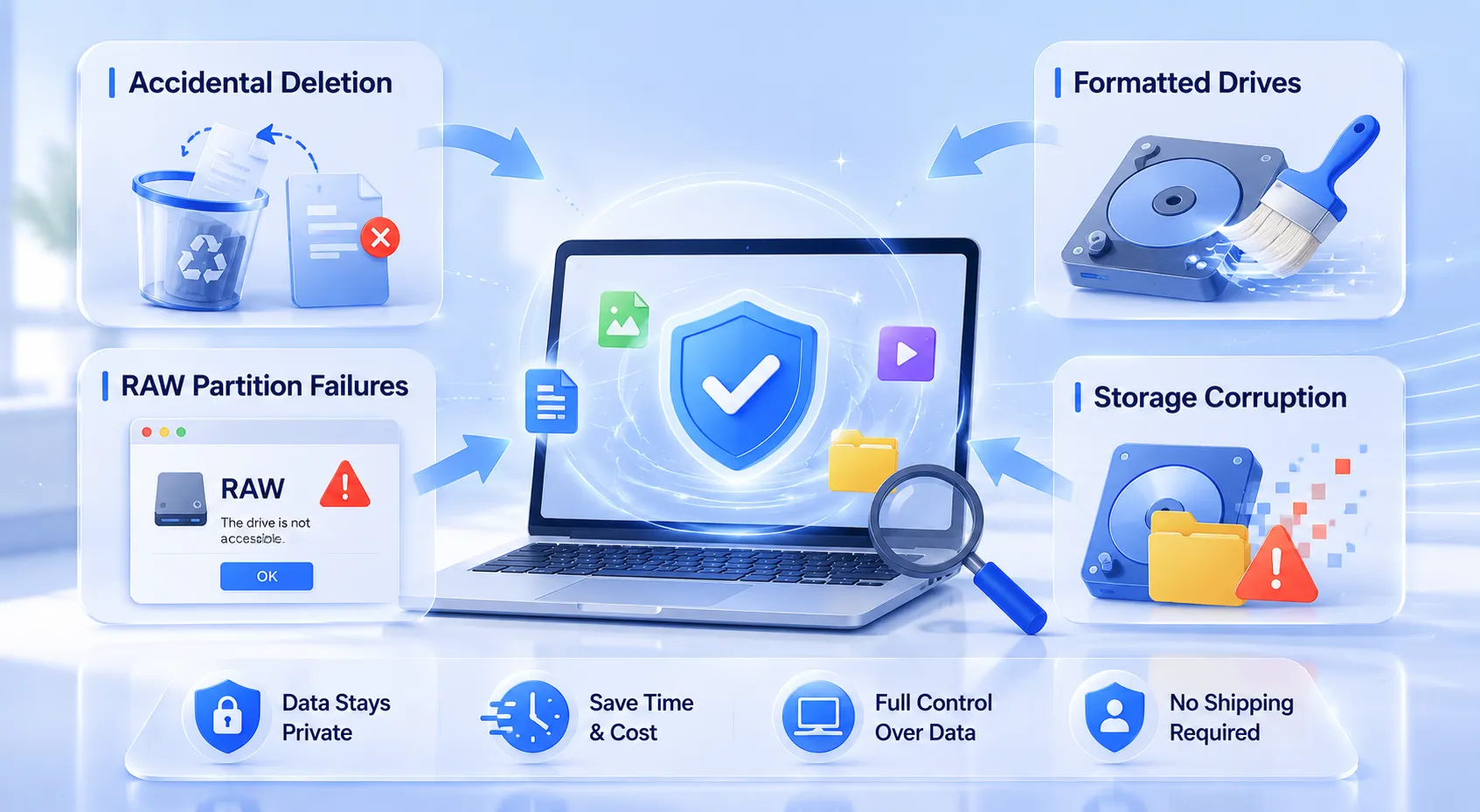
La bonne nouvelle, c'est que la plupart des incidents liés à la perte de données ne sont pas dus à une défaillance matérielle. Ils résultent plutôt de problèmes logiques. Dans ces cas-là, il convient d'utiliser un logiciel professionnel de récupération de données est un choix bien plus pratique que de commander un service coûteux en laboratoire service de récupération de données.
Vous pouvez facilement gérer les situations courantes suivantes depuis votre bureau :
- Suppression accidentelle : Pressage
Maj + Supprou vider la corbeille par erreur. - Disques formatés : Effacement accidentel d'une partition lors de la réinstallation du système d'exploitation.
- Problèmes liés aux partitions RAW : A la rencontre d'un Récupération de la partition RAW cas où le système signale soudainement que le disque est inaccessible.
- Corruption des données de stockage : Gérer les problèmes de corruption du système de fichiers sur les disques durs locaux, les SSD ou les cartes SD d'appareils photo.
En optant pour une solution numérique service de récupération de données En outre, vous gardez un contrôle total sur vos supports de stockage. Vous n'avez pas à attendre la livraison, ni à confier vos informations personnelles à des techniciens tiers.
Découvrez Magic Data Recovery : votre solution à la demande de niveau entreprise
Si vous recherchez une solution plus efficace pour remplacer un coûteux service de récupération de données, tu devrais essayer Magic Data Recovery. Développé par Amagicsoft, Cet outil de pointe fonctionne comme un laboratoire de données numériques directement sur votre ordinateur. Il comble le fossé entre les analyses médico-légales complexes et une accessibilité grand public.
Caractéristiques principales de Magic Data Recovery
- Technologie d'analyse approfondie avancée : Le logiciel utilise des algorithmes avancés d'analyse secteur par secteur. Il contourne les structures endommagées du système de fichiers pour localiser les traces cachées des données supprimées.
- Prise en charge d'un grand nombre de systèmes de fichiers : Que votre disque dur utilise les systèmes de fichiers NTFS, FAT32, exFAT ou Mac, l'outil lit et analyse les données brutes sans difficulté.
- Aperçu sans aucun risque : Contrairement à certains outils traditionnels qui exigent un paiement d'avance, ce logiciel mise sur la transparence des résultats. Il vous permet de rechercher, de filtrer et de prévisualiser les fichiers récupérables avant de débourser le moindre centime.
- Limite de récupération gratuite généreuse : Pour vous garantir une tranquillité d'esprit totale, le programme offre une Limite de 500 Mo pour la récupération gratuite des données. Vous pouvez tester son efficacité sans aucun risque.
Cas d'utilisation courants
Imaginons un photographe professionnel qui formate par inadvertance une carte SD contenant les photos de mariage d'un client. En envoyant cette carte à un service de récupération de données pourrait compromettre leur calendrier. En utilisant la technique Magic Data Recovery, le photographe peut réaliser une récupération de données sur disque dur numérisez immédiatement, prévisualisez les images brutes et récupérez les photos de mariage en quelques minutes. De même, si un employé de bureau perd un document essentiel à la suite d'une coupure de courant imprévue, cet outil peut localiser les fragments temporaires du système afin de récupérer le fichier sans difficulté.
Guide étape par étape : comment effectuer une récupération de données chez soi
Faire soi-même service de récupération de données La récupération de données à domicile est un jeu d'enfant si vous utilisez le bon outil. Veuillez suivre ce guide simple, étape par étape, pour récupérer vos données perdues en toute sécurité.
Étape 1 : Télécharger et installer Magic Data Recovery
Commencez par télécharger et installer Magic Data Recovery. Pour garantir le succès de la récupération, vous devez installer l'application sur une partition différente de celle qui contient vos fichiers perdus. Cette approche préventive évite tout écrasement accidentel des données et préserve l'intégrité de vos fichiers manquants.
Prise en charge de Windows 7/8/10/11 et Windows Server
Étape 2 : Sélectionnez le Cible Lieu de numérisation
Lancez le logiciel pour afficher l'interface principale épurée. Sélectionnez ensuite le disque, la partition locale ou le support de stockage sur lequel vos fichiers ont été supprimés. Une fois la sélection effectuée, lancez l'analyse approfondie pour démarrer la récupération de données sur disque dur processus.

Étape 3 : Numériser le Stockage Dispositif
L'utilitaire lance automatiquement une analyse approfondie afin d'explorer en détail les secteurs de stockage. De plus, le programme met à jour et répertorie en temps réel tous les éléments récupérables à mesure que le processus d'analyse progresse.

Étape 4 : Prévisualisation des fichiers avant la récupération
Vous pouvez ensuite utiliser la visionneuse de fichiers intégrée pour examiner le contenu de vos documents ou images. Cette étape de validation essentielle vous permet de ne consacrer du temps qu'à la récupération des fichiers dont vous avez réellement besoin.

Étape 5 : Récupération des fichiers vers un emplacement sûr
Enfin, cochez les cases situées à côté des fichiers souhaités et enregistrez-les en toute sécurité. N'oubliez jamais de choisir un disque ou un périphérique de stockage totalement différent pour vos données restaurées, car les réenregistrer sur la source d'origine risque d'entraîner une corruption irréversible des fichiers.

Magic Data Recovery vs. laboratoires traditionnels vs. logiciels spécialisés
Pour choisir la bonne approche, il faut bien comprendre les différentes options qui s'offrent à vous. Le tableau comparatif ci-dessous met en évidence les raisons pour lesquelles une solution logicielle spécialisée constitue la la meilleure alternative aux services de récupération de données pour détecter les erreurs logiques.
Fonctionnalité | Service traditionnel de récupération de données | Logiciels techniques de pointe | Magic Data Recovery |
Coût moyen | $300 – $1 500+ | $80 – $200 en prépaiement | Jusqu'à 500 Mo gratuits ; mises à niveau à prix abordable |
Délai d'exécution | 5 à 30 jours ouvrables | Immédiat, mais nécessite un apprentissage rapide | Immédiat (en quelques minutes) |
Convivialité | En rupture de stock (à commander) | Éditeurs hexadécimaux avancés pour les pros | Assistant simple en 3 étapes |
Confidentialité et sécurité | Risque d'exposition de tiers | Sécurisé (traitement local) | 100% Safe (Traitement local) |
Conseils de pros pour optimiser le taux de réussite de votre service de récupération de données
Pour obtenir les meilleurs résultats possibles lors d'une restauration en libre-service, gardez à l'esprit ces conseils reconnus dans le secteur :
- Cessez immédiatement d'utiliser le lecteur : Dès que vous constatez qu'il manque des données, débranchez le disque dur ou fermez toutes les applications en cours d'exécution. Si le système d'exploitation continue d'écrire des journaux en arrière-plan, il risque d'écraser définitivement vos fichiers cachés.
- Évitez d'utiliser Chkdsk ou les outils de réparation de disque : Les utilitaires système intégrés, tels que chkdsk sous Windows, sont conçus pour réparer les systèmes de fichiers, et non pour sauver des fichiers. Leur exécution sur un disque instable efface souvent les restes de fichiers récupérables.
- Conservez une copie des disques défaillants : Si vous pensez que votre disque dur présente des signes de détérioration mécanique précoce, utilisez d'abord un outil de création d'image disque secteur par secteur. Vous pourrez ensuite lancer votre logiciel professionnel de récupération de données en toute sécurité sur le fichier image sans solliciter le disque physique.
Conclusion : pourquoi cet outil est plus performant qu'un service classique de récupération de données
En résumé, un service de récupération de données est sans aucun doute utile en cas de pannes mécaniques graves. Cependant, pour la grande majorité des suppressions accidentelles, des erreurs de formatage et Récupération de la partition RAW Dans ce domaine, une approche logicielle s'avère nettement plus efficace. Elle élimine les délais d'attente inutiles, protège votre vie privée et vous évite des frais de laboratoire exorbitants.
Nous recommandons vivement Magic Data Recovery comme votre solution de sécurité numérique de référence. En offrant un aperçu transparent des fichiers et une véritable Limite de 500 Mo pour la récupération gratuite des données, cela élimine toute incertitude du processus. Si vous êtes actuellement à la recherche d'une solution efficace, sûre et immédiate Solution HDD Pour récupérer vos fichiers perdus, n'attendez pas. Téléchargez Magic Data Recovery dès aujourd'hui et bénéficiez de résultats de qualité professionnelle directement depuis votre ordinateur.
Prise en charge de Windows 7/8/10/11 et Windows Server
Foire aux questions sur les options du service de récupération de données
Combien coûte un service professionnel de récupération de données ?
Un service de récupération de données physiques facture généralement ses prestations en fonction de la complexité des dommages plutôt que de la taille des fichiers. Les tarifs commencent généralement autour de 1 430 £ et peuvent dépasser 1 000 £ pour des interventions complexes en salle blanche. À l'inverse, les solutions logicielles offrent des résultats identiques pour les problèmes logiques à un coût bien inférieur.
Puis-je récupérer gratuitement des fichiers sur un disque dur formaté ?
Oui, c'est possible. Si le disque formaté n'a pas été écrasé par de nouveaux fichiers, vous pouvez utiliser Magic Data Recovery pour récupérer vos données. Le logiciel vous permet d'effectuer une analyse approfondie complète et de sauvegarder jusqu'à 500 Mo de fichiers, et ce, tout à fait gratuitement.
Est-il sûr d'utiliser un logiciel tiers de récupération de données ?
L'utilisation d'un outil réputé proposé par un développeur de confiance tel que Amagicsoft est tout à fait sûre. Le logiciel fonctionne en mode lecture seule sur votre ordinateur. Il analyse donc vos secteurs de stockage en local sans modifier vos données existantes ni exposer vos informations personnelles au public.
Pourquoi une solution logicielle est-elle plus avantageuse qu'un service local de récupération de données ?
Les solutions logicielles offrent des résultats immédiats, sans aucun délai d'expédition. De plus, elles sont nettement plus économiques que les laboratoires physiques. En utilisant un logiciel chez vous, vous vous assurez également que vos données professionnelles sensibles ou vos photos personnelles restent entièrement confidentielles, ce qui vous évite les risques liés au traitement de vos données par des tiers.
Que dois-je faire dès que je me rends compte que mes données ont disparu ?
Vous devez cesser immédiatement d'utiliser le périphérique de stockage concerné. N'enregistrez pas de nouveaux fichiers, n'installez pas d'applications et n'exécutez pas d'utilitaires de réparation du disque système sur ce disque. Ces opérations génèrent de nouvelles données qui risquent d'écraser les traces cachées de vos fichiers perdus et d'entraîner une perte définitive de données.
Magic Data Recovery peut-il résoudre un problème de récupération de partition RAW ?
Oui. Lorsqu'un système de fichiers passe en mode RAW, votre système d'exploitation ne parvient plus à lire la structure des données. Cependant, Magic Data Recovery contourne ces couches logiques endommagées. Il analyse directement les secteurs bruts pour localiser, prévisualiser et reconstruire vos documents perdus en toute sécurité.

Vasilii est un spécialiste de la récupération de données qui possède une dizaine d'années d'expérience pratique dans ce domaine. Tout au long de sa carrière, il a résolu avec succès des milliers de cas complexes impliquant des fichiers supprimés, des disques formatés, des partitions perdues et des systèmes de fichiers RAW. Son expertise couvre à la fois les méthodes de récupération manuelle à l'aide d'outils professionnels tels que les éditeurs hexagonaux et les solutions automatisées avancées à l'aide de logiciels de récupération. La mission de Vasilii est de rendre accessible aux professionnels de l'informatique et aux utilisateurs quotidiens des connaissances fiables en matière de récupération de données, afin de les aider à sauvegarder leurs précieuses ressources numériques.