
Come recuperare i dati dell'HDD in modo sicuro senza esporre file privati

La perdita di file importanti dall'HDD può essere stressante, ma è possibile eseguire recupero dati sicuro a casa senza mettere a rischio le vostre informazioni private. Questa guida spiega passo per passo i metodi, le precauzioni e gli strumenti per recuperare i file persi in modo sicuro ed efficace.
Allo stesso tempo, un'altra preoccupazione diventa ancora più importante: I contenuti del recupero dati possono essere visualizzati durante determinati processi. Per questo motivo, gli utenti desiderano un Recupero HDD soluzioni. Fortunatamente, è possibile recuperare i file mantenendo la privacy.
Supporta Windows 7/8/10/11 e Windows Server
Indice dei contenuti
Perché il recupero dati sicuro è importante
In primo luogo, i dispositivi moderni memorizzano informazioni molto personali. Di conseguenza, la perdita di dati non comporta solo disagi, ma crea anche stress emotivo. Pertanto, Il recupero dei dati è imbarazzante per molte persone.
Inoltre, gli utenti spesso immaginano che altri possano vedere i loro file. Ad esempio, le immagini personali o i documenti riservati possono sembrare troppo sensibili per essere esposti. Per questo motivo, l'esitazione aumenta. Tuttavia, la comprensione del processo di recupero aiuta a ridurre questa paura.
Il contenuto del recupero dati può essere visualizzato durante il recupero?
In alcuni casi, sì, I contenuti del recupero dati possono essere visualizzati durante il ripristino. Ad esempio, i tecnici possono visualizzare l'anteprima dei file per confermare l'avvenuto ripristino. Quindi, controllano l'integrità dei file per garantirne l'utilizzabilità. Pertanto, i file leggibili potrebbero essere aperti durante questo processo.
Tuttavia, la situazione cambia quando si utilizzano strumenti locali. In questo caso, l'utente mantiene il controllo. Di conseguenza, I contenuti del recupero dati possono essere visualizzati solo da voi.
Il recupero dei dati è imbarazzante a causa dei rischi per la privacy
Sebbene il recupero sia necessario, diversi rischi spiegano perché Il recupero sicuro dei dati è importante:
Accesso da parte di terzi
Quando si invia un dispositivo a un centro di assistenza, altre persone gestiscono i dati. Pertanto, i file sensibili potrebbero diventare accessibili.
Verifica manuale dei file
I tecnici a volte aprono i file per confermare i risultati. Di conseguenza, I contenuti del recupero dati possono essere visualizzati durante la verifica.
Elaborazione basata sul cloud
Alcuni strumenti caricano i dati online. Di conseguenza, i file escono dal dispositivo, aumentando il rischio di esposizione.
Come recuperare i dati con Safe Data Recovery
Fortunatamente è possibile ridurre questi rischi scegliendo l'approccio giusto.
Utilizzare il software di recupero offline
Innanzitutto, selezionate strumenti che funzionano localmente. Questo assicura che I contenuti del recupero dati possono essere visualizzati solo sul proprio dispositivo.
Evitare la manipolazione esterna
Inoltre, evitate di inviare il vostro dispositivo di archiviazione a terzi, a meno che non sia necessario. In questo modo si mantiene il pieno controllo.
Interrompere immediatamente l'utilizzo dell'unità
Infine, interrompere la scrittura di nuovi dati. Di conseguenza, il successo del recupero migliora e la privacy rimane protetta.
La scelta migliore quando il recupero dei dati è imbarazzante
Per la maggior parte degli utenti, il software di recupero locale offre l'opzione più sicura. Una soluzione efficace è Magic Data Recovery. Esegue la scansione dell'archivio direttamente senza caricare i dati. Pertanto, Il recupero dei dati è imbarazzante non è più un ostacolo, perché i file non lasciano mai il dispositivo.
Inoltre, supporta Unità RAW e file system danneggiati. Di conseguenza, il recupero rimane possibile anche in scenari complessi.
Magic Data Recovery è uno strumento di recupero locale che consente di recuperare i dati senza che nessuno li veda.
Caratteristiche:
- Ambiente di recupero locale
Non è necessario caricare i dati nel cloud. Nessuna preoccupazione che altri vedano i vostri file.
- Supporta il recupero di unità cancellate, formattate o inaccessibili.
Supporta più dispositivi di archiviazione come le unità USB, Schede SD, e HDD esterni.
- Compatibile con Windows
Funziona su Windows 11 / 10 / 8 / 7 / Vista / XP ed è facile da usare senza conoscenze specifiche.
- Recupero gratuito fino a 500 MB
Potete verificare gratuitamente se i vostri dati sono recuperabili, in modo da essere tranquilli.
- Molto più conveniente rispetto all'assunzione di uno specialista locale.
Come utilizzare Magic Data Recovery
1.Scaricare e installare Magic Data Recovery
Installarlo su un'unità diversa da quella in cui si trovano i dati che si desidera recuperare. Per evitare di sovrascrivere i dati eliminati, interrompere immediatamente qualsiasi nuova scrittura sull'unità.
Supporta Windows 7/8/10/11 e Windows Server
2. Selezionare l'unità che si desidera recuperare e avviare la scansione.
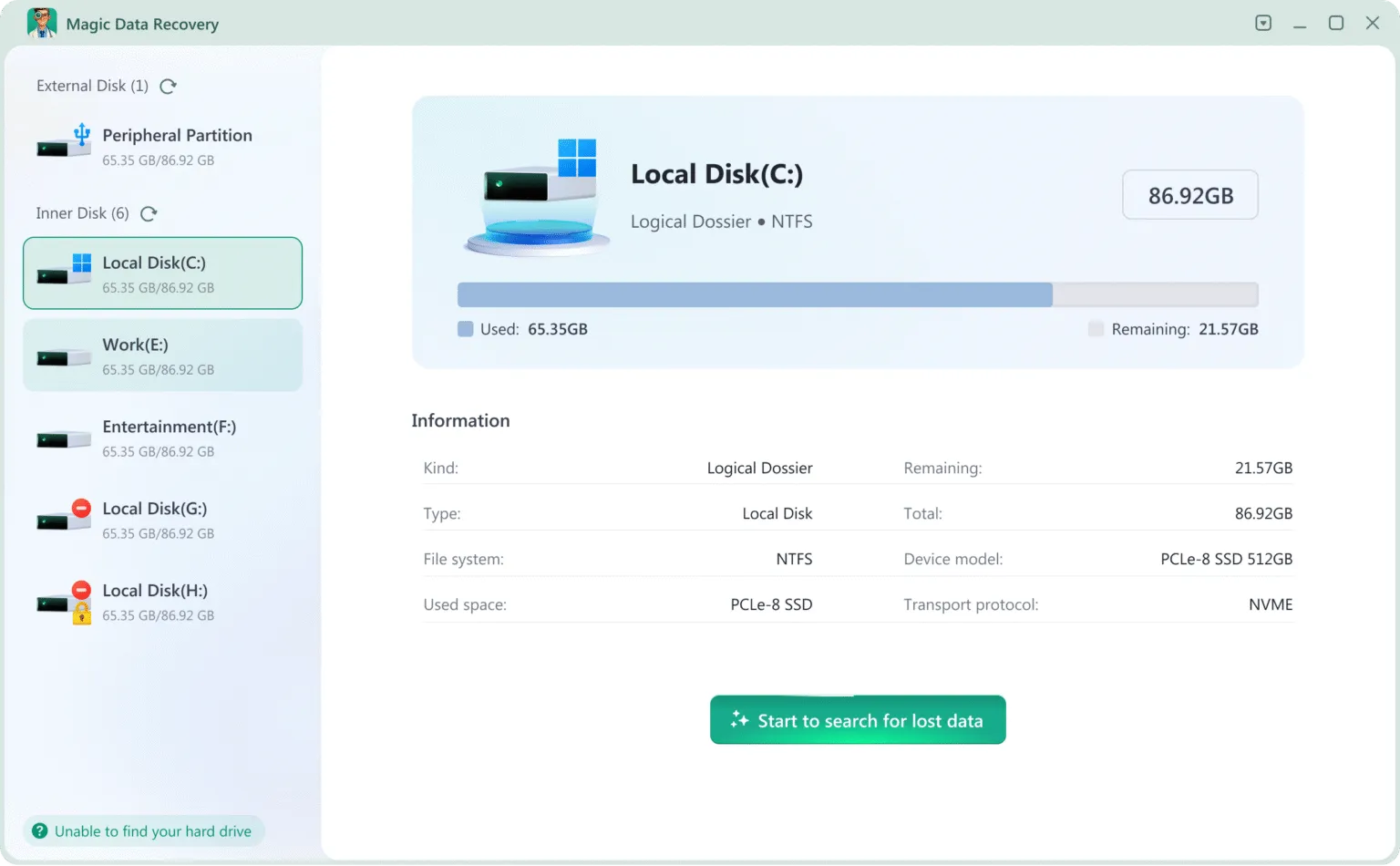
3. Attendere il completamento della scansione
Magic Data Recovery esegue automaticamente una scansione rapida e una scansione avanzata per trovare i file eliminati, anche da unità formattate o danneggiate.
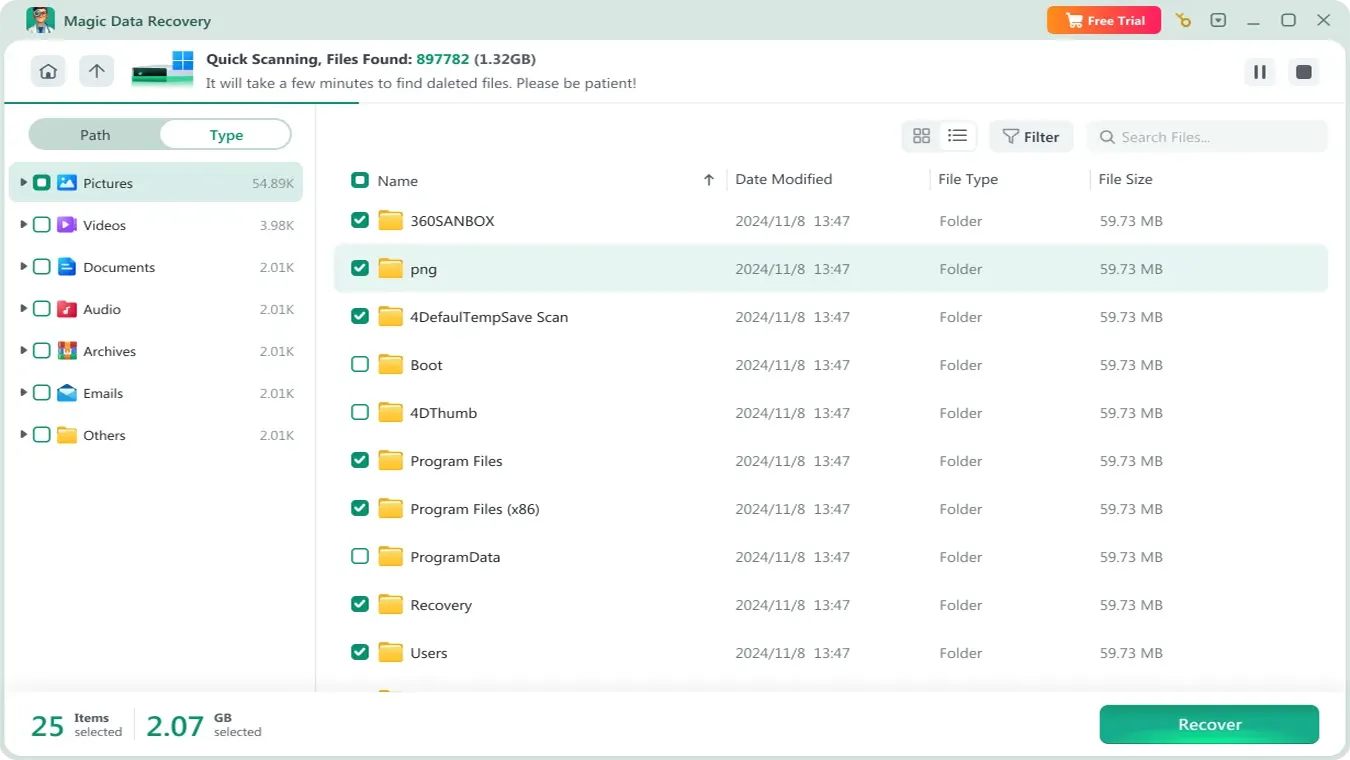
4.Visualizzare in anteprima i file e confermare quelli necessari
È possibile visualizzare un elenco di file recuperabili. Utilizzare la funzione di anteprima per verificare se si tratta dei file necessari.

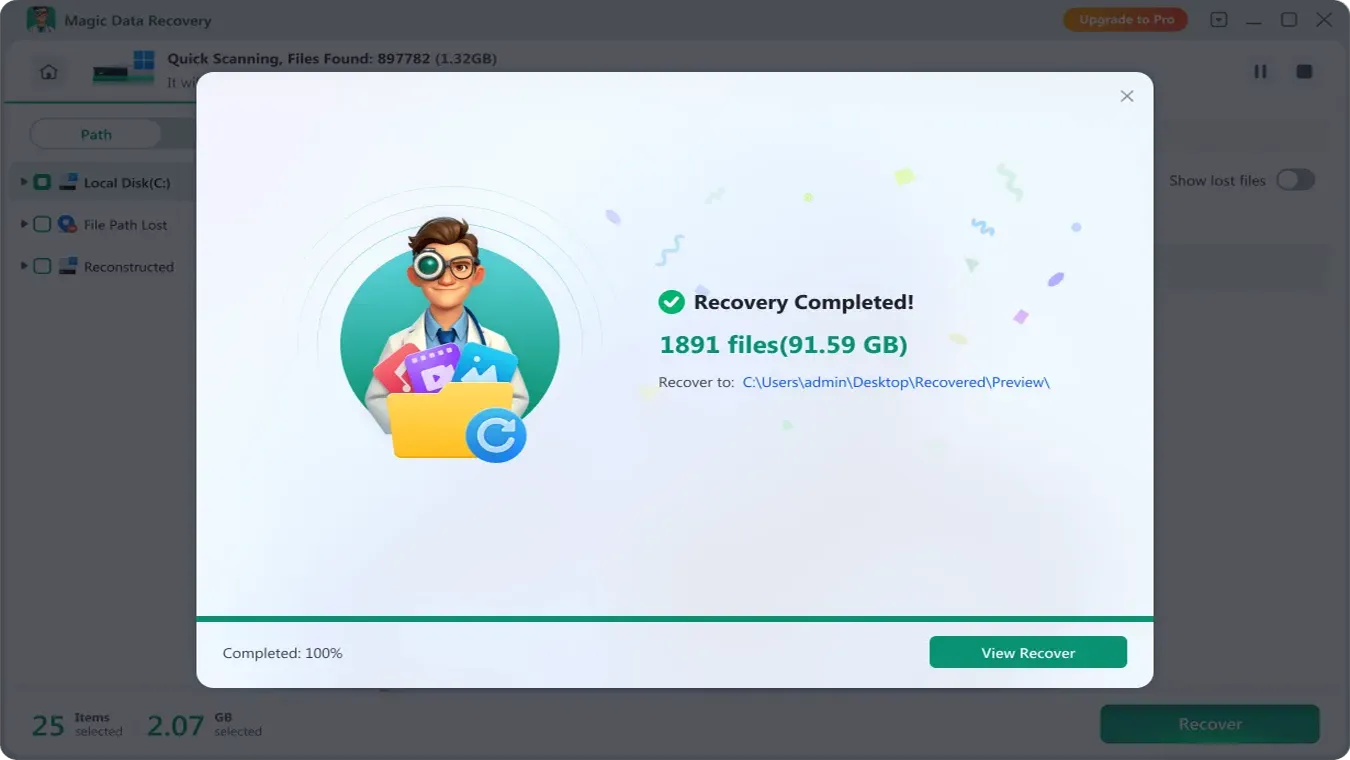
5. Recuperare i file
Selezionate i file che volete recuperare e specificate una posizione sicura per il recupero. Tutto qui! Avete recuperato con successo i vostri dati privati senza che nessuno li veda.
Il recupero dati è imbarazzante: Confronto tra software e servizi
Fattore | Servizio di recupero | Software di recupero |
La privacy | Limitato | Alto |
Accesso ai file | Possibile | Solo per l'utente |
Il rischio | Più alto | Più basso |
Controllo | Basso | Completo |
Pertanto, quando Il recupero dei dati è imbarazzante, Il software offre una soluzione più sicura e privata.
Conclusione
In molte situazioni, Il recupero dei dati è imbarazzante, ma ritardare il recupero spesso porta a perdita permanente dei dati. Pertanto, è essenziale agire tempestivamente.
Esecuzione recupero dati sicuro vi assicura di poter recuperare i file perduti del disco rigido a casa vostra, proteggendo al contempo la vostra privacy. Seguendo i metodi passo-passo descritti in questa guida e utilizzando strumenti di recupero affidabili, è possibile ripristinare file importanti in modo efficace, ridurre al minimo la perdita di dati ed evitare di esporre informazioni sensibili. Sia che si scelga il recupero fai-da-te o l'assistenza di un professionista, dare la priorità alla sicurezza e alla privacy è la chiave per un processo di recupero dati di successo.
Allo stesso tempo, la privacy deve rimanere una priorità. Perché I contenuti del recupero dati possono essere visualizzati in alcuni Recupero HDD La scelta di strumenti offline offre una protezione migliore. In definitiva, l'approccio più sicuro combina un'azione rapida con il pieno controllo dei dati.
Supporta Windows 7/8/10/11 e Windows Server
FAQ
Come si può eseguire un recupero dati sicuro a casa?
Quali sono gli strumenti consigliati per un recupero sicuro dei dati dell'HDD?
È possibile recuperare i file persi senza rischiare la privacy?
Quali sono i passaggi che garantiscono un recupero sicuro dei dati da un disco rigido danneggiato?
Come evitare gli errori più comuni durante il recupero sicuro dei dati?
Il recupero sicuro dei dati fai da te è affidabile come i servizi professionali?
Come recuperare i file in modo sicuro se l'unità non viene riconosciuta da Windows?
Quali precauzioni devo prendere per proteggere i dati privati durante il recupero?

Vasilii è uno specialista del recupero dati con circa 10 anni di esperienza pratica nel settore. Nel corso della sua carriera, ha risolto con successo migliaia di casi complessi riguardanti file cancellati, unità formattate, partizioni perse e file system RAW. La sua esperienza copre sia i metodi di recupero manuale utilizzando strumenti professionali come gli editor esadecimali, sia le soluzioni automatiche avanzate con i software di recupero. La missione di Vasilii è quella di rendere accessibile la conoscenza del recupero dati affidabile sia ai professionisti IT che agli utenti di tutti i giorni, aiutandoli a salvaguardare i loro preziosi beni digitali.