
Come ottenere le chiavi CD per Windows 10 (metodi gratuiti ed efficaci)
Molti utenti scoprono problemi di attivazione dopo aver reinstallato Windows, cambiato hardware o acquistato un PC di seconda mano. Senza un valido chiavi cd windows 10, funzioni quali la personalizzazione, gli aggiornamenti del sistema e le protezioni di sicurezza potrebbero essere limitate.
Questa guida spiega modi sicuri e pratici ottenere o recuperare una chiave di licenza di Windows. Imparerete:
- Quando le chiavi generiche gratuite funzionano davvero
- Come recuperare una licenza esistente dal proprio sistema
- Quando l'assistenza Microsoft è l'opzione migliore
- Perché una soluzione dedicata Trova il codice prodotto di Windows 10 può far risparmiare tempo ed evitare errori
È possibile scaricare il programma di ricerca del codice prodotto di Windows 10 (Magic Recovery Key) dal pulsante sottostante.
Supporta Windows 7/8/10/11 e Windows Server
Indice dei contenuti
Cosa sono le chiavi CD per Windows 10?
La chiave CD di Windows 10 (detta anche chiave prodotto) è un Codice a 25 caratteri utilizzato per attivare il sistema operativo. Conferma che la copia di Windows è autentica e legalmente autorizzata.
Situazioni comuni in cui è richiesta una chiave CD
- Reinstallazione di Windows sullo stesso PC
- Sostituzione della scheda madre o del disco rigido
- Attivazione di Windows dopo un aggiornamento
- Recupero di una licenza smarrita o dimenticata
Prima di scegliere una soluzione, è essenziale capire quale metodo si applica alla vostra situazione.
È possibile ottenere Chiavi CD Windows 10 gratis?
Sì, ma con importanti limitazioni.
Microsoft fornisce chiavi di prodotto generiche per Windows 10 a scopo di installazione e di test. Queste chiavi consentono a Windows di installarsi correttamente, ma non sempre garantiscono l'attivazione permanente.
Quando possono essere utili le chiavi generiche gratuite
- Installare Windows prima di acquistare una licenza
- Verifica della compatibilità con il nuovo hardware
- Attivazione temporanea per la risoluzione dei problemi
Quando non funzionano
- Uso personale a lungo termine
- Trasferimento di licenze tra dispositivi
- Attivazione di sistemi limitati dagli OEM
Chiavi di prodotto generiche comuni per Windows 10
⚠️ Queste chiavi sono fornite da Microsoft solo a scopo di installazione.
Chiave di Windows 10 Professional
W269N-WFGWX-YVC9B-4J6C9-T83GX
Chiave di prodotto di Windows 10 Professional N
MH37W-N47XK-V7XM9-C7227-GCQG9
Chiave aziendale di Windows 10
NPPR9-FWDCX-D2C8J-H872K-2YT43
Chiave Windows 10 Enterprise N
DPH2V-TTNVB-4X9Q3-TJR4H-KHJW4
Chiave di Windows 10 Education
NW6C2-QMPVW-D7KKK-3GKT6-VCFB2
Windows 10 Home N
AKJUS-WY2CT-JWBJ2-T68TQ-YBH2V
Windows 10 Enterprise 2015 LTSB N
JAHSU-QMPVW-D7KKK-3GKT6-VCFB2
Windows 10 Pro per le workstation
AKSIU-WY2CT-JWBJ2-T68TQ-YBH2V
Windows Pro N per stazioni di lavoro
SJUY7-NFMTC-H88MJ-PFHPY-QJ4BJ
Windows 10 Pro Education
AJUYS-8C467-V2W6J-TX4WX-WT2RQ
Windows 10 Enterprise N
AJSU7-GRT3P-VKWWX-X7T3R-8B639
Chiave aziendale di Windows 10
ALSOI-MHBT6-FXBX8-QWJK7-DRR8H
Windows 10 Enterprise S
8UY76-TNFGY-69QQF-B8YKP-D69TJ
Windows 10 Enterprise G N
AJSUY-NPHTM-C97JM-9MPGT-3V66T
Windows 10 Pro Education N
ALSOI-4C88C-JK8YV-HQ7T2-76DF9
L'uso di chiavi generiche è un soluzione temporanea, non sostituisce una licenza valida.
Come trovare la chiave esistente utilizzando una Trova il codice prodotto di Windows 10
Se Windows era già stato attivato in precedenza sul computer, l'approccio più sicuro è quello di recuperare la chiave originale invece di cercare nuovi chiavi cd windows 10.
Perché il recupero del codice prodotto funziona
Windows memorizza le informazioni sulle licenze nel registro di sistema. Strumenti specializzati possono leggere questi dati senza modificare il sistema.
Recupero delle chiavi di Windows 10 con Magic Recovery Key
Magic Recovery Key di Amagicsoft è un prodotto leggero e affidabile. Trova il codice prodotto di Windows 10 progettato per gli utenti di tutti i giorni.
Problemi fondamentali che risolve
- Chiavi di prodotto Windows perse o dimenticate
- Problemi di attivazione dopo la reinstallazione
- Accesso alle licenze sui sistemi più vecchi
Vantaggi principali
- Supporta Windows 7 / 8 / 10 / 11 e Windows Server
- Scansione in sola lettura (senza modifiche al sistema)
- Visualizzazione chiara e pronta per la copia della licenza
Come funziona (passo dopo passo)
1. Scaricare e installare Magic Recovery Key.
Supporta Windows 7/8/10/11 e Windows Server

3. Aprire Chiavi di registro → Locale.
4. Individuate il codice prodotto di Windows 10.
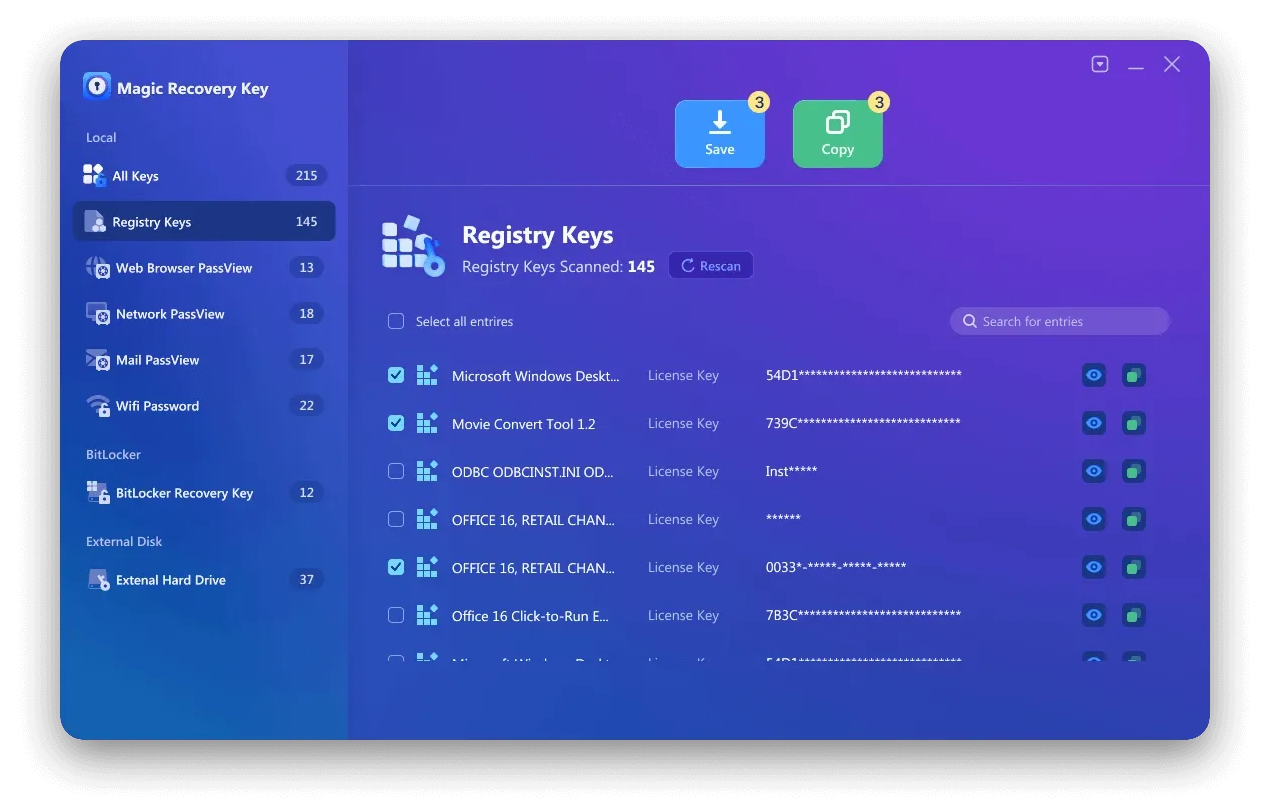
5. Copiare o salvare in modo sicuro.
Scenario di utilizzo nel mondo reale
Un caso comune è la reinstallazione di Windows dopo un guasto al disco. Invece di contattare l'assistenza o acquistare un'altra licenza, gli utenti possono recuperare la chiave esistente in pochi secondi.
Se volete una soluzione rapida e a basso rischio, Magic Recovery Key è un'opzione pratica che vale la pena provare.
Se siete alla ricerca di una soluzione più efficiente e affidabile, potreste provare Magic Recovery Key.
Contattare l'assistenza Microsoft: Quando il recupero non è possibile
A volte il recupero di una chiave in locale non è sufficiente.
L'assistenza Microsoft è consigliata quando:
- Avete acquistato Windows in formato digitale
- La licenza è collegata a un account Microsoft
- Le modifiche all'hardware hanno causato il fallimento dell'attivazione
Consigli per la preparazione
- Conservare la prova d'acquisto
- Conoscere i dettagli dell'account Microsoft
- Preparate le informazioni sul dispositivo
Microsoft può spesso riassegnare o riattivare licenze dopo la verifica.
Errori comuni da evitare nella ricerca delle chiavi CD
- Scaricare chiavi da siti web non verificati
- Utilizzo di attivatori incrinati o modificati
- Riutilizzo delle chiavi su più dispositivi
Questi metodi possono causare errori di attivazione, instabilità del sistema o rischi per la sicurezza.
Conclusione
Trovare il giusto chiavi cd windows 10 dipende dalla vostra situazione.
- Chiavi generiche aiuto per l'installazione, non per l'attivazione permanente
- Magic Recovery Key aiuta a recuperare ciò che già si possiede
- Supporto Microsoft aiuta quando le licenze sono basate sull'account
Tra queste opzioni, Magic Recovery Key si distingue per gli utenti che desiderano un sicuro, veloce e non tecnico modo per recuperare le licenze esistenti senza rischi inutili.
Supporta Windows 7/8/10/11 e Windows Server
Domande frequenti
Le chiavi CD gratuite di Windows 10 sono legali?
Posso riutilizzare la mia vecchia chiave di Windows 10?
Qual è il product key finder di Windows 10 più sicuro?
I tasti generici attivano Windows in modo permanente?
È possibile recuperare una chiave dopo aver reinstallato Windows?
È rischioso utilizzare strumenti chiave di terze parti?
Cosa succede se la mia scheda madre è stata sostituita?
Devo comprare una nuova chiave se ho perso la mia?

Erin Smith è riconosciuta come una delle scrittrici più professionali di Amagicsoft. Negli ultimi 10 anni ha continuamente affinato le sue capacità di scrittura e ha aiutato milioni di lettori a risolvere i loro problemi tecnologici.