
Visualizzatore di codici prodotto di Windows: Recuperare i codici di licenza persi (Guida 2026)

Perdere il codice prodotto di Windows può causare seri problemi quando è necessario reinstallare Windows, sostituire un disco rigido, aggiornare il PC o trasferire il software su un altro dispositivo. Sebbene l'attivazione di Windows avvenga spesso in modo automatico sui computer moderni, molti utenti devono comunque recuperare il proprio codice di licenza originale prima di apportare modifiche significative al sistema. È proprio qui che entra in gioco un Visualizzatore del codice prodotto di Windows diventa utile.
Un programma affidabile per la visualizzazione dei codici prodotto di Windows è in grado di eseguire una scansione del computer e di visualizzare le informazioni relative alla licenza memorizzate in un formato facilmente leggibile. Anziché cercare tra vecchie e-mail, confezioni del prodotto, voci del Registro di sistema o risultati della riga di comando, è possibile utilizzare uno strumento dedicato per individuare più rapidamente il codice di licenza di Windows.
In questa guida del 2026 scoprirai a cosa serve un visualizzatore di codici prodotto Windows, quando è necessario utilizzarne uno, perché i metodi manuali spesso falliscono e come Magic Recovery Key può aiutarvi recuperare le chiavi di licenza perse di Windows e dei software in modo sicuro.
Indice dei contenuti
Che cos'è un visualizzatore di codici prodotto di Windows?
A Visualizzatore del codice prodotto di Windows è uno strumento software che consente di individuare e visualizzare la chiave di licenza di Windows memorizzata sul computer. A seconda delle modalità di installazione o attivazione di Windows, la chiave potrebbe trovarsi in diverse posizioni, tra cui il Registro di sistema di Windows, il firmware BIOS/UEFI, i file di sistema o i dati relativi all'acquisto.
Un codice prodotto di Windows contiene solitamente 25 caratteri e segue questo formato:
XXXXX-XXXXX-XXXXX-XXXXX-XXXXX
Tuttavia, non tutti i computer Windows attivati mostrano un codice prodotto visibile. Molti dispositivi Windows 10 e Windows 11 utilizzano una licenza digitale, soprattutto se il sistema era preinstallato, è stato aggiornato da una versione precedente o è stato attivato tramite un account Microsoft. Di conseguenza, gli utenti spesso si rendono conto che semplici comandi restituiscono un risultato vuoto o mostrano solo informazioni parziali.
Uno strumento professionale per la visualizzazione dei codici prodotto di Windows risolve questo problema controllando le posizioni in cui si trovano i codici, che gli utenti comuni potrebbero trascurare. Pertanto, offre un modo più veloce e sicuro per recuperare i dettagli della licenza prima di reinstallare Windows o sostituire l'hardware.
Quando serve un programma per visualizzare il codice prodotto di Windows?
In diverse situazioni comuni potrebbe essere necessario un programma per visualizzare i codici prodotto di Windows.
Innanzitutto, potrebbe servirti prima di reinstallare Windows. Se formatti il sistema senza salvare i dati della licenza, la riattivazione potrebbe rivelarsi più complicata. Pertanto, è consigliabile recuperare e salvare la chiave di licenza prima di formattare il disco.
In secondo luogo, potrebbe servirti dopo aver acquistato un computer di seconda mano. Uno strumento per la visualizzazione dei codici prodotto di Windows può aiutarti a verificare se sul dispositivo è presente un codice di licenza e se il sistema conserva informazioni di attivazione recuperabili.
In terzo luogo, potrebbe servirti in caso di aggiornamento dell'hardware. Modifiche significative, come la sostituzione della scheda madre o dell'unità di sistema, possono talvolta influire sull'attivazione. Se recuperi il codice prodotto in anticipo, riduci il rischio di perdere l'accesso alla tua licenza.
Infine, potrebbe servirti per la gestione delle licenze software. Molti utenti non perdono solo i codici di attivazione di Windows, ma anche quelli di Microsoft Office, dei software Adobe, di AutoCAD, degli strumenti per i PDF e di altri programmi a pagamento. In questi casi, uno strumento di recupero delle chiavi di licenza più completo può farti risparmiare tempo.
Metodi comuni per recuperare un codice prodotto di Windows (e relativi limiti)
Prima di scegliere uno strumento, è importante capire perché molti metodi comuni falliscono.
Utilizzo del prompt dei comandi (CMD)
A prima vista, i comandi CMD sono spesso consigliati agli utenti avanzati.
Esempio di comando:
percorso wmic softwarelicensingservice get OA3xOriginalProductKey
Pro
- Non è necessario alcun software aggiuntivo
Contro
- Non è in grado di rilevare molte chiavi OEM o integrate
- Spesso restituisce risultati vuoti su Windows 10/11
- Non è facile da usare per i principianti
Nell'uso reale, questo metodo funziona solo in scenari limitati.
Modifica del registro di Windows
Un altro approccio prevede la navigazione manuale nei percorsi del registro di sistema, come ad esempio:
HKEY_LOCAL_MACHINE\SOFTWARE\Microsoft\Windows NT\CurrentVersion
I rischi
- Elevata possibilità di errori di sistema
- Le modifiche accidentali possono causare la disattivazione di Windows.
- Il danneggiamento del registro può impedire l'avvio del sistema
Per gli utenti non tecnici, questo metodo non è consigliato.
Strumenti di terze parti non verificati
Molti strumenti online affermano di essere un Visualizzatore di chiavi CD di Windows, ma non tutti sono affidabili.
I problemi più comuni includono:
- Rilevamento impreciso dei tasti
- Algoritmi obsoleti
- Potenziali rischi per la sicurezza
La scelta dello strumento sbagliato può creare più problemi di quanti ne risolva.
La soluzione professionale: Un affidabile visualizzatore di codici prodotto di Windows
A causa di queste limitazioni, i sistemi moderni richiedono un approccio più intelligente. È qui che un professionista Visualizzatore di chiavi di licenza di Windows diventa prezioso.
Una soluzione affidabile dovrebbe:
- Rilevamento delle chiavi OEM e UEFI integrate
- Supporto di Windows 7 fino a Windows 11
- Lavorare offline per proteggere la privacy
- Visualizzare i risultati in modo chiaro e accurato
Perché scegliere Magic Recovery Key come visualizzatore di codici prodotto di Windows?
Magic Recovery Key aiuta gli utenti a recuperare i codici prodotto smarriti senza dover seguire complicate procedure tecniche. Anziché richiedere di effettuare ricerche nelle cartelle di sistema o di modificare le voci del Registro di sistema, esegue una scansione del sistema ed elenca in un unico posto tutte le informazioni relative alle licenze rilevabili.
Questo lo rende utile in diversi scenari di ripristino.
Se stai per reinstallare Windows, Magic Recovery Key può aiutarti a individuare e salvare in backup il tuo codice prodotto di Windows prima di procedere. Se il tuo computer utilizza un codice OEM, lo strumento può verificare se sono disponibili informazioni sulla licenza recuperabili. Se hai bisogno di gestire le licenze software, può esserti d’aiuto anche in questo individuare i codici prodotto per le applicazioni supportate.
Inoltre, Magic Recovery Key non si limita esclusivamente a Windows. È in grado di recuperare i codici prodotto di Windows, Windows Server, Microsoft Office, i programmi Adobe e molte altre applicazioni installate. Pertanto, è la soluzione ideale per gli utenti che desiderano uno strumento di recupero dei codici di licenza più versatile, anziché un programma monouso.
Per gli utenti comuni, il vantaggio principale è la semplicità. Non sono necessarie competenze avanzate nell'uso della riga di comando. Non è necessario cercare manualmente nel Registro di sistema. È invece possibile eseguire la scansione, visualizzare, copiare e salvare le informazioni relative alle chiavi con una procedura molto semplice.
Come utilizzare Magic Recovery Key per visualizzare il codice prodotto di Windows
Seguite questi semplici passaggi:
1. Scaricare Magic Recovery Key da il sito web ufficiale di Amagicsoft.
Supporta Windows 7/8/10/11 e Windows Server
2. Installare e lanciare il programma.
3. Aprire Locale > Chiavi di registro.

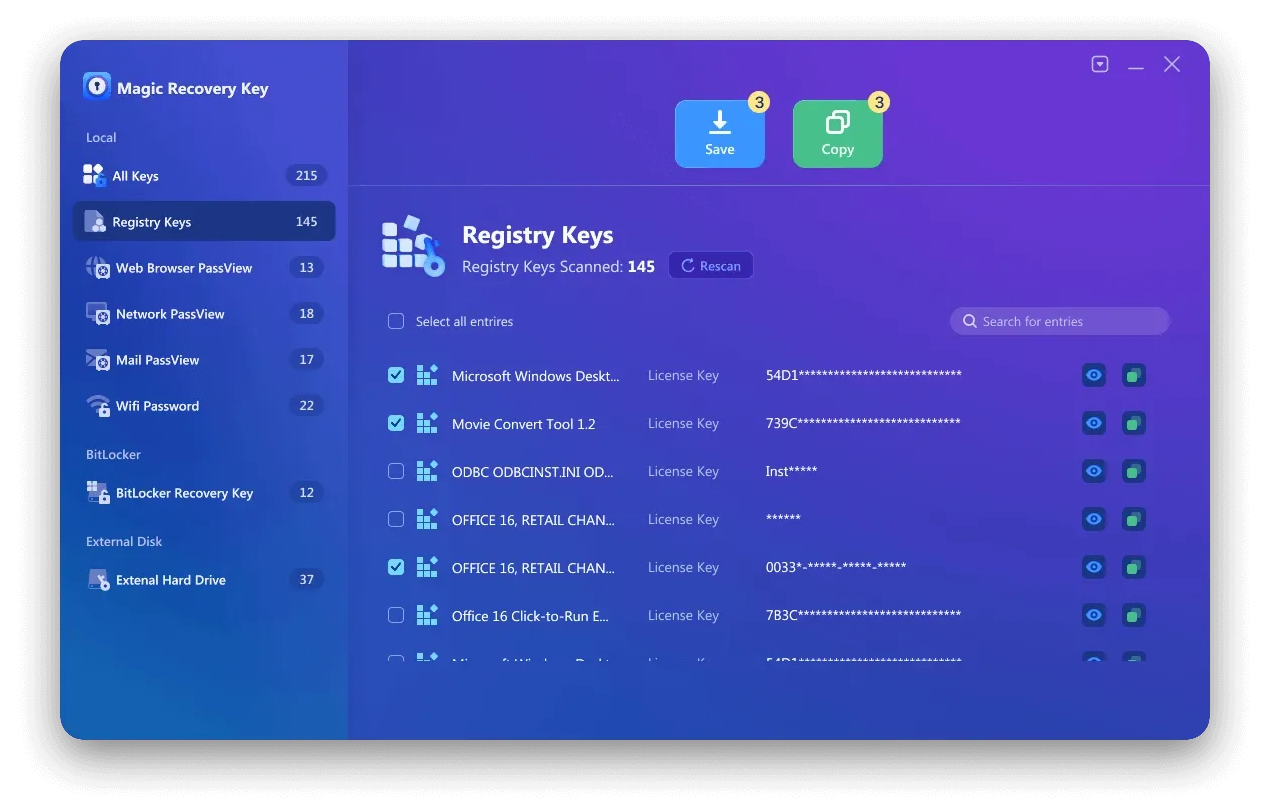
5. Copiare o salvare la chiave in modo sicuro.
L'intero processo richiede solo pochi clic e non richiede conoscenze tecniche.
Altri metodi per visualizzare una chiave CD di Windows (se preferite le opzioni manuali)
Anche se si raccomanda l'uso di strumenti professionali, esistono comunque metodi alternativi.
Metodo 1: Linea di comando (utenti avanzati)
✔ Non è richiesto alcun software
❌ Non è in grado di rilevare la maggior parte delle chiavi OEM
Metodo 2: Editor del Registro di sistema
⚠ Alto rischio di instabilità del sistema
⚠ Non adatto ai principianti
Questi metodi possono funzionare in casi limitati, ma sono meno affidabili di un sistema dedicato. Visualizzatore di codici prodotto di Windows.
Consigli prima di reinstallare Windows
Prima di reinstallare Windows, segui alcuni semplici passaggi per evitare problemi di attivazione.
Per prima cosa, recupera e salva il tuo codice prodotto di Windows. Uno strumento per visualizzare i codici prodotto di Windows può aiutarti a farlo rapidamente.
Successivamente, accedi con l'account Microsoft associato al tuo dispositivo se utilizzi una licenza digitale. Ciò può semplificare la riattivazione dopo la reinstallazione di Windows.
Inoltre, esegui il backup dei file importanti prima di modificare le partizioni o formattare il disco. Il recupero della licenza è importante, ma lo sono anche i tuoi dati personali.
Infine, conserva i codici di attivazione delle altre applicazioni a pagamento. Se reinstalli Windows senza averne effettuato il backup, potresti perdere l'accesso ai programmi che richiedono l'attivazione manuale.
Conclusione
La perdita del codice prodotto di Windows non deve impedirti di reinstallare Windows, aggiornare l'hardware o gestire le licenze software. Sebbene i metodi integrati, come il Prompt dei comandi e PowerShell, possano essere d'aiuto in alcuni casi specifici, spesso non funzionano sui sistemi moderni che utilizzano l'attivazione OEM, codici memorizzati in UEFI o licenze digitali.
Un visualizzatore professionale di codici prodotto Windows ti offre un modo più semplice e sicuro per recuperare le informazioni sulla licenza. Magic Recovery Key aiuta gli utenti a individuare i codici prodotto di Windows e altre chiavi di licenza software senza dover ricorrere a complicate operazioni manuali. Si tratta quindi di una soluzione pratica per chiunque desideri recuperare, copiare ed eseguire il backup di importanti dati di attivazione prima di apportare modifiche al sistema.
Se nel 2026 avrai bisogno di un programma affidabile per visualizzare i codici prodotto di Windows, Magic Recovery Key vale la pena di provare.
Supporta Windows 7/8/10/11 e Windows Server
Domande frequenti
Qual è il miglior visualizzatore di codici prodotto di Windows?
Posso trovare il mio codice prodotto di Windows senza usare alcun software?
Perché il Prompt dei comandi non mostra il mio codice prodotto di Windows?
È sicuro utilizzare un programma per visualizzare i codici prodotto di Windows?
È possibile recuperare un codice prodotto di Windows 11 utilizzando un programma per visualizzare i codici prodotto di Windows?
Devo recuperare il codice prodotto di Windows prima di reinstallare Windows?
Magic Recovery Key è in grado di trovare i codici prodotto di altri software?

Erin Smith è riconosciuta come una delle scrittrici più professionali di Amagicsoft. Negli ultimi 10 anni ha continuamente affinato le sue capacità di scrittura e ha aiutato milioni di lettori a risolvere i loro problemi tecnologici.