
Windows Product Key Viewer: Recuperar claves de licencia perdidas (Guía 2026)

Perder una clave de producto de Windows puede suponer un verdadero problema cuando necesitas reinstalar Windows, cambiar un disco duro, actualizar tu ordenador o transferir programas a otro dispositivo. Aunque la activación de Windows suele realizarse automáticamente en los ordenadores modernos, muchos usuarios siguen necesitando encontrar su clave de licencia original antes de realizar cambios importantes en el sistema. Ahí es donde una Visor de claves de producto de Windows resulta útil.
Un visor de claves de producto de Windows fiable puede analizar tu ordenador y mostrar la información de la licencia almacenada en un formato legible. En lugar de buscar en correos electrónicos antiguos, cajas de productos, entradas del registro o resultados de la línea de comandos, puedes utilizar una herramienta específica para localizar tu clave de licencia de Windows más rápidamente.
En esta guía de 2026, descubrirás para qué sirve un visor de claves de producto de Windows, cuándo necesitas uno, por qué los métodos manuales suelen fallar y cómo Magic Recovery Key puede ayudarle Recuperar claves de licencia perdidas de Windows y de programas con seguridad.
Índice
¿Qué es un visor de claves de producto de Windows?
A Visor de claves de producto de Windows es una herramienta de software que te ayuda a encontrar y mostrar la clave de licencia de Windows almacenada en tu ordenador. Dependiendo de cómo se haya instalado o activado Windows, la clave puede encontrarse en varios lugares, como el Registro de Windows, el firmware de la BIOS/UEFI, los archivos del sistema o los registros de compra.
Una clave de producto de Windows suele contener 25 caracteres y sigue este formato:
XXXXX-XXXXX-XXXXX-XXXXX-XXXXX
Sin embargo, no todos los ordenadores con Windows activado muestran una clave de producto visible. Muchos dispositivos con Windows 10 y Windows 11 utilizan una licencia digital, sobre todo si el sistema venía preinstalado, se actualizó desde una versión anterior o se activó a través de una cuenta de Microsoft. Por ello, los usuarios suelen encontrarse con que los comandos sencillos no arrojan ningún resultado o solo muestran información parcial.
Un visor profesional de claves de producto de Windows resuelve este problema comprobando las ubicaciones de las claves que los usuarios normales pueden pasar por alto. Por lo tanto, te ofrece una forma más rápida y segura de recuperar los datos de la licencia antes de reinstalar Windows o cambiar el hardware.
¿Cuándo necesitas un visor de claves de producto de Windows?
Es posible que necesites un visor de claves de producto de Windows en varias situaciones habituales.
En primer lugar, es posible que la necesites antes de reinstalar Windows. Si borras todo el contenido del sistema sin guardar la información de la licencia, la reactivación puede resultar más complicada. Por lo tanto, es recomendable recuperar y hacer una copia de seguridad de tu clave antes de formatear el disco.
En segundo lugar, es posible que la necesites tras comprar un ordenador de segunda mano. Un visor de claves de producto de Windows puede ayudarte a comprobar si el dispositivo cuenta con una clave de licencia y si el sistema almacena información de activación recuperable.
En tercer lugar, es posible que la necesites al actualizar el hardware. Los cambios importantes, como sustituir la placa base o la unidad del sistema, pueden afectar en ocasiones a la activación. Si recuperas tu clave de producto con antelación, reduces el riesgo de perder el acceso a tu licencia.
Por último, es posible que la necesites para gestionar las licencias de software. Muchos usuarios no solo pierden las claves de Windows, sino también las de Microsoft Office, el software de Adobe, AutoCAD, herramientas de PDF y otros programas de pago. Una herramienta de recuperación de claves de licencia más completa puede ahorrarte tiempo en estos casos.
Métodos comunes para recuperar una clave de producto de Windows (y sus límites)
Antes de elegir una herramienta, es importante entender por qué fallan muchos métodos habituales.
Uso del símbolo del sistema (CMD)
A primera vista, los comandos CMD suelen recomendarse para usuarios avanzados.
Ejemplo de comando:
wmic path softwarelicensingservice get OA3xOriginalProductKey
Pros
- No necesita software adicional
Contras
- No se pueden detectar muchas llaves OEM o incrustadas
- A menudo devuelve resultados vacíos en Windows 10/11
- No es fácil de usar para principiantes
En el mundo real, este método sólo funciona en escenarios limitados.
Edición del Registro de Windows
Otro método consiste en navegar manualmente por rutas del registro como:
HKEY_LOCAL_MACHINE\SOFTWARE\Microsoft\Windows NT\CurrentVersion
Riesgos
- Alta probabilidad de errores del sistema
- Los cambios accidentales pueden provocar la desactivación de Windows
- La corrupción del registro puede impedir el arranque del sistema
No se recomienda este método a los usuarios sin conocimientos técnicos.
Herramientas de terceros no verificadas
Muchas herramientas en línea afirman ser un Visor de claves de CD de Windows, pero no todos son de fiar.
Los problemas más comunes son:
- Detección imprecisa de claves
- Algoritmos obsoletos
- Posibles riesgos para la seguridad
Elegir la herramienta equivocada puede crear más problemas de los que resuelve.
La solución profesional: Un Visor de Claves de Producto de Windows Fiable
Debido a estas limitaciones, los sistemas modernos requieren un enfoque más inteligente. Aquí es donde un profesional Visor de claves de licencia de Windows adquiere valor.
Una solución fiable debería:
- Detectar claves OEM y UEFI incrustadas
- Compatible con Windows 7 hasta Windows 11
- Trabajar sin conexión para proteger la intimidad
- Mostrar los resultados de forma clara y precisa
¿Por qué elegir Magic Recovery Key como visor de claves de producto de Windows?
Magic Recovery Key Ayuda a los usuarios a recuperar claves de producto perdidas sin tener que seguir complicados pasos técnicos. En lugar de pedirte que busques en las carpetas del sistema o que modifiques entradas del Registro, analiza el sistema y muestra toda la información de licencia detectable en un solo lugar.
Esto lo hace útil para distintos escenarios de recuperación.
Si te estás preparando para reinstalar Windows, Magic Recovery Key puede ayudarte a localizar y hacer una copia de seguridad de tu clave de producto de Windows antes de nada. Si tu ordenador utiliza una clave OEM, la herramienta puede comprobar si existe información de licencia recuperable. Si necesitas gestionar licencias de software, también puede ayudarte. localizar claves de producto para las aplicaciones compatibles.
Además, Magic Recovery Key no se limita únicamente a Windows. Permite recuperar claves de producto de Windows, Windows Server, Microsoft Office, programas de Adobe y muchas otras aplicaciones instaladas. Por lo tanto, resulta ideal para aquellos usuarios que buscan una solución más amplia para la recuperación de claves de licencia, en lugar de una herramienta con una única función.
Para los usuarios normales, la mayor ventaja es la sencillez. No es necesario tener conocimientos avanzados sobre la línea de comandos. Tampoco es necesario buscar manualmente en el Registro. En su lugar, puedes analizar, ver, copiar y guardar la información de las claves mediante un proceso muy sencillo.
Cómo utilizar Magic Recovery Key para ver la clave de producto de Windows
Sigue estos sencillos pasos:
1. Descargue Magic Recovery Key desde el sitio web oficial de Amagicsoft.
Compatible con Windows 7/8/10/11 y Windows Server
2. Instale e inicie el programa.
3. Abra Local > Claves del Registro.

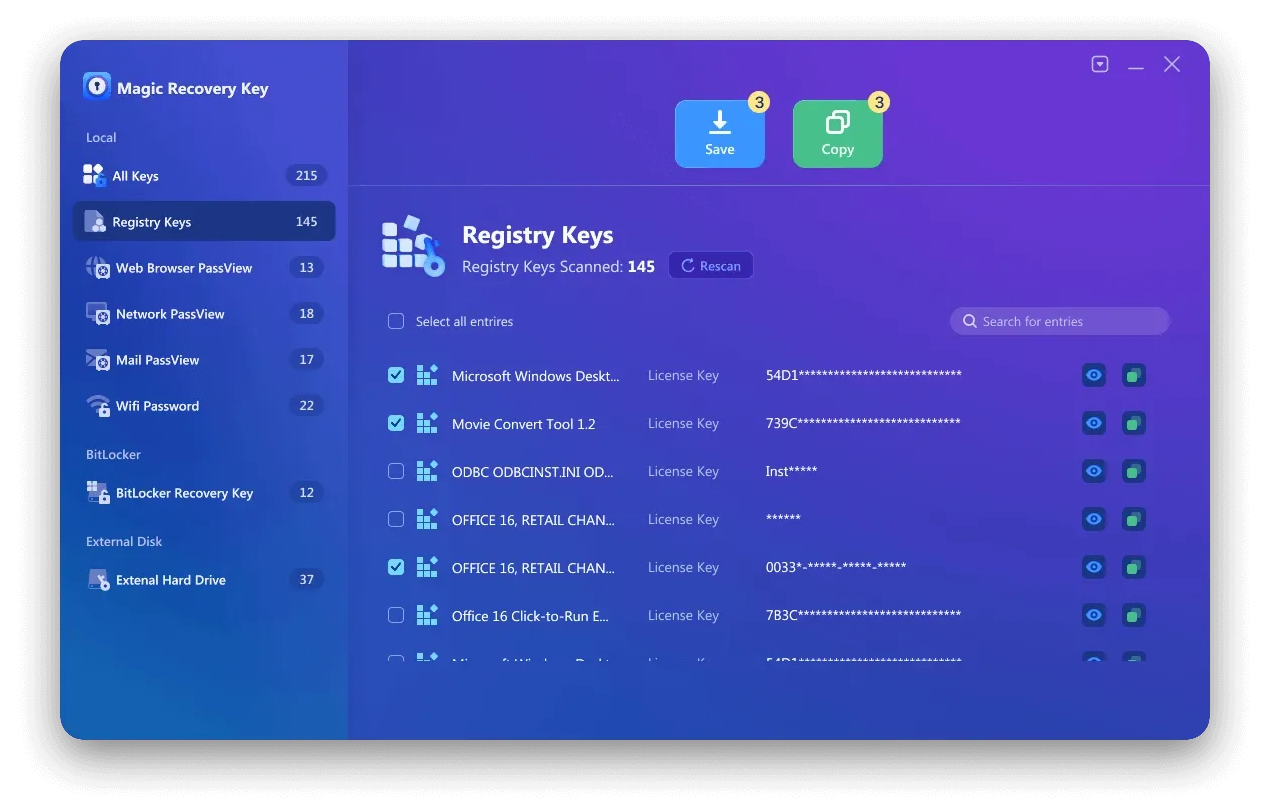
5. Copie o guarde la clave de forma segura.
Todo el proceso se realiza en unos pocos clics y no requiere conocimientos técnicos.
Otros métodos para ver una clave de CD de Windows (si prefiere las opciones manuales)
Aunque se recomiendan las herramientas profesionales, siguen existiendo métodos alternativos.
Método 1: Línea de comandos (usuarios avanzados)
✔ No necesita software
❌ No detecta la mayoría de las llaves OEM
Método 2: Editor del Registro
⚠ Alto riesgo de inestabilidad del sistema
⚠ No apto para principiantes
Estos métodos pueden funcionar en casos limitados, pero son menos fiables que un Visor de claves de producto de Windows.
Consejos antes de reinstalar Windows
Antes de reinstalar Windows, sigue unos sencillos pasos para evitar problemas de activación.
En primer lugar, recupera y guarda tu clave de producto de Windows. Una herramienta para visualizar claves de producto de Windows puede ayudarte a hacerlo rápidamente.
A continuación, inicia sesión con la cuenta de Microsoft vinculada a tu dispositivo si utilizas una licencia digital. Esto puede facilitar la reactivación tras reinstalar Windows.
Además, haz una copia de seguridad de los archivos importantes antes de modificar las particiones o formatear el disco. La recuperación de la licencia es importante, pero tus datos personales también lo son.
Por último, guarda las claves de software de otras aplicaciones de pago. Si reinstalas Windows sin hacer una copia de seguridad de esas claves, podrías perder el acceso a los programas que requieren una activación manual.
Conclusión
El hecho de haber perdido una clave de producto de Windows no tiene por qué impedirte reinstalar Windows, actualizar el hardware o gestionar las licencias de software. Aunque los métodos integrados, como el Símbolo del sistema y PowerShell, pueden resultar útiles en algunos casos concretos, a menudo fallan en los sistemas modernos que utilizan la activación OEM, claves almacenadas en UEFI o licencias digitales.
Un visor profesional de claves de producto de Windows te ofrece una forma más sencilla y segura de recuperar la información de la licencia. Magic Recovery Key ayuda a los usuarios a localizar las claves de producto de Windows y otras claves de licencia de software sin necesidad de seguir complicados pasos manuales. Por lo tanto, es una solución práctica para cualquiera que desee recuperar, copiar y hacer una copia de seguridad de datos de activación importantes antes de realizar cambios en el sistema.
Si necesitas un visor de claves de producto de Windows fiable en 2026, Magic Recovery Key vale la pena intentarlo.
Compatible con Windows 7/8/10/11 y Windows Server
Preguntas frecuentes
¿Cuál es el mejor visor de claves de producto de Windows?
¿Puedo encontrar mi clave de producto de Windows sin utilizar ningún programa?
¿Por qué el Símbolo del sistema no muestra mi clave de producto de Windows?
¿Es seguro utilizar un programa para ver la clave de producto de Windows?
¿Puede un programa para ver claves de producto de Windows recuperar una clave de Windows 11?
¿Debería recuperar mi clave de producto de Windows antes de reinstalar Windows?
¿Puede Magic Recovery Key encontrar claves de producto para otros programas?

Erin Smith es reconocida como una de las redactoras más profesionales de Amagicsoft. Ha perfeccionado continuamente sus habilidades de escritura durante los últimos 10 años y ha ayudado a millones de lectores a resolver sus problemas tecnológicos.