
Recensione di Apeaksoft Data Recovery: caratteristiche, prezzi, pro e contro
Apeaksoft Data Recovery Vale la pena provarlo per i file cancellati o formattati su supporti leggibili. L'acquisto è giustificato quando la versione di prova consente di recuperare file utilizzabili e la licenza è adeguata al numero di computer in uso. Una cartella cancellata e una chiavetta USB illeggibile possono sembrare entrambe preoccupanti, ma non offrono le stesse possibilità di recupero.
La presente recensione esamina le caratteristiche ufficiali, la documentazione e le condizioni di acquisto utilizzando gli stessi criteri per entrambi i prodotti. Amagicsoft sviluppa Magic Data Recovery, l’alternativa per Windows descritta di seguito. Si tratta di una recensione basata sulla documentazione, non di un test pratico sulle prestazioni di recupero; non forniamo alcuna garanzia in merito alla velocità misurata o a tassi di recupero superiori.
Per quanto riguarda il processo di recupero sottostante, inizia con il nostro Guida al recupero dei file cancellati. In questo caso, l'obiettivo è stabilire se il software e la relativa licenza siano adatti allo scopo.
Indice dei contenuti
Giudizio a prima vista: chi dovrebbe prendere in considerazione Apeaksoft Data Recovery?
Apeaksoft Data Recovery è la scelta più sensata quando la versione di prova ripristina i file di destinazione e hai bisogno di un flusso di lavoro semplice sul desktop. Scegli una licenza solo dopo aver identificato la tua piattaforma e il numero di computer che devi coprire.
- Fino a 200 MB di documenti o foto: Inizia con la quota di recupero gratuita offerta da Apeaksoft; un piano a pagamento potrebbe non essere necessario.
- Un esempio più esteso in Windows: Si consideri la quota di 500 MB pubblicizzata da Magic Data Recovery per i test relativi a cancellazioni, formattazioni o errori del file system. Ciò offre una maggiore capacità di prova, ma non garantisce un recupero migliore.
- Più computer Windows: Confronta la licenza a vita per tre PC di Apeaksoft con la licenza personale per un solo computer di Magic.
- Ripristino del Mac: Valutate l'edizione separata per Mac di Apeaksoft; il prodotto Magic di cui si parla in questo articolo è destinato a Windows.
- Fare clic o scollegare ripetutamente l'unità di archiviazione: Prima di scegliere una delle due applicazioni, è consigliabile richiedere una valutazione da parte di un professionista.
Le prime due quote provengono dalle pagine dei prodotti dei fornitori. Nessuna delle due quote specifica la quantità di dati utilizzabili che una determinata scansione produrrà. Fonti: Funzionalità di Apeaksoft e Magic Data Recovery.
Come abbiamo valutato il software
A tal proposito Recensione di Apeaksoft Data Recovery, il 13 ottobre 2026 abbiamo consultato la pagina del prodotto del fornitore, la guida per l’utente, la pagina di acquisto di Windows e la politica di rimborso. Abbiamo inoltre consultato le pagine del prodotto e di acquisto di Amagicsoft ai fini del confronto alternativo.
I nostri criteri riguardano la piattaforma, il flusso di lavoro documentato, l’effettiva capacità di recupero gratuita, le licenze e i limiti di recupero. Entrambi i prodotti vengono valutati in base agli stessi criteri di valutazione incentrati sull’acquisto riportati di seguito.
Perché questa recensione include un'alternativa
Questo articolo valuta Apeaksoft Data Recovery, anziché stilare una classifica di tutti i programmi di recupero dati. Abbiamo incluso Magic perché la sua applicazione per Windows gestisce operazioni di cancellazione e formattazione sovrapposte e perché i termini relativi alla versione di prova e alla licenza personale pubblicati consentono un confronto diretto al momento dell’acquisto.
Escludiamo dal confronto le suite di recupero specifiche per telefoni cellulari, i servizi di laboratorio professionali e gli strumenti RAID aziendali, poiché comportano requisiti di accesso o operazioni di recupero diversi. Altri strumenti desktop di uso generale non rientrano nell’ambito di questo articolo; la loro omissione non implica prestazioni inferiori. Il rapporto commerciale è indicato all’inizio, in modo che i lettori possano valutare la raccomandazione nel contesto.
Cosa si può dedurre dalle prove disponibili
Prove verificate | Cosa supporta | Ciò che non può stabilire |
Pagine ufficiali dei prodotti | Piattaforme, funzionalità e limiti delle versioni di prova pubblicizzati | Esito positivo del ripristino su un determinato dispositivo |
Guida ufficiale di Apeaksoft | Passaggi documentati relativi alla scansione, al filtraggio, all'anteprima e all'esportazione | Comportamento della versione attuale sul nostro hardware |
Pagine relative agli acquisti e ai rimborsi | Prezzi indicati, copertura della licenza e testo della polizza | Scelte finali al momento del pagamento o prezzi dei futuri rinnovi |
Benchmark di recupero condiviso | Per questo articolo non è stato effettuato alcun test di benchmark | Velocità comparativa o percentuali di recupero dei file integri |
Funzionalità di Apeaksoft Data Recovery: cosa conta nella pratica
Dispositivi supportati e scenari di ripristino
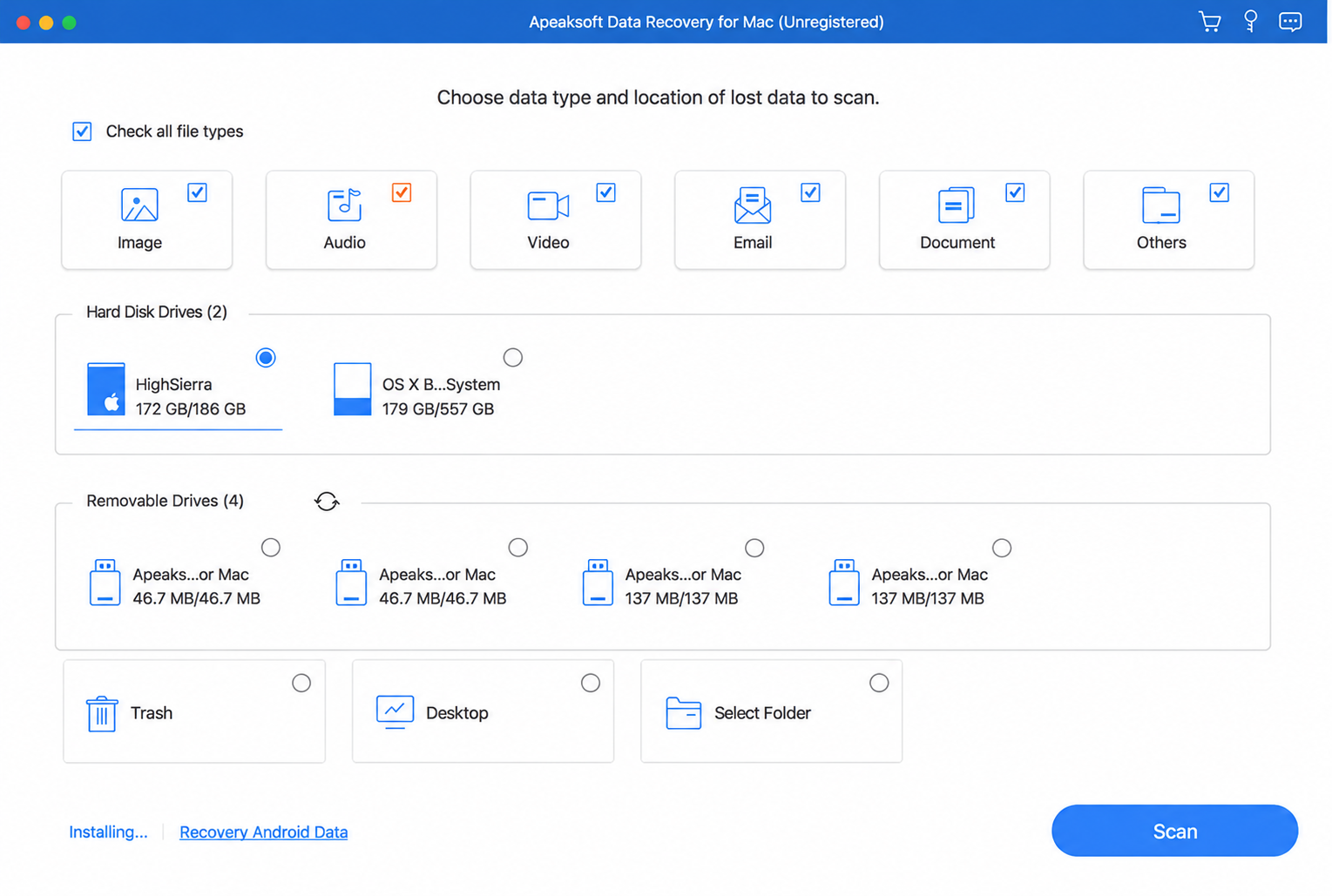
Le posizioni dei fornitori Apeaksoft Data Recovery per il recupero di file su Windows e Mac, compresi i casi di cancellazione e formattazione. La copertura dichiarata comprende unità interne ed esterne, dispositivi di archiviazione USB e schede di memoria, con i formati più comuni di foto, video, documenti, file audio ed e-mail.
Il riconoscimento del dispositivo è più importante del marchio stampato sulla custodia. Ad esempio, una scheda di memoria per fotocamera collegata tramite un lettore richiede un’operazione di recupero diversa rispetto a quella necessaria per un telefono che rende accessibili le foto solo tramite un’interfaccia di trasferimento. Verificate che l’applicazione possa accedere effettivamente alla memoria prima di fare affidamento su una generica dichiarazione di compatibilità con i dispositivi.
Quick Scan, Deep Scan, and Result Filtering
The official guide describes quick and deep scanning, path/type views, filtering, preview, and saving scan information as an SPF file. Its Windows instructions show a quick scan followed automatically by a deeper scan.
A quick scan generally benefits from surviving file-system records—the information that tracks names and locations. A deeper search may find content after those records disappear, but it may also lose original filenames or folder organization.
Neither scan mode proves that a file is complete. A familiar filename can point to damaged content, while a file with a generic name may still open correctly.
Anteprima prima del recupero
Preview gives Apeaksoft Data Recovery users an opportunity to inspect supported files before exporting them. However, a thumbnail or the opening seconds of a video cannot verify the entire file.
The verification section below explains how to assess actual output. Treat preview as a screening tool: it helps identify the right file, while opening the recovered copy establishes whether it remains useful.
Apeaksoft Data Recovery Pricing and License Terms
Quanto segue Apeaksoft Data Recovery pricing reflects the advertised Windows offers checked on October 13, 2026. Confirm the final amount, renewal price, and selected extras at checkout; promotions and taxes can change the total.
Windows license | Advertised offer | Crossed-out reference price | Computer | Billing |
One month | $22.45 | $44.90 | 1 pezzo | Auto-renewing |
Un anno | $55.96 | $69.95 | 1 pezzo | Auto-renewing |
A vita | $71.96 | $89.95 | 3 PCs | One-time purchase |
Check the Additional Trial Subscription
The purchase page also advertises seven days of Screen Recorder access, followed by automatic renewal at $29.90 per month. Inspect whether checkout includes this extra and cancel before renewal if you do not want it. A lifetime recovery license does not make an accompanying subscription a lifetime purchase.
Read the Refund Conditions
The Windows store lists seven days for the monthly plan and 30 days for annual and lifetime plans. However, the general refund policy states 30 days for monthly subscriptions as well. Ask support to resolve that discrepancy before purchasing.
The policy also makes refunds conditional and excludes incomplete recovery as a refund reason. A money-back banner should not replace a trial.
Apeaksoft Data Recovery Pros and Cons
La taglia più adatta: Users evaluating common file loss on readable storage, particularly those who value the separate Mac edition or three-PC Windows lifetime option.
Documented workflow: Select a location, scan, narrow the results, preview supported content, and recover selected files.
Observed recovery result: Not measured in this review. The vendor’s own review cannot establish an independent performance advantage.
Trial and license: Advertised 200MB free recovery; Windows monthly and annual plans cover one PC, while the lifetime plan covers three.
Pro
- A small free recovery allowance: It provides a way to validate actual output before buying.
- Windows and Mac editions: Users can evaluate the edition for their operating system.
- Documented search and preview tools: These help narrow a long results list.
- A three-PC lifetime option: Its license coverage may suit someone managing multiple computers.
Contro
- The free allowance is small: A single video can exceed 200MB.
- Subscription details need attention: Monthly and annual licenses renew, and the advertised additional trial introduces another potential charge.
- Refund information differs between pages: Buyers should clarify the applicable window.
- Edition matters: A Windows purchase does not establish Mac license coverage; Mac users must check the separate edition and terms.
Verdict:Apeaksoft Data Recovery offers a practical evaluation route for small recovery jobs. Its three-PC lifetime coverage may be more relevant than a small price difference for a household with several Windows computers.
Apeaksoft Data Recovery vs Magic Data Recovery
Per gli utenti di Windows, Magic Data Recovery is a relevant alternative when files disappear after deletion, formatting, or file-system errors. The comparison below uses published terms, not a recovery-rate ranking.
Fattore determinante | Apeaksoft Data Recovery | Magic Data Recovery |
Platform considered | Windows; separate Mac edition available | Finestre |
Advertised free recovery | 200MB | 500MB for testing |
Annual Windows license | $55.96 offer; 1 PC | $49.95 offer; 1 computer |
Lifetime/perpetual license | $71.96 offer; 3 PCs | $69.95 offer; 1 computer |
Approccio al recupero | Quick/deep scans with preview and filtering | Scanning, preview, and recovery workflow |
Main purchase limitation | Small trial allowance; check subscriptions | Trial remains capped; personal licenses cover one computer |
Measured recovery winner | No shared benchmark | No shared benchmark |
Prices checked October 13, 2026. See the Magic Data Recovery plans for current license details.
Magic Data Recovery: The Same Review Criteria

La taglia più adatta: Windows users handling deleted files, accidental formatting, or file-system errors on readable storage.
Documented workflow: Select a device, scan, inspect supported previews, and save selected files elsewhere.
Observed recovery result: Not measured in this review. No shared test establishes a recovery-rate advantage over Apeaksoft.
Trial and license: Advertised 500MB testing allowance; displayed personal offers are $49.95 annually and $69.95 perpetual, each for one computer. See the official product details e license plans.
Pro
- The larger advertised trial allowance gives more room to inspect restored output.
- Deletion, formatting, and file-system error coverage fits common Windows recovery tasks.
- A one-computer perpetual option suits users who prefer an ongoing personal license.
Contro
- The product discussed here targets Windows; it does not provide the Mac option in this comparison.
- The 500MB allowance remains limited and may not cover a large video or folder.
- Personal licenses cover one computer, compared with Apeaksoft’s advertised three-PC lifetime option.
Verdetto: Questo Apeaksoft Data Recovery alternative deserves consideration when a Windows user needs a larger trial sample. Its advertised allowance supports that recommendation; actual recovered-file quality remains the deciding factor.
Which License Fits Your Recovery Job?
Il costo di Apeaksoft Data Recovery depends on whether you need one recovery session, ongoing access, or several computers.
Situazione | Practical choice | Motivo |
A few files totaling less than 200MB | Start with Apeaksoft’s free allowance | A paid license may add no value for this job |
One-time Windows job exceeding the trial limit | Consider Apeaksoft’s monthly license after validating output | Lowest displayed initial paid cost among the plans compared; remember renewal |
Larger trial sample on one Windows PC | Evaluate Magic’s 500MB allowance | More capacity to inspect output before upgrading |
Ongoing use on one Windows computer | Compare annual and perpetual terms | Match spending to how long you expect to need access |
Two or three Windows computers | Consider Apeaksoft’s three-PC lifetime option | Device coverage can matter more than the price of one license |
Mac storage recovery | Check Apeaksoft’s Mac edition separately | The Windows prices above do not establish Mac pricing |
At the displayed offers, the Apeaksoft Data Recovery pricing difference between one year and lifetime is $16.00. That buys different duration and PC coverage, not evidence of better recovery. Magic’s displayed perpetual price is $20.00 above its annual offer, with one-computer coverage in both cases.
For example, a quick-formatted USB drive containing work documents presents a plausible software-recovery task if the drive remains stable and readable. Either tool may fit. A Windows user can compare available samples, while a buyer managing several PCs should also compare activation coverage.
How to Evaluate Apeaksoft Data Recovery Safely
Prima dell'uso Apeaksoft Data Recovery, check backups, cloud copies, and the Recycle Bin. If a good copy already exists, restore it first. Do not format an unreadable drive or run repair operations that write to it merely to prepare for scanning.
Scan and Save Without Overwriting the Source
- Stop writing to the affected device and avoid installing recovery software onto it.
- Select the storage where the files originally lived, then run the documented scan.
- Narrow results by path, type, or filename and preview supported content.
- Recover selected files to a different physical device.
These steps adapt the official workflow. Microsoft also advises minimizing computer use after deletion and keeping recovery source and destination separate. See the Apeaksoft guide e Microsoft recovery guidance.
Distinguish Found Files from Usable Files
Use the same checks for Apeaksoft Data Recovery and Magic:
Result stage | Cosa controllare |
Trovato | The scan lists a relevant entry; this alone proves little about content |
Visualizzabile in anteprima | The application displays supported content, beyond a name or icon |
Recuperato | The application exports a copy to the destination |
Intatto | The copy opens correctly and contains the expected usable content |
Open documents and inspect their pages, view photos at full size, and check videos throughout their duration. For valuable project files, load the recovered copy in the application that created it. Generic filenames may still contain intact content; familiar filenames may not.
A fair controlled comparison would record the OS, software versions, drive model, interface, file system, sample count, and sizes. It would test deletion and quick formatting separately, restore an identical starting state before each tool, and save output elsewhere. This describes a verification method, not a benchmark performed for this article. Never create a test scenario on the only copy of important data.
When Recovery Software Is the Wrong Next Step
Apeaksoft Data Recovery and competing applications search for data that still exists and remains accessible. They cannot recreate bytes that new data has overwritten.
Stop repeated DIY attempts if a drive clicks, disconnects frequently, or produces persistent read errors. These symptoms can indicate hardware trouble. For irreplaceable data, seek an assessment before further scanning.
On an SSD, TRIM and subsequent controller cleanup can also remove deleted content. An encrypted volume may require its password or recovery key before software can interpret the files. Buying another license does not remove these limits.
Conclusion: Is Apeaksoft Data Recovery Worth It?
Apeaksoft Data Recovery deserves consideration for common file-loss situations on readable storage, especially when its trial returns usable files. Check the selected edition, license coverage, renewal terms, and refund conditions before buying.
For Windows recovery after deletion, formatting, or file-system errors, we recommend evaluating Magic Data Recovery. Its 500MB testing allowance offers more scope to validate files, while its personal plans suit a single-computer recovery job. The recommendation rests on that practical fit, not an unverified claim of better recovery rates.
If the loss is accidental deletion, our Guida al recupero dei file cancellati explains the next steps. Start with the option that fits your platform and device count, then use the verification checks above to judge its output.
Supporta Windows 7/8/10/11 e Windows Server
Domande frequenti
Apeaksoft Data Recovery è gratuito?
È sicuro utilizzare Apeaksoft Data Recovery?
Apeaksoft Data Recovery è in grado di recuperare file da un'unità formattata?
Apeaksoft Data Recovery funziona su Windows e Mac?
Perché i file recuperati non si aprono?
La licenza a vita di Apeaksoft Data Recovery si rinnova automaticamente?
Posso ottenere un rimborso se il recupero non va a buon fine?
Qual è un'alternativa adeguata a Windows?

Jason è uno specialista nel recupero dati e nell’assistenza tecnica con oltre 15 anni di esperienza sul campo. Ha lavorato a lungo a stretto contatto con gli utenti finali, risolvendo casi complessi di perdita di dati e fornendo soluzioni pratiche di recupero in caso di cancellazione accidentale, unità formattate, file system danneggiati, partizioni perse, guasti di sistema e altre emergenze di recupero. La sua competenza comprende anche il backup e il ripristino, la riparazione dei file e il ripristino di emergenza, con particolare attenzione a fornire indicazioni sicure, affidabili e tecnicamente accurate.