
Apeaksoft Data Recovery im Test: Funktionen, Preise, Vor- und Nachteile
Apeaksoft Data Recovery is worth trying for deleted or formatted files on readable storage. Paying makes sense when the trial produces usable files and the license fits your computer count. A deleted folder and an unreadable USB drive can look equally worrying, but they do not offer the same recovery chances.
This review checks official features, documentation, and purchase terms using the same criteria for both products. Amagicsoft develops Magic Data Recovery, the Windows alternative discussed below. This is a documentation-based review, not a hands-on recovery benchmark; we make no claims about measured speed or superior recovery rates.
For the underlying recovery process, start with our Anleitung zur Wiederherstellung gelöschter Dateien. Here, the focus is deciding whether the software and its license fit the job.
Inhaltsübersicht
Quick Verdict: Who Should Consider Apeaksoft Data Recovery?
Apeaksoft Data Recovery makes most sense when its trial restores your target files and you need a straightforward desktop workflow. Choose a license only after identifying your platform and the number of computers you need to cover.
- Up to 200MB of documents or photos: Start with Apeaksoft’s advertised free recovery allowance; a paid plan may be unnecessary.
- A larger Windows sample: Consider Magic Data Recovery’s advertised 500MB testing allowance for deletion, formatting, or file-system errors. This offers more trial capacity, not proven better recovery.
- Multiple Windows computers: Compare Apeaksoft’s three-PC lifetime license with Magic’s one-computer personal license.
- Mac recovery: Evaluate Apeaksoft’s separate Mac edition; the Magic product discussed here targets Windows.
- Clicking or repeatedly disconnecting storage: Seek a professional assessment before choosing either application.
The first two allowances come from the vendors’ product pages. Neither allowance establishes how much usable data a particular scan will produce. Sources: Apeaksoft features und Magic Data Recovery.
How We Reviewed the Software
For this Apeaksoft Data Recovery review, we checked the vendor’s product page, user guide, Windows purchase page, and refund policy on October 13, 2026. We also checked Amagicsoft’s product and purchase pages for the alternative comparison.
Our criteria cover platform, documented workflow, actual free recovery, licensing, and recovery boundaries. Both products receive the same purchase-focused review fields below.
Why This Review Includes One Alternative
This article evaluates Apeaksoft Data Recovery, rather than ranking every recovery program. We include Magic because its Windows application addresses overlapping deletion and formatting tasks, and its published trial and personal-license terms allow a direct purchasing comparison.
We exclude phone-specific recovery suites, professional laboratory services, and enterprise RAID tools from the comparison because they involve different access requirements or recovery tasks. Other general-purpose desktop tools remain outside this article’s scope; their omission does not imply inferior performance. The commercial relationship appears in the opening so readers can judge the recommendation in context.
What the Available Evidence Can Establish
Evidence checked | What it supports | What it cannot establish |
Official product pages | Advertised platforms, features, and trial limits | Recovery success on a particular device |
Official Apeaksoft guide | Documented scan, filter, preview, and export steps | Current-version behavior on our own hardware |
Purchase and refund pages | Displayed prices, license coverage, and policy wording | Final checkout selections or future renewal prices |
Shared recovery benchmark | No benchmark performed for this article | Comparative speed or intact-file recovery rates |
Apeaksoft Data Recovery Features: What Matters in Practice
Supported Devices and Recovery Scenarios
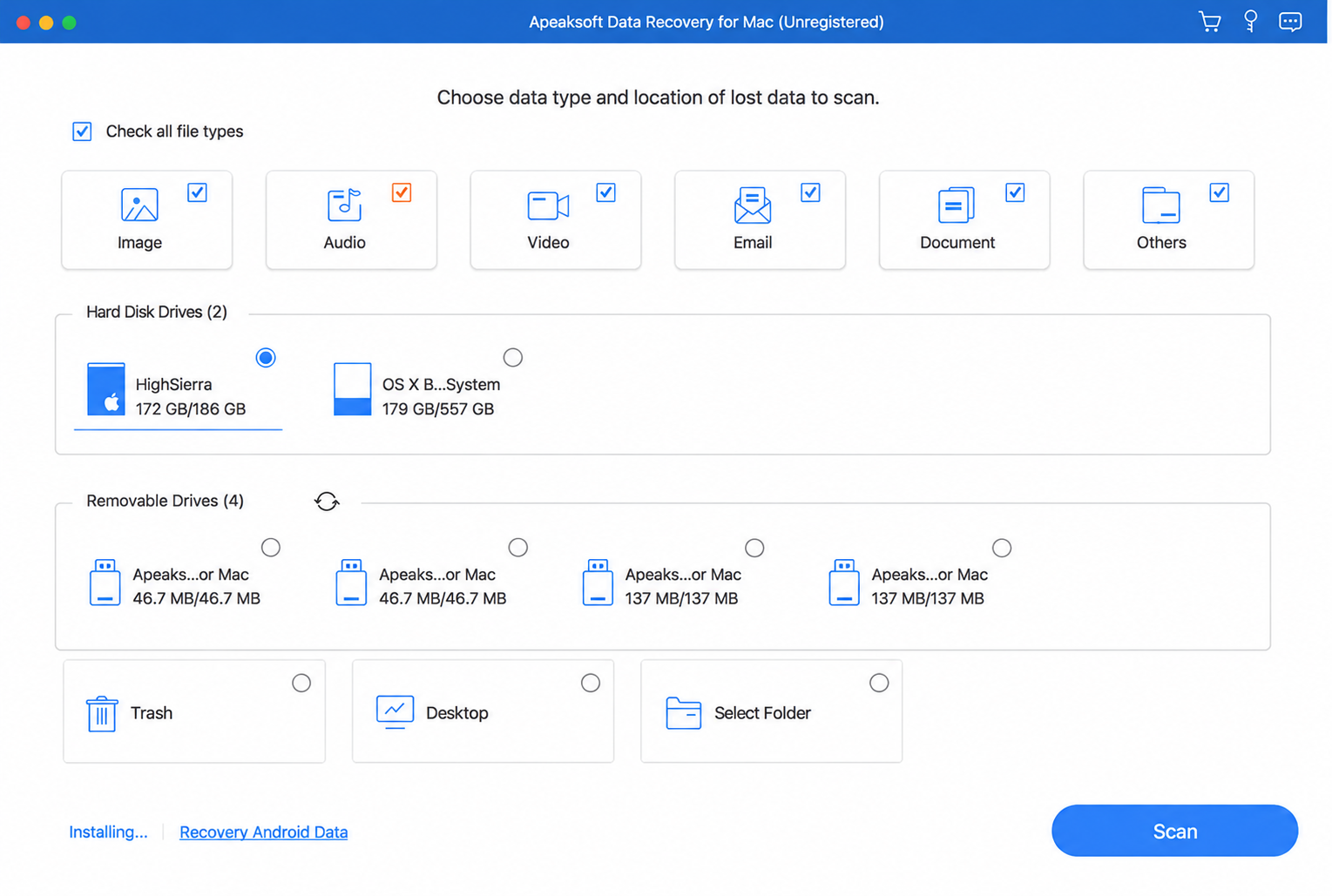
The vendor positions Apeaksoft Data Recovery for Windows and Mac file recovery, including deletion and formatting. Its published coverage includes internal and external drives, USB storage, and memory cards, with common photo, video, document, audio, and email formats.
Device recognition matters more than the brand printed on the casing. For example, a camera card connected through a reader presents a different recovery task from a phone that exposes only photos through a transfer interface. Confirm that the application can access the actual storage before relying on a broad device-support claim.
Quick Scan, Deep Scan, and Result Filtering
The official guide describes quick and deep scanning, path/type views, filtering, preview, and saving scan information as an SPF file. Its Windows instructions show a quick scan followed automatically by a deeper scan.
A quick scan generally benefits from surviving file-system records—the information that tracks names and locations. A deeper search may find content after those records disappear, but it may also lose original filenames or folder organization.
Neither scan mode proves that a file is complete. A familiar filename can point to damaged content, while a file with a generic name may still open correctly.
Vorschau vor Wiederherstellung
Preview gives Apeaksoft Data Recovery users an opportunity to inspect supported files before exporting them. However, a thumbnail or the opening seconds of a video cannot verify the entire file.
The verification section below explains how to assess actual output. Treat preview as a screening tool: it helps identify the right file, while opening the recovered copy establishes whether it remains useful.
Apeaksoft Data Recovery Pricing and License Terms
Das Folgende Apeaksoft Data Recovery pricing reflects the advertised Windows offers checked on October 13, 2026. Confirm the final amount, renewal price, and selected extras at checkout; promotions and taxes can change the total.
Windows license | Advertised offer | Crossed-out reference price | Computer | Billing |
One month | $22.45 | $44.90 | 1 PC | Auto-renewing |
Ein Jahr | $55.96 | $69.95 | 1 PC | Auto-renewing |
Lifetime | $71.96 | $89.95 | 3 PCs | One-time purchase |
Check the Additional Trial Subscription
The purchase page also advertises seven days of Screen Recorder access, followed by automatic renewal at $29.90 per month. Inspect whether checkout includes this extra and cancel before renewal if you do not want it. A lifetime recovery license does not make an accompanying subscription a lifetime purchase.
Read the Refund Conditions
The Windows store lists seven days for the monthly plan and 30 days for annual and lifetime plans. However, the general refund policy states 30 days for monthly subscriptions as well. Ask support to resolve that discrepancy before purchasing.
The policy also makes refunds conditional and excludes incomplete recovery as a refund reason. A money-back banner should not replace a trial.
Apeaksoft Data Recovery Pros and Cons
Am besten geeignet: Users evaluating common file loss on readable storage, particularly those who value the separate Mac edition or three-PC Windows lifetime option.
Documented workflow: Select a location, scan, narrow the results, preview supported content, and recover selected files.
Observed recovery result: Not measured in this review. The vendor’s own review cannot establish an independent performance advantage.
Trial and license: Advertised 200MB free recovery; Windows monthly and annual plans cover one PC, while the lifetime plan covers three.
Profis
- A small free recovery allowance: It provides a way to validate actual output before buying.
- Windows and Mac editions: Users can evaluate the edition for their operating system.
- Documented search and preview tools: These help narrow a long results list.
- A three-PC lifetime option: Its license coverage may suit someone managing multiple computers.
Nachteile
- The free allowance is small: A single video can exceed 200MB.
- Subscription details need attention: Monthly and annual licenses renew, and the advertised additional trial introduces another potential charge.
- Refund information differs between pages: Buyers should clarify the applicable window.
- Edition matters: A Windows purchase does not establish Mac license coverage; Mac users must check the separate edition and terms.
Verdict:Apeaksoft Data Recovery offers a practical evaluation route for small recovery jobs. Its three-PC lifetime coverage may be more relevant than a small price difference for a household with several Windows computers.
Apeaksoft Data Recovery vs Magic Data Recovery
Für Windows-Benutzer, Magic Data Recovery is a relevant alternative when files disappear after deletion, formatting, or file-system errors. The comparison below uses published terms, not a recovery-rate ranking.
Entscheidungsfaktor | Apeaksoft Data Recovery | Magic Data Recovery |
Platform considered | Windows; separate Mac edition available | Windows & Mac |
Advertised free recovery | 200MB | 500MB for testing |
Annual Windows license | $55.96 offer; 1 PC | $49.95 offer; 1 computer |
Lifetime/perpetual license | $71.96 offer; 3 PCs | $69.95 offer; 1 computer |
Ansatz zur Wiederherstellung | Quick/deep scans with preview and filtering | Scanning, preview, and recovery workflow |
Main purchase limitation | Small trial allowance; check subscriptions | Trial remains capped; personal licenses cover one computer |
Measured recovery winner | No shared benchmark | No shared benchmark |
Prices checked October 13, 2026. See the Magic Data Recovery plans for current license details.
Magic Data Recovery: The Same Review Criteria

Am besten geeignet: Windows users handling deleted files, accidental formatting, or file-system errors on readable storage.
Documented workflow: Select a device, scan, inspect supported previews, and save selected files elsewhere.
Observed recovery result: Not measured in this review. No shared test establishes a recovery-rate advantage over Apeaksoft.
Trial and license: Advertised 500MB testing allowance; displayed personal offers are $49.95 annually and $69.95 perpetual, each for one computer. See the official product details und license plans.
Profis
- The larger advertised trial allowance gives more room to inspect restored output.
- Deletion, formatting, and file-system error coverage fits common Windows recovery tasks.
- A one-computer perpetual option suits users who prefer an ongoing personal license.
Nachteile
- The product discussed here targets Windows; it does not provide the Mac option in this comparison.
- The 500MB allowance remains limited and may not cover a large video or folder.
- Personal licenses cover one computer, compared with Apeaksoft’s advertised three-PC lifetime option.
Fazit: Diese Apeaksoft Data Recovery alternative deserves consideration when a Windows user needs a larger trial sample. Its advertised allowance supports that recommendation; actual recovered-file quality remains the deciding factor.
Which License Fits Your Recovery Job?
Die Kosten für Apeaksoft Data Recovery depends on whether you need one recovery session, ongoing access, or several computers.
Situation | Practical choice | Grund |
A few files totaling less than 200MB | Start with Apeaksoft’s free allowance | A paid license may add no value for this job |
One-time Windows job exceeding the trial limit | Consider Apeaksoft’s monthly license after validating output | Lowest displayed initial paid cost among the plans compared; remember renewal |
Larger trial sample on one Windows PC | Evaluate Magic’s 500MB allowance | More capacity to inspect output before upgrading |
Ongoing use on one Windows computer | Compare annual and perpetual terms | Match spending to how long you expect to need access |
Two or three Windows computers | Consider Apeaksoft’s three-PC lifetime option | Device coverage can matter more than the price of one license |
Mac storage recovery | Check Apeaksoft’s Mac edition separately | The Windows prices above do not establish Mac pricing |
At the displayed offers, the Apeaksoft Data Recovery pricing difference between one year and lifetime is $16.00. That buys different duration and PC coverage, not evidence of better recovery. Magic’s displayed perpetual price is $20.00 above its annual offer, with one-computer coverage in both cases.
For example, a quick-formatted USB drive containing work documents presents a plausible software-recovery task if the drive remains stable and readable. Either tool may fit. A Windows user can compare available samples, while a buyer managing several PCs should also compare activation coverage.
How to Evaluate Apeaksoft Data Recovery Safely
Vor der Verwendung Apeaksoft Data Recovery, check backups, cloud copies, and the Recycle Bin. If a good copy already exists, restore it first. Do not format an unreadable drive or run repair operations that write to it merely to prepare for scanning.
Scan and Save Without Overwriting the Source
- Stop writing to the affected device and avoid installing recovery software onto it.
- Select the storage where the files originally lived, then run the documented scan.
- Narrow results by path, type, or filename and preview supported content.
- Recover selected files to a different physical device.
These steps adapt the official workflow. Microsoft also advises minimizing computer use after deletion and keeping recovery source and destination separate. See the Apeaksoft guide und Microsoft recovery guidance.
Distinguish Found Files from Usable Files
Use the same checks for Apeaksoft Data Recovery and Magic:
Result stage | Was ist zu prüfen? |
Gefunden | The scan lists a relevant entry; this alone proves little about content |
Vorschau verfügbar | The application displays supported content, beyond a name or icon |
Wiederhergestellt | The application exports a copy to the destination |
Unversehrt | The copy opens correctly and contains the expected usable content |
Open documents and inspect their pages, view photos at full size, and check videos throughout their duration. For valuable project files, load the recovered copy in the application that created it. Generic filenames may still contain intact content; familiar filenames may not.
A fair controlled comparison would record the OS, software versions, drive model, interface, file system, sample count, and sizes. It would test deletion and quick formatting separately, restore an identical starting state before each tool, and save output elsewhere. This describes a verification method, not a benchmark performed for this article. Never create a test scenario on the only copy of important data.
When Recovery Software Is the Wrong Next Step
Apeaksoft Data Recovery and competing applications search for data that still exists and remains accessible. They cannot recreate bytes that new data has overwritten.
Stop repeated DIY attempts if a drive clicks, disconnects frequently, or produces persistent read errors. These symptoms can indicate hardware trouble. For irreplaceable data, seek an assessment before further scanning.
On an SSD, TRIM and subsequent controller cleanup can also remove deleted content. An encrypted volume may require its password or recovery key before software can interpret the files. Buying another license does not remove these limits.
Conclusion: Is Apeaksoft Data Recovery Worth It?
Apeaksoft Data Recovery deserves consideration for common file-loss situations on readable storage, especially when its trial returns usable files. Check the selected edition, license coverage, renewal terms, and refund conditions before buying.
For Windows recovery after deletion, formatting, or file-system errors, we recommend evaluating Magic Data Recovery. Its 500MB testing allowance offers more scope to validate files, while its personal plans suit a single-computer recovery job. The recommendation rests on that practical fit, not an unverified claim of better recovery rates.
If the loss is accidental deletion, our Anleitung zur Wiederherstellung gelöschter Dateien explains the next steps. Start with the option that fits your platform and device count, then use the verification checks above to judge its output.
Unterstützt Windows 7/8/10/11 und Windows Server
FAQs
Ist Apeaksoft Data Recovery kostenlos?
Ist die Nutzung von Apeaksoft Data Recovery sicher?
Kann Apeaksoft Data Recovery Dateien von einem formatierten Laufwerk wiederherstellen?
Funktioniert Apeaksoft Data Recovery unter Windows und Mac?
Warum lassen sich wiederhergestellte Dateien nicht öffnen?
Verlängert sich die lebenslange Lizenz für Apeaksoft Data Recovery automatisch?
Erhalte ich eine Rückerstattung, wenn die Wiederherstellung fehlschlägt?
Was ist eine geeignete Alternative zu Windows?

Jason ist ein Spezialist für Datenwiederherstellung und technischen Support mit über 15 Jahren praktischer Erfahrung. Er hat intensiv mit Endnutzern zusammengearbeitet, schwierige Fälle von Datenverlust behoben und praktische Lösungen für versehentlich gelöschte Daten, formatierte Laufwerke, beschädigte Dateisysteme, verlorene Partitionen, Systemausfälle und andere Notfälle im Bereich der Datenwiederherstellung bereitgestellt. Zu seinen Fachgebieten gehören außerdem Datensicherung und -wiederherstellung, Dateireparatur sowie Notfallwiederherstellung, wobei er besonderen Wert auf eine sichere, zuverlässige und technisch korrekte Beratung legt.