
공장 초기화 후 파일을 복구할 수 있나요?
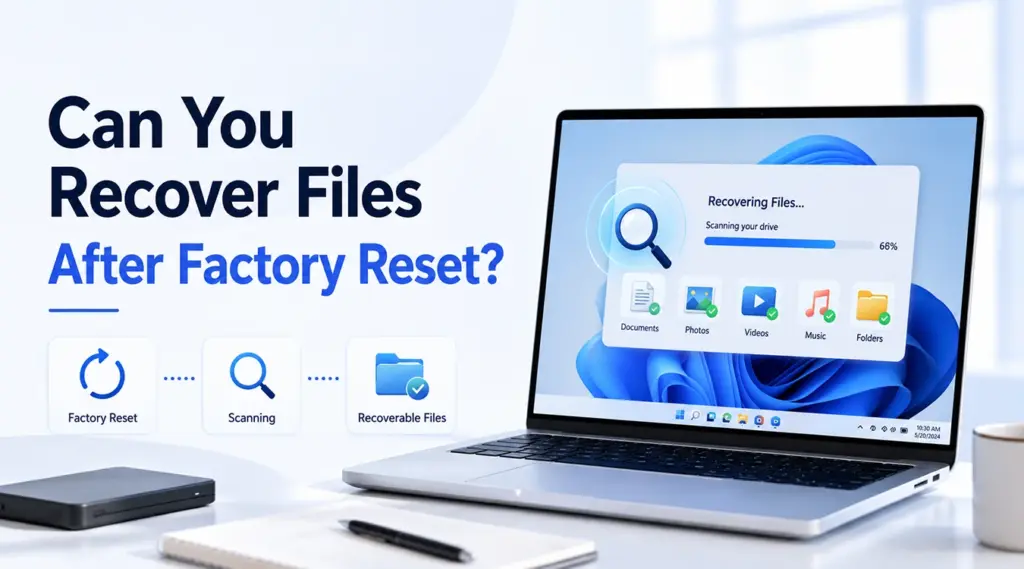
공장 초기화는 심각한 Windows 문제를 해결할 수 있지만, 사진, 문서, 동영상 및 업무 파일도 삭제될 수 있습니다. 따라서 많은 사용자들이 다음과 같이 급히 묻습니다: 초기화 후 파일을 복구할 수 있나요?? 대부분의 경우 데이터 복구가 가능합니다. 하지만 복구 결과는 초기화 옵션, 저장 장치 유형, 암호화 여부, 백업 유무, 그리고 이후 컴퓨터를 얼마나 사용했는지에 따라 달라집니다.
이 가이드는 다음과 같이 설명합니다. 초기화 후 파일을 복구하는 방법 Windows 11 및 Windows 10에서. 먼저, 어떤 요인이 영향을 미치는지 알아보겠습니다. HDD 복구. 다음으로, 백업 솔루션, 복구 소프트웨어 및 전문 서비스를 비교해 볼 수 있습니다. 마지막으로, 어떻게 Magic Data Recovery 필요할 때 도움이 될 수 있습니다 백업 없이 공장 초기화 후 파일 복구하기.
Windows 7/8/10/11 및 Windows Server 지원
목차
Windows 11/10에서 공장 초기화를 한 후 파일을 복구할 수 있나요?
네, 하지만 초기화 후 파일을 복구할 수 있나요? 이에 대한 답변은 상황에 따라 다릅니다. Windows에서는 ‘내 파일 유지’와 ‘모든 항목 제거’ 옵션을 제공합니다. ‘내 파일 유지’를 선택하면 일반적으로 앱과 설정을 제거하는 동시에 개인 데이터는 보존됩니다. 반면, ‘모든 항목 제거’를 선택하면 현재 설치된 Windows에서 개인 파일이 삭제됩니다.
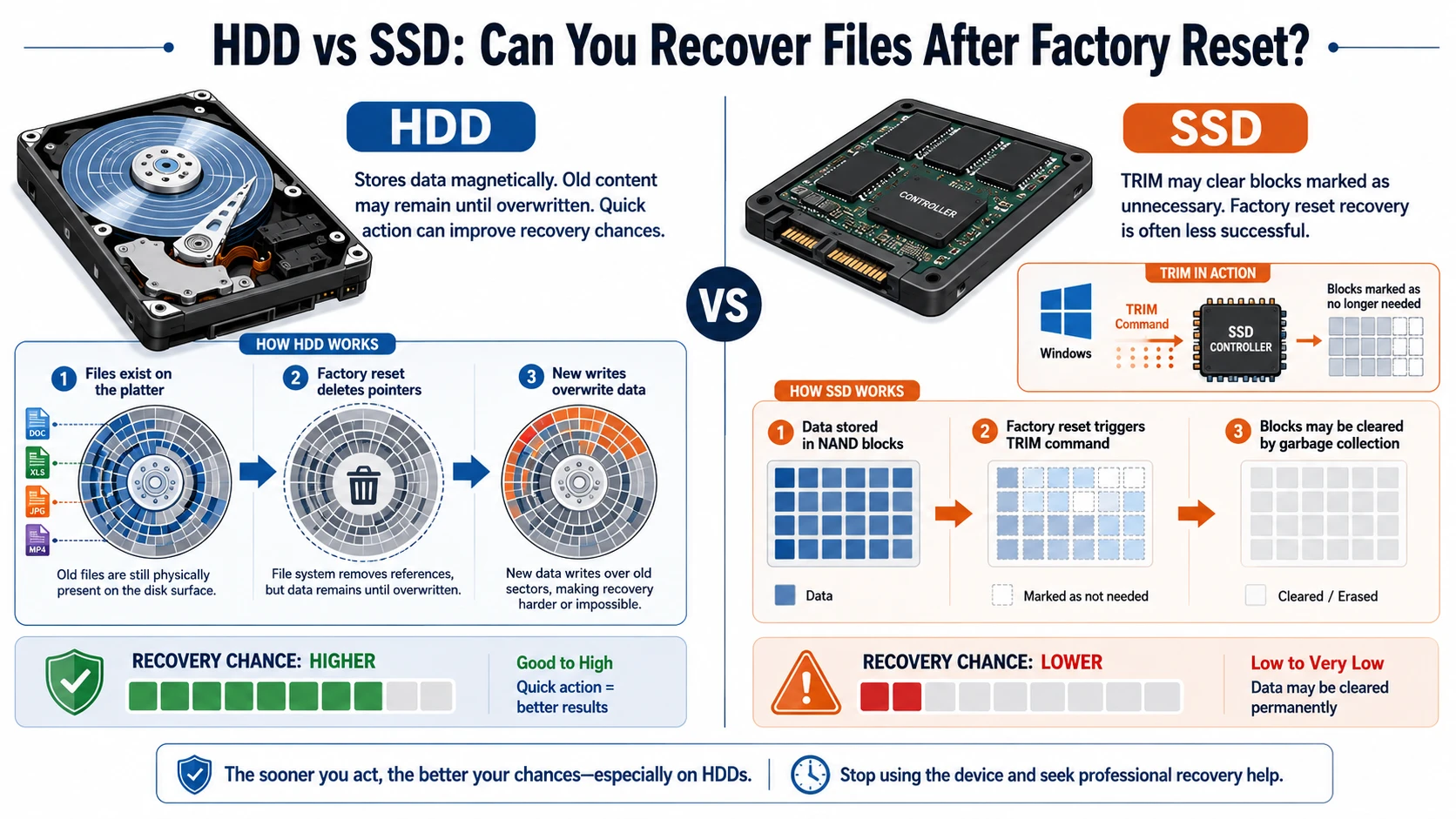
그렇긴 하지만, 한 HDD Windows가 해당 파일을 덮어쓸 때까지 기존 파일 내용이 유지될 수 있습니다. 한 SSD, 그러나 다음을 사용할 수 있습니다. TRIM 삭제된 블록을 더 빠르게 정리하기 위해. 따라서, SSD 공장 초기화 복구 대개 HDD 복구보다 더 어려운 것으로 드러납니다.
상황 | 회복 전망 | 가장 좋은 다음 단계 |
내 파일 보관 | 보통 괜찮음 | 사용자 폴더 확인 |
HDD에 있는 모든 내용을 삭제하기 | 가능 | PC 사용을 중단하고 스캔하세요 |
TRIM 기능이 있는 SSD에서 초기화하기 | 종종 어렵다 | 먼저 백업을 확인하세요 |
드라이브 정리 기능 활성화됨 | 매우 낮음 | 전문가를 고려해 보세요 |
OneDrive 또는 파일 기록이 있습니다 | Good | 백업 복원 |
BitLocker는 드라이브를 보호합니다 | 키 필요 | 복구 키 찾기 |
무엇보다 중요한 것은 문제가 발생한 드라이브의 사용을 중단하는 것입니다. 업데이트, 다운로드 및 새로운 설치 과정은 복구 가능한 데이터를 덮어쓸 수 있습니다. 따라서, 이 질문에 대한 답은 초기화 후 파일을 복구할 수 있나요? 신속하게 대처하면 상황이 나아집니다.
HDD 대 SSD: 공장 초기화 후 파일을 복구할 수 있을까?
저장 방식은 큰 영향을 미칩니다 초기화 후 파일을 복구할 수 있나요?. HDD는 데이터를 자기 방식으로 저장하므로, 새로운 데이터가 덮어쓰기 전까지는 기존 데이터가 남아 있을 수 있습니다. 따라서 신속히 조치를 취하면 HDD 데이터 복구 성공률을 높일 수 있습니다.
SSD는 작동 방식이 다릅니다. Windows는 TRIM 명령을 전송하여, 특정 블록에 더 이상 필요한 데이터가 포함되어 있지 않음을 컨트롤러에 알릴 수 있습니다. 그 결과, SSD 공장 초기화 복구 성공률이 낮은 경우가 많습니다.
공장 초기화 후 파일을 복구하기 전에 해야 할 일
시작하기 전에 초기화 후 데이터 복구, 남아 있을 수 있는 데이터를 보호하십시오:
- 파일 다운로드와 프로그램 설치를 중단하십시오.
- Windows 업데이트를 일시 중지합니다.
- 서식 지정, 디스크 정리 및 재설정을 피하십시오.
- 문제가 발생한 드라이브에는 복구 소프트웨어를 설치하지 마십시오.
- 복구된 파일을 저장할 다른 드라이브나 파티션을 선택하십시오.
- 가능하다면 다른 컴퓨터를 사용하여 해당 드라이브를 검사하십시오.
- BitLocker 복구 키를 미리 준비해 두십시오.
복구 소프트웨어는 덮어쓴 정보를 복원할 수 없기 때문에 이러한 단계가 중요합니다. 따라서 안전한 준비 과정은 직접적으로 초기화 후 파일을 복구할 수 있나요?. 다시 말해, 초기화 후 파일을 복구할 수 있나요? 종종 그 다음에 무엇을 하지 않느냐에 달려 있습니다.
Windows 재설정 옵션이 파일 복구에 미치는 영향
내 파일 보관하기
‘내 파일 유지’ 기능은 표준 사용자 폴더에 있는 개인 파일을 보존한 채 Windows를 재설치합니다. 하지만 Windows는 앱을 제거하고 많은 설정을 초기화합니다. 따라서 복구 소프트웨어를 사용하기 전에 바탕화면, 문서, 다운로드, 사진, 동영상 및 OneDrive를 확인하시기 바랍니다.
모두 삭제
“모든 항목 제거”를 선택하면 현재 설치된 사용자 파일, 앱 및 설정이 모두 삭제됩니다. 하지만 새로운 파일이 덮어쓰기 전까지는 HDD에 복구 가능한 데이터가 남아 있을 수 있습니다. 따라서 다음이 필요한 사용자는 Windows 10 공장 초기화 후 파일 복구하기 또는 Windows 11은 해당 장치의 사용을 즉시 중단해야 합니다.
클라우드 다운로드, 로컬 재설치 및 데이터 삭제
‘클라우드 다운로드’는 마이크로소프트에서 최신 Windows 파일을 가져오는 반면, ‘로컬 재설치’는 PC에 이미 있는 파일을 사용합니다. 두 옵션 중 어느 하나만으로는 복구 성공 여부를 결정할 수 없습니다. 오히려 저장소 유형, 이후의 디스크 활동, 암호화 여부, 그리고 재설정 옵션이 더 큰 영향을 미칩니다.
드라이브 정리 기능을 활성화한 경우, Windows는 복구를 어렵게 만들기 위해 추가적인 쓰기 작업을 수행했습니다. 그 결과, 일반적인 복구 소프트웨어로는 사용 가능한 데이터를 거의 찾지 못할 수 있습니다.
BitLocker 암호화
BitLocker는 드라이브를 암호화합니다. 따라서 보호된 데이터에 접근하려면 48자리 복구 키가 필요할 수 있습니다. Microsoft 계정, 업무용 계정, 저장된 파일, 인쇄된 기록 또는 USB 장치를 확인해 보십시오. 이 키가 없으면 손상되지 않은 데이터도 읽을 수 없을 수 있습니다.
초기화 후 파일을 복구하는 방법: 4가지 방법
결정을 내릴 때 초기화 후 파일을 복구하는 방법, 가장 안전한 방법부터 시작하세요. 이 순서에 따르면 초기화 후 파일을 복구할 수 있나요? 좀 더 실용적이고 위험을 고려한 해결책입니다. 먼저, 기존 사본을 확인하세요. 그런 다음, 사용할 수 있는 백업이 없을 때는 복구 소프트웨어를 사용하세요.
방법 1: 클라우드 스토리지 확인하기
OneDrive, Google Drive, Dropbox 및 업무용 저장소에 로그인하세요. 그런 다음 각 서비스의 ‘휴지통’을 확인하세요. 공장 초기화는 일반적으로 로컬 PC에만 영향을 미치며, 이미 온라인에 저장된 파일에는 영향을 주지 않습니다.
하지만 모든 폴더가 자동으로 동기화되었다고 가정해서는 안 됩니다. 재설정 전에 클라우드 백업에 ‘바탕화면’, ‘문서’, ‘사진’ 및 기타 중요한 폴더가 포함되었는지 확인하십시오.
방법 2: 파일 기록을 사용하여 복원하기
재설정 전에 ‘파일 기록’ 기능을 활성화한 경우, 백업 소스를 연결하고 이전 버전을 찾아보세요. 그런 다음 필요한 폴더를 안전한 위치로 복원하세요.
이 방법은 대개 가장 신뢰할 수 있는 솔루션 삭제된 데이터를 복원하는 대신 별도의 사본을 사용하기 때문입니다.
방법 3: 다른 기기 및 계정 검색하기
USB 드라이브, SD 카드, 오래된 컴퓨터, 이메일 첨부 파일, 메신저 앱, 공유 폴더 등을 확인해 보세요. 예를 들어, 동료가 프로젝트 파일을 아직 가지고 있을 수도 있고, 휴대폰에는 이전에 컴퓨터로 옮겼던 사진이 남아 있을 수도 있습니다.
방법 4: 백업 없이 Magic Data Recovery 사용하기
백업에 누락된 파일이 포함되어 있지 않은 경우, Magic Data Recovery 명확한 Windows 복구 절차를 제공합니다. Windows 7, Windows 8, Windows 10 및 Windows 11을 지원합니다. 또한 심층 스캔, 파일 필터, 미리 보기 및 선택적 복구 기능을 제공합니다.
이 소프트웨어는 흔히 발생하는 문제를 해결해 줍니다. 사용자들은 리셋 작업이 단순히 파일 레코드만 삭제했는지, 아니면 그 밑에 있는 내용을 덮어썼는지 종종 알지 못하기 때문입니다. 따라서 Magic Data Recovery는 해당 드라이브를 스캔하여 여전히 복구 가능한 데이터를 표시해 줍니다.
다음 단계를 따라 초기화 후 파일 복구 Magic Data Recovery와 함께:
1단계: Magic Data Recovery 다운로드 및 설치
Magic Data Recovery를 다운로드하여 설치하십시오. 단, 분실된 파일이 있던 드라이브와는 다른 위치를 선택하십시오. 이 조치를 통해 설치 프로그램이 복구 가능한 데이터를 덮어쓰는 것을 방지할 수 있습니다.
Windows 7/8/10/11 및 Windows Server 지원
2단계: 공장 초기화로 인해 영향을 받는 드라이브 선택
프로그램을 실행하고 메인 화면에서 드라이브와 파티션을 확인하세요. 다음으로, 공장 초기화 전에 파일이 저장되어 있던 드라이브를 선택하세요. 그런 다음 스캔을 시작하세요.

3단계: 드라이브에서 손실된 파일 검색하기
Magic Data Recovery는 자동으로 고급 스캔을 시작합니다. 이 과정에서 스캔이 진행됨에 따라 복구 가능한 파일 목록이 표시됩니다. 따라서 스캔이 완료되기 전에도 결과를 확인할 수 있습니다.

4단계: 복구 전 파일 미리보기
다음으로, 미리보기 기능을 사용하여 각 파일의 내용과 상태를 확인하세요. 또한 파일 유형, 이름, 크기 또는 위치별로 결과를 필터링할 수 있습니다. 이 단계를 통해 실제로 필요한 문서, 사진, 동영상 및 기타 파일만 복구할 수 있습니다.

5단계: 파일을 안전한 위치로 복구하기
마지막으로, 대상 파일을 선택하고 복구를 시작하십시오. 복구된 데이터는 다른 드라이브나 저장 위치에 저장하십시오. 해당 드라이브에 파일을 복원해서는 안 됩니다. 새로 데이터를 쓰면 복구 가능한 다른 데이터가 덮어쓰이거나 복구 결과가 손상될 수 있기 때문입니다.

다음과 같은 질문을 하는 사용자를 위해 백업 없이 공장 초기화 후 파일을 복구할 수 있나요?, 이 과정은 남아 있는 데이터를 확인하는 실용적인 방법을 제공합니다. 그러나 Magic Data Recovery는 덮어쓰기, 보안 삭제, TRIM 정리 완료 또는 필요한 암호화 키의 분실 후에는 파일을 복구할 수 없습니다.
공장 초기화 후 파일 복구에 Magic Data Recovery를 사용해야 하는 이유는 무엇일까요?
Magic Data Recovery는 명령줄 도구보다 시각적인 방식을 선호하는 일반 Windows 사용자에게 적합합니다. 우선, ‘선택’, ‘스캔’, ‘미리 보기’, ‘복구’로 구성된 워크플로를 통해 각 단계가 명확하게 구분됩니다. 또한, 미리 보기 기능을 통해 파일 내용을 확인할 수 있으며, 필터 기능을 사용하면 중요한 문서, 사진, 동영상 및 압축 파일을 더 쉽게 찾을 수 있습니다.
예를 들어, Windows 11 사용자가 ‘모든 항목 제거’를 선택한 후, 중요한 프로젝트 폴더가 OneDrive에 백업되지 않았다는 사실을 나중에 알게 될 수 있습니다. 해당 파일이 HDD에 남아 있고 Windows가 이를 덮어쓰지 않았다면, Magic Data Recovery를 통해 복구 가능한 데이터를 찾을 수 있습니다.
다음과 비교 시스템 복원, 이 도구는 개인 파일 복구에 중점을 둡니다. 시스템 복원은 주로 시스템 설정, 드라이버 및 응용 프로그램을 처리합니다. 또한, Magic Data Recovery를 사용하면 복구 전에 스캔 결과를 확인할 수 있습니다.
주요 장점은 다음과 같습니다:
- 간단한 그래픽 기반 복구 절차
- 복잡한 대상에 대한 고급 스캔 데이터 손실 사례
- 파일 유형 및 위치 필터
- 복구 전 파일 미리보기
- 모든 것을 복원하는 대신 선택적으로 복구하기
- 일반적인 사진, 동영상, 문서 및 압축 파일 지원
- 주요 Windows 버전과의 호환성
여전히, 초기화 후 파일을 복구할 수 있나요? 이는 데이터의 물리적 상태에 따라 달라집니다. 이 소프트웨어는 덮어쓴 섹터, 보안 삭제된 영역, 초기화된 SSD 블록, 또는 누락된 BitLocker 키를 우회할 수 없습니다. 이러한 솔직한 한계 덕분에, 불가능한 결과를 약속하는 다른 도구들보다 더 신뢰할 수 있는 선택지입니다.
초기화 후 파일을 복구할 때 흔히 저지르는 실수
이러한 오류를 피하세요:
- 문제가 발생한 C: 드라이브에 복구 소프트웨어 설치하기
- 초기화 후 대용량 파일 다운로드
- 다시 초기화하거나 포맷하기
- 복구된 파일을 동일한 드라이브에 다시 저장하기
- 중요한 데이터를 안전하게 백업하기 전에 디스크 복구 시작
- 시스템 복원에 개인 문서가 포함되어 있다고 가정할 때
- 물리적으로 고장 난 디스크를 계속 스캔하기
- 미리 보기를 거치지 않고 모든 스캔 결과를 복원하기
따라서, 여러분이 다음과 같이 물으시면 초기화 후 파일을 복구할 수 있나요?, 복구 도구를 비교하기 전에 새로운 쓰기 작업이 발생하지 않도록 하는 데 중점을 두십시오.
데이터 복구 전문가에게 언제 연락해야 할까요?
드라이브에서 딸깍거리는 소리가 나거나, 연결이 끊기거나, 과열되거나, BIOS에서 인식되지 않거나, 회전 상태가 불규칙할 경우 DIY 복구를 중단하십시오. 물리적 결함의 경우 전문 장비가 필요하며, 반복적인 스캔은 손상을 악화시킬 수 있습니다.
또한, 해당 파일이 비즈니스, 법률, 연구 또는 개인적인 측면에서 매우 중요한 가치를 지닌 경우에는 전문가에게 문의하십시오. 하지만 올바른 키가 없다면 실험실이라 해도 덮어쓴 데이터를 복원하거나 BitLocker 암호화된 내용을 해독할 수는 없습니다.
결론: 공장 초기화 후 파일을 복구할 수 있을까요?
그래서, 초기화 후 파일을 복구할 수 있나요?? 대부분의 경우 그렇습니다. 특히 백업이 있거나 HDD에 Windows가 아직 덮어쓰지 않은 데이터가 남아 있는 경우에는 더욱 그렇습니다. 하지만 SSD TRIM, 드라이브 정리, 암호화, 물리적 손상, 그리고 지속적인 사용은 성공률을 급격히 떨어뜨릴 수 있습니다.
먼저, 문제가 발생한 드라이브의 사용을 중단하십시오. 다음으로 OneDrive, 파일 기록 및 기타 복사본을 확인하십시오. 백업이 없는 경우, Magic Data Recovery 간편한 스캔, 미리보기 및 선택적 복구 워크플로를 제공합니다. 불가능한 결과를 약속하지 않으면서도 핵심 문제를 해결해 주기 때문에 이 도구를 추천합니다.
따라서 효율적인 것이 필요할 때는 하드 드라이브 복구 솔루션, Magic Data Recovery를 미리 실행해 보고, 미리보기 결과를 꼼꼼히 확인한 뒤, 복구된 파일을 다른 위치에 저장하세요.
Windows 7/8/10/11 및 Windows Server 지원
자주 묻는 질문
백업 없이 공장 초기화 후 파일을 복구할 수 있나요?
이는 저장 장치에 원본 데이터가 여전히 남아 있는지 여부에 달려 있습니다. 해당 드라이브의 사용을 중단하고, 가능하면 다른 위치에서 스캔을 진행하십시오. HDD의 경우 데이터가 덮어쓰기되기 전에 복구할 수 있는 경우가 있지만, SSD의 경우 TRIM이 삭제된 블록을 지운 후에는 복구가 더 어려워지는 경우가 많습니다.
Windows 11에서 공장 초기화 후 파일을 복구할 수 있나요?
네, Windows 11을 공장 초기화한 후에도 OneDrive, 파일 기록, 다른 장치 및 문제가 발생한 디스크를 확인하여 파일을 복구할 수 있습니다. 먼저, 업데이트와 새로운 설치를 중단하십시오. 그런 다음, 사용 가능한 백업을 복원하거나 드라이브를 안전하게 스캔하십시오. 다만, BitLocker, SSD TRIM, 드라이브 정리 및 이후 사용으로 인해 복구 가능성이 낮아질 수 있습니다.
Windows 10에서 공장 초기화를 한 후 파일을 복구할 수 있나요?
Windows 10을 공장 초기화한 후 파일을 복구하려면 먼저 클라우드 저장소와 ‘파일 기록’을 확인하세요. 해당 위치에 파일이 없다면 해당 디스크 사용을 중단하고 다른 위치에서 스캔을 실행하세요. 복구된 항목은 다른 곳에 저장하세요. 다만, 데이터가 완전히 덮어쓰기되거나 보안 삭제된 경우에는 어떤 도구로도 데이터를 복구할 수 없습니다.
공장 초기화를 하면 모든 데이터가 영구적으로 삭제되나요?
항상 그런 것은 아닙니다. ‘내 파일 유지’ 옵션을 선택하면 개인 파일이 일반적으로 보존되는 반면, ‘모든 항목 제거’를 선택하면 현재 사용 중인 Windows 설치 환경에서 해당 파일이 삭제됩니다. 하지만 일부 콘텐츠는 덮어쓰기가 이루어질 때까지 HDD에 남아 있을 수 있습니다. 반면, SSD TRIM, 드라이브 정리, 암호화 및 컴퓨터의 지속적인 사용은 데이터 복구를 극히 어렵게 만들거나 아예 불가능하게 만들 수 있습니다.
공장 초기화 설정을 되돌릴 수 있나요?
Windows에는 완료된 재설정을 되돌릴 수 있는 간단한 버튼이 제공되지 않습니다. 대신 OneDrive, 파일 기록, 시스템 이미지 또는 다른 백업에서 개인 파일을 복원해야 합니다. 백업이 없는 경우에는 문제가 발생한 디스크를 검사하십시오. 일반적으로 제거된 앱을 다시 설치하고 Windows 설정을 다시 구성해야 합니다.
파일을 복구할 수 있는 기간은 얼마나 되나요?
정해진 기한은 없습니다. 대신, Windows가 해당 드라이브에 새로운 데이터를 기록할 때마다 복구 가능성은 점점 낮아집니다. 업데이트, 다운로드, 웹 브라우징, 앱 설치 등으로 인해 삭제된 내용이 금세 덮어쓰일 수 있습니다. 따라서 데이터 손실을 발견하는 즉시 컴퓨터 사용을 중단하고 가장 안전한 복구 방법을 시작해야 합니다.
Magic Data Recovery는 무료인가요?
Magic Data Recovery는 500MB 용량의 파일을 무료로 스캔, 미리 보기 및 복구할 수 있는 체험판을 제공합니다. 따라서 사용자는 유료 옵션을 선택하기 전에 필요한 파일이 검색되는지 확인할 수 있습니다. 기능, 제한 사항 및 가격은 변경될 수 있으므로, 항상 공식 제품 페이지에서 최신 라이선스 약관을 확인하시기 바랍니다.

바실리는 이 분야에서 약 10년간 실무 경험을 쌓은 데이터 복구 전문가입니다. 그는 경력 전반에 걸쳐 삭제된 파일, 포맷된 드라이브, 손실된 파티션 및 RAW 파일 시스템과 관련된 수천 건의 복잡한 사례를 성공적으로 해결했습니다. 그의 전문 지식은 헥스 에디터와 같은 전문 도구를 사용한 수동 복구 방법과 복구 소프트웨어를 사용한 고급 자동화 솔루션을 모두 다룹니다. 바실리의 사명은 IT 전문가와 일반 사용자 모두에게 신뢰할 수 있는 데이터 복구 지식을 제공하여 소중한 디지털 자산을 보호할 수 있도록 돕는 것입니다.