
Análise do Donemax Data Recovery: Teste com HDD
Recuperação de Dados Donemax can list a deleted file without returning a usable copy. That distinction matters more than a long feature list. In an Amagicsoft test involving 35 deleted files on a 500 GB HDD, Donemax completed its scan in 45 minutes, but two recovered documents displayed garbled text.
Magic Data Recovery completed its scan in 37 minutes, and all 35 recovered files opened normally. This review explains those observations alongside pricing, licensing, and platform differences. Amagicsoft develops Magic Data Recovery, so we disclose that relationship and apply the same assessment criteria to both tools.
For the wider recovery process, see our guia de recuperação de arquivos excluídos. Windows users facing deletion, formatting, or file system errors can also evaluate Magic Data Recovery. Our direct comparison below covers HDD deletion only.
Índice
Quick Verdict: Which Tool Fits the Job?
Recuperação de Dados Donemax remains worth considering, particularly for Mac users or buyers who need its two-computer licensing. However, Magic produced the stronger content-usability result in our Windows HDD deletion test.
- Windows HDD deletion: Start by evaluating Magic. All 35 recovered test files opened normally, and its quick scan already listed the entire deleted set.
- Recovery on a Mac: Consider Donemax’s separate Mac edition. Our Windows results do not establish Mac performance.
- Two-computer licensing: Check Donemax’s consumer plans, which cover two PCs or two Macs depending on the edition.
- A small Windows recovery job: Magic’s published 500 MB testing allowance provides more evaluation room than Donemax’s stated 200 MB.
- An intact backup or a failing disk: Restore the backup first, or seek a professional diagnosis instead of buying another program.
Donemax Data Recovery vs Magic Data Recovery
This focused comparison covers a branded review and one relevant Windows alternative. It is not an exhaustive “best software” ranking. Donemax is the subject of the article; Magic addresses the same common Windows recovery tasks and was part of the supplied test record. Other products fall outside this two-tool comparison, rather than receiving an implied lower ranking.
Fator decisivo | Donemax | Magic Data Recovery |
Plataforma | Separate Windows and Mac editions | Windows application |
Published Windows free recovery allowance | 200 MB | 500 MB for testing |
Completed scan in the HDD test | 45 minutes | 37 minutes |
Early discovery of all 35 deleted files | No quick-scan timing or count recorded | All 35 listed during quick scan; elapsed time not recorded |
Recovered content in the test | Two documents displayed garbled text; other content was reported normal | All 35 files opened normally |
Nomes originais dos arquivos | Three recovered files lost their original names | Filename preservation was not separately recorded |
Displayed one-year consumer price | $89.95 for two PCs | $49.95 promotional price; $69.95 crossed out; one computer |
Displayed lifetime consumer price | $109.95 for two PCs | $69.95 promotional price; $99.95 crossed out; one computer |
Main trade-off | Mac option and broader consumer device coverage, but two document-content issues in this test | Better content-usability result in this test, but Windows-only scope and one-computer consumer licensing |
Test observations come from the Amagicsoft test record. Published features and displayed USD prices were checked on October 13, 2026: Donemax Windows features, Donemax Windows pricing, Magic features, e Magic pricing.
How We Tested Donemax Data Recovery
The Amagicsoft test used a Windows 11 version 26H2 computer and a 500 GB mechanical hard disk. The dataset contained 35 deleted files across four categories: documents, images, videos, and audio.
Test detail | Recorded information |
Sistema operacional | Windows 11, version 26H2 |
Source storage | 500 GB HDD |
Conjunto de dados | 35 files: documents, images, videos, and audio |
Cenário de perda | Exclusão de arquivos |
Programs compared | Donemax Data Recovery and Magic Data Recovery |
Scan observation | Time to completed scan; early file discovery where reported |
Output validation | Whether recovered files opened normally; document readability and filename issues where reported |
What the Test Record Shows
The supplied record describes deleting the 35 files, scanning the affected HDD with both applications, recovering the files, and checking the output. We assess the results using three separate questions:
- Discovery: Did the application list the deleted files?
- Content usability: Did the recovered files open normally?
- Metadata: Did the output retain the original filenames?
Recuperação de Dados Donemax and Magic face the same criteria. A filename issue does not automatically mean content corruption, while a successful export does not establish readable content.
Limits of This Comparison
The record does not specify software versions, the HDD model or interface, file system, per-category counts, file sizes, deletion method, or test date. It also does not document test order, restoration of identical disk state between runs, destination storage, or repeat runs. These omissions limit reproducibility and how confidently we can attribute every difference to the software.
Opening normally is a practical usability check, not proof of byte-for-byte identity. No hash comparison, complete playback verification, or systematic preview count was supplied. We also have no measured quick-scan duration.
Accordingly, these results describe one reported HDD deletion test. They do not establish performance for formatted volumes, SSDs, RAW drives, physical faults, or macOS.
Donemax Data Recovery Test Results: Speed and File Quality
Completed Scans Took 45 and 37 Minutes
Recuperação de Dados Donemax completed its scan in 45 minutes. Magic completed its scan in 37 minutes, an eight-minute difference in the recorded test.
Magic’s quick scan already listed all 35 deleted files. That matters because the wanted files appeared before the completed scan. However, the record does not say how long the quick scan took, so 37 minutes should not be described as quick-scan time.
Scan duration can change with disk capacity, interface, file system, fragmentation, and scan settings. Treat these timings as observations from this setup, not promised completion times for another drive.
Content Problems and Filename Loss Are Different
All 35 files recovered with Magic opened normally. With Recuperação de Dados Donemax, two recovered documents displayed garbled text, and three files lost their original filenames. The remaining content was reported as normal.
The record does not identify whether the two document problems overlap with the three filename issues. We therefore do not add them together and claim that five distinct files failed.
Garbled text means those two document outputs did not meet our practical readability check. Filename loss affects organization and identification, but a renamed file can still contain usable data.
What We Can Conclude
Magic produced the better reported content-usability outcome and completed its scan sooner in this test. That supports recommending it first for a similar Windows HDD deletion task.
It does not establish a universal recovery rate. Nor does it explain why the two Donemax documents displayed garbled text; identifying the cause would require the original files, recovered outputs, and repeat testing.
Donemax Data Recovery Review: Pros, Cons, and Fit
Best Fit and Workflow
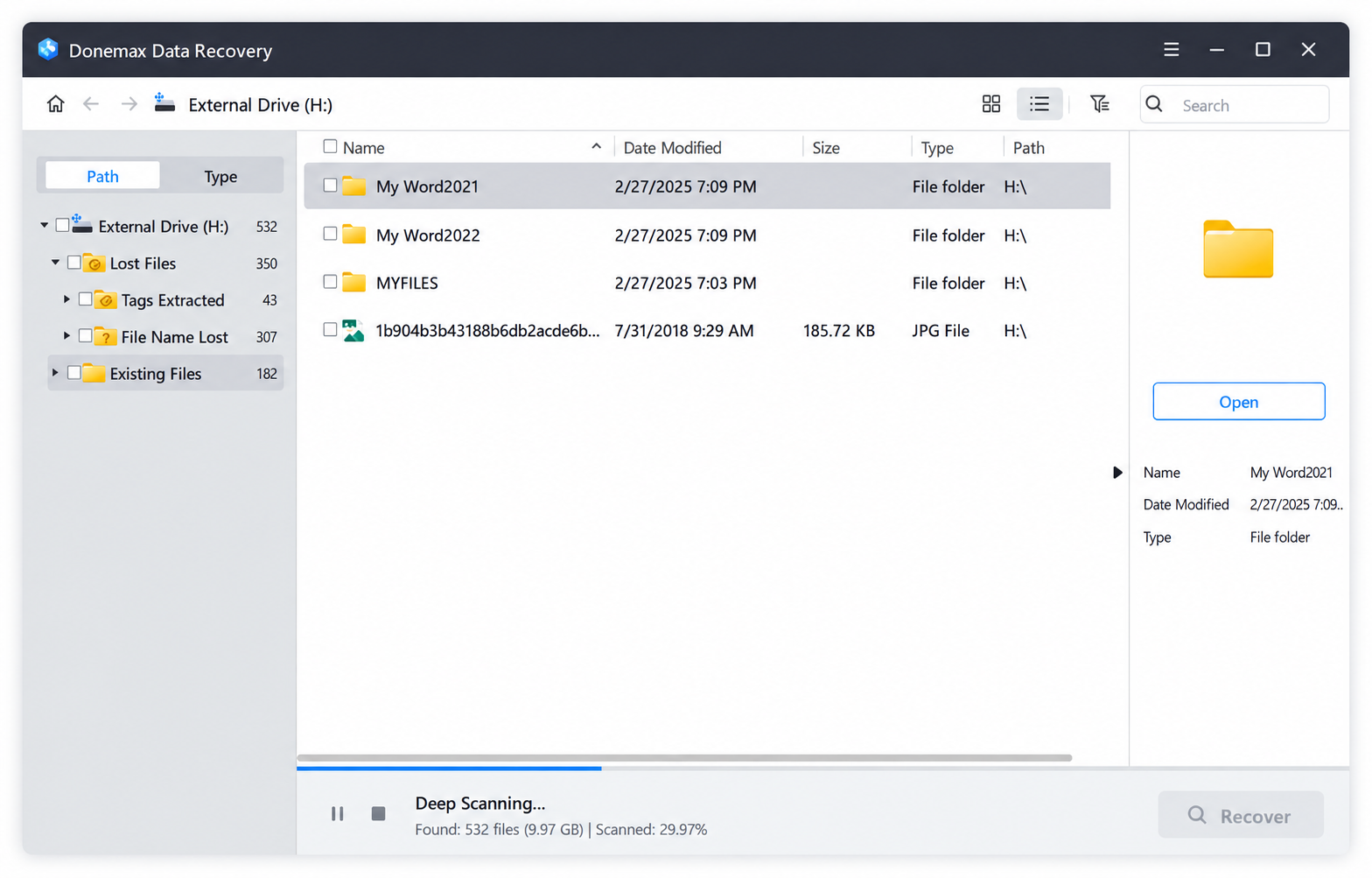
Recuperação de Dados Donemax suits users who want a graphical recovery workflow and either a Mac edition or two-computer consumer licensing. Its documented workflow involves selecting storage, scanning it, previewing supported results, and exporting files.
The Windows product page lists deep scanning and common file systems such as NTFS, ReFS, FAT, and exFAT. Confirm support for the specific volume and edition before purchasing.
Observed Results, Pros, and Cons
In the HDD deletion test, Donemax completed scanning in 45 minutes. Most recovered content was reported normal, but two documents displayed garbled text.
Prós
- A separate Mac edition broadens the platform choice.
- Consumer plans cover two computers on the selected platform.
- File preview supports checking results before recovery.
- Most content in the reported deletion test opened normally.
Contras
- Two recovered documents failed the readability check in this test.
- Three files lost their original names, making identification less convenient.
- The published 200 MB Windows allowance offers limited room for larger test files.
- Windows and Mac licenses are separate purchases.
Veredicto: Donemax remains a candidate when its platform or license coverage fits. For important documents, inspect actual recovered samples rather than relying on file discovery alone.
Magic Data Recovery: Pros, Cons, and Fit

Best Fit and Workflow
For Windows users evaluating Donemax Data Recovery alternatives, Magic is relevant to deletion, formatting, and file system error scenarios. Its documented workflow also follows selection, scanning, preview, and recovery.
The 500 MB published testing allowance and lower displayed one-computer pricing make small recovery jobs easier to evaluate. These are buying considerations, separate from the test results.
Observed Results, Pros, and Cons
Magic completed the recorded scan in 37 minutes. Its quick scan already listed the full deleted set, and all 35 recovered files opened normally.
Prós
- All 35 recovered test files passed the reported opening check.
- Quick scan listed all the deleted test files before scan completion.
- The completed scan took eight minutes less in this setup.
- The published Windows testing allowance is larger.
Contras
- This comparison includes no native macOS application.
- Consumer licensing covers one computer.
- A 35-file opening check cannot establish performance for large media collections or different loss scenarios.
- Original-filename preservation was not separately recorded.
Veredicto: Magic is our preferred starting point for a similar Windows HDD deletion job because of the usable recovered output in this test. That recommendation does not extend automatically to untested scenarios.
Compatível com Windows 7/8/10/11 e Windows Server
Donemax Data Recovery Free Limits and Pricing
Donemax Data Recovery free does not mean unlimited restoration. Its Windows product page states free scanning, preview, and a 200 MB recovery allowance. Magic’s product page states a 500 MB testing allowance.
These limits govern exported data, not the number of filenames a scan can display. A large video may exceed an allowance even when several small documents fit within it.
Donemax consumer license | Displayed USD price | Cobertura |
One month | $69.95; $79.95 crossed out | Two PCs or two Macs, depending on edition |
Um ano | $89.95 | Two PCs or two Macs, depending on edition |
Lifetime | $109.95 | Two PCs or two Macs, depending on edition |
O Windows purchase page e Mac purchase page state no automatic renewal. Monthly and yearly access still expires at the end of the purchased term.
O Donemax refund policy includes conditions and exclusions. A 30-day guarantee should not be treated as an unconditional refund promise.
Donemax Data Recovery for Mac: A Separate Decision
Donemax Data Recovery for Mac is relevant when recovery must run directly on macOS. Our Windows HDD test provides no measured evidence about that edition.
Verifique o official Mac product page against your exact operating system and storage device. Its published compatibility references vary, so confirm the current download requirements before paying.
The comparison’s 200 MB allowance comes from the Windows page. We have not verified the allowance inside the current Mac build. Neither the Windows license nor Windows test outcome should substitute for checking the Mac edition.
Choose by Scenario, Then Validate the Files
Situação | Practical next step |
Deleted documents on a readable Windows HDD | Evaluate Magic first based on this test; check document content after export |
Recovery must run on a Mac | Evaluate Donemax’s Mac edition and its current compatibility |
Two computers need consumer licenses | Compare Donemax’s two-computer plan with the cost of separate one-computer plans |
Large video or audio recovery | Check complete playback and seekability; opening a file alone is insufficient |
Formatting or file system errors | Evaluate a tool that documents that scenario; do not extrapolate the deletion test |
Advanced recovery requiring disk images or specialist controls | Verify those capabilities separately; this comparison does not test them |
For a deleted-file workflow, see our guides to recovering files after emptying the Recycle Bin e recovering deleted files from an external drive. These supporting articles address specific deletion tasks.
Before Using Donemax Data Recovery or Another Tool
Stop writing to the affected storage. Install the application on unaffected storage and save recovered files to a separate physical device.
For a stable drive, the official Donemax user guide explains drive selection, scanning, and recovery. Validate the exported output in the normal application: inspect document text, view images, and play media beyond the first few seconds.
Do not continue scanning an HDD that clicks, repeatedly disconnects, or struggles to read. Restore an existing backup first when one is available. Recovery software also cannot bypass encryption credentials or recreate overwritten content.
On SSDs, TRIM can make deleted content unavailable. Microsoft’s Documentação do TRIM explains why deleting files from an SSD differs from this mechanical-HDD test.
Conclusion: Is Donemax Data Recovery Worth It?
Recuperação de Dados Donemax offers useful platform and licensing options, but our reported deletion test exposed a meaningful limitation: two recovered documents contained garbled text. Three files also lost their original names.
Recomendamos Magic Data Recovery first for a similar Windows HDD deletion task because all 35 recovered files opened normally, the quick scan listed the entire deleted set, and the completed scan took 37 minutes rather than 45.
Magic also supports formatting and file system error scenarios, although this test did not evaluate them. Choose by platform and validated output, and use our guia de recuperação de arquivos excluídos for the wider recovery process.
Compatível com Windows 7/8/10/11 e Windows Server
Perguntas frequentes
O Donemax Data Recovery é gratuito?
Qual foi o desempenho do Donemax Data Recovery no teste com o HDD?
O Magic Data Recovery era mais rápido que o Donemax?
Quanto custa o Donemax Data Recovery?
O Donemax Data Recovery funciona no Mac?
Can Donemax Data Recovery recover a formatted drive?
Does losing the original filename mean the file is corrupt?
Why recommend Magic Data Recovery as an alternative?

Jason é especialista em recuperação de dados e suporte técnico, com mais de 15 anos de experiência prática. Ele tem trabalhado extensivamente com usuários finais, resolvendo casos complexos de perda de dados e oferecendo soluções práticas de recuperação para exclusões acidentais, unidades formatadas, sistemas de arquivos danificados, partições perdidas, falhas de sistema e outras emergências de recuperação. Sua especialização também abrange backup e restauração, reparo de arquivos e recuperação de desastres, com forte ênfase em orientações seguras, confiáveis e tecnicamente precisas.