Can I Recover Formatted SD Card Data?

Formatting an SD card can make every photo, video, and document disappear. However, the files may still remain until new data replaces them. Therefore, the answer to can I recover formatted SD card data is often yes, especially after a quick format.
This guide explains what affects recovery, 如何從已格式化的 SD 卡中恢復檔案, 以及 how to recover formatted data from Android phone storage. It also shows how Magic Data Recovery can provide a practical SD 卡復原解決方案 by scanning, previewing, and restoring recoverable files without requiring complex command-line operations.
支援 Windows 7/8/10/11 和 Windows Server
目錄
Can I Recover Formatted SD Card Data?
In many cases, you can. Still, the result depends on the format type, later use, physical condition, and encryption settings.
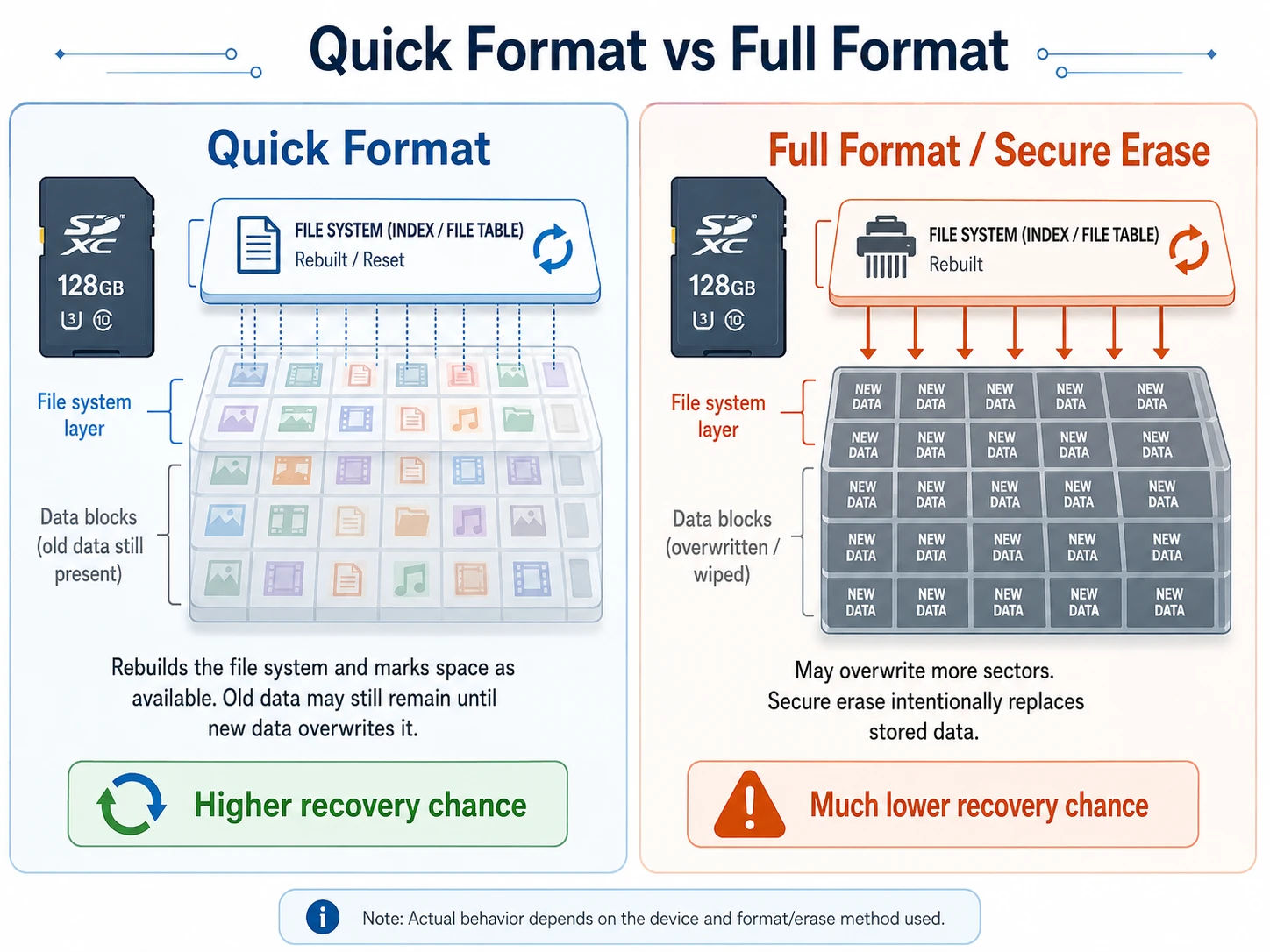
A quick format usually removes the file system records that point to your files. It does not always erase every storage sector. As a result, recovery software may locate old records or identify files through their internal signatures.
A full format, secure erase, or heavy reuse creates a different situation. Once new information overwrites the original sectors, no program can reconstruct the missing content reliably. Consequently, can I recover formatted SD card data becomes harder after you record new photos or videos.
For example, removing the card immediately may preserve many images. By contrast, recording 4K videos may overwrite them.
快速格式化與完整格式化
A 快速格式 rebuilds the file system and marks the space as available. Therefore, old content may remain until the device writes new data.
A 完整格式 may overwrite more sectors. Likewise, secure erase tools intentionally replace stored information. In those cases, recovery has a much lower chance of success.

Overwriting Matters More Than Time
Time alone does not normally erase inactive files. Instead, new writes create the main risk. Therefore, if you are asking can I recover a formatted SD card, stop using it before trying any recovery method.
What to Do Before You Recover Formatted SD Card Files
Your first actions can affect the result. For that reason:
- Remove the card from the camera, phone, drone, or recorder.
- Do not take new photos or videos.
- 請勿再次格式化此記憶卡。.
- Do not run CHKDSK or another repair tool first.
- Do not install recovery software on the card.
- 將已復原的檔案儲存到另一個磁碟機。.
- 請使用穩定的讀卡機和 USB 連接埠。.
If the card has a lock switch, use it. In addition, click Cancel if Windows asks you to format the card.
如何使用 Magic Data Recovery 從已格式化的 SD 卡中恢復檔案
When Windows detects the correct card capacity, software recovery offers a practical first step. Magic Data Recovery provides a visual workflow for scanning, filtering, previewing, and restoring files.
Step 1: Connect the SD Card
First, turn off the original device and remove the card. Next, insert it into a reliable USB card reader and connect it directly to the computer.
開啟 磁碟管理 and check the capacity. File Explorer may not open the card, yet recovery software may still read it.
Step 2: Install Magic Data Recovery
Download Magic Data Recovery from the official Amagicsoft website. Then, install it on the computer’s internal drive.
Never install the program on the formatted card. Otherwise, the installation may overwrite recoverable data.
支援 Windows 7/8/10/11 和 Windows Server
Step 3: Select and Scan the Card
Launch the software and identify the card by its capacity, drive letter, and device name. After that, start a complete scan.
Meanwhile, keep the card connected. The scan may find photos, videos, documents, audio, and RAW files even when folders no longer appear.
針對使用者詢問 can I recover formatted SD card photos, the scan provides useful evidence before recovery.

步驟 4:篩選和預覽檔案
After the scan, filter results by file type, size, date, or name. In addition, preview important files before recovery.
A correct preview usually indicates a better recovery chance. However, a video thumbnail does not always confirm that the complete file remains intact.

步驟 5:復原至另一個磁碟機
Select the files and save them to the computer or another external disk. Never recover them to the formatted SD card.
Finally, open full-size photos, play videos from beginning to end, and test documents. Recovered files may lose their original names or contain damage if later writes replaced part of their data.

How to Recover Formatted Data from Android Phone Storage
這句話 how to recover formatted data from Android phone storage can describe three different problems. Therefore, identify the storage type first.
Recover Android Formatted SD Card Used as Portable Storage
A portable microSD card works like normal removable storage. To recover Android formatted SD card 檔案:
- Turn off the phone and remove the card.
- Insert it into a card reader.
- Connect it to a Windows computer.
- Scan it with Magic Data Recovery.
- Save the files to the computer.
Card-reader access usually offers a more stable connection.
Android SD Card Used as Internal Storage
Some Android phones let users format a microSD card as internal or adopted storage. Android then encrypts the card and links it to the original device.
As a result, Windows may see unreadable data. Standard recovery software cannot bypass that encryption. Therefore, do not reformat the card as portable storage.
Keep the original phone and card together. For valuable files, seek professional assessment before making changes.
Android Phone After a Factory Reset
A factory reset affects the phone’s internal storage rather than a removable card. Modern Android encryption also limits direct recovery afterward.
Therefore, when researching how to recover formatted data from Android phone memory, check Google Photos, Google Drive, Google One, manufacturer cloud services, app backups, and previous computer copies first.
Magic Data Recovery works best when Windows can access the SD or microSD card as a storage device. It does not bypass Android encryption.
Can I Recover Formatted SD Card Data with Other Methods?
Yes, other methods may help. However, each option has limits.
從備份還原
First, check your computer, external drives, cloud storage, camera app, and phone gallery. A backup offers the safest solution.
Try a Free Recovery Tool
照片記錄 和 Windows 檔案復原 may help experienced users. However, command-line tools require more setup and may not preserve original names or folders.
Create an Image or Seek Professional Help
If the card disconnects, reads slowly, shows the wrong capacity, or becomes hot, stop repeated scans. Instead, create a byte-to-byte image or contact a professional service. Software cannot repair broken hardware.
為何 Magic Data Recovery 是實用的解決方案
Users who ask can I recover formatted SD card files usually face missing folders, uncertain file health, and complicated recovery tools.
Magic Data Recovery addresses those problems through a clear scan, filter, preview, and recovery process. Its main advantages include:
- A beginner-friendly interface
- Support for SD and microSD cards
- File type filtering
- 復原前預覽
- Selective restoration
- No command-line setup
For example, a camera owner can scan a formatted card, preview files, and save them to a computer.
Compared with repair commands, Magic Data Recovery focuses on locating files instead of changing the source file system. Compared with command-line tools, it offers a more accessible review process. Therefore, it provides a practical solution when Windows can detect a physically healthy card.
如果您需要有效率的方式 從已格式化的 SD 卡中恢復檔案, consider trying Magic Data Recovery before reusing the card.
Conclusion: Can I Recover Formatted SD Card Data Safely?
所以、, can I recover formatted SD card data? In many quick-format cases, yes. However, stop using the card, avoid repair commands, and save recovered files to another drive.
Magic Data Recovery earns a recommendation because it scans removable storage, filters results, previews files, and lets users choose a safe destination. Moreover, it suits camera, drone, and portable Android SD card scenarios without forcing beginners to learn command-line tools.
Still, no software can restore overwritten data, repair broken memory chips, or bypass Android encryption. That limitation makes Magic Data Recovery a practical and trustworthy choice for users who need to 從已格式化的 SD 卡中恢復檔案.
支援 Windows 7/8/10/11 和 Windows Server
常見問題
Can I Recover a Formatted SD Card?
Yes, you may recover a formatted SD card after a quick format if no new data has overwritten the original files. Stop using the card, connect it through a reliable reader, and scan it with recovery software. However, a full overwrite, secure erase, or physical failure can make software recovery impossible.
Can I Recover Formatted SD Card Data After Taking New Photos?
You may still recover files from sectors that the new photos did not overwrite. However, every new photo or video reduces the remaining recovery area. Therefore, remove the card as soon as possible and avoid further recording. A complete scan may find unaffected files, although some recovered items may contain damage.
How Do I Recover Files from a Formatted SD Card for Free?
Start by checking backups on your computer, cloud account, or external drives. You can also try PhotoRec or Windows File Recovery. However, these tools may require technical knowledge and may not preserve original filenames or folders. Always save recovered data to another drive rather than the formatted card.
Can CMD Recover Files from a Formatted SD Card?
CMD repair commands cannot recreate data that another process has overwritten. In addition, CHKDSK may change the file system and complicate later recovery. Therefore, avoid repair commands before scanning the card. Windows File Recovery uses a command-line interface, but it focuses on file recovery rather than file system repair.
How Do I Recover Formatted Data from an Android Phone?
First, identify whether the data was on a portable microSD card, adopted storage, or the phone’s internal memory. Remove and scan a portable card with a computer. However, adopted storage and factory-reset internal memory involve encryption. In those cases, check Google Photos, device backups, manufacturer cloud services, and app backups first.
Can I Recover an Android Formatted SD Card Without a Computer?
Android recovery apps may create temporary data on the same storage and overwrite recoverable content. Therefore, a Windows computer and card reader usually provide a safer method for portable microSD cards. If Android used the card as internal storage, keep it with the original phone and avoid reformatting it.
Does Full Formatting Permanently Erase an SD Card?
A full format may check or overwrite more sectors than a quick format. Secure erase tools intentionally replace stored data. Once new information overwrites the original sectors, recovery software cannot restore them. However, the exact result depends on the device, format method, and whether the card received additional writes.
Vasilii 是一位在該領域擁有約 10 年實務經驗的資料復原專家。在他的職業生涯中,他已成功解決數千個複雜的個案,包括刪除的檔案、格式化的硬碟機、遺失的磁碟分割和 RAW 檔案系統。他的專業知識涵蓋使用十六進位編輯器等專業工具的手動復原方法,以及使用復原軟體的進階自動解決方案。Vasilii 的使命是讓 IT 專業人士和一般使用者都能獲得可靠的資料復原知識,協助他們保護寶貴的數位資產。.