
フォーマットされたSDカードのデータは復元できますか?
SDカードをフォーマットすると、写真、動画、ドキュメントがすべて消えてしまう可能性があります。ただし、新しいデータで上書きされるまでは、ファイルが残っている場合もあります。したがって、この質問に対する答えは フォーマットされたSDカードは復元できますか? 多くの場合、データは残っています。特にクイックフォーマットを行った後はそうです。.
このガイドでは、復旧に影響を与える要因について解説します。, フォーマットされたSDカードからファイルを復元する方法, そして Androidスマートフォンからフォーマットされたデータを復元する方法 ストレージ。また、その仕組みについても説明しています。 Magic Data Recovery 実用的な SDカード復元ソリューション 複雑なコマンドライン操作を必要とせずに、復元可能なファイルをスキャン、プレビュー、および復元することで。.
Windows 7/8/10/11およびWindows Serverをサポート
目次
フォーマットされたSDカードのデータは復元できますか?
多くの場合、可能です。とはいえ、結果はファイル形式の種類、その後の用途、物理的な状態、および暗号化設定によって異なります。.
クイックフォーマットでは、通常、ファイルを指し示すファイルシステムレコードが削除されます。ただし、必ずしもすべてのストレージセクタが消去されるわけではありません。その結果、データ復元ソフトウェアが古いレコードを見つけ出したり、ファイルの内部シグネチャからファイルを特定したりする可能性があります。.
完全フォーマット、セキュア消去、あるいは徹底的な再利用が行われると、状況は一変します。新しい情報が元のセクタを上書きしてしまうと、どのプログラムでも失われた内容を確実に復元することはできなくなります。したがって、, フォーマットされたSDカードは復元できますか? 新しい写真や動画を撮影すると、データの処理が難しくなります。.
例えば、すぐにカードを取り出せば、多くの画像を保存できる場合があります。対照的に、4K動画を録画すると、それらの画像が上書きされてしまう可能性があります。.
クイック・フォーマットとフル・フォーマットの比較
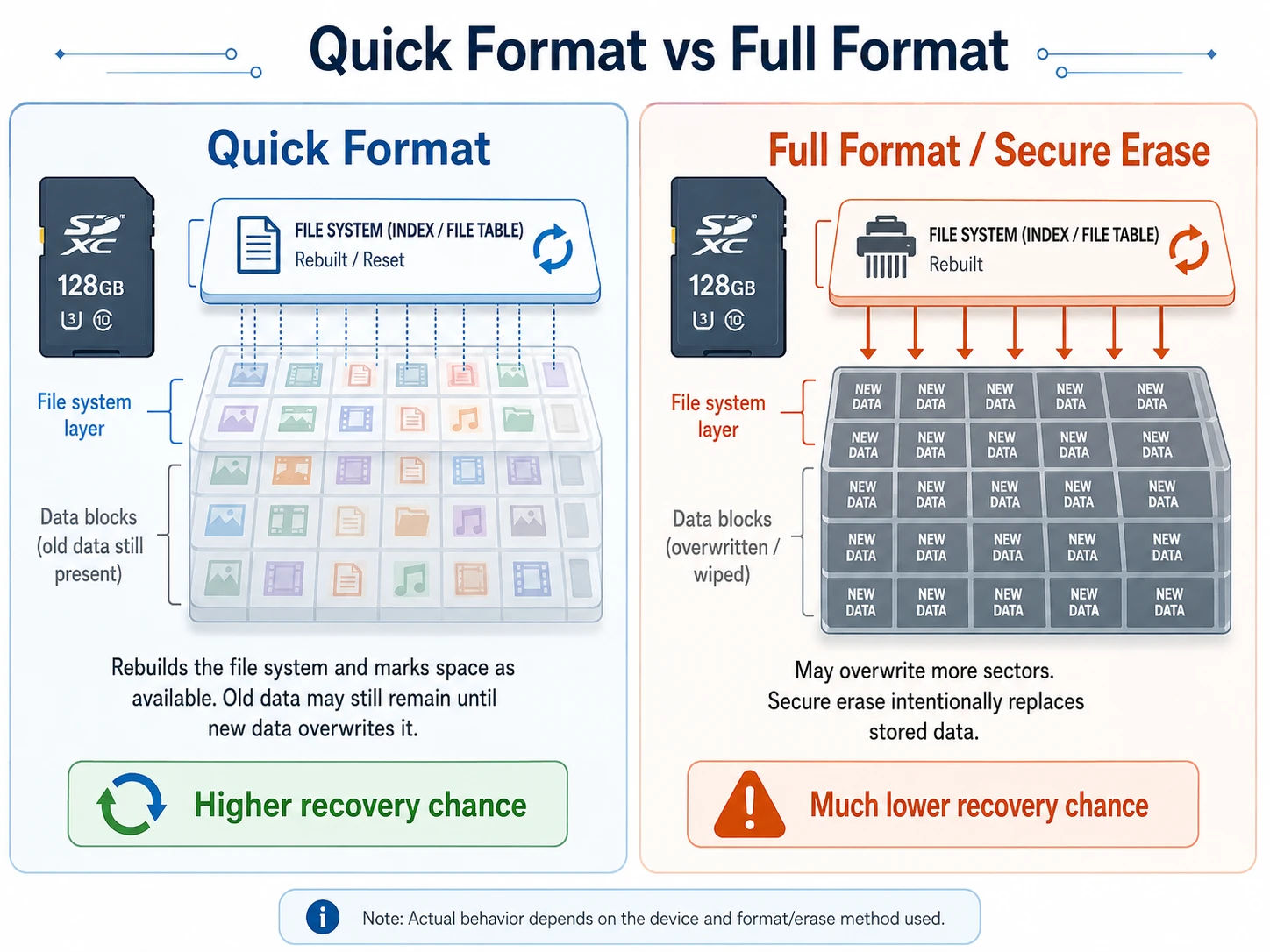
A クイックフォーマット ファイルシステムを再構築し、その領域を空き領域としてマークします。そのため、デバイスが新しいデータを書き込むまでは、古いコンテンツが残ったままになる場合があります。.
A フルフォーマット さらに多くのセクタを上書きする可能性があります。同様に、セキュア消去ツールも、保存されている情報を意図的に上書きします。こうした場合、データの復元が成功する可能性は大幅に低くなります。.
時間よりも上書きの方が重要だ
通常、時間が経っただけでは、使用されていないファイルは削除されません。むしろ、新たな書き込みが行われることが主なリスクとなります。したがって、もしあなたが フォーマットされたSDカードは復元できますか, 、復旧方法を試す前に、その使用を中止してください。.
フォーマットされたSDカードのファイルを復元する前にすべきこと
最初の対応が結果に影響を与える可能性があります。そのため:
- カメラ、スマートフォン、ドローン、またはレコーダーからカードを取り出してください。.
- 新しい写真や動画を撮影しないでください。.
- カードを再度フォーマットしないでください。.
- まず、CHKDSK やその他の修復ツールを実行しないでください。.
- カードに復元ソフトウェアをインストールしないでください。.
- 復元したファイルを別のドライブに保存します。.
- 安定したカードリーダーとUSBポートを使用してください。.
カードにロックスイッチがある場合は、それを使用してください。また、Windows からカードのフォーマットを求めるメッセージが表示された場合は、「キャンセル」をクリックしてください。.
Magic Data Recoveryを使ってフォーマットされたSDカードからファイルを復元する方法
Windowsがカードの容量を正しく認識したら、ソフトウェアによる復旧が現実的な第一歩となります。. Magic Data Recovery ファイルのスキャン、フィルタリング、プレビュー、復元を行うための視覚的なワークフローを提供します。.
手順 1:SD カードを接続する
まず、元のデバイスの電源を切り、カードを取り出してください。次に、信頼できるUSBカードリーダーにカードを挿入し、コンピュータに直接接続してください。.
オープン ディスク管理 そして、容量を確認してください。ファイルエクスプローラーではカードが開かない場合でも、データ復元ソフトなら読み取れる可能性があります。.
ステップ 2: Magic Data Recovery をインストールする
Magic Data RecoveryをAmagicsoftの公式サイトからダウンロードしてください。その後、コンピュータの内部ドライブにインストールしてください。.
フォーマット済みのカードには、絶対にプログラムをインストールしないでください。そうしないと、インストール作業によって復元可能なデータが上書きされる恐れがあります。.
Windows 7/8/10/11およびWindows Serverをサポート
ステップ3:カードを選択してスキャンする
ソフトウェアを起動し、容量、ドライブ文字、デバイス名からカードを特定します。その後、完全スキャンを開始してください。.
その間、カードは接続したままにしておいてください。フォルダが表示されなくなっても、スキャンによって写真、動画、ドキュメント、音声、RAWファイルが見つかる場合があります。.
というユーザーのために フォーマットされたSDカードは復元できますか? 写真と同様に、スキャン画像は復旧作業の前に有用な手がかりとなります。.

ステップ 4: ファイルのフィルタリングとプレビュー
スキャンが完了したら、ファイルの種類、サイズ、日付、または名前で結果を絞り込んでください。また、復元する前に重要なファイルをプレビューすることもできます。.
プレビューが正しく表示される場合、通常は復元できる可能性が高くなります。ただし、動画のサムネイルが表示されたからといって、ファイル全体が無傷であるとは限りません。.

ステップ5:別のドライブに復元する
ファイルを選択し、コンピュータまたは別の外部ディスクに保存してください。フォーマット済みのSDカードには絶対に復元しないでください。.
最後に、写真をフルサイズで開き、動画を最初から最後まで再生し、文書を確認してください。復元されたファイルは、元のファイル名が失われている場合や、その後書き込みが行われてデータの一部が上書きされたために破損している場合があります。.

Androidスマートフォンのストレージからフォーマットされたデータを復元する方法
というフレーズがある。 Androidスマートフォンからフォーマットされたデータを復元する方法 「ストレージ」という言葉は、3つの異なる問題を指す場合があります。したがって、まずストレージの種類を特定してください。.
AndroidでフォーマットされたSDカードを復元する ポータブルストレージとして使用
ポータブルmicroSDカードは、通常の取り外し可能なストレージと同じように機能します。 AndroidでフォーマットされたSDカードを復元する ファイル:
- 携帯電話の電源を切り、SIMカードを取り出してください。.
- カードリーダーに差し込んでください。.
- Windows搭載のパソコンに接続してください。.
- Magic Data Recoveryでスキャンしてください。.
- ファイルをコンピュータに保存してください。.
カードリーダーによるアクセスは、通常、より安定した接続が得られます。.
AndroidのSDカードを内部ストレージとして使用
一部のAndroidスマートフォンでは、ユーザーがmicroSDカードを内部ストレージまたはアドプトストレージとしてフォーマットできるようになっています。これにより、Androidはカードを暗号化し、そのカードを元のデバイスに関連付けます。.
その結果、Windows ではデータが読み取れない状態になる可能性があります。一般的な復元ソフトウェアでは、その暗号化を解除することはできません。したがって、このカードをポータブルストレージとして再フォーマットしないでください。.
元の携帯電話とカードは一緒に保管してください。重要なファイルについては、変更を加える前に専門家に確認を依頼してください。.
工場出荷時設定へのリセット後のAndroidスマートフォン
工場出荷時設定へのリセットは、取り外し可能なカードではなく、端末の内部ストレージに影響を及ぼします。また、最新のAndroidの暗号化機能により、リセット後の直接的なデータ復元も制限されます。.
したがって、調査を行う際には Androidスマートフォンからフォーマットされたデータを復元する方法 まず、Googleフォト、Googleドライブ、Google One、メーカーのクラウドサービス、アプリのバックアップ、および以前のパソコンに保存されていたデータを確認してください。.
Magic Data Recoveryは、WindowsがSDカードまたはmicroSDカードをストレージデバイスとして認識できる場合に最も効果的に動作します。Androidの暗号化機能をバイパスするものではありません。.
フォーマットされたSDカードのデータは、他の方法で復元できますか?
確かに、他の方法も役立つかもしれません。しかし、どの選択肢にも限界があります。.
バックアップからの復元
まず、パソコン、外付けドライブ、クラウドストレージ、カメラアプリ、そしてスマートフォンのギャラリーを確認してください。バックアップを取っておくことが最も確実な対策です。.
無料の復元ツールを試してみてください
フォトレック そして Windowsファイル復元 経験豊富なユーザーには役立つかもしれません。ただし、コマンドラインツールは設定に手間がかかり、元の名前やフォルダが保持されない場合があります。.
画像を作成するか、専門家に相談する
カードの接続が切れたり、読み取り速度が遅くなったり、容量が正しく表示されなかったり、カードが熱くなったりした場合は、繰り返しスキャンを行うのを中止してください。その代わりに、バイト単位のイメージを作成するか、専門のサービス業者に連絡してください。ソフトウェアでは、故障したハードウェアを修復することはできません。.
Magic Data Recoveryが実用的なソリューションである理由
質問をするユーザー フォーマットされたSDカードは復元できますか? ファイルの取り扱いにおいては、通常、フォルダの欠落、ファイルの状態が不明確であること、そして復元ツールが複雑であるといった問題に直面します。.
Magic Data Recoveryは、明確なスキャン、フィルタリング、プレビュー、復元という一連のプロセスを通じて、これらの問題に対処します。その主な利点は以下の通りです:
- 初心者にも使いやすいインターフェース
- SDカードおよびmicroSDカードへの対応
- ファイル形式によるフィルタリング
- リカバリー前のプレビュー
- 選択的修復
- コマンドラインでの設定は不要
たとえば、カメラの所有者は、フォーマット済みのカードをスキャンして、ファイルをプレビューし、それらをパソコンに保存することができます。.
修復コマンドと比較して、Magic Data Recoveryはソースファイルシステムを変更するのではなく、ファイルの特定に重点を置いています。コマンドラインツールと比較しても、より利用しやすい確認プロセスを提供します。そのため、Windowsが物理的に正常なカードを検出できる場合、実用的な解決策となります。.
効率的な方法が必要な場合 フォーマットされたSDカードからファイルを復元する, 、カードを再利用する前に、Magic Data Recoveryを試してみることを検討してください。.
まとめ:フォーマットされたSDカードのデータは安全に復元できるのか?
だから, フォーマットされたSDカードは復元できますか? データは? 多くのクイックフォーマットの場合、はい。ただし、そのカードの使用を中止し、修復コマンドは実行せず、復元したファイルは別のドライブに保存してください。.
Magic Data Recovery リムーバブルストレージをスキャンし、結果を絞り込み、ファイルをプレビューでき、ユーザーが安全な保存先を選択できるため、おすすめできるアプリです。さらに、カメラ、ドローン、ポータブルAndroid端末にも適しています。 SDカードの活用例 初心者にコマンドラインツールの習得を強いることなく。.
とはいえ、上書きされたデータを復元したり、破損したメモリチップを修復したり、Androidの暗号化を回避したりできるソフトウェアは存在しません。この制限があるからこそ、Magic Data Recoveryは、次のようなニーズを持つユーザーにとって実用的かつ信頼できる選択肢となっています。 フォーマットされたSDカードからファイルを復元する.
Windows 7/8/10/11およびWindows Serverをサポート
よくある質問
フォーマットされたSDカードは復元できますか?
はい、クイックフォーマット後に元のファイルが新しいデータで上書きされていない限り、フォーマットされたSDカードからデータを復元することは可能です。カードの使用を中止し、信頼できるリーダーに接続して、復元ソフトウェアでスキャンしてください。ただし、完全な上書き、セキュア消去、または物理的な故障が発生している場合は、ソフトウェアによる復元が不可能になる場合があります。.
新しい写真を撮影した後でも、フォーマットされたSDカードのデータを復元することはできますか?
新しい写真で上書きされていないセクタからは、まだファイルを復元できる可能性があります。ただし、新しい写真や動画を1つ保存するごとに、復元可能な領域は減少していきます。そのため、できるだけ早くカードを取り外し、それ以上の記録は避けてください。完全スキャンを行うと、影響を受けていないファイルが見つかる可能性がありますが、復元されたファイルの中には破損しているものもあるかもしれません。.
フォーマットされたSDカードから無料でファイルを復元するにはどうすればよいですか?
まずは、お使いのパソコン、クラウドアカウント、または外付けドライブにあるバックアップを確認してみてください。また、「PhotoRec」や「Windows ファイル復元」を試してみるのも良いでしょう。ただし、これらのツールを使用するには技術的な知識が必要な場合があり、元のファイル名やフォルダ構造が保持されない可能性があります。復元したデータは、必ずフォーマット済みのカードではなく、別のドライブに保存してください。.
CMDでは、フォーマットされたSDカードからファイルを復元できますか?
CMDの修復コマンドでは、他のプロセスによって上書きされたデータを復元することはできません。また、CHKDSKを実行するとファイルシステムが変更され、その後の復旧作業が複雑になる可能性があります。そのため、カードをスキャンする前に修復コマンドを実行することは避けてください。「Windows File Recovery」はコマンドラインインターフェースを使用しますが、ファイルシステムの修復ではなく、ファイルの復旧に重点を置いています。.
Androidスマートフォンから消去したデータを復元するにはどうすればよいですか?
まず、データが取り外し可能なmicroSDカード、外部ストレージ、あるいは端末の内部メモリのいずれに保存されていたかを確認してください。取り外し可能なカードは取り外して、パソコンでスキャンしてください。ただし、外部ストレージや工場出荷時設定にリセットされた内部メモリには暗号化が適用されています。そのような場合は、まず「Googleフォト」、端末のバックアップ、メーカーのクラウドサービス、アプリのバックアップを確認してください。.
パソコンを使わずに、AndroidでフォーマットされたSDカードを復元することはできますか?
Androidのリカバリアプリは、同じストレージ上に一時データを作成し、復元可能なデータを上書きしてしまう可能性があります。そのため、ポータブルmicroSDカードの場合は、通常、Windowsパソコンとカードリーダーを使用する方が安全です。Androidでそのカードを内部ストレージとして使用していた場合は、元のスマートフォンと一緒に保管し、再フォーマットは避けてください。.
完全フォーマットを行うと、SDカードの内容は完全に消去されますか?
完全フォーマットでは、クイックフォーマットよりも多くのセクタがチェックまたは上書きされる場合があります。セキュア消去ツールは、保存されているデータを意図的に上書きします。新しい情報が元のセクタを上書きすると、データ復元ソフトではそれらを復元できなくなります。ただし、実際の結果は、デバイスやフォーマット方法、およびカードに追加の書き込みが行われたかどうかによって異なります。.

バシリイは、この分野で約10年の実務経験を持つデータ復元のスペシャリストです。そのキャリアを通じて、彼は削除されたファイル、フォーマットされたドライブ、失われたパーティション、RAWファイルシステムを含む何千もの複雑なケースの解決に成功してきました。彼の専門知識は、16進エディタなどの専門ツールを使用した手動復元方法と、復元ソフトウェアを使用した高度な自動化ソリューションの両方をカバーしています。バシリの使命は、信頼できるデータ復元知識をITプロフェッショナルと一般ユーザーの双方が利用できるようにし、貴重なデジタル資産を保護できるようにすることです。.