All My Files Disappeared Windows 10? Fix It

All My Files Disappeared Windows 10

如果你搜尋了 all my files disappeared Windows 10, you need to know where the files went and whether you can recover them from hard drives. Fortunately, Windows may simply hide the files, move them to another profile, sync them through OneDrive, or lose access because of a disk issue.

First, stop writing new data to the affected drive. New files can overwrite recoverable data. Therefore, this guide starts with safe checks and moves to recovery with Magic Data Recovery only when Windows cannot find the files.

支援 Windows 7/8/10/11 和 Windows Server

目錄

All My Files Disappeared Windows 10: What Should I Check First?

files disappeared Windows 10, identify the symptom before trying random fixes.

你注意到的事情

可能原因

最佳第一步

Desktop files disappeared

Profile, OneDrive, hidden files

Check profile and hidden items

更新後檔案消失了

Profile or folder change

Search This PC

One folder looks empty

Hidden, moved, or deleted files

Show hidden items

Files disappeared from hard drive Windows 10

Drive-letter, partition, or file-system issue

檢查磁碟管理

Files are not in Recycle Bin

可能已發生永久刪除

使用復原軟體

In short, start with the simplest explanation. Then move to recovery only if those checks fail.

1. Search for Missing Files in Windows 10

針對使用者搜尋 all my files disappeared Windows 10, File Explorer should come first because the files may still exist elsewhere.

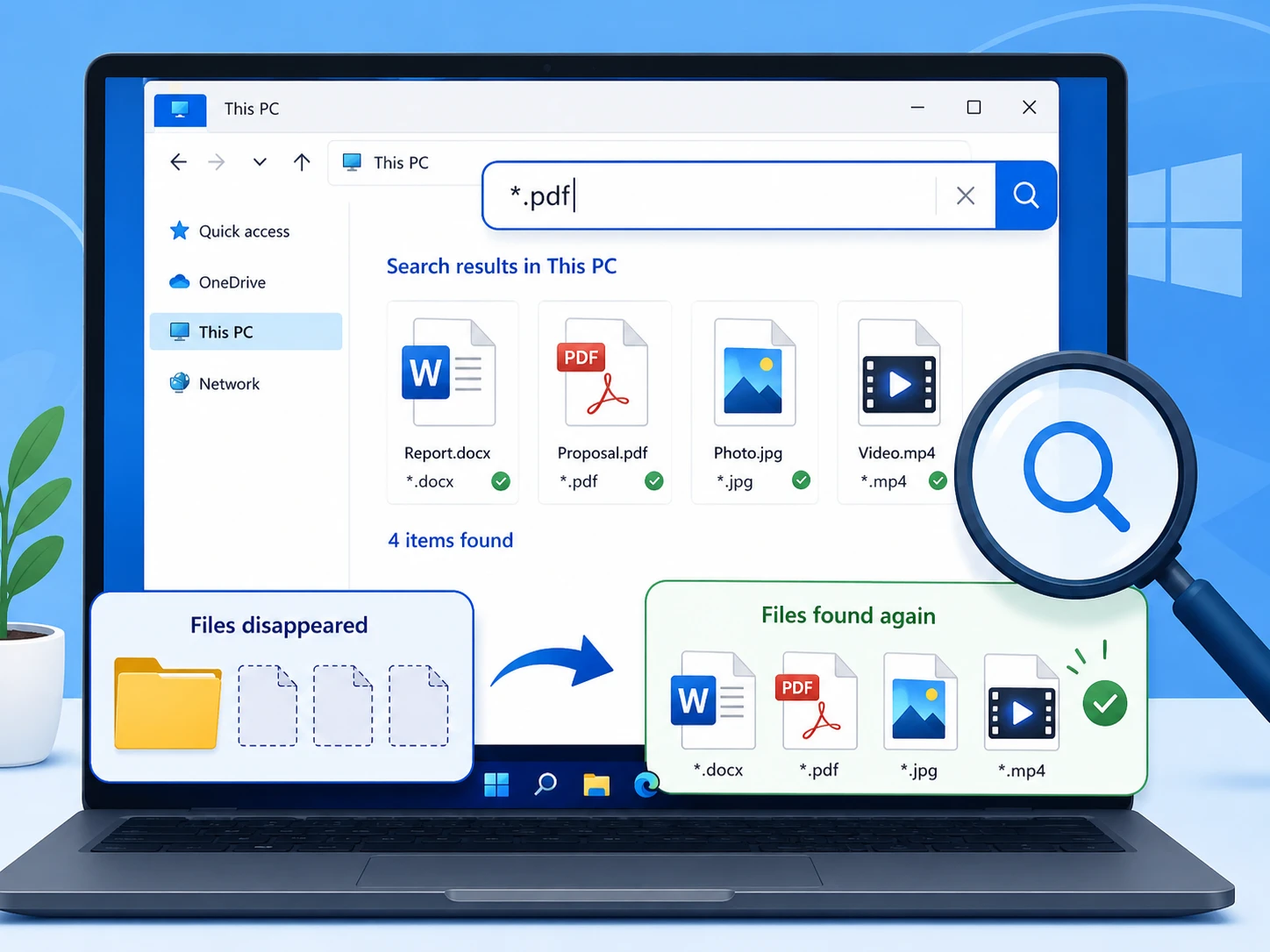
Open File Explorer, select 此電腦, and search for the filename. If you do not remember it, try *.docx, *.xlsx, *.jpg, 或 *.pdf.

Next, right-click a result and choose 開啟檔案位置 to confirm where Windows stored it.

search my files disapeeared on Windows 10

2. Check the Recycle Bin

Accidental deletion can make all my files disappeared Windows 10 look like a serious system failure.

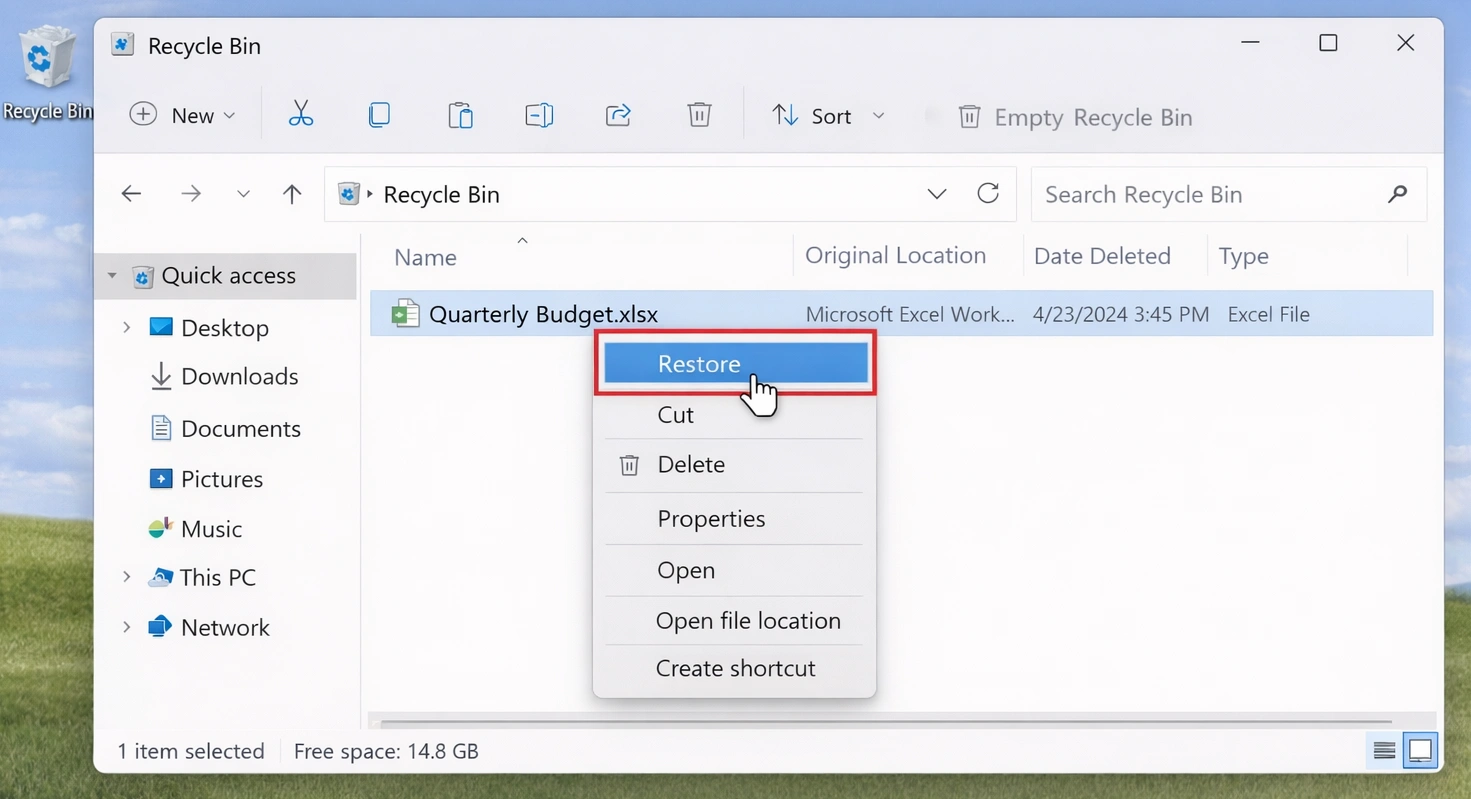
Open the Recycle Bin and search for the missing files. If you find them, right-click and choose 還原.

然而、, Shift + 刪除, ,......。 清空回收站, or formatting can bypass this route. If so, avoid adding new data to the affected drive.

recover-disappeared-files-from-recycle-bin

3. Show Hidden Files and Folders

針對使用者搜尋 all my files disappeared Windows 10, hidden items are another common explanation: Windows may hide files instead of deleting them.

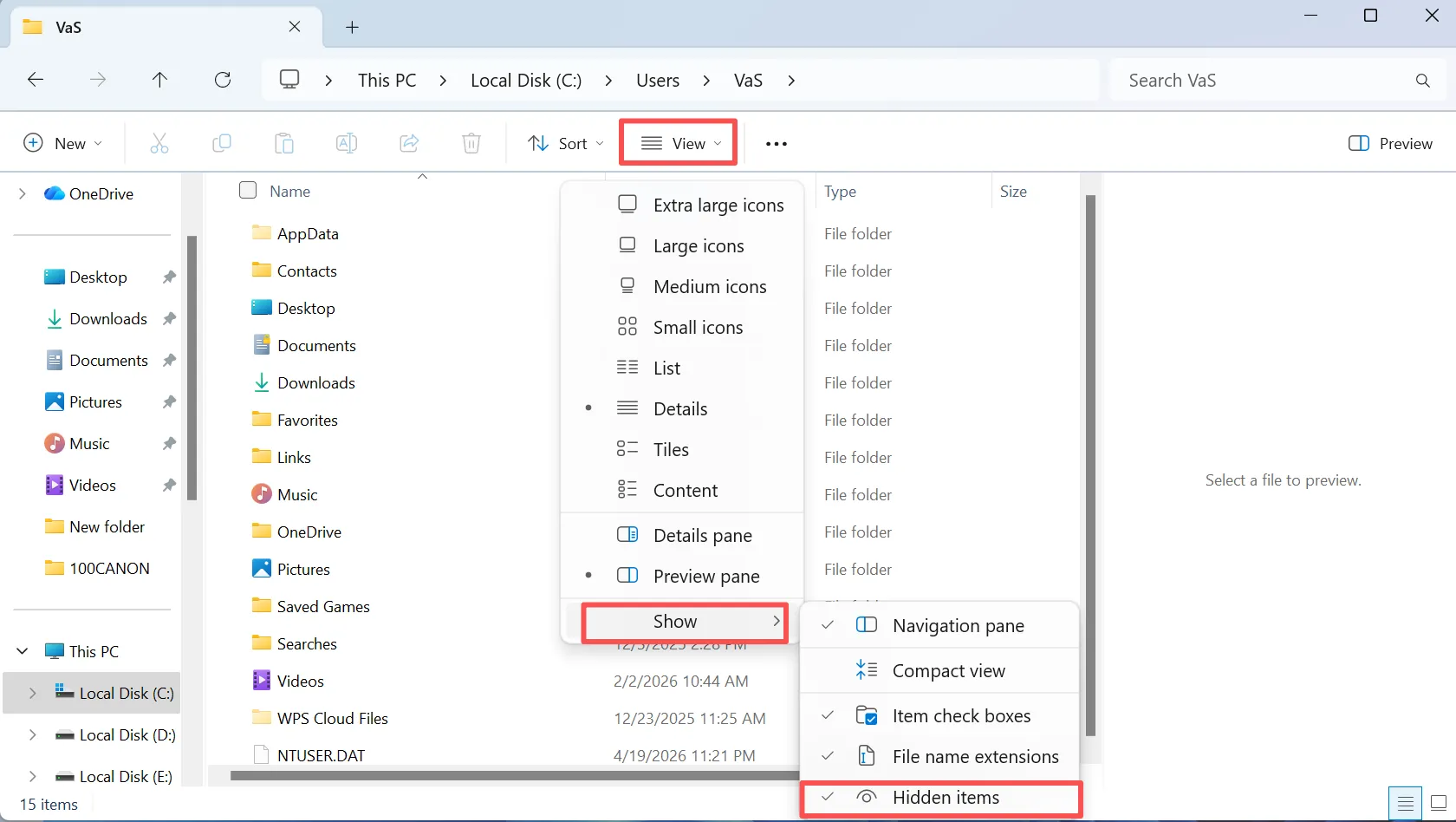
Open File Explorer, choose 檢視, ,並啟用 隱藏項目. Then return to the empty-looking folder. If the files reappear, move or unhide them as needed.

In addition, check File Explorer Options for broader visibility settings.

check hidden files for files disappeared on Windows 10

4. Check the Correct Windows User Profile

A profile change can explain all files disappeared in Windows 10, especially after an update or sign-in issue.

開啟 C:\Users\ and check Desktop, Documents, Downloads, Pictures, and Videos under the current and older profiles.

For example, files may remain under an older profile. Therefore, verify the path before assuming the data is gone.

5. Check OneDrive, Windows.old, and Backups

如果 all your files disappeared and the problem started after synchronization or an upgrade, another copy may already exist.

First, check OneDrive if you use Microsoft cloud storage. Next, inspect C:\Windows.old after a major Windows upgrade. Finally, check File History and other backups.

If a backup contains the file, restore that copy first.

6. Files Still Missing? Recover Them with Magic Data Recovery

If the previous methods fail, permanent deletion, formatting, or file-system damage may have removed normal access to the files. At this point, ordinary Windows search may no longer help.

Magic Data Recovery scans the affected drive for recoverable data. Amagicsoft states that it supports more than 5,000 file formats and HDDs, SSDs, USB drives, and memory cards. Moreover, the workflow stays simple: select, scan, preview, and recover.

This approach helps when files disappeared from hard drive Windows 10, after permanent deletion, or after accidental formatting. Unlike File History, it does not require an earlier backup. However, overwritten data may no longer be recoverable. Therefore, act early.

步驟 1:下載並安裝 Magic Data Recovery

Download Magic Data Recovery and install it on a drive other than the one where the files disappeared. This choice reduces writes to the source drive and helps protect recoverable data.

支援 Windows 7/8/10/11 和 Windows Server

步驟 2:選擇檔案消失的磁碟機

Launch Magic Data Recovery. From the main interface, choose the drive or partition that originally stored the missing files. Then start the scan.

Using Magic Data Recovery to recover disappeared files

Step 3: Scan the Drive for Missing or Deleted Files

The program starts an Advanced Scan on the selected drive. Meanwhile, recoverable files appear as the scan progresses, so you can review discovered data during the process.

等待掃描

步驟 4:復原前預覽檔案

Next, use the preview feature to check file content. This step helps you confirm the correct documents, photos, videos, or other files before recovery.

For a disappeared files recovery case with many scan results, previewing makes the process easier to manage.

預覽檔案

步驟 5:將檔案復原至安全位置

Finally, select the files you want and save them to a different drive or storage location. Do not restore them to the source drive while other data remains missing, because new writes may overwrite recoverable content.

This rule matters especially when files disappeared from hard drive Windows 10 and the scan finds more files that still need recovery.

檔案復原

7. Files Disappeared From Hard Drive Windows 10? Check Disk Management

If an entire partition or drive seems empty or missing, open 磁碟管理 before formatting or repartitioning it.

The Partition Has No Drive Letter

A healthy partition without a drive letter may stay hidden from File Explorer. Assign an unused letter if the volume otherwise looks normal.

The Drive Shows as RAW

RAW means Windows cannot read the file system normally. Therefore, recover important files before you format or repair the volume.

The Space Shows as Unallocated

Unallocated space may indicate lost partition information. Instead, scan the drive before creating a new partition.

files disappeared from hard drive Windows 10, recover important data before repair whenever possible.

8. Restore Missing Files with File History

File History can help with all my files disappeared Windows 10 if you enabled backups before the loss.

Open the original folder, right-click it, and choose 還原先前版本. 接著檢視可用的副本,並還原您所需的版本。.

However, File History cannot create an older copy after data loss. Therefore, if no usable history exists, choose another recovery method.

Why Did All My Files Disappeared Windows 10 Happen?

The search all my files disappeared in Windows 10 describes a symptom, not one cause. Common causes include deletion, hidden attributes, profile or OneDrive changes, formatting, lost partitions, and file-system problems.

Therefore, separate “missing” from “deleted.” Search finds existing files, backups restore copies, and recovery software helps when Windows loses normal access.

What Not to Do When Files Disappeared Windows 10

When important files vanish, your next action can affect recovery.

First, avoid large downloads or file copies to the affected drive. Second, do not format a RAW partition just because Windows prompts you. Third, do not create a new partition over important 未分配 空間。.

Finally, keep recovered files off the source drive until recovery ends.

How to Prevent Files Disappeared Windows 10 Problems

After solving an all my files disappeared in Windows 10, reduce the risk of another loss.

First, enable File History or another scheduled backup. Next, keep another copy of essential files on separate storage or a trusted cloud service.

In addition, test backups periodically. Finally, watch for repeated file-system errors, disappearing partitions, or unexpected disconnects.

總結

如果 all files disappeared on Windows 10, start with low-risk checks: search the PC, inspect the Recycle Bin, show hidden files, verify your profile, and review backups.

Next, check Disk Management if a drive or partition disappears. If Windows still cannot locate the files, recover important data before formatting or rebuilding partitions.

Magic Data Recovery fits this stage because it scans for deleted or inaccessible data and lets users preview files before recovery. Therefore, locate first, recover second, and repair last. If files disappeared from hard drive Windows 10 without a usable backup, Magic Data Recovery offers a practical 硬碟復原 method without exaggerated promises.

支援 Windows 7/8/10/11 和 Windows Server

常見問題

Why did my files suddenly disappear in Windows 10?

Several issues can cause files disappeared Windows 10, including hidden files, profile changes, OneDrive changes, accidental deletion, formatting, or file-system problems. First, search the PC and check hidden items, user folders, and backups. If those steps fail, minimize writes to the affected drive and consider recovery software.

Can files disappear in Windows 10 without being deleted?

Yes. When files disappeared Windows 10, Windows may still store them on the disk. Hidden attributes, profile changes, OneDrive synchronization, moved folders, or drive-letter problems can make files look missing. Therefore, check File Explorer, hidden items, user profiles, cloud storage, and Disk Management before treating the issue as permanent data loss.

How do I recover files that disappeared from a hard drive?

If files disappeared from hard drive Windows 10, first confirm that the drive appears in Disk Management. Then check its drive letter, file-system status, and partition layout. If Windows still cannot find the files and no backup exists, stop writing new data to that drive and scan it with a recovery tool such as Magic Data Recovery.

清空資源回收筒後可以復原檔案嗎?

Possibly. Emptying the Recycle Bin removes normal Windows access, but file data may remain until new information overwrites the same storage space. Therefore, minimize use of the source drive. If files disappeared after you emptied the bin, a recovery scan may still locate recoverable content.

Can File History recover permanently deleted files?

File History can restore an earlier copy only when Windows created that backup before deletion. It cannot create a historical version afterward. Therefore, check File History first if you enabled it previously. If no usable backup exists and all files disappeared, a recovery scan may provide another practical option.

Should I format a drive when Windows asks me to?

No, not if the drive contains important missing files. Formatting changes file-system structures and may reduce recovery options. When files disappeared from hard drive Windows 10 and the volume shows RAW or unreadable, recover valuable data first. After you secure the files, you can repair or reformat the drive with less risk.

Why use Magic Data Recovery instead of Windows tools?

Windows Search, Recycle Bin, File History, and profile checks work well when files remain accessible or a backup exists. However, they cannot solve every deletion or formatting case. When files disappeared Windows 10 and normal methods fail, Magic Data Recovery can scan the affected drive, preview recoverable files, and restore selected data without command-line recovery steps.

Vasilii 是一位在該領域擁有約 10 年實務經驗的資料復原專家。在他的職業生涯中,他已成功解決數千個複雜的個案,包括刪除的檔案、格式化的硬碟機、遺失的磁碟分割和 RAW 檔案系統。他的專業知識涵蓋使用十六進位編輯器等專業工具的手動復原方法,以及使用復原軟體的進階自動解決方案。Vasilii 的使命是讓 IT 專業人士和一般使用者都能獲得可靠的資料復原知識,協助他們保護寶貴的數位資產。.