
Todos os meus arquivos sumiram no Windows 10? Como resolver isso
Se você pesquisou Todos os meus arquivos sumiram no Windows 10, você precisa saber para onde os arquivos foram enviados e se é possível recuperá-los dos discos rígidos. Felizmente, o Windows pode simplesmente ocultar os arquivos, movê-los para outro perfil, sincronizá-los pelo OneDrive ou fazer com que o acesso seja perdido devido a um problema no disco.
Primeiro, pare de gravar novos dados na unidade afetada. Novos arquivos podem sobrescrever dados recuperáveis. Portanto, este guia começa com verificações de segurança e passa para a recuperação com Magic Data Recovery somente quando o Windows não consegue localizar os arquivos.
Compatível com Windows 7/8/10/11 e Windows Server
Índice
Todos os meus arquivos sumiram no Windows 10: o que devo verificar primeiro?
Quando Arquivos desapareceram no Windows 10, identifique o sintoma antes de tentar soluções aleatórias.
O que você percebe | Causa provável | Melhor primeira etapa |
Os arquivos da área de trabalho sumiram | Perfil, OneDrive, arquivos ocultos | Verificar o perfil e os itens ocultos |
Os arquivos desapareceram após uma atualização | Alteração de perfil ou pasta | Pesquisar neste PC |
Uma pasta parece estar vazia | Arquivos ocultos, movidos ou excluídos | Mostrar itens ocultos |
Arquivos desapareceram do disco rígido do Windows 10 | Problema com a letra da unidade, partição ou sistema de arquivos | Verificar o gerenciamento de disco |
Os arquivos não estão na Lixeira | Pode ter ocorrido uma exclusão definitiva | Usar software de recuperação |
Resumindo, comece pela explicação mais simples. Só então passe para a recuperação se essas verificações derem errado.
1. Como localizar arquivos perdidos no Windows 10
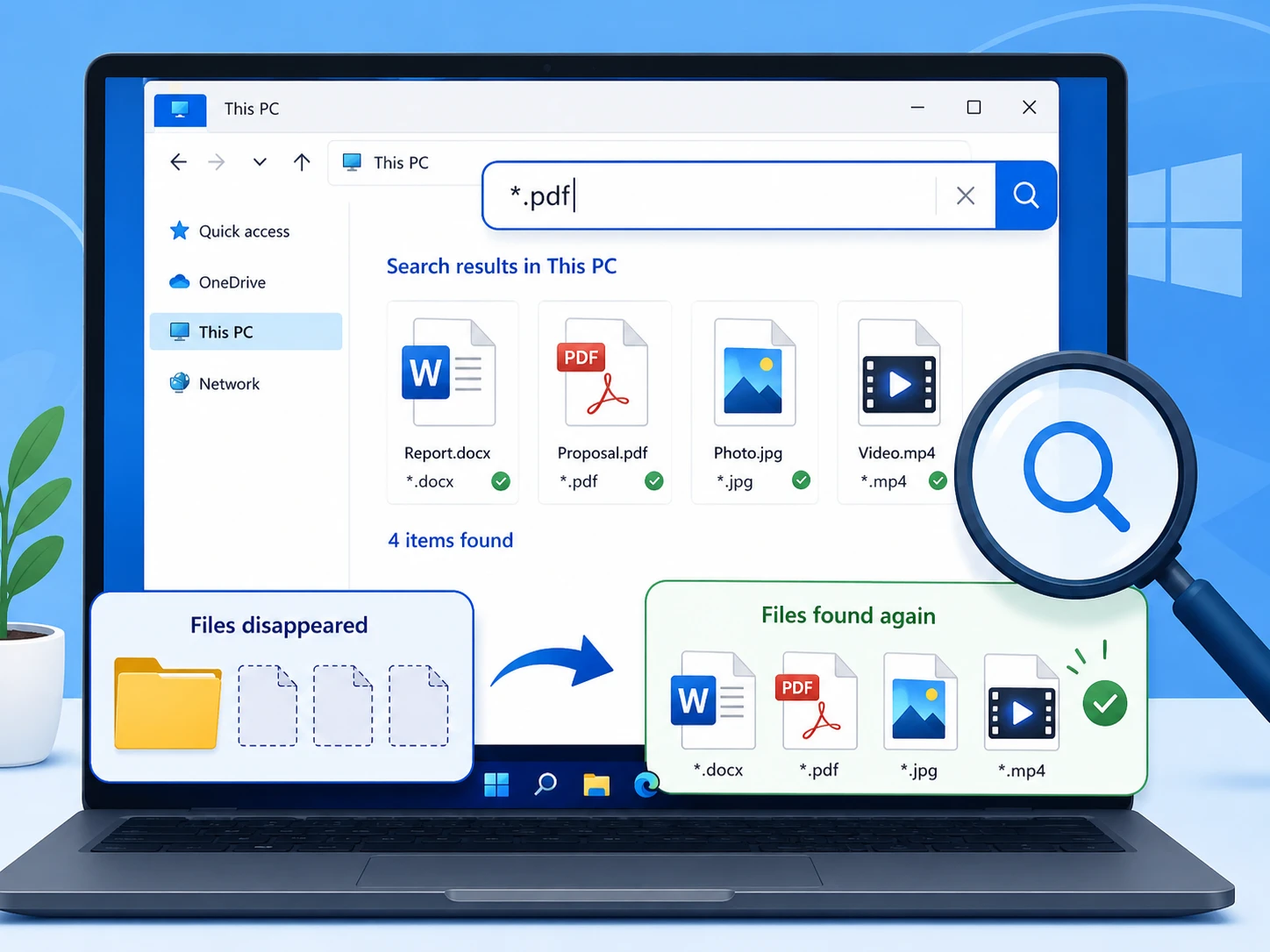
Para usuários que pesquisam Todos os meus arquivos sumiram no Windows 10, o Explorador de Arquivos deve ser consultado primeiro, pois os arquivos ainda podem existir em outro lugar.
Abra o Explorador de Arquivos e selecione Este PC, e procure pelo nome do arquivo. Se você não se lembrar dele, tente *.docx, *.xlsx, *.jpg, ou *.pdf.
Em seguida, clique com o botão direito do mouse em um resultado e selecione Abrir localização do arquivo para verificar onde o Windows o armazenou.
2. Verifique a Lixeira
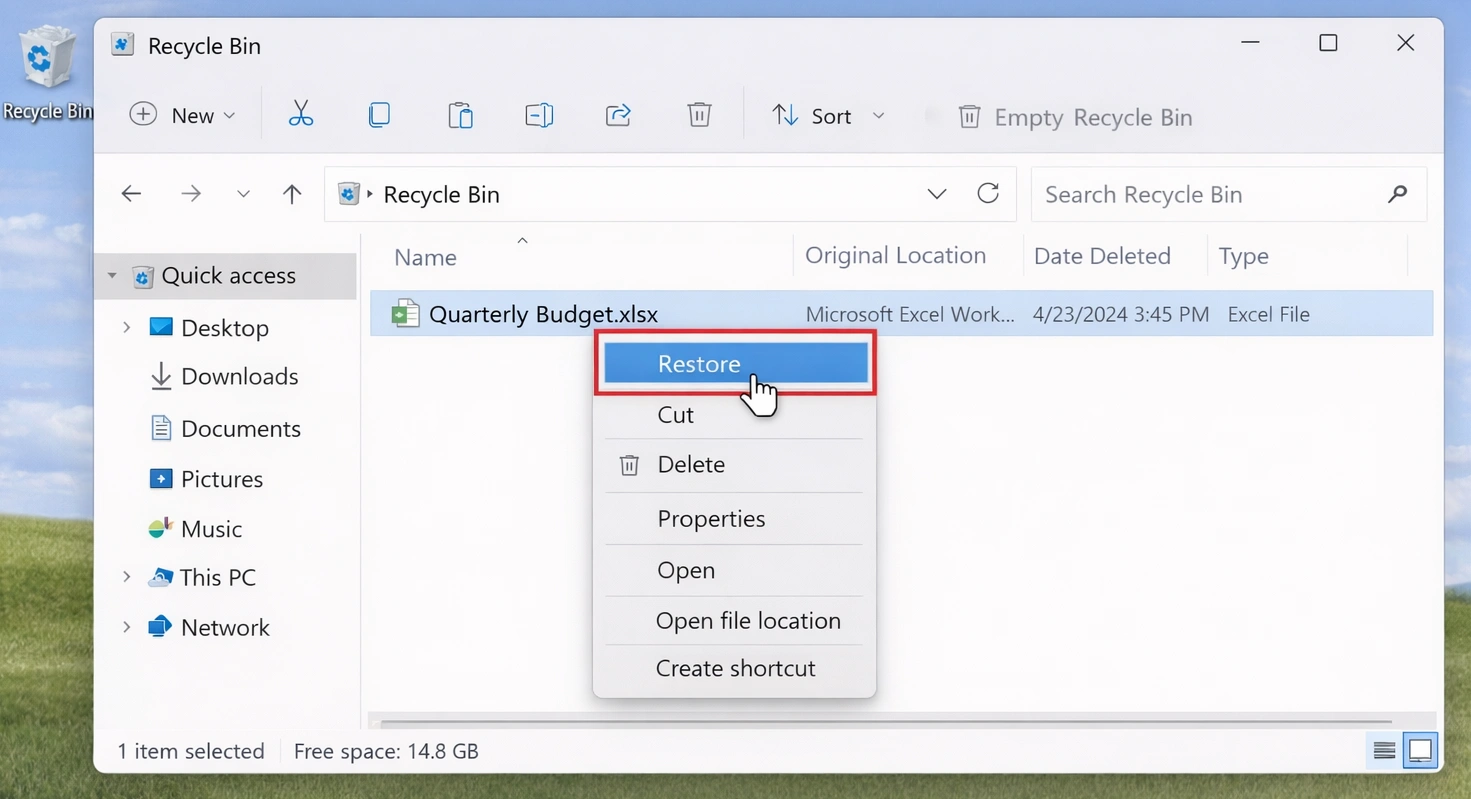
A exclusão acidental pode fazer com que Todos os meus arquivos sumiram no Windows 10 parece uma falha grave no sistema.
Abra a Lixeira e procure os arquivos que estão faltando. Se você os encontrar, clique com o botão direito do mouse e selecione Restaurar.
No entanto, Shift + Delete, e Lixeira esvaziada, ou a formatação pode contornar esse caminho. Nesse caso, evite adicionar novos dados à unidade afetada.
3. Mostrar arquivos e pastas ocultos
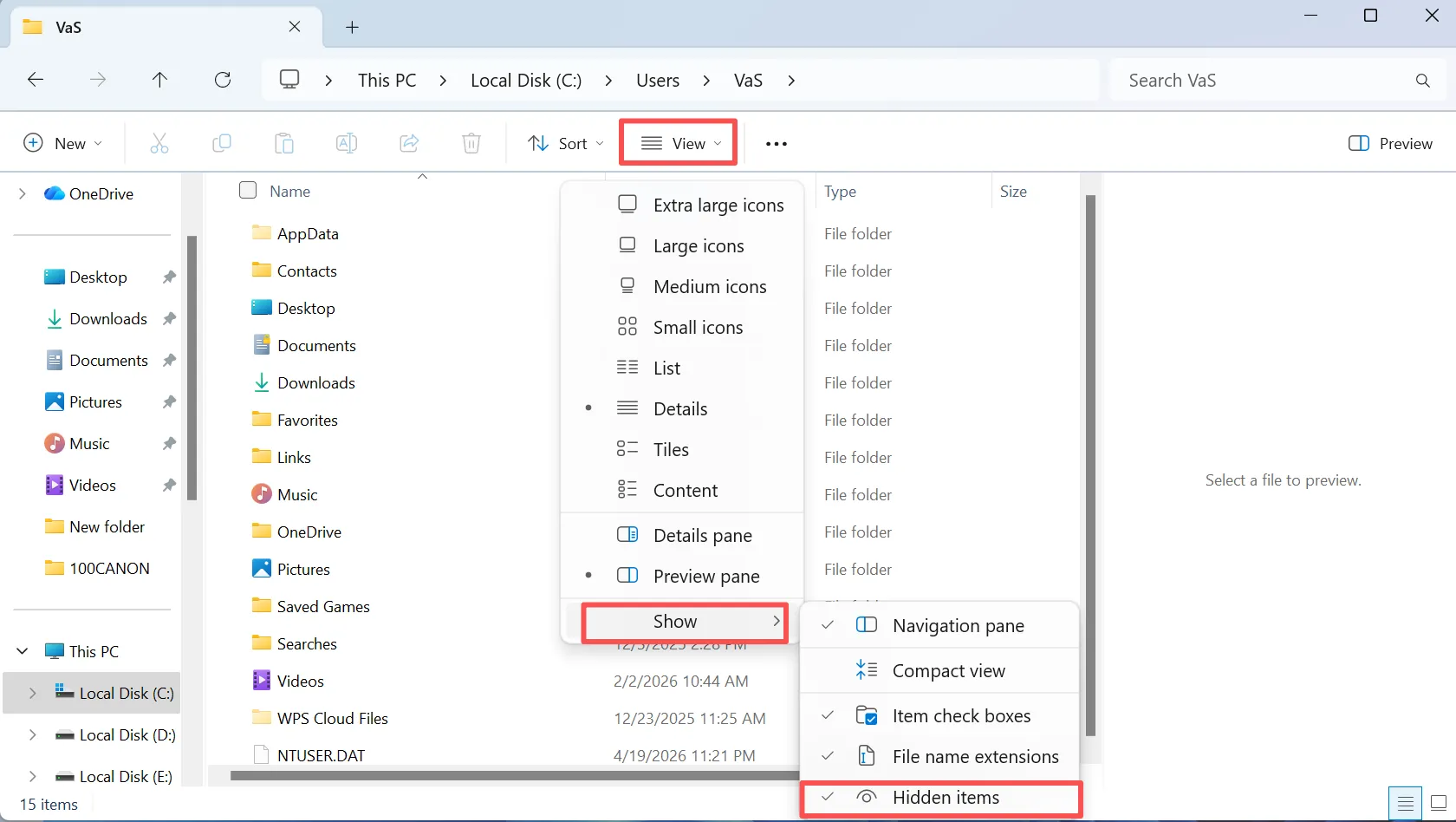
Para usuários que pesquisam Todos os meus arquivos sumiram no Windows 10, os itens ocultos são outra explicação comum: o Windows pode ocultar arquivos em vez de excluí-los.
Abra o Explorador de Arquivos e selecione Ver, e ativar Itens ocultos. Em seguida, volte para a pasta que parece estar vazia. Se os arquivos reaparecerem, mova-os ou exiba-os conforme necessário.
Além disso, verifique as Opções do Explorador de Arquivos para acessar configurações de visibilidade mais abrangentes.
4. Verifique se o perfil de usuário do Windows está correto
Uma mudança no perfil pode explicar Todos os arquivos sumiram no Windows 10, especialmente após uma atualização ou um problema ao fazer login.
Aberto C:\Usuários\ e verifique as pastas “Área de Trabalho”, “Documentos”, “Downloads”, “Imagens” e “Vídeos” nos perfis atuais e anteriores.
Por exemplo, os arquivos podem permanecer em um perfil antigo. Portanto, verifique o caminho antes de presumir que os dados foram perdidos.
5. Verifique o OneDrive, a pasta Windows.old e os backups
Se todos os seus Os arquivos desapareceram e o problema começou após a sincronização ou uma atualização; talvez já exista outra cópia.
Primeiro, verifique o OneDrive, caso você utilize o armazenamento em nuvem da Microsoft. Em seguida, verifique C:\Windows.old após uma grande atualização do Windows. Por fim, verifique o Histórico de Arquivos e outros backups.
Se um backup contiver o arquivo, restaure essa cópia primeiro.
6. Ainda faltam arquivos? Recupere-os com o Magic Data Recovery
Se os métodos anteriores falharem, é possível que a exclusão definitiva, a formatação ou danos no sistema de arquivos tenham impedido o acesso normal aos arquivos. Nesse caso, a pesquisa padrão do Windows pode não ser mais útil.
Magic Data Recovery analisa a unidade afetada em busca de dados recuperáveis. A Amagicsoft afirma que oferece suporte a mais de 5.000 formatos de arquivo, além de HDDs, SSDs, pen drives e cartões de memória. Além disso, o fluxo de trabalho é simples: selecionar, analisar, visualizar e recuperar.
Essa abordagem ajuda quando Arquivos desapareceram do disco rígido do Windows 10, após a exclusão definitiva ou após uma formatação acidental. Ao contrário do Histórico de Arquivos, esse recurso não requer um backup anterior. No entanto, os dados sobrescritos podem não ser mais recuperáveis. Portanto, tome providências o quanto antes.
Etapa 1: Faça o download e instale o Magic Data Recovery
Baixe o Magic Data Recovery e instale-o em uma unidade diferente daquela em que os arquivos desapareceram. Essa opção reduz as gravações na unidade de origem e ajuda a proteger os dados recuperáveis.
Compatível com Windows 7/8/10/11 e Windows Server
Etapa 2: Selecione a unidade na qual os arquivos desapareceram
Inicie o Magic Data Recovery. Na interface principal, selecione a unidade ou partição onde os arquivos perdidos estavam armazenados originalmente. Em seguida, inicie a varredura.

Etapa 3: Verifique a unidade em busca de arquivos ausentes ou excluídos
O programa inicia uma verificação avançada na unidade selecionada. Enquanto isso, os arquivos recuperáveis são exibidos à medida que a verificação avança, permitindo que você analise os dados encontrados durante o processo.

Etapa 4: Visualizar arquivos antes da recuperação
Em seguida, use o recurso de visualização para verificar o conteúdo dos arquivos. Essa etapa ajuda você a confirmar se os documentos, fotos, vídeos ou outros arquivos estão corretos antes da recuperação.
Em um caso de recuperação de arquivos perdidos com muitos resultados de varredura, a visualização antecipada facilita o gerenciamento do processo.

Etapa 5: Recuperar arquivos em um local seguro
Por fim, selecione os arquivos desejados e salve-os em uma unidade ou local de armazenamento diferente. Não os restaure na unidade de origem enquanto ainda houver dados ausentes, pois novas gravações podem sobrescrever o conteúdo recuperável.
Essa regra é importante especialmente quando Arquivos desapareceram do disco rígido do Windows 10 e a verificação identifica mais arquivos que ainda precisam ser recuperados.

7. Arquivos desapareceram do disco rígido no Windows 10? Verifique o Gerenciamento de Discos
Se uma partição ou unidade inteira parecer vazia ou estiver faltando, abra Gerenciamento de disco antes de formatá-lo ou reparticioná-lo.
A partição não possui letra de unidade
Uma partição em bom estado que não possua uma letra de unidade pode permanecer oculta no Explorador de Arquivos. Atribua uma letra não utilizada se, fora isso, o volume parecer normal.
A unidade aparece como RAW
RAW significa que o Windows não consegue ler o sistema de arquivos normalmente. Portanto, recupere os arquivos importantes antes de formatar ou reparar o volume.
O espaço aparece como não alocado
O espaço não alocado pode indicar perda de informações da partição. Em vez disso, faça uma verificação na unidade antes de criar uma nova partição.
Quando Arquivos desapareceram do disco rígido do Windows 10, sempre que possível, recupere os dados importantes antes do conserto.
8. Recuperar arquivos perdidos com o Histórico de Arquivos
O Histórico de Arquivos pode ajudar com Todos os meus arquivos sumiram no Windows 10 se você tiver ativado os backups antes da perda.
Abra a pasta original, clique com o botão direito do mouse nela e selecione Restaurar versões anteriores. Em seguida, verifique as cópias disponíveis e restaure a versão de que você precisa.
No entanto, o Histórico de Arquivos não pode criar uma cópia anterior após a perda de dados. Portanto, se não houver nenhum histórico utilizável, escolha outro método de recuperação.
Por que todos os meus arquivos sumiram no Windows 10?
A busca Todos os meus arquivos sumiram no Windows 10 descreve um sintoma, não uma causa. As causas mais comuns incluem exclusão, atributos ocultos, alterações no perfil ou no OneDrive, formatação, partições perdidas e problemas no sistema de arquivos.
Portanto, é preciso diferenciar “arquivos perdidos” de “arquivos excluídos”. A função de busca localiza arquivos existentes, os backups restauram cópias e os softwares de recuperação ajudam quando o Windows perde o acesso normal.
O que não fazer quando os arquivos desaparecem no Windows 10
Quando arquivos importantes desaparecem, o que você fizer em seguida pode afetar a recuperação.
Primeiro, evite downloads grandes ou cópias de arquivos para a unidade afetada. Segundo, não formate uma partição RAW só porque o Windows solicitar isso. Terceiro, não crie uma nova partição sobre arquivos importantes não alocado espaço.
Por fim, mantenha os arquivos recuperados fora da unidade de origem até que a recuperação seja concluída.
Como evitar o problema do desaparecimento de arquivos no Windows 10
Depois de resolver um Todos os meus arquivos sumiram no Windows 10, reduzir o risco de outra perda.
Primeiro, ative o Histórico de Arquivos ou outro backup programado. Em seguida, mantenha outra cópia dos arquivos essenciais em um dispositivo de armazenamento separado ou em um serviço de nuvem confiável.
Além disso, faça backups de teste periodicamente. Por fim, fique atento a erros repetidos no sistema de arquivos, partições que desaparecem ou desconexões inesperadas.
Conclusão
Se Todos os arquivos sumiram no Windows 10, comece com verificações de baixo risco: faça uma varredura no computador, verifique a Lixeira, exiba os arquivos ocultos, verifique seu perfil e analise os backups.
Em seguida, verifique o Gerenciamento de Discos caso uma unidade ou partição desapareça. Se o Windows ainda não conseguir localizar os arquivos, recupere os dados importantes antes de formatar ou reconstruir as partições.
Magic Data Recovery é ideal para essa etapa, pois procura por dados excluídos ou inacessíveis e permite que os usuários visualizem os arquivos antes da recuperação. Portanto, primeiro localize, depois recupere e, por fim, repare. Se Arquivos desapareceram do disco rígido do Windows 10 Sem um backup utilizável, o Magic Data Recovery oferece uma solução prática recuperação de disco rígido método sem promessas exageradas.
Compatível com Windows 7/8/10/11 e Windows Server
PERGUNTAS FREQUENTES
Por que meus arquivos desapareceram de repente no Windows 10?
Vários fatores podem causar o desaparecimento de arquivos no Windows 10, incluindo arquivos ocultos, alterações no perfil, alterações no OneDrive, exclusão acidental, formatação ou problemas no sistema de arquivos. Primeiro, faça uma busca no PC e verifique os itens ocultos, as pastas do usuário e os backups. Se essas etapas não derem certo, minimize as gravações na unidade afetada e considere o uso de um software de recuperação.
Os arquivos podem desaparecer no Windows 10 sem serem excluídos?
Sim. Quando os arquivos desaparecem do Windows 10, o sistema ainda pode mantê-los armazenados no disco. Atributos ocultos, alterações no perfil, sincronização do OneDrive, pastas movidas ou problemas com letras de unidade podem fazer com que os arquivos pareçam ter sumido. Portanto, verifique o Explorador de Arquivos, os itens ocultos, os perfis de usuário, o armazenamento em nuvem e o Gerenciamento de Discos antes de considerar o problema como uma perda definitiva de dados.
Como faço para recuperar arquivos que sumiram do disco rígido?
Se os arquivos desapareceram do disco rígido do Windows 10, primeiro verifique se a unidade aparece no Gerenciamento de Discos. Em seguida, verifique a letra da unidade, o status do sistema de arquivos e o layout da partição. Se o Windows ainda não conseguir localizar os arquivos e não houver nenhum backup, pare de gravar novos dados nessa unidade e faça uma varredura nela com uma ferramenta de recuperação, como o Magic Data Recovery.
Posso recuperar arquivos depois de esvaziar a Lixeira?
É possível. Esvaziar a Lixeira remove o acesso normal do Windows, mas os dados dos arquivos podem permanecer até que novas informações sobrescrevam o mesmo espaço de armazenamento. Portanto, minimize o uso da unidade de origem. Se os arquivos desapareceram depois que você esvaziou a Lixeira, uma verificação de recuperação ainda pode localizar conteúdo recuperável.
O Histórico de Arquivos consegue recuperar arquivos excluídos permanentemente?
O Histórico de Arquivos só pode restaurar uma cópia anterior se o Windows tiver criado esse backup antes da exclusão. Ele não pode criar uma versão histórica posteriormente. Portanto, verifique primeiro o Histórico de Arquivos, caso você o tenha ativado anteriormente. Se não houver nenhum backup utilizável e todos os arquivos tiverem desaparecido, uma verificação de recuperação pode ser outra opção viável.
Devo formatar um disco quando o Windows me pedir?
Não, não se a unidade contiver arquivos importantes que estão faltando. A formatação altera as estruturas do sistema de arquivos e pode reduzir as opções de recuperação. Quando os arquivos desaparecerem do disco rígido do Windows 10 e o volume aparecer como RAW ou ilegível, recupere primeiro os dados importantes. Depois de proteger os arquivos, você poderá reparar ou reformatar a unidade com menos risco.
Por que usar o Magic Data Recovery em vez das ferramentas do Windows?
A Pesquisa do Windows, a Lixeira, o Histórico de Arquivos e as verificações de perfil funcionam bem quando os arquivos permanecem acessíveis ou quando existe um backup. No entanto, eles não conseguem resolver todos os casos de exclusão ou formatação. Quando os arquivos desaparecem no Windows 10 e os métodos convencionais falham, o Magic Data Recovery pode fazer uma varredura na unidade afetada, exibir uma pré-visualização dos arquivos recuperáveis e restaurar os dados selecionados sem a necessidade de etapas de recuperação por linha de comando.

Vasilii é um especialista em recuperação de dados com cerca de 10 anos de experiência prática na área. Ao longo de sua carreira, ele resolveu com sucesso milhares de casos complexos envolvendo arquivos excluídos, unidades formatadas, partições perdidas e sistemas de arquivos RAW. Sua experiência abrange métodos de recuperação manual usando ferramentas profissionais, como editores hexadecimais, e soluções automatizadas avançadas com software de recuperação. A missão do Vasilii é tornar o conhecimento confiável sobre recuperação de dados acessível tanto para profissionais de TI quanto para usuários comuns, ajudando-os a proteger seus valiosos ativos digitais.