
Windows 10でファイルがすべて消えてしまった? その解決方法
もし検索したなら Windows 10でファイルがすべて消えてしまった, 、ファイルがどこへ移動したのか、そしてそれらを ハードドライブからそれらを復元する. 幸いなことに、Windowsでは、単にファイルが非表示になっているだけだったり、別のプロファイルに移動されていたり、OneDrive経由で同期されていたり、あるいはディスクの問題でアクセスできなくなっているだけの場合もあります。.
まず、問題のあるドライブへの新規データの書き込みを中止してください。新しいファイルが、復元可能なデータを上書きしてしまう可能性があります。そのため、このガイドでは、安全な確認作業から始め、その後、以下の手順で復元作業に進みます。 Magic Data Recovery Windowsがファイルを見つけられない場合のみ。.
Windows 7/8/10/11およびWindows Serverをサポート
目次
Windows 10ですべてのファイルが消えてしまった:まず何を確認すべきか?
いつ Windows 10でファイルが消えた, 、むやみに解決策を試す前に、まず症状を特定してください。.
気づくこと | 考えられる原因 | 最高の第一歩 |
デスクトップ上のファイルが消えてしまった | プロフィール、OneDrive、隠しファイル | プロフィールと非表示のアイテムを確認する |
アップデート後にファイルが消えてしまった | プロフィールまたはフォルダの変更 | このPCを検索 |
あるフォルダが空のように見えます | 非表示、移動、または削除されたファイル | 非表示の項目を表示する |
Windows 10のハードドライブからファイルが消えてしまった | ドライブ文字、パーティション、またはファイルシステムに関する問題 | ディスク管理のチェック |
ファイルがごみ箱に入っていない | 完全に削除された可能性があります | リカバリーソフトウェアを使用する |
要するに、まずは最も単純な説明から始めましょう。そして、その確認がすべて失敗した場合にのみ、復旧作業に移りましょう。.
1. Windows 10 で失われたファイルを検索する
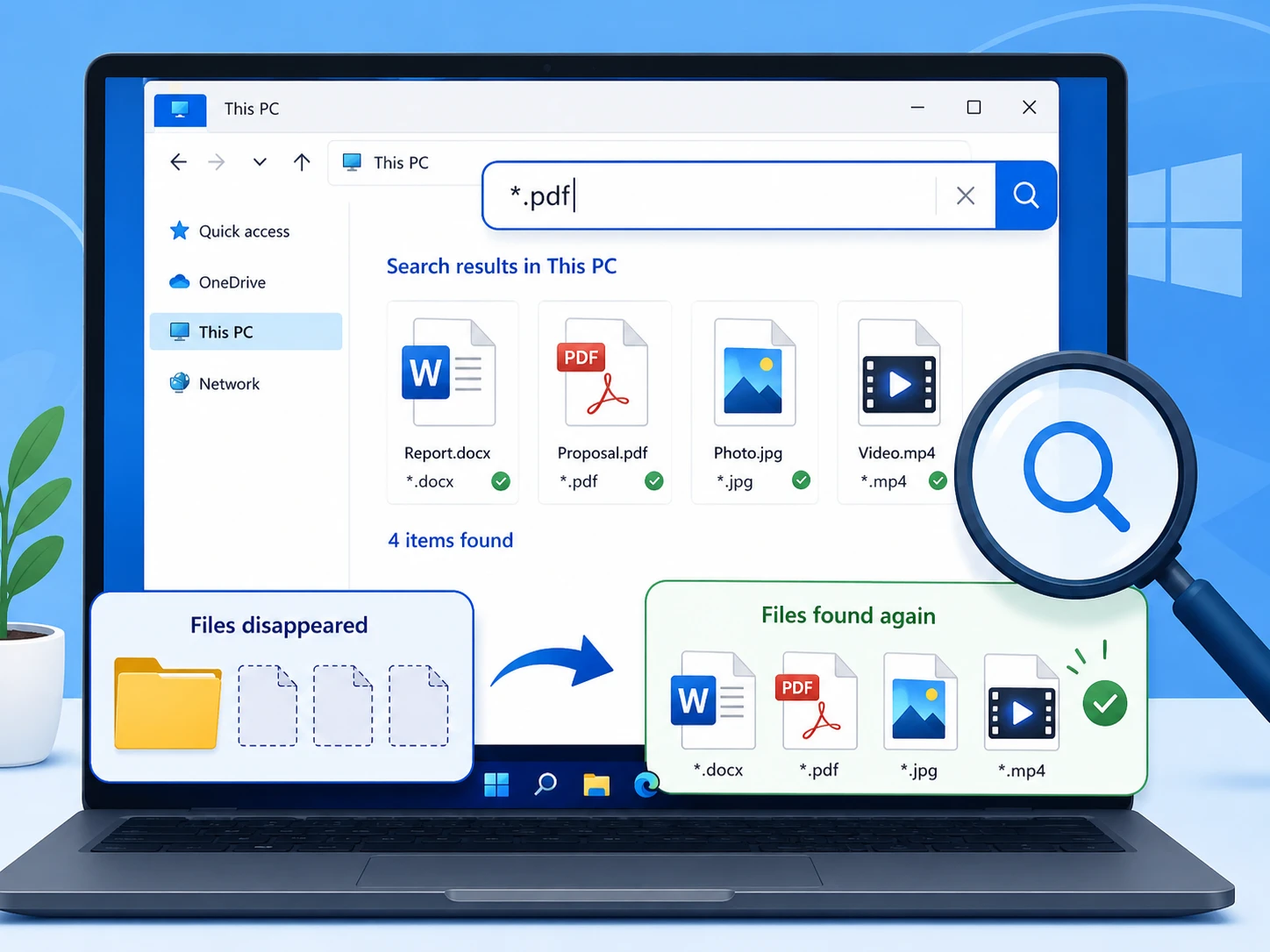
検索するユーザー Windows 10でファイルがすべて消えてしまった, 、ファイルエクスプローラーを先に確認すべきです。ファイルが別の場所にまだ残っている可能性があるためです。.
ファイルエクスプローラーを開き、[ ] を選択します。 このPC, ファイル名を検索してください。思い出せない場合は、次の方法を試してみてください。 *.docx, *.xlsx, *.jpg, あるいは *.pdf.
次に、検索結果を右クリックして、[ ファイルの保存先を開く Windowsがどこに保存したかを確認するため。.
2. ごみ箱を確認する
誤って削除してしまうと、 Windows 10でファイルがすべて消えてしまった 深刻なシステム障害のようだ。.
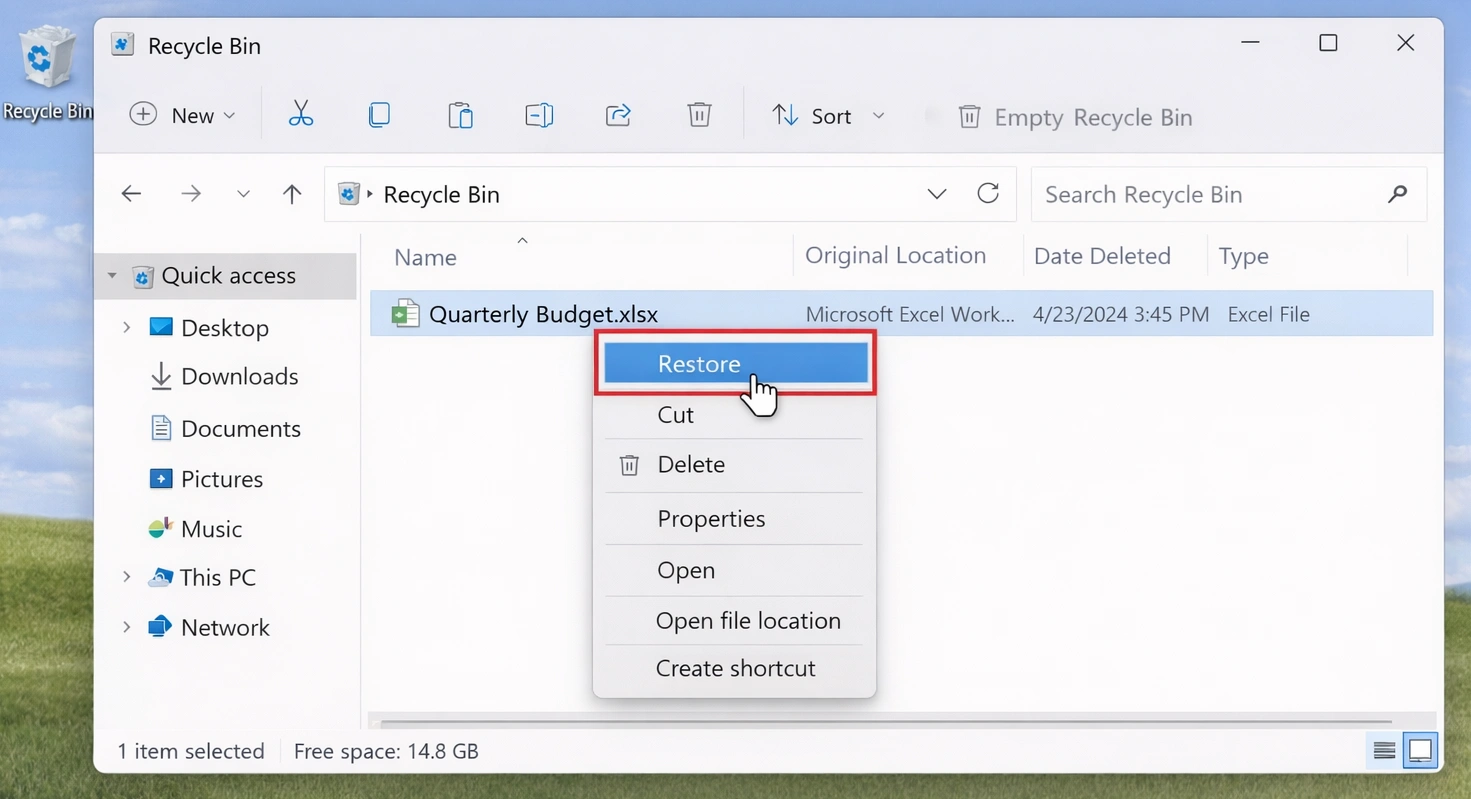
ごみ箱を開き、失われたファイルを検索してください。見つかった場合は、そのファイルを右クリックして、 リストア.
しかしだ、, Shift + Delete, (1)、(2)、(3)、(4) 空になったごみ箱, 、あるいはフォーマットを行うと、この手順を省略できる場合があります。その場合は、影響を受けるドライブに新しいデータを追加しないようにしてください。.
3. 隠しファイルと隠しフォルダを表示する
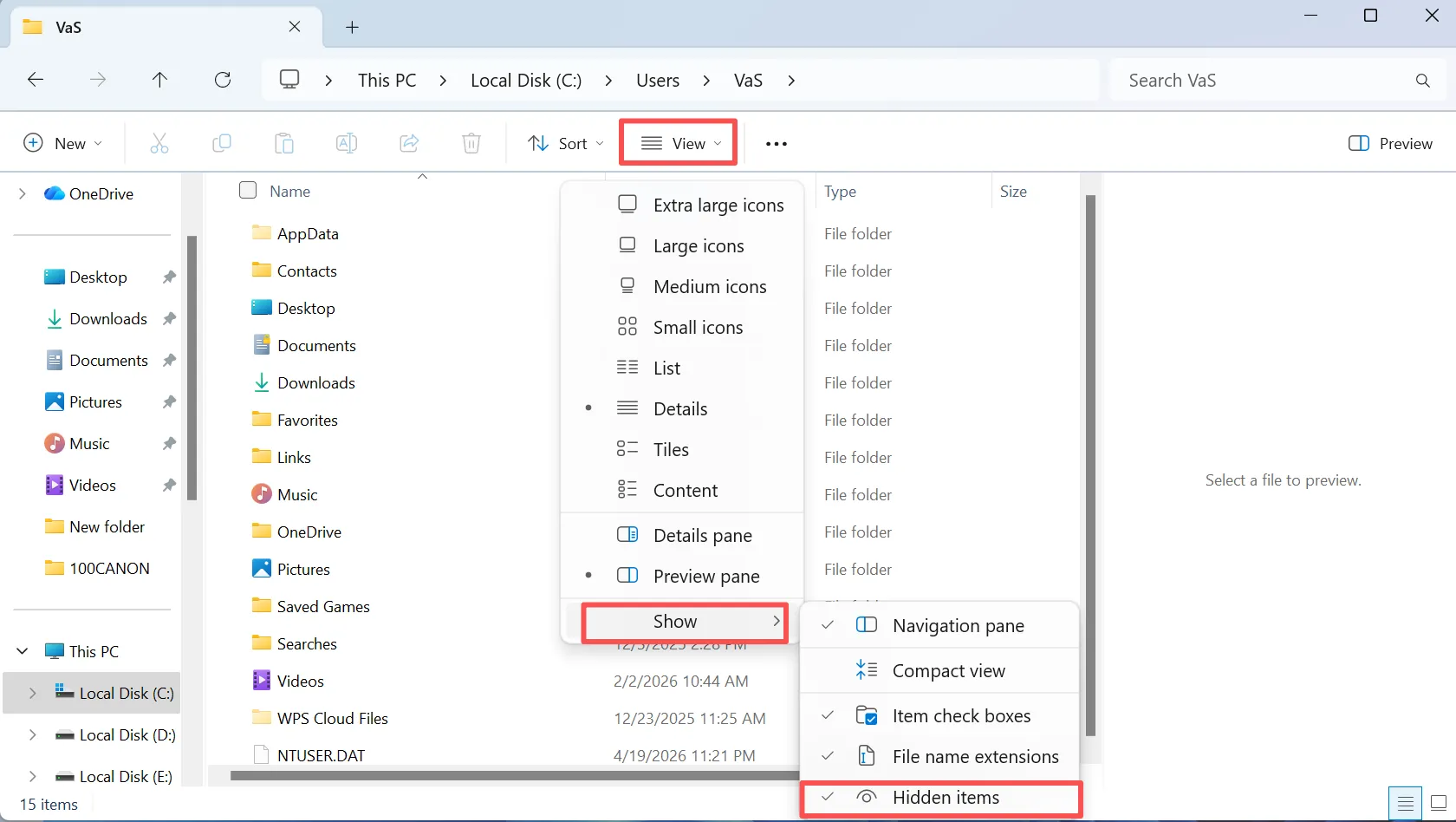
検索するユーザー Windows 10でファイルがすべて消えてしまった, 、隠しファイルもよくある理由の一つです。Windowsはファイルを削除する代わりに、非表示にする場合があります。.
ファイルエクスプローラーを開き、[ ] を選択します。 表示, そして有効にする 隠しアイテム. その後、空っぽに見えるフォルダに戻ります。ファイルが再び表示された場合は、必要に応じてそれらを移動するか、非表示を解除してください。.
また、より詳細な表示設定については、「ファイル エクスプローラーのオプション」を確認してください。.
4. 正しい Windows ユーザー プロファイルを確認する
プロフィールの変更が理由として考えられる Windows 10ですべてのファイルが消えてしまった, 、特にアップデート後やログインに問題があった後は。.
オープン C:\Users\ また、現在および以前のプロファイルにある「デスクトップ」、「ドキュメント」、「ダウンロード」、「ピクチャ」、「動画」を確認してください。.
たとえば、ファイルが古いプロファイルの下に残っている場合があります。そのため、データが消えたと決めつける前に、パスを確認してください。.
5. OneDrive、Windows.old、およびバックアップを確認する
もし あなたのすべての ファイルが消えてしまい、同期やアップグレードの後に問題が発生した場合は、別のコピーがすでに存在している可能性があります。.
まず、Microsoftのクラウドストレージをご利用の場合は、OneDriveを確認してください。次に、 C:\Windows.old Windowsの大規模なアップグレードの後。最後に、「ファイル履歴」やその他のバックアップを確認してください。.
バックアップにそのファイルが含まれている場合は、まずそのコピーを復元してください。.
6. まだファイルが見つからない? Magic Data Recoveryで復元しましょう
上記の方法で解決できない場合、ファイルが完全に削除されたり、フォーマットされたり、ファイルシステムが破損したりしたために、ファイルに通常通りアクセスできなくなっている可能性があります。この段階では、Windowsの通常の検索機能では解決できない可能性があります。.
Magic Data Recovery 影響を受けたドライブをスキャンして、復元可能なデータを検索します。Amagicsoftは、5,000種類以上のファイル形式およびHDD、SSD、USBドライブ、メモリーカードに対応していると謳っています。さらに、そのワークフローは「選択、スキャン、プレビュー、復元」というシンプルな手順で進みます。.
このアプローチは、次のような場合に役立ちます。 Windows 10のハードドライブからファイルが消えてしまった, 、完全に削除された後や、誤ってフォーマットしてしまった後でも可能です。「ファイル履歴」とは異なり、以前のバックアップは必要ありません。ただし、上書きされたデータは復元できなくなる可能性があります。そのため、早めに対処してください。.
ステップ1: Magic Data Recoveryのダウンロードとインストール
Magic Data Recoveryをダウンロードし、ファイルが消失したドライブとは別のドライブにインストールしてください。こうすることで、元のドライブへの書き込み回数を減らし、復元可能なデータを保護するのに役立ちます。.
Windows 7/8/10/11およびWindows Serverをサポート
手順 2:ファイルが消えたドライブを選択する
Magic Data Recoveryを起動します。メイン画面から、失われたファイルが元々保存されていたドライブまたはパーティションを選択します。その後、スキャンを開始します。.

ステップ 3:ドライブをスキャンして、紛失または削除されたファイルを探す
このプログラムは、選択したドライブに対して「詳細スキャン」を開始します。スキャンが進むにつれて復元可能なファイルが表示されるため、処理の途中で検出されたデータを確認することができます。.

ステップ4:リカバリーの前にファイルをプレビューする
次に、プレビュー機能を使用してファイルの内容を確認します。この手順により、復元前に、正しい文書、写真、動画、その他のファイルであることを確認できます。.
スキャン結果が多数ある消失ファイルの復元作業では、プレビュー機能を利用することで、作業の管理が容易になります。.

ステップ5:ファイルを安全な場所に復元する
最後に、必要なファイルを選択し、別のドライブまたは保存先に保存してください。他のデータがまだ失われたままである間は、それらを元のドライブに復元しないでください。新しい書き込みによって、復元可能なデータが上書きされてしまう恐れがあるためです。.
このルールは、特に次のような場合に重要になります。 Windows 10のハードドライブからファイルが消えてしまった そして、スキャンにより、まだ復元が必要なファイルがさらに見つかりました。.

7. Windows 10のハードドライブからファイルが消えてしまった?「ディスクの管理」を確認してください
パーティション全体やドライブが空になっている、あるいは存在しないように見える場合は、以下を開いてください。 ディスク管理 フォーマットやパーティションの再分割を行う前に。.
パーティションにドライブ文字が割り当てられていません
ドライブ文字が割り当てられていない正常なパーティションは、ファイルエクスプローラーに表示されない場合があります。ボリュームに異常が見られない場合は、未使用のドライブ文字を割り当ててください。.
ドライブが「RAW」と表示される
「RAW」とは、Windows がファイルシステムを正常に読み取れない状態を指します。そのため、ボリュームをフォーマットまたは修復する前に、重要なファイルを復元してください。.
その領域が「未割り当て」と表示される
未割り当て領域は、パーティション情報が失われていることを示している可能性があります。その場合は、新しいパーティションを作成する前に、ドライブをスキャンしてください。.
いつ Windows 10のハードドライブからファイルが消えてしまった, 、修理を行う際は、可能な限り事前に重要なデータを復元してください。.
8. 「ファイル履歴」を使って失われたファイルを復元する
「ファイル履歴」は、次のような場合に役立ちます。 Windows 10でファイルがすべて消えてしまった データが失われる前にバックアップを有効にしていた場合。.
元のフォルダを開き、そのフォルダを右クリックして、[ 旧バージョンの復元. その後、利用可能なコピーを確認し、必要なバージョンを復元してください。.
ただし、「ファイル履歴」では、データが失われた後にそれ以前のコピーを作成することはできません。したがって、利用可能な履歴が存在しない場合は、別の復元方法を選択してください。.
Windows 10で、なぜすべてのファイルが消えてしまったのでしょうか?
検索 Windows 10でファイルがすべて消えてしまった これは症状の説明であり、特定の原因を示すものではありません。一般的な原因としては、ファイルの削除、非表示属性、プロファイルやOneDriveの設定変更、フォーマット、パーティションの消失、ファイルシステムの問題などが挙げられます。.
したがって、「紛失」と「削除」を区別してください。検索機能は既存のファイルを見つけ出し、バックアップはコピーを復元し、Windowsが通常通りアクセスできなくなった場合には、復旧ソフトウェアが役立ちます。.
Windows 10でファイルが消えてしまったときにやってはいけないこと
重要なファイルが消えてしまった場合、その直後の対応が復元できるかどうかに影響を与える可能性があります。.
まず、問題のあるドライブへの大容量のダウンロードやファイルのコピーは避けてください。次に、Windowsからプロンプトが表示されたからといって、RAWパーティションをフォーマットしないでください。第三に、重要なデータが保存されている領域の上に新しいパーティションを作成しないでください。 未割り当て スペース.
最後に、復元作業が完了するまでは、復元されたファイルを元のドライブには保存しないでください。.
Windows 10でファイルが消えてしまう問題を予防する方法
ある問題を解いた後、 Windows 10でファイルがすべて消えてしまった, 、再び損失を被るリスクを軽減する。.
まず、「ファイル履歴」またはその他の定期バックアップ機能を有効にしてください。次に、重要なファイルの別のコピーを、別のストレージや信頼できるクラウドサービスに保存しておいてください。.
また、定期的にバックアップのテストを行ってください。最後に、ファイルシステムエラーの繰り返し、パーティションの消失、または予期せぬ接続切断に注意してください。.
まとめ
もし Windows 10ですべてのファイルが消えてしまった, 、まずはリスクの低い確認作業から始めましょう。PCの検索、ごみ箱の確認、隠しファイルの表示、ユーザープロファイルの確認、バックアップの確認などを行ってください。.
次に、ドライブやパーティションが表示されなくなった場合は、「ディスクの管理」を確認してください。それでも Windows がファイルを見つけられない場合は、フォーマットやパーティションの再構築を行う前に、重要なデータを復元してください。.
Magic Data Recovery このツールはこの段階に適しています。なぜなら、削除されたデータやアクセスできないデータをスキャンし、ユーザーが復元前にファイルをプレビューできるからです。したがって、まずは場所を特定し、次に復元を行い、最後に修復を行うという順序で進めてください。もし Windows 10のハードドライブからファイルが消えてしまった 実用的なバックアップがない場合、Magic Data Recoveryは実用的な ハードドライブ回復 大げさな約束をせずに、その方法を実践する。.
Windows 7/8/10/11およびWindows Serverをサポート
よくある質問
Windows 10で、なぜファイルが突然消えてしまったのでしょうか?
Windows 10でファイルが消えてしまう原因としては、隠しファイル、プロファイルの変更、OneDriveの設定変更、誤削除、フォーマット、ファイルシステムの問題など、いくつかの要因が考えられます。まず、PC内を検索して、隠しアイテム、ユーザーフォルダ、バックアップを確認してください。これらの手順で解決しない場合は、問題のドライブへの書き込みを最小限に抑え、復元ソフトの利用を検討してください。.
Windows 10では、削除されなくてもファイルが消えてしまうことはありますか?
はい。Windows 10 でファイルが消えた場合でも、Windows はそのファイルをディスク上に保存している可能性があります。隠し属性の設定、プロファイルの変更、OneDrive の同期、フォルダの移動、またはドライブ文字の問題などが原因で、ファイルが消えたように見えることがあります。したがって、この問題を永久的なデータ損失とみなす前に、ファイル エクスプローラー、隠しファイル、ユーザー プロファイル、クラウド ストレージ、およびディスクの管理を確認してください。.
ハードドライブから消えてしまったファイルを復元するにはどうすればよいですか?
Windows 10のハードドライブからファイルが消えてしまった場合は、まず「ディスクの管理」にそのドライブが表示されていることを確認してください。次に、ドライブ文字、ファイルシステムの状態、パーティションの構成を確認してください。それでもWindowsでファイルが見つからず、バックアップも存在しない場合は、そのドライブへの新規データの書き込みを中止し、Magic Data Recoveryなどの復元ツールを使用してスキャンを行ってください。.
ごみ箱を空にした後、ファイルを復元できますか?
可能性はあります。ごみ箱を空にすると、Windows からの通常のアクセスはできなくなりますが、新しいデータが同じ記憶領域を上書きするまでは、ファイルのデータが残っている場合があります。そのため、対象のドライブの使用は最小限に抑えてください。ごみ箱を空にした後にファイルが消えてしまった場合でも、復元スキャンを実行すれば、復元可能なデータが見つかる可能性があります。.
「ファイル履歴」では、完全に削除されたファイルを復元できますか?
「ファイル履歴」では、Windows が削除前にそのバックアップを作成していた場合にのみ、以前のコピーを復元できます。削除後に履歴バージョンを作成することはできません。したがって、以前に「ファイル履歴」を有効にしていた場合は、まずそちらを確認してください。使用可能なバックアップが存在せず、すべてのファイルが消失してしまった場合は、復元スキャンが別の現実的な選択肢となる可能性があります。.
Windowsからドライブのフォーマットを求められた場合、フォーマットすべきでしょうか?
いいえ、そのドライブに重要なファイルが欠落している場合はそうはいきません。フォーマットを行うとファイルシステムの構造が変更され、復旧の選択肢が狭まる可能性があります。Windows 10のハードドライブからファイルが消え、ボリュームが「RAW」と表示されたり読み取れなくなったりした場合は、まず貴重なデータを復旧させてください。ファイルを安全に確保した後であれば、リスクを最小限に抑えてドライブの修復や再フォーマットを行うことができます。.
Windowsのツールではなく、なぜMagic Data Recoveryを使うのか?
Windowsの検索、ごみ箱、ファイル履歴、およびプロファイルチェックは、ファイルにアクセスできる状態であるか、バックアップが存在する場合に有効です。しかし、これらはすべての削除やフォーマットの問題を解決できるわけではありません。Windows 10でファイルが消失し、通常の方法では復元できない場合、Magic Data Recoveryを使用すれば、影響を受けたドライブをスキャンし、復元可能なファイルをプレビューして、コマンドラインによる復元手順を必要とせずに、選択したデータを復元することができます。.

バシリイは、この分野で約10年の実務経験を持つデータ復元のスペシャリストです。そのキャリアを通じて、彼は削除されたファイル、フォーマットされたドライブ、失われたパーティション、RAWファイルシステムを含む何千もの複雑なケースの解決に成功してきました。彼の専門知識は、16進エディタなどの専門ツールを使用した手動復元方法と、復元ソフトウェアを使用した高度な自動化ソリューションの両方をカバーしています。バシリの使命は、信頼できるデータ復元知識をITプロフェッショナルと一般ユーザーの双方が利用できるようにし、貴重なデジタル資産を保護できるようにすることです。.