如何從 Defender 恢復被隔離的檔案

Microsoft Defender suddenly removing a downloaded installer, ZIP archive, work document, or utility can be alarming—especially when you know the file came from a source you trust. Fortunately, a file flagged by Defender is not always permanently deleted. In many cases, it is simply isolated in quarantine and can still be restored.
If you are trying to find how to recover quarantined files from Windows Defender, start with Windows Security rather than installing recovery software immediately. Microsoft Defender can normally restore an item while it still exists in quarantine. However, if Defender has already removed the file and no quarantine copy remains, the problem becomes a deleted-file recovery case.
This guide walks through both situations. You will learn how to restore a quarantined item through Protection History, use Microsoft’s MpCmdRun utility when the graphical interface fails, recover a genuinely removed file, and prevent the same trusted file from being quarantined again.
For broader cases involving files that have actually been erased, see our 刪除的檔案復原 guide. If the original file is no longer available through Defender, Magic Data Recovery can scan the affected storage device for recoverable data.
支援 Windows 7/8/10/11 和 Windows Server
重要: Never restore a Defender detection simply because you need the file. Confirm that the file, developer, and download source are trustworthy first.
目錄
Quick Answer: How to Recover Quarantined Files from Windows Defender
The right method depends on what Microsoft Defender actually did.
情況 | 最佳解決方案 |
File appears under Quarantined Items | Restore it through Windows Security |
Restore option is missing but quarantine still exists | 使用 MpCmdRun |
File was removed and is no longer quarantined | Check backups or use data recovery |
File came from an official download source | Download a fresh copy |
Restored file is detected again | Verify it, then allow only if you trust it |
Work or school PC | Contact your administrator |
For most home users, Windows Defender quarantine recovery should begin with Protection History. Data recovery software becomes relevant only after Defender can no longer restore the original file.
What Happens When Windows Defender Quarantines a File?
Understanding quarantine is important before attempting recovery.
When Microsoft Defender identifies a suspicious file, it may isolate that file so Windows applications can no longer run or normally access it. This process protects the system while keeping Defender in control of the item.
A quarantined file is therefore different from a permanently deleted file.
「隔離」、「移除」與「刪除」的區別
A quarantined file still exists under Microsoft Defender’s control. If Defender still retains it, you can usually restore it.
A removed file has already been deleted by Defender. In this situation, the Restore option may no longer be available.
A file can also disappear because of manual deletion, another antivirus program, disk errors, or unrelated storage problems.
This distinction matters when learning how to recover quarantined files from Windows Defender. Recovery software does not need to be your first step when Defender still has the file.
Microsoft currently instructs Windows users to open Virus & threat protection → Protection history, filter for quarantined items, and select Restore when appropriate. Microsoft also provides MpCmdRun as an official command-line recovery method.
Method 1: Restore Quarantined Files from Windows Defender
最簡單的方法 restore quarantined files in Windows Defender is through the Windows Security interface.

步驟 1:開啟「Windows 安全性」
新聞 Windows + S, 請輸入:
視窗安全
Open the matching result.
Then select:
病毒與威脅防護
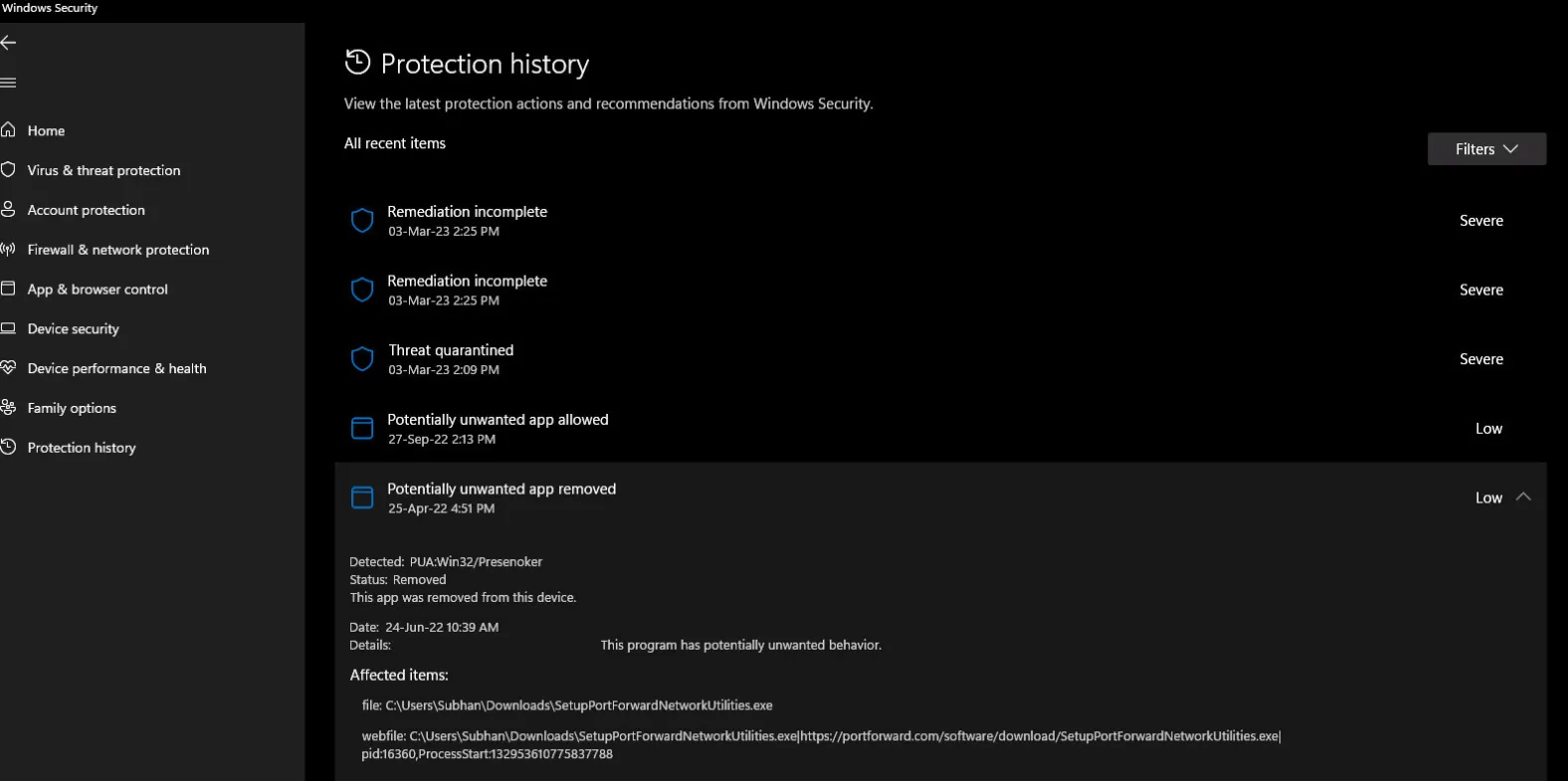
步驟 2:開啟保護記錄
Under Virus & threat protection, select:
保護記錄
Windows displays recent actions taken by Microsoft Defender.
If many records appear, use the filter and choose:
Quarantined Items
Step 3: Find the Correct Detection
Open the detection associated with your missing file.
Before restoring it, check:
- The original file location
- Threat or detection name
- 檔案名稱
- Download source
- Publisher or digital signature, when available
For example, suppose Defender quarantines an installer you downloaded directly from a software developer’s official website. If the filename, digital signature, and publisher all match what you expected, a false positive is more plausible.
However, an unfamiliar executable from an email attachment or unknown download site should stay quarantined.
步驟 4:選擇「還原」
Expand the detection and select:
Actions → Restore
Defender should return the file if the quarantined copy still exists.
Microsoft notes that restoring a quarantined threat can cause Defender to detect the same file again. If you are certain the detection is a false positive, review the new alert and use 允許在裝置上執行 rather than broadly disabling your antivirus protection.
對於大多數進行搜尋的用戶而言 how to recover quarantined files from Windows Defender, this is the safest and fastest solution.
Method 2: Recover Defender Quarantined Files with MpCmdRun
Sometimes the file does not appear properly in Windows 安全性保護記錄, or the graphical interface does not provide the restore option you expect.
Microsoft provides another method called MpCmdRun, a command-line utility included with Microsoft Defender Antivirus.
步驟 1:以管理員身分開啟指令提示
新聞 Windows + S, enter:
cmd
按一下滑鼠右鍵 指令提示, then choose:
以管理員身分執行
Administrator privileges matter because Defender restricts access to quarantined data.
Step 2: Locate MpCmdRun
On many Windows installations, Defender’s command-line utility is located under:
C:\ProgramData\Microsoft\Windows Defender\Platform\<version>\
Microsoft’s documentation recommends using the latest Defender platform folder. If that location is unavailable, Windows may also use:
C:\Program Files\Windows Defender
Step 3: List Quarantined Files
Once Command Prompt is operating from the correct Defender directory, run:
MpCmdRun.exe -Restore -ListAll
This command lists items Defender still retains in quarantine.
Microsoft currently documents this exact MpCmdRun restore workflow for Microsoft Defender Antivirus.
Step 4: Restore the Required File
After identifying the item, run:
MpCmdRun.exe -Restore -Name
Replace <filename> with the filename shown in the previous result.
If MpCmdRun can still see the item, this method may succeed even when the normal interface is inconvenient.
However, if the item no longer exists in the quarantine list, repeatedly running Defender commands will not restore deleted storage data. At that point, move to the next method.
Method 3: Recover Files Deleted by Windows Defender with Magic Data Recovery
There is an important point that many recovery guides blur:
Restoring quarantine is not the same as recovering deleted files.
When Defender still owns the quarantine copy, use Windows Security or MpCmdRun. But if Defender has already removed the file and no usable quarantine copy remains, how to recover quarantined files from Windows Defender becomes a conventional deleted-data recovery problem.
這就是 Magic Data Recovery 變得相關。.
Magic Data Recovery scans the original storage device rather than depending on Defender’s quarantine database. It supports files lost through accidental deletion, formatting, file-system errors, and other data-loss situations.
It can also work with HDDs, SSDs, USB drives, SD cards, external storage, and common Windows file systems, while supporting more than 5,000 file types.
您應該在何時使用 Magic Data Recovery?
請在以下情況下考慮:
- Defender has already removed the original file.
- Windows Defender quarantined files no longer appear in Protection History.
- MpCmdRun cannot list the required item.
- 您沒有可用的備份。.
- The file cannot simply be downloaded again.
- You need to search the original disk for deleted file data.
Unlike Defender’s Restore feature, Magic Data Recovery does not require an active quarantine record.
Step 1: Stop Writing New Data to the Drive
If the file has truly been deleted, avoid unnecessary downloads, installations, file copies, and large Windows updates on the affected drive.
Deleted storage space may eventually be reused by new data.
If the missing file came from another partition, USB drive, or external disk, install the recovery software somewhere else whenever possible.
Step 2: Scan the Original Storage Location
Launch Magic Data Recovery and select the partition or storage device where the missing file originally existed.

例如:
- File disappeared from Desktop → usually scan the Windows system partition.
- File was quarantined from an external HDD → scan that external HDD.
- File was removed from a USB drive → scan the USB device.
Start the scan and allow the software to search for deleted and lost files.
Step 3: Filter and Preview Results
When many files appear, narrow the results by:
- 檔案名稱
- Path
- 檔案類型
- Extension
- 檔案大小
Preview supported files when possible before recovery.

This step is especially useful if the original file name or directory structure has been partially lost.
Step 4: Recover the File to Another Location
Select the required file and save it to a different drive or partition.

Do not immediately write recovered data back to the same affected storage location. Doing so may overwrite other recoverable information.
Also keep expectations realistic. No deleted-file recovery application can guarantee that every file will remain recoverable. Continued disk usage, overwriting, storage condition, and SSD TRIM behavior can all affect results.
That distinction makes Magic Data Recovery a practical fallback rather than an unnecessary replacement for Microsoft’s built-in restoration tools.
Method 4: Restore the File from a Backup or Original Source
Before performing a deep recovery scan, check whether you already have another clean copy.
可能的地點包括:
- OneDrive
- 檔案歷史
- 外接式備份硬碟機
- 另一個讀卡機
- 雲端儲存
- 電子郵件附件
- Project repositories
- Organization backups
If Defender removed a program installer, DLL, archive, or application component that originally came from a legitimate developer, downloading the newest version from the official developer may be safer than restoring an older copy.
This is particularly true for executable files.
A clean replacement often provides a better solution than trying to recover files deleted by Windows Defender from old storage sectors.
Why Can't I Find the Restore Option in Windows Defender?
Users frequently open Protection History only to discover that 還原 遺失。.
Several explanations are possible.
Defender Already Removed the File
If Defender reports the item as removed rather than quarantined, there may be no quarantine copy to restore.
Try MpCmdRun. If it cannot find the item either, check backups or scan the original storage device.
「防護記錄」中不再顯示該事件
Microsoft states that Protection History keeps events for approximately two weeks. Older records can therefore disappear from the visible history.
This does not necessarily mean that every underlying quarantine item is deleted at exactly the same time. Therefore, MpCmdRun is still worth checking.
You Do Not Have Administrator Rights
Protection History details and certain Defender operations require administrator permission.
If you use a standard Windows account, sign in with an administrator account or ask the device owner for help.
Your Organization Controls Microsoft Defender
Business and school computers may use centrally managed Defender policies.
If your IT department manages quarantine, exclusions, or security policies, do not attempt to bypass those controls. Contact the administrator instead.
What If Defender Quarantines the File Again?
A restored file may immediately trigger another detection.
Do not solve this by permanently disabling Microsoft Defender.
取而代之的是
- Confirm where the file came from.
- Check the developer or publisher.
- Inspect its digital signature when available.
- Confirm that the filename and version match the expected software.
- Update Microsoft Defender definitions.
- If you are confident it is a false positive, review the new detection.
- 選擇 允許在裝置上執行 where appropriate.
Microsoft explicitly warns that allowing a genuinely malicious file may expose your computer and data to risk.
Should You Add a Windows Defender Exclusion?
An exclusion prevents Defender from scanning a specified file, folder, file type, or process.
That can help with a repeatedly misidentified trusted application, but exclusions should remain as narrow as possible.
For example, excluding one verified application file creates less exposure than excluding:
C:\ or an entire Downloads folder.
Never add an exclusion simply because software instructs you to disable antivirus protection without explaining why.
If you suspect a false positive, contacting the software developer or reporting the detection to Microsoft is also a safer long-term approach.
Best Practices Before Restoring Defender Quarantined Files
學習時 how to recover quarantined files from Windows Defender, protecting the PC matters as much as getting the file back.
Keep these rules in mind:
- Restore only files whose origin you understand.
- Prefer Microsoft’s built-in Restore option first.
- Use MpCmdRun when the GUI cannot restore an existing quarantine item.
- Do not permanently disable Defender for one file.
- Keep Windows and Defender definitions updated.
- Maintain backups of important work.
- If the file was actually deleted, minimize writes to its original drive.
- 將恢復的資料儲存至其他位置。.
- On managed PCs, contact IT rather than bypassing security controls.
This order keeps the recovery process both practical and secure.
總結
最佳答案 how to recover quarantined files from Windows Defender depends on whether the file is still quarantined or has already been removed.
If Defender still holds the file, start with Windows Security → Virus & threat protection → Protection history → Quarantined Items → Restore. If the graphical interface does not work, Microsoft’s MpCmdRun utility provides another official way to restore quarantine items.
If the file has genuinely disappeared from Defender, check backups or download a fresh trusted copy first. When neither option is available, Magic Data Recovery is worth trying because it scans the storage device itself for deleted data rather than relying on Defender’s quarantine database.
Its support for deleted files, formatted drives, file-system errors, multiple storage devices, preview, filtering, and thousands of file formats makes it useful when ordinary Windows Defender quarantine recovery has reached its limit.
For more information about files that have been permanently removed, see Amagicsoft’s 刪除的檔案復原 指南。.
Most importantly, never restore a suspicious file solely because it is important. Verify the file first, then choose the recovery method that matches its actual status.
支援 Windows 7/8/10/11 和 Windows Server
常見問題
How do I recover quarantined files from Windows Defender?
Where are Windows Defender quarantined files stored?
Can I recover a file after Windows Defender deletes it?
Why is there no Restore button in Windows Defender?
Will Windows Defender quarantine a restored file again?
Can Magic Data Recovery restore files directly from Defender quarantine?
Does Windows Defender quarantine delete files permanently?
Should I disable Windows Defender before recovering a file?
Jason 在電腦資料安全產業擁有超過 15 年的實務經驗。他專精於資料復原、備份與還原,以及檔案修復技術,已協助全球數百萬使用者解決複雜的資料遺失與安全問題。.