
LaCie 資料復原:還原遺失的檔案
A LaCie Rugged drive may show an empty project folder, or Windows may ask to format a disk holding your photos. LaCie data recovery may help after deletion or file-system damage, but the safest method depends on the cause. See Amagicsoft’s 硬碟資料恢復中心 for related HDD cases.
Deleted files may remain until overwritten, and quick formatting can leave content intact. However, SSD TRIM, secure erasure, and physical damage can prevent recovery. A missing drive icon does not necessarily mean erasure.
停止使用受影響的硬碟機。. Below, diagnose the loss, try backups, and decide whether software or a recovery lab makes sense.
目錄
Before LaCie Data Recovery: Protect the Original Files
- Do not copy, download, or save anything to the LaCie drive. New writes may overwrite deleted data.
- Cancel prompts to format or initialize the disk. 請勿建立新的分割區。.
- Avoid CHKDSK /f, Disk Utility First Aid, and partition repair until you have recovered or securely copied important files. Such tools may change file-system records.
- Keep recovery output on a different physical drive. Never install software on the affected disk.
- Stop if the drive clicks, grinds, overheats, or repeatedly disconnects. Further power cycles and scans may worsen hardware damage.
If the drive holds your only irreplaceable copy and seems damaged, seek professional advice before testing again.
Can LaCie Data Recovery Work? Choose Your Situation
你所看到的 | 可能的情況 | 最佳的第一步 |
A file or folder vanished, but the disk opens | Wrong path, hidden file, or deletion | Search locations; check Recycle Bin or Trash |
You emptied Recycle Bin or used permanent deletion | File records may be removed | Stop writing; look for backups |
The LaCie disk was quick-formatted | Recreated file-system metadata | Avoid reuse; restore backup or scan a stable disk |
Windows shows RAW or asks to format | Unreadable file-system metadata | Cancel prompt; diagnose before repair |
Disk is missing from File Explorer/Finder | Cable, mounting, format, or hardware issue | Check safe connection and disk detection |
Clicking, impact damage, or unstable connection | 可能的硬體故障 | Disconnect; ask a recovery lab |
邏輯性損失 means storage remains readable but file records or paths are damaged. 物理故障 means hardware cannot reliably read the disk. LaCie data recovery software cannot repair damaged heads or electronics.
LaCie Data Recovery Diagnosis: Missing or Unreadable Drive
Check Cables and Disk Detection
Try another compatible cable or direct USB/Thunderbolt port. Check power on desktop models. Stop if you hear unusual sounds.
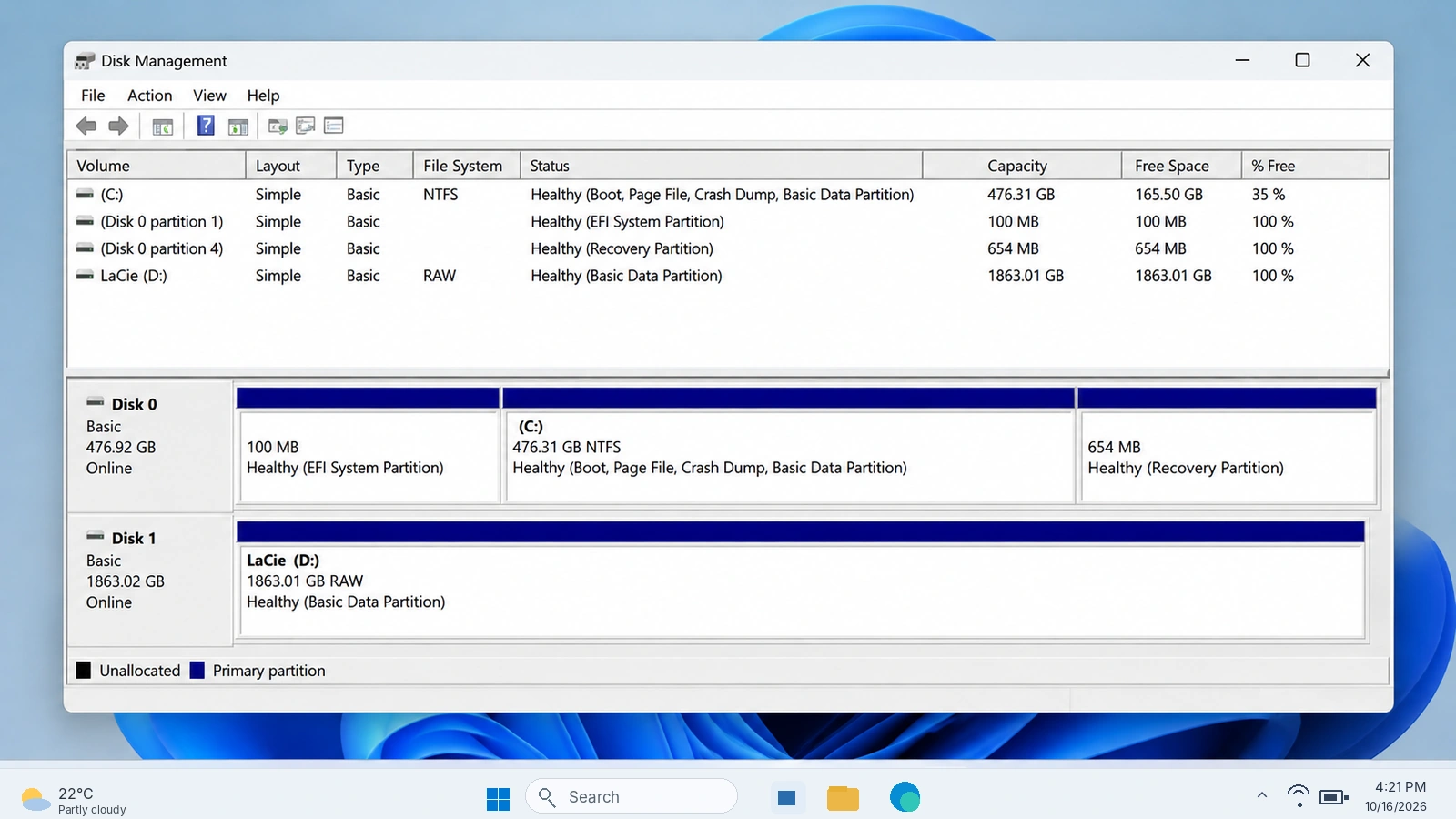
On Windows, right-click Start > Disk Management. Identify the LaCie device by its capacity. On Mac, open Disk Utility > View > Show All Devices.
- Healthy partition without a letter: On Windows, a missing drive letter may explain its absence in File Explorer. Assigning an unused letter can help when the file system itself is healthy.
- RAW / Unallocated / Not Initialized: Windows cannot interpret the volume or its partition information. This does not necessarily mean every file is erased. Do not format or initialize it.
- Disk missing entirely or reporting an implausible size: Suspect the cable, enclosure, or device hardware. If simple connection checks fail, stop DIY recovery.
If detected normally, check hidden or renamed folders. See our external hard drive recovery guide.
Check Mac File Systems and Security
Windows cannot natively open APFS or HFS+ volumes. Check the drive on a Mac before attempting LaCie data recovery. exFAT normally works on both systems.
LaCie Secure drives may require a password in Seagate Toolkit. According to Seagate Secure documentation, Factory Reset and Crypto Erase delete data. Password-reset keys must be configured beforehand.
Why Deleted, Formatted, and RAW LaCie Drives Need Different Solutions
Deletion usually marks storage space as reusable; content may survive until overwritten. Thus, LaCie data recovery tools sometimes find invisible files.
A 快速格式 rebuilds file-system structures. A full overwrite or secure erase can destroy recoverable content. RAW means the operating system cannot interpret the file system; it does not mean files were explicitly deleted.
關於 固態硬碟機, TRIM marks blocks as unused; garbage collection can make them unrecoverable. Therefore, LaCie data recovery outcomes differ between HDDs and SSDs.
Start LaCie Data Recovery with Existing Copies
Check Recycle Bin, Trash, and Other Copies
最適合 Files accidentally deleted while the drive still works.
LaCie data recovery is simplest when another usable copy already exists.
Check folders and cloud version history, then 回收站 (Windows)或 垃圾 (Mac). External-drive deletion sometimes bypasses Recycle Bin, so an empty bin proves little.
Limit: You need an existing copy. Restore it to healthy storage and check that it opens.
Restore a Previous Backup Version
最適合 Files included in a backup before the loss.
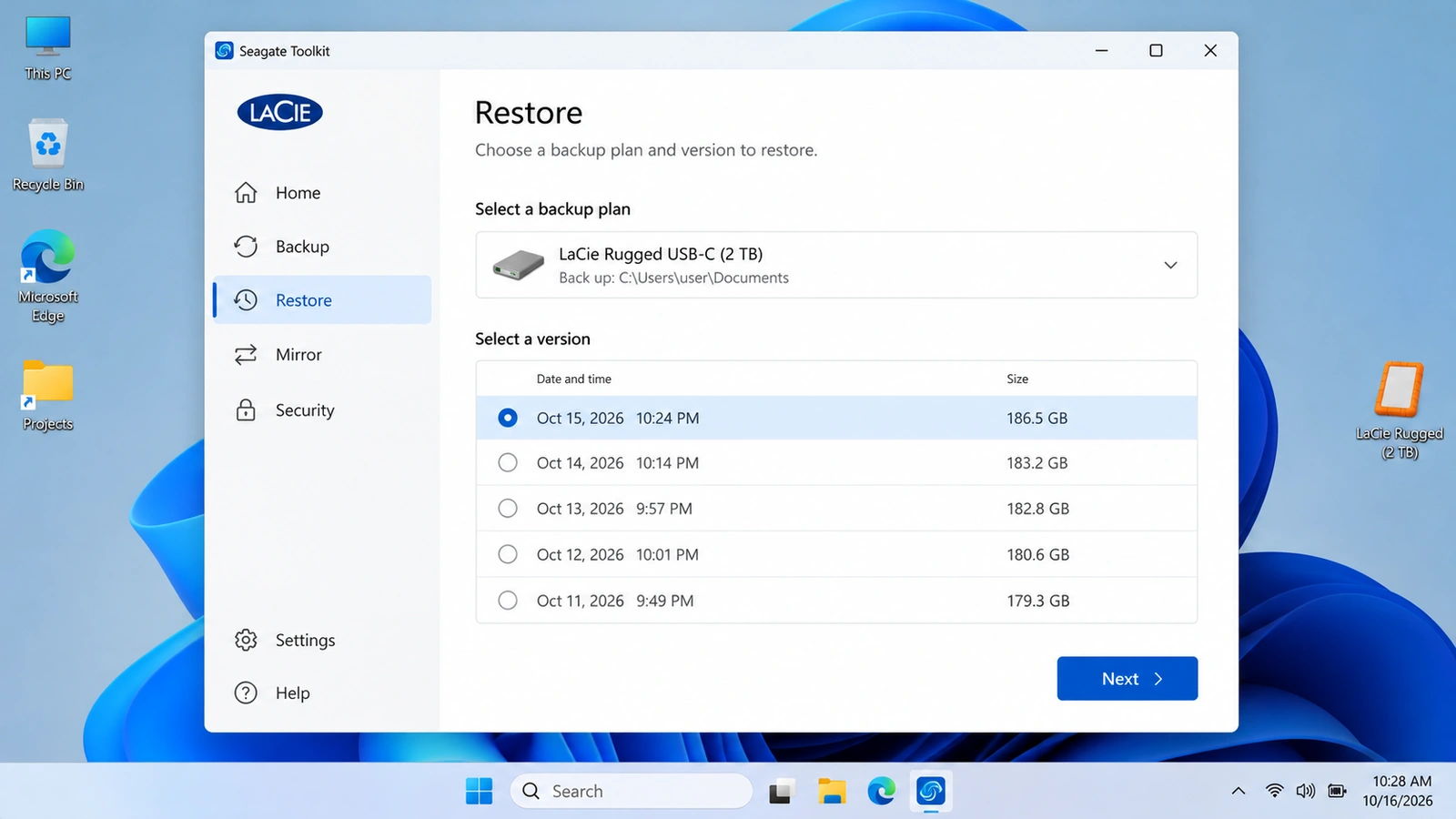
If you used LaCie Toolkit Backup on Windows, follow Seagate’s Restore instructions: open Toolkit, select 還原, choose the plan and version, then set a safe destination. Toolkit backs up selected computer folders to external storage; a backup stored only on the failed disk may also be inaccessible.
視窗 檔案歷史 or macOS 時間機器 can restore previously backed-up folders. However, Toolkit Mirror is not a versioned backup: deletions can propagate to both synced folders. Autosave helps with unsaved application work, not all deleted files.
If no accessible copy exists, move to recovery software only if the LaCie disk reads consistently.
Try Microsoft’s Free Windows File Recovery
最適合 Windows users comfortable with commands, whose readable LaCie volume has an accessible drive letter and contains deleted files.
安裝 Windows 檔案復原 on an unaffected drive. For a LaCie source E: and healthy destination D:, use winfr E: D: /extensive. Confirm the letters first.
This offers a free LaCie data recovery option, although it requires an appropriate source drive and a separate destination.
Limit: This command-line tool cannot fix missing hardware or unlock encryption. For graphical filtering and preview, see below.
Use Magic Data Recovery When LaCie Files Are Really Lost
When Recycle Bin, backups, and native options cannot restore deleted or formatted files, Magic Data Recovery offers a Windows-based LaCie data recovery workflow for compatible, readable HDDs and SSDs.
It searches surviving file records and recognizable content, then lets you filter and preview supported results. Unlike backups and Recycle Bin, it does not require a saved copy or visible deleted-item listing. It suits permanent deletion, quick formatting, and some logical damage.
限制: No physical repair, encryption bypass, overwritten-data recovery, or guaranteed SSD recovery. Mac-only file-system support should not be assumed.
How to Use Magic Data Recovery on a LaCie Drive
步驟 1:下載並安裝 Magic Data Recovery
Download the installer from the product page. Install it on your Windows PC’s internal disk or another unaffected volume—not the LaCie partition that lost files.
支援 Windows 7/8/10/11 和 Windows Server
Step 2: Select the LaCie Drive Where the Files Were Stored
Connect the stable LaCie drive, open Magic Data Recovery, identify the correct drive or partition by capacity, and start scanning.

Step 3: Scan for Lost LaCie Photos, Videos, or Documents
Allow the scan to examine the selected volume. Browse the files as results appear, using names, paths, or types where available.

步驟 4:復原前預覽檔案
使用 預覽 for supported photos or documents to check whether the content matches what you need. Not all formats or damaged files can be previewed.

步驟 5:將檔案復原至不同的磁碟機
Select the files and save them to a separate healthy physical disk. Never save recovered data back to the source LaCie drive.

If built-in options no longer work, you can try Magic Data Recovery before further writes overwrite surviving files.
Verify Recovery Before Repairing the LaCie Disk
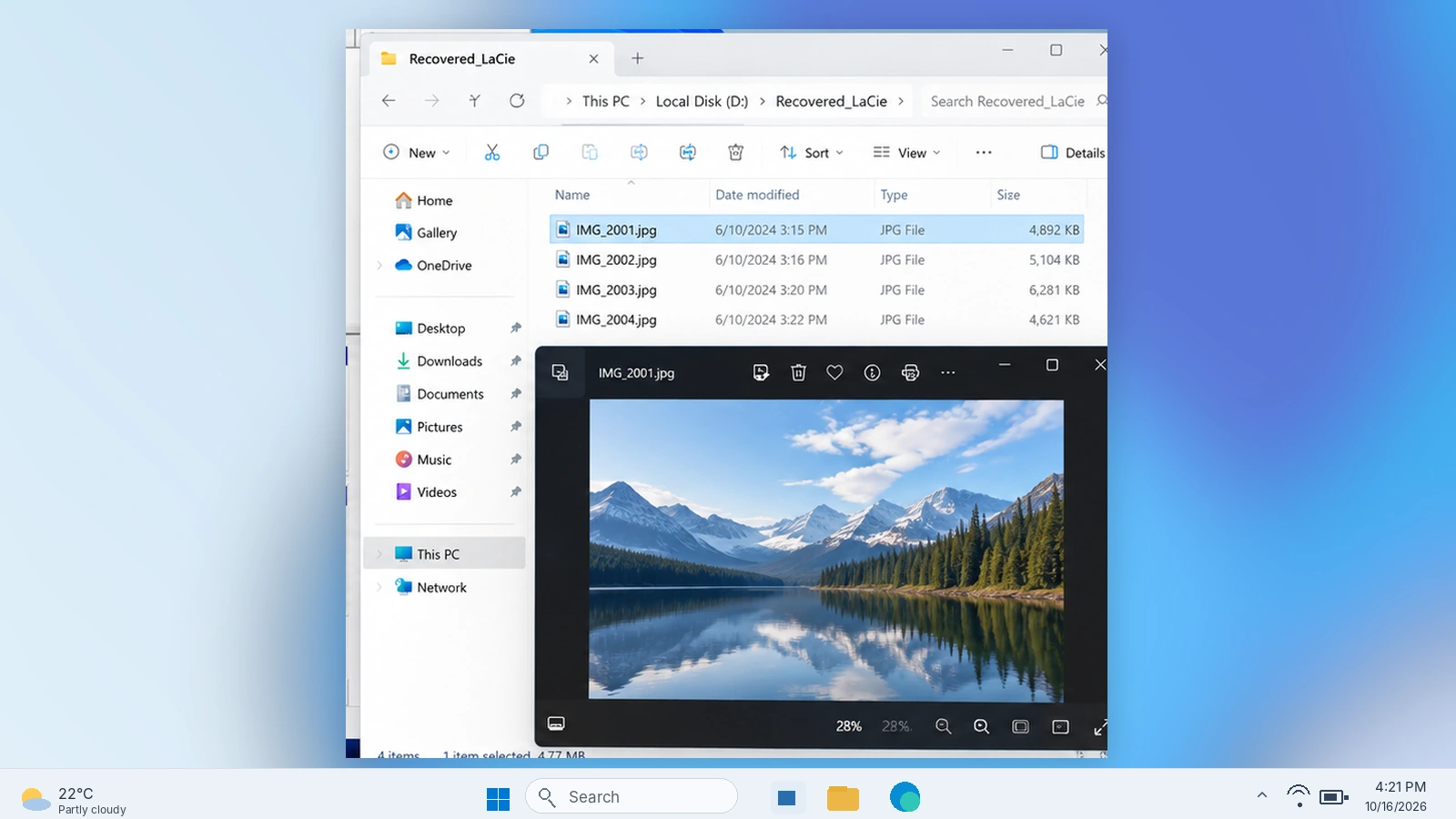
Finding a filename does not prove the file works. 之後 LaCie data recovery, check recovered copies:
- Open several important files in their usual applications, not just the recovery tool’s preview.
- Compare file sizes, dates, and content with any available references.
- For video projects, test playback at different points and confirm linked media opens.
- Preserve the original drive until you have verified the files that matter.
A 0 KB file or one that will not open may have missing content. Repair or reformat the source only after verifying important recovered files.
When to Stop DIY LaCie Data Recovery
Choose professional LaCie data recovery services if the drive clicks, suffered impact damage, disconnects during reads, or holds irreplaceable originals. Do not repeatedly scan it.
Multi-disk LaCie 2big/5big/6big RAID devices need special care: a RAID 0 failure and RAID 1 mirror failure follow different recovery paths. Avoid changing RAID mode, rebuilding an array, or removing disks without documenting their original positions.
Some models include Seagate Rescue 資料復原服務. .使用 official Rescue plan lookup with your serial number to check coverage. Ordinary warranty coverage does not automatically include data recovery, and professional service cannot guarantee a result.
Prevent Future Data Loss on LaCie Drives
Keep an independent backup plus an off-site/cloud copy. Use version history, not only two-way sync. Verify backup files before formatting.
Keep project originals on separate devices, eject drives properly, and investigate new read errors. SSD TRIM may permanently remove deleted content without further user writes.
總結
LaCie data recovery begins with the drive’s condition, not a download. If files are simply missing, verify paths and compatibility. If a backup or Recycle Bin copy exists, restore it first. For a stable, readable disk with permanently deleted or quick-formatted files, try native tools or Magic Data Recovery, always saving recovered files elsewhere.
However, a clicking HDD, unstable RAID, or physically damaged SSD needs professional assessment. Check results before attempting repairs, and use the 硬碟資料恢復中心 for other storage-related scenarios. The safest LaCie data recovery decision is the one that preserves your remaining options.
支援 Windows 7/8/10/11 和 Windows Server
常見問題
Is LaCie Data Recovery Possible Months After Deletion?
Can LaCie Data Recovery Software Work If the Drive Is Not Detected?
Are There Free LaCie Data Recovery Options?
Does a Quick Format Erase Everything on a LaCie External Hard Drive?
What Happens If I Forget My LaCie Secure Password?
Can I Recover LaCie Files on Windows If the Drive Was Used on Mac?
Is Professional LaCie Data Recovery Covered by the Warranty?

Vasilii 是一位在該領域擁有約 10 年實務經驗的資料復原專家。在他的職業生涯中,他已成功解決數千個複雜的個案,包括刪除的檔案、格式化的硬碟機、遺失的磁碟分割和 RAW 檔案系統。他的專業知識涵蓋使用十六進位編輯器等專業工具的手動復原方法,以及使用復原軟體的進階自動解決方案。Vasilii 的使命是讓 IT 專業人士和一般使用者都能獲得可靠的資料復原知識,協助他們保護寶貴的數位資產。.