
如何安全地取消格式化 SD 卡並恢復檔案

我從相機中取出 SD 卡,並將它放入電腦中。然後,一個錯誤訊息跳了出來,說明“......"。“SD 卡未格式化.”我格式化了記憶卡,但現在 SD 卡上的所有檔案都消失了。請問有人知道我該如何 解除 SD 卡格式化?
不小心格式化 SD 卡這麼簡單的錯誤,可能會導致您遺失所有珍貴的檔案。許多使用者都遇到過這些令人遺憾的情況,並正在尋找 formated SD card recovery methods 來撤銷 SD 卡格式化。幸運的是,有可靠的方法可以達成此目的。.
本文將帶您了解以下步驟 解除 SD 卡格式化. .我們也會深入探討 從格式化的 SD 卡中復原資料. .本指南將介紹一系列不同的方法,您可以根據自己的情況找出最有效的方法。當您閱讀完本指南後,您將掌握使用下列方法從 SD 卡復原資料的技巧 Magic Data Recovery 沒有任何麻煩。.
支援 Windows 7/8/10/11 和 Windows Server
目錄
Can You Really Unformat an SD Card?
You cannot restore the previous file system with a single Windows command, but you may be able to recover files from a formatted SD card. A quick format usually rebuilds the file-system structures and marks the storage space as available for reuse without immediately overwriting every data sector. Recovery remains possible only while the original data has not been replaced.

A full format in modern Windows normally writes across the storage device, making software recovery from overwritten areas unlikely or impossible. Formatting behavior may vary between cameras, phones, and other devices, so a scan provides the most practical way to determine whether files remain recoverable.
Recovery can also be affected by continued use, physical damage, encryption, file-system corruption, and the type of formatting performed.
| 情況 | 通常的情況是 | 復甦前景 |
|---|---|---|
| 快速格式 | File-system records are reset, but file content may remain | Scan immediately before new data is written |
| Full format or overwrite | Storage areas are written over | Poor or impossible for overwritten areas |
| Camera/device format | Behavior varies by device | 停止使用卡片並掃描 |
| 卡片有物理性損壞 | Card may disconnect or show the wrong capacity | 使用專業的資料恢復服務 |
| Encrypted Android SD card | Files may depend on the original encryption key | Recovery may be impossible after key loss |
How to Unformat an SD Card on Windows
方法 1:使用 Magic Data Recovery
Magic Data Recovery 是一款頂級的專業資料復原軟體,可協助您從各種資料遺失情況中擷取資料。它的主要優勢之一是,當用於 從 SD 卡復原資料, 它可以確保 SD 卡上的資料保持完整,同時努力恢復最全面的遺失資料。以下是如何使用它解決「Unformat SD Card」問題的逐步指南:
1. 首先,將 SD 卡透過讀卡機連接至 Windows 電腦。確保 Windows 電腦能成功識別 SD 卡。此連線對後續的資料復原過程至關重要。.
2. 接下來,點選下面的按鈕下載Magic Data Recovery。這將使您能夠獲得這款強大的專業資料恢復軟體。
支援 Windows 7/8/10/11 和 Windows Server
3.下載完成後,安裝 Magic Data Recovery 在您的電腦上。安裝完成後,啟動軟體。在應用程式介面中,選擇 SD 卡為要掃描的磁碟機。.
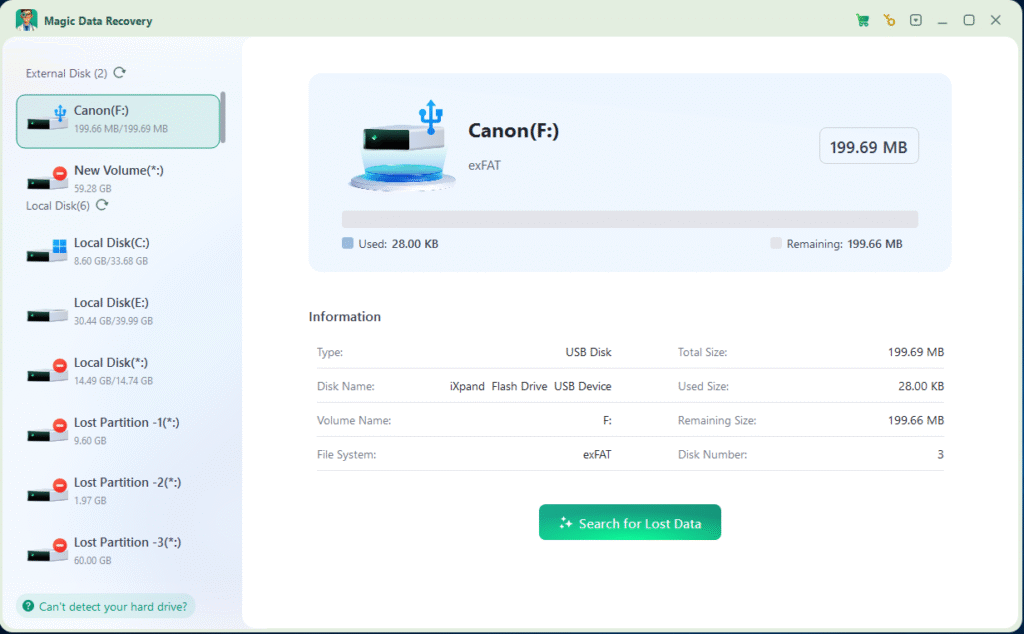
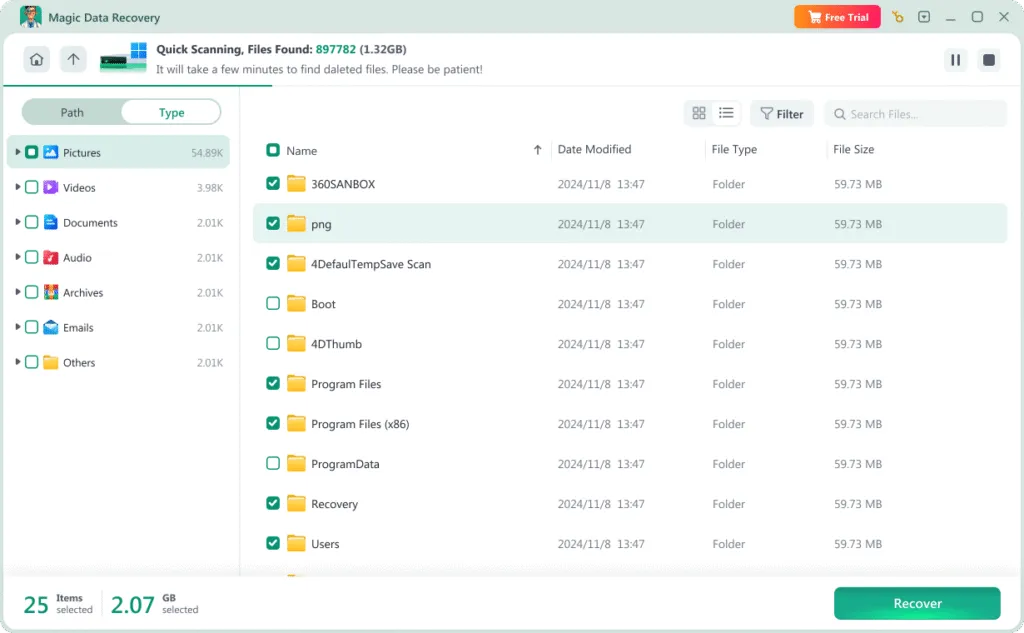
5. 然後,只要勾選要復原的檔案旁邊的方塊即可。選擇需要的檔案後,按一下「復原」按鈕。此時,請選擇電腦上的另一個磁碟機來儲存復原的檔案。將檔案儲存至不同的磁碟機以避免覆寫原始資料是很重要的。.

6. 最後,在復原程序完成後,您可以在指定的儲存位置存取並檢查已復原的檔案,以確保已成功擷取所有必要的資料。.
方法 2: 從備份或雲端還原
方法 3:使用 CMD(指令提示)
命令提示符 (CMD) 是 Windows 中的本機工具,可協助您從格式化的記憶卡中復原資料。此方法有點技術性,但非常有效。對於那些不願依賴第三方軟體,而希望利用系統上已有工具的人而言,這是一個理想的選擇。.
使用 CMD 進行資料復原需要執行特定指令來檢查磁碟並擷取遺失的檔案。雖然一開始可能看起來有點嚇人,但遵循正確的步驟可以讓過程變得容易管理。如果您擅長使用命令列,並希望使用內建的解決方案,CMD 可以是一種強大的方法,用於解除 SD 卡的格式化,並恢復遺失的檔案。 復原您的資料.
2. 以管理員身份開啟命令提示符。在搜尋列中輸入「cmd」即可。然後用滑鼠右鍵按一下「命令提示符」,並選擇「以管理員身分執行」。.
3.在 Command Prompt 視窗中輸入 chkdsk X:/f(將 X 改為 SD 卡的磁碟機代號)。按 Enter 並等待程序完成。Command Prompt 將掃描並嘗試修正 SD 卡上的任何錯誤。.
4.輸入 attrib -h -r -s /s /d X:. 並按下鍵盤上的 Enter 鍵。(記住 X 代表 SD 卡的磁碟機代號)。.

方法 4:聯絡當地資料復原服務商店
Consider a professional data recovery service if the SD card is not detected in Disk Management, shows 0 bytes or the wrong capacity, repeatedly disconnects, overheats, or has been cracked, bent, or exposed to water.
Stop powering on an unstable card because repeated connection attempts may worsen physical damage. If the card remains stable and displays the correct capacity, a read-only software scan is usually a reasonable first step. Professional services cost more, but they may be the safest option when hardware repair is required.
What to Do Immediately After Formatting an SD Card
- 立即停止使用 SD 卡。.
- Do not take new photos or record new videos.
- 請勿再次格式化此記憶卡。.
- Do not run CHKDSK or other repair tools before recovery.
- Install recovery software on the computer, not the SD card.
- 將已復原的檔案儲存到另一個磁碟機。.
- Use a professional service if the card disconnects, overheats, or shows the wrong capacity.
Conclusion: Can You Unformat an SD Card?
You cannot undo SD card formatting with Ctrl+Z or a Windows repair command, but you may be able to recover files that remain after a quick format. Stop using the card, check your backups first, and scan it before running CHKDSK or formatting it again.
Magic Data Recovery is a practical option for Windows users because it can scan SD and microSD cards, filter and preview found files, and save recoverable data to another drive. It cannot recover overwritten files or repair physical damage, so acting quickly is important.
For additional recovery guidance after accidental formatting, visit our 已格式化磁碟復原指南.
支援 Windows 7/8/10/11 和 Windows Server
常見問題
Can you unformat an SD card?
How do I unformat an SD card for free?
Can CHKDSK unformat an SD card?
Can I recover an SD card after a quick format?
完全格式化之後可以復原檔案嗎?
Can I unformat an SD card used in a camera?
How long do I have to recover a formatted SD card?
我應該將已復原的 SD 卡檔案儲存到哪裡?

Erin Smith 是 Amagicsoft 公認最專業的作家之一。過去 10 年來,她不斷磨練自己的寫作技巧,幫助數百萬讀者解決技術問題。.