
Indirizzamento a blocchi logici (LBA): come funzionano i numeri di settore
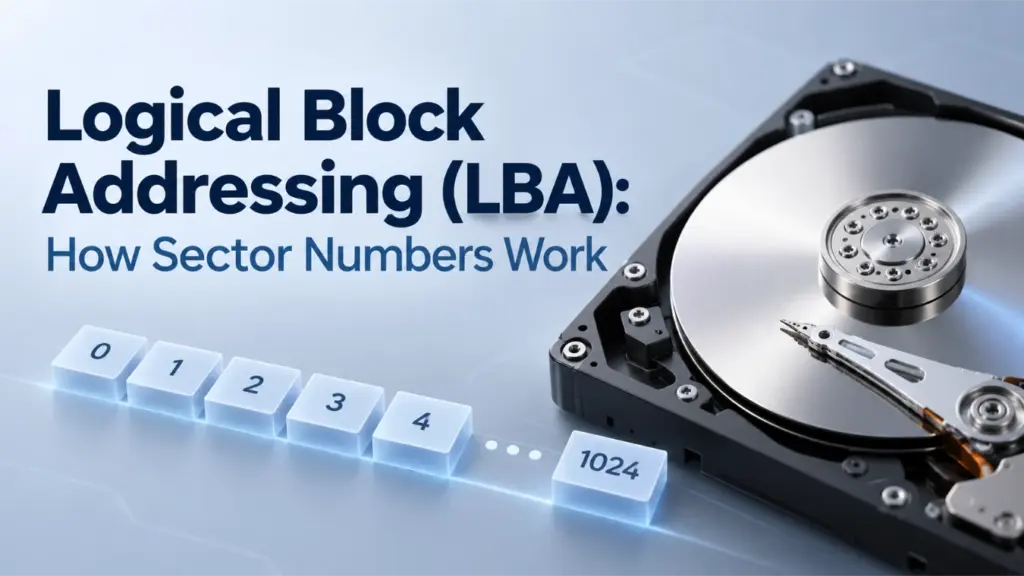
Indirizzamento a blocchi logici (LBA) è un metodo per identificare i blocchi di memoria tramite numeri sequenziali anziché tramite le coordinate di cilindro, testina e settore. LBA 0 identifica il primo blocco logico, LBA 1 identifica il secondo e così via. Tuttavia, un numero LBA da solo non determina un offset in byte: sono necessari anche la dimensione del blocco logico e l’origine dello spazio di indirizzamento. Comprendere questa relazione aiuta a spiegare la struttura dei dischi, i confini delle partizioni e le differenze tra settori logici e fisici.
Indice dei contenuti
Spiegazione dell'LBA: come funzionano gli indirizzi di blocco logici
LBA considera i blocchi indirizzabili di un dispositivo di archiviazione come una sequenza lineare. Anziché descrivere una posizione utilizzando tre coordinate, come avviene nell’indirizzamento Cylinder-Head-Sector (CHS), assegna a ciascun blocco logico un indice intero.
Ad esempio, i primi quattro blocchi logici sono:
LBA | Significato |
0 | Primo blocco logico |
1 | Secondo blocco logico |
2 | Terzo blocco logico |
3 | Quarto blocco logico |
Un esempio pratico
Immaginate una chiavetta USB che esponga blocchi logici da 512 byte. Uno strumento di gestione del disco richiede un blocco specificandone il numero LBA. Selezionate un esempio per vedere a quale blocco si riferisce quel numero.
La richiesta
“Leggi LBA 3”. Al disco viene richiesto il blocco numero 3, non il terzo blocco.
In parole povere
LBA 3 = il quarto blocco
Prima di esso ci sono tre blocchi: LBA 0, LBA 1 e LBA 2. Poiché il conteggio parte da zero, l'indirizzo 3 indica la posizione quattro.
Una distinzione importante: LBA 3 significa “numero di blocco logico 3”, non “numero di file 3” né “posizione fisica 3”. L’intervallo di byte sopra indicato deriva dalla dimensione del blocco logico di 512 byte dell’esempio. Per determinare quale file, se ce n’è uno, utilizzi quel blocco, sono necessari i metadati del file system.
Questa numerazione parte da zero. Se un dispositivo espone (N) blocchi logici, il suo ultimo LBA valido è N − 1, supponendo che lo spazio di indirizzamento inizi a LBA 0 e non presenti lacune nella numerazione.
Ad esempio, un dispositivo che espone 2.000.000 di blocchi logici ha un LBA finale pari a 1,999,999. Il numero di blocchi è quindi maggiore di uno rispetto all'ultimo LBA.
LBA è una convenzione di indirizzamento, non un file system. Non descrive i nomi dei file, le directory né l'allocazione dei file. Le tabelle delle partizioni utilizzano gli indirizzi di blocco logici per indicare dove iniziano e finiscono le partizioni, mentre i file system utilizzano i propri metadati per organizzare i file all'interno di tali partizioni.
Anche l'origine dello spazio di indirizzamento è importante. Un LBA relativo al disco e un numero di blocco relativo al volume possono riferirsi a posizioni diverse anche se i loro valori numerici sono identici. È necessario verificare sempre se uno strumento riporta indirizzi relativi all'intero dispositivo o a una partizione prima di combinare i suoi risultati con le informazioni della tabella delle partizioni.
Come calcolare l'offset in byte di un numero di settore LBA
Un Numero di settore LBA identifica un blocco logico, ma per convertire quel numero in una posizione in byte è necessario conoscere la dimensione del blocco logico.
L'offset del byte iniziale viene calcolato come segue:
Offset del byte iniziale = LBA × Dimensione logica del blocco
Se la dimensione del blocco logico è indicata con (B), l'intervallo di byte (inclusi) di un LBA è:
Start offset = LBA × B
End offset = (LBA + 1) × B − 1
The subtraction of one is necessary because byte offsets are zero-based and the end offset is inclusive.
Example: LBA 50 with different logical block sizes
Consider LBA 50 under two common logical block sizes.
Calculation | 512-byte logical block | 4,096-byte logical block |
Starting offset | 25,600 bytes | 204,800 bytes |
Starting offset in hexadecimal |
|
|
Last byte offset | 26,111 bytes | 208,895 bytes |
Last offset in hexadecimal |
|
|
Total bytes addressed | 512 | 4,096 |
For a 512-byte logical block, LBA 50 starts at byte offset 25,600 and covers bytes 25,600–26,111. That inclusive range contains exactly 512 bytes.
For a 4,096-byte logical block, the same LBA starts at byte offset 204,800 and covers bytes 204,800–208,895, a total of 4,096 bytes.
These are illustrative calculations, not measurements from a physical disk.
The important result is that the same LBA can correspond to different byte offsets when the logical block size changes. You cannot assume that multiplying every LBA by 512 will produce the correct byte offset for every device.
The calculation also assumes that the LBA and logical block size refer to the same address space. If a tool reports a partition-relative block number but you need a disk-relative address, you must account for the partition’s starting LBA and confirm that both values use the same logical block unit.
LBA-to-Byte-Offset Explorer
Change the LBA number to compare the byte range it identifies under two common logical block sizes.
With a 512-byte logical block
Starting byte offset
Inclusive byte range
Last byte offset
With a 4,096-byte logical block
Starting byte offset
Inclusive byte range
Last byte offset
Calculation: start offset = LBA × logical block size
Inclusive end: end offset = (LBA + 1) × logical block size − 1
Teaching example only. This calculator does not read a disk. The calculation assumes the LBA and block size refer to the same logical device, with byte offsets measured from that device's beginning.
LBA vs. CHS Addressing
LBA vs. CHS is primarily a comparison between two ways of expressing a storage address.
CHS stands for Cylinder, Head, and Sector. It represents a location using three coordinates, while LBA assigns the location a single sequential number.
Caratteristica | LBA | CHS |
Address representation | One linear block number | Cylinder, head, and sector coordinates |
Numbering | LBA starts at 0 | Traditional sector numbers start at 1 |
Address calculation | Multiply the LBA by the logical block size to obtain a byte offset | Requires geometry parameters to translate the coordinates |
Modern disk interpretation | Logical address exposed by the storage interface | May represent translated geometry rather than actual physical geometry |
Partition-table use | Explicit LBA fields are used by modern partitioning structures | Legacy fields remain in MBR entries for compatibility |
How CHS coordinates map to LBA
A traditional CHS-to-LBA conversion requires the number of heads per cylinder and the number of sectors per track.
Using zero-based cylinder and head numbers and a one-based sector number:
LBA = ((Cylinder × Heads per cylinder) + Head) × Sectors per track + (Sector − 1)
For example, suppose a hypothetical geometry has 16 heads per cylinder and 63 sectors per track. The CHS address (1, 2, 3) converts to:
LBA = ((1 × 16) + 2) × 63 + (3 − 1)
LBA = 18 × 63 + 2
LBA = 1,136
This example demonstrates the conversion formula; it does not describe the physical layout of a particular drive.
Modern drives do not necessarily expose a CHS geometry that corresponds to their actual physical tracks and heads. Legacy software may use translated CHS values for compatibility, so those values should not automatically be interpreted as physical locations.
Il UEFI specification’s MBR partition-record definition explicitly distinguishes the CHS fields from the LBA fields used by UEFI firmware to determine partition locations.
LBA is simpler to use as a linear addressing scheme, but its addressable capacity still depends on the width of the address field and the storage interface. The term LBA alone does not specify a universal address width.
Logical Block Size vs. Physical Sector Size
An LBA identifies a logical block exposed by the storage device or interface. That logical block is not necessarily the same size as a physical sector on the underlying medium.
Three common hard-drive formats illustrate the distinction:
Formato | Dimensione del settore logico | Dimensioni del settore fisico |
512n | 512 byte | 512 byte |
512e | 512 byte | 4.096 byte |
4Kn | 4.096 byte | 4.096 byte |
These are common formats, not an exhaustive list of every block size that a storage interface may report.
In a 512e drive, eight 512-byte logical sectors fit within one 4,096-byte physical sector. The operating system addresses the logical sectors, while the device manages the relationship between those sectors and the physical storage layout.
This difference matters for two reasons:
- Address calculation: Use the logical block size associated with the LBA address space to calculate the byte offset.
- Alignment and performance: Physical sector boundaries can affect how efficiently the device performs writes. If the device’s logical address zero is aligned to a physical boundary, an LBA that is a multiple of eight aligns to a 4,096-byte boundary on a 512e layout. Actual alignment can also depend on device-reported offsets and transfer-granularity requirements.
Microsoft’s documentation on Advanced Format disk compatibility explains why Windows and storage applications need to account for differences between logical and physical sector sizes.
Do not use the physical sector size as a substitute for the logical block size in the basic LBA-to-byte-offset formula. They describe different aspects of the storage layout.
How LBA Is Used in MBR and GPT
LBA becomes especially useful when examining partition tables because these structures use block addresses to describe disk layout.
LBA fields in MBR
The Master Boot Record (MBR) occupies LBA 0 on an MBR-partitioned disk. Its partition table contains four 16-byte partition entries.
Each entry includes two important 32-bit fields:
StartingLBA, at byte offset 8 relative to the beginning of the partition entry, identifies the partition’s starting logical block.SizeInLBA, at byte offset 12 relative to the beginning of the partition entry, specifies the number of logical blocks in the partition.
If the partition size is nonzero, its ending LBA can be calculated as:
Ending LBA = StartingLBA + SizeInLBA − 1
For example, a partition beginning at LBA 2,048 and containing 1,000,000 logical blocks ends at LBA 1,002,047. Il Amagicsoft MBR partition table guide explains the partition-entry layout and how the starting address and block count determine partition boundaries.
LBA fields in GPT
The GUID Partition Table (GPT) uses LBA to locate its metadata and define partition ranges.
On a conventional GPT-partitioned disk, the layout includes:
Posizione | Struttura |
LBA 0 | MBR protettivo |
LBA 1 | Primary GPT header |
A seguito degli LBA | Primary partition-entry array |
Intervallo LBA utilizzabile | Spazio disponibile per le partizioni |
Near the end of the device | Backup partition-entry array |
Ultimo LBA | Backup GPT header |
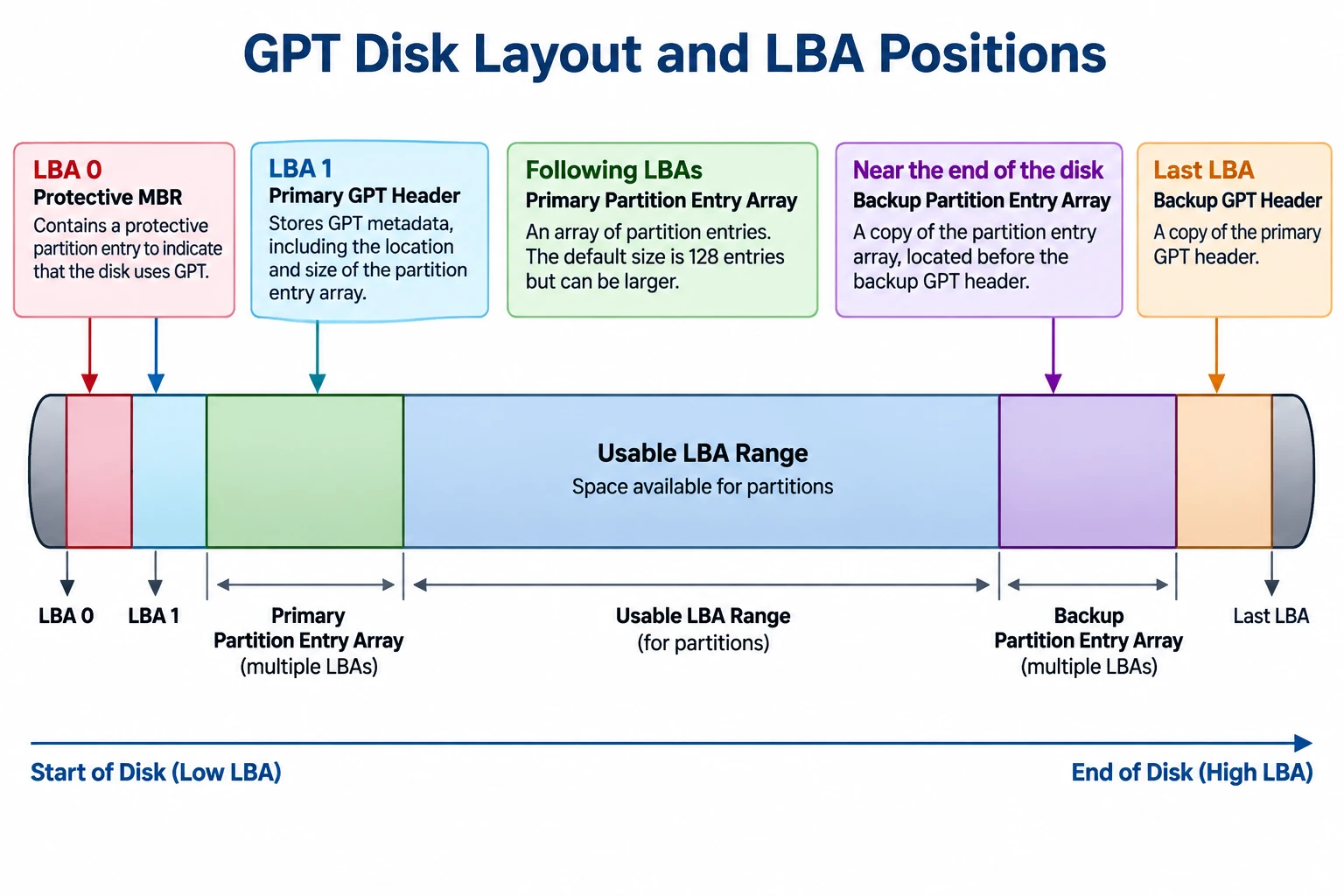
The exact usable range depends on the disk layout, logical block size, and the locations reserved for GPT metadata.
GPT partition entries contain 64-bit StartingLBA e FineLBA fields. Both boundaries are inclusive, so the number of logical blocks in a partition is:
Partition size in blocks = EndingLBA − StartingLBA + 1
The GPT header also includes PartitionEntryLBA, which identifies the starting LBA of the associated partition-entry array.
For a field-level explanation of these addresses and the primary and backup headers, see Amagicsoft’s GPT Header guide.
Il sito ufficiale UEFI specification, Section 5, defines the GPT layout and its address fields. It specifies 64-bit LBAs for GPT, whereas MBR partition entries use 32-bit starting-LBA and size fields.
Why MBR and GPT have different addressing limits
With 32-bit sector-address fields, MBR has a commonly encountered capacity boundary of approximately 2 TiB when logical sectors are 512 bytes.
The arithmetic is:
2³² logical blocks × 512 bytes = 2 TiB
This is approximately 2.2 trillion bytes in decimal units. The limit comes from the address-field width and the assumed logical sector size; it is not a universal limit for every device or every possible logical block size.
GPT’s 64-bit LBA fields provide a much larger theoretical address space. Actual usable capacity still depends on the operating system, firmware, drivers, device interface, and partitioning implementation.
Microsoft’s documentation on Windows support for disks exceeding 2 TB explains the relationship between the MBR addressing limitation and GPT.
How to Check Logical and Physical Sector Information in Windows
Windows provides a command for querying sector information reported by the storage device and its driver.
- Aprire il Prompt dei comandi.
- Correre
fsutil fsinfo sectorinfo D:, replacingD:con la lettera dell'unità appropriata. - Examine the reported logical and physical sector information.
Microsoft documents this command in Fsutil fsinfo. Its example output includes fields such as Byte logici per settore e Numero di byte fisici per settore per l'atomicità.
For example, if the system reports LogicalBytesPerSector : 4096, a 4,096-byte logical block size is appropriate for the corresponding LBA-to-byte-offset calculation.
Compare the logical sector size with the reported physical-sector information to understand the device’s addressing and alignment characteristics. The available fields and values may vary with the Windows version, storage device, and driver.
This command queries sector information; it does not read a particular LBA’s raw contents or identify the physical location of a file. It is a useful way to verify an input needed for the calculation, not a complete disk-structure analysis.
LBA Limitations and Common Misconceptions
LBA provides a logical address, but several conclusions cannot be drawn from the address alone.
- An LBA does not identify a file. The file system’s metadata is needed to map files and their allocated clusters to the corresponding storage regions.
- An LBA is not a physical media address. On an SSD, for example, the device’s flash translation layer manages the mapping between host-visible logical addresses and internal flash storage.
- An LBA does not establish whether data is intact. A readable address, an I/O error, or a partition-table inconsistency does not by itself prove that a file is recoverable or that a drive has physical damage.
- A byte offset depends on the correct logical block size. Using an assumed 512-byte size on a device exposing 4,096-byte logical blocks produces an incorrect result.
- Address origins must match. A partition-relative address cannot be treated as a disk-relative address without accounting for the partition’s starting position and confirming the tool’s addressing convention.
These distinctions are important when diagnosing partition layouts, interpreting disk utilities, or studying file-system structures. LBA supplies the address; additional metadata and device information are needed to interpret what is stored there.
Conclusione
Logical block addressing provides a linear way to identify logical storage blocks, but interpreting an LBA requires the correct logical block size and address-space origin. The distinction between logical and physical sectors, the differences between MBR and GPT fields, and the limitations of CHS compatibility values all affect how disk addresses should be understood. For reliable analysis, calculate offsets from verified parameters and interpret them alongside the relevant partition and file-system metadata.
Domande frequenti
L'LBA corrisponde al numero di settore?
La numerazione LBA parte da zero?
N − 1, non N.Come si calcola l'offset in byte di un LBA?
Offset in byte = LBA × Dimensione logica del blocco. Ad esempio, l'LBA 50 su un dispositivo con blocchi logici da 512 byte inizia all'offset di 25.600 byte. Verificare la dimensione del blocco logico prima di utilizzare il risultato.Perché lo stesso LBA può avere offset in byte diversi?
Qual è la differenza tra LBA e CHS?
L'LBA identifica la posizione fisica di un file?
Perché l'MBR ha un limite di capacità di 2 TiB?
Windows è in grado di visualizzare l'LBA di un file specifico?
fsutil fsinfo sectorinfo Il comando restituisce informazioni relative al settore, non l'LBA di un file. Per individuare i dati di un file è necessario interpretare la struttura della partizione e i metadati del file system; il risultato può dipendere dalla frammentazione e dalla convenzione di indirizzamento dello strumento.
Vasilii è uno specialista del recupero dati con circa 10 anni di esperienza pratica nel settore. Nel corso della sua carriera, ha risolto con successo migliaia di casi complessi riguardanti file cancellati, unità formattate, partizioni perse e file system RAW. La sua esperienza copre sia i metodi di recupero manuale utilizzando strumenti professionali come gli editor esadecimali, sia le soluzioni automatiche avanzate con i software di recupero. La missione di Vasilii è quella di rendere accessibile la conoscenza del recupero dati affidabile sia ai professionisti IT che agli utenti di tutti i giorni, aiutandoli a salvaguardare i loro preziosi beni digitali.