
Logical Block Addressing (LBA): How Sector Numbers Work
Logical block addressing (LBA) is a method of identifying storage blocks with sequential numbers instead of cylinder, head, and sector coordinates. LBA 0 identifies the first logical block, LBA 1 identifies the second, and so on. However, an LBA number alone does not determine a byte offset: you also need the logical block size and the address-space origin. Understanding this relationship helps explain disk layouts, partition boundaries, and the differences between logical and physical sectors.
Table of Contents
LBA Explained: How Logical Block Addresses Work
LBA treats a storage device’s addressable blocks as a linear sequence. Instead of describing a location using three coordinates, as Cylinder-Head-Sector (CHS) addressing does, it assigns each logical block an integer index.
For example, the first four logical blocks are:
LBA | Meaning |
0 | First logical block |
1 | Second logical block |
2 | Third logical block |
3 | Fourth logical block |
A practical example
Imagine a USB drive that exposes 512-byte logical blocks. A disk tool requests one block by its LBA number. Select an example to see which block the number refers to.
The request
“Read LBA 3.” The drive is being asked for the block numbered 3—not the third block.
In plain English
LBA 3 = the 4th block
Three blocks come before it: LBA 0, LBA 1, and LBA 2. Because counting starts at zero, address 3 points to position four.
Important distinction: LBA 3 means “logical block number 3,” not “file number 3” and not “physical location 3.” The byte range above follows from the example’s 512-byte logical block size. A file system’s metadata is needed to determine which file, if any, uses that block.
This numbering is zero-based. If a device exposes (N) logical blocks, its last valid LBA is N − 1, assuming the address space begins at LBA 0 and contains no gaps in its numbering.
For example, a device exposing 2,000,000 logical blocks has a last LBA of 1,999,999. The number of blocks is therefore one greater than the last LBA.
LBA is an addressing convention, not a file system. It does not describe filenames, directories, or file allocation. Partition tables use logical block addresses to describe where partitions begin and end, while file systems use their own metadata to organize files within those partitions.
The address-space origin also matters. A disk-relative LBA and a volume-relative block number may refer to different locations even when their numeric values are identical. Always establish whether a tool reports addresses relative to the entire device or to a partition before combining its results with partition-table information.
How to Calculate an LBA Sector Number's Byte Offset
An LBA sector number identifies a logical block, but converting that number into a byte position requires the logical block size.
The starting byte offset is calculated as:
Starting byte offset = LBA × Logical block size
If the logical block size is represented by (B), the inclusive byte range of an LBA is:
Start offset = LBA × B
End offset = (LBA + 1) × B − 1
The subtraction of one is necessary because byte offsets are zero-based and the end offset is inclusive.
Example: LBA 50 with different logical block sizes
Consider LBA 50 under two common logical block sizes.
Calculation | 512-byte logical block | 4,096-byte logical block |
Starting offset | 25,600 bytes | 204,800 bytes |
Starting offset in hexadecimal |
|
|
Last byte offset | 26,111 bytes | 208,895 bytes |
Last offset in hexadecimal |
|
|
Total bytes addressed | 512 | 4,096 |
For a 512-byte logical block, LBA 50 starts at byte offset 25,600 and covers bytes 25,600–26,111. That inclusive range contains exactly 512 bytes.
For a 4,096-byte logical block, the same LBA starts at byte offset 204,800 and covers bytes 204,800–208,895, a total of 4,096 bytes.
These are illustrative calculations, not measurements from a physical disk.
The important result is that the same LBA can correspond to different byte offsets when the logical block size changes. You cannot assume that multiplying every LBA by 512 will produce the correct byte offset for every device.
The calculation also assumes that the LBA and logical block size refer to the same address space. If a tool reports a partition-relative block number but you need a disk-relative address, you must account for the partition’s starting LBA and confirm that both values use the same logical block unit.
LBA-to-Byte-Offset Explorer
Change the LBA number to compare the byte range it identifies under two common logical block sizes.
With a 512-byte logical block
Starting byte offset
Inclusive byte range
Last byte offset
With a 4,096-byte logical block
Starting byte offset
Inclusive byte range
Last byte offset
Calculation: start offset = LBA × logical block size
Inclusive end: end offset = (LBA + 1) × logical block size − 1
Teaching example only. This calculator does not read a disk. The calculation assumes the LBA and block size refer to the same logical device, with byte offsets measured from that device's beginning.
LBA vs. CHS Addressing
LBA vs. CHS is primarily a comparison between two ways of expressing a storage address.
CHS stands for Cylinder, Head, and Sector. It represents a location using three coordinates, while LBA assigns the location a single sequential number.
Feature | LBA | CHS |
Address representation | One linear block number | Cylinder, head, and sector coordinates |
Numbering | LBA starts at 0 | Traditional sector numbers start at 1 |
Address calculation | Multiply the LBA by the logical block size to obtain a byte offset | Requires geometry parameters to translate the coordinates |
Modern disk interpretation | Logical address exposed by the storage interface | May represent translated geometry rather than actual physical geometry |
Partition-table use | Explicit LBA fields are used by modern partitioning structures | Legacy fields remain in MBR entries for compatibility |
How CHS coordinates map to LBA
A traditional CHS-to-LBA conversion requires the number of heads per cylinder and the number of sectors per track.
Using zero-based cylinder and head numbers and a one-based sector number:
LBA = ((Cylinder × Heads per cylinder) + Head) × Sectors per track + (Sector − 1)
For example, suppose a hypothetical geometry has 16 heads per cylinder and 63 sectors per track. The CHS address (1, 2, 3) converts to:
LBA = ((1 × 16) + 2) × 63 + (3 − 1)
LBA = 18 × 63 + 2
LBA = 1,136
This example demonstrates the conversion formula; it does not describe the physical layout of a particular drive.
Modern drives do not necessarily expose a CHS geometry that corresponds to their actual physical tracks and heads. Legacy software may use translated CHS values for compatibility, so those values should not automatically be interpreted as physical locations.
The UEFI specification’s MBR partition-record definition explicitly distinguishes the CHS fields from the LBA fields used by UEFI firmware to determine partition locations.
LBA is simpler to use as a linear addressing scheme, but its addressable capacity still depends on the width of the address field and the storage interface. The term LBA alone does not specify a universal address width.
Logical Block Size vs. Physical Sector Size
An LBA identifies a logical block exposed by the storage device or interface. That logical block is not necessarily the same size as a physical sector on the underlying medium.
Three common hard-drive formats illustrate the distinction:
Format | Logical sector size | Physical sector size |
512n | 512 bytes | 512 bytes |
512e | 512 bytes | 4,096 bytes |
4Kn | 4,096 bytes | 4,096 bytes |
These are common formats, not an exhaustive list of every block size that a storage interface may report.
In a 512e drive, eight 512-byte logical sectors fit within one 4,096-byte physical sector. The operating system addresses the logical sectors, while the device manages the relationship between those sectors and the physical storage layout.
This difference matters for two reasons:
- Address calculation: Use the logical block size associated with the LBA address space to calculate the byte offset.
- Alignment and performance: Physical sector boundaries can affect how efficiently the device performs writes. If the device’s logical address zero is aligned to a physical boundary, an LBA that is a multiple of eight aligns to a 4,096-byte boundary on a 512e layout. Actual alignment can also depend on device-reported offsets and transfer-granularity requirements.
Microsoft’s documentation on Advanced Format disk compatibility explains why Windows and storage applications need to account for differences between logical and physical sector sizes.
Do not use the physical sector size as a substitute for the logical block size in the basic LBA-to-byte-offset formula. They describe different aspects of the storage layout.
How LBA Is Used in MBR and GPT
LBA becomes especially useful when examining partition tables because these structures use block addresses to describe disk layout.
LBA fields in MBR
The Master Boot Record (MBR) occupies LBA 0 on an MBR-partitioned disk. Its partition table contains four 16-byte partition entries.
Each entry includes two important 32-bit fields:
StartingLBA, at byte offset 8 relative to the beginning of the partition entry, identifies the partition’s starting logical block.SizeInLBA, at byte offset 12 relative to the beginning of the partition entry, specifies the number of logical blocks in the partition.
If the partition size is nonzero, its ending LBA can be calculated as:
Ending LBA = StartingLBA + SizeInLBA − 1
For example, a partition beginning at LBA 2,048 and containing 1,000,000 logical blocks ends at LBA 1,002,047. The Amagicsoft MBR partition table guide explains the partition-entry layout and how the starting address and block count determine partition boundaries.
LBA fields in GPT
The GUID Partition Table (GPT) uses LBA to locate its metadata and define partition ranges.
On a conventional GPT-partitioned disk, the layout includes:
Location | Structure |
LBA 0 | Protective MBR |
LBA 1 | Primary GPT header |
Following LBAs | Primary partition-entry array |
Usable LBA range | Space available for partitions |
Near the end of the device | Backup partition-entry array |
Last LBA | Backup GPT header |
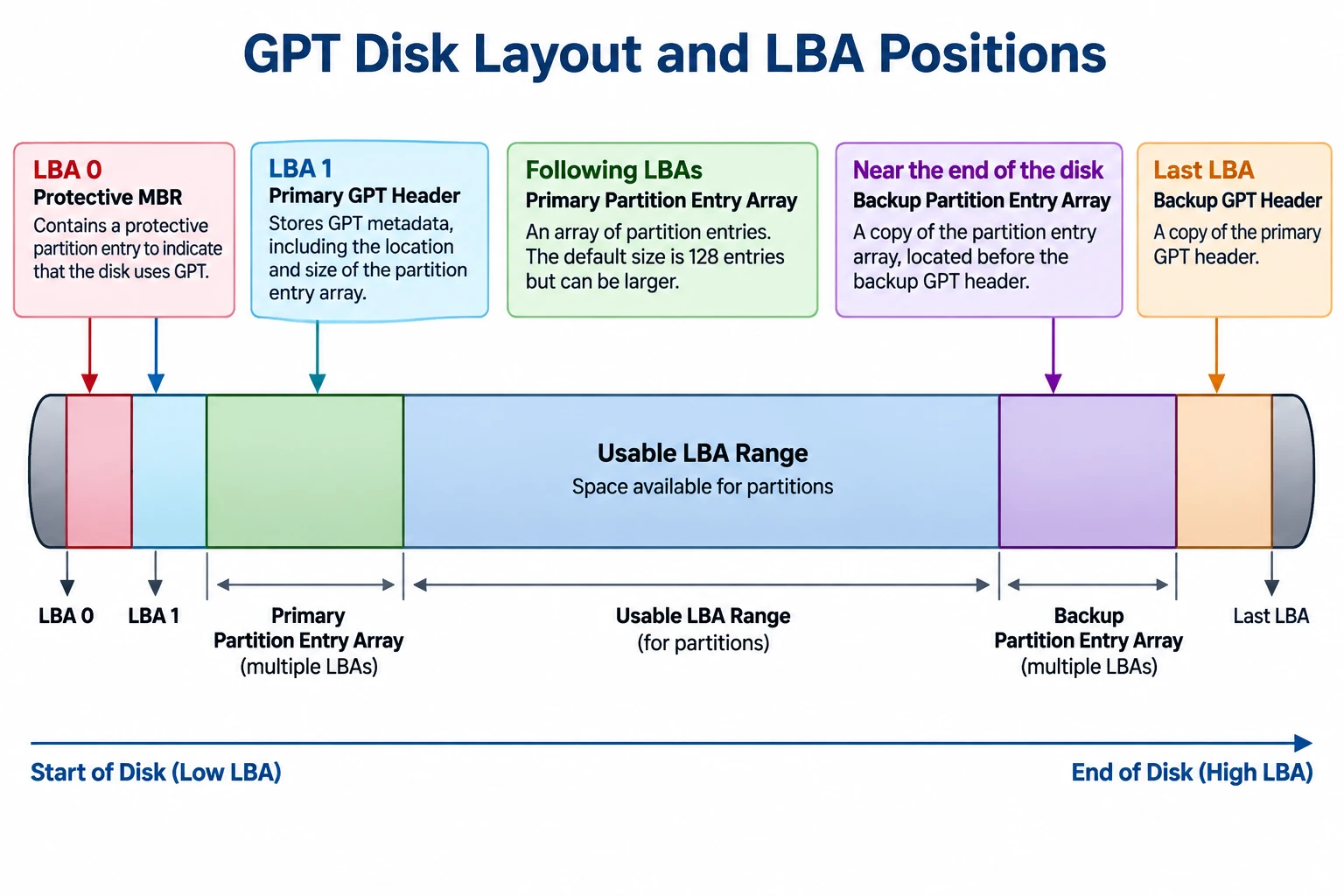
The exact usable range depends on the disk layout, logical block size, and the locations reserved for GPT metadata.
GPT partition entries contain 64-bit StartingLBA and EndingLBA fields. Both boundaries are inclusive, so the number of logical blocks in a partition is:
Partition size in blocks = EndingLBA − StartingLBA + 1
The GPT header also includes PartitionEntryLBA, which identifies the starting LBA of the associated partition-entry array.
For a field-level explanation of these addresses and the primary and backup headers, see Amagicsoft’s GPT Header guide.
The official UEFI specification, Section 5, defines the GPT layout and its address fields. It specifies 64-bit LBAs for GPT, whereas MBR partition entries use 32-bit starting-LBA and size fields.
Why MBR and GPT have different addressing limits
With 32-bit sector-address fields, MBR has a commonly encountered capacity boundary of approximately 2 TiB when logical sectors are 512 bytes.
The arithmetic is:
2³² logical blocks × 512 bytes = 2 TiB
This is approximately 2.2 trillion bytes in decimal units. The limit comes from the address-field width and the assumed logical sector size; it is not a universal limit for every device or every possible logical block size.
GPT’s 64-bit LBA fields provide a much larger theoretical address space. Actual usable capacity still depends on the operating system, firmware, drivers, device interface, and partitioning implementation.
Microsoft’s documentation on Windows support for disks exceeding 2 TB explains the relationship between the MBR addressing limitation and GPT.
How to Check Logical and Physical Sector Information in Windows
Windows provides a command for querying sector information reported by the storage device and its driver.
- Open Command Prompt.
- Run
fsutil fsinfo sectorinfo D:, replacingD:with the appropriate drive letter. - Examine the reported logical and physical sector information.
Microsoft documents this command in Fsutil fsinfo. Its example output includes fields such as LogicalBytesPerSector and PhysicalBytesPerSectorForAtomicity.
For example, if the system reports LogicalBytesPerSector : 4096, a 4,096-byte logical block size is appropriate for the corresponding LBA-to-byte-offset calculation.
Compare the logical sector size with the reported physical-sector information to understand the device’s addressing and alignment characteristics. The available fields and values may vary with the Windows version, storage device, and driver.
This command queries sector information; it does not read a particular LBA’s raw contents or identify the physical location of a file. It is a useful way to verify an input needed for the calculation, not a complete disk-structure analysis.
LBA Limitations and Common Misconceptions
LBA provides a logical address, but several conclusions cannot be drawn from the address alone.
- An LBA does not identify a file. The file system’s metadata is needed to map files and their allocated clusters to the corresponding storage regions.
- An LBA is not a physical media address. On an SSD, for example, the device’s flash translation layer manages the mapping between host-visible logical addresses and internal flash storage.
- An LBA does not establish whether data is intact. A readable address, an I/O error, or a partition-table inconsistency does not by itself prove that a file is recoverable or that a drive has physical damage.
- A byte offset depends on the correct logical block size. Using an assumed 512-byte size on a device exposing 4,096-byte logical blocks produces an incorrect result.
- Address origins must match. A partition-relative address cannot be treated as a disk-relative address without accounting for the partition’s starting position and confirming the tool’s addressing convention.
These distinctions are important when diagnosing partition layouts, interpreting disk utilities, or studying file-system structures. LBA supplies the address; additional metadata and device information are needed to interpret what is stored there.
Conclusion
Logical block addressing provides a linear way to identify logical storage blocks, but interpreting an LBA requires the correct logical block size and address-space origin. The distinction between logical and physical sectors, the differences between MBR and GPT fields, and the limitations of CHS compatibility values all affect how disk addresses should be understood. For reliable analysis, calculate offsets from verified parameters and interpret them alongside the relevant partition and file-system metadata.
FAQs
Is LBA the same as a sector number?
Does LBA numbering start at zero?
N − 1, not N.How do I calculate an LBA's byte offset?
Byte offset = LBA × Logical block size. For example, LBA 50 on a device with 512-byte logical blocks begins at byte offset 25,600. Confirm the logical block size before using the result.Why can the same LBA have different byte offsets?
What is the difference between LBA and CHS?
Does LBA identify a file's physical location?
Why does MBR have a 2-TiB capacity limitation?
Can Windows show the LBA of a specific file?
fsutil fsinfo sectorinfo command reports sector information, not the LBA of a file. Locating file data requires interpreting the partition layout and file-system metadata, and the result may depend on fragmentation and the tool's address convention.
Vasilii is a data recovery specialist with around 10 years of hands-on experience in the field. Throughout his career, he has successfully solved thousands of complex cases involving deleted files, formatted drives, lost partitions, and RAW file systems. His expertise covers both manual recovery methods using professional tools like hex editors and advanced automated solutions with recovery software. Vasilii's mission is to make reliable data recovery knowledge accessible to both IT professionals and everyday users, helping them safeguard their valuable digital assets.