
논리 블록 주소 지정(LBA): 섹터 번호의 작동 원리
논리 블록 주소 지정(LBA) 이는 실린더, 헤드, 섹터 좌표 대신 순차적인 번호를 사용하여 스토리지 블록을 식별하는 방법입니다. LBA 0은 첫 번째 논리 블록을, LBA 1은 두 번째 논리 블록을 나타내며, 이와 같은 방식으로 이어집니다. 그러나 LBA 번호만으로는 바이트 오프셋을 결정할 수 없으며, 논리 블록 크기와 주소 공간의 기점도 함께 알아야 합니다. 이러한 관계를 이해하면 디스크 레이아웃, 파티션 경계, 그리고 논리 섹터와 물리 섹터의 차이점을 설명하는 데 도움이 됩니다.
목차
LBA 설명: 논리 블록 주소의 작동 원리
LBA는 저장 장치의 주소 지정 가능한 블록들을 선형 순서로 취급합니다. 실린더-헤드-섹터(CHS) 주소 지정 방식처럼 세 개의 좌표로 위치를 표현하는 대신, 각 논리 블록에 정수 인덱스를 할당합니다.
예를 들어, 처음 네 개의 논리 블록은 다음과 같습니다:
LBA | 의미 |
0 | 첫 번째 논리 블록 |
1 | 두 번째 논리 블록 |
2 | 세 번째 논리 블록 |
3 | 네 번째 논리 블록 |
실제 사례
512바이트 단위의 논리 블록을 노출하는 USB 드라이브를 상상해 보세요. 디스크 도구가 LBA 번호를 지정하여 하나의 블록을 요청합니다. 예시를 선택하여 해당 번호가 어떤 블록을 가리키는지 확인해 보세요.
요청
“LBA 3을 읽으십시오.” 드라이브에 3번 블록을 읽으라는 요청이 들어온 것입니다. 세 번째 블록이 아닙니다.
알기 쉬운 말로
LBA 3 = 4번째 블록
그 앞에는 LBA 0, LBA 1, LBA 2라는 세 개의 블록이 있습니다. 카운팅은 0부터 시작하기 때문에, 주소 3은 네 번째 위치를 가리킵니다.
중요한 차이점: LBA 3은 “논리 블록 번호 3”을 의미하며, “파일 번호 3”이나 “물리적 위치 3”을 의미하지 않습니다. 위의 바이트 범위는 예시에서 제시된 512바이트의 논리 블록 크기에 따른 것입니다. 해당 블록을 사용하는 파일이 있는지, 있다면 어떤 파일인지 확인하려면 파일 시스템의 메타데이터가 필요합니다.
이 번호 매기기는 0을 기준으로 합니다. 장치가 (N)개의 논리 블록을 노출하는 경우, 해당 장치의 마지막 유효 LBA는 N − 1, 주소 공간이 LBA 0에서 시작하고 번호 매김에 공백이 없다고 가정할 때.
예를 들어, 2,000,000개의 논리 블록을 노출하는 장치의 마지막 LBA는 1,999,999. 따라서 블록 수는 마지막 LBA보다 1 더 큽니다.
LBA는 파일 시스템이 아닌 주소 지정 규칙입니다. LBA는 파일 이름, 디렉터리 또는 파일 할당 방식을 설명하지 않습니다. 파티션 테이블은 논리 블록 주소(LBA)를 사용하여 파티션의 시작과 끝 위치를 지정하는 반면, 파일 시스템은 자체 메타데이터를 사용하여 해당 파티션 내의 파일을 구성합니다.
주소 공간의 기준점도 중요합니다. 디스크 상대 LBA와 볼륨 상대 블록 번호는 숫자 값이 동일하더라도 서로 다른 위치를 가리킬 수 있습니다. 도구의 결과를 파티션 테이블 정보와 결합하기 전에, 해당 주소가 전체 장치 기준인지 아니면 파티션 기준인지 항상 확인해야 합니다.
LBA 섹터 번호의 바이트 오프셋을 계산하는 방법
An LBA 섹터 번호 논리 블록을 식별하지만, 해당 번호를 바이트 위치로 변환하려면 논리 블록 크기가 필요합니다.
시작 바이트 오프셋은 다음과 같이 계산됩니다:
시작 바이트 오프셋 = LBA × 논리 블록 크기
논리 블록 크기를 (B)로 나타낼 때, LBA의 포함 바이트 범위는 다음과 같습니다:
시작 오프셋 = LBA × B
종료 오프셋 = (LBA + 1) × B − 1
바이트 오프셋은 0을 기준으로 하며, 끝 오프셋은 해당 값을 포함하므로 1을 빼야 합니다.
예시: 서로 다른 논리 블록 크기를 가진 LBA 50
두 가지 일반적인 논리 블록 크기에 따른 LBA 50을 고려해 보자.
계산 | 512바이트 논리 블록 | 4,096바이트 논리 블록 |
시작 오프셋 | 25,600바이트 | 204,800바이트 |
16진수 시작 오프셋 |
|
|
마지막 바이트 오프셋 | 26,111 바이트 | 208,895 바이트 |
16진수 형식의 마지막 오프셋 |
|
|
총 주소 지정된 바이트 수 | 512 | 4,096 |
512바이트 논리 블록의 경우, LBA 50은 바이트 오프셋에서 시작합니다. 25,600 그리고 바이트를 다룹니다 25,600–26,111. 해당 포괄 범위는 정확히 512바이트를 포함합니다.
4,096바이트 크기의 논리 블록의 경우, 동일한 LBA는 바이트 오프셋에서 시작합니다. 204,800 그리고 바이트를 다룹니다 204,800–208,895, 총 4,096바이트입니다.
이는 예시적인 계산일 뿐, 실제 디스크에서 측정한 값이 아닙니다.
중요한 결론은 다음과 같습니다. 논리 블록 크기가 변경되면 동일한 LBA가 서로 다른 바이트 오프셋에 대응될 수 있습니다.. 모든 LBA에 512를 곱하면 모든 장치에 대해 올바른 바이트 오프셋이 산출된다고 가정해서는 안 됩니다.
또한 이 계산은 LBA와 논리 블록 크기가 동일한 주소 공간을 가리킨다고 가정합니다. 도구가 파티션 상대 블록 번호를 표시하지만 디스크 상대 주소가 필요한 경우, 해당 파티션의 시작 LBA를 고려해야 하며 두 값이 모두 동일한 논리 블록 단위를 사용하는지 확인해야 합니다.
LBA-바이트 오프셋 탐색기
LBA 번호를 변경하여, 두 가지 일반적인 논리 블록 크기에서 해당 LBA가 지칭하는 바이트 범위를 비교해 보십시오.
512바이트 논리 블록을 사용하여
시작 바이트 오프셋
포함된 바이트 범위
마지막 바이트 오프셋
4,096바이트 크기의 논리 블록으로
시작 바이트 오프셋
포함된 바이트 범위
마지막 바이트 오프셋
계산: 시작 오프셋 = LBA × 논리 블록 크기
포괄적인 결말: 종료 오프셋 = (LBA + 1) × 논리 블록 크기 − 1
이 예시는 교육용으로만 제공됩니다. 이 계산기는 디스크를 읽지 않습니다. 이 계산은 LBA와 블록 크기가 동일한 논리 장치를 가리키며, 바이트 오프셋이 해당 장치의 시작 부분에서 측정된다고 가정합니다.
LBA 대 CHS 주소 지정
LBA 대 CHS 이는 주로 저장소 주소를 표현하는 두 가지 방식 간의 비교입니다.
CHS stands for Cylinder, Head, and Sector. It represents a location using three coordinates, while LBA assigns the location a single sequential number.
기능 | LBA | CHS |
Address representation | One linear block number | Cylinder, head, and sector coordinates |
Numbering | LBA starts at 0 | Traditional sector numbers start at 1 |
Address calculation | Multiply the LBA by the logical block size to obtain a byte offset | Requires geometry parameters to translate the coordinates |
Modern disk interpretation | Logical address exposed by the storage interface | May represent translated geometry rather than actual physical geometry |
Partition-table use | Explicit LBA fields are used by modern partitioning structures | Legacy fields remain in MBR entries for compatibility |
How CHS coordinates map to LBA
A traditional CHS-to-LBA conversion requires the number of heads per cylinder and the number of sectors per track.
Using zero-based cylinder and head numbers and a one-based sector number:
LBA = ((Cylinder × Heads per cylinder) + Head) × Sectors per track + (Sector − 1)
For example, suppose a hypothetical geometry has 16 heads per cylinder and 63 sectors per track. The CHS address (1, 2, 3) converts to:
LBA = ((1 × 16) + 2) × 63 + (3 − 1)
LBA = 18 × 63 + 2
LBA = 1,136
This example demonstrates the conversion formula; it does not describe the physical layout of a particular drive.
Modern drives do not necessarily expose a CHS geometry that corresponds to their actual physical tracks and heads. Legacy software may use translated CHS values for compatibility, so those values should not automatically be interpreted as physical locations.
그리고 UEFI specification’s MBR partition-record definition explicitly distinguishes the CHS fields from the LBA fields used by UEFI firmware to determine partition locations.
LBA is simpler to use as a linear addressing scheme, but its addressable capacity still depends on the width of the address field and the storage interface. The term LBA alone does not specify a universal address width.
Logical Block Size vs. Physical Sector Size
An LBA identifies a logical block exposed by the storage device or interface. That logical block is not necessarily the same size as a physical sector on the underlying medium.
Three common hard-drive formats illustrate the distinction:
형식 | 논리 섹터 크기 | 물리적 부문 규모 |
512n | 512바이트 | 512바이트 |
512e | 512바이트 | 4,096바이트 |
4Kn | 4,096바이트 | 4,096바이트 |
These are common formats, not an exhaustive list of every block size that a storage interface may report.
In a 512e drive, eight 512-byte logical sectors fit within one 4,096-byte physical sector. The operating system addresses the logical sectors, while the device manages the relationship between those sectors and the physical storage layout.
This difference matters for two reasons:
- Address calculation: Use the logical block size associated with the LBA address space to calculate the byte offset.
- Alignment and performance: Physical sector boundaries can affect how efficiently the device performs writes. If the device’s logical address zero is aligned to a physical boundary, an LBA that is a multiple of eight aligns to a 4,096-byte boundary on a 512e layout. Actual alignment can also depend on device-reported offsets and transfer-granularity requirements.
Microsoft’s documentation on Advanced Format disk compatibility explains why Windows and storage applications need to account for differences between logical and physical sector sizes.
Do not use the physical sector size as a substitute for the logical block size in the basic LBA-to-byte-offset formula. They describe different aspects of the storage layout.
How LBA Is Used in MBR and GPT
LBA becomes especially useful when examining partition tables because these structures use block addresses to describe disk layout.
LBA fields in MBR
The Master Boot Record (MBR) occupies LBA 0 on an MBR-partitioned disk. Its partition table contains four 16-byte partition entries.
Each entry includes two important 32-bit fields:
StartingLBA, at byte offset 8 relative to the beginning of the partition entry, identifies the partition’s starting logical block.SizeInLBA, at byte offset 12 relative to the beginning of the partition entry, specifies the number of logical blocks in the partition.
If the partition size is nonzero, its ending LBA can be calculated as:
Ending LBA = StartingLBA + SizeInLBA − 1
For example, a partition beginning at LBA 2,048 and containing 1,000,000 logical blocks ends at LBA 1,002,047. . Amagicsoft MBR partition table guide explains the partition-entry layout and how the starting address and block count determine partition boundaries.
LBA fields in GPT
The GUID Partition Table (GPT) uses LBA to locate its metadata and define partition ranges.
On a conventional GPT-partitioned disk, the layout includes:
위치 | 구조 |
LBA 0 | 보호용 MBR |
LBA 1 | Primary GPT header |
LBA 준수 | Primary partition-entry array |
사용 가능한 LBA 범위 | 칸막이를 설치할 수 있는 공간 |
Near the end of the device | Backup partition-entry array |
마지막 LBA | Backup GPT header |
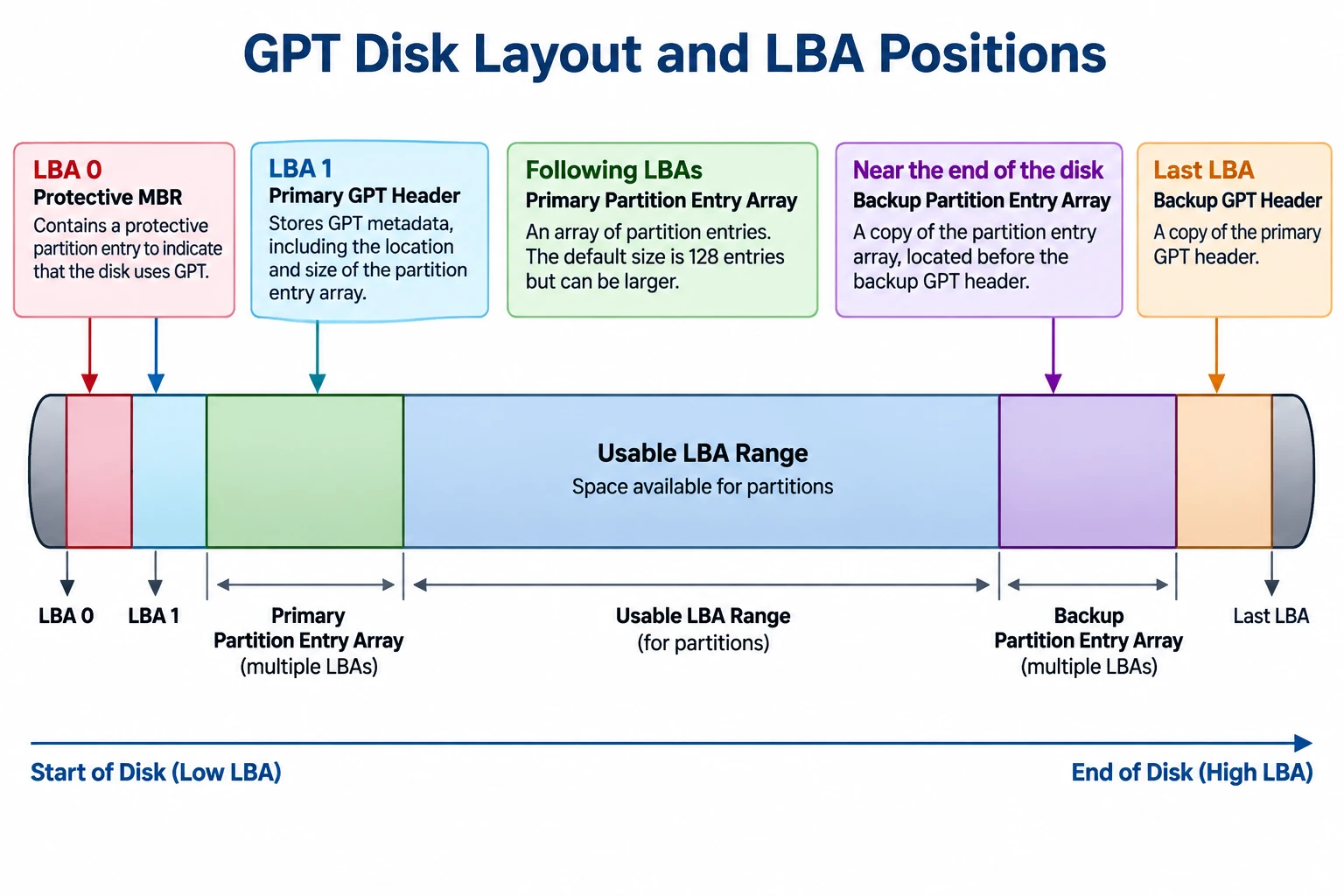
The exact usable range depends on the disk layout, logical block size, and the locations reserved for GPT metadata.
GPT partition entries contain 64-bit StartingLBA 그리고 EndingLBA fields. Both boundaries are inclusive, so the number of logical blocks in a partition is:
Partition size in blocks = EndingLBA − StartingLBA + 1
The GPT header also includes PartitionEntryLBA, which identifies the starting LBA of the associated partition-entry array.
For a field-level explanation of these addresses and the primary and backup headers, see Amagicsoft’s GPT Header guide.
공식 UEFI specification, Section 5, defines the GPT layout and its address fields. It specifies 64-bit LBAs for GPT, whereas MBR partition entries use 32-bit starting-LBA and size fields.
Why MBR and GPT have different addressing limits
With 32-bit sector-address fields, MBR has a commonly encountered capacity boundary of approximately 2 TiB when logical sectors are 512 bytes.
The arithmetic is:
2³² logical blocks × 512 bytes = 2 TiB
This is approximately 2.2 trillion bytes in decimal units. The limit comes from the address-field width and the assumed logical sector size; it is not a universal limit for every device or every possible logical block size.
GPT’s 64-bit LBA fields provide a much larger theoretical address space. Actual usable capacity still depends on the operating system, firmware, drivers, device interface, and partitioning implementation.
Microsoft’s documentation on Windows support for disks exceeding 2 TB explains the relationship between the MBR addressing limitation and GPT.
How to Check Logical and Physical Sector Information in Windows
Windows provides a command for querying sector information reported by the storage device and its driver.
- 명령 프롬프트를 엽니다.
- 실행
fsutil fsinfo sectorinfo D:, replacingD:를 적절한 드라이브 문자로 바꾸세요. - Examine the reported logical and physical sector information.
Microsoft documents this command in Fsutil fsinfo. Its example output includes fields such as 섹터당 논리적 바이트 수 그리고 원자성을 위한 섹터당 물리적 바이트 수.
For example, if the system reports LogicalBytesPerSector : 4096, a 4,096-byte logical block size is appropriate for the corresponding LBA-to-byte-offset calculation.
Compare the logical sector size with the reported physical-sector information to understand the device’s addressing and alignment characteristics. The available fields and values may vary with the Windows version, storage device, and driver.
This command queries sector information; it does not read a particular LBA’s raw contents or identify the physical location of a file. It is a useful way to verify an input needed for the calculation, not a complete disk-structure analysis.
LBA Limitations and Common Misconceptions
LBA provides a logical address, but several conclusions cannot be drawn from the address alone.
- An LBA does not identify a file. The file system’s metadata is needed to map files and their allocated clusters to the corresponding storage regions.
- An LBA is not a physical media address. On an SSD, for example, the device’s flash translation layer manages the mapping between host-visible logical addresses and internal flash storage.
- An LBA does not establish whether data is intact. A readable address, an I/O error, or a partition-table inconsistency does not by itself prove that a file is recoverable or that a drive has physical damage.
- A byte offset depends on the correct logical block size. Using an assumed 512-byte size on a device exposing 4,096-byte logical blocks produces an incorrect result.
- Address origins must match. A partition-relative address cannot be treated as a disk-relative address without accounting for the partition’s starting position and confirming the tool’s addressing convention.
These distinctions are important when diagnosing partition layouts, interpreting disk utilities, or studying file-system structures. LBA supplies the address; additional metadata and device information are needed to interpret what is stored there.
결론
Logical block addressing provides a linear way to identify logical storage blocks, but interpreting an LBA requires the correct logical block size and address-space origin. The distinction between logical and physical sectors, the differences between MBR and GPT fields, and the limitations of CHS compatibility values all affect how disk addresses should be understood. For reliable analysis, calculate offsets from verified parameters and interpret them alongside the relevant partition and file-system metadata.
자주 묻는 질문
LBA는 섹터 번호와 같은 것인가요?
LBA 번호 매기기는 0부터 시작하나요?
N − 1, 아니라 N.LBA의 바이트 오프셋은 어떻게 계산하나요?
바이트 오프셋 = LBA × 논리 블록 크기. 예를 들어, 논리 블록 크기가 512바이트인 장치의 LBA 50은 바이트 오프셋 25,600에서 시작합니다. 결과를 사용하기 전에 논리 블록 크기를 확인하십시오.왜 동일한 LBA에 서로 다른 바이트 오프셋이 있을 수 있나요?
LBA와 CHS의 차이점은 무엇인가요?
LBA는 파일의 물리적 위치를 식별합니까?
MBR에는 왜 2-TiB 용량 제한이 있나요?
Windows에서 특정 파일의 LBA를 확인할 수 있나요?
fsutil fsinfo sectorinfo 이 명령어는 파일의 LBA가 아닌 섹터 정보를 반환합니다. 파일 데이터를 찾으려면 파티션 레이아웃과 파일 시스템 메타데이터를 해석해야 하며, 그 결과는 조각화 상태와 도구의 주소 지정 방식에 따라 달라질 수 있습니다.
바실리는 이 분야에서 약 10년간 실무 경험을 쌓은 데이터 복구 전문가입니다. 그는 경력 전반에 걸쳐 삭제된 파일, 포맷된 드라이브, 손실된 파티션 및 RAW 파일 시스템과 관련된 수천 건의 복잡한 사례를 성공적으로 해결했습니다. 그의 전문 지식은 헥스 에디터와 같은 전문 도구를 사용한 수동 복구 방법과 복구 소프트웨어를 사용한 고급 자동화 솔루션을 모두 다룹니다. 바실리의 사명은 IT 전문가와 일반 사용자 모두에게 신뢰할 수 있는 데이터 복구 지식을 제공하여 소중한 디지털 자산을 보호할 수 있도록 돕는 것입니다.