
I 5 migliori software di recupero dati per PC nel 2026: testati e messi a confronto
La perdita di file importanti può verificarsi a seguito di cancellazione accidentale, formattazione, errori di partizione, arresti anomali del sistema o danneggiamento di un'unità esterna. Se i file sono andati persi da un HDD, un SSD, una chiavetta USB o un dispositivo di archiviazione esterno, è fondamentale scegliere il software di recupero più adatto, poiché un'operazione errata potrebbe ridurre le possibilità di un recupero riuscito. Per gli utenti che hanno bisogno di recuperare i dati dai dischi rigidi, è importante smettere innanzitutto di utilizzare l'unità interessata e ricorrere a un software di recupero affidabile prima di tentare qualsiasi operazione di riparazione o formattazione.
In questa guida mettiamo a confronto i cinque migliori software di recupero dati per PC del 2026: Magic Data Recovery, Disk Drill, EaseUS Data Recovery Wizard, Recoverit e 4DDiG Data Recovery. Il confronto verte sugli scenari di recupero, sui dispositivi supportati, sulla facilità d’uso, sul rapporto qualità-prezzo e sull’idoneità di ciascuno strumento sia per gli utenti comuni che per casi di recupero più complessi.
Supporta Windows 7/8/10/11 e Windows Server
Indice dei contenuti
Migliore scelta in assoluto: Magic Data Recovery
Per la maggior parte degli utenti Windows, Magic Data Recovery rappresenta la scelta migliore in assoluto poiché supporta i più comuni scenari di perdita di dati, quali file cancellati, unità formattate, partizioni perse, chiavette USB danneggiate, schede SD, dischi rigidi (HDD) e SSD. Inoltre, semplifica il processo di recupero: è sufficiente eseguire la scansione dell’unità interessata, visualizzare in anteprima i file recuperabili e salvarli in un’altra posizione sicura.
Come abbiamo testato i migliori software di recupero
Per confrontare in modo equo i migliori software di recupero presenti in questa lista, ci siamo concentrati sulle esigenze di recupero più comuni degli utenti Windows:
Scenari di recupero: file cancellati, unità formattate, partizioni danneggiate, cartelle perse, chiavette USB, schede SD, dischi rigidi (HDD) e SSD.
Anteprima dei file: se gli utenti possono visualizzare in anteprima i file recuperabili prima di pagarli o salvarli.
Facilità d'uso: la possibilità per i principianti di eseguire una scansione e un recupero senza dover compiere operazioni tecniche.
Supporto di dispositivi e file system: se il software supporta le unità Windows più comuni e i dispositivi di archiviazione esterni.
Valore del prezzo: se il modello di licenza è chiaro e ragionevole sia per un utilizzo una tantum che a lungo termine.
Politica di assistenza e rimborso: se gli utenti possono ricevere assistenza nel caso in cui il software non riesca a recuperare i file di cui hanno bisogno.
1. Magic Data Recovery - Il leader indiscusso per potenza e valore
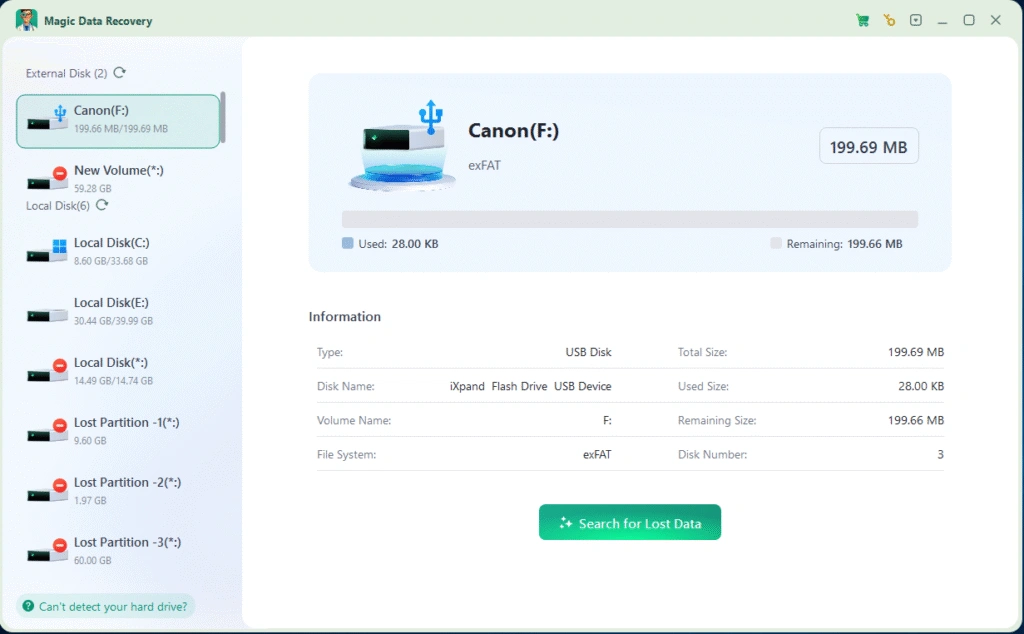
Magic Data Recovery è in testa alla nostra classifica come il prodotto definitivo Il miglior strumento di recupero dati per PC grazie all'eccezionale tasso di recupero, all'ampio supporto di formati e all'impareggiabile design di facile utilizzo.
Caratteristiche principali e perché è vincente:
Tasso di successo del recupero leader nel settore: Nei nostri test, ha recuperato un numero maggiore di file, soprattutto da unità formattate e settori danneggiati, rispetto a qualsiasi altro strumento.
Supporta tutti i tipi di file e i dispositivi: Dai documenti e le foto ai video e ai file di sistema, li gestisce tutti su HDD, SSD, unità USB e schede di memoria.
Valore imbattibile e prezzi trasparenti: Offre licenze a vita a costi contenuti, laddove altri vendono solo abbonamenti, garantendo un eccezionale valore a lungo termine.
Garanzia di rimborso immediato “senza domande”: Se il recupero fallisce, gli utenti possono richiedere immediatamente un rimborso completo: una politica che crea un'immensa fiducia.
Assistenza tecnica professionale 24/7: Ottenete un aiuto rapido e personalizzato per qualsiasi problema di recupero, giorno e notte.
Sia che abbiate perso poche immagini o un'intera partizione, Magic Data Recovery offre risultati di livello professionale senza complessità. È la miscela ideale di prestazioni, affidabilità e valore.
👉 Provate ora l'Magic Data Recovery - La scelta #1 per il 2025
Supporta Windows 7/8/10/11 e Windows Server
2. Disk Drill - Scansione intelligente con interfaccia utente semplice
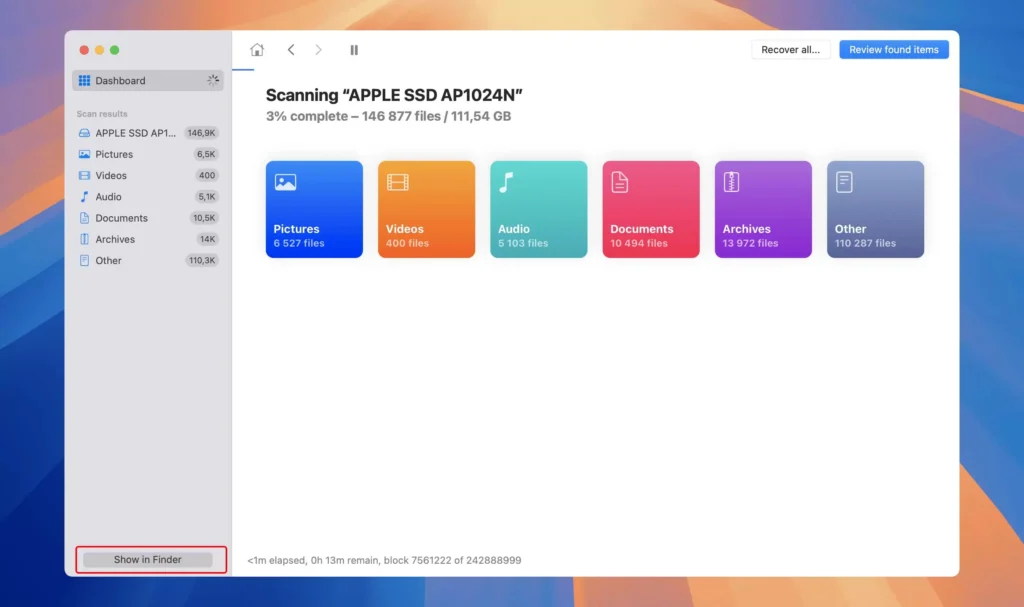
Trapano a disco è un altro nome noto, che offre un'interfaccia pulita e algoritmi di recupero intelligenti che rendono facile l'avvio per i principianti.
Pro:
Interfaccia intuitiva adatta a utenti non tecnici.
Offre un recupero gratuito per file di piccole dimensioni.
Supporta diversi file system (NTFS, FAT32, exFAT).
Contro:
La scansione profonda è significativamente più lenta di Magic Data Recovery algoritmo avanzato.
Manca l'assistenza tecnica professionale 24 ore su 24 che è standard con la nostra scelta migliore.
Verdetto: Disk Drill è una scelta solida per i recuperi rapidi e su piccola scala, ma non è l'ideale per le unità di grandi dimensioni o per gli scenari di perdita di dati complessi, dove Magic Data Recovery eccelle.
3. EaseUS Data Recovery Wizard - Versatile ma costoso
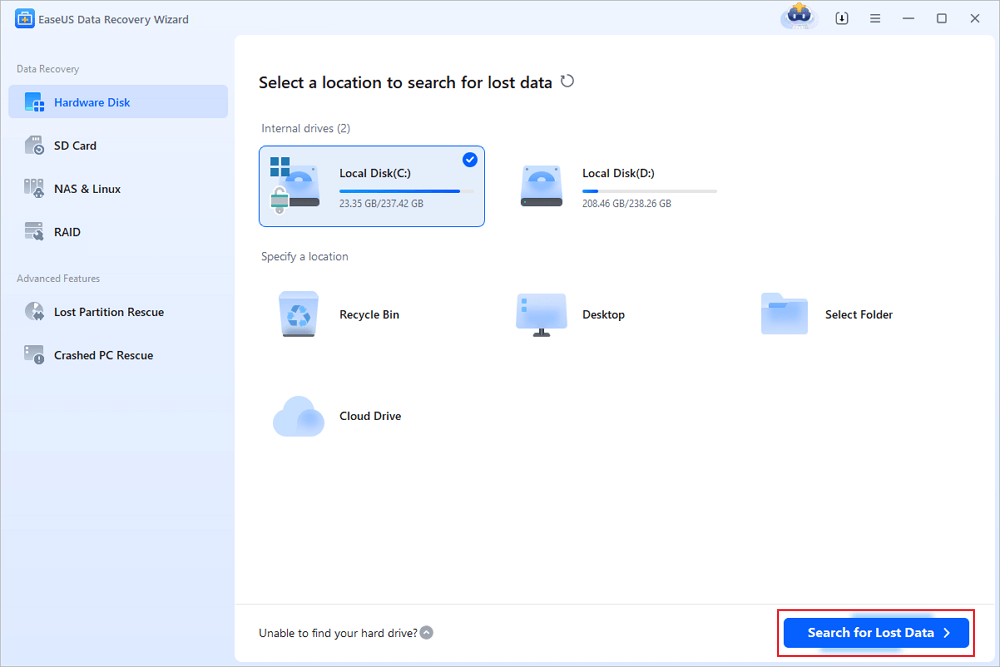
EaseUS Data Recovery Wizard è un attore di lunga data nel mercato dei sistemi di recupero, che offre funzionalità solide e aggiornamenti costanti.
Pro:
Recupero affidabile per un'ampia gamma di formati di file.
Utile funzione di anteprima prima del recupero.
Supporto per il recupero in cloud e in remoto.
Contro:
Gli abbonamenti sono relativamente costosi se paragonati al valore di vita del prodotto. Magic Data Recovery.
Il processo di scansione può essere lento su dischi di grandi dimensioni.
Verdetto: EaseUS si comporta complessivamente bene, ma la sua struttura dei prezzi e il suo supporto più lento rendono Magic Data Recovery un valore migliore per la maggior parte degli utenti.
4. Recoverit - Interfaccia facile da usare con un buon recupero dei supporti
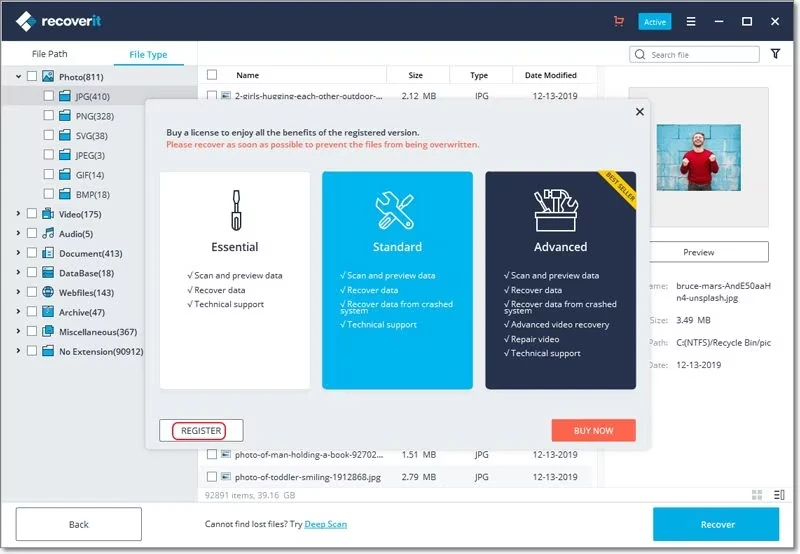
Recupero di Wondershare si concentra sulla semplicità e sulla velocità. È particolarmente indicato per recuperare foto, video e file multimediali da dispositivi consumer.
Pro:
Navigazione facile e scansione veloce.
Eccellenti prestazioni di recupero di foto e video.
È disponibile l'integrazione del backup nel cloud.
Contro:
Rilevamento limitato del tipo di file sulle unità danneggiate.
Il suo motore di recupero non è altrettanto robusto per gli scenari complessi e non raggiunge la percentuale di successo raggiunta da Magic Data Recovery.
Verdetto: Recoverit è ottimo per gli utenti occasionali che recuperano i supporti, ma i professionisti potrebbero trovare la sua profondità di recupero meno impressionante.
5. Recupero dati 4DDiG - Interfaccia moderna e risultati decenti
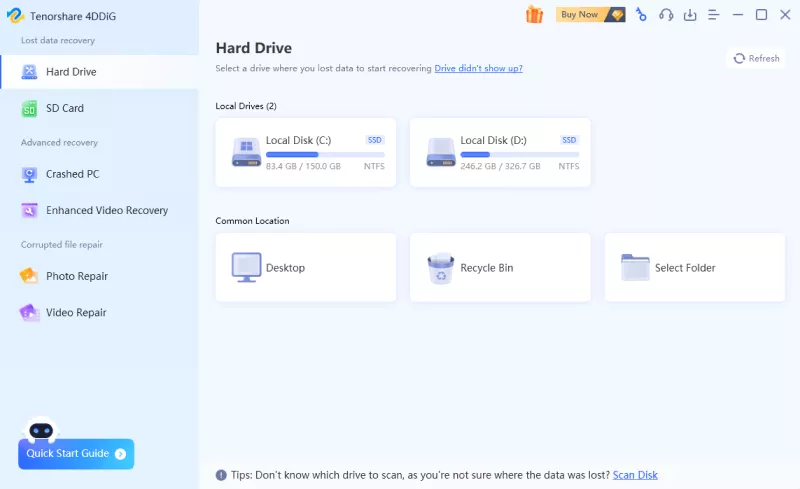
Recupero dati 4DDiG offre un design moderno e un processo di recupero semplificato che si rivolge agli utenti di tutti i giorni.
Pro:
Interfaccia elegante con passaggi di recupero chiari.
Buon equilibrio tra velocità e precisione per casi semplici.
Supporta il recupero di dischi formattati e danneggiati.
Contro:
Nei nostri test, alcuni file recuperati potevano essere localizzati ma non erano completamente apribili, soprattutto negli scenari di perdita di dati più complessi.
Le informazioni sulla politica post-acquisto potrebbero essere più chiare, poiché gli utenti si aspettano una guida più trasparente durante il processo di rimborso.
Verdetto: il risultato è che
4DDiG si comporta bene per le attività di recupero quotidiane e offre un'esperienza pulita e adatta ai principianti. Tuttavia, in base ai risultati dei nostri test, la sua capacità di ripristinare dati gravemente danneggiati o profondamente nascosti è stata meno consistente e alcuni elementi recuperati erano parzialmente illeggibili. Per gli utenti che necessitano di tassi di successo più elevati in casi complessi, le alternative di alto livello possono offrire risultati più solidi.
Confronto rapido dei migliori software di recupero dati
Prima di leggere le recensioni complete, ecco un breve confronto tra i cinque migliori software di recupero dati per PC. Utilizza questa tabella per scegliere lo strumento più adatto in base alle tue esigenze di recupero, alla facilità d'uso, al rapporto qualità-prezzo e agli scenari di utilizzo.
| Caratteristica | Magic Data Recovery | Trapano a disco | EaseUS Data Recovery Wizard | Recupero | Recupero dati 4DDiG |
|---|---|---|---|---|---|
| La nostra valutazione | 5/5 | 4/5 | 4/5 | 3.5/5 | 3.5/5 |
| Il migliore per | Utenti Windows che necessitano di un ripristino semplice e completo | Principianti e piccoli interventi di recupero | Ripresa generale accompagnata da un ampio riconoscimento del marchio | Recupero di foto e video | Un semplice momento di relax quotidiano |
| Scenari di recupero | File cancellati, unità formattate, partizioni danneggiate, perdita di partizioni, chiavette USB, schede SD, dischi rigidi (HDD) e SSD | File cancellati, recupero di file multimediali e unità esterne | File cancellati, unità formattate e recupero delle partizioni | File multimediali, foto, video e dispositivi esterni | File cancellati, unità formattate e semplici problemi relativi al disco |
| Facilità d'uso | Molto facile | Molto facile | Molto facile | Facile | Facile |
| Valore dei prezzi | Eccellente | Buono | Fiera | Fiera | Fiera |
| Scansione gratuita / Anteprima | Sì | Recupero gratuito limitato | Recupero gratuito limitato | Recupero gratuito limitato | Recupero gratuito limitato |
| Il miglior caso d'uso | La scelta migliore in assoluto per gli utenti Windows che necessitano di una soluzione affidabile per il recupero dei dati in caso di perdita comune | Ideale per gli utenti che desiderano un'interfaccia semplice per il recupero rapido dei file cancellati | Ideale per gli utenti che preferiscono un marchio di recovery affermato e dotato di un'ampia gamma di funzionalità di recupero | Ideale per gli utenti che recuperano principalmente foto, video o file multimediali | Ideale per gli utenti comuni che hanno esigenze di base in materia di recupero di file cancellati o di dischi formattati |
Verdetto finale: quale dei migliori software di recupero dati dovresti scegliere nel 2026?
Dopo aver messo a confronto questi cinque migliori software di recupero dati, Magic Data Recovery risulta essere la scelta migliore in assoluto per la maggior parte degli utenti Windows. Offre una procedura di recupero semplice, un ampio supporto per i dispositivi, un'utile anteprima dei file e un ottimo rapporto qualità-prezzo per gli utenti che hanno bisogno di recuperare file cancellati, formattati, danneggiati o persi da dispositivi di archiviazione comuni.
Scegliere Magic Data Recovery se necessario:
✅ Una procedura di ripristino semplice per gli utenti di PC Windows.
✅ Supporto per file cancellati, unità formattate, partizioni perse, chiavette USB, schede SD, HDD, e gli SSD.
✅ Anteprima del file prima del recupero.
✅ Prezzi trasparenti e valore a lungo termine.
✅ Un supporto utile quando sorgono domande relative al recupero.
Se stai cercando un software di recupero dati di alto livello che coniughi facilità d'uso, ampiezza delle funzionalità di recupero e rapporto qualità-prezzo, Magic Data Recovery è un'ottima scelta da provare per prima nel 2026.
Supporta Windows 7/8/10/11 e Windows Server
Software di recupero top Domande frequenti
Qual è il miglior software di recupero dati per PC?
È possibile recuperare gratuitamente i file cancellati utilizzando il software di recupero top?
Perché scegliere Magic Data Recovery rispetto ad altri strumenti di recupero dati?
È possibile recuperare i file da un disco rigido formattato?
Gli strumenti di recupero dati possono recuperare i file da una scheda USB o SD danneggiata?
Il recupero dei file sovrascriverà i miei dati esistenti?
Ho bisogno di competenze tecniche per utilizzare il software di recupero?
Quanto tempo richiede una tipica scansione di recupero?
Il software di recupero può ripristinare i vecchi file eliminati?
È sicuro installare il software di recupero sulla stessa unità in cui si sono persi i dati?

Erin Smith è riconosciuta come una delle scrittrici più professionali di Amagicsoft. Negli ultimi 10 anni ha continuamente affinato le sue capacità di scrittura e ha aiutato milioni di lettori a risolvere i loro problemi tecnologici.