
Come risolvere la corruzione degli indici per le unità NTFS
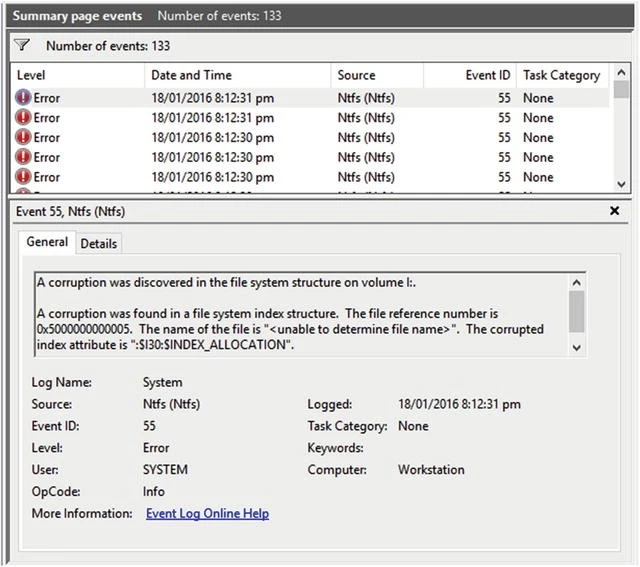
Indice Corruzione si verifica quando la struttura interna dell'indice dei file di una partizione NTFS diventa danneggiata o illeggibile. Questo indice (noto anche come indice delle directory) tiene traccia dei nomi e delle posizioni dei file. Quando è danneggiato, Windows può mostrare errori come “Il file o la directory sono corrotti e illeggibili”.” o “Impossibile accedere all'unità.”
Il danneggiamento di solito riguarda il modo in cui NTFS legge le voci delle directory piuttosto che i file stessi. In altre parole, spesso i dati esistono ancora, solo che Windows non riesce a localizzarli correttamente.
Indice dei contenuti
Come NTFS gestisce l'indicizzazione
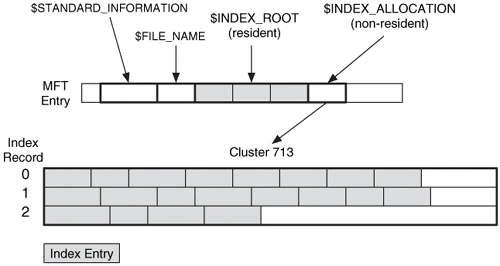
NTFS utilizza un sistema di indici gerarchici basati sull'indice Tabella file master (MFT). Ogni voce di file e cartella in NTFS punta ai record dell'MFT, che memorizzano metadati quali dimensioni, timestamp e posizione del cluster.
Quando l'MFT o le sue voci di indice si danneggiano, il file system perde la sua “mappa”. Il risultato è corruzione dell'indice ntfs- un errore logico in cui i dati esistono ancora ma non è accessibile attraverso il normale significa.
Cause comuni di corruzione degli indici
1. Perdita di potenza inattesa durante i trasferimenti di file o gli aggiornamenti del sistema.
2. Settori danneggiati sulla superficie dell'unità che disturbano i metadati dei file.
3. Rimozione non sicura di unità esterne o dispositivi USB.
4. Malware o ransomware modificare i metadati NTFS.
5. Hardware invecchiato o instabile come i cavi SATA o i controller SSD.
6. Scritture interrotte durante gli aggiornamenti di Windows o le operazioni su file di grandi dimensioni.
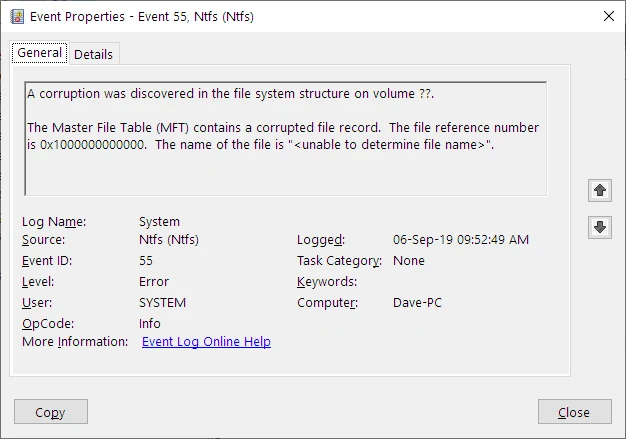
Se il problema si diffonde alla Tabella file master, si può anche incontrare il temuto tabella del file master corrotta messaggio, segnalando un cedimento strutturale più profondo.
Sintomi tipici
▪️ Esplora file si blocca o si arresta quando si aprono le cartelle.
▪️ Le unità appaiono come “RAW” o non allocato in Gestione disco.
▪️ Alcuni file scompaiono o visualizzano una dimensione di 0 KB.
▪️ Windows richiede di eseguire “Scansione e correzione” ogni volta che l'unità viene collegata.
▪️ chkdsk L'output mostra “Correzione di un errore nell'indice” o “Eliminazione di una voce dell'indice”.”
Quando compaiono questi segnali, è meglio interrompere immediatamente tutte le operazioni di scrittura.
Come risolvere in modo sicuro la corruzione dell'indice
Seguite questi passaggi per riparare i danni e proteggere i vostri dati:
1. Interrompere l'utilizzo dell'unità interessata.
Non eseguire strumenti di pulizia o di deframmentazione che possono sovrascrivere i dati. dati recuperabili.
2. Controllare lo stato di salute del disco.
Eseguire la diagnostica SMART utilizzando strumenti come CrystalDiskInfo per rilevare i problemi fisici. Se esistono settori danneggiati, clonare l'unità prima di procedere.
3. Usare CHKDSK con attenzione.
Nel prompt dei comandi (Admin):
chkdsk X: /f /r
Esegue una scansione e tenta di correggere gli errori dell'indice logico. Tuttavia, si noti che CHKDSK può eliminare i file inaccessibili durante la riparazione.
1. Se il CHKDSK fallisce, passare alla modalità di ripristino.
Utilizzate un software di recupero dati professionale come Magic Data Recovery. È in grado di ricostruire l'indice NTFS e di recuperare i file da un file tabella del file master corrotta senza scrivere nuovi dati sull'unità.
2. Verificare i file recuperati e riformattarli.
Una volta che tutti i file sono stati protetti, formattare il disco per ricreare una struttura NTFS pulita ed eliminare gli errori residui.
Recupero avanzato per gravi corruzioni NTFS
Quando entrambi i indice e MFT sono gravemente danneggiati, i metadati del filesystem potrebbero essere irrecuperabili con le sole utility di Windows.
In questi casi:
- Utilizzare un scansione di sola lettura settore per settore con Amagicsoft’modalità di recupero profondo.
- Ricostruisce l'albero delle directory originali analizzando le intestazioni dei file e i frammenti di record NTFS.
- Il processo è sicuro, in quanto non modifica mai il disco di origine.
Questo approccio è essenziale quando si ha a che fare con gravi corruzione dell'indice ntfs o combinato Danno MFT su SSD e HDD di grandi dimensioni.
Consigli per la prevenzione
- Utilizzare sempre l'opzione “Rimozione sicura dell'hardware”. prima di scollegare le unità esterne.
- Evitare gli arresti forzati e interruzioni di corrente.
- Mantenere aggiornati gli aggiornamenti del firmware e di Windows.
- Pianificazione di scansioni regolari del disco (sfc /scannow, DISM /Online /Pulizia immagine).
- Backup dei file critici utilizzando sia l'archiviazione locale che quella nel cloud.
La manutenzione proattiva riduce significativamente la possibilità di incontrare nuovamente il danneggiamento dell'indice.
Conclusione
Indice Corruzione nelle unità NTFS può sembrare catastrofico, ma la maggior parte dei dati rimane intatta sotto l'indice danneggiato.
Combinando gli strumenti diagnostici, software di recupero sicuro, Con un'attenta gestione, gli utenti possono ripristinare completamente l'accesso senza perdere i file ripristinare l'accesso senza perdere i file.
Che si tratti di una piccola corruzione dell'indice ntfs o un tabella del file master corrotta, Un'azione tempestiva garantisce un recupero senza problemi.
Recuperare i file prima della riparazione
Se il sistema segnala “Corruzione dell'indice” o “Tabella file master corrotta”, non formattare immediatamente l'unità.
Scaricare Magic Data Recovery per eseguire una scansione sicura e di sola lettura e recuperare i file prima di tentare la riparazione.
Supporta Windows 7/8/10/11 e Windows Server
Indice Domande frequenti sulla corruzione
Che cosa significa un errore di indice di file in NTFS?
Un problema di indice NTFS è pericoloso?
Perché la Master File Table si corrompe?
Come posso sapere se il sistema di directory del mio disco è danneggiato?
CHKDSK può riparare completamente i danni di NTFS?
Qual è il modo più sicuro per ripristinare i file da un'unità NTFS danneggiata?
Le unità SSD soffrono degli stessi problemi di corruzione delle directory?
Come posso evitare problemi simili con NTFS in futuro?

Erin Smith è riconosciuta come una delle scrittrici più professionali di Amagicsoft. Negli ultimi 10 anni ha continuamente affinato le sue capacità di scrittura e ha aiutato milioni di lettori a risolvere i loro problemi tecnologici.