
Recupero dati di emergenza: Servizio locale o software?

Quando si perdono improvvisamente dati importanti, come foto, file di lavoro e video, molte persone sentono l'urgenza di “recuperarli immediatamente!”. Allo stesso tempo, spesso si avverte un senso di preoccupazione per la privacy, per paura che altri possano vedere i propri dati. Infatti, quando si richiede il recupero a un servizio professionale, esiste la possibilità che una terza parte possa accedere ai dati, il che può far sentire alcuni utenti “imbarazzati” o “a disagio”.”
In questo articolo confronteremo i servizi professionali con le opzioni di auto-recupero tramite software e presenteremo Magic Data Recovery, un software che permette di recuperare i dati in modo sicuro e veloce, anche senza competenze tecniche.
Supporta Windows 7/8/10/11 e Windows Server
Indice dei contenuti
Realtà e prezzi dei servizi di recupero dati express
Recupero dati espresso si riferisce a servizi che danno la priorità al recupero e all'analisi dei dati, consentendo di ripristinare i dati dell'HDD in poche ore o addirittura nello stesso giorno.
Ad esempio, servizi professionali come “Express Data Recovery” possono analizzare e recuperare i dati da HDD, SSD, unità USB e così via, visitando il fornitore del servizio o inviando il dispositivo per posta.
Tuttavia, danni fisici (ad esempio, guasti al motore, bruciature di PCB) spesso richiedono interventi specializzati in camera bianca, che possono costare decine di migliaia di yen.
D'altra parte, danni logici (ad es, cancellazione accidentale, errori di formattazione o problemi di riconoscimento) possono essere risolti rapidamente utilizzando un software appropriato, come Magic Data Recovery.
Confronto di tempi e costi: Fornitori di servizi vs. software
La tabella seguente mette a confronto il servizio di recupero dati express e il software di recupero Magic Data Recovery. Se non siete sicuri di quale opzione scegliere, fate riferimento a quanto segue:
| Articoli a confronto | Servizio di recupero dati espresso | Magic Data Recovery (Software) |
|---|---|---|
| Problemi supportati | Guasti fisici e logici | Principalmente guasti logici (ad es. cancellazione, formattazione, RAW) |
| Tempo di recupero | Da poche ore a 1 giorno (in loco) | Da pochi minuti a qualche ora (a casa) |
| Gamma di costi | ¥30,000 - ¥150,000 | 7.278 ¥ (licenza di 1 anno, al lordo delle imposte), versione permanente circa 10.192 ¥ (al lordo delle imposte) |
| Conoscenze richieste | Personale professionale richiesto | Interfaccia facile da usare con guida per i principianti |
| Tasso di successo | Alto (compresi i guasti fisici) | Alto (specializzato per i guasti logici) |
| Facilità d'uso | Richiede la consegna del dispositivo o della posta | Recupero immediato a casa |
| Prestazioni di costo | ★★★☆☆ | ★★★★★ |
Sintesi:
Per danni fisici come rumori anomali o guasti hardware → Utilizzare Express Data Recovery Services.
Per problemi logici come file cancellati, azionamenti formattati, o errori di riconoscimento → Utilizzare Magic Data Recovery per un recupero rapido.
Passi per il recupero sicuro dei dati basati sulle linee guida ufficiali di Microsoft
Secondo documentazione ufficiale di Microsoft, quando si elimina o si formatta un'unità, i dati non vengono immediatamente cancellati. Al contrario, i dati rimangono sull'unità finché non vengono sovrascritti. Ciò significa che intervenire tempestivamente prima che i dati vengano sovrascritti è fondamentale per il successo del recupero dei dati.
Sulla base di questo principio, Magic Data Recovery riduce al minimo il tempo necessario per avviare la scansione, consentendo di iniziare il recupero dei dati immediatamente dopo l'eliminazione o la formattazione. Questo lo rende lo strumento più efficace per il recupero dei dati espresso.
Strumento consigliato per il recupero dati espresso: Magic Data Recovery
Magic Data Recovery è un software di recupero dati espresso facile da usare, anche per i principianti.
Caratteristiche principali:
Scansione immediata: Avvia la scansione non appena si collega il dispositivo.
Ampio supporto per i dispositivi: Compatibile con HDD, SSD, USB, schede SD, dischi rigidi esterni e altro ancora.
Sistemi di file supportati: Supporta i principali formati, tra cui NTFS, FAT, exFAT, ReFS, ecc.
Anteprima dei file: Anteprima dei file prima del recupero, per evitare un recupero non necessario.
Interfaccia utente guidata: Passi semplici e facili da seguire per i principianti.
Come utilizzare Magic Data Recovery per recuperare i dati in modo sicuro
Se vi sentite in imbarazzo per il recupero dei dati o pensate che farlo da soli possa essere difficile, Magic Data Recovery è la soluzione più sicura e semplice.
Ecco come usarlo:
1. Scaricare e installare
Scaricate Magic Data Recovery dal sito ufficiale e installatelo sul vostro PC.
Supporta Windows 7/8/10/11 e Windows Server
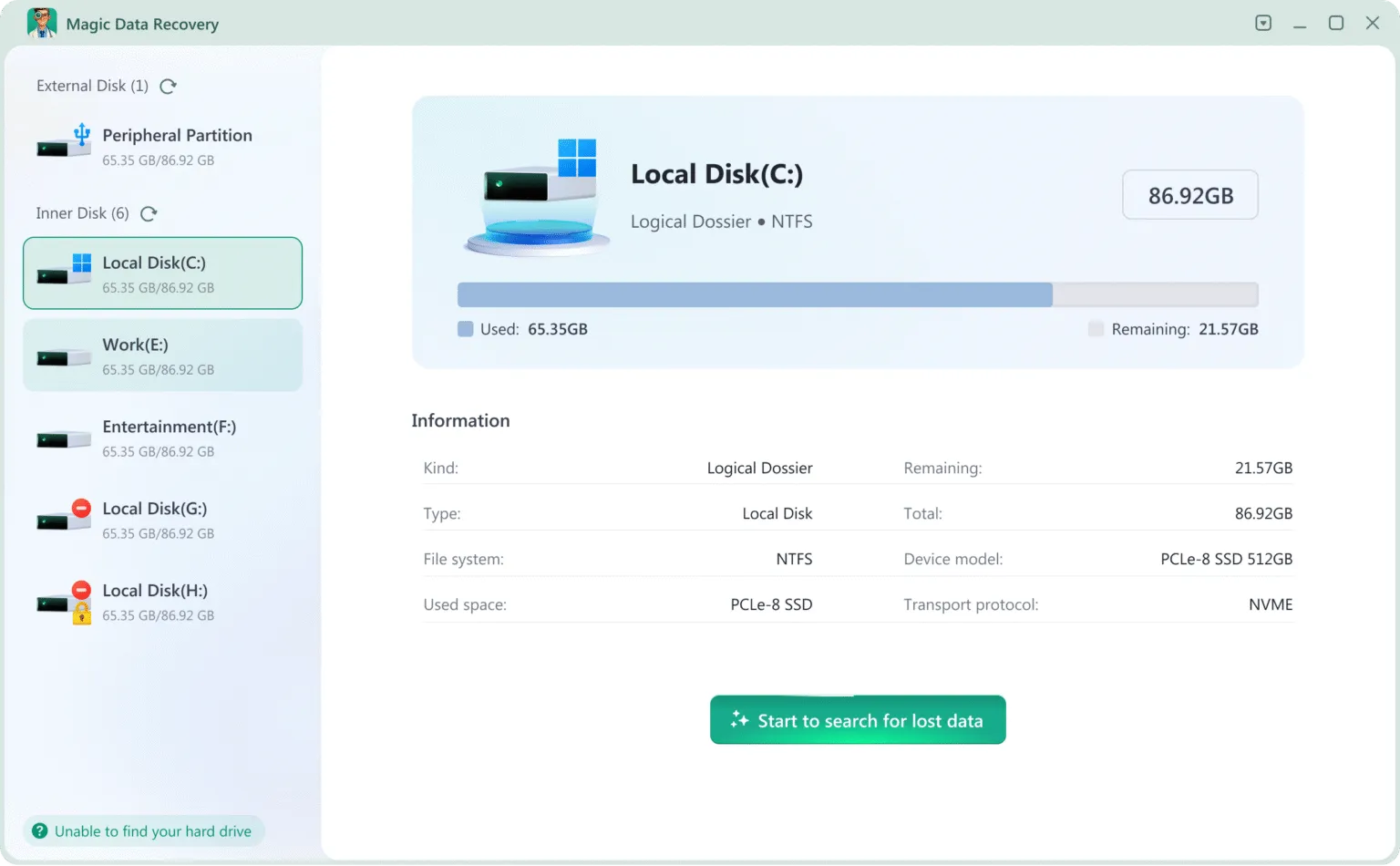
2.Selezionare l'unità che si desidera ripristinare
Una volta avviato, verranno visualizzate tutte le unità collegate (HDD, SSD, USB, schede SD, ecc.).
Selezionare l'unità che si desidera recuperare e fare clic su Ricerca dati persi.
3. Attendere il completamento della scansione
Magic Data Recovery eseguirà automaticamente la scansione dell'unità ed elencherà tutti i file recuperabili. Si prega di astenersi dall'utilizzare il dispositivo durante il processo di scansione.
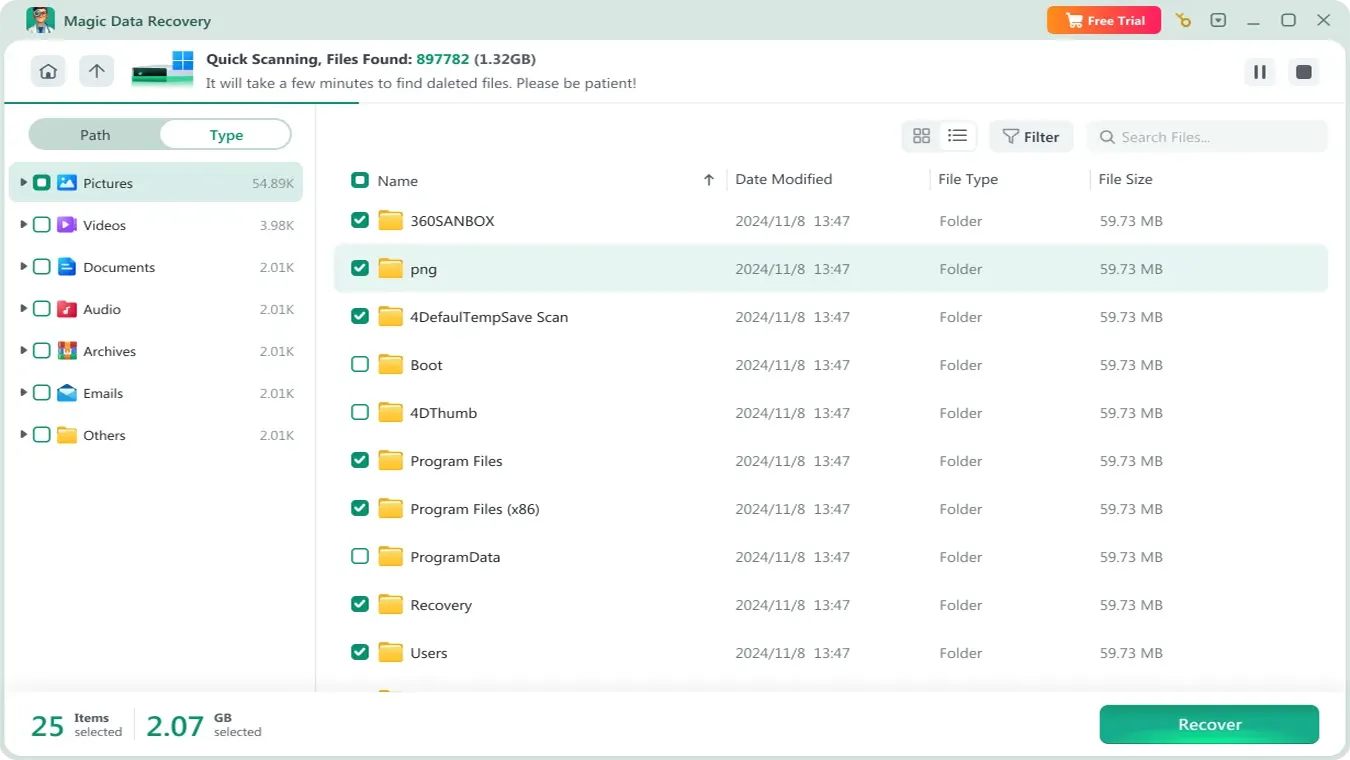
4. Anteprima e conferma dei file
È possibile visualizzare in anteprima i file rilevati dal software. Scegliete solo i file necessari da recuperare.

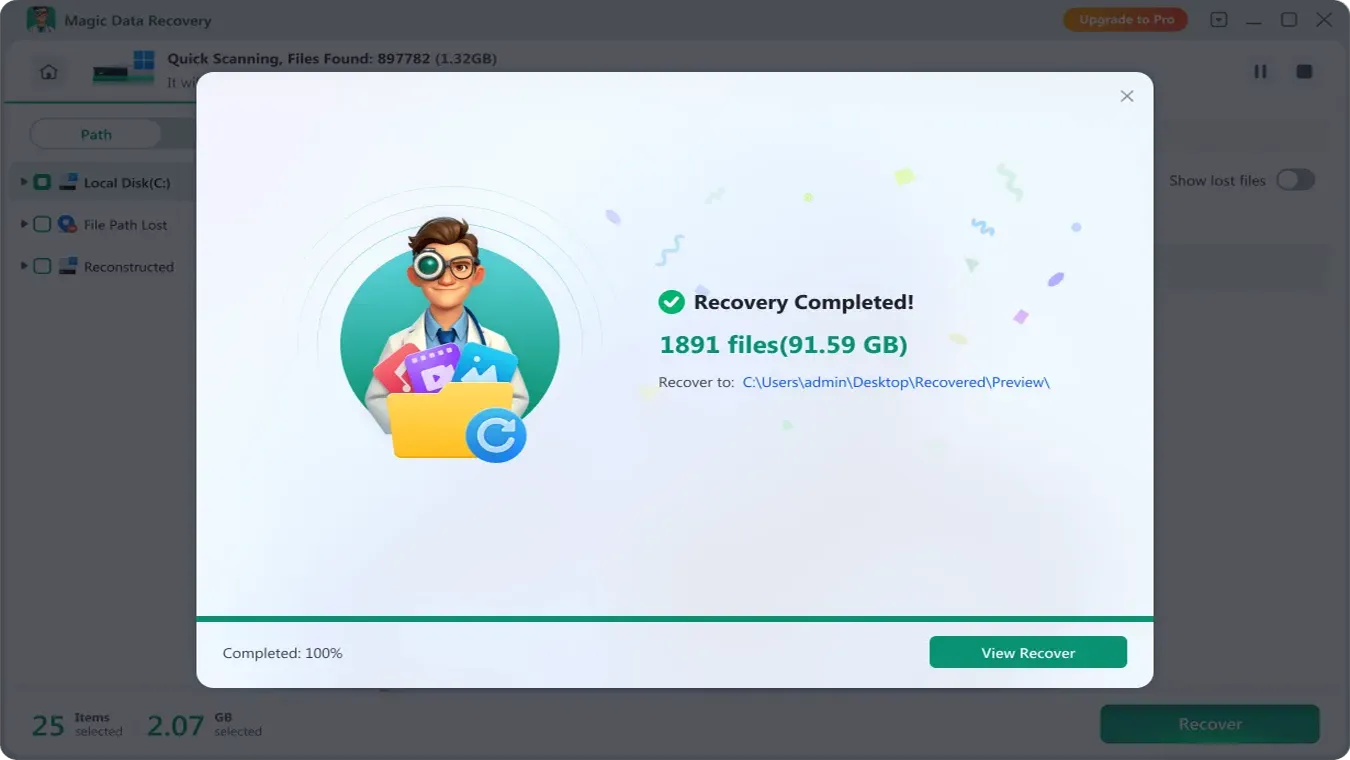
5. Salvare i file recuperati
Salvare i file recuperati in un'altra unità per evitare di sovrascrivere i dati originali.
È inoltre possibile visualizzare la guida video qui:
Conclusione
In situazioni di perdita di dati urgenti, è importante recuperare i dati nel modo più rapido, sicuro e privato possibile. Mentre i servizi di recupero dati express sono ideali per danni fisici, Magic Data Recovery è la soluzione migliore per i guasti logici come cancellazioni o formattazioni. Come dimostrato, Magic Data Recovery è semplice da usare, con un'interfaccia user-friendly, e aderisce ai principi di recupero dati di Microsoft, garantendo sicurezza ed efficacia.
Prima di temere che il recupero dati express sia la vostra unica opzione, provate Magic Data Recovery per un'esperienza di recupero dati efficiente, sicura e privata a casa vostra.
Supporta Windows 7/8/10/11 e Windows Server
FAQ
Quanto costa il recupero dati express?
Posso eseguire il recupero dati express da solo?
Qual è la differenza tra Express Data Recovery Services e Magic Data Recovery?

Vasilii è uno specialista del recupero dati con circa 10 anni di esperienza pratica nel settore. Nel corso della sua carriera, ha risolto con successo migliaia di casi complessi riguardanti file cancellati, unità formattate, partizioni perse e file system RAW. La sua esperienza copre sia i metodi di recupero manuale utilizzando strumenti professionali come gli editor esadecimali, sia le soluzioni automatiche avanzate con i software di recupero. La missione di Vasilii è quella di rendere accessibile la conoscenza del recupero dati affidabile sia ai professionisti IT che agli utenti di tutti i giorni, aiutandoli a salvaguardare i loro preziosi beni digitali.