
NTFS 삭제 파일 MFT 테스트: 삭제 후 어떤 변화가 일어나는가?
An NTFS 삭제 파일 MFT 테스트 파일 이름 이상의 정보를 비교해야 합니다. 최종 삭제가 완료되면 NTFS는 파일 레코드를 해제하고, 해당 파일의 활성 디렉터리 항목을 제거하며, 비상주 데이터 클러스터를 해제할 수 있습니다. 그러나 이러한 변경 사항이 반드시 이전 내용을 지우는 것은 아닙니다. 이 실험에서는 삭제 및 레코드 재사용 과정을 통해 작은 상주 TXT 파일과 비상주 JPG 파일을 비교한 다음, JPG 파일의 외부 데이터에 대한 정의된 덮어쓰기 과정을 검토합니다. 이 비교에서는 세 가지 질문을 구분하여 살펴봅니다. 즉, 파일 이름이 유지되는지, 매핑 정보가 유지되는지, 그리고 원본 바이트가 여전히 일치하는지 여부입니다.
목차
이 NTFS 삭제 파일 MFT 시험에서 평가하는 내용
핵심적인 질문은 삭제된 MFT 레코드가 여전히 파일을 온전히 설명할 수 있는지 여부입니다. 그 답은 메타데이터와 콘텐츠 모두에 달려 있습니다. 남아 있는 이름은 이전 파일을 식별할 수 있고, 남아 있는 런리스트는 비거주 스트림의 이전 클러스터 위치를 파악할 수 있습니다. 그러나 이 두 가지 모두 해당 클러스터에 여전히 원본 데이터가 포함되어 있음을 입증하지는 못합니다.
배경으로, 마스터 파일 테이블 이 가이드에서는 레코드가 이름, 속성 및 저장 위치를 어떻게 연결하는지 설명합니다. 여기서는 정의된 상태 간의 변화에 중점을 둡니다.
이 실험에서는 생성된 NTFS 구조 샘플, 계산된 바이트 비교 결과, 그리고 명시적으로 정의된 할당 상태 전환을 사용했습니다. 스크린샷은 wxHexEditor에서 열린 생성된 레코드를 보여주며, JPG 레코드의 플래그와 TXT 파일의 상주 콘텐츠 바이트 등, 변경 전후의 선택 영역이 일치하도록 표시되어 있습니다. 이 모델은 휴지통으로 이동하는 경우와는 달리, 모든 핸들이 닫힌 상태에서 단일 링크 파일이 완전히 삭제된 상황을 따릅니다.
NTFS MFT 테스트 구성 및 가정
이 NTFS 삭제 파일 MFT 테스트는 암호화되지 않은 NTFS 3.1 논리 볼륨을 사용합니다. 이 테스트는 512바이트 논리 섹터, 4,096바이트 클러스터, 1,024바이트 MFT 레코드를 사용합니다. 파티션은 디스크 LBA 2048에서 시작됩니다. 이는 장치 사양이 아닌, 테스트를 위해 선택된 입력값입니다.
목표는, mft-lab-file.jpg, 역대 최고치인 42위를 차지했다. 이름이 밝혀지지 않은 비거주자인 $DATA 스트림의 크기는 정확히 10,240바이트입니다. 논리 클러스터 번호 8192부터 시작하는 하나의 연속된 블록이 세 개의 클러스터를 차지합니다. 따라서 할당된 크기는 12,288바이트이며, 이 중 2,048바이트는 파일의 논리적 끝을 넘어갑니다. 이 할당 단위 크기 이 안내서에서는 ‘크기’와 ‘할당’의 차이점을 설명합니다.
두 대상 모두 하드 링크 하나 또한 NTFS 압축, 스파스 할당, 대체 데이터 스트림 또는 확장 레코드가 없습니다. 이 JPG 파일은 결정론적 픽셀 패턴을 가지며, 길이를 10,240바이트로 설정하는 JPEG 주석 세그먼트를 포함하는 유효한 160 × 120 JPEG 파일입니다. 샘플 형식을 확인하기 위해 이 파일을 디코딩했습니다. 레코드 42는 시퀀스 번호 42로 시작합니다.
두 번째 목표는, resident-note.txt, 레코드 43 내에 정확히 64바이트의 ASCII 텍스트를 포함하고 있으며, 초기 위치는 시퀀스 7입니다. 이 $DATA 값에는 별도의 데이터 클러스터가 필요하지 않습니다. 두 예시 모두에서, 속성 헤더 저장 형식을 결정합니다: a .txt 확장자만으로는 상주 데이터가 보장되지 않으며, .jpg 확장만으로는 비거주자 데이터를 입증할 수 없다.
각 즉시 삭제 비교에 대해, 이 모델은 페이로드와 기존 속성을 유지합니다. 이후 시나리오에서는 레코드 슬롯을 변경하거나, JPG의 경우 하나의 외부 데이터 클러스터를 변경합니다. 이를 통해 특정 SSD 읽기 순서나 Windows 쓰기 순서를 가정하지 않고도 각 변경 사항의 영향을 분리하여 분석할 수 있습니다.
NTFS 삭제 파일 MFT 테스트 절차
시나리오 1~4는 비거주자 JPG를 따릅니다. S3과 S4는 S2에서 독립적으로 분기됩니다. S5~S7은 별도의 거주자 TXT 제어 구조를 형성하며, 해당 상태들은 레코드 42 대신 레코드 43을 사용합니다.
비거주자 JPG: NTFS MFT 테스트 상태
S1 — JPG 기준선.
이름, 비거주자 데이터 매핑 및 사용 중 플래그가 설정된 레코드 42를 생성합니다. 해당 레코드 및 클러스터 할당 비트를 설정합니다. 전체 내용을 생성하고 SHA-256 다이제스트를 계산합니다.
S2 — JPG 파일 삭제 완료.
S1부터 시작하여, 액티브 디렉터리 멤버십에서 원래 이름을 제거하고, 레코드의 사용 중 비트를 지우며, 링크 수를 0으로 줄이고, 시퀀스 번호를 증가시킵니다. 관련 레코드 및 클러스터 비트맵 비트를 지웁니다. 정의된 ‘보존 메타데이터(retained-metadata)’ 사례에 따라 기존 파일 이름, 데이터 속성 및 페이로드를 보존합니다.
S3 — JPG 기록 슬롯이 재사용되었습니다.
S2부터 시작하여, 레코드 42를 다음의 속성으로 대체하십시오. new-owner.txt, 작은 상주 파일. 레코드 할당 비트를 다시 설정합니다. 앞의 세 데이터 클러스터는 변경하지 않고 비워 둡니다. 현재 레코드가 여전히 원래의 매핑을 제공하는지 확인합니다.
S4 — JPG 중간 클러스터가 덮어쓰여졌습니다.
S2로 별도로 돌아갑니다. LCN 8193을 다른 파일에 할당하고, 해당 클러스터의 각 바이트를 비트별 반전값으로 대체합니다 (원본 XOR 풀링 필터). 이렇게 정의된 치환 작업은 해당 범위의 모든 바이트를 변경합니다. 해제된 기존 대상 레코드는 변경하지 마십시오. 결과로 생성된 10,240바이트 스트림을 원본과 비교하십시오.
상주 TXT: NTFS MFT 테스트 상태
S5 — Resident TXT 기준선.
43번째 레코드를 생성합니다. resident-note.txt 상주 영역 내에 64바이트가 포함된 $DATA 속성. 레코드 할당 비트를 설정하고, 값의 위치와 다이제스트를 기록합니다. 이 데이터 스트림에는 외부 클러스터 할당이 없습니다.
S6 — 레지던트 TXT 삭제 완료.
S5부터 시작하여 활성 파일 이름을 제거하고, 레코드의 사용 중 비트 및 할당 비트를 지우며, 링크를 0으로 설정하고, 시퀀스를 7에서 8로 증가시킵니다. 상주 콘텐츠 바이트는 그대로 유지합니다. 이 스트림의 경우 별도로 지워야 할 페이로드 클러스터 비트는 없습니다.
S7 — Resident TXT record reused.
Starting from S6, reuse record 43 for replacement1.txt. Place 64 tilde characters in the same resident-value range. Compare that range with the original text to determine whether the original payload survives this replacement.
Compare Contents After Deletion and Reuse
Evaluate content separately. For the JPG, decode the retained mapping, read the external ranges in file order, and stop at 10,240 bytes. For the TXT, read the 64-byte value inside its record. Compare the complete bytes and digest; exclude cluster slack and do not use the filename as the integrity check.
These transformations apply to disposable generated structures. For a device-based follow-up, use expendable test media and verify the target’s identity before deleting anything. Preserve the affected source when investigating actual data loss.
NTFS File Deletion Hex Comparison
In the paired screenshot section below, compare each file with its own earlier state. The header field at +0x16 is the two-byte flags word. Its low bit changes from allocated to free. The nearby sequence and link fields provide supporting context. The h suffix identifies hexadecimal row offsets; the JPG screenshots select +0x16–+0x17; the TXT screenshots instead select the resident content for comparison.
Deleted File MFT Fields: What Changed?
The flag change releases the record; it does not instruct a parser to replace the file’s data with zeros. The sequence change also matters: an old reference that names record 42 with sequence 42 is now stale. Microsoft documents the sequence increment when a file record segment is freed.
The two bitmap changes describe record and cluster allocation. $MFT::$BITMAP tracks record allocation. In this sample, record 42 corresponds to bit 2 of byte +0x05. The volume’s $Bitmap::$DATA tracks cluster allocation. Clusters 8192–8194 correspond to bits 0–2 of byte +0x0400.
Clearing those bits makes resources available for reuse. It does not establish whether a later read returns original content. Also, the original name’s removal from the active directory index is separate from the retained $파일_이름 attribute inside the freed record. Directory-tree updates can shift or overwrite index entries, so index remnants need their own interpretation.
How Does the MFT Locate a Deleted File?
In S1 and S2, the nonresident data attribute begins at record +0x118. Its mapping-pairs offset 는 0x40, placing the runlist at record +0x158. The bytes describe one run of three clusters starting at LCN 8192. The interactive comparison below retains the actual Hex values and lets readers inspect these fields.
LCNs are relative to the volume. Therefore, the first data cluster starts at volume byte offset 0x02000000. Adding the chosen partition offset gives disk byte offset 0x02100000, or disk LBA 67584. Confusing these bases would make a recovery reader inspect the wrong location.
Resident TXT vs Nonresident JPG: The Same Deletion, Different Storage
Compare the two files at the same stage: S5 versus S1 before deletion, S6 versus S2 after deletion, and S7 versus S3 after record reuse. The TXT occupies record 43; the JPG occupies record 42. Different filenames, record numbers, and initial sequence values identify different objects rather than showing deletion changes.
무대 | Resident TXT: 64 bytes | Nonresident JPG: 10,240 bytes |
삭제 전 | Content is inside record 43 at | Record 42 holds the runlist; content is in external clusters 8192–8194. |
삭제 후 | Record is free; all 64 resident content bytes remain in the defined state. | Record and three clusters are free; the old mapping and all 10,240 content bytes remain in the defined state. |
After record reuse | The replacement value overwrites the same range: 0 / 64 original bytes match. | The replacement owner removes the old mapping; the baseline-known external range still matches 10,240 / 10,240 bytes. |
Inspect Deleted File MFT Test Fields
The interactive comparison opens with the two deleted states side by side. Its summary follows all three matched stages, and its storage view distinguishes resident content from nonresident mapping pairs.
Allocation, content checks and addresses
Before Deletion: Where Are the File Contents?
The 64-byte TXT has FormCode 00 at record +0x120. Its complete contents occupy +0x130–+0x16F inside the MFT record. The 10,240-byte JPG has FormCode 01; its record holds mapping pairs at +0x158, while the image bytes occupy external clusters 8192–8194.
Resident TXT
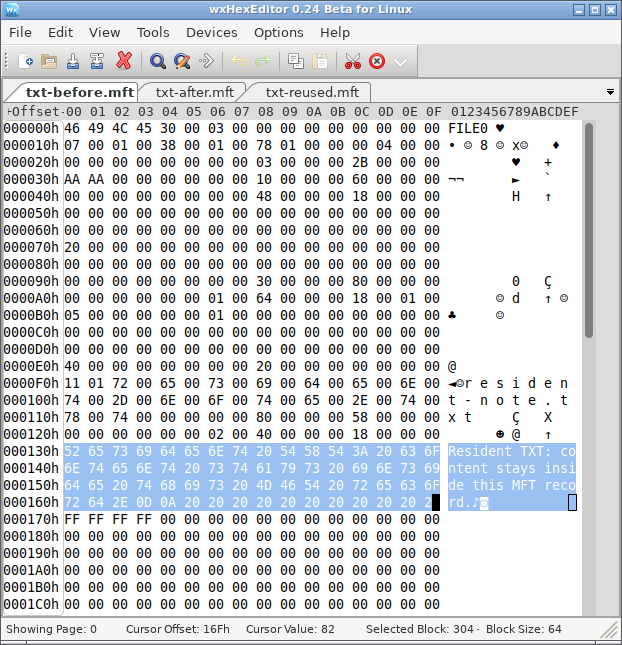
S5: The selected text is the file content itself, stored inside record 43.
Nonresident JPG
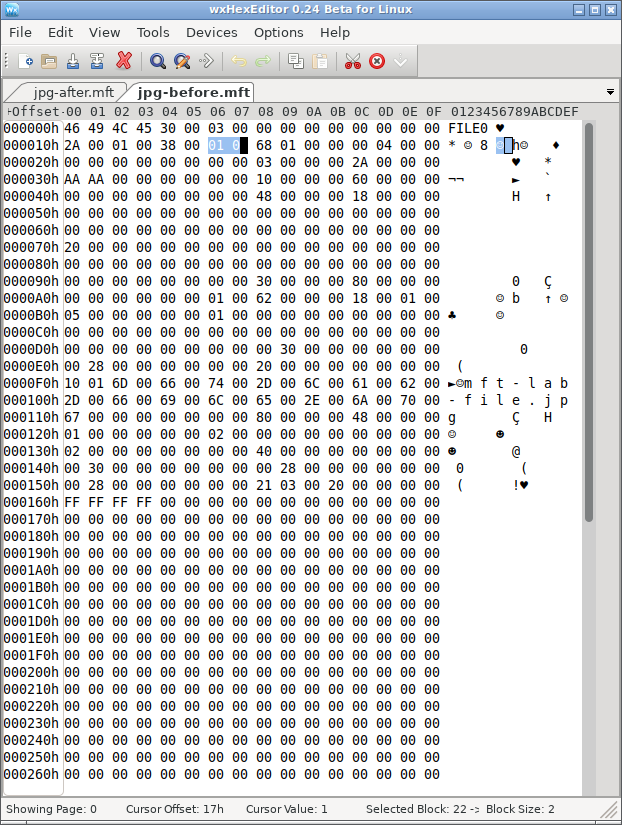
S1: Record 42 stores the nonresident attribute and runlist; the JPEG content is at the external location described by that mapping.
After Deletion: What Is Freed, and What Remains?
Both records lose their in-use bit. For the TXT, the defined deletion state retains all 64 bytes inside the freed record; this resident stream has no separate payload clusters to release. For the JPG, deletion also releases its three external data clusters. The defined S2 state retains both the old runlist and all 10,240 external content bytes.
Resident TXT
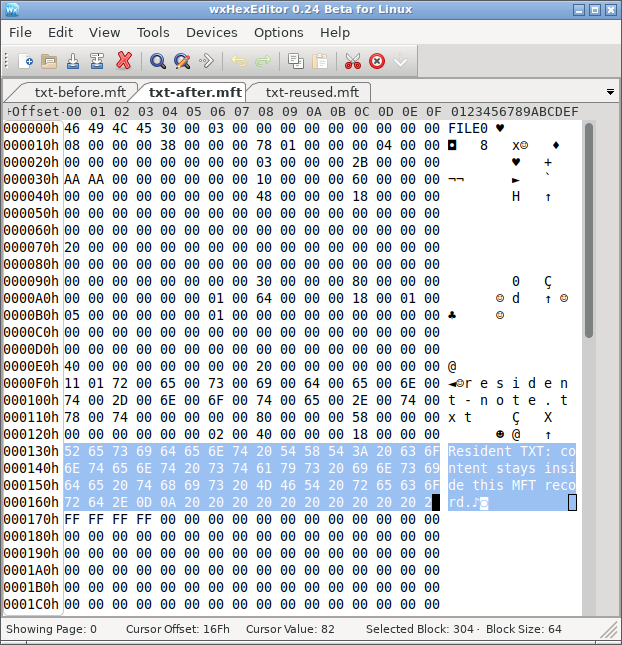
S6: Flags become 00 00, but the selected resident content is unchanged from S5.
Nonresident JPG
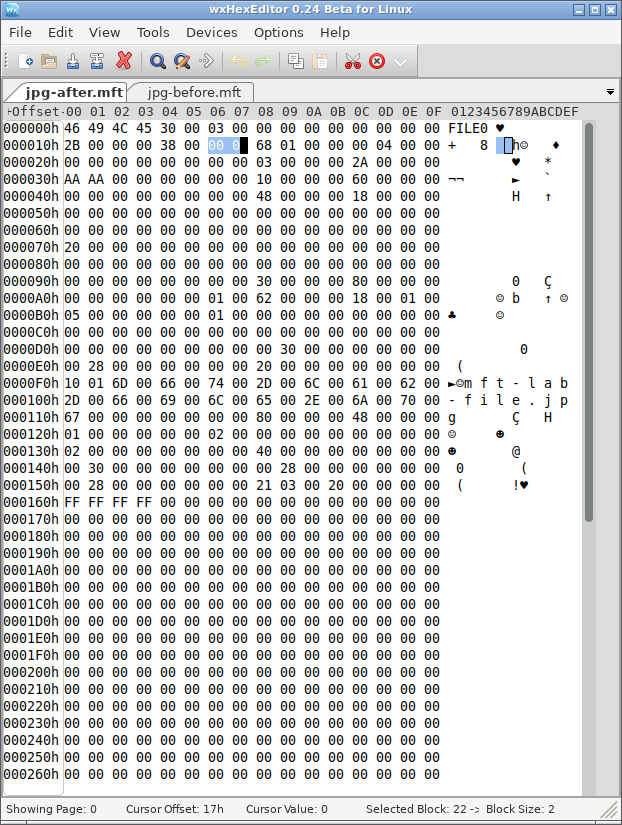
S2: Flags become 00 00, while the record retains its mapping. The external content check in the HTML reports 10,240 matching bytes.
After Record Reuse: What Does the Same Operation Destroy?
In the TXT control, the replacement owner writes 64 tilde characters over the same resident-value range. All 64 original bytes in that range differ. In the JPG control, the replacement owner removes the original record’s mapping, but the defined operation leaves the external image data unchanged. Thus the JPG loses its old map while its data survives elsewhere; the TXT loses its original content within the reused record.
Resident TXT
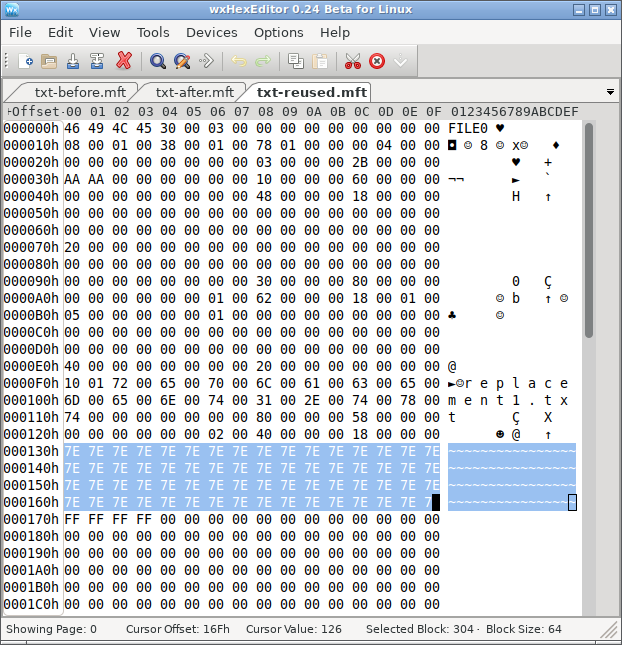
S7: The same selected range now contains replacement text. Original resident content matching that range: 0 / 64 bytes.
Nonresident JPG
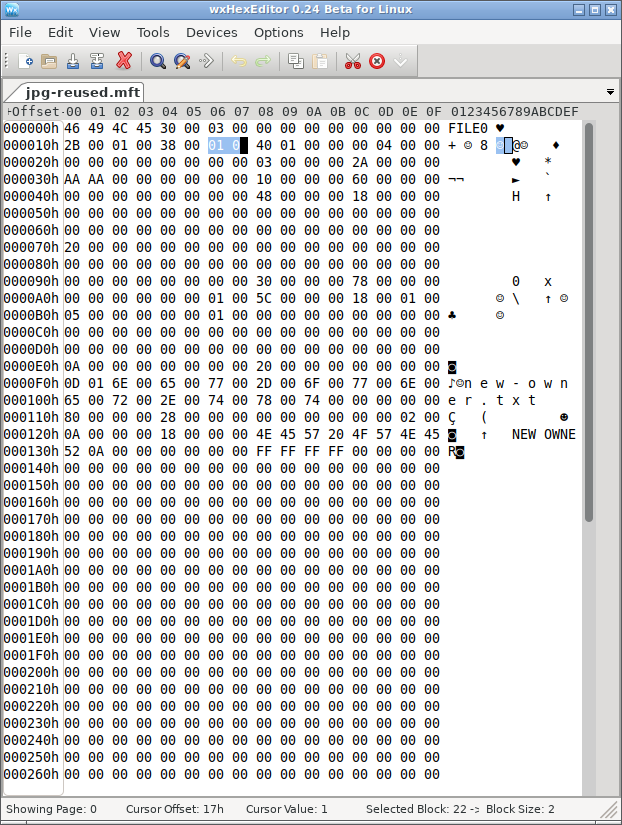
S3: Record 42 now describes new-owner.txt; the original JPG mapping is gone. The separately checked original external range still matches all 10,240 JPG bytes.
These are two different failure paths after the same kind of record reuse. A recovery assessment must check the resident value inside the TXT’s record, but it must check both historical mapping and external contents for the JPG. The record itself still occupies space within $MFT; “no external clusters” describes the resident TXT data stream only.
NTFS Deletion Metadata Experiment Results
For the JPG, S2 retains both the old map and all original content by construction. Reading the mapped clusters and trimming to 10,240 bytes produces a full byte-for-byte match and the same SHA-256 digest. That establishes content identity for this generated sample. However, this NTFS deleted file MFT test does not measure any application’s recovery performance.
S3 separates content survival from metadata survival. The original data bytes still match, but the current record belongs to a different file and no longer holds the original runlist. The saved baseline identifies where those bytes used to be; that knowledge is a comparison reference, not metadata available from the reused record. Other surviving structures or content analysis would be needed to locate and identify the old stream independently.
S4 demonstrates the opposite problem. The original filename and map remain in the freed record, but its middle cluster contains replacement bytes. Only 6,144 original bytes match; 4,096 differ. Reading the complete old range still produces a 10,240-byte result, yet its digest fails the original-content check. A correct filename and file length can therefore accompany damaged content. JPEG viewing behavior is a separate check from byte-for-byte identity.
For the TXT, S6 retains all 64 resident content bytes. In S7, none of those bytes match the replacement value. This is a content loss within the defined record replacement, without overwriting an external data cluster.
The NTFS deleted file MFT test above pairs the TXT and JPG at the same stage. Its other views retain the per-file before-and-after checks, while the details provide the calculated content digests.
Why Deleted File MFT Flags Cannot Prove Recoverability
A useful assessment needs three separate checks. First, establish the file’s identity from coherent metadata. Next, interpret its storage attributes, including resident-value boundaries, external mappings, and any additional records or streams. Finally, verify the contents available from those ranges. The generated scenarios deliberately let those checks produce different answers.
The two targets require different content checks. The resident TXT keeps its payload inside its record; the nonresident JPG relies on mapping information to reach external clusters. In S3, the new owner is resident to isolate record reuse from reuse of the JPG’s old data clusters. S5–S7 separately demonstrate what happens when the deleted target itself has resident data. Fragmented, compressed, encrypted, and sparse streams introduce additional interpretation requirements.
Nor should a tool equate an unused record with an intact deleted file automatically. Structural validity, allocation state, ownership, mapping consistency, and readable content answer different questions. Even a valid text fragment does not establish that a document, photograph, or video is complete.
What File Explorer and Disk Management Can Show
After final deletion, the original name should disappear from normal directory enumeration. Free space can increase once the file system releases its allocation, although unrelated activity can change the displayed total.
Ordinary deletion of one file does not turn an otherwise healthy NTFS volume into RAW or unallocated space. Disk Management describes volumes and partitions; it does not expose individual MFT record flags. A RAW label or missing partition therefore calls for a separate file-system or partition diagnosis, rather than being treated as confirmation of this deletion mechanism.
When File Recovery Comes Before File-System Repair
If the volume still works and only files are missing, repair is not the first explanation or action. Continued writes can reuse both freed records and freed clusters. Avoid installing tools, saving recovered files, or running unnecessary repair operations on the affected volume. Examine a suitable preserved copy when possible and save recovered content elsewhere.
For a practical check, Magic Data Recovery can scan the affected drive and preview supported files before recovery. Install it on another drive and save recovered files elsewhere; the software cannot recover content that later writes have overwritten.
SSD behavior adds another condition. The TRIM 명령 can notify storage that released logical ranges are no longer needed. Microsoft’s read-only query fsutil 동작 쿼리 DisableDeleteNotify reports the notification setting; it does not prove that a specific range retains its bytes.
If the original logical ranges return zeros or replacement content, a surviving MFT name cannot supply the missing nonresident payload. Conversely, readable old bytes still require correct mapping and content validation. Disabling notifications later does not reverse notifications already issued.
NTFS Deleted File MFT Test: Conclusion
이 NTFS 삭제 파일 MFT 테스트 separates record allocation, data mapping, and content integrity. In the JPG’s retained-metadata scenario, deletion frees the record and clusters while the original content still matches. However, record reuse removes the old map without changing those data bytes, and a cluster overwrite damages content while leaving the old name and map available.
The resident TXT control adds a different failure path: deleting its record leaves the defined 64-byte value intact, but reusing that record replaces the value itself. The JPG instead requires separate checks of its record and external data.
The practical conclusion is to verify each layer independently. A filename identifies a candidate; a resident-value offset or nonresident runlist identifies its content location; a complete content check determines whether that location still reproduces the original stream. That distinction explains why a deleted file can appear in a scan yet fail to open correctly after extraction.
자주 묻는 질문
MFT 플래그 0x0002는 삭제된 파일을 나타내는 것입니까?
FILE 서명은 NTFS MFT 레코드의 유효성을 검증합니까?
시퀀스 번호를 통해 파일이 몇 번 삭제되었는지 알 수 있나요?
삭제된 파일에 비트맵 비트만으로도 여유 클러스터를 할당할 수 있습니까?
하드 링크 하나를 삭제하면 항상 해당 파일의 데이터가 해제되나요?
올바른 확장자가 추출된 콘텐츠가 유효하다는 것을 증명해 주는가?

바실리는 이 분야에서 약 10년간 실무 경험을 쌓은 데이터 복구 전문가입니다. 그는 경력 전반에 걸쳐 삭제된 파일, 포맷된 드라이브, 손실된 파티션 및 RAW 파일 시스템과 관련된 수천 건의 복잡한 사례를 성공적으로 해결했습니다. 그의 전문 지식은 헥스 에디터와 같은 전문 도구를 사용한 수동 복구 방법과 복구 소프트웨어를 사용한 고급 자동화 솔루션을 모두 다룹니다. 바실리의 사명은 IT 전문가와 일반 사용자 모두에게 신뢰할 수 있는 데이터 복구 지식을 제공하여 소중한 디지털 자산을 보호할 수 있도록 돕는 것입니다.