
마스터 파일 테이블(MFT): 정의와 NTFS에서의 활용 방식
그리고 마스터 파일 테이블(MFT) is an NTFS system file containing records that describe the files and folders on a volume. These records hold metadata, such as filenames and timestamps, and information needed to retrieve file contents. Windows uses the table to locate and manage files on NTFS-formatted storage.
그리고 NTFS 마스터 파일 테이블 belongs to the NTFS 파일 시스템. It connects the names visible in File Explorer with the records and storage locations behind them. It is essential file-system metadata, not a file that users normally open or maintain themselves.
목차
Master File Table: Quick Facts
항목 | 설명 |
Abbreviation | MFT |
System filename | $MFT |
Technical category | NTFS metadata file |
범위 | One NTFS volume |
주요 목적 | Describe files, directories, and how their contents are stored |
Record coverage | At least one record for each file or directory, including the table itself |
Data storage | File contents can be resident inside a record or nonresident elsewhere on the volume |
Routine maintenance | No manual deletion or editing is required |

The Master File Table Explained in Plain English
Think of an NTFS volume as a library. Documents, photos, and videos are the books; the 마스터 파일 테이블 is the catalog that identifies them and helps locate them.
The analogy has one important limit. A sufficiently small file can have its contents stored inside its record. The table therefore does more than point to other locations: sometimes it contains the data itself.
A filename such as report.docx is useful to a person, but NTFS also needs to know which directory contains it and how to retrieve its contents. The table supplies the records that describe those relationships.
How the Master File Table Works
The easiest way to understand the mechanism is to follow a file through creation, opening, updating, and deletion.
Creating a File
When an application creates a file, NTFS assigns a base file record and stores its attributes. Those attributes describe different aspects of the file, including its name and data.
If all attributes cannot fit into the base record, NTFS can use additional records. An attribute list identifies where the file’s attributes are located. Consequently, one file does not always correspond to exactly one record in the 마스터 파일 테이블.
Opening a File: A Simple Example
Suppose an application opens C:\Projects\report.docx. At a simplified level, NTFS follows these relationships:
- Resolve the directory path. Directory indexes identify the entries along the requested path.
- Find the file reference. The entry for
report.docxrefers to its base file record. - Read the file’s attributes. NTFS interprets the record and any associated extension records.
- Retrieve the requested data. The $DATA attribute either contains the contents or describes their storage outside the record.
This illustrates the role of the 마스터 파일 테이블 in file access. It is not a claim that every open operation physically rereads the whole table; Windows can cache file-system information.
Data form | Where the contents are stored | How NTFS retrieves them |
Resident | Inside the file record | Reads the attribute value |
Nonresident | In clusters elsewhere on the volume | Uses the attribute’s mapping information |
A cluster is an allocation unit on the volume. These mappings describe logical storage locations, not the physical arrangement of flash cells inside an SSD. Microsoft’s documentation explains the distinction through resident and nonresident attribute structures.
Updating a File
Saving changes can alter file contents, file size, timestamps, or allocation information. NTFS updates the relevant data and metadata to reflect those changes. The exact changes depend on the operation: renaming a file and appending data affect different attributes.
그리고 마스터 파일 테이블 is therefore an active structure used during normal file operations, rather than a catalog created once and left unchanged.
Deleting a File
Once a file is actually deleted from the file system, its records can become available for reuse. Moving a file to the Recycle Bin is not the same as completing this deletion.
The record header includes a sequence number that changes when a record is freed. Together with the record number, it helps distinguish a current file reference from an obsolete one. A reusable record should not be interpreted as a permanent archive of the deleted file.
What Does a Master File Table Record Contain?
Each record starts with a header and contains attributes. The header describes the record; the attributes describe aspects of the file.
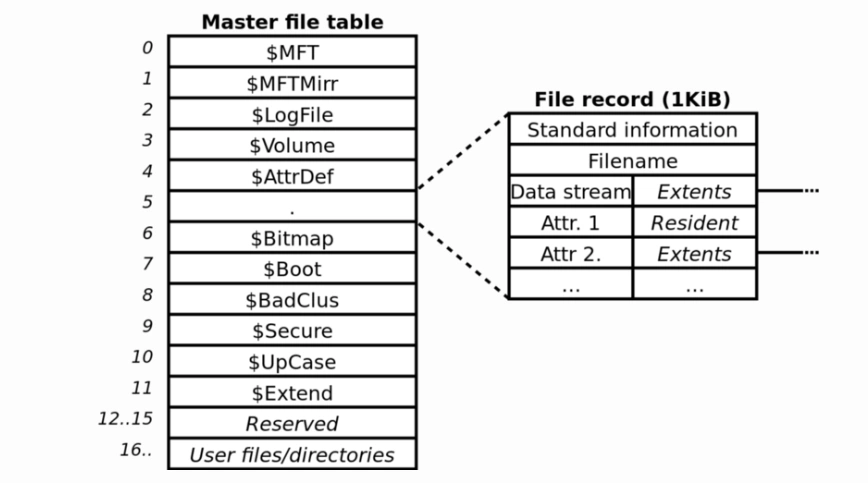
Component or information | 목적 |
Record header | Describes record status and information needed to interpret it |
$표준_정보 | Holds basic metadata, including timestamps and file flags |
$파일_이름 | Stores a filename and a reference to its parent directory |
$DATA | Represents file contents, either resident or nonresident |
File size and allocation information | Describes the data stream’s logical length and allocated storage |
$ATTRIBUTE_LIST, when required | Locates attributes distributed across multiple records |
Security identifier | Connects the file to its security information |
These are selected components, not an exhaustive list. For a deeper explanation, see the guide to Master File Table records.
File Size Is Different From Allocated Size
File size is the logical length of a data stream. Allocated size describes the storage allocated to it. For an ordinary nonresident, uncompressed file, allocation occurs in whole clusters, so allocated storage may exceed the logical file length.
For example, on a volume with 4,096-byte clusters, an ordinary 5,000-byte nonresident data stream needs two clusters, or 8,192 bytes of allocated storage. This is an illustrative calculation, not a universal rule for resident, compressed, or sparse data.
A Filename Is Different From a Full Path
The $FILE_NAME attribute contains a name and a parent-directory reference. It does not simply store C:\Projects\report.docx as one complete path field.
A parser can reconstruct a path through directory relationships. This explains why a report may show a full path even though that path is not stored as a single attribute in the 마스터 파일 테이블.
Permissions Use Related Security Metadata
In NTFS 3.x, $STANDARD_INFORMATION includes a security identifier, while the $Secure metadata file stores security descriptors. Each record does not need to contain a separate, complete copy of every permission setting.
Why the Master File Table Matters
이해 마스터 파일 테이블 helps distinguish a file’s identity from its contents. A filename found in a metadata report does not, by itself, establish that the complete document remains readable.
It also helps interpret technical output. For example, an MFT starting cluster identifies where the table begins on a volume. It does not identify the location of every user file or prove that the table is healthy.
The practical lesson is to read each field for what it actually describes. Names, parent references, data mappings, and timestamps answer different questions; none is a substitute for a separate backup.
Master File Table vs NTFS and FAT
NTFS is the file system; the Master File Table is one of its central structures. The terms describe different levels of the storage system.
용어 | 의미 |
NTFS | The file system organizing files and directories on a volume |
MFT | The table of records describing those objects |
$MFT | The NTFS metadata file containing the table |
MFT 기록 | An individual record within that table |
FAT | A File Allocation Table used by FAT-family file systems to track cluster chains |
In FAT32, directory entries hold file information, while the FAT links the clusters allocated to files. NTFS uses file records and attributes, including mappings for nonresident data. The MFT is therefore not simply another name for a FAT.
NTFS has other bookkeeping structures too. The volume’s $Bitmap tracks cluster allocation, while $MFT has its own bitmap for tracking record use. These answer different questions: which storage clusters are allocated, and which records are occupied.
Where Is the Master File Table Located?
그리고 마스터 파일 테이블 resides on the NTFS volume it describes. Its special filename is $MFT, represented at the volume root—for example, C:\$MFT for a volume mounted as C:.
That is a logical location, not a fixed physical address shared by every drive. NTFS volume information exposes the starting logical cluster number through MftStartLcn.
The MFT zone is space reserved to accommodate table growth. It is distinct from the allocated records inside $MFT. For more detail about logical paths and cluster locations, read the Master File Table location guide.
How to View Master File Table Information in Windows
On Windows 10 or Windows 11, open an administrator Command Prompt or Terminal and run:
- fsutil fsinfo ntfsinfo C:
교체 C: with the appropriate NTFS drive letter. This command queries volume information; it does not repair or rebuild the table.
Depending on the Windows version, the output can include these fields:
필드 | 이것이 알려주는 것 |
Bytes Per FileRecord Segment | The record size used on this volume |
Mft Start Lcn | The starting logical cluster number of the table |
Mft Zone Start / End | The boundaries of the reserved growth zone |
For example, a record size of 1,024 bytes describes one record segment. It does not mean every file is 1,024 bytes long or that the entire table occupies that amount of space.
Microsoft documents the query in its fsutil fsinfo command reference. Viewing these summary fields is different from parsing individual records and checking file contents.
Common Misconceptions and Safety
The MFT Is Not a Complete Backup
$MFTMirr duplicates a limited initial portion of the table, not every file record. Neither it nor the 마스터 파일 테이블 provides a separate backup of all user files.
Its Presence Does Not Indicate Malware
$MFT is an expected NTFS metadata file. However, an unrelated downloaded file with “MFT” in its name should not automatically be treated as this system object. Identify the context before drawing conclusions about an unfamiliar filename.
Do Not Delete or Disable It
Manually deleting, overwriting, or editing $MFT can prevent NTFS from interpreting files correctly. It is not a cleanup target or an optional feature that can be switched off.
If a drive becomes inaccessible, protect important data before choosing a repair workflow. CHKDSK repair options modify the file system; they are different from the information query shown above.
What Happens If the Master File Table Is Corrupted?
손상된 마스터 파일 테이블 can prevent NTFS from locating or interpreting files correctly. Files or folders may become inaccessible even when some underlying contents remain on the drive. However, a RAW volume or startup failure alone does not prove that the MFT is damaged.
If important files are affected, prioritize data protection before attempting repairs. Avoid formatting the volume or immediately running chkdsk X: /f, which modifies the file system. Where possible, secure a backup or disk image first. For further guidance, see the RAW drive troubleshooting guide.
When to Use a Related Guide
If the goal is to understand the 마스터 파일 테이블, no maintenance action is required.
For genuinely deleted files, continue with the 삭제된 파일 복구 가이드. For a RAW volume or a related CHKDSK message, use the RAW drive troubleshooting guide.
Detailed repair, table size, disk usage, fragmentation, and mirror analysis remain separate topics. They should be evaluated against the actual symptoms rather than added to a general definition.
결론
그리고 마스터 파일 테이블 supplies the records NTFS needs to describe files and retrieve their contents. Its attributes connect names, directory relationships, and data storage. Understanding those connections makes technical reports easier to interpret and explains why metadata, file contents, and backups serve different purposes.
Master File Table FAQs
Is $MFT an Ordinary File With a .mft Extension?
example.mft may belong to an unrelated application. Check its context and role before assuming that it is part of the NTFS Master File Table.Does Each NTFS Volume Have Its Own Table?
Do Folders Have MFT Records Too?
Can Multiple Filenames Refer to the Same File?
What Identifies a File's Entry in the Table?
Is the MFT the Same as the Windows Search Index?
Does a Listed Filename Prove That a File Is Recoverable?
Can a Timestamp Prove When Someone Opened a File?

바실리는 이 분야에서 약 10년간 실무 경험을 쌓은 데이터 복구 전문가입니다. 그는 경력 전반에 걸쳐 삭제된 파일, 포맷된 드라이브, 손실된 파티션 및 RAW 파일 시스템과 관련된 수천 건의 복잡한 사례를 성공적으로 해결했습니다. 그의 전문 지식은 헥스 에디터와 같은 전문 도구를 사용한 수동 복구 방법과 복구 소프트웨어를 사용한 고급 자동화 솔루션을 모두 다룹니다. 바실리의 사명은 IT 전문가와 일반 사용자 모두에게 신뢰할 수 있는 데이터 복구 지식을 제공하여 소중한 디지털 자산을 보호할 수 있도록 돕는 것입니다.