
GPT 헤더: 구조, 백업 및 CRC32
A GPT 헤더 디스크의 GUID 파티션 테이블(GPT)을 설명하는 메타데이터 구조입니다. 이 구조는 디스크를 식별하고, 파티션 항목 배열의 위치를 지정하며, 사용 가능한 디스크 경계를 정의하고, 메타데이터 손상을 감지하는 데 사용되는 체크섬을 저장합니다. GPT는 중복성을 위해 주 헤더와 백업 헤더를 유지합니다. 바이트 레이아웃과 CRC32 필드를 이해하면 파티션 정보가 어떻게 검증되는지, 그리고 헤더가 손상되었다고 해서 반드시 해당 파일이 손실되는 것은 아닌 이유를 설명하는 데 도움이 됩니다.
목차
GPT 헤더란 무엇인가요?
GPT 헤더는 UEFI 사양에서 정의한 디스크 파티션 방식인 GUID 파티션 테이블(GPT)의 일부입니다.
기존의 MBR(Master Boot Record) 방식과 달리, GPT는 파티션 메타데이터를 두 군데에 저장합니다. 하나는 디스크 시작 부분 근처에, 다른 하나는 끝 부분 근처에 있습니다.
각 GPT 헤더에는 관련 파티션 항목 배열을 찾아내고 해석하는 데 필요한 정보가 포함되어 있으며, 여기에는 다음이 포함됩니다:
- GPT 형식을 식별하는 서명.
- GPT 헤더의 수정 횟수와 크기.
- 헤더 자체의 위치와 대체 헤더의 위치.
- 첫 번째 및 마지막 사용 가능한 논리 블록 주소.
- 고유한 디스크 식별자.
- 파티션 항목 배열의 위치와 크기.
- 메타데이터 무결성을 확인하기 위한 CRC32 체크섬.
GPT 헤더에는 파일 이름, 폴더 구조 또는 파일 내용이 직접 저장되지 않습니다. 이러한 정보는 파티션 내부의 파일 시스템에 속합니다.
파티셔닝 방식에 대한 개요는 다음을 참조하십시오. GPT(GUID 파티션 테이블). 공식 정의는 다음에서 확인할 수 있습니다. UEFI 사양, 5.3절.
GPT 헤더는 어디에 위치해 있나요?
GPT는 주 메타데이터와 백업 메타데이터를 디스크의 양쪽 끝단에 배치합니다.
일반적인 GPT 디스크의 경우:
위치 | 목차 |
LBA 0 | 보호용 MBR |
LBA 1 | 기본 GPT 헤더 |
LBA 준수 | 기본 파티션 항목 배열 |
사용 가능한 LBA 범위 | 칸막이를 설치할 수 있는 공간 |
마지막 블록 이전의 LBA | 백업 파티션 항목 배열 |
마지막 LBA | GPT 헤더 백업 |
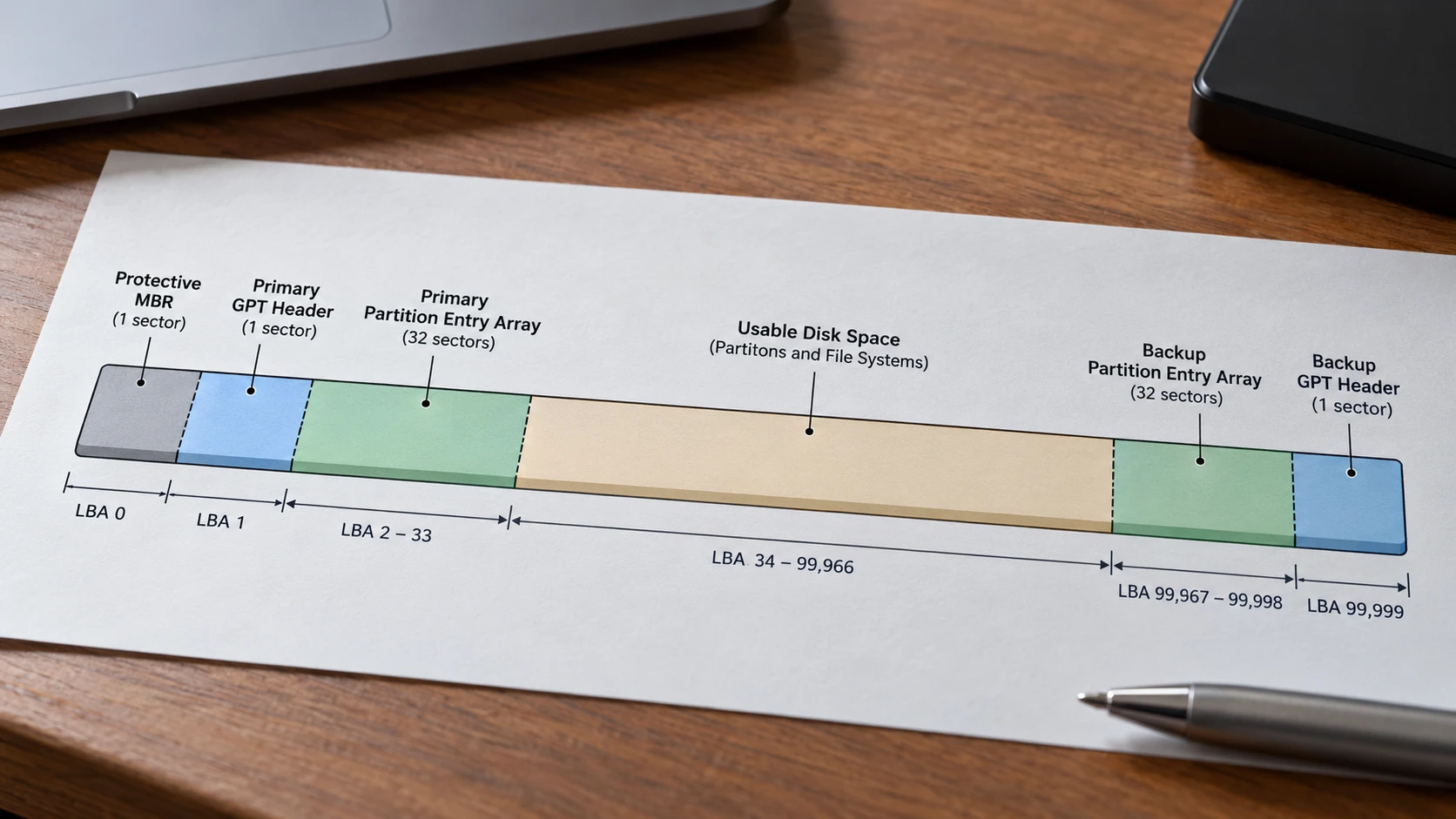
보호용 MBR은 구형 MBR 전용 도구가 GPT 디스크를 할당되지 않은 공간으로 인식하는 것을 방지하는 데 도움이 됩니다.
이는 GPT 헤더 자체와는 다릅니다. 기존 파티션 메타데이터와의 비교에 대해서는 다음을 참조하십시오. MBR 파티션 테이블.
논리 섹터와 바이트 주소
GPT는 구조를 식별할 때 절대 바이트 오프셋이 아닌 논리 블록 주소(LBA)를 사용합니다.
LBA를 바이트 오프셋으로 변환하려면:
바이트 오프셋 = LBA × 논리 블록 크기
예를 들어
- 512바이트 논리 블록으로 구성된 디스크에서, 기본 헤더는 바이트 오프셋
512(0x200). - 4,096바이트 논리 블록으로 구성된 디스크에서, 기본 헤더는 바이트 오프셋
4096(0x1000).
헤더는 일반적으로 논리 블록 내에서 92바이트를 차지하지만, 이 형식에서는 논리 블록 크기까지 더 큰 헤더를 허용합니다.
92바이트 헤더를 512바이트 섹터와 혼동해서는 안 됩니다. 512바이트 헤더 블록의 나머지 바이트는 예약된 영역이므로 반드시 0으로 채워져야 합니다.
GPT 헤더 구조: 필드, 오프셋 및 크기
GPT 헤더 구조체는 다음에서 정의되어 있습니다. UEFI 사양 2.10, 표 5.5.
다음 오프셋 값들은 디스크의 시작 부분이 아닌 GPT 헤더의 시작 부분을 기준으로 합니다.
필드 | 오프셋 (16진수) | 크기 | 목적 |
서명 |
| 8바이트 | GPT 헤더를 식별합니다. |
수정 |
| 4바이트 | GPT 형식 수정 |
헤더 크기 |
| 4바이트 | 헤더 길이(바이트 단위) |
헤더 CRC32 |
| 4바이트 | 헤더의 체크섬 |
예약됨 |
| 4바이트 | 반드시 0이어야 합니다 |
MyLBA |
| 8바이트 | 이 헤더의 위치 |
대체 LBA |
| 8바이트 | 다른 헤더의 위치 |
첫 번째 사용 가능한 LBA |
| 8바이트 | 첫 번째 사용 가능한 파티션 블록 |
최종 사용 가능 LBA |
| 8바이트 | 마지막으로 사용 가능한 파티션 블록 |
디스크 GUID |
| 16바이트 | 고유 디스크 식별자 |
PartitionEntryLBA |
| 8바이트 | 관련 항목 배열의 시작 |
파티션 항목 수 |
| 4바이트 | 참가 정원 |
파티션 항목 크기 |
| 4바이트 | 각 항목의 크기 |
PartitionEntryArrayCRC32 |
| 4바이트 | 항목 배열의 체크섬 |
정의된 필드들은 오프셋을 차지합니다 0x00 ~을 통해 0x5B, 총 92바이트입니다. 바이트는 0x5C 논리 블록의 끝 부분까지는 예약되어 있습니다.
서명 및 수정
유효한 GPT 헤더는 ASCII 서명으로 시작합니다. EFI 부품.
8바이트는 다음과 같습니다:
45 46 49 20 50 41 52 54
표준 GPT 개정판 1.0은 리틀 엔디안 바이트로 다음과 같이 표현됩니다:
00 00 01 00
이것들은 수치 값을 나타냅니다 0x00010000. GPT 헤더 개정판은 UEFI 사양 버전과 다릅니다.
일반적으로 사용되는 헤더 크기는 92바이트이며, 다음과 같이 인코딩됩니다:
5C 00 00 00
디스크 GUID 및 바이트 순서
DiskGUID 필드는 오프셋부터 시작하여 16바이트를 차지합니다. 0x38.
GPT 디스크를 식별합니다. 이는 각 개별 파티션 항목 내에 저장된 고유 파티션 GUID와는 다릅니다.
또한 GUID는 원시 16진수 데이터를 해석할 때 중요한 세부 사항을 하나 더 제시합니다. 바로 첫 세 구성 요소는 리틀 엔디안 바이트 순서를 따르는 반면, 마지막 여덟 바이트는 표시된 순서를 그대로 유지한다는 점입니다.
예를 들어, 다음은 예시용 GUID입니다:
f0e1d2c3-b4a5-4c6d-8e9f-102030405060
다음과 같이 저장됩니다:
C3 D2 E1 F0 A5 B4 6D 4C 8E 9F 10 20 30 40 50 60
16바이트의 원시 데이터를 왼쪽에서 오른쪽으로 직접 모두 읽으면 잘못된 텍스트 형식의 GUID가 생성됩니다.
파티션 엔트리 배열 필드
파티션 항목 배열은 다음 세 가지 필드로 구성됩니다:
PartitionEntryLBA배열이 시작되는 위치를 지정합니다.파티션 항목 수항목 수를 정의합니다.파티션 항목 크기각 항목의 크기를 정의합니다.
배열의 바이트 길이는 다음과 같이 계산됩니다:
배열 크기 = 항목 수 × 항목 크기
각 요소가 128바이트인 128개의 요소를 포함하는 배열의 경우:
128 × 128 = 16,384 바이트
512바이트 논리 블록의 경우:
16,384 ÷ 512 = 32 논리 블록
이는 파티션 항목 배열의 예약된 공간이며, 실제 파일 데이터가 차지하는 공간이 아닙니다.
현재 UEFI 사양에서는 엔트리 크기를 다음과 같이 정의하고 있습니다. 128 × 2^n 바이트, 여기서 n 는 0 이상의 정수입니다. 일반적인 GPT 디스크는 128바이트 크기의 항목을 사용합니다.
Each slot in the partition entry array describes one partition through its type GUID, unique partition GUID, LBA boundaries, attributes, and name. For a field-by-field explanation of the GPT 파티션 항목 구조, including byte offsets and GUID encoding, see our GPT 파티션 항목: 구조, 배열 및 GUID 필드 가이드.
주 GPT 헤더와 백업 GPT 헤더: 무엇이 달라졌나요?
주 GPT 헤더와 백업 GPT 헤더는 필드 구조가 동일하지만, 포함된 바이트 내용은 서로 다릅니다.
위치와 일부 내부 포인터가 다릅니다.
다음과 같은 GPT 디스크를 예로 들어 보겠습니다.
- 100,000개의 논리 블록, 번호가 매겨짐
0~을 통해99,999. - 논리 블록 크기는 512바이트입니다.
- 각각 128바이트인 128개의 슬롯으로 구성된 엔트리 배열.
- 양쪽 끝에 각각 32블록으로 구성된 파티션 항목 배열이 있습니다.
레이아웃은 다음과 같습니다:
구조 | 기본 GPT | GPT 백업 |
헤더 LBA |
|
|
MyLBA |
|
|
대체 LBA |
|
|
PartitionEntryLBA |
|
|
항목 배열 범위 |
|
|
첫 번째 사용 가능한 LBA |
|
|
최종 사용 가능 LBA |
|
|
헤더 크기 | 92바이트 | 92바이트 |
이러한 위치는 디스크 크기와 두 개의 32블록 파티션 항목 배열에서 직접 도출됩니다.
예를 들어
백업 어레이 시작 위치 = 마지막 LBA − 어레이 블록 수
99,999 − 32 = 99,967
마지막으로 사용할 수 있는 블록은 해당 백업 어레이보다 앞에 위치해야 합니다:
99,967 − 1 = 99,966
따라서 두 헤더 모두 동일한 사용 가능한 디스크 범위를 설명하지만, 파티션 엔트리 배열에 대해서는 서로 다른 물리적 위치를 가리킵니다.
이러한 방식을 통해 GPT를 지원하는 소프트웨어는 주 사본이 손상되었을 때 백업 메타데이터를 확인할 수 있습니다.
그러나 두 개의 사본이 있다고 해서 그 중 어느 하나라도 유효하거나 최신 버전임을 보장하는 것은 아닙니다.
예제: 16진수 바이트로 된 GPT 헤더 해독하기
다음 예제에서는 물리적 디스크에서 캡처한 바이트가 아닌, 의도적으로 생성된 GPT 메타데이터를 사용합니다.
여기서는 앞서 사용된 것과 동일한 10만 블록 디스크에 대해 설명하고 있습니다.
이 예제에는 값이 채워진 파티션이 하나도 없습니다. 128개의 파티션 항목 슬롯이 모두 0으로 채워져 있어, 완전히 정의된 입력값을 바탕으로 두 항목 배열의 체크섬을 모두 계산할 수 있습니다.
1단계: 헤더 확인하기
At the beginning of the primary header, the first 16 bytes are:
45 46 49 20 50 41 52 54 00 00 01 00 5C 00 00 00
Split the sequence by field:
Byte range | Hex bytes | Decoded meaning |
|
|
|
|
| 수정 |
|
| Header size: 92 bytes |
The signature, revision, and header size match the expected format.
That establishes a plausible header, but it does not by itself prove that the GPT is valid.
Step 2: Decode the Location Fields
The primary header contains:
필드 | Stored bytes | Decoded value |
MyLBA |
|
|
대체 LBA |
|
|
첫 번째 사용 가능한 LBA |
|
|
최종 사용 가능 LBA |
|
|
PartitionEntryLBA |
|
|
These values use little-endian byte order.
For example, the bytes 9F 86 01 00 00 00 00 00 represent 0x000000000001869F, or decimal 99,999.
The backup header reverses MyLBA 그리고 대체 LBA and changes PartitionEntryLBA 에 99,967.
Step 3: Compare the Header Checksums
For this specific synthetic example, using the DiskGUID shown earlier and a zero-filled 16,384-byte partition entry array, the calculated values are:
체크섬 | 기본 GPT | GPT 백업 |
헤더 CRC32 |
|
|
PartitionEntryArrayCRC32 |
|
|
The header checksums differ because the headers contain different location fields.
The partition entry array checksums match because the two arrays contain identical zero-filled bytes.
These are calculated example values, not universal GPT checksum constants. A different disk GUID, partition layout, or metadata change would produce different results.
How GPT Header CRC32 Validation Works
GPT uses two separate CRC32 checksums to detect changes in its partition metadata:
헤더 CRC32verifies the GPT header itself.PartitionEntryArrayCRC32verifies the associated partition entry array.
Both use the standard CRC-32 algorithm, but they cover different byte ranges.
HeaderCRC32: How the Checksum Is Calculated
그리고 헤더 CRC32 field occupies four bytes at header-relative offset 0x10.
에 따르면 UEFI Specification, the checksum must be calculated with this field temporarily set to zero.
The verification process follows five steps:
- Read the header. Obtain the GPT header bytes from a disk image and determine the
헤더 크기field at offset0x0C. - Record the stored CRC32. Read the four bytes at offsets
0x10–0x13as a little-endian 32-bit value. - Zero the checksum field. In a temporary copy, replace these four bytes with
00 00 00 00. - Calculate CRC32. Compute the standard CRC-32 checksum over exactly
헤더 크기bytes. - Compare the results. If the calculated value matches the stored value, the header passes its CRC32 integrity check.
For a standard 92-byte GPT header, the calculation covers offsets 0x00–0x5B, not the entire 512-byte logical sector.
A standard CRC-32 calculator or Python’s zlib.crc32() can perform the calculation. The algorithm uses the reflected polynomial 0xEDB88320, an initial register value of 0xFFFFFFFF, and a final XOR of 0xFFFFFFFF.
Example: Verifying a GPT Header CRC32
Consider the synthetic GPT header used earlier in this article.
항목 | 가치 |
헤더 크기 |
|
Stored HeaderCRC32 |
|
Stored bytes |
|
CRC field during calculation |
|
Calculated CRC32 |
|
Validation result | Match |
The calculated checksum matches the stored value, indicating that the example header passes its CRC32 check.
If even one covered byte changes without updating the stored checksum, the calculation will generally produce a different result.
중요: Always perform the calculation on a temporary copy or read-only working data. Do not overwrite checksum bytes on the original disk.
0x76EF8C67 in little-endian order. Select 제로 to see how the input is prepared.0xEDB88320 · Init 0xFFFFFFFF · Final XOR 0xFFFFFFFF. Teaching sample, not captured disk data.PartitionEntryArrayCRC32: Validating Partition Entries
The second checksum, PartitionEntryArrayCRC32, is stored at header-relative offset 0x58.
와 달리 헤더 CRC32, it covers the partition entry array rather than the header.
Its calculation length is:
NumberOfPartitionEntries × SizeOfPartitionEntry
For an array containing 128 entries of 128 bytes each:
128 × 128 = 16,384 바이트
To verify this checksum, calculate CRC32 over the entire 16,384-byte array and compare the result with the checksum stored in the GPT header.
No checksum field needs to be zeroed within the partition entry array.
The primary and backup arrays must be checked separately because they occupy different locations. Any unused padding after the array’s final entry is excluded from the calculation.
Why Both Checksums Matter
The two checksums answer different questions:
- HeaderCRC32: Do the header bytes match the checksum stored in the header?
- PartitionEntryArrayCRC32: Do the partition entry bytes match the checksum stored in the header?
A GPT header may pass its own CRC32 check while its partition entry array is corrupted.
Similarly, both checksums may pass even when partition boundaries are logically incorrect or the metadata is outdated.
CRC32 verifies metadata integrity, not disk health or file recoverability. Additional checks are necessary to determine whether partition entries are consistent and the underlying file systems remain accessible.
How to Check Whether a GPT Header Is Valid
UEFI specifies that GPT-aware software must check the header signature, header CRC, MyLBA, and the CRC of the associated partition entry array. For the primary GPT, it must also examine the alternate header.
A practical inspection should include these additional consistency checks:
확인 | Expected condition | 중요한 이유 |
서명 |
| Identifies the structure |
헤더 크기 | At least 92 bytes; no larger than a logical block | Defines the checksum range |
헤더 CRC32 | Matches recalculated CRC32 | Detects header-byte changes |
MyLBA | Matches the physical header location | Detects misplaced metadata |
대체 LBA | Points to the other header | Supports redundant layout validation |
PartitionEntryLBA | Points to an array within disk bounds | Prevents invalid array addressing |
PartitionEntryArrayCRC32 | Matches actual array bytes | Detects entry-array corruption |
사용 가능한 LBA 범위 | Ordered, in bounds, and outside metadata regions | Checks layout consistency |
Primary/backup metadata | Consistent where required | Detects conflicting copies |
Passing these checks does not verify individual file systems or files. Partition entry boundaries also need to be checked for validity and overlap.
그리고 UEFI GPT validation requirements provide the normative basis for deciding whether GPT metadata is valid.
What Happens When a GPT Header Is Corrupted?
The consequences depend on which metadata remains usable.
Primary Header Damaged, Backup Valid
If the primary GPT is invalid, GPT-aware software must examine the header at the last logical block and validate its associated partition entry array.
A valid backup can provide the metadata necessary to reconstruct the primary copy, subject to the platform’s recovery policies.
Such a repair writes partition metadata and should not be attempted casually on a disk containing important, unsecured data.
Backup Header Damaged, Primary Valid
The primary partition layout may still be readable.
However, the backup needs restoration to preserve GPT redundancy.
An apparently accessible disk can therefore still have damaged backup metadata.
Both Headers Invalid
If neither header is valid, the disk has no valid GPT header under the UEFI validation rules.
This does not necessarily mean that every partition or file has been physically erased.
Partition metadata, file system metadata, and file contents occupy different areas of the disk.
When important files are involved, preserve the original disk and distinguish 손실된 파티션 데이터 복구 from rewriting the partition table.
Valid Header but Incorrect Partition Information
A structurally valid header is not sufficient to establish that its partition entries describe the current disk correctly.
For example, stale GPT metadata can remain at the end of a disk after legacy partitioning software changes the disk layout.
A valid-looking backup must therefore be evaluated alongside the protective MBR, current disk capacity, partition entries, and other available evidence.
UEFI specifically warns against relying on stale GPT structures after a disk has been reformatted to legacy MBR.
How to Inspect a GPT Header Safely
For detailed analysis, use a disk image or a hexadecimal viewer with read-only access.
- Confirm the correct physical disk and its reported logical block size.
- If the disk has important data, capture a suitable image before modifying any metadata. An unstable or failing disk requires an appropriate acquisition approach.
- Open the image in a hex editor without enabling write operations.
- Locate the primary header at LBA
1, corresponding to byte offsetLogicalBlockSize × 1. - Check the signature at offset
0x00and interpret the other fields using the header-relative offsets. - Determine the last LBA from the image or disk capacity, then inspect the backup header.
- Compare field values, header checksums, and the associated partition entry arrays.
Windows Disk Management and PowerShell’s Get-Disk can identify the disk’s partition style, but their ordinary summary views do not provide a complete byte-level GPT header validation.
Do not initialize, format, or run DiskPart clean merely because a disk reports an invalid or missing partition. Likewise, CHKDSK is a file system repair tool, not a general GPT header reconstruction method.
Limitations and Important Edge Cases
Several conditions affect GPT header interpretation.
Different logical block sizes. A 4Kn disk uses 4,096-byte logical blocks. The primary header remains at LBA 1, but its absolute byte offset differs from that on a 512-byte logical-sector disk.
Larger GPT headers. A header may exceed 92 bytes within the permitted logical block size. CRC32 must use the actual validated 헤더 크기, not an assumed constant.
Disk resizing or cloning. If a disk is enlarged, the old backup header may no longer be at the final LBA. GPT metadata must be evaluated against the current device size before making corrections.
CRC32 is not cryptographic authentication. Matching checksums do not prove that metadata is authentic or free from deliberate manipulation.
Physical media problems. Read errors, intermittent connections, or controller failures can prevent reliable inspection. Repeated attempts on failing hardware may make recovery more difficult.
These limitations explain why GPT validation requires several related checks rather than a single signature or checksum comparison.
결론
그리고 GPT 헤더 provides the location, boundaries, identifiers, and integrity information required to interpret a GUID Partition Table. Its structure is defined by explicit byte offsets, and its primary and backup copies provide redundant metadata at opposite ends of a disk.
Correct analysis requires more than locating EFI 부품. The header CRC32, partition entry array CRC32, LBA pointers, usable boundaries, and primary/backup consistency must be evaluated together.
Understanding these relationships makes it possible to recognize valid GPT metadata, identify inconsistencies, and distinguish partition-table corruption from actual loss of file data.
자주 묻는 질문
GPT 헤더 서명이란 무엇인가요?
EFI 부품. 16진수로는 45 46 49 20 50 41 52 54. 이 시퀀스는 주 헤더와 백업 헤더 모두의 시작 부분에 나타납니다. 이 시퀀스만 발견된다고 해서 GPT 전체가 유효하다고 단정할 수는 없습니다.GPT 헤더의 크기는 몇 바이트인가요?
헤더 크기 이 필드는 실제 길이를 정의하며, 이 길이는 최소 92바이트 이상이어야 하고 논리 블록 크기보다 클 수 없습니다. 논리 블록의 나머지 바이트는 예약되어 있습니다.주 GPT 헤더와 백업 GPT 헤더는 어디에 저장되어 있나요?
1. 백업 헤더는 디스크의 마지막 논리 블록에 저장됩니다. 각 헤더의 MyLBA 자신의 위치를 파악하는 반면, 대체 LBA 다른 헤더를 식별합니다.주 GPT 헤더와 백업 GPT 헤더의 CRC32 값이 서로 다른 이유는 무엇인가요?
MyLBA, 대체 LBA, 그리고 대개 PartitionEntryLBA. 이 바이트들은 HeaderCRC32에 포함되기 때문에, 두 헤더가 모두 동일한 디스크를 정확하게 기술하고 있더라도 계산된 체크섬은 일반적으로 서로 달라집니다.디스크가 손상된 상태에서도 GPT 헤더가 CRC32 검증을 통과할 수 있나요?
손상된 GPT 헤더를 백업에서 복구할 수 있나요?
GPT 디스크 GUID는 파티션 GUID와 같은 것인가요?
디스크 GUID GPT 헤더의 이 필드는 디스크를 식별합니다. 개별 파티션 항목에는 파티션 유형 GUID와 고유한 파티션 GUID를 포함한 별도의 식별자가 포함되어 있습니다. 이 값들은 각기 다른 역할을 하므로 혼동해서는 안 됩니다.
바실리는 이 분야에서 약 10년간 실무 경험을 쌓은 데이터 복구 전문가입니다. 그는 경력 전반에 걸쳐 삭제된 파일, 포맷된 드라이브, 손실된 파티션 및 RAW 파일 시스템과 관련된 수천 건의 복잡한 사례를 성공적으로 해결했습니다. 그의 전문 지식은 헥스 에디터와 같은 전문 도구를 사용한 수동 복구 방법과 복구 소프트웨어를 사용한 고급 자동화 솔루션을 모두 다룹니다. 바실리의 사명은 IT 전문가와 일반 사용자 모두에게 신뢰할 수 있는 데이터 복구 지식을 제공하여 소중한 디지털 자산을 보호할 수 있도록 돕는 것입니다.