
GPT 파티션 항목: 구조, 배열 및 GUID 필드
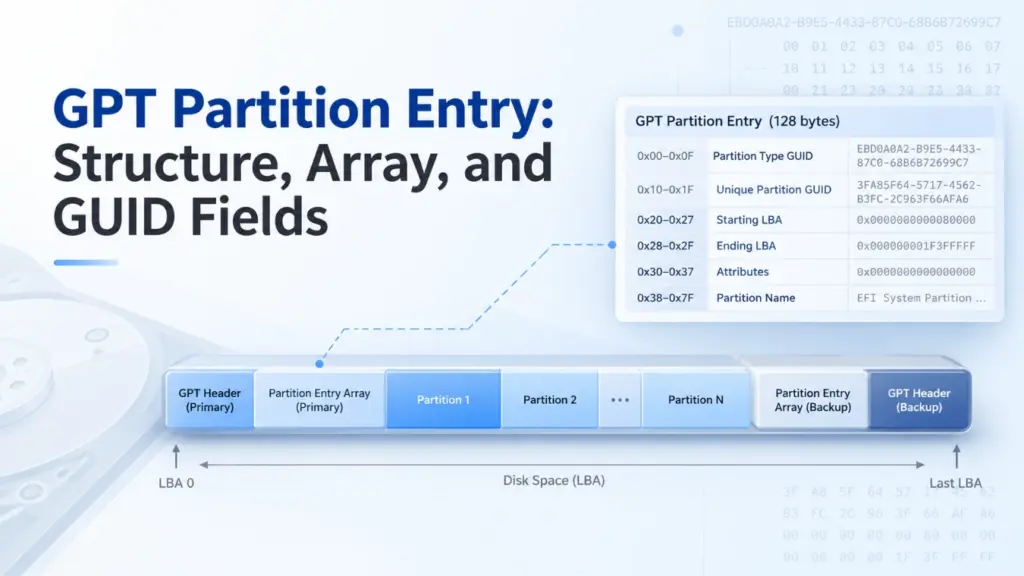
A GPT 파티션 항목 는 GUID 파티션 테이블(GPT) 디스크상의 하나의 파티션을 설명하는 레코드입니다. 이 레코드는 파티션의 유형, 고유 GUID, 시작 및 종료 논리 블록 주소(LBA), 속성 및 이름을 식별합니다. 일반적으로 GPT 파티션 항목 구조 128바이트를 차지합니다. 이 필드들을 디코딩하면 파티션을 찾아내고, 그 크기를 계산하며, 메타데이터가 타당한지 확인할 수 있습니다.
이 가이드는 UEFI 사양 2.10을 따르며, Windows 10, Windows 11 및 Windows Server를 실제 예시로 사용합니다. 기본이 되는 GPT 형식은 다른 호환 운영 체제에도 적용됩니다. 아래에 제시된 모든 바이트 예시는 실제 디스크에서 캡처한 것이 아니라 합성된 것입니다.
목차
GPT 파티션 항목이란 무엇인가요?
A GPT 파티션 항목 파티션의 정체성과 경계를 정의하며, 파티션의 파일은 포함하지 않습니다. 이 구조가 어디에 해당하는지 파악하려면 다음 세 가지 구조를 구분해 보십시오:
구조 | 저장되는 내용 |
GPT 헤더 | 배열 위치, 요소 수 및 크기, 사용 가능한 LBA 범위, 체크섬 |
GPT 파티션 항목 배열 | 사용되지 않은 슬롯을 포함한 일련의 파티션 레코드 |
GPT 파티션 항목 | 한 파티션의 GUID, 경계, 속성 및 이름 |
이 항목은 운영 체제가 특정 논리 블록 영역으로 이동하도록 지시합니다. 해당 영역에는 NTFS, FAT32, exFAT, 다른 파일 시스템 또는 일반적인 파일 시스템이 없는 데이터가 포함될 수 있습니다.
전체 디스크 레이아웃에 대해서는 Amagicsoft의 GUID 파티션 테이블(GPT) 개요.
GPT 파티션 항목 구조: 6개의 필드와 해당 오프셋
UEFI 사양 2.10, 5.3.3절 표준 128바이트를 정의합니다. GPT 파티션 항목 구조:
필드 | 상대적 오프셋 | 길이 | 의미 |
|
| 16바이트 | 지정된 파티션 유형 |
|
| 16바이트 | 이 특정 파티션의 식별자 |
|
| 8바이트 | 첫 번째 논리 블록 |
|
| 8바이트 | 마지막 논리 블록(해당 블록 포함) |
|
| 8바이트 | 64비트 속성 마스크 |
|
| 72바이트 | UTF-16LE 코드 유닛으로 저장된 이름 |
이러한 오프셋은 다음의 시작 부분에서 시작되며 항목 1개, 디스크의 시작 부분이 아닙니다. 또한, 128바이트는 일반적인 항목 크기일 뿐, 유일하게 허용되는 크기는 아닙니다. UEFI 2.10에서는, 파티션 항목 크기 다음과 같아야 한다 128 × 2^n, 비음의 정수 n. 더 큰 항목의 경우, 오프셋을 초과하는 바이트는 0x7F 는 예약되어 있으며 반드시 0이어야 합니다.
두 개의 GUID 필드
PartitionTypeGUID 소프트웨어에 해당 항목이 어떤 종류의 파티션을 나타내는지 알려줍니다. 고유 파티션 GUID 특정 파티션을 식별합니다. 예를 들어, 두 개의 기본 데이터 파티션은 유형 GUID를 공유할 수 있지만, 고유한 파티션 GUID는 공유해서는 안 됩니다.
두 필드 모두 GPT 디스크 식별자가 아닙니다. 디스크 GUID GPT 헤더에 속합니다.
LBA 경계 및 파티션 크기
A GPT 파티션 항목 두 엔드포인트를 모두 부호 없는 리틀 엔디안 64비트 정수로 저장합니다. 왜냐하면 EndingLBA 포괄적인 경우, 블록 수와 용량을 다음과 같이 계산합니다:
블록 수 = 종료 LBA − 시작 LBA + 1
바이트 단위 크기 = 블록 수 × 논리 블록 크기
파티션이 LBA 2048부터 LBA 4095까지 이어지는 경우, 이 파티션은 2,048개의 블록을 차지합니다. 논리 블록 크기가 512바이트인 경우, 이 파티션의 크기는 1 MiB입니다. 논리 블록 크기가 4096바이트인 경우, 이 파티션의 크기는 8 MiB입니다. LBA가 항상 512바이트를 나타낸다고 가정해서는 안 됩니다.
속성 및 파티션 이름
그리고 속성 이 필드에는 64비트 마스크가 저장됩니다. UEFI에서는 비트 0을 ‘필수 파티션(Required Partition)’, 비트 1을 ‘블록 I/O 프로토콜 없음(No Block I/O Protocol)’, 비트 2를 ‘레거시 BIOS 부팅 가능(Legacy BIOS Bootable)’으로 정의합니다. UEFI 2.10에서는 비트 3~47이 예약되어 있으며, 비트 48~63은 파티션 유형에 따라 다르게 사용됩니다.
해당되는 Windows 파티션 유형의 경우, 마이크로소프트의 GPT 파티션 정보 관련 문서 읽기 전용(비트 60), 섀도 복사본(61), 숨김(62), 기본 드라이브 문자 없음(63) 등을 포함한 상위 비트 플래그를 정의합니다. 이러한 Windows의 의미를 모든 파티션 유형에 무분별하게 적용해서는 안 됩니다.
파티션 이름 36개의 UTF-16 코드 유닛(72바이트)으로 구성됩니다. 더 짧은 이름의 경우 널 종결자가 사용됩니다. 중요한 점은, 이 GPT 이름이 파일 시스템 내에 저장된 볼륨 레이블과는 별개라는 것입니다. 읽기 GPT 파티션 항목 그것만으로는 Windows가 마운트된 볼륨에 대해 표시하는 레이블을 결정할 수 없습니다.
GPT 파티션 엔트리 배열의 작동 원리
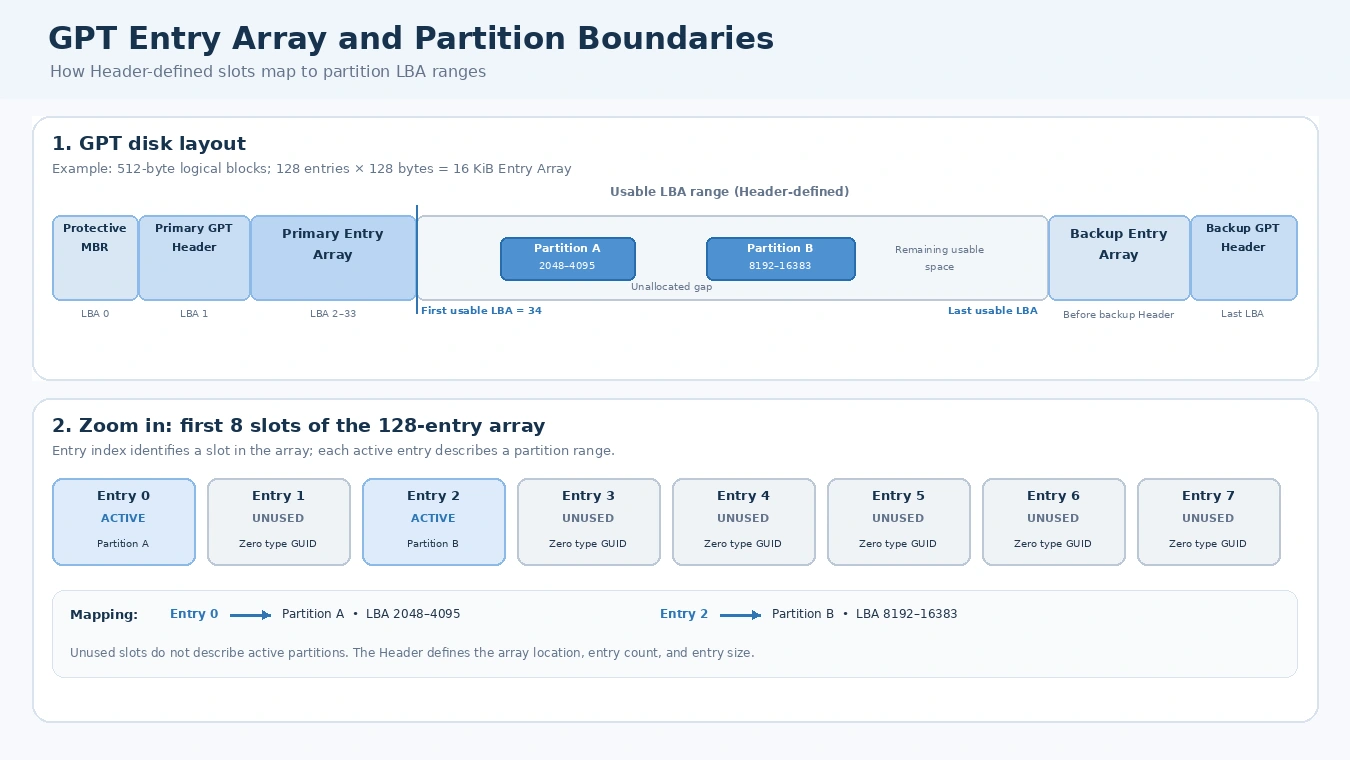
그리고 GPT 파티션 항목 배열 동일한 크기의 슬롯을 연속적으로 포함합니다. 이 디스크의 GPT 헤더에는 다음과 같이 명시되어 있습니다. PartitionEntryLBA, 파티션 항목 수, 및 파티션 항목 크기. 따라서 소프트웨어는 특정 레코드를 확실하게 찾아내기 전에 헤더를 읽어야 합니다.
배열 bytes = 파티션 항목 수 × 파티션 항목 크기
배열 logical blocks = ceiling(배열 bytes ÷ 논리 블록 크기)
UEFI 2.10은 엔트리 어레이(Entry Array)를 위해 최소 16,384바이트의 공간이 필요합니다. 일반적인 구성에서는 각각 128바이트인 128개의 슬롯을 사용합니다. 따라서 512바이트 논리 블록 디스크에서는 32개의 블록을, 4096바이트 디스크에서는 4개의 블록을 차지합니다. 그러나 128은 보편적인 파티션 제한값은 아닙니다. 헤더에서 항목 수를 지정합니다.
사용되지 않은 슬롯의 값은 0입니다. PartitionTypeGUID; 제대로 관리된 배열에서는 나머지 바이트들도 0이어야 합니다. 따라서 사용 가능한 슬롯 128개는 not 즉, 128개의 활성 파티션을 의미합니다.
인덱스를 통해 특정 항목을 찾기
항목 찾기 i, 여기서 i 0부터 시작하려면 다음을 사용하세요:
절대 바이트 오프셋 = (PartitionEntryLBA × 논리 블록 크기) + (i × 파티션 항목 크기)
예를 들어, 다음과 같이 가정해 보자. PartitionEntryLBA = 2, SizeOfPartitionEntry = 128, 및 i = 5.
논리 블록 크기 | 계산된 절대 오프셋 | 디스크상의 위치 |
512바이트 |
| LBA 3, 128번째 바이트 |
4096바이트 |
| LBA 2, 640번째 바이트 |
이는 제시된 예시에 대한 계산 결과일 뿐, 두 개의 실제 장치에 대한 관측 결과가 아닙니다. 동일한 GPT 파티션 항목 장치의 논리 블록 크기가 변경되면 인덱스가 서로 다른 LBA에 위치할 수 있습니다.
주 어레이 및 백업 어레이
일반적인 GPT 디스크는 주 헤더를 LBA 1에, 백업 헤더를 마지막 LBA에 배치합니다. 주 엔트리 어레이는 일반적으로 주 헤더 뒤에 위치하며, 백업 엔트리 어레이는 백업 헤더 앞에 위치합니다. 이들의 위치는 고정된 섹터 범위가 아니라 각 헤더 필드에 의해 결정됩니다.
우리의 GPT 헤더 구조 및 CRC32 안내서 이 문서에서는 이러한 헤더 필드와 두 배열 간의 관계를 자세히 설명합니다.
GPT 파티션 유형 GUID 대 고유 파티션 GUID
A GPT 파티션 유형 GUID 파티션의 용도를 설명합니다. 고유 파티션 GUID는 특정 파티션을 식별하는 반면, 디스크 GUID는 GPT 디스크를 식별합니다. 이 세 가지 식별자는 서로 관련이 있지만 서로 대체할 수는 없습니다.
Common Windows-related type GUIDs include:
Partition type | Type GUID |
EFI 시스템 파티션 |
|
Microsoft Reserved |
|
Microsoft Basic Data |
|
Microsoft Recovery |
|
A type GUID does not directly identify a file system. For example, a Microsoft Basic Data partition could hold NTFS, FAT32, or exFAT. To recognize its file system, software must inspect data inside the partition.
Likewise, not every GPT disk has an EFI System Partition. An ordinary GPT data disk may not need one.
When copying disks, duplicate unique identifiers can also matter. UEFI requires GPT-aware copying software to generate appropriate new Disk GUIDs and Unique Partition GUIDs. A raw clone may preserve identifiers instead, so never assume that an exact copy has newly generated GUIDs.
Decode a GPT Partition Entry from Hex
Here is the article’s worked technical example: a synthetic GPT 파티션 항목 built from the UEFI field layout. It is internally consistent as a single entry, but it is not a complete GPT disk image or a real-world experiment.
필드 | Decoded example |
유형 | Microsoft Basic Data |
Type GUID |
|
Unique GUID |
|
Starting LBA | 2048 |
Ending LBA | 4095 |
속성 |
|
Partition Name |
|
Synthetic Basic Data partition entry, not a WinHex capture or a reading from your device. The entry is internally consistent; no complete disk layout or GPT header CRC is asserted.
Step 1: Decode the type GUID
The first 16 bytes are:
A2 A0 D0 EB E5 B9 33 44 87 C0 68 B6 B7 26 99 C7
The on-disk GUID representation uses little-endian byte order for its first 4-byte, 2-byte, and 2-byte components. Therefore:
A2 A0 D0 EB가EBD0A0A2.E5 B9가B9E5.33 44가4433.- The remaining eight bytes produce
87C0-68B6B72699C7.
The complete value is the Microsoft Basic Data type GUID. See Microsoft’s GUID representation specification for the underlying encoding.
Step 2: Decode the LBA fields
At relative offset 0x20, the bytes 00 08 00 00 00 00 00 00 represent decimal 2048 in little-endian order.
에서 0x28, FF 0F 00 00 00 00 00 00 represents decimal 4095. Therefore, this GPT 파티션 항목 describes 2,048 logical blocks, not 2,047.
If the device exposes 512-byte logical blocks, the starting byte offset equals 2048 × 512 = 1,048,576. If it exposes 4096-byte blocks, the corresponding offset is 8,388,608.
Step 3: Decode attributes and name
The example’s attribute bytes are all zero, so no attribute bits are set. At relative offset 0x38, the name starts with 44 00 41 00 54 00 41 00, which decodes to DATA in UTF-16LE.
A hex editor’s ASCII column may show D.A.T.A. because it treats the zero bytes as nonprintable characters. However, those periods are not part of the partition name.
Together, these steps let you move from raw bytes to a readable GPT 파티션 항목 without treating GUID text, LBA values, and UTF-16LE text as if they shared one encoding.
How to Validate a GPT Partition Entry
A decoded GPT 파티션 항목 is not necessarily a valid description of the disk. Check its fields against the GPT Header and other active entries.
확인 | 확인해야 할 사항 | 중요한 이유 |
Active slot |
| All-zero type marks an unused slot |
LBA order |
| Rejects reversed or empty ranges |
Usable range | Both endpoints fall between | Keeps partitions out of reserved GPT space |
Overlap | Active entries describe disjoint ranges | Avoids conflicting partition descriptions |
Identifiers | Appropriate nonduplicate Unique Partition GUIDs | Avoids identity conflicts |
Reserved bits | Required reserved bits and bytes are zero | Checks compliance with the entry format |
These checks reveal metadata consistency, not the original cause of a failure. A GPT 파티션 항목 is only one part of a broader disk-layout check. A boundary can be invalid even when its two 64-bit fields decode without error.
CRC32 checks cover the whole Entry Array
GPT does not store a CRC32 in each entry. Instead, the Header stores PartitionEntryArrayCRC32, calculated over exactly NumberOfPartitionEntries × SizeOfPartitionEntry bytes. This range includes unused entry slots, but excludes any logical-block padding after the declared array length.
If software modifies a GPT 파티션 항목, it must update the Array CRC32 and then the corresponding Header CRC32. A matching checksum means that the bytes agree with the recorded checksum. It does not prove the partition boundaries, identifiers, or file system are correct.
For a complete integrity review, also compare the primary and backup GPT metadata. However, do not assume that a backup always preserves an older partition layout.
GPT validity is not file-system validity
A GPT 파티션 항목 may accurately point to a partition whose NTFS or exFAT structures are damaged. Conversely, a deleted entry may leave much of the underlying data untouched. The partition table and the file system occupy different structural layers, so they require different checks.
Missing or Corrupted GPT Partition Entry: What Changes?
An unused slot, a deleted partition definition, and a damaged record are not identical:
- Unused: Its type GUID is zero, and a properly cleared slot has zero values in the remaining fields.
- 삭제됨: A partitioning operation removes the definition from the active GPT layout. Depending on what else the operation does, the old file-system data may remain.
- 손상됨: A record contains inaccurate or conflicting information, such as an incorrect LBA boundary or GUID.
Windows may show the affected region as Unallocated or fail to mount a volume. Still, those symptoms alone cannot identify which GPT 파티션 항목 field changed.
A valid backup array can sometimes help determine the intended layout. Yet a normal deletion may update both arrays, and an outdated backup may contain obsolete addresses. Therefore, restoring a record solely because it appears in a backup is unsafe.
If important data is at risk, avoid formatting, initializing, running destructive partition commands, or rewriting GPT metadata before preserving the source. If the drive repeatedly disconnects or reports serious read errors, stop unnecessary access.
GPT Partition Entry vs. MBR Partition Entry
그리고 GPT 파티션 항목 provides more metadata than an MBR partition record, which occupies only 16 bytes.
기능 | GPT | MBR |
Typical entry size | 128 bytes | 16바이트 |
Partition type | 128-bit GUID | 8-bit type code |
Partition identifier | Unique Partition GUID | No equivalent per-entry GUID |
Range | 64-bit starting and ending LBAs | 32-bit starting LBA and sector count |
이름 | UTF-16LE field | No partition-name field |
Built-in metadata redundancy | Primary and backup structures | No built-in backup partition table |
MBR supports extended partitions to provide additional logical volumes. GPT instead uses an array whose slot count is declared in the Header. See the MBR 파티션 테이블 for its record format.
GPT vs. MBR: See the Structural Difference
Compare the disk layouts and inspect the structure of each partition record.
GPT disk layout
Modern structurePrimary and backup metadata; partition records live in arrays.
Common GPT layout. Exact array locations and sizes are defined by the headers.
MBR disk layout
Legacy structureThe first sector contains boot code and four partition-table entries.
Conceptual MBR layout. Extended partitions are optional.
Partition record fields: 128 bytes vs. 16 bytes
Record size at a common scale
At this shared scale, one GPT entry is eight times the size of one MBR entry. The colored field blocks in the two cards below are interactive.
GPT partition entry · 128 bytes (common)
Six defined fields describe type, identity, boundaries, attributes, and name.
MBR partition entry · 16 bytes
Four slots are stored in the MBR sector. Each slot uses a compact legacy record.
What changes when you use GPT instead of MBR?
| 기능 | GPT | MBR |
|---|---|---|
| Record size | 128 bytes is common; Header defines entry size and count. | 16 bytes per entry; four top-level slots in the MBR. |
| Partition type | 128-bit GUID | 8-bit type code |
| 대처 | 64-bit starting and ending LBA | 32-bit starting LBA and sector count |
| Partition count | Depends on the Entry Array size | Four primary-table slots; one may be an extended partition |
| Metadata redundancy | Primary and backup GPT metadata | No built-in backup partition table |
GPT is not simply a larger partition record. It uses a Header-defined array, GUID-based identifiers, 64-bit LBA boundaries, and backup metadata. MBR uses a compact 16-byte record and a four-slot table in the first sector.
Teaching example based on the GPT format defined by UEFI and the legacy MBR partition-record layout. The diagrams summarize structure; they do not read or modify a disk.
결론
A GPT 파티션 항목 connects a partition’s identity to its logical-block range. Its six fields explain what the partition is meant to be, where it resides, and which attributes apply. By combining the GPT 파티션 항목 구조, Header-defined array offsets, GUID decoding, and boundary checks, you can interpret GPT metadata without confusing it with the file system or assuming that a valid CRC32 proves the data is healthy.
자주 묻는 질문
모든 GPT 파티션 항목의 크기가 정확히 128바이트인가요?
128 × 2^n 바이트. 헤더의 파티션 항목 크기 field는 파서에게 실제 크기를 알려줍니다. 따라서 항상 정확히 128바이트씩 앞으로 건너뛰는 파서는 더 큰 항목을 잘못 읽을 수 있습니다.GPT 파티션 항목 배열은 128개 이상의 파티션을 저장할 수 있나요?
GPT 파티션 유형 GUID를 통해 해당 파티션이 NTFS인지 알 수 있나요?
왜 16진수 편집기에서 GUID가 뒤집혀서 표시되나요?
GPT 파티션 이름은 볼륨 레이블과 같은 것인가요?
GPT 파티션 항목이 CRC32 검증을 통과했더라도 잘못된 것일 수 있나요?
GPT 파티션 항목을 삭제하면 파일이 지워지나요?

바실리는 이 분야에서 약 10년간 실무 경험을 쌓은 데이터 복구 전문가입니다. 그는 경력 전반에 걸쳐 삭제된 파일, 포맷된 드라이브, 손실된 파티션 및 RAW 파일 시스템과 관련된 수천 건의 복잡한 사례를 성공적으로 해결했습니다. 그의 전문 지식은 헥스 에디터와 같은 전문 도구를 사용한 수동 복구 방법과 복구 소프트웨어를 사용한 고급 자동화 솔루션을 모두 다룹니다. 바실리의 사명은 IT 전문가와 일반 사용자 모두에게 신뢰할 수 있는 데이터 복구 지식을 제공하여 소중한 디지털 자산을 보호할 수 있도록 돕는 것입니다.