
ReclaiMe 파일 복구 리뷰 및 대체 프로그램
ReclaiMe File Recovery는 삭제된 파일을 복구하고, 포맷된 볼륨에 접근하며, 많은 기본 복구 유틸리티가 지원하지 않는 저장소 구성도 처리할 수 있습니다. Windows, Linux, Mac 파일 시스템 모두에서 작동한다는 점 때문에, 특히 NAS 관리자나 특이한 저장소 형식을 다루는 사용자에게는 고려해 볼 만한 가치가 있습니다.
하지만 폭넓은 호환성에는 장단점이 따릅니다. ReclaiMe는 Windows에서 실행되며, 복구된 파일을 저장하려면 유료 라이선스가 필요하고, 몇 가지 고급 파일 시스템 기능은 더 비싼 ‘Ultimate’ 에디션에서만 사용할 수 있습니다. 단순히 외장 드라이브에서 사진을 삭제한 사용자에게는 이러한 기능들이 불필요할 수 있습니다.
이 ReclaiMe 파일 복구 리뷰에서는 해당 제품의 기능, 가격, 라이선스, 제한 사항 및 일상적인 Windows 파일 복구를 위한 대안을 살펴봅니다. 우리는 동일한 기준을 바탕으로 제품을 비교하고, 공개된 기술 문서를 참고하며, 통제된 비교를 통해 검증되지 않은 주장과 독립적으로 보고된 테스트 결과를 구분합니다.
파일 삭제가 복구 가능성에 어떤 영향을 미치는지에 대한 설명은 당사의 삭제된 파일 복구 가이드. Windows 사용자도 다음을 평가해 볼 수 있습니다. Magic Data Recovery ReclaiMe의 전문 기능이 필요한지 여부를 결정하기 전에.
목차
간단한 평가: ReclaiMe 파일 복구 프로그램, 사용할 가치가 있을까?
ReclaiMe File Recovery는 더 폭넓은 파일 시스템 호환성이 필요한 사용자에게, 특히 Ultimate 에디션의 경우 합리적인 선택지입니다. 하지만 일상적인 Windows 파일 복구 작업에 있어 반드시 가장 가성비가 뛰어난 선택이라고 단정할 수는 없습니다.
귀하의 상황 | 추천 옵션 | 주된 이유 |
Windows에서 실수로 삭제한 파일 | Magic Data Recovery | 무료 복구 수당 및 간편한 업무 절차 |
NTFS 또는 exFAT로 포맷된 드라이브 | 두 제품 중 하나 | 두 문서 모두 이러한 파일 시스템에 대한 지원을 다룹니다. |
APFS 또는 HFS+ 저장소 | ReclaiMe Ultimate | Apple 파일 시스템과의 명시적 호환성 |
BTRFS 또는 XFS 스토리지 | ReclaiMe Ultimate | 문서화된 리눅스 파일 시스템 지원 |
EXT2/3/4 저장소 | 두 제품 중 하나 | 두 제품 모두 EXT를 지원합니다 |
지원되는 NAS 또는 RAID 복구 | ReclaiMe Ultimate | 보다 전문적인 저장소 재구성 옵션 |
물리적 고장 증상이 나타나는 HDD | 전문 복구 서비스 | 반복적인 스캔은 위험을 높일 수 있습니다 |
이러한 권장 사항은 측정된 복구 성능 순위가 아닌, 문서화된 호환성 및 구매 시 고려 사항을 반영한 것입니다.
ReclaiMe 파일 복구란 무엇인가요?
ReclaiMe 파일 복구 이 프로그램은 내장 하드 드라이브, 외장 디스크, USB 플래시 드라이브, 메모리 카드 및 지원되는 고급 저장 장치 구성에서 파일을 복구하도록 설계된 Windows 기반 데이터 복구 애플리케이션입니다.
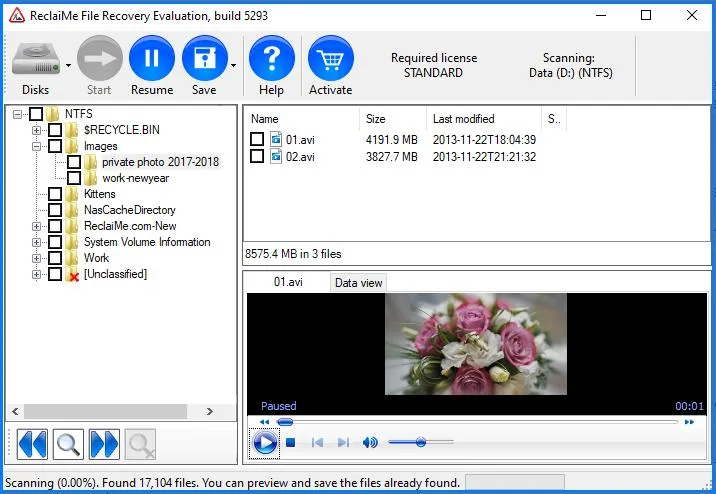
이 소프트웨어는 다음과 같은 여러 유형의 논리적 데이터 손실을 해결합니다:
파일 및 폴더의 실수로 인한 삭제.
빠르게 포맷된 파티션이나 액세스할 수 없는 파티션.
RAW 파일 시스템 오류.
지원되는 Linux 및 Apple 파일 시스템에서 데이터가 손실되었습니다.
특정 NAS 및 RAID 복구 상황.
ReclaiMe는 ‘Standard’와 ‘Ultimate’라는 두 가지 주요 소비자용 에디션을 제공합니다.
Standard 버전은 일반적인 Windows 파일 시스템을 지원합니다. Ultimate 버전은 지원 범위를 여러 Linux, UNIX 및 Apple 파일 형식과 추가적인 스토리지 구성까지 확장합니다.
제품 페이지에 나열된 기능의 수보다 이러한 구분이 더 중요합니다. 예를 들어, APFS 디스크용으로 ‘Standard’ 버전을 구매한다고 해도 ‘Ultimate’ 버전에 포함된 광고된 APFS 지원 기능을 이용할 수 없습니다.
이 제조사는 또한 추가 기능을 갖춘 별도의 전문 제품인 ‘ReclaiMe Pro’도 제공하고 있습니다. 이 제품의 기능은 일반 ‘Standard’ 또는 ‘Ultimate’ 라이선스에 포함된 기능과 혼동해서는 안 됩니다.
ReclaiMe와 Magic Data Recovery를 비교한 이유
이 기사는 시중에 나와 있는 모든 복구 애플리케이션을 순위별로 소개하기보다는, 주로 ReclaiMe에 대한 제품 리뷰를 다루고 있습니다.
Magic Data Recovery를 직접적인 대안으로 포함시킨 이유는, 두 제품 모두 삭제된 파일, 포맷된 볼륨, 접근 불가능한 파일 시스템 등 Windows에서 흔히 발생하는 데이터 손실 상황을 해결해 주기 때문입니다. 또한 두 제품의 라이선스 모델과 고급 호환성 측면에서도 차이가 있어, 이는 구매 결정에 영향을 미칠 수 있습니다.
우리의 선정 기준은 다음과 같았습니다:
두 제품 모두 Windows 기반 복구 기능을 지원해야 합니다.
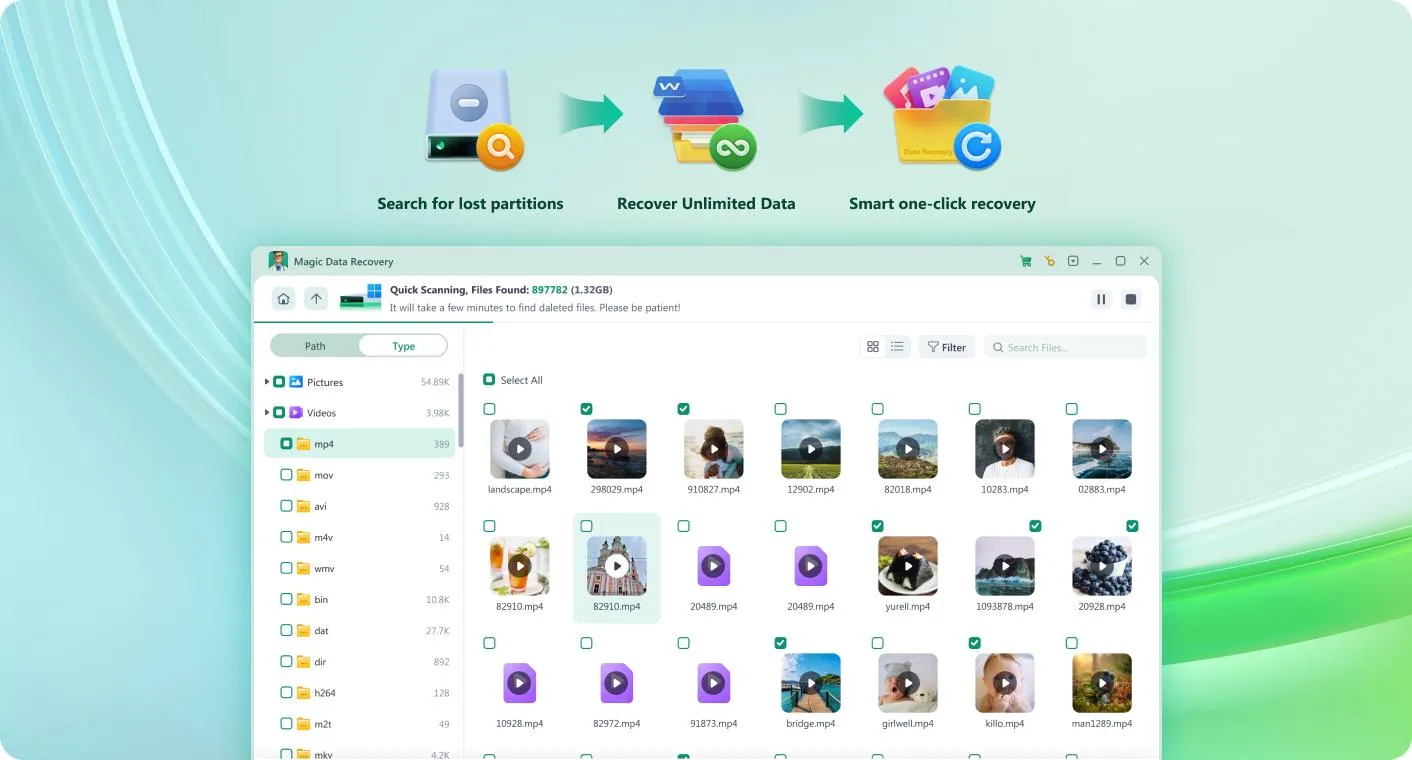
두 가지 모두 스캔 및 파일 미리보기 워크플로를 제공해야 합니다.
두 제품 모두 일반 내장 저장 장치 및 외장 저장 장치에서 데이터를 복구하는 과정을 문서화해야 합니다.
각 제품의 공개된 라이선스, 파일 시스템 지원 현황 및 제한 사항을 비교할 수 있어야 합니다.
본 표에는 Disk Drill, EaseUS, R-Studio, PhotoRec을 포함하지 않았습니다. 해당 제품들도 적합할 수 있지만, 이를 공정하게 평가하려면 동일한 평가 기준을 적용한 보다 광범위한 비교가 필요합니다. 이 제품들이 제외되었다고 해서 복구 능력이 떨어지는 것은 아닙니다.
The purpose here is narrower: determine when ReclaiMe’s specialist features justify its licensing cost, and when a conventional Windows recovery solution is sufficient.
Editorial disclosure: Magic Data Recovery is developed by Amagicsoft, the publisher of this article. This relationship is disclosed separately from the technical evaluation. Neither product receives a performance ranking without comparable test evidence.
ReclaiMe File Recovery vs. Magic Data Recovery: Feature Comparison
The following table uses the same decision criteria for both applications.
Comparison factor | ReclaiMe 파일 복구 | Magic Data Recovery |
Operating platform | Windows | Windows |
삭제된 파일 복구 | 예 | 예 |
포맷된 드라이브 복구 | 예 | 예 |
RAW file-system recovery | 지원되는 시나리오 | 지원되는 시나리오 |
NTFS, FAT, exFAT | 예 | 예 |
ReFS | 예 | 예 |
EXT2/3/4 | 얼티밋 에디션 | 예 |
APFS, HFS+ | 얼티밋 에디션 | Not documented |
XFS, BTRFS | 얼티밋 에디션 | Not documented |
NAS / RAID reconstruction | Selected configurations | No equivalent dedicated reconstruction feature documented |
파일 미리 보기 | 예 | 예 |
Free scanning | 예 | 예 |
Free recovery allowance | No general free save allowance | 500MB |
Main consumer license | Standard / Ultimate | PRO |
Lifetime option | 예 | 예 |
Typical use case | Broad file-system and specialized storage recovery | Common Windows file recovery |
주요 한계 | Windows host, internet requirement, paid recovery | Windows-focused, less specialist NAS compatibility |
The table summarizes officially documented features rather than assuming that every listed feature will work in every incident. For example, support for a file system does not guarantee recovery from a damaged or encrypted device.
ReclaiMe File Recovery Features: What Does It Actually Offer?
1. Deleted File and Folder Recovery
When files are deleted from a hard drive, their contents may remain in storage even after Windows removes the corresponding directory references.
ReclaiMe searches accessible file-system structures and storage data to identify missing files. When sufficient metadata survives, the software may display recognizable filenames and folder paths.
This can be particularly useful when a user accidentally deletes an entire project directory from an NTFS external drive.
However, results depend on the original file system, the amount of subsequent writing, and the storage technology. An SSD affected by TRIM may offer far fewer recovery opportunities than an HDD with unchanged data sectors.
2. Formatted and RAW Drive Recovery
A quick format may remove file-system structures without physically overwriting every file’s content.
ReclaiMe can examine supported formatted volumes and attempt to reconstruct recoverable data.
RAW drives require additional care. A RAW status means Windows cannot identify a usable file system; it does not necessarily indicate mechanical failure.
Avoid formatting the affected drive again or running potentially destructive repairs before attempting to preserve important data.
3. Windows, Mac, and Linux File-System Support
ReclaiMe’s file-system coverage is one of its more meaningful differences from basic Windows recovery software.
파일 시스템 | ReclaiMe Standard | ReclaiMe Ultimate |
FAT / exFAT | 예 | 예 |
NTFS / ReFS | 예 | 예 |
EXT2 / EXT3 / EXT4 | 아니요 | 예 |
XFS / BTRFS | 아니요 | 예 |
HFS / HFS+ | 아니요 | 예 |
APFS / UFS | 아니요 | 예 |
ZFS | 아니요 | 아니요 |
These capabilities should guide the license decision.
For example, a deleted folder on an NTFS disk generally does not require Ultimate. By contrast, recovering a BTRFS volume from a Linux NAS may require its more extensive support.
ReclaiMe runs on Windows even when working with Apple-formatted disks. Mac users therefore need access to a compatible Windows computer and a suitable way to connect the affected storage.
4. NAS and RAID Recovery
ReclaiMe Ultimate supports various NAS configurations, including selected Synology, QNAP, and other network-storage systems.
The manufacturer notes that some RAID cases may require its separate ReclaiMe Free RAID Recovery utility.
This is relevant because a NAS recovery problem can involve two different tasks: reconstructing the storage layout and then recovering files from the reconstructed file system.
An application capable of reading EXT4 or BTRFS does not necessarily provide complete RAID reconstruction.
ReclaiMe also lists unsupported configurations, including some advanced array types and ZFS scenarios. Users should confirm their exact NAS model and disk layout against the compatibility documentation before purchasing.
5. File Preview and Search
ReclaiMe displays discovered folders and files in a navigable interface.
Its search function can help locate missing data by attributes such as filename, type, size, or modification date.
The preview pane supports various image and document formats. For some unsupported formats, the software can display hexadecimal content instead of a conventional preview.
A limitation worth understanding is that a valid-looking preview is evidence of readable content, not proof that every byte of a large file is intact.
For databases, archives, and large videos, integrity checks after saving are particularly important.
ReclaiMe File Recovery Pricing: Standard vs. Ultimate
ReclaiMe offers four principal consumer licensing options. The main purchasing decision involves both file-system compatibility and license duration.
Official prices checked: October 12, 2026.
License | 가격 | Duration | 최상의 대상 |
Standard Limited | $59.95 | 7 days | One-time Windows file recovery |
Standard Lifetime | $89.95 | Lifetime | Repeated Windows recovery needs |
Ultimate Limited | $119.95 | 7 days | One-time recovery from supported advanced file systems |
Ultimate Lifetime | $189.95 | Lifetime | Regular Linux, Mac-formatted disk, or NAS recovery |
The manufacturer describes the shorter licenses as seven-day keys, not automatically renewing monthly subscriptions. The stated prices may also be subject to applicable tax.
Does ReclaiMe Require an Internet Connection
Yes. ReclaiMe’s official purchase page states that the recovery computer must have an internet connection.
This can be a drawback in restricted IT environments or when a computer must remain isolated under organizational security rules.
The manufacturer specifically advises customers not to purchase if they cannot meet this requirement.
Which ReclaiMe License Offers Better Value
For a single NTFS or exFAT incident, Standard Limited is the least expensive advertised option.
Users who expect to run repeated recoveries may find Standard Lifetime more economical, while those handling APFS, BTRFS, XFS, or supported NAS layouts should evaluate Ultimate.
Before buying, confirm that the original file system is supported and that the files you need appear in the trial results.
Magic Data Recovery Pricing: A Windows Alternative
For comparison, Magic Data Recovery uses a different licensing model. It offers a free recovery allowance and paid PRO licenses for unrestricted file recovery.
License | Listed price | Computer limit | Upgrade coverage |
무료 | $0 | 무료 버전 | 최대 500MB 복구 |
PRO 1 Year | $49.95 | 1 PC | 1 year |
PRO Perpetual | $69.95 | 1 PC | Lifetime |
Technician 1 Year | $299.95 | 299 PCs | 1 year |
Technician Perpetual | $399.95 | 299 PCs | Lifetime |
The paid prices above are the offers displayed on the official purchase page at the time of checking. They may change, and the refund policy is subject to its applicable terms rather than an unconditional recovery guarantee.
Price Comparison for Common Windows Recovery
For a Windows user who does not need ReclaiMe Ultimate’s specialist features, the entry-level paid options differ as follows:
Purchasing consideration | ReclaiMe Standard | Magic Data Recovery PRO |
Lower-cost paid option | $59.95 / 7 days | $49.95 / 1 year |
Lifetime license | $89.95 | $69.95 |
Free file recovery | Not generally included | Up to 500 MB |
Published PC limit | Confirm license terms | 1 PC for PRO |
Main compatibility focus | Windows 파일 시스템 | Windows file systems plus EXT2/3/4 |
This price comparison does not establish a recovery-quality winner. It shows that Magic Data Recovery currently offers a lower advertised entry price and a different free-trial benefit for ordinary Windows file loss.
ReclaiMe Ultimate remains relevant when its additional file-system or NAS capabilities are required.
How We Evaluated ReclaiMe File Recovery and Its Alternative
Recovery software deserves more scrutiny than a simple feature checklist. Finding a deleted filename, previewing a photograph, and restoring a complete working file are different outcomes.
For transparency, this article is a documentation-based technical comparison supplemented by published independent testing. It is not a new laboratory benchmark.
평가 기준
We use the following criteria for both products:
Criterion | What we examine | 중요한 이유 |
Platform compatibility | Supported operating systems | Determines whether software can run |
File-system compatibility | NTFS, ReFS, EXT, APFS and others | Determines which storage formats are supported |
복구 시나리오 | Deletion, formatting, RAW volumes | Matches software to the type of loss |
Preview and verification | Search, filters, file previews | Helps assess results before purchasing |
라이선스 | Price, duration, restrictions | Determines the actual purchase cost |
Advanced storage | RAID, NAS, disk images | Matters for more complex incidents |
Recovery evidence | Independently tested file integrity | Would support measured performance conclusions |
The same criteria apply to ReclaiMe and Magic Data Recovery. Features that lack supporting documentation are not assumed to be available.
Evidence Sources and Their Limitations
Three types of evidence inform the comparison.
Official documentation:ReclaiMe’s compatibility matrix, licensing page, and file-preview documentation establish its published capabilities and restrictions. Amagicsoft’s product guide and store provide corresponding details for Magic Data Recovery.
Independent testing:Handy Recovery published a hands-on ReclaiMe review on December 7, 2023. Its reviewer created a test folder containing one JPEG and one PNG file on a D: drive, deleted the folder, and used ReclaiMe’s trial version to search for it.
The reviewer reported that ReclaiMe located the folder and displayed its original name and the two deleted image files. However, the trial restrictions prevented the reviewer from completing and verifying paid recovery in that test.
Editorial assessment:Recommendations about which software fits a particular situation are based on compatibility, workflow, price, and documented limitations. These judgments are not presented as measured recovery results.
What the Published Test Actually Demonstrates
Measurement | Published ReclaiMe observation | Magic Data Recovery |
Test environment | Windows D: drive; exact OS and drive model not fully specified | Windows D: drive; exact OS and drive model not fully specified |
데이터 세트 | One JPEG and one PNG | One JPEG and one PNG |
손실 시나리오 | 실수로 삭제 | 실수로 삭제 |
Found files | Both test images located | Both test images located |
폴더 구조 | Original folder name visible | Original folder name visible |
미리 보기 | Cannot preview | Images visible in trial |
Saved files | Saved files successfully | Saved files successfully |
파일 무결성 | 예 | 예 |
What a Controlled Recovery Test Should Include
For a future laboratory comparison, both products should use the same test media and file dataset.
A reproducible test protocol would include:
Record the Windows version, software version, storage model, interface, and original file system.
Prepare identical datasets containing documents, images, video files, and archives.
Test deletion, quick formatting, and logical file-system damage separately.
Use a restored baseline disk image for every test rather than performing repeated recovery experiments on an increasingly modified drive.
Scan each source without writing recovered content to it.
Record files found, previewable files, files saved successfully, and intact files.
Compare recoverable file hashes with the baseline data where applicable.
Repeat unexpected findings before drawing conclusions.
No numerical recovery results are assigned until such testing actually takes place.
This distinction protects readers from a common misunderstanding: a scan that lists hundreds of files may still fail to reconstruct the files that matter.
ReclaiMe File Recovery: Strengths and Weaknesses
Best for: users needing broad file-system compatibility or supported NAS recovery.
강점
Broader file-system coverage:Ultimate supports APFS, HFS+, BTRFS, XFS, and EXT file systems.
Advanced storage support:Compatible with selected NAS and RAID scenarios, sometimes through a separate utility.
Useful search and preview:Discovered files can be filtered and inspected before licensing.
Flexible license durations:Both short-term and lifetime options are advertised.
제한 사항
Windows-only host:The software cannot run natively on macOS.
Paid saving:Trial users generally cannot save recovered files without a license.
Edition restrictions:Standard does not include several Linux and Apple file systems.
Internet requirement:Recovery requires an internet-connected Windows computer.
Unsupported layouts:Advanced cases such as certain ZFS and RAID configurations fall outside ordinary Ultimate coverage.
ReclaiMe Verdict
ReclaiMe is especially relevant when a storage device uses an advanced file system or supported multi-disk configuration.
Its higher licensing cost may be justified for those cases. However, customers recovering ordinary Windows files should evaluate the trial first rather than assuming that wider compatibility leads to better recovery results.
Magic Data Recovery: Strengths and Weaknesses
Best for: everyday Windows recovery, particularly deletion, formatting, and common file-system problems.
강점
Free recovery allowance:The published free version can restore up to 500 MB.
Multiple recovery scenarios:Supports deleted files, formatted drives, and logical file-loss incidents.
Broad Windows device support:Works with accessible HDDs, SSDs, USB drives, memory cards, and other supported media.
Quick and deep scanning:Provides scanning options for locating missing data.
Familiar recovery workflow:Users select a device, scan, inspect files, and save results to another location.
제한 사항
Windows-focused application:No equivalent native macOS version is documented.
Specialist file-system restrictions:APFS, HFS+, BTRFS, and XFS recovery are not listed as supported capabilities.
No equivalent dedicated RAID reconstruction feature:Connecting a NAS disk to Windows is not the same as reconstructing an entire failed NAS array.
Free allowance is limited:Larger recoveries typically require upgrading.
Physical damage remains outside ordinary DIY recovery:A failing HDD may require professional assistance.
Magic Data Recovery Verdict
Magic Data Recovery offers a practical alternative for Windows users recovering data from conventional storage.
Its free recovery allowance is useful when the missing files are relatively small. The documented scanning and preview workflow also lets users evaluate their storage before committing to a paid version.
For a typical Windows deletion or formatting incident, it is reasonable to try Magic Data Recoverybefore paying for advanced storage features that may not be needed.
Windows 7/8/10/11 및 Windows Server 지원
What Do Independent Reviews and Users Say About ReclaiMe?
Independent reports provide context that product documentation cannot always capture, although they should not be treated as substitutes for controlled benchmarks.
Handy Recovery’s 2023 review reported that ReclaiMe located its small deleted-image dataset and retained the original folder name in the displayed results. Its positive observations concerned the discovery and browsing process, not verification of completed paid recovery.
User feedback also includes advanced-storage examples. A May 2026 Trustpilot reviewer described recovering data from a Synology NAS with a BTRFS-based configuration after a storage-volume problem. That is relevant to ReclaiMe’s specialist positioning, but the report is a self-described customer experience, not independently validated laboratory evidence.
These reports suggest useful scenarios in which ReclaiMe may deserve evaluation. They do not establish that it outperforms every competing utility, nor that similar outcomes are guaranteed on other storage devices.
How to Choose Between ReclaiMe and Magic Data Recovery
The choice becomes clearer once the original storage type and the nature of the loss are identified.
Scenario 1: Deleted Files from a Windows Hard Drive
For a recently deleted folder on an NTFS drive, both products offer relevant recovery functionality.
Magic Data Recovery is worth evaluating first when its free allowance or lower-priced PRO license fits the task. ReclaiMe Standard remains a valid alternative, particularly if its trial preview finds the required files.
Scenario 2: A Formatted USB Flash Drive or SD Card
Both products support common FAT and exFAT storage.
Neither should be assumed to recover data that has already been overwritten. Avoid recording new photographs, copying files, or reformatting the card again before recovery.
Choose based on the scan results, file-preview quality, and actual cost of saving the needed files.
Scenario 3: Files from a Mac-Formatted Drive
If the source uses APFS or HFS+, ReclaiMe Ultimate provides documented support.
The drive must be accessible from a Windows computer running ReclaiMe.
Magic Data Recovery does not currently document equivalent APFS or HFS+ recovery functionality, so it should not be recommended as a direct substitute in this case.
Scenario 4: Lost Data from a Linux Server or NAS
First identify the storage layout.
Both applications document EXT2/3/4 support, but ReclaiMe Ultimate additionally supports XFS and BTRFS as well as selected NAS and RAID configurations.
For a complex multi-disk storage failure, compatibility with the file system alone is insufficient. Preserving the original disks and reconstructing the layout safely may be necessary.
Scenario 5: A Physically Failing Hard Drive
Neither product should be the default first action when the disk clicks, repeatedly disconnects, or cannot be detected reliably.
Further scanning may expose unstable hardware to unnecessary reads.
For irreplaceable data, professional imaging and recovery services may be the more appropriate option.
When Should You Avoid Buying Any Recovery Software?
A recovery purchase is not always necessary or useful.
Check the following before paying:
An intact backup exists:Restore the backup instead of scanning the original drive.
The file is merely hidden or moved:Search alternate folders, user profiles, and cloud storage history.
The storage is physically unstable:Stop repeated scans and consider professional recovery.
The data has been securely erased:Ordinary software cannot reconstruct bytes that no longer remain.
The drive uses unsupported encryption or an unsupported array layout:Verify compatibility before purchasing.
The preview cannot locate critical files:Paying for a license does not normally improve the underlying scan result.
For SSDs, TRIM introduces an additional limitation. Deleted blocks may become unavailable to conventional recovery even without further visible file-writing activity.
When possible, preserve the source media and recover files to a different destination.
How to Use ReclaiMe File Recovery Safely
After confirming that ReclaiMe supports the affected device, the basic workflow is:
Protect the source:Stop using the affected drive and avoid installing software onto it.
Download ReclaiMe:Obtain the installer from the 공식 웹사이트.
Select the storage device:Confirm its identity and capacity before scanning.
Review the results:Search filenames, browse folders, and preview supported files.
Check the license requirement:Select Standard or Ultimate based on the original file system.
Save elsewhere:Recover selected files to a different healthy drive and verify that they open correctly.
This is a brief operational overview rather than a substitute for the manufacturer’s full user documentation.
Conclusion: Is ReclaiMe File Recovery the Best Choice?
ReclaiMe File Recovery is a capable recovery application with a particularly strong documented range of file-system support in its Ultimate edition.
Its main advantages become relevant when the source uses APFS, HFS+, XFS, BTRFS, or a supported NAS configuration. In those situations, ReclaiMe may offer capabilities not documented for simpler Windows recovery utilities.
For conventional Windows data loss, however, broader specialist support is not always a reason to spend more.
Magic Data Recovery provides a focused alternative for recovering deleted files, formatted drives, and missing data from common Windows-accessible storage devices. Its 500 MB free recovery allowance and published PRO license pricing give users a different cost structure to consider.
That is why we recommend evaluating Magic Data Recovery for routine Windows recovery while considering ReclaiMe Ultimate for its more specialized storage compatibility.
Neither tool can guarantee recovery from overwritten sectors, severe physical damage, or unsupported configurations. The safest choice starts with identifying the storage problem, preserving the original data, and inspecting recovery evidence before buying.
For additional practical guidance, visit our 삭제된 파일 복구 가이드.
Windows 7/8/10/11 및 Windows Server 지원
자주 묻는 질문
ReclaiMe 파일 복구 프로그램은 무료로 사용할 수 있나요?
ReclaiMe 파일 복구 프로그램은 안전한가요?
ReclaiMe는 포맷된 하드 드라이브에서 파일을 복구할 수 있나요?
ReclaiMe 파일 복구 프로그램은 Mac에서도 작동하나요?
ReclaiMe Standard와 Ultimate의 차이점은 무엇인가요?
Magic Data Recovery는 ReclaiMe의 좋은 대안일까요?
ReclaiMe는 고장 난 NAS나 RAID에서 데이터를 복구할 수 있나요?
스캔 결과를 확인하기 전에 ReclaiMe를 구매해야 할까요?

Jason는 15년 이상의 실무 경험을 갖춘 데이터 복구 및 기술 지원 전문가입니다. 그는 현장 사용자와 폭넓게 협력하며, 까다로운 데이터 손실 사례를 해결하고, 실수로 인한 삭제, 드라이브 포맷, 파일 시스템 손상, 파티션 손실, 시스템 장애 및 기타 긴급 복구 상황에 대한 실용적인 복구 솔루션을 제공해 왔습니다. 또한 백업 및 복원, 파일 복구, 재해 복구 분야에서도 전문성을 갖추고 있으며, 안전하고 신뢰할 수 있으며 기술적으로 정확한 지침을 제공하는 데 중점을 두고 있습니다.