
Reseña de ReclaiMe File Recovery y alternativas
ReclaiMe File Recovery permite recuperar archivos borrados, acceder a volúmenes formateados y gestionar configuraciones de almacenamiento que muchas utilidades básicas de recuperación no admiten. Su compatibilidad con los sistemas de archivos de Windows, Linux y Mac hace que merezca la pena tenerlo en cuenta, especialmente para los administradores de NAS y los usuarios que trabajan con formatos de almacenamiento poco habituales.
Sin embargo, una amplia compatibilidad conlleva algunas desventajas. ReclaiMe funciona en Windows, requiere una licencia de pago para guardar los archivos recuperados y reserva varios sistemas de archivos avanzados para su edición Ultimate, que es más cara. Para alguien que simplemente haya borrado unas fotos de una unidad externa, esas funciones pueden resultar innecesarias.
En esta reseña de ReclaiMe File Recovery se analizan sus características, precios, licencias, limitaciones y una alternativa para la recuperación diaria de archivos en Windows. Comparamos los productos según los mismos criterios, consultamos la documentación técnica publicada y distinguimos los resultados de pruebas comunicados de forma independiente de las afirmaciones que no han sido verificadas mediante una comparación controlada.
Para obtener una explicación sobre cómo afecta la eliminación de archivos a la posibilidad de recuperación, consulta nuestro guía de recuperación de archivos eliminados. Los usuarios de Windows también pueden probar Magic Data Recovery antes de decidir si necesitan las funciones especializadas de ReclaiMe.
Índice
Opinión rápida: ¿Merece la pena utilizar ReclaiMe File Recovery?
ReclaiMe File Recovery es una opción razonable para los usuarios que necesitan una mayor compatibilidad con los sistemas de archivos, sobre todo con la edición Ultimate. Sin embargo, no es necesariamente la mejor opción en cuanto a relación calidad-precio para la recuperación habitual de archivos en Windows.
Tu situación | Opción recomendada | Motivo principal |
Archivos borrados por error en Windows | Magic Data Recovery | Desgravación fiscal por recuperación y un proceso de trabajo sencillo |
Unidad formateada en NTFS o exFAT | Cualquiera de los dos productos | Ambos documentan la compatibilidad con estos sistemas de archivos |
Almacenamiento APFS o HFS+ | ReclaiMe Ultimate | Compatibilidad explícita con los sistemas de archivos de Apple |
Almacenamiento BTRFS o XFS | ReclaiMe Ultimate | Compatibilidad documentada con sistemas de archivos de Linux |
Almacenamiento EXT2/3/4 | Cualquiera de los dos productos | Ambos admiten EXT |
Recuperación compatible con NAS o RAID | ReclaiMe Ultimate | Opciones más especializadas de almacenamiento y reconstrucción |
Disco duro con síntomas de fallo físico | Servicio profesional de recuperación | Las exploraciones repetidas pueden aumentar el riesgo |
Estas recomendaciones reflejan la compatibilidad documentada y aspectos que deben tenerse en cuenta a la hora de la compra, y no clasificaciones basadas en mediciones del rendimiento de recuperación.
¿Qué es ReclaiMe File Recovery?
ReclaiMe - Recuperación de archivos es una aplicación de recuperación de datos para Windows diseñada para recuperar archivos de discos duros internos, discos externos, memorias USB, tarjetas de memoria y configuraciones de almacenamiento avanzadas compatibles.
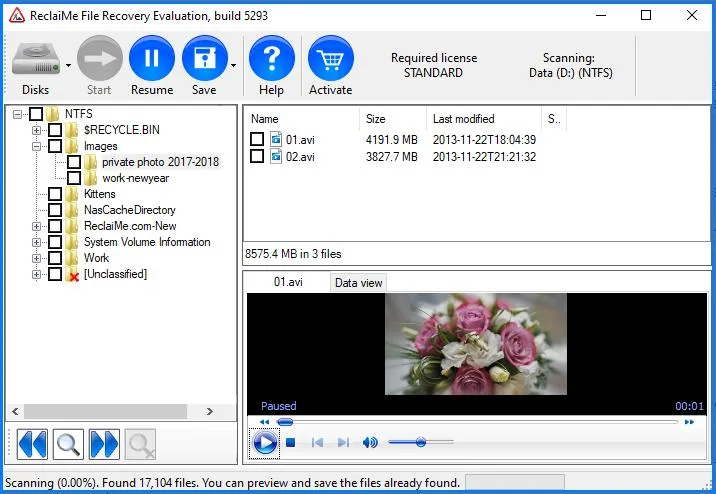
El software aborda varios tipos de pérdida lógica de datos:
Borrado accidental de archivos y carpetas.
Particiones formateadas rápidamente o inaccesibles.
Errores del sistema de archivos RAW.
Datos perdidos en sistemas de archivos compatibles con Linux y Apple.
Ciertas situaciones de recuperación de NAS y RAID.
ReclaiMe ofrece dos ediciones principales para particulares: Standard y Ultimate.
La versión Standard es compatible con los sistemas de archivos habituales de Windows. La versión Ultimate amplía esa compatibilidad a varios formatos de Linux, UNIX y Apple, así como a configuraciones de almacenamiento adicionales.
Esta distinción es más importante que el número de funciones que aparecen en la página del producto. Por ejemplo, si se adquiere la versión Standard para un disco APFS, no se dispondrá de la compatibilidad con APFS anunciada que sí ofrece la versión Ultimate.
El fabricante también ofrece ReclaiMe Pro, un producto especializado independiente con funciones adicionales. Sus características no deben confundirse con las incluidas en las licencias estándar o Ultimate habituales.
Por qué hemos comparado ReclaiMe con Magic Data Recovery
Este artículo es, ante todo, una reseña del producto ReclaiMe, más que una clasificación de todas las aplicaciones de recuperación disponibles.
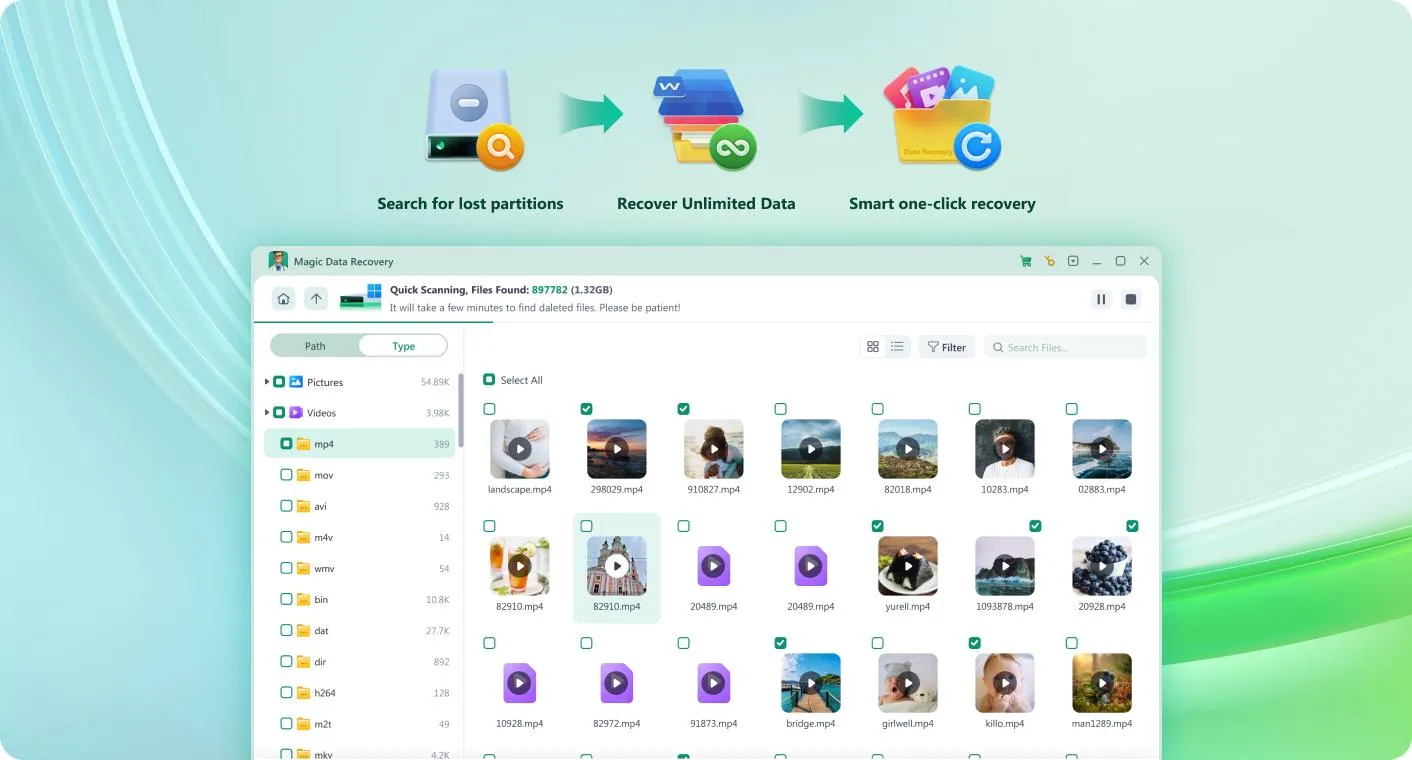
Hemos incluido Magic Data Recovery como alternativa directa, ya que ambos productos abordan situaciones habituales de pérdida de datos en Windows, como archivos borrados, volúmenes formateados y sistemas de archivos inaccesibles. Sus modelos de licencia y su compatibilidad avanzada también difieren en aspectos que pueden influir en la decisión de compra.
Nuestros criterios de selección fueron:
Ambos productos deben ser compatibles con la recuperación basada en Windows.
Ambos deben ofrecer un flujo de trabajo de digitalización y vista previa de archivos.
Ambos deben documentar la recuperación desde medios de almacenamiento internos y extraíbles comunes.
Sus licencias publicadas, la compatibilidad con los sistemas de archivos y sus limitaciones deben estar disponibles para poder compararlas.
No hemos incluido Disk Drill, EaseUS, R-Studio ni PhotoRec en la tabla principal. Es posible que esos productos también sean adecuados, pero para evaluarlos de forma imparcial sería necesario realizar una comparación más amplia utilizando el mismo criterio de evaluación. Su exclusión no implica que su capacidad de recuperación sea inferior.
The purpose here is narrower: determine when ReclaiMe’s specialist features justify its licensing cost, and when a conventional Windows recovery solution is sufficient.
Editorial disclosure: Magic Data Recovery is developed by Amagicsoft, the publisher of this article. This relationship is disclosed separately from the technical evaluation. Neither product receives a performance ranking without comparable test evidence.
ReclaiMe File Recovery vs. Magic Data Recovery: Feature Comparison
The following table uses the same decision criteria for both applications.
Comparison factor | ReclaiMe - Recuperación de archivos | Magic Data Recovery |
Operating platform | Windows | Windows |
Recuperación de archivos eliminados | Sí | Sí |
Recuperación de unidades formateadas | Sí | Sí |
RAW file-system recovery | Escenarios admitidos | Escenarios admitidos |
NTFS, FAT, exFAT | Sí | Sí |
ReFS | Sí | Sí |
EXT2/3/4 | Edición definitiva | Sí |
APFS, HFS+ | Edición definitiva | Not documented |
XFS, BTRFS | Edición definitiva | Not documented |
NAS / RAID reconstruction | Selected configurations | No equivalent dedicated reconstruction feature documented |
Vista previa del archivo | Sí | Sí |
Free scanning | Sí | Sí |
Free recovery allowance | No general free save allowance | 500 MB |
Main consumer license | Standard / Ultimate | PRO |
Lifetime option | Sí | Sí |
Typical use case | Broad file-system and specialized storage recovery | Common Windows file recovery |
Limitación clave | Windows host, internet requirement, paid recovery | Windows-focused, less specialist NAS compatibility |
The table summarizes officially documented features rather than assuming that every listed feature will work in every incident. For example, support for a file system does not guarantee recovery from a damaged or encrypted device.
ReclaiMe File Recovery Features: What Does It Actually Offer?
1. Deleted File and Folder Recovery
When files are deleted from a hard drive, their contents may remain in storage even after Windows removes the corresponding directory references.
ReclaiMe searches accessible file-system structures and storage data to identify missing files. When sufficient metadata survives, the software may display recognizable filenames and folder paths.
This can be particularly useful when a user accidentally deletes an entire project directory from an NTFS external drive.
However, results depend on the original file system, the amount of subsequent writing, and the storage technology. An SSD affected by TRIM may offer far fewer recovery opportunities than an HDD with unchanged data sectors.
2. Formatted and RAW Drive Recovery
A quick format may remove file-system structures without physically overwriting every file’s content.
ReclaiMe can examine supported formatted volumes and attempt to reconstruct recoverable data.
RAW drives require additional care. A RAW status means Windows cannot identify a usable file system; it does not necessarily indicate mechanical failure.
Avoid formatting the affected drive again or running potentially destructive repairs before attempting to preserve important data.
3. Windows, Mac, and Linux File-System Support
ReclaiMe’s file-system coverage is one of its more meaningful differences from basic Windows recovery software.
Sistema de archivos | ReclaiMe Standard | ReclaiMe Ultimate |
FAT / exFAT | Sí | Sí |
NTFS / ReFS | Sí | Sí |
EXT2 / EXT3 / EXT4 | No | Sí |
XFS / BTRFS | No | Sí |
HFS / HFS+ | No | Sí |
APFS / UFS | No | Sí |
ZFS | No | No |
These capabilities should guide the license decision.
For example, a deleted folder on an NTFS disk generally does not require Ultimate. By contrast, recovering a BTRFS volume from a Linux NAS may require its more extensive support.
ReclaiMe runs on Windows even when working with Apple-formatted disks. Mac users therefore need access to a compatible Windows computer and a suitable way to connect the affected storage.
4. NAS and RAID Recovery
ReclaiMe Ultimate supports various NAS configurations, including selected Synology, QNAP, and other network-storage systems.
The manufacturer notes that some RAID cases may require its separate ReclaiMe Free RAID Recovery utility.
This is relevant because a NAS recovery problem can involve two different tasks: reconstructing the storage layout and then recovering files from the reconstructed file system.
An application capable of reading EXT4 or BTRFS does not necessarily provide complete RAID reconstruction.
ReclaiMe also lists unsupported configurations, including some advanced array types and ZFS scenarios. Users should confirm their exact NAS model and disk layout against the compatibility documentation before purchasing.
5. File Preview and Search
ReclaiMe displays discovered folders and files in a navigable interface.
Its search function can help locate missing data by attributes such as filename, type, size, or modification date.
The preview pane supports various image and document formats. For some unsupported formats, the software can display hexadecimal content instead of a conventional preview.
A limitation worth understanding is that a valid-looking preview is evidence of readable content, not proof that every byte of a large file is intact.
For databases, archives, and large videos, integrity checks after saving are particularly important.
ReclaiMe File Recovery Pricing: Standard vs. Ultimate
ReclaiMe offers four principal consumer licensing options. The main purchasing decision involves both file-system compatibility and license duration.
Official prices checked: October 12, 2026.
License | Precio | Duration | Lo mejor para |
Standard Limited | $59.95 | 7 days | One-time Windows file recovery |
Standard Lifetime | $89.95 | Lifetime | Repeated Windows recovery needs |
Ultimate Limited | $119.95 | 7 days | One-time recovery from supported advanced file systems |
Ultimate Lifetime | $189.95 | Lifetime | Regular Linux, Mac-formatted disk, or NAS recovery |
The manufacturer describes the shorter licenses as seven-day keys, not automatically renewing monthly subscriptions. The stated prices may also be subject to applicable tax.
Does ReclaiMe Require an Internet Connection
Yes. ReclaiMe’s official purchase page states that the recovery computer must have an internet connection.
This can be a drawback in restricted IT environments or when a computer must remain isolated under organizational security rules.
The manufacturer specifically advises customers not to purchase if they cannot meet this requirement.
Which ReclaiMe License Offers Better Value
For a single NTFS or exFAT incident, Standard Limited is the least expensive advertised option.
Users who expect to run repeated recoveries may find Standard Lifetime more economical, while those handling APFS, BTRFS, XFS, or supported NAS layouts should evaluate Ultimate.
Before buying, confirm that the original file system is supported and that the files you need appear in the trial results.
Magic Data Recovery Pricing: A Windows Alternative
For comparison, Magic Data Recovery uses a different licensing model. It offers a free recovery allowance and paid PRO licenses for unrestricted file recovery.
License | Listed price | Computer limit | Upgrade coverage |
Gratis | $0 | Edición gratuita | Recuperación de hasta 500 MB |
PRO 1 Year | $49.95 | 1 PC | 1 year |
PRO Perpetual | $69.95 | 1 PC | Lifetime |
Technician 1 Year | $299.95 | 299 PCs | 1 year |
Technician Perpetual | $399.95 | 299 PCs | Lifetime |
The paid prices above are the offers displayed on the official purchase page at the time of checking. They may change, and the refund policy is subject to its applicable terms rather than an unconditional recovery guarantee.
Price Comparison for Common Windows Recovery
For a Windows user who does not need ReclaiMe Ultimate’s specialist features, the entry-level paid options differ as follows:
Purchasing consideration | ReclaiMe Standard | Magic Data Recovery PRO |
Lower-cost paid option | $59.95 / 7 days | $49.95 / 1 year |
Lifetime license | $89.95 | $69.95 |
Free file recovery | Not generally included | Up to 500 MB |
Published PC limit | Confirm license terms | 1 PC for PRO |
Main compatibility focus | Sistemas de archivos de Windows | Windows file systems plus EXT2/3/4 |
This price comparison does not establish a recovery-quality winner. It shows that Magic Data Recovery currently offers a lower advertised entry price and a different free-trial benefit for ordinary Windows file loss.
ReclaiMe Ultimate remains relevant when its additional file-system or NAS capabilities are required.
How We Evaluated ReclaiMe File Recovery and Its Alternative
Recovery software deserves more scrutiny than a simple feature checklist. Finding a deleted filename, previewing a photograph, and restoring a complete working file are different outcomes.
For transparency, this article is a documentation-based technical comparison supplemented by published independent testing. It is not a new laboratory benchmark.
Criterios de evaluación
We use the following criteria for both products:
Criterion | What we examine | Por qué es importante |
Platform compatibility | Supported operating systems | Determines whether software can run |
File-system compatibility | NTFS, ReFS, EXT, APFS and others | Determines which storage formats are supported |
Escenarios de recuperación | Deletion, formatting, RAW volumes | Matches software to the type of loss |
Preview and verification | Search, filters, file previews | Helps assess results before purchasing |
Licencias | Price, duration, restrictions | Determines the actual purchase cost |
Advanced storage | RAID, NAS, disk images | Matters for more complex incidents |
Recovery evidence | Independently tested file integrity | Would support measured performance conclusions |
The same criteria apply to ReclaiMe and Magic Data Recovery. Features that lack supporting documentation are not assumed to be available.
Evidence Sources and Their Limitations
Three types of evidence inform the comparison.
Official documentation:ReclaiMe’s compatibility matrix, licensing page, and file-preview documentation establish its published capabilities and restrictions. Amagicsoft’s product guide and store provide corresponding details for Magic Data Recovery.
Independent testing:Handy Recovery published a hands-on ReclaiMe review on December 7, 2023. Its reviewer created a test folder containing one JPEG and one PNG file on a D: drive, deleted the folder, and used ReclaiMe’s trial version to search for it.
The reviewer reported that ReclaiMe located the folder and displayed its original name and the two deleted image files. However, the trial restrictions prevented the reviewer from completing and verifying paid recovery in that test.
Editorial assessment:Recommendations about which software fits a particular situation are based on compatibility, workflow, price, and documented limitations. These judgments are not presented as measured recovery results.
What the Published Test Actually Demonstrates
Measurement | Published ReclaiMe observation | Magic Data Recovery |
Test environment | Windows D: drive; exact OS and drive model not fully specified | Windows D: drive; exact OS and drive model not fully specified |
Conjunto de datos | One JPEG and one PNG | One JPEG and one PNG |
Escenario de pérdidas | Eliminación accidental | Eliminación accidental |
Found files | Both test images located | Both test images located |
Estructura de carpetas | Original folder name visible | Original folder name visible |
Vista previa | Cannot preview | Images visible in trial |
Saved files | Saved files successfully | Saved files successfully |
Integridad de los archivos | Sí | Sí |
What a Controlled Recovery Test Should Include
For a future laboratory comparison, both products should use the same test media and file dataset.
A reproducible test protocol would include:
Record the Windows version, software version, storage model, interface, and original file system.
Prepare identical datasets containing documents, images, video files, and archives.
Test deletion, quick formatting, and logical file-system damage separately.
Use a restored baseline disk image for every test rather than performing repeated recovery experiments on an increasingly modified drive.
Scan each source without writing recovered content to it.
Record files found, previewable files, files saved successfully, and intact files.
Compare recoverable file hashes with the baseline data where applicable.
Repeat unexpected findings before drawing conclusions.
No numerical recovery results are assigned until such testing actually takes place.
This distinction protects readers from a common misunderstanding: a scan that lists hundreds of files may still fail to reconstruct the files that matter.
ReclaiMe File Recovery: Strengths and Weaknesses
Best for: users needing broad file-system compatibility or supported NAS recovery.
Puntos fuertes
Broader file-system coverage:Ultimate supports APFS, HFS+, BTRFS, XFS, and EXT file systems.
Advanced storage support:Compatible with selected NAS and RAID scenarios, sometimes through a separate utility.
Useful search and preview:Discovered files can be filtered and inspected before licensing.
Flexible license durations:Both short-term and lifetime options are advertised.
Limitaciones
Windows-only host:The software cannot run natively on macOS.
Paid saving:Trial users generally cannot save recovered files without a license.
Edition restrictions:Standard does not include several Linux and Apple file systems.
Internet requirement:Recovery requires an internet-connected Windows computer.
Unsupported layouts:Advanced cases such as certain ZFS and RAID configurations fall outside ordinary Ultimate coverage.
ReclaiMe Verdict
ReclaiMe is especially relevant when a storage device uses an advanced file system or supported multi-disk configuration.
Its higher licensing cost may be justified for those cases. However, customers recovering ordinary Windows files should evaluate the trial first rather than assuming that wider compatibility leads to better recovery results.
Magic Data Recovery: Strengths and Weaknesses
Best for: everyday Windows recovery, particularly deletion, formatting, and common file-system problems.
Puntos fuertes
Free recovery allowance:The published free version can restore up to 500 MB.
Multiple recovery scenarios:Supports deleted files, formatted drives, and logical file-loss incidents.
Broad Windows device support:Works with accessible HDDs, SSDs, USB drives, memory cards, and other supported media.
Quick and deep scanning:Provides scanning options for locating missing data.
Familiar recovery workflow:Users select a device, scan, inspect files, and save results to another location.
Limitaciones
Windows-focused application:No equivalent native macOS version is documented.
Specialist file-system restrictions:APFS, HFS+, BTRFS, and XFS recovery are not listed as supported capabilities.
No equivalent dedicated RAID reconstruction feature:Connecting a NAS disk to Windows is not the same as reconstructing an entire failed NAS array.
Free allowance is limited:Larger recoveries typically require upgrading.
Physical damage remains outside ordinary DIY recovery:A failing HDD may require professional assistance.
Magic Data Recovery Verdict
Magic Data Recovery offers a practical alternative for Windows users recovering data from conventional storage.
Its free recovery allowance is useful when the missing files are relatively small. The documented scanning and preview workflow also lets users evaluate their storage before committing to a paid version.
For a typical Windows deletion or formatting incident, it is reasonable to try Magic Data Recoverybefore paying for advanced storage features that may not be needed.
Compatible con Windows 7/8/10/11 y Windows Server
What Do Independent Reviews and Users Say About ReclaiMe?
Independent reports provide context that product documentation cannot always capture, although they should not be treated as substitutes for controlled benchmarks.
Handy Recovery’s 2023 review reported that ReclaiMe located its small deleted-image dataset and retained the original folder name in the displayed results. Its positive observations concerned the discovery and browsing process, not verification of completed paid recovery.
User feedback also includes advanced-storage examples. A May 2026 Trustpilot reviewer described recovering data from a Synology NAS with a BTRFS-based configuration after a storage-volume problem. That is relevant to ReclaiMe’s specialist positioning, but the report is a self-described customer experience, not independently validated laboratory evidence.
These reports suggest useful scenarios in which ReclaiMe may deserve evaluation. They do not establish that it outperforms every competing utility, nor that similar outcomes are guaranteed on other storage devices.
How to Choose Between ReclaiMe and Magic Data Recovery
The choice becomes clearer once the original storage type and the nature of the loss are identified.
Scenario 1: Deleted Files from a Windows Hard Drive
For a recently deleted folder on an NTFS drive, both products offer relevant recovery functionality.
Magic Data Recovery is worth evaluating first when its free allowance or lower-priced PRO license fits the task. ReclaiMe Standard remains a valid alternative, particularly if its trial preview finds the required files.
Scenario 2: A Formatted USB Flash Drive or SD Card
Both products support common FAT and exFAT storage.
Neither should be assumed to recover data that has already been overwritten. Avoid recording new photographs, copying files, or reformatting the card again before recovery.
Choose based on the scan results, file-preview quality, and actual cost of saving the needed files.
Scenario 3: Files from a Mac-Formatted Drive
If the source uses APFS or HFS+, ReclaiMe Ultimate provides documented support.
The drive must be accessible from a Windows computer running ReclaiMe.
Magic Data Recovery does not currently document equivalent APFS or HFS+ recovery functionality, so it should not be recommended as a direct substitute in this case.
Scenario 4: Lost Data from a Linux Server or NAS
First identify the storage layout.
Both applications document EXT2/3/4 support, but ReclaiMe Ultimate additionally supports XFS and BTRFS as well as selected NAS and RAID configurations.
For a complex multi-disk storage failure, compatibility with the file system alone is insufficient. Preserving the original disks and reconstructing the layout safely may be necessary.
Scenario 5: A Physically Failing Hard Drive
Neither product should be the default first action when the disk clicks, repeatedly disconnects, or cannot be detected reliably.
Further scanning may expose unstable hardware to unnecessary reads.
For irreplaceable data, professional imaging and recovery services may be the more appropriate option.
When Should You Avoid Buying Any Recovery Software?
A recovery purchase is not always necessary or useful.
Check the following before paying:
An intact backup exists:Restore the backup instead of scanning the original drive.
The file is merely hidden or moved:Search alternate folders, user profiles, and cloud storage history.
The storage is physically unstable:Stop repeated scans and consider professional recovery.
The data has been securely erased:Ordinary software cannot reconstruct bytes that no longer remain.
The drive uses unsupported encryption or an unsupported array layout:Verify compatibility before purchasing.
The preview cannot locate critical files:Paying for a license does not normally improve the underlying scan result.
For SSDs, TRIM introduces an additional limitation. Deleted blocks may become unavailable to conventional recovery even without further visible file-writing activity.
When possible, preserve the source media and recover files to a different destination.
How to Use ReclaiMe File Recovery Safely
After confirming that ReclaiMe supports the affected device, the basic workflow is:
Protect the source:Stop using the affected drive and avoid installing software onto it.
Download ReclaiMe:Obtain the installer from the sitio web oficial.
Select the storage device:Confirm its identity and capacity before scanning.
Review the results:Search filenames, browse folders, and preview supported files.
Check the license requirement:Select Standard or Ultimate based on the original file system.
Save elsewhere:Recover selected files to a different healthy drive and verify that they open correctly.
This is a brief operational overview rather than a substitute for the manufacturer’s full user documentation.
Conclusion: Is ReclaiMe File Recovery the Best Choice?
ReclaiMe File Recovery is a capable recovery application with a particularly strong documented range of file-system support in its Ultimate edition.
Its main advantages become relevant when the source uses APFS, HFS+, XFS, BTRFS, or a supported NAS configuration. In those situations, ReclaiMe may offer capabilities not documented for simpler Windows recovery utilities.
For conventional Windows data loss, however, broader specialist support is not always a reason to spend more.
Magic Data Recovery provides a focused alternative for recovering deleted files, formatted drives, and missing data from common Windows-accessible storage devices. Its 500 MB free recovery allowance and published PRO license pricing give users a different cost structure to consider.
That is why we recommend evaluating Magic Data Recovery for routine Windows recovery while considering ReclaiMe Ultimate for its more specialized storage compatibility.
Neither tool can guarantee recovery from overwritten sectors, severe physical damage, or unsupported configurations. The safest choice starts with identifying the storage problem, preserving the original data, and inspecting recovery evidence before buying.
For additional practical guidance, visit our guía de recuperación de archivos eliminados.
Compatible con Windows 7/8/10/11 y Windows Server
Preguntas frecuentes
¿El uso de ReclaiMe File Recovery es gratuito?
¿Es seguro el programa ReclaiMe File Recovery?
¿Puede ReclaiMe recuperar archivos de un disco duro formateado?
¿Funciona ReclaiMe File Recovery en Mac?
¿Cuál es la diferencia entre ReclaiMe Standard y Ultimate?
¿Es Magic Data Recovery una buena alternativa a ReclaiMe?
¿Puede ReclaiMe recuperar datos de un NAS o un RAID averiado?
¿Debería comprar ReclaiMe antes de consultar los resultados del análisis?

Jason es un especialista en recuperación de datos y asistencia técnica con más de 15 años de experiencia práctica. Ha trabajado intensamente con usuarios finales, resolviendo casos complejos de pérdida de datos y ofreciendo soluciones prácticas de recuperación para eliminaciones accidentales, unidades formateadas, sistemas de archivos dañados, particiones perdidas, fallos del sistema y otras situaciones de emergencia relacionadas con la recuperación. Su experiencia también abarca las copias de seguridad y la restauración, la reparación de archivos y la recuperación ante desastres, con especial énfasis en ofrecer una orientación segura, fiable y técnicamente precisa.