
콘텐츠로 건너뛰기
아매직소프트 로고 아이콘
  • 홈
  • 제품
    • Magic Data Recovery
    • Magic Recovery Key
  • 스토어
  • 블로그
  • 자세히 보기
    • 아마직소프트 소개
    • 문의하기
    • 개인정보 보호정책
    • 약관
    • 라이선스 계약
    • 환불 정책
  • 한국어
    • English
    • 日本語
    • Deutsch
    • Français
    • 繁體中文
Wiki

데이터 유효성 검사

2025년 11월 30일 Eddie Data Validation에 댓글 닫힘
데이터 유효성 검사

목차

Data Quality Problems Start at the Input

Many systems fail long before disks or applications break.
They fail quietly when a form accepts the wrong date, a script writes an invalid ID, or a backup job logs “success” with incomplete values.

Those small errors travel into reports, dashboards, and even recovery workflows.
Data validation stops that drift by checking each value against clear technical rules before it enters your core datasets.
what is Data Validation


Core Idea Behind Data Validation

Data validation means checking incoming data for accuracy, completeness, and consistency before storage or processing.
You can run these checks at the UI, the API, the ETL pipeline, or directly in the database.

Typical goals:

  • Reject clearly invalid values

  • Flag suspicious or incomplete records

  • Normalize formats into predictable patterns

  • Protect downstream systems from bad input

Instead of trusting every value, your systems challenge each one, then accept, correct, or reject it in a controlled way.

Types of Validation Rules and Their Role

You rarely rely on a single rule.
Most implementations combine several validation types to cover different risks.

Validation Type초점Simple Example
Format / SyntaxStructure of a valueEmail must contain “@” and domain
Range / LimitNumeric or date boundariesAge between 0 and 120
Referential / LookupRelationship to other dataOrder uses an existing customer ID
Business LogicDomain-specific conditionsEnd date occurs after start date

Together, these rules form a safety net around critical fields such as IDs, timestamps, and amounts.

 Where Validation Lives: UI, Services, and Storage

Robust systems do not rely on a single validation layer.
They combine checks at multiple points in the flow.

On the User Interface

  • Forms enforce required fields and formats.

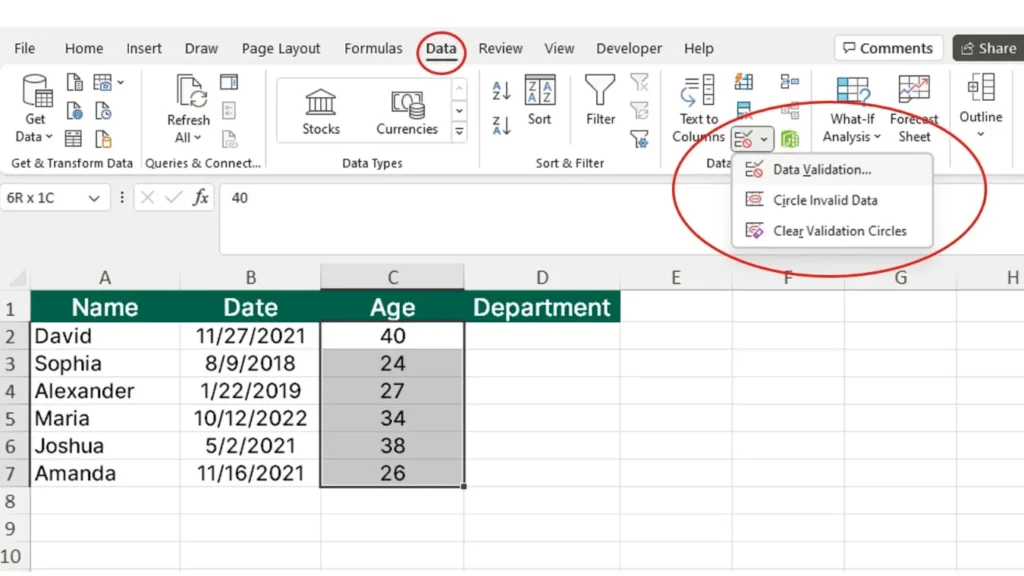
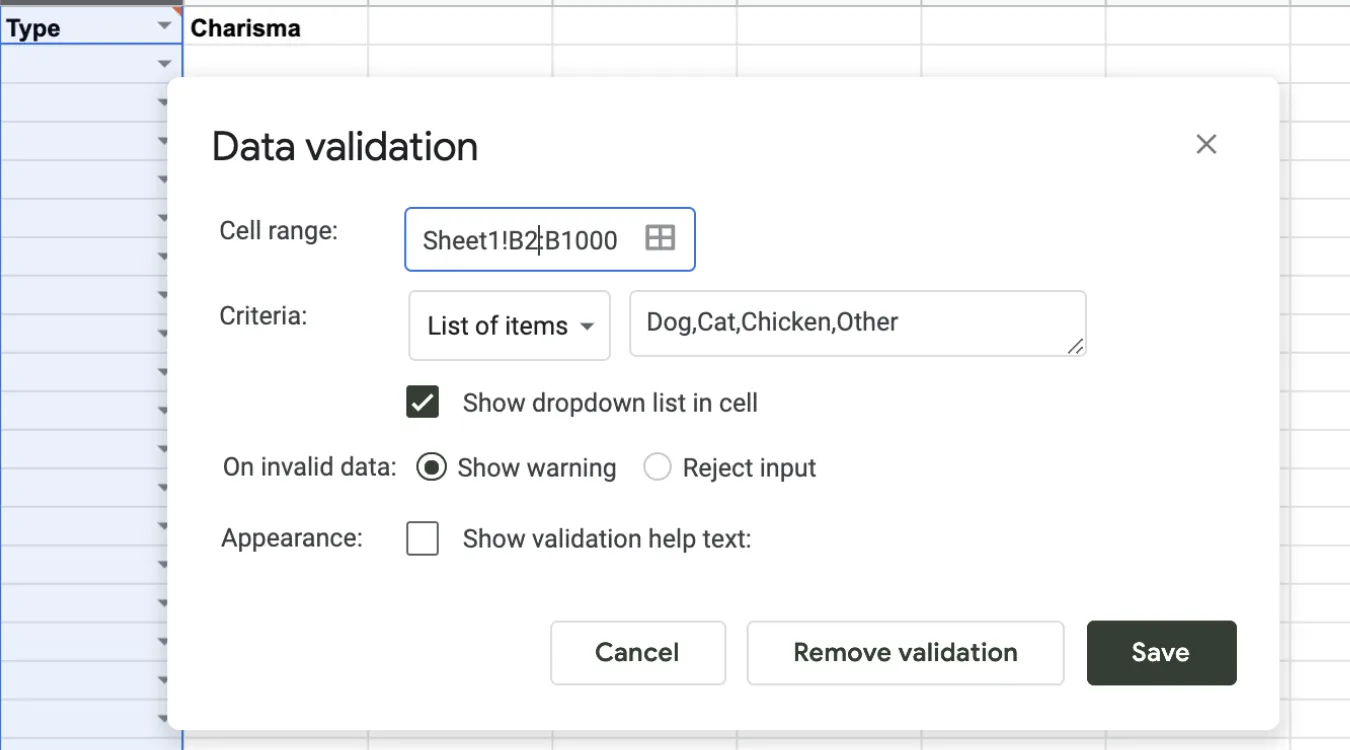
  • Dropdown lists limit choices to valid items.

  • Real-time hints steer users toward valid input.

You reduce simple mistakes early, but you still treat the UI as untrusted because automation and scripts can bypass it.

In APIs and Services

  • REST or RPC endpoints validate payload structure and types.

  • Services apply business rules and permissions.

  • Central logic keeps behavior consistent across clients.

This layer protects internal data even when new front ends appear.

Inside Databases and ETL Jobs

  • Database constraints, triggers, and check clauses enforce strict rules.

  • ETL processes validate imported files and log rejected rows.

  • Batch jobs reconcile aggregates to catch missing or duplicated data.

This deeper layer guards long-term storage, where corrupted values matter most.

Implementing Validation in SQL and Storage Systems

Relational databases provide strong tools for validation close to the data.
You can combine them with application-level checks for better coverage.

Common mechanisms:

  • Data types: use the most specific type (DATE, INT, DECIMAL) instead of generic strings.

  • CHECK constraints: enforce ranges or patterns on columns.

  • FOREIGN KEY constraints: guarantee valid relationships between tables.

  • UNIQUE constraints: prevent duplicate keys or identifiers.

For log and backup catalog tables that support tools such as Amagicsoft 데이터 복구, these constraints ensure that job records, paths, and timestamps remain trustworthy during audits or incident analysis.

Magic Data Recovery 다운로드

Windows 7/8/10/11 및 Windows Server 지원


Practical Steps for a Data Validation Workflow

A systematic approach keeps validation maintainable and auditable.

  1. Define the contract
    List required fields, allowed ranges, formats, and relationships for each dataset.

  2. Map rules to layers
    Decide which checks run in the UI, which live in the API, and which belong in the database.

  3. Implement and centralize business rules
    Use reusable functions, shared libraries, or stored procedures so multiple services follow identical logic.

  4. Log failures and anomalies
    Log every rejection with reasons. Over time, patterns highlight weak inputs or misunderstood rules.

  5. Test regularly
    Create test cases with valid, borderline, and invalid values to confirm that rules behave as intended.


Data Validation in Backup and Recovery Contexts

For backup, archive, and 데이터 복구 workflows, validation supports both safety and traceability.

Examples:

  • Backup jobs validate source paths and schedules before running.

  • Recovery tools validate destination volumes and free space before restoring.

  • Catalogs validate job statuses and sizes so reports match reality.

Amagicsoft 데이터 복구, for instance, benefits from accurate job metadata.
When logs and paths pass validation, technicians can filter and interpret scan results correctly and reduce the chance of restoring to the wrong location.

Windows 7/8/10/11 및 Windows Server를 지원합니다.

Magic Data Recovery 다운로드

Windows 7/8/10/11 및 Windows Server 지원

Summary for Practitioners

Data validation converts vague assumptions about “clean data” into explicit, testable rules.
Those rules shield analytics, compliance work, and recovery operations from silent corruption.

By distributing checks across UI, services, and storage, and by logging every failure, you gain both higher quality and better forensic visibility.
The result: fewer surprises when you need reliable data the most.

자주 묻는 질문


What do you mean by data validation?

Data validation means checking data against defined rules before you accept it into a system. Rules cover formats, ranges, relationships, and business logic. You can validate values at the user interface, in APIs, and in the database so only accurate, consistent, and complete records move forward into storage and analytics.

What are the four types of data validation?

Many teams group validation into four broad types. Format checks confirm structure, such as date or email patterns. Range checks verify minimum and maximum limits. Referential checks ensure related records exist. Business rule checks enforce domain-specific logic, such as allowed status transitions or consistent date ordering between fields.

What does validation data do?

Validation data refers to the subset of records that you use to test rules or models. In applications, it shows whether current validation logic catches real-world errors without blocking correct input. In machine learning, it helps tune models without touching training or test sets, so you avoid overfitting and keep performance estimates realistic.

What is data validation in SQL?

In SQL, data validation relies on data types, constraints, and relationships defined inside the schema. You enforce ranges with CHECK constraints, uniqueness with UNIQUE keys, and relationships with FOREIGN KEY constraints. These rules stop invalid rows at the database boundary and protect downstream queries, reports, and integrations from corrupt values.

In SQL, data validation relies on data types, constraints, and relationships defined inside the schema. You enforce ranges with CHECK constraints, uniqueness with UNIQUE keys, and relationships with FOREIGN KEY constraints. These rules stop invalid rows at the database boundary and protect downstream queries, reports, and integrations from corrupt values.

The main purpose of validation is to protect decisions and processes from bad data. By stopping incorrect, incomplete, or inconsistent values early, you prevent faulty analytics, broken workflows, and misleading reports. Effective validation preserves trust in dashboards, audits, and recovery logs without forcing constant manual correction later.

What are the 4 levels of validation?

A practical four-level view includes field-level, record-level, cross-record, and system-level validation. Field-level checks single values, record-level checks relationships within one row, cross-record validation checks duplicates or sequence rules, and system-level validation compares aggregates, totals, or reconciliation reports across entire datasets and periods.

How do you validate data?

You validate data by defining rules, implementing checks at key entry points, and monitoring failures. Start with clear formats and ranges, then add business logic and referential integrity. Apply rules in the UI, in service layers, and in databases, and log rejected records along with reasons so you can refine the rules over time.

Why is data validation needed?

Data validation prevents small entry errors from turning into costly business mistakes. Without it, you risk incorrect invoices, broken backups, misleading KPIs, and unreliable recovery plans. Validation also supports compliance and auditing, because you can demonstrate that systems checked and controlled input according to documented rules.

What is an example of validation?

A simple example appears in a signup form. The system checks that an email address contains a valid structure, a password meets complexity rules, and a required checkbox confirms consent. Only when all rules pass does the application create the account and write a new record into the user database.

What are the three steps of data validation?

A three-step summary works well for many projects. First, define the validation rules based on business and technical requirements. Second, implement those rules across input forms, services, and databases. Third, monitor and refine by reviewing error logs, user feedback, and edge cases so the rules stay accurate as systems evolve.
  • WiKi
Eddie

Eddie는 컴퓨터 업계의 여러 유명 회사에서 10년 이상 근무한 경력을 가진 IT 전문가입니다. 그는 모든 프로젝트에 심도 있는 기술 지식과 실용적인 문제 해결 기술을 제공합니다.

글 탐색

이전 게시물
다음

검색

카테고리

  • 비트 로커 복구
  • 삭제된 파일 복구
  • 포맷 파일 복구
  • 하드 드라이브 복구
  • 라이선스 키 복구
  • 손실된 파일 복구
  • 메모리 카드 복구
  • 뉴스
  • 사진 복구
  • SSD 복구
  • 분류
  • USB 드라이브 복구
  • 사용자 가이드
  • Wiki

최근 게시물

  • 외장 하드 드라이브로서 SSD의 장단점
    외장 하드 드라이브로서 SSD의 장단점
  • Mac 컴퓨터에서 대상 디스크 모드 및 공유 모드를 사용하는 방법
    Mac 컴퓨터에서 대상 디스크 모드 및 공유 모드를 사용하는 방법: 전체 가이드
  • 중복 파일 찾기
    중복 파일 찾기

태그

방법 Magic Data Recovery Magic Recovery Key WiKi

관련 게시물

중복 파일 찾기
Wiki

중복 파일 찾기

2025년 12월 2일 Eddie 아직 댓글이 없습니다

목차 중복 파일은 실제 백업이 아닙니다 많은 사용자가 문서를 새 폴더나 외장 드라이브로 드래그하여 “추가 안전” 사본을 보관하는데, 시간이 지나면 이러한 사본이 늘어나 보호는커녕 오히려 혼란만 가중시킵니다. 중복 파일은 저장 공간을 낭비하고 백업 속도를 저하시키며 데이터 복구를 더욱 복잡하게 만듭니다. 중복 파일 찾기는 중복 사본을 식별하는 데 도움이 되므로 [...]

컨텍스트 전환
Wiki

컨텍스트 전환

2025년 12월 2일 Eddie 아직 댓글이 없습니다

목차 공유 리소스로서의 CPU 시간 최신 운영 체제는 수십 또는 수백 개의 활성 스레드를 저글링합니다.CPU 코어가 몇 개만 존재하므로 대부분의 스레드는 작은 하위 집합이 실행되는 동안 대기열에서 대기합니다. 컨텍스트 전환을 통해 스케줄러는 실행 중인 스레드 하나를 일시 중지하고 다른 스레드를 다시 시작할 수 있습니다.이 빠른 전환은 병렬 처리의 착각을 불러일으킵니다 [...]

데이터 수집
Wiki

데이터 수집

2025년 12월 2일 Eddie 아직 댓글이 없습니다

목차 인시던트 장면: 인시던트가 발생하면 가장 먼저 라이브 시스템을 “둘러보는” 경우가 많은데, 계획되지 않은 클릭, 루트 로그인 또는 파일 복사로 인해 타임스탬프, 로그, 할당되지 않은 공간이 변경될 수 있으며 깨끗한 상태를 기록하기 전에 변경될 수 있습니다. 데이터 수집은 이 문제를 해결하며, 통제된 [...]에서 데이터를 수집하는 데 중점을 둡니다.

아매직소프트 로고 아이콘

당사의 비전은 사용자에게 최고 수준의 제품과 서비스를 제공하는 세계적으로 유명한 소프트웨어 브랜드 및 서비스 제공업체가 되는 것입니다.

제품
  • Magic Data Recovery
  • Magic Recovery Key
정책
  • 약관
  • 개인정보 보호정책
  • 환불 정책
  • 라이선스 계약
회사
  • 아마직소프트 소개
  • 문의하기
  • 스토어
팔로우하기

저작권 © 2025 아마직소프트. 모든 권리 보유.

  • 약관
  • 개인정보 보호정책

