
Zum Inhalt springen
amagicsoft Logo-Symbol
  • Startseite
  • Produkte
    • Magic Data Recovery
    • Magic Recovery Key
  • Laden Sie
  • Blog
  • Mehr
    • Über Amagicsoft
    • Kontakt US
    • Datenschutzbestimmungen
    • Bedingungen
    • Lizenzvereinbarung
    • Erstattungspolitik
  • Deutsch
    • English
    • 日本語
    • 한국어
    • Français
    • 繁體中文
Wiki

Validierung von Daten
30. November 2025 Eddie Kommentare deaktiviert für Data Validation
Validierung von Daten

Inhaltsübersicht

Data Quality Problems Start at the Input

Many systems fail long before disks or applications break.
They fail quietly when a form accepts the wrong date, a script writes an invalid ID, or a backup job logs “success” with incomplete values.

Those small errors travel into reports, dashboards, and even recovery workflows.
Data validation stops that drift by checking each value against clear technical rules before it enters your core datasets.
what is Data Validation


Core Idea Behind Data Validation

Data validation means checking incoming data for accuracy, completeness, and consistency before storage or processing.
You can run these checks at the UI, the API, the ETL pipeline, or directly in the database.

Typical goals:

  • Reject clearly invalid values

  • Flag suspicious or incomplete records

  • Normalize formats into predictable patterns

  • Protect downstream systems from bad input

Instead of trusting every value, your systems challenge each one, then accept, correct, or reject it in a controlled way.

Types of Validation Rules and Their Role

You rarely rely on a single rule.
Most implementations combine several validation types to cover different risks.

Validation TypeSchwerpunktSimple Example
Format / SyntaxStructure of a valueEmail must contain “@” and domain
Range / LimitNumeric or date boundariesAge between 0 and 120
Referential / LookupRelationship to other dataOrder uses an existing customer ID
Business LogicDomain-specific conditionsEnd date occurs after start date

Together, these rules form a safety net around critical fields such as IDs, timestamps, and amounts.

 Where Validation Lives: UI, Services, and Storage

Robust systems do not rely on a single validation layer.
They combine checks at multiple points in the flow.

On the User Interface

  • Forms enforce required fields and formats.

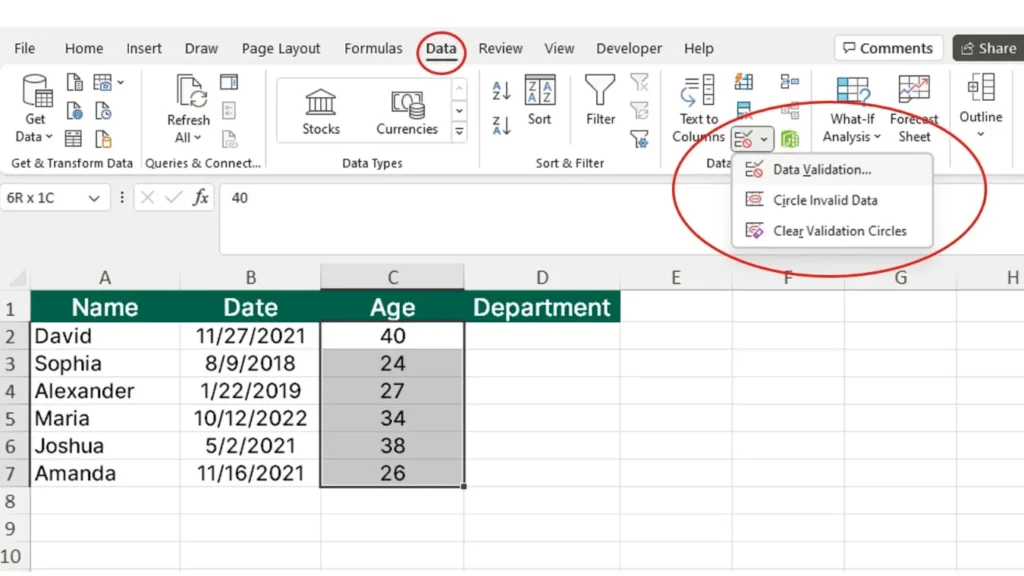
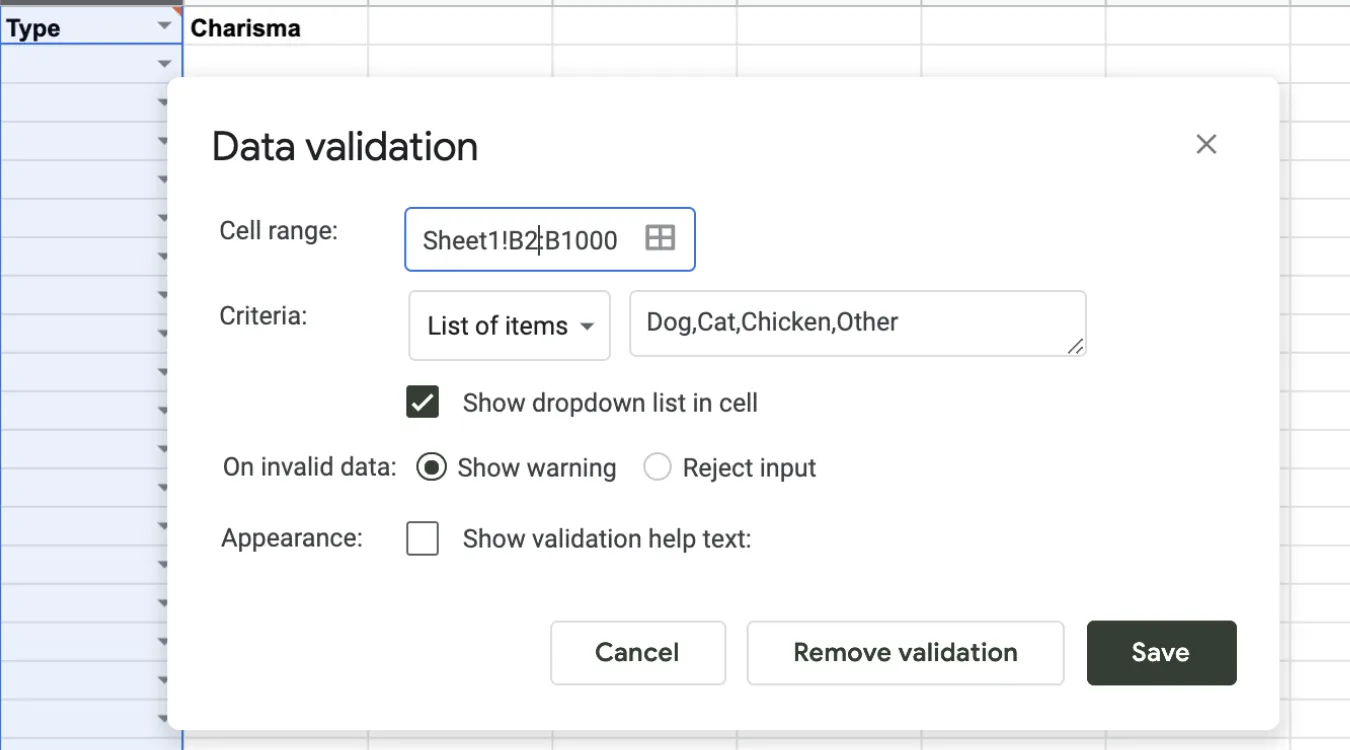
  • Dropdown lists limit choices to valid items.

  • Real-time hints steer users toward valid input.

You reduce simple mistakes early, but you still treat the UI as untrusted because automation and scripts can bypass it.

In APIs and Services

  • REST or RPC endpoints validate payload structure and types.

  • Services apply business rules and permissions.

  • Central logic keeps behavior consistent across clients.

This layer protects internal data even when new front ends appear.

Inside Databases and ETL Jobs

  • Database constraints, triggers, and check clauses enforce strict rules.

  • ETL processes validate imported files and log rejected rows.

  • Batch jobs reconcile aggregates to catch missing or duplicated data.

This deeper layer guards long-term storage, where corrupted values matter most.

Implementing Validation in SQL and Storage Systems

Relational databases provide strong tools for validation close to the data.
You can combine them with application-level checks for better coverage.

Common mechanisms:

  • Data types: use the most specific type (DATE, INT, DECIMAL) instead of generic strings.

  • CHECK constraints: enforce ranges or patterns on columns.

  • FOREIGN KEY constraints: guarantee valid relationships between tables.

  • UNIQUE constraints: prevent duplicate keys or identifiers.

For log and backup catalog tables that support tools such as Amagicsoft Datenrettung, these constraints ensure that job records, paths, and timestamps remain trustworthy during audits or incident analysis.

Herunterladen Magic Data Recovery

Unterstützt Windows 7/8/10/11 und Windows Server


Practical Steps for a Data Validation Workflow

A systematic approach keeps validation maintainable and auditable.

  1. Define the contract
    List required fields, allowed ranges, formats, and relationships for each dataset.

  2. Map rules to layers
    Decide which checks run in the UI, which live in the API, and which belong in the database.

  3. Implement and centralize business rules
    Use reusable functions, shared libraries, or stored procedures so multiple services follow identical logic.

  4. Log failures and anomalies
    Log every rejection with reasons. Over time, patterns highlight weak inputs or misunderstood rules.

  5. Test regularly
    Create test cases with valid, borderline, and invalid values to confirm that rules behave as intended.


Data Validation in Backup and Recovery Contexts

For backup, archive, and Datenwiederherstellung workflows, validation supports both safety and traceability.

Beispiele:

  • Backup jobs validate source paths and schedules before running.

  • Recovery tools validate destination volumes and free space before restoring.

  • Catalogs validate job statuses and sizes so reports match reality.

Amagicsoft Datenrettung, for instance, benefits from accurate job metadata.
When logs and paths pass validation, technicians can filter and interpret scan results correctly and reduce the chance of restoring to the wrong location.

Unterstützt Windows 7/8/10/11 und Windows Server.

Herunterladen Magic Data Recovery

Unterstützt Windows 7/8/10/11 und Windows Server

Summary for Practitioners

Data validation converts vague assumptions about “clean data” into explicit, testable rules.
Those rules shield analytics, compliance work, and recovery operations from silent corruption.

By distributing checks across UI, services, and storage, and by logging every failure, you gain both higher quality and better forensic visibility.
The result: fewer surprises when you need reliable data the most.

Häufig gestellte Fragen


What do you mean by data validation?

Data validation means checking data against defined rules before you accept it into a system. Rules cover formats, ranges, relationships, and business logic. You can validate values at the user interface, in APIs, and in the database so only accurate, consistent, and complete records move forward into storage and analytics.

What are the four types of data validation?

Many teams group validation into four broad types. Format checks confirm structure, such as date or email patterns. Range checks verify minimum and maximum limits. Referential checks ensure related records exist. Business rule checks enforce domain-specific logic, such as allowed status transitions or consistent date ordering between fields.

What does validation data do?

Validation data refers to the subset of records that you use to test rules or models. In applications, it shows whether current validation logic catches real-world errors without blocking correct input. In machine learning, it helps tune models without touching training or test sets, so you avoid overfitting and keep performance estimates realistic.

What is data validation in SQL?

In SQL, data validation relies on data types, constraints, and relationships defined inside the schema. You enforce ranges with CHECK constraints, uniqueness with UNIQUE keys, and relationships with FOREIGN KEY constraints. These rules stop invalid rows at the database boundary and protect downstream queries, reports, and integrations from corrupt values.

In SQL, data validation relies on data types, constraints, and relationships defined inside the schema. You enforce ranges with CHECK constraints, uniqueness with UNIQUE keys, and relationships with FOREIGN KEY constraints. These rules stop invalid rows at the database boundary and protect downstream queries, reports, and integrations from corrupt values.

The main purpose of validation is to protect decisions and processes from bad data. By stopping incorrect, incomplete, or inconsistent values early, you prevent faulty analytics, broken workflows, and misleading reports. Effective validation preserves trust in dashboards, audits, and recovery logs without forcing constant manual correction later.

What are the 4 levels of validation?

A practical four-level view includes field-level, record-level, cross-record, and system-level validation. Field-level checks single values, record-level checks relationships within one row, cross-record validation checks duplicates or sequence rules, and system-level validation compares aggregates, totals, or reconciliation reports across entire datasets and periods.

How do you validate data?

You validate data by defining rules, implementing checks at key entry points, and monitoring failures. Start with clear formats and ranges, then add business logic and referential integrity. Apply rules in the UI, in service layers, and in databases, and log rejected records along with reasons so you can refine the rules over time.

Why is data validation needed?

Data validation prevents small entry errors from turning into costly business mistakes. Without it, you risk incorrect invoices, broken backups, misleading KPIs, and unreliable recovery plans. Validation also supports compliance and auditing, because you can demonstrate that systems checked and controlled input according to documented rules.

What is an example of validation?

A simple example appears in a signup form. The system checks that an email address contains a valid structure, a password meets complexity rules, and a required checkbox confirms consent. Only when all rules pass does the application create the account and write a new record into the user database.

What are the three steps of data validation?

A three-step summary works well for many projects. First, define the validation rules based on business and technical requirements. Second, implement those rules across input forms, services, and databases. Third, monitor and refine by reviewing error logs, user feedback, and edge cases so the rules stay accurate as systems evolve.
  • WiKi
Eddie

Eddie ist ein IT-Spezialist mit mehr als 10 Jahren Erfahrung, die er bei mehreren bekannten Unternehmen der Computerbranche gesammelt hat. Er bringt tiefgreifende technische Kenntnisse und praktische Problemlösungsfähigkeiten in jedes Projekt ein.

Beitrags-Navigation

Vorherige
Weiter

Suche

Kategorien

  • Bitlocker-Wiederherstellung
  • Wiederherstellung gelöschter Dateien
  • Formatieren der Dateiwiederherstellung
  • Festplattenwiederherstellung
  • Lizenzschlüssel-Wiederherstellung
  • Wiederherstellung verlorener Dateien
  • Wiederherstellung von Speicherkarten
  • Nachrichten
  • Foto-Wiederherstellung
  • SSD-Wiederherstellung
  • Uncategorized
  • USB-Laufwerk-Wiederherstellung
  • Benutzerhandbuch
  • Wiki

Neueste Beiträge

  • Die Vor- und Nachteile von SSDs als externe Festplattenlaufwerke
    Die Vor- und Nachteile von SSDs als externe Festplattenlaufwerke
  • Verwendung des Zieldatenträgermodus und des Freigabemodus auf Mac-Computern
    Verwendung des Zieldatenträgermodus und des Freigabemodus auf Mac-Computern: Eine vollständige Anleitung
  • Duplikat-Finder
    Duplikat-Finder

Tags

Wie man Magic Data Recovery Magic Recovery Key WiKi

Verwandte Beiträge

Duplikat-Finder
Wiki

Duplikat-Finder

2. Dezember 2025 Eddie Noch keine Kommentare

Inhaltsverzeichnis Doppelte Dateien sind keine echten Backups Viele Benutzer legen “zusätzliche Sicherheitskopien” von Dokumenten an, indem sie sie in neue Ordner oder auf externe Laufwerke ziehen, die sich mit der Zeit vervielfältigen und eher zu einem Durcheinander als zu einem Schutz werden. Doppelte Dateien verschwenden Speicherplatz, verlangsamen Backups und machen die Datenwiederherstellung unübersichtlich.Ein Duplicate File Finder hilft, redundante Kopien zu identifizieren, so [...]

Kontextwechsel
Wiki

Kontextwechsel

2. Dezember 2025 Eddie Noch keine Kommentare

Inhaltsverzeichnis CPU-Zeit als gemeinsam genutzte Ressource Moderne Betriebssysteme jonglieren mit Dutzenden oder Hunderten aktiver Threads. Da nur wenige CPU-Kerne vorhanden sind, warten die meisten Threads in Warteschlangen, während eine kleine Teilmenge läuft. Ein Kontextwechsel ermöglicht es dem Scheduler, einen laufenden Thread anzuhalten und einen anderen fortzusetzen. Dieser schnelle Wechsel erzeugt die Illusion von Parallelität [...]

Datenerfassung
Wiki

Datenerfassung

2. Dezember 2025 Eddie Noch keine Kommentare

Inhaltsverzeichnis Schauplatz eines Vorfalls: Vor der Datenerfassung gefährdete Daten Wenn ein Vorfall eintritt, besteht der erste Instinkt oft darin, sich im Live-System “umzusehen”. Ungeplante Klicks, Root-Logins oder Dateikopien können Zeitstempel, Protokolle und nicht zugewiesenen Speicherplatz verändern, bevor jemand einen sauberen Zustand erfasst. Die Datenerfassung löst dieses Problem und konzentriert sich auf die Sammlung von Daten in einem kontrollierten [...]

amagicsoft Logo-Symbol

Unsere Vision ist es, eine weltweit bekannte Softwaremarke und ein Dienstleistungsanbieter zu werden, der seinen Nutzern erstklassige Produkte und Dienstleistungen anbietet.

Produkte
  • Magic Data Recovery
  • Magic Recovery Key
Politik
  • Bedingungen
  • Datenschutzbestimmungen
  • Erstattungspolitik
  • Lizenzvereinbarung
Unternehmen
  • Über Amagicsoft
  • Kontakt US
  • Laden Sie
Folgen Sie uns

Urheberrecht © 2025 Amagicsoft. Alle Rechte vorbehalten.

  • Bedingungen
  • Datenschutzbestimmungen

